Slashdot Mirror
Domain: fusion94.org
Stories and comments across the archive that link to fusion94.org.
Comments · 10
-
Re:Are you sure you haven't been brainwashed?
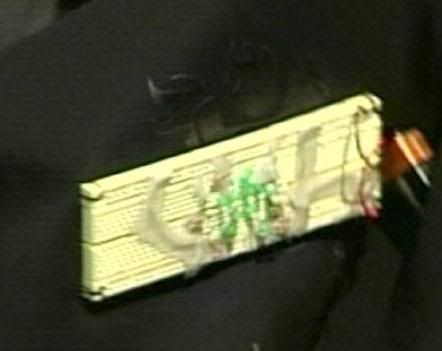
Speaking as a person who has been "involved with electronics" for over 30 years, I have to say you are quite wrong. Even turned inside out to show the breadboard (as in the pic) the device in no way looks threatening.
Bullshit. The only way the device in the first picture "in no way appears threatening to you" is because you're not familiar with what improvised explosives and detonators can actually look like.
This is her device:
http://img.photobucket.com/albums/v232/btrosko/fakeboom.jpg
This is the detonator for an IED:
http://fusion94.org/images/missed_call.jpg
I'm an EE, so I know from being able to look at that picture of her device for a bit on a computer monitor that it appears to be a 9 volt battery driving some LEDs with current-limiting resistors in series with them.
I don't know that's what it is, I just know that's what it looks like. To verify that that's what it is, I'd need to be able to inspect it with my hands on it.
Now, what criteria would you suggest that non-EEs use to tell the difference between the harmless LED display in the first picture, and the deadly explosive detonator in the second picture? Oooh, the first one has an exposed breadboard. Well, so does the second one. Exposed wiring on both. Exposed circuit components on both. Both have a battery and glowy lights (There's a cellphone there, so it's going to have at least one LED on it, and it even has a nice fancy LCD display).
So what criteria would you suggest airport and security personnel use to evaluate such things that would allow them to accurately, at a glance, tell the difference between a hacked-together LED display, and a hacked-together IED? Especially when it's sitting there on the chest of someone who's walking into a crowded terminal. -
Re:"Yeah, those suspicious e-lectronics".
Your link is broken (extra slash). Here perhaps?
-
Re:"Yeah, those suspicious e-lectronics".
Right, because IEDs are never based on breadboards. http://fusion94.org/blog/index.php?tag=ied/
Police see somebody walk in with a breadboard and wires taped to her chest carrying a wad of putty. Please. They defused (no pun intended) the situation, nobody got hurt, and she gets to explain to a court why she's dumb enough to not realize the problem with her outfit.
Why would a bomber carry something on the outside of her chest? To create panic before the blast that could kill as many people as the actual blast. Or as a prelude to a second, larger blast at the exits as everyone flees. I don't know or care, but letting her walk around like that would have been negligence on the part of the police. -
Re:It's official. The terrorists have won.
Oh you were at the airport to see the blinking lights or how she was acting? This is what an IDE looks like http://fusion94.org/blog/index.php?tag=ied/ and this is what her thing looks like http://news.yahoo.com/photo/070921/480/f0ccb94f30c148a5bb53c35e333ee697;_ylt=AgjQr2h5m3Kt6FZZi3tY4FJH2ocA/ How about you walk into a bank with a rubber gun and wave it around at on off duty cop? Ever stop to think someone had to make a split second decision to protect the thousands of people in the airport? The cops did not have time to sit and check out what she had. It looked like electronics it was on her shirt like a suicide jacket that is always talked about in the movies and on the news. You must not have a family. If you do maybe someone should sit next to your family with a fake bomb or a fake gun pointed at you and see if you are worried. Can you tell the difference in a split second?
-
Re:"Yeah, those suspicious e-lectronics".
Do you know what an IED looks like? Are you a bomb expert? I have a friend that is and that device does look similar to an IED. click here for an example and then decide if that doesn't look like a bomb.
-
Re:OperaBut I am getting disappointed with FF - it crashes badly, processes get stuck, memory is an issue.
It seems that the good FF folks just forgot to make sure the cache gets flushed. So you can fix FF's "memory leak" easily. See here.
-
HUGE Firefox INSECT.
That's an important observation. Can you provide more explanation, and the URLs?
I visited the Major League Baseball site: http://www.mlb.com/ and my Firefox 1.06 CPU use jumped to 19%, with all pages loaded and NO browser activity.
I wish they would fix this; they've known about it for years. It has something to do with the Flash plugin, I understand.
This bug is a show-stopper for me. I wish they would concentrate on it. -
Re:Great!
I got this all the time too - apparently this isn't a Firefox problem but instead a memory leak in the Flash plugin.
See here for workaround: http://fusion94.org/archives/2005/07/firefox_memor y.html -
To fix memory leak
read this : http://fusion94.org/archives/2005/07/firefox_memo
r y.html
1)Type about:config into the location bar and press enter
2)Right click any line to bring up a sub-menu
3)Choose "new">"integer"
4)paste this into the dialogue that appears: browser.cache.memory.capacity
5)Next click Okay
6)Specify the amount in kb (about 60000 should do) in the next dialogue that appears
7)Restart Firefox and happy surfing. -
Re:Woohoo!It seems to be a problem with the cache for the Flash plugin. Either disable Flash (I use click to view for Flash, usually), or limit the cache size.
Here's a page about it.