Slashdot Mirror
Domain: linuxvirtualserver.org
Stories and comments across the archive that link to linuxvirtualserver.org.
Stories · 7
-
Slashdot's Setup, Part 1- Hardware
As part of our 10-Year anniversary coverage, we intend to update our insanely dated FAQ entry that describes our system setup. Today is Part 1 where we talk mostly about the hardware that powers Slashdot. Next week we'll run Part 2 where we'll talk mostly about Software. Read on to learn about our routers, our databases, our webservers and more. And as a reminder, don't forget to bid on our charity auction for the EFF and if you are in Ann Arbor, our anniversary party is tomorrow night.CT:Most of the following was written by Uriah Welcome, famed sysadmin extraordinaire, responsible for our corporate intertubes. He Writes...
Many of you have asked about the infrastructure that supports your favorite time sink... err news site. The question even reached the top ten questions to ask CmdrTaco. So I've been asked to share our secrets on how we keep the site up and running, as well as a look towards the future of Slashdot's infrastructure. Please keep in mind that this infrastructure not only runs Slashdot, but also all the other sites owned by SourceForge, Inc.: SourceForge.net, Thinkgeek.com, Freshmeat.net, Linux.com, Newsforge.com, et al.
Well, let's begin with the most boring and basic details. We're hosted at a Savvis data center in the Bay Area. Our data center is pretty much like every other one. Raised floors, UPSs, giant diesel generators, 24x7 security, man traps, the works. Really, once you've seen one class A data center, you've seen them all. (CT: I've still never seen one. And they won't let us take pictures. Boo savvis.)
Next, our bandwidth and network. We currently have two Active-Active Gigabit uplinks; again nothing unique here, no crazy routing, just symmetric, equal cost uplinks. The uplinks terminate in our cage at a pair of Cisco 7301s that we use as our gateway/border routers. We do some basic filtering here, but nothing too outrageous; we tier our filtering to try to spread the load. From the border routers, the bits hit our core switches/routers, a pair of Foundry BigIron 8000s. They have been our workhorses throughout the years. The BigIron 8000s have been in production since we built this data center in 2002 and actually, having just looked at it... haven't been rebooted since. These guys used to be our border routers, but alas... their CPUs just weren't up to the task after all these years and growth. Many machines plug directly into these core switches, however for certain self contained racks we branch off to Foundry FastIron 9604s. They are basically switches and do nothing but save us ports on the cores.
Now onto the meat: the actual systems. We've gone through many vendors over the years. Some good, some...not so much. We've had our share of problems with everyone. Currently in production we have the following: HP, Dell, IBM, Rackable, and I kid you not, VA Linux Systems. Since this article is about Slashdot, I'll stick to their hardware. The first hop on the way to Slashdot is the load balancing firewalls, which are a pair of Rackable Systems 1Us; P4 Xeon 2.66Gz, 2G RAM, 2x80GB IDE, running CentOS and LVS. These guys distribute the traffic to the next hop, which are the web servers.
Slashdot currently has 16 web servers all of which are running Red Hat 9. Two serve static content: javascript, images, and the front page for non logged-in users. Four serve the front page to logged in users. And the remaining ten handle comment pages. All web servers are Rackable 1U servers with 2 Xeon 2.66Ghz processors, 2GB of RAM, and 2x80GB IDE hard drives. The web servers all NFS mount the NFS server, which is a Rackable 2U with 2 Xeon 2.4Ghz processors, 2GB of RAM, and 4x36GB 15K RPM SCSI drives. (CT: Just as a note, we frequently shuffle these 16 servers from one task to another to handle changes in load or performance. Next week's software story will explain in much more detail exactly what we do with those machines. Also as a note- the NFS is read-only, which was really the only safe way to use NFS around 1999 when we started doing it this way.)
Besides the 16 web servers, we have 7 databases. They currently are all running CentOS 4. They breakdown as follows: 2 Dual Opteron 270's with 16GB RAM, 4x36GB 15K RPM SCSI Drives These are doing multiple-master replication, with one acting as Slashdot's single write-only DB, and the other acting as a reader. We have the ability to swap their functions dynamically at any time, providing an acceptable level of failover.
2 Dual Opteron 270's with 8GB RAM, 4x36GB 15K RPM SCSI Drives These are Slashdot's reader DBs. Each derives data from a specific master database (listed above). The idea is that we can add more reader databases as we need to scale. These boxes are barely a year old now — and still are plenty fast for our needs.
Lastly, we have 3 Quad P3 Xeon 700Mhz with 4GB RAM, 8x36GB 10K RPM SCSI Drives which are sort of our miscellaneous 'other' boxes. They are used to host our accesslog writer, an accesslog reader, and Slashdot's search database. We need this much for accesslogs because moderation and stats require a lot of CPU time for computation.
And that is basically it, in a nutshell. There isn't anything too terribly crazy about the infrastructure. We like to keep things as simple as possible. This design is also very similar to what all the other SourceForge, Inc. sites use, and has proved to scale quite well.
CT: Thanks to Uriah and Chris Brown for the report. Now if only we remember to update the FAQ entry...
-
Surviving Slashdotting with a Small Server
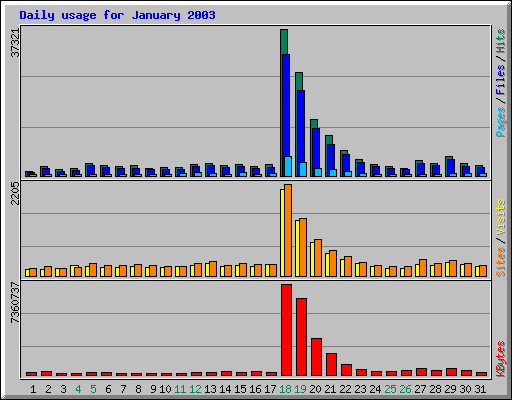
S.BartFarst writes "Our little departmental server has been slashdotted twice in the last year and survived! Implementation of a two-headed redundant hardware scheme using linux virtual server and backup and failover capabilities enhanced by the linux high-availability tools has produced a nifty low-cost solution. Gotta love those little white boxes! (also having a university-supplied BIG PIPE doesn't hurt). More interesting is the documentation of the apparent exponentially decaying attention span of slashdotters. Anybody else observed similar phenomena?" -
Load Balancers for Linux?
scales asks: "We currently use the Dispatcher component of IBM's WebSphere Edge Server as a load balancer on some Red Hat boxes where I work, and the boss has asked me to look into OSS alternatives. I've already been pointed at Linux Virtual Server and Ultra Monkey, and I was wondering if any readers have had any experience with these packages, or had any opinions they could offer about other products." Ask Slashdot last visited a similar topic way back in 1999, so I think it might be time for an update. -
OpenBSD Acquires IP Load Balancing
xarc writes "OpenBSD 3.2-current has acquired IP load balancing support via its packet filter, PF. This is a great step for those of us who prefer OpenBSD, but are dependent on other OSes and software (such as Linux's Linux Virtual Server) to provide similar functionality." -
In Depth Look At Red Hat Certification
Matthew Miller recently went through the RH300 training course, as well as the RHCE Certification Exam. He was kind enough to write an overview and give us his opinions on both of them, as well as his opinions on the relevance and quality of the training and the exam. Certification has been discussed extensively with regards to Linux, and here's a big scoop of food for thought.The following was written by Slashdot Reader Matthew Miller
I'm fortunate enough to work at a place that realizes the importance of keeping employees educated and up-to-date. Since my largest current project is Linux-related, and based on Red Hat's distribution in specific, we thought it'd be worthwhile to send me to Red Hat for their RH300 course. I'm pretty familiar with Linux, but I'm a long way from knowing everything, and it's always interesting to learn what the vendor thinks are the most important parts of their product. We chose RH300 because it's the highest-level systems administration class currently offered. It's also the one linked to the RHCE exam, which was an added bonus, but learning was my main goal, not getting the certification. This is my report on the experience -- hopefully, it will help you decide if this is a good choice for you, either as a sysadmin or as an employer.
The Training CenterThis course is not only available directly from Red Hat, but also from various partner organizations, including Global Knowledge, which has a training center here in Boston. However, we decided that if we were going to go to the expense of sending me, I might as well go directly to Red Hat, to increase the chances of getting a good instructor, and to insure adequate access to resources. We've had experiences in the past with third-party instructors who didn't know much beyond what was written in the materials. Of course, I don't know that this would be the case with Global Knowledge's version of RH300 -- perhaps someone else can comment on any experience they've had there.
So, it was off to the Red Hat headquarters in Durham, NC. Incidentally, I stayed in the Residence Inn there -- it was on Red Hat's site as being nearby. They didn't mention that it was on the other side of a major highway, with no provision for pedestrians to get across. Moral: stay at one of the closer hotels, or else get a car. Anyway, the RH building is very nice -- much bigger than I expected. (I suppose the IPO cash is going to good use.) Of course, as students, we weren't shown much of it -- no tour, and we weren't introduced to any of the celebrity employees. (Fair enough -- with several classes coming through every week, they'd never get anything done.) The people I did meet seemed pretty cool, and in general I got the impression that it's a fun place to work.
The classroom was about as I expected -- projection screen up front, rows of decent-enough small-brand Celeron-based systems (one per student). The machines were on a private network -- reasonable for the course, but unfortunately there was no provision for Internet access, which at the least would have been nice to have when I finished labs early.
We did have access to a breakroom with free soft drinks / juice and various snack items. This is also where the lunches were served -- to my surprise, these were quite good, and there were even decent non-meat choices.
The TeacherThe instructor was very knowledgeable -- not necessarily a complete guru, but he knew his stuff, including the "why" behind the course material. He was able to present the material in a good way, and was good at answering questions. I think the decision to go to Red Hat directly was wise; unlike a third-party consultant, he had some idea of what was going on inside of Red Hat and of their potential future plans. For example, during the section on the printing subsystem, he mentioned that they're considering a replacement for LPR in future releases -- perhaps LPRng or even CUPS. It's unlikely that someone from a different company would have had access to that kind of information.
Other StudentsThe other students in the course had a wide range of skills and backgrounds. I think that everyone probably met the listed better than pico. However, I could tell that some people were struggling. The instructor mentioned that the pass rate for the exam is about 65%, and I wouldn't be surprised if our class came out at that level or worse. It's not that anyone was stupid -- just that some people were out of their depth. On the other end of the spectrum, there were some people who were over-qualified: a few highly experienced sysadmins, and some folks from IBM taking the class because they are soon going to teach it.
The CourseThe course was generally similar to the outline found on Red Hat's site, although I think the online information is a bit out of date. (Notice that the Web page makes reference to ipfwadm instead of ipchains or netfilter.) The eight units had slightly different names, and covered slightly different information. In the most drastic example, Unit 8, listed on the Web site as "Systems Administration and Security II", has turned into "Routers, Firewalls, Clusters and Troubleshooting". Some of the information listed in the online Unit 8 was moved into Unit 7, and some of it (cops, for instance) wasn't talked about at all. Hopefully, the online info will be updated soon.
Overall, the class went into less depth than I was hoping. Some of this was due to limitations of the lab setup -- it's a bit difficult to experiment with RAID in any meaningful way when you've only got one IDE hard drive, and obviously impossible to set up a cluster on one machine (short of running VMware). Other things where just plain introductory -- the section on the kernel, for example, focused on the steps required to build and install a new kernel, rather than being an in-depth discussion of tunable parameters. The part about Apache was similar; I was hoping to hear "You've all configured Apache before; here's things you should be aware of when you need it to do such-and-such", but the most advanced we got was setting up a virtual host. Building RPMs from source was mentioned briefly, but there was no information given on important and largely undocumented topics like --buildpolicy.
That's not to say I didn't learn anything -- the section on LVS / Piranha was enlightening even without hands-on experience, and I appreciated the part about quotas, which isn't something I've worked with much. And, I learned a large number of tiny things which add up to making the experience worthwhile to me. RPM can now do globbing over ftp! Portmap uses tcp_wrappers, but doesn't do reverse name lookups, so be sure to use IP addresses instead of names. RH Linux provides a little script called "service" that lets one avoid the tedium of typing /etc/rc.d/init.d/servicename all the time. And so on....
The "300" designation is a bit misleading. This isn't really what I'd consider an upper-level course -- it's more along the lines of SysAdmin 101. Overall, I think this class is probably worthwhile to someone with a good RH Linux background who hasn't done any systems administration. In fact, I'd even recommend it to people in that situation. On the other hand, if you've been a Linux sysadmin for a while, you'll probably be bored most of the time. It might be valuable to experienced Unix sysadmins who haven't dealt with Linux much (or even Linux admins who haven't used Red Hat Linux), but the course wasn't particularly taught from that angle and there are probably better options.
The ExamSince I signed a confidentiality agreement, I can't talk about specific details of the test, but I will address the exam in general terms. It's a day-long three part process, with each part being worth 1/3 of the total. To pass, your overall score must be at least 80%, and you can't do worse than 50% on any one part.
One of the sections is a typical multiple-choice test, but the other two are lab based. I was quite impressed with the hands-on tests -- they are certainly what makes the RHCE meaningful. I'm not aware of any other sysadmin certifications that work this way.
For one of the lab tests, students are given a several-page specification, and must install and configure Red Hat Linux and several network services. This wasn't particularly difficult, and shouldn't be for anyone with much experience. For me, the hardest part was resisting the temptation to go beyond the spec -- since I finished the given requirements with plenty of spare time, I considered installing and setting up additional services in a way that would fit in with the listed goals. But, I decided that it'd be better to leave well-enough alone -- there's no concept of extra credit.
The other hands-on test is the cool and exciting one. Students are given preconfigured setups which are broken in some way, and given a task that must be completed. The system's problem doesn't necessarily relate directly to the task, but does interfere with it. The test-taker must find out what's wrong and correct the error. (Reinstalling packages is not allowed.) Being able to list the steps taken and to repeat the fix is important, but ultimately the test is scored on a works / doesn't work basis. One the examiner verifies that the problem is fixed, he or she wipes the system and provides another broken config.
This problem-solving section directly tests skills important to being a sysadmin in the real world; if someone has trouble with these, they're probably not ready for a systems administration job. Of course, just passing this test doesn't guarantee good problem solving skills (let alone all the other needed abilities), but it does seem a genuinely valuable indicator.
I've only two complaints with this part of the test. First, I'd make it a much larger section -- at least 50% -- and I'd increase the number of problems given so that there'd be a better sample size. The various challenges are assigned at random, and some are easier than others, and each tests knowledge of different parts of the system. The way it's done isn't bad, but it wouldn't hurt to have a lot more of it. Second, I'd give each student two computers, and make more of the problems network-related. This has logistical and cost issues (especially in places other than Red Hat's own training centers), but since many of the problems faced in the real world have to do with the way systems interact, I feel it'd be worth it.
The Exam Separated From The CourseYou may have noticed that I seem a lot more excited by the exam than by the course itself. I think both are valuable, but they seemed aimed at slightly different levels. The course definitely can serve as a good review for the exam, but if you need the course, you won't do well on the test. If you're tight on cash and the certification seems valuable to you or to your employer, going straight to the exam would be reasonable. (Make sure you take a look at Red Hat's test prep page.) On the other hand, if you need to be quickly brought up to speed on the basic knowledge required of a RH Linux sysadmin, it might make sense to take this course without worrying about the test. Since RH300 is equivalent to RH033 + RH133 + RH253, this could be a much more intensive and time-efficient option.
Red Hat-SpecificnessIt's probably obvious, but bears mentioning anyway: this is a Red Hat Linux course and certification, not a general Linux one. I found this to be true both explicitly and implicitly. The instructor was good about saying "This is the Red Hat way of doing things -- it's possibly different on other distributions." (I found the increase-the-whole-pie attitude to be common to all of the RH employees I talked to.) There were also quite a few things that were just assumed. If you take the exam without knowing a lot about Red Hat Linux in particular, you're likely to have trouble.
This doesn't make the certification meaningless for organizations running other distributions -- many of the skills and knowledge required for the test (especially the problem solving part) are generally applicable anywhere. In fact, due to the lab-based testing process, I have more respect for this exam than I might for a multiple-choice test covering more distributions. I think this issue is a one-way sort of thing: the RHCE exam requires knowledge of Red Hat Linux, but anyone who can pass it shouldn't have much trouble picking up other flavors.
StuffOk, the Web page promises that they'll give Red Hat promotional items to course participants. Yeah, well, they can do better on this front. Not even a t-shirt! C'mon, everyone gives t-shirts. Vendor shirts are a staple of my wardrobe! All we got was a mousepad, some stickers, and a baseball cap. (No chance of getting a red fedora.) Oh, and of course an official copy of the CD (with the 180 days of support). Many people in the class were surprised to learn that Red Hat doesn't sell anything from their offices -- you can't buy copies of the distro or additional merchandise. They've got a lot of students coming through there, so it seems like this could be a decent (even if relatively small) revenue stream.
A Bit About Study GuidesBefore I went, I flipped through RHCE Exam Cram , the sole study guide I found at the local bookstore. Someone in the class actually purchased it and brought it with them, and I got a chance to read more of it then. I wasn't really impressed. The book was especially concerned with what it called "trick questions", and indeed its sample questions were sometimes a bit confusing -- and often poorly worded. After taking the test, I can say that this seems mostly to be a problem with the book, not something encountered on the actual exam, which was mostly straightforward and fair.
There are RHCE study guides, but I wouldn't recommend spending any money on any of them. As the course instructor told us: if you're going to pass, you'll do so even if you don't have a guide. And if you're going to fail, the guide won't be much help.
ConclusionI think the RH300 course and RHCE certification can be valuable to both employers and individuals. The course provides a nice quick overview of the basics needed to move, for example, from being a systems operator to being an admin. I wouldn't think of it as either a requirement for the test or as something that can make someone not ready suddenly have the skills required for the exam. Since the exam is hands-on and lab based, those abilities can only come from real world experience. Looking at that from the other direction: this is exactly what makes the RHCE worth anything. While it's not a total statement on someone's talent, being able to pass is a strong indicator that they have the basic skills for a systems administration job. If I were making hiring decisions, I wouldn't make the RHCE a requirement, but I would have more confidence in applicants who have it.
-
IP Over SCSI?
morzel asks: "One of the advantages of SCSI based systems is that a plethora of devices can exist on the same high-bandwidth bus, including multiple host adapters - at least: that's the theory. While it seems pretty obvious to me to use this as a low latency/high-bandwidth interconnect between a small number of hosts, I've never seen an actual implementation of such a system. Do these, preferrably IP-based systems, actually exist? I'm not in need of a Beowulf style cluster just yet (I don't have an application for them) but I am interested in the possible usage of SCSI as a _fast_ interconnection for small numbers of load-balancing machines in cluster. A combination with the Linux Virtual Server Project could create a killer solution... Right? Thanks for all input/comments on this!" (Read on...)"I would think these kinds of interconnects would be ideal for small clusters, or larger clusters where groups of eight nodes could be interconnected with each other, with one node acting as the master node. This would probably provide more bandwidth and less latency than ethernet-based solutions, and on the other hand could be a lot cheaper than special hardware."
-
On Building High Volume Dynamic Web Sites
kolestrol asks: "A while back I built a Web site using mysql and Java servlets to track Kosova refugees. That experience had taught me a lot. I had severely underestimated the job. I was wondering if anyone has any similar experiences, i.e. maintaining highly data-driven interactive Web sites with a high volume, and how they have managed to handle the load. Furthermore, how have they managed to handle content (site redesigns, etc.). The reason I ask is that ever since the above-mentioned project, I have been doing a lot more research, trying to find a free Linux solution. The only thing I found was at The Linux Virtual Server Project." I don't know how the larger Web sites do it, but I assume they evolved in stages to add their current features. What kind of design decisions are made when designing such sites?" (Read more.)"Apart from this I have been talking to commercial vendors like BEA (I was very impressed) who provided application servers with load-balancing, replication, etc., starting at $20,000 (Australian) -- they run sites like Amazon.com, Qwest, Wells-Fargo etc.
There is an issue here (is there? I don't have any experience to really know hence am asking you) ... I can build a custom solution with load balancing written at the application level. But how does this affect my maintainability (for example Amazon.com moving from just books to all sorts of other stuff .. how long did it take to redesign the site etc.)?
The site I first built could potentially hold information about a million refugees, and allowed searching on most fields regarding information on a person (wildcard queries). Unfortunately, on doing some stress testing (with around 700,000 records) I found that at most 15 hits could be handled every ten seconds. I optimized the code, switched JDBC drivers to a faster driver, wrote a simple load balancer (and I mean very simple) and limited searching of fields to a few fields as well as preventing bad wildcard queries (e.g., a wildcard at the start would make little if any use of the index). Consequently, I managed to get the system to handle slightly more load (200 hits at 5 seconds) (Hardware was Dual Pentium II 450Mhz I think, 512MB RAM, 2x8G Ultra-wide SCSI hard drives, and running Linux of course). BTW, The Kosova refugees articles has a lot of misinformation, e.g. encrypted databases, and the time to actually build it was actually one week (and two weeks of overcoming red tape, etc.)."