Slashdot Mirror
Domain: viemu.com
Stories and comments across the archive that link to viemu.com.
Comments · 20
-
Re:Never understood the modes
Vim isn't about typing. It's about manipulating text. Some of which involves typing and that's why it has insert mode, but a lot of it is about finding your place in a document or moving one block of text from one area to another area, or changing all of something into something else according to a pattern, and you can do all of this without taking your hands off of the keyboard.
Why, oh WHY, do those #?@! nutheads use vi? makes a pretty reasonable argument.
-
Re:GUI and CLUI: Two Great Tastes ...
* Vim,
* Vimperator and
* ViEmu -
Re:You know you're doing something wrong when
My main one is using this plugin: http://www.viemu.com/
-
Re:Netbeans ( or others )
This is not informative to anyone who wants to use a recent version of Visual Studio (ie, anything since VS2003) because it does not work. There is a lame workaround to open the file externally in vim and save it back. You need to use ViEmu if you want a vi mode in VS. It is commercial software, but worth it. If you are stuck on VS5 or 6, god help you; a vi mode is not going to save you.
In any case, what the OP is looking for is actually just vim and the knowledge to use it to its full potential. Extending vim is not a "mortal sin," it is very useful and done all the time. There are plugins and examples for everything the OP wants to do, and if he likes vim he will probably like these better than clicky IDE.
-
Re:Netbeans ( or others )
There's also http://www.viemu.com/ (it costs $$$, but if you are forced to use VisualStudio...) and http://ideavim.sourceforge.net/ (free plug-in for IntelliJ IDEA). And for people who use EMACS as their IDE, there's http://www.emacswiki.org/emacs/ViperMode
-
Blasphemy!
Vim emulation for Microsoft Visual Studio:
-
Re:ViEmu + Visual Studio
Normally, I'm a vim+make guy, but I occasionally have to use Visual Studio. The ViEmu plugin was the best $99 I've ever spent on windows software.
The OP explicitly asked for linux based IDE.
-
ViEmu + Visual Studio
Normally, I'm a vim+make guy, but I occasionally have to use Visual Studio. The ViEmu plugin was the best $99 I've ever spent on windows software. Doesn't embed vim, but it does support all of the vim extensions I use on a regular basis. It's actually pretty impressive how much of vi/vim they manage to implement - you quickly forget that you're not in the "real thing".
They also have plugins for Word,Outlook,etc but I don't use those programs so I haven't tried their plugins.
One minus: I don't think it works on the free version of VS (which I believe lacks plugin support in general) so this only applies if you have the full VS distro.
As a UNIX partisan, I can't recommend VS as your primary environment (so I guess I'm not answering the posters question, really) but if you're like me and just need a windows environment occasionally, I highly recommend checking it out.
-
Re:Mouse?There's a very good summary explaining why learning vi/vim is well worth the steep learning curve, entitled: Why, oh WHY, do those #?@! nutheads use vi?.
... with vi, your keyboard becomes a huge specialized text-editing gamepad with almost a hundred buttons. Each of them has at least two functions, shifted and unshifted, so you have almost two hundred functions at a single keypress (not counting Shift).
-
Re:VI and Emacs? In this day and age?
Emacs is more specialized but I'm not knocking it.
Did you just seriously call emacs more specialized than vim*? Really? It's basically a Lisp environment with stuff handy for building text editors (and a nifty little example program implementing one). It couldn't be less specialized if they tried.
However if you're developing today, you need to move away from modal editors
No, you don't. And emacs isn't a modal editor.
that have awful help systems
As a vim user with little emacs experience, I can't speak for it (though you're probably horribly wrong there too), but vim has an excellent help system.
and no menus.
Both editors have GUI versions with fancy menus, if that's your thing.
They simply don't encourage learning
Learning the basics is plenty easy with emacs. You have to learn more if you want to know every single tiny little feature of it, but that's because it puts 'modern' IDEs to shame. The general stance among vim users is that while it's harder to learn, once you do, it's more efficient. And it also puts IDEs to shame.
and get in your way if you're away from the editor for too long
set showmode, and more importantly, you should read the first point of this article. You should read the rest too, probably, but that's the relevant part.
and have to try to remember obscure commands (or look them up!).
Again, the whole "GUI versions with menus" thing.
Note they are EDITORS. An IDE does much much more.
Both can do just about anything an IDE can. And from the other direction, every single IDE I've seen is nowhere near as good at the whole "editing text" thing that is so fundamental to programming. They tend to be on the level of something like ed at most, and often less.
You should also be using IDEs and editors that support multiple languages. Gone are the days when a computer professional could afford to know just one or two languages. Who the hell wants to learn the quirks of different editors for each one?
Both emacs and vim support ridiculous amounts of languages.
You are hilariously ignorant and basically every single word of your post is wrong.
*I am going to be talking about vim because unless you are talking about a decades old emacs implementation, it's not really a sensible comparison
-
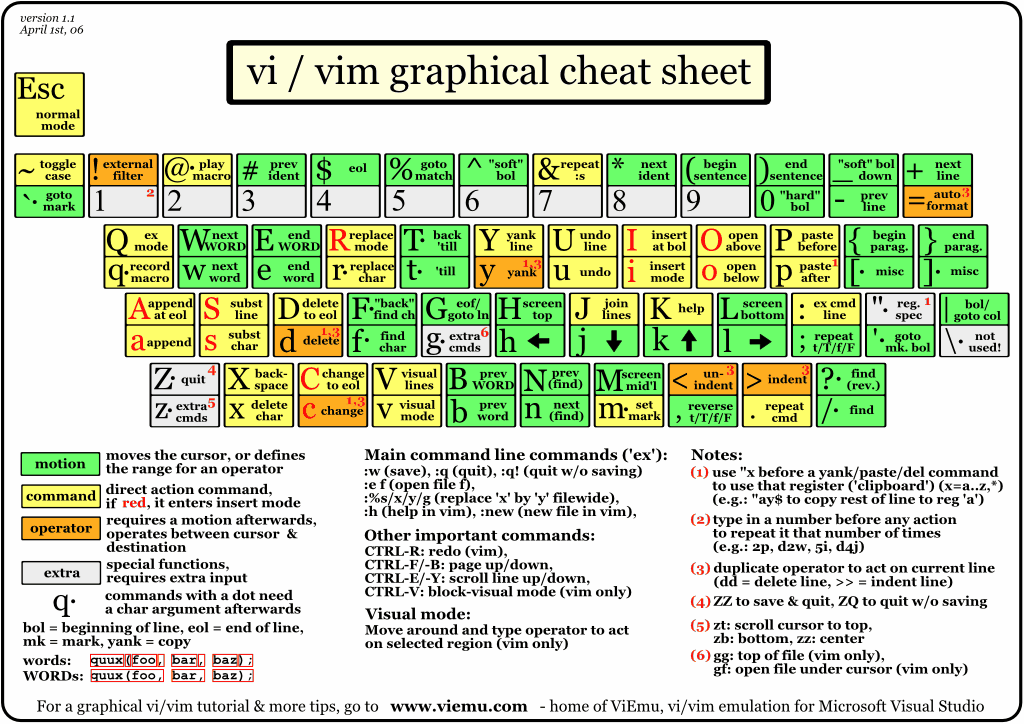
vim cheat sheet
-
Re:ReplacementI'm pretty sure it was viemu. I'm doing my dev work in eclipse now, but I do remember that the VS vi plugin was pretty good, actually seems a little better than the vi plugin I am using for eclipse.
Oh yeah and another vi thing I remembered that if you position the cursor over a word and press # it will load that word into the search buffer so you can do a n/N for the next or previous occurrence (which I've just discovered dosen't work in my vi plugin )-:
-
graphical cheatsheet
This site comes useful.
-
Re:Tab
http://www.viemu.com/viemu-vi-vim-word-outlook.html and Ctrl+P
-
Re:Vim is painful.
http://www.viemu.com/a_vi_vim_graphical_cheat_sheet_tutorial.html is another good cheat sheet and a good tutorial.
-
Re:Ahh yes but does it...
You're assuming it has to be a trade. It doesn't: vi-vim emulation for Visual Studio.
I'm a happy man these days, with VS IntelliSense, ReSharper refactorings and Vim modal editing.
-
Re:VIM for the Windows guy
I'm pretty much in the same boat as you man. Primarily Windows (I play with some Linux at home), primarily
SELECT * FROM something WHERE somethingid IN (34,116,1,34,634,63,463,2)
just highlight the column, copy it to gvim, it'll look like this:
34
116
1
34
634
63
463
2
and then record a macro to comma separate it (start your cursor at the top:
q - begin record
[any letter here] - assigns that macro to this letter
A - appends at the end of the current line (now you're in edit mode)
, - just types in a comma
DELETE - deletes the endline and brings up the next line
ESC - gets back to normal mode
q - stops recording
Now to play back the recording, type @[the letter you chose]
To play back the last recorded macro, type @@
To play back the macro 30 times, type 30 @[the letter you chose]
I'm sure advanced vim users will be able to give you better ways to regex replace the eol with a , but this trick applies when you need a list like '23asdf24','1212124','12asdf','asdfa' and in other cases too, macros are cool for half-wit people like me. The beauty of it, is vim will remember the macro after you close it, so you'll always have it.
you may have already seen this, but it's helped me learn a lot of stuff. It's a great tutorial:
http://www.viemu.com/a_vi_vim_graphical_cheat_shee t_tutorial.html -
Re:I just can't get the hang of vim
This rocks.
-
Re:I 3 VIM
I finally decided to give vim a serious try. The key was finding _this_ cheat sheet.
Even better, try this cheat sheet:
http://www.viemu.com/vi-vim-cheat-sheet.gif
It overlays different vi[m] commands on an actual keyboard.
I've printed a copy to pin up right next to my desk, and it's a super informative reference. -
For those that like the best of both worlds