Slashdot Mirror
Domain: naquadah.org
Stories and comments across the archive that link to naquadah.org.
Comments · 59
-
Re:Unity?
what I really want out of a desktop environment is to stay out of my way.
Here, have you tried using Awesome?
Ubuntu: "sudo apt-get install awesome"
Fedora: "sudo yum install awesome"
Arch: "sudo pacman -S awesome" -
Come to Linux: the water's fine!
If you don't like a company or their product then don't give them money or use their product.
I'm happy to say that Linux (specifically Ubuntu and Mint) has never been better in terms of hardware support and software compatibility.
Steams runs flawlessly for me on Ubuntu 14.04 and 16.04 even using a weird and little known window manager. Over 80% of my games run just fine:
XCOM and XCOM 2
Alien: Isolation
Chivalry: Medieval Warfare
Empire and Atilla Total War
All the Valve games
Indie games: Hyper Light Drifter, Serpent in the Staglands, Broforce, Darwinia, Frozen Synapse and others
Wargame: AirLand Battle
Kerbal Space Program
Age of Wonders III
Antichamber
Metro 2033 and Last Light
Planetary Annihilation
The Talos Principle
Torchlight II
Wasteland 2
The Witcher 2
And that's just the games that I've bought and played. New ones are coming out every week-- more than I have time or desire for.
Everything I could want or need installs through a package manager-- yes an actual package manager like windows should have had twenty years ago-- for free.
I have access to every programming language known to man, more text editors than I can list, more IDEs, more compilers, more everything and all trivially installable for free.
I can trivially download themes for all my applications with a huge variety of colors and styles or even create my own without any bullshit hacks or fly-by-night
I can update or upgrade my system when I want rather than when Microsoft wants.
I can pick from and install any combination of dozens of desktop environments whenever I want. Try 'em, don't like 'em? Uninstall and try another one!
And they all support customization to an extent that will inspire awe in the average Windows user-- yes, you can set a hot-key for that! Yes, you can move the close button to the left or the right or the center or even remove it altogether! Yes, you can script a widget that will alert you when it's time to take the dog for a walk, or even download one that someone else already wrote! And on and on.
Oh wait, did I mention that all of this is FREE? Free as in cost and free as in freedom.
No longer do I worry what data Microsoft is gathering about me; no longer and I simply an advertising mark.
No longer do I pay stupid amounts of money for a dongle from Apple or for a replacement disc from Microsoft.
No longer do I sign up for a {$software->manufacturer} account just to use my computer.
No longer do I pay for the privilege of using my own computer and operating system for as long as Microsoft will deign to allow me to.
Microsoft continues to screw you over and over and over again and you still use their OS???? Isn't that the definition of insanity?
Come home, slashdotters. Come home. -
Re:Ubuntu with tweaks
The root of my preferences lies in this need: as much space for _my_ application and as little as possible for the OS, but easily accessible when I need its functions, without running any occult desktop environments
Have you heard of tiling window managers? I use AwesomeWM myself; though I hear that i3 is really cool and the same for dwm and xmonad.
-
awesome?
Maybe it'll be awesome.
No, it won't be awesome.
-
Re:Awesome!
No, not awesome, MATE!
-
Re:Awesome!
Are you sure you want awesome, though?
-
Re:lamest name ever
How many steps does it take in your DE of choice?
most DE allow configurable keyboard shortcuts, some even provide a default one for terminals. it's "modkey" (that's the windows logo key
I guess if someone actually has to locate and click an icon or navigate a menu just to pop a terminal, he probably doesn't use terminals very often, so "access cost" would hardly be an issue for him. what this user probably wants, provided he can have his favorite most used apps handy somewhere, is an uniform access method for everything else. a search panel isn't really such a bad idea for that. for an intensive user, however, it's just unnecessary bloat, he already knows what he's looking for.
bytheway, you may check this out: http://awesome.naquadah.org/
side effect: very high chance to win a beatific smile(tm) to wear while browsing gnome/unity threads! -
Re:Awesome
-
Re:VLC, MPLAYER, WHATEVER-PLAYER???
Why would awesome want to become ffmpeg? ~
-
Re:stopped using it?
funny. real funny. but sad at the same time
i'm a kde user, so i'm some keyboard, some clicking desktop env user.
but some of my colleagues have x11+xterm, and one is a user of http://awesome.naquadah.org/that's a bit too much fr me at this time, but claiming that windows "is one of the most keyboard friendly UI's I've used" seemed like being locked in a cell and then given a pencil. and claiming that it's the most efficient computing device.
-
No problem here
My productivity has never been higher using "awesome" at home and work
http://awesome.naquadah.org/
Installation was quite painless, apt-get install awesome and its all done, pretty much. It is... awesomeOh wait, were they talking about those gigantic slow clunky things that include a kitchen sink and everything? Yeah, those can just go away... please.
I kind of liked xfce4 also but thats getting a bit too desktoppy. Too much extra junk I'll never use. I want my apps not the desktop environment's selection.
-
defected to Awesome
I've long been a KDE user, switched to it in the KDE 4.1 days and never understood why people were so unhappy about it. I found it to be slick and useful, despite the regular problems with the NetworkManager applet in Debian Unstable. I just used the Gnome applet instead, which fit without a hitch.
Last year, finally frustrated enough with juggling between the windows of my various terminals and editors, I chose to give a tiling window manager a good try, and spent some effort on the ill-named Awesome (seriously, how do you SEO that?).
Though it's certainly not aimed at Joe Six-Pack in that you actually have to edit the Lua-based config file to configure it yourself, I found it extremely powerful and perfectly suited to my needs. The "tag" system to organize your window is supreme in allowing me precise control over which windows to display.
I discovered that I didn't have a use for all the frills of Gnome and KDE, except for USB-key and Wifi network management which are both accessible from the CLI anyhow (see udisks and nmcli).
-
Re:Why am I not Running KDE?
And I am Awesome
And what will yo ube when someone releases a window manager called suckcocks? No--don't mod me down, it's french or something. Pronounced 'suchochs'.
-
Re:Less is More! Anyone with me?
A vote for ratpoison WM on my mythtv frontends, not because I use it, but there was some bug requiring a WM, not to actually do anything, but to handle the root screen or something I can't even remember. Tradition, I guess.
http://www.nongnu.org/ratpoison/
A vote for awesome WM on all my linux desktops. A gross simplification seems to be xmonad is to Haskell as awesome is to Lua. Doesn't really matter what language its written in, since its only purpose in life is to start a terminal and/or chrome and switch between them.
-
Re:Why am I not Running KDE?
And I am Awesome
-
Re:Fine, I'll bite
Windows because it looks nice
You know what looks nice? Awesome. Can't do that on Windows.
drivers (for me) have always just worked
I have just as many driver problems on Windows as on Linux. Linux generally comes with a working driver for just about any piece of hardware, and you can go get proprietary drivers for extra features.
Any software I care about works.
I suppose so. You can run bash on Windows if you want, but it's much nicer to use in a real unix environment. Same with great software like vim, rtorrent, irssi, latex, and R. They all exist on windows, but it's not the same.
I can play games from just about any era of Windows.
When I want to play games on Linux, I just run emulators. There's no shortage of fun games to play, only a lack of current ones.
-
Love the OS, really can't get used to Unity
Ubuntu/Precise is awesome. It really shows how much effort went into this release. I am extremely happy with how little I needed to customize or fix after installing it on my laptop (suspend/resume, encrypted file systems, unusual hardware drivers
On the other hand, despite trying to get used to Unity, the new UI just does not work for me. I can even (almost) understand the design choices. It certainly looks shiny and discoverability of most UI features is pretty good. A lot of the UI has been simplified to make it easier to use for casual users.
Unfortunately, almost every single one of these changes really gets in the way of my day to day productivity. I spend so much time every day using my computer, I need a window manager that gets out of the way most of the time. And that defaults to doing the right thing, when I need it to do something for me.
I am sure, as a power user with very specific requirements, I am not in the primary target group for Unity. But fortunately, after installing GNOME Panel and the Awesome window manager, I found a solution for my UI needs. I am now as happy as can be. This is by far the nicest Linux distribution I have used.
-
Re:BLECK!
May I introduce you to the tiling window manager? Take a gander at awesome, the first and last window manager a competent person should ever need.
Forget "virtual desktops". Forget "windows". They're silly concepts not suited for anyone but a designer.
-
I use awesome on debian test
and I love it, I use pcmanfm as filemanager and some lx components for casual adjustment like lxinput/lxtask. http://awesome.naquadah.org/
-
Re:Looking Good
I use awesome with KDE in quite a few places and find it to be a generally excellent combination. The procedure for doing so is documented on the awesome wiki.
noah
-
Re:Looking Good
I use awesome with KDE in quite a few places and find it to be a generally excellent combination. The procedure for doing so is documented on the awesome wiki.
noah
-
Re:KDE.
I'd sorta agree, KDE is uniquely polished and clean compared to the other "full" DEs. If I've got to pick between something 'major and current', KDE is it. The biggest disadvantage it has, IMO, is all the dbus etc. subsystems which are required to be running for any of the KDE-related stuff to also be running. (I'm sure you'll find that, in piecing together your desktops, you've got to run some complementary/competitive background processes to keep it all tied together. I don't find this preferable.)
I used to use XFCE4 and dabbled with lxde for a while. I'd jump back to something like these (or icewm, back in the day) when one of the others became too bloated/slow, consuming most resources.
Personally, I'm a fan of awesome. It's fairly lightweight (currently using 36Mb, 201 shared), blazingly fast, and minimalist. If I want to use the mouse (rarely), I can do so (as it has a task bar and a menu, etc.), behaving a bit like openbox (or similar). If I want to float my windows about like most DEs, I can do so, or I can (as I preference) tile the windows to use the most of my screen effectively. It's keyboard-centric (though the learning curve was negligible - I use similar default bindings in browsers already), and makes the best use of the the "virtual desktop" concept of any DE I've seen aside from Enlightenment DR16, back in the day. It's got x.org compliant status area implementation, a clock, and implemented using the newer xcb instead of the older (and crappier) xlib. Most importantly, I've been using it since the 0.2.0 days (3, 4, 5 years?) and haven't had any marked problems with it (other than Ubuntu fucking something up with 11.04's Xorg implementation, making xmodmap not work). I highly recommend it for anyone tired of standard fare.
-
Awesome WM
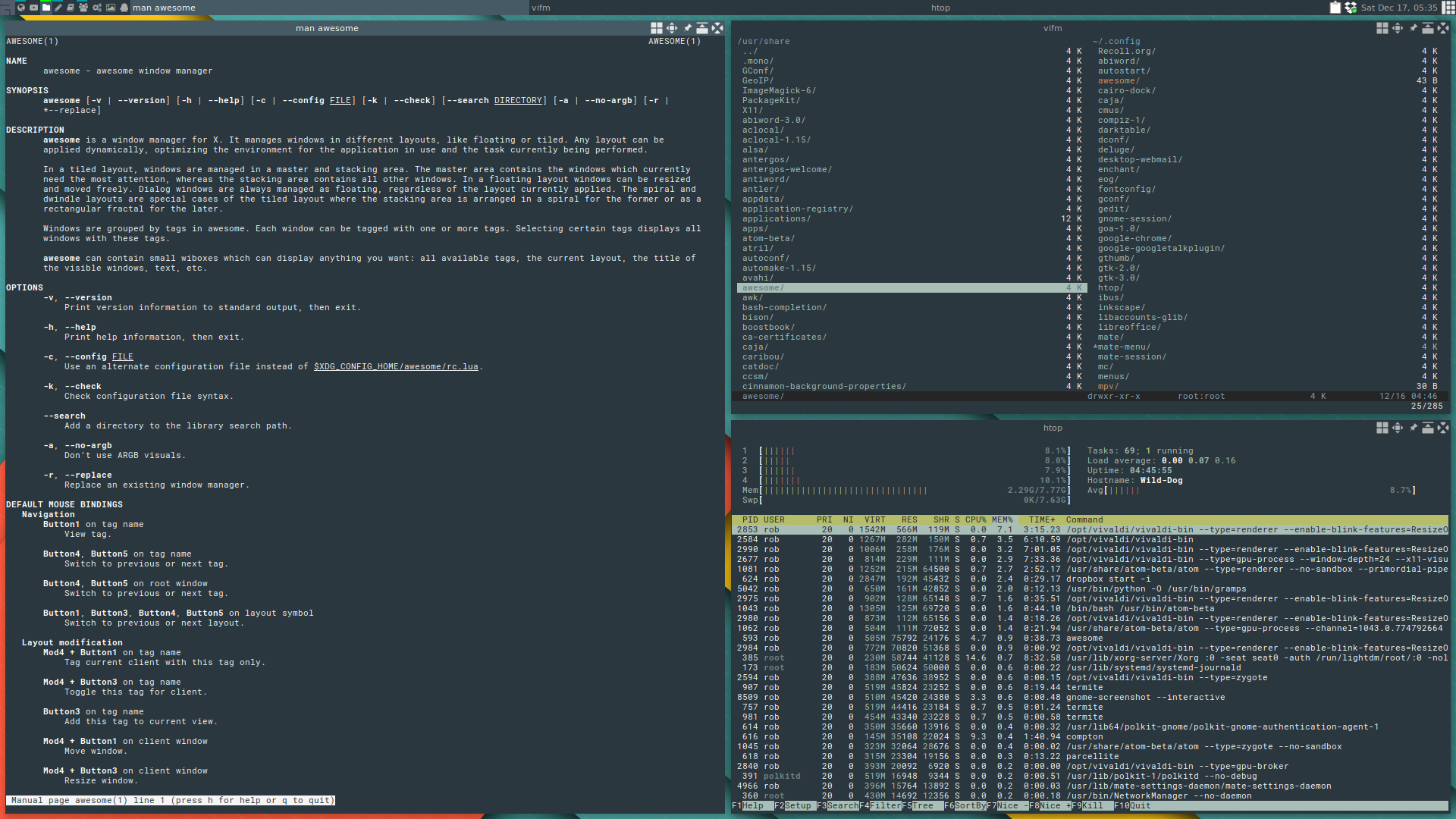
I use Awesome WM. It's a tiling window manager, and it lives up to it's name! I use it both on ArchLinux and OpenSuse, and the stock configuration needs very little configuration to be perfectly useable. The configuration is written in Lua, so it takes a little time to master, but the amount of customization you can do is unbeatable. Screenshots
-
Re:Not necessarily.
The most usable UIs I've used, in this regard, are tiling window managers:
* awesome, by far the best
* xmonad, a marginal second because
* ion, because he (as far as I can tell) started the idea in vogue, and did a good implementation. That, and he's a vitriolic asshole who deserves honorable mention.They're usable almost solely with a keyboard, but a keyboard you do need. Throw a launcher on there, and it'd be the bee's knees for anything with a keyboard. I've used one of the above on 4" touchscreens up through multiple 30" monitors, and it scales quite well.
-
Tabbed interface (off-topic)
I like the tabbed interface a whole lot better than having a bunch of windows running around. We geeks castigated IE for years until they adopted tabbed browsing; how come we meekly accept non-tabbed office suite interfaces?
Since I never had much use for overlapping windows or desktop icons I moved to a tiling window manager (Awesome) some time back. And guess wat? If you use the maximized layout you effectively have a tabbed interface provided by the window manager. Other layouts, seen from the tabs perspective, allow you to see tabs side by side. Tags (virtual desktops on steroids) can be seen as sets of tabs with the flexibility to move windows between sets (and more). The question then becomes why applications should provide something that's done well and more flexibly by the window manager. I've already stopped using tabs in some applications because of this, they don't add value anymore, as I don't have much use for nested tabs.
To me the popularity of tabbed interfaces suggests that many people prefer this over overlapping windows, without realising it makes more sense as part of the window manager than as part of the application. In the window manager it's available to all applications, it is more consistent and immensely flexible. Awesome, and presumably other tiling window managers, have this built in without calling it tabs (what they do is more flexible than just tabs). I think a clever and usable way of docking windows into tabsets would make a lot of sense in other types of window managers. Tabs within applications have started to look to me like a problem solved in the wrong place.
-
Re:So we're back to Windows 1.0?
no overlapping windows? How am I suppose to quickly look at two open applications? or drag and drop items?
This is no problem. Just hit Mod4-space to cycle through tiling layouts until you see one you like.
-
Re:Lua?
Here is an idea instead of adding Lua support, I don't know, USE LUA... Wow what a concept!
Julien Danjou (of awesome fame, a high profile Lua using application), explains it fairly well. Basically, the Lua API is a huge pain to use and contorts the program around it making anything but the most trivial uses nearly impossible.
Lua and a language and basic extension library, however, is eminently usable by non-programmers. This makes it a fairly small task to implement the user facing parts of Lua. This was actually mostly done during GSoC 2010, but like most GSoC projects the student kind of trailed off once he passed the final evaluation and hasn't made too much effort at merging it into master. There was, however, chatter on the Guile IRC channel today about finally getting around to doing that (there is finite maintainer time and everyone has a day job and whatnot).
-
Re:Anachronistic much?
The backend is just catching up to Debian/yum, but the front end is way ahead.
The interfaces for Windows and OS X may be way ahead for people who point-and-click, but for people such as myself, whose fingers rarely leave the home row, window managers such as awesome and xmonad are way ahead of anything produced by Microsoft and Apple.
-
one word
-
Re:Windows?
Have you seen the 'Awesome' window manager? If you look at its home page at http://awesome.naquadah.org/ you will notice one of its features is 'No mouse needed: everything can be performed with keyboard;'.
Don't get me wrong, I also liked the fact the Amiga let me move the pointer via the keyboard, hell it saved my ass when I killed my rodent once but to say Linux sucks with running a GUI with only a keyboard when solutions such as Awesome exist is a bit of an over simplification.
-
Re:How many JIT engines is this now?
Maybe you could say why is he an idiot, instead of rambling.
From where I'm sitting, as a noob in Lua, I see a guy who has written for the past three years a very nice WM (Awesome), which contains a Lua library with thousands of lines, and some random Anonymous Coward who provides no arguments to support his position.
-
Re:How To Tweak GNOME 3
If you look for something "fast, light, without acceleration requirements", I suggest awesome.
This is what I use, and it's awesome.
-
Re:I'm not convinced by either
I switched to an awesome desktop with a mix of Gnome and KDE applets. It's not the perfect desktop for everyone, but it's getting pretty darn close to being perfect for me.
-
Re:I'm not convinced by either
You need configurability? I'd ditch KDE, GNOME, etc. Use screen. If you can master the terminal you have given yourself almost ultimate configurability. By nature terminal apps are more configurable than GUI apps.
Have to have a GUI (perhaps for web browsing or skype) but want to keep your configurability? Use awesome window manager.
-
Re:IceWM FTW
KDE decided that icons are unnecessary
With about 150 widows that reopen automatically from my last session, the last time I saw my desktop is about 3 years ago, so I'd say that's a good idea.
Guess I'm lucky to use IceWM which still works the way it worked ten years ago - and I find that a good thing.
That's the good thing with Linux, plenty of window managers to chose from. There are plenty of interesting contenders, like Awesome and others which are really different.
-
Re:Already Running that Version on Ubuntu
So basically they are reinventing Awesome...
-
Re:look and feel of ubuntu?
I don't think awesome runs on Windows.
-
Re:Just Tell Me One Thing... Is it Awesome?
What if the submitter is talking about Awesome?
-
Re:Why?
Why bother with something as kludgish as hacking on a feature to a largely incompatible framework when a better alternative exists?
We work on the concept of "tasks" and "workflow"; our computers do not, instead lumping stuff together somewhat aimlessly on a taskbar (or similar mechanism).
Give awesome a try. It is indeed, awesome. It can't really easily be described but to say that it works well out of the box: it shares many common keystrokes with other editor/tools/window managers, can be used purely with the mouse (as you get acclimated), and is crazy in how customizable it can be. It allows for fairly seamless integration of applications into tasks via "tags": app A can be tagged any number of times, and by available on those "tags" (call 'em views, vdesktops, whatever). I can tile windows in a number of fashions or have them "float" like they do in other window managers - configurable on a per-application or per-tag basis (and changeable with a single key combination).
I'd say going from "green" to "effective user" should take less than a day or two unless you've been using the same UI for years and years and have ingrained bad habits to beak.
-
Re:Here's a theme
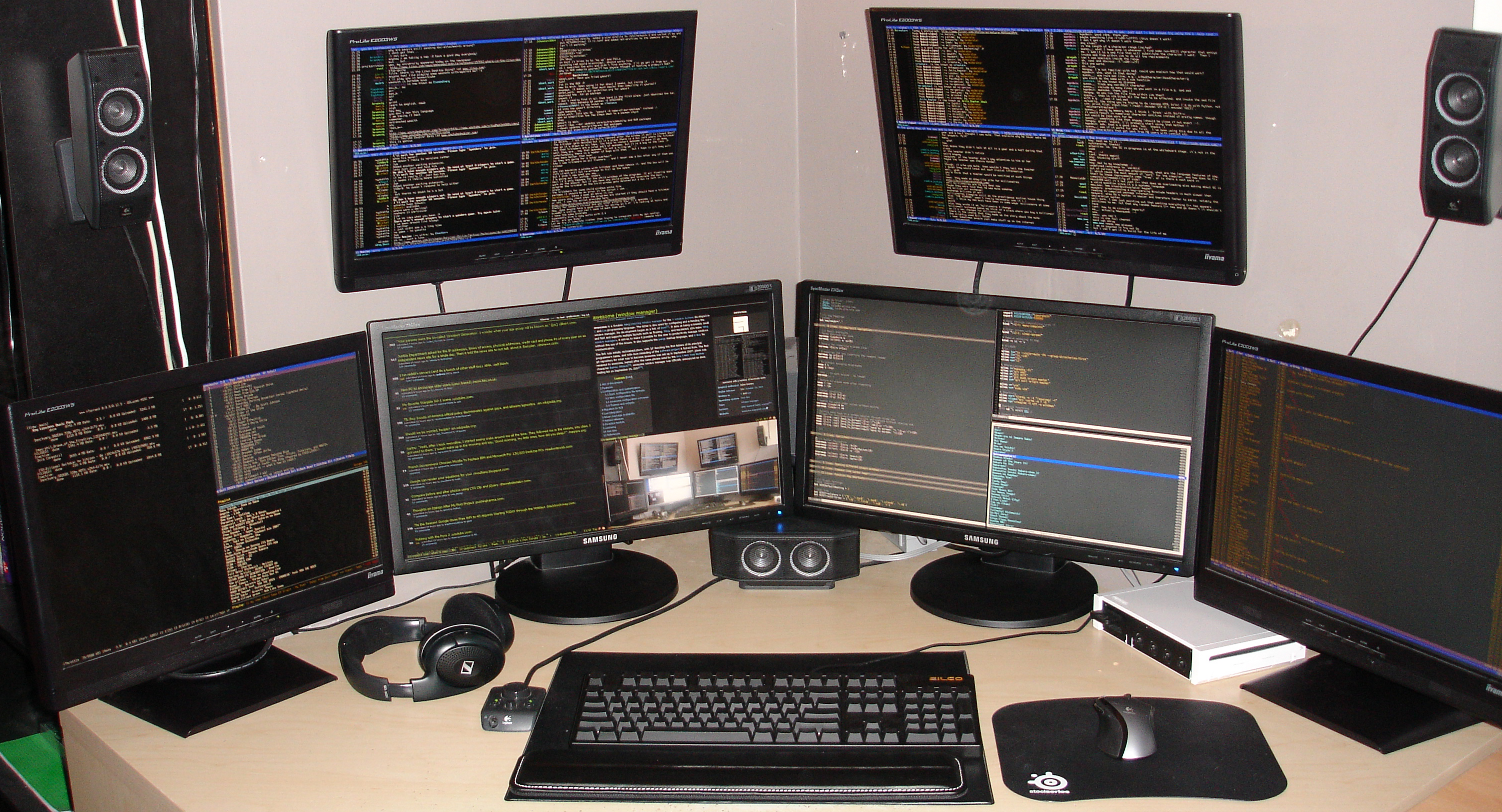
As many as you can get video cards for. Ex.: 6 monitor setup running AwesomeWM
Linux's supported this for ages... -
Re:Google
Mr. Albanach Surly should also mention that both the programs he linked are basically dead, unmaintained relics. One of the wikipedia pages he linked even mentioned this. He did actually read what he linked, right?
The OP has asked a very interesting question though. If you could take something like xmove or Xpra and make an awesome window manager aware/compatible, it would be very interesting software indeed.
-
Re:Very good question.
Ah! This might be it, I just Google'd it and it looks very promising: http://awesome.naquadah.org/
-
Re:tiling
Tiling window managers are really great. The poster should really at least try one for a few weeks. I personaly use Awesome. It really is one of the best ways to exploit large/multiple screens.
-
Use a specialized Window Manager
The standard Window Managers (kwin, metacity) just don't cut it with many displays.
I recommend trying out Awsome
It's a bit difficult to get used to a first. But it really is the best WM for multiple monitors I have ever used.
-
Re:A few great Amiga ideas I'm still waiting for
In modern parlance, sounds to me like you're describing a tiling window manager, or maybe something like Awesome.
-
Tiling Window Managers
-
Re:XFCE
No, Awesome is awesome. XFCE is just nice.
-
Re:Seems Obvious
Enlightenment is not Awesome.
Awesome is awesome. -
Re:Cool
Still, even when she's able to read, when it comes to computer use, having that object segmentation issue the GP is talking about might heavily impact the ability to use overlapping windows in a GUI... Better use awesome or something similar.
-
Re:My gut says about 5%
"I'm on my way to becoming a bona fide CLI zealot at this point."
I'm with you on this one. Odd reason, though.
OpenSolaris got too slow on my Ultrasparc laptop, Linux wouldn't run on it at all, but OpenBSD explicitly supports it, so that's what I used. So I was running XFCE on it, but that was still sluggish (650MHz). Looking around some more, I found Awesome. Lots of xterms (I'd prefer urxvt, but arrow keys don't work) and I'm loving the hell out of it.