 Slashdot Mirror
Domain: sisoftware.net
Stories and comments across the archive that link to sisoftware.net.
Comments · 9
-
China has the CPU future
This is what happened after China acquired AMD license to produce x64 chips in China, and acquired VIA's x86 license which VIA got from acquiring Cyrix.
The CPU license pool is cracked opened. Soon CPUs in China will be 1/4 the price of Intel/AMD but has better performance.
https://www.reddit.com/r/hardw...
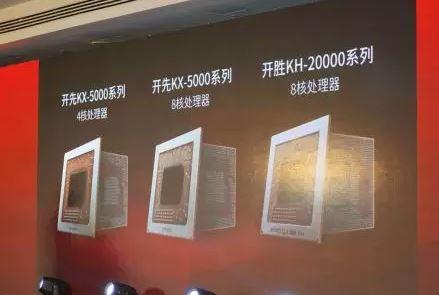
Zhaoxin launched KX-5000 quad/octa-core x86 processors on Dec 28, 2017 in Shanghai, China: image, report, translation.
Zhaoxin revealed KX-6000 & KX-7000 roadmap: image, report, translation.
Other reports: golem.de, pcgameshardware.de, bitsandchips.it, phoronix
KX-5000:
Full SOC design (integrated southbridge)
28nm process by HLMC, 2.1 billion transistors
4-core / 8-core SKUs, no SMT
2.0-2.2GHz base clock, 2.4GHz max turbo
IMC supports dual channel DDR4-2400
PCIe 3.0 lanes
iGPU
integrated audio codec
ZX-200 I/O extension (chipset): SATA3.0, USB 3.1 Gen2, Gigabit Ethernet
OEM: Lenovo desktop M6200KX-6000: 16nm tick-tock
KX-7000: new uArch, DDR5, PCIe 4.0
Related info:
About VIA & Zhaoxin: wikipedia and wikichip.
KX-5000 preview: image, report
KaiXian KX-5000 series was listed in PCI-SIG integrators list on Nov 10, 2017.
Zhaoxin KaiXian KX-5640 in SiSoftware database.
Zhaoxin ZX-C, KX-5000 series on exhibition on Nov 21, 2017 in Ukraine: report, translation.
KX-5000 CPU arch: block diagram, report, translation.
-
Re:What's the "bang for the buck"?
That was for x87 FP though. While it's important in that a lot of code out there might still use it, for performance on any Intel architecture, you're supposed to use SSE (scalar SSE if you're not doing SIMD). I would like to see SSE performance broken down to SP vs DP. I suspect, from what little I know of the vector pipeline, that it'd be pretty much exactly half the performance.
No. The Multimedia benchmark in the Sandra suite is all SSE. See their FAQ here.
The following is their only Double test:
Q: What is the SSE2 Whetstone benchmark?
A: With the introduction of SSE2 and its support for double floats (64-bit) it is now possible to write code that does not use the legacy FPU at all. This version shows that the full Whetstone benchmark can be implemented using SSE2 and thus take advantage of the SIMD mode of operation.And if you want further proof, here is another page posting unabridged benchmark results, which indicate clearly that the Double benchmark uses iSSE2 (you can see the same ~5.5x drop in performance as with the other benchmark I linked). PcPer was just incredibly lazy marking their benchmark graphs.
Atom sucks at double precision. You can deny it all you want, but the benchmarks ring true. I can't say I'm surprised - double performance is one of the first things to go when you're targeting low-power.
-
Re:Alternative?
On the NVIDIA side, CUDA performance and usage flexibility is still typically and substantially higher than is achievable via OpenCL, since obviously CUDA exists to fairly optimally exploit their GPU architectural capabilities whereas OpenCL is a generic GPU-vendor / architecture "neutral" platform that doesn't give as much card specific control as CUDA (or CAL in AMD's case).
That's not true. I've run many equivalent CUDA and OpenCL kernels on NVIDIA cards, and they perform both the same. Pretty much in accordance with those benchmarks.
There's no reason for OpenCL code to be any slower than CUDA code (the same compiler is used, only with small changes in the frontend). Maintainability on the other hand... with CUDA you can launch a kernel just like you were calling a function; with OpenCL you have almost a dozen of setup steps (reminds me of programming Win32 applications directly with raw Win32 api calls). Function and operator overloading, templates... those are nice things to have at your disposal when you need it. Let's hope they make an "OpenCL++" standard too.
-
Re:And of course
Always, always run Sandra http://www.sisoftware.net/ on any machine you buy or build.
So where can I get the Linux version?
-
Re:And of course
Always, always run Sandra http://www.sisoftware.net/ on any machine you buy or build.
-
Multifaceted analysis
You have to attack the bottleneck problem from all angles. This means using many utilities, but also using your gut feeling. To do so, you need a lot of data.
Benchmarking programs are a great start. 3DMark and PCMark from Futuremark are great tools for this. 3DMark plays scripted animations that use the latest pixel shaders and other effects. Because it's scripted it mostly taxes the GPU. PCMark benchmarks many components in isolated tests. Both utilities let you compare results with other people's machines online. Also, Sisoft SANDRA not only gives great info and benchmarks, but also offers advice based on your configuration at the bottom of every analysis. All free and all worth a look.
Numbers are great but they're not enough. Once you've benchmarked your PC, test the whole shebang altogether. Play a variety of games that stress different components. Play Bejewelled 2 or Guild Wars to test video. Play Sims 2 to test your CPU. Play Call of Duty 2 or Civilization 4 to test everything all together.
P.s., if you're an audiophile and budget is of little matter you should consider Creative's X-fi sound cards. They have an onboard CPU that offloads digital signal processing from the CPU, freeing it for other tasks. You can expect maybe a 5% relief in CPU power even in applications that are not optimized for X-fi (even the Windows desktop!) -
Overclock!
My lowly P4 2.4C is running overclocked at 270 MHz FSB (3.24 GHz) using Vcore of 1.65 Volts, air cooling via a Thermalright SP-94 heatsink (that I really should lapp) and Artic Silver 5 compound: 55C at load with 30C ambient, CPU fan at minimum (~2600 RPM). It benchmarks faster than the 3.6E, 3.4C, etc.
Using Sandra to benchmark, and Prime95 to torture-test for a minimum of 24 hours without errors.
-
Sandra
SiSoft's Sandra is good for some basic hardware info on the machine.
It was nice finding out that the RAM I bought from Coast-to-Coast memory that I got a "deal" on was actually a step down in terms of speed (which they were selling for the "sale" price...so it all worked out).
They have diagnosit tests, but I've only used the free version. But its a nice first-line strategy for sizing up machines. -
Re:Much easier solution
You could try this page, and if they move it the steps are:
- amd.com
- Technical Resources link at top
- Technical Documentation at top left
- AMD Athlon(tm) XP Tech Docs
System makers can brand executables, but it is more common for them to use oeminfo.ini. If the General tab under system properties doesn't have a "Computer:" heading and does have a "Manufactured and Supported by:" heading, manufacturers logo or Support Information button, then your system has been branded by the OEM. If you have an oem system then it is about 99% certain that when it was branded, the cpu model ( 1700+ ) was created during.
So, which company made your computer system? I don't have to ask if you built it yourself. We wouldn't be having this discussion if you had.
Some well respected software that won't/can't tell you your sold-as-speed, Sandra 2003, wcpuid, CPU-Z and the Linux kernel.
I have built thousands of systems from scratch and generally know what I am speaking about, but have been wrong before and will be wrong again. I have kept a civil tongue while you made snide remarks like "What's your next brilliant theory?". I have provided detailed information, you quoted WinXP as an unquestionable resource. Check the Forums at overclockers.com, one of the many places on the web to get good info and meet strange new people. BTW, with watercooling, my AthlonXP 1700+ DLT3C (1.5v) chip will run 2.55GHz and pass the prime95 torture test.
Have a great Palm Sunday.
.jpg)
.jpg)
