 Slashdot Mirror
A Simple Tool for Tracking Switch Ports?
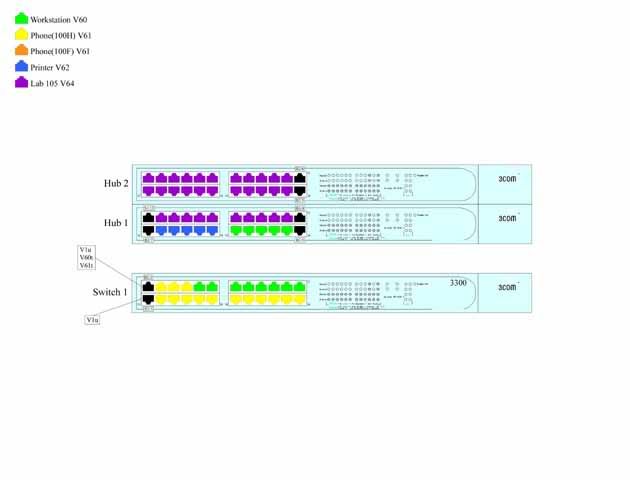
jeremy cobert asks: "I work for a large school district in the Computer Networking department. We have several network closets at each school and each switch is set for different equipment on different VLAN's. Sometimes a Tech at a school will call in and need a printer plugged into a switch, and we are currently using maps drawn with PhotoShop to keep track of which ports are set for different equipment. I can look at a map and tell them to use a port that is already setup for printers. I am the only person who knows how to use Photoshop in our department and it is becoming way too time consuming every time someone switches a port. Here is an example of how we currently track our ports. Is there any program that we can use to make changes and diagrams in some similar fashion?"
But isnt there an SNMP program for 3com switches that does this automatically? I am not a net admin but I worked as a tech in school before and I do remember when we got our massive campus network upgrade to new cisco equipment. The head IT guy was all giddy about how he can see every port and device on the entire campus network from some cisco management program he used.
We keep similar info in a simple HTML table in a Wiki ['trac' to be exact]
I should put something clever here. Maybe someday.
Then you have to deal with the "master" spreadsheet.
We use a wiki. Switch ports are in a table on the wiki. Click on the machine name in the port assignment and it goes to the wiki page for the machine. Back and forth links. And the IP address table, firewall translations, etc. All on the wiki. Apache config notes? On the wiki. Docs for new users? Policies? On the wiki. Why have 15 different documents?
I like to see how things are connected, what ports are in what blocks, what's wired to to what but my diagrams are simple boxes within boxes connected by lines with a simple ledgend. For what you are doing, you do not need to spend time drawing an exact replica of your 3com 3300 switches with color, the light display, the 3com label, etc. That's just a waste of time. I use open office for my diagrams. If you are using windows, ms paint should suffice.
This is the best idea yet.
... endpoints.
At my $place_of_employment, we use the Fluke Optiview console. What it does is it polls every port and every device on every port. Then you can either dig down a list of hosts, printers, servers, etc - or you can have it print out a network diagram (using MS Visio) or give you a switch port printout, which lists what is on each switch - down to the IP, computer name, MAC address, you name it.
It only works with Layer 2, though - so you need remote endpoints on each of your routable
Don't ask me how much we paid - I'm sure it was expensive. However, it definitely took us less time than rolling our own. But, if your switch is managed, for documentation's sake - you can probably use the switch to find all this information out yourself!
Karnal