 Slashdot Mirror
A Simple Tool for Tracking Switch Ports?
jeremy cobert asks: "I work for a large school district in the Computer Networking department. We have several network closets at each school and each switch is set for different equipment on different VLAN's. Sometimes a Tech at a school will call in and need a printer plugged into a switch, and we are currently using maps drawn with PhotoShop to keep track of which ports are set for different equipment. I can look at a map and tell them to use a port that is already setup for printers. I am the only person who knows how to use Photoshop in our department and it is becoming way too time consuming every time someone switches a port. Here is an example of how we currently track our ports. Is there any program that we can use to make changes and diagrams in some similar fashion?"
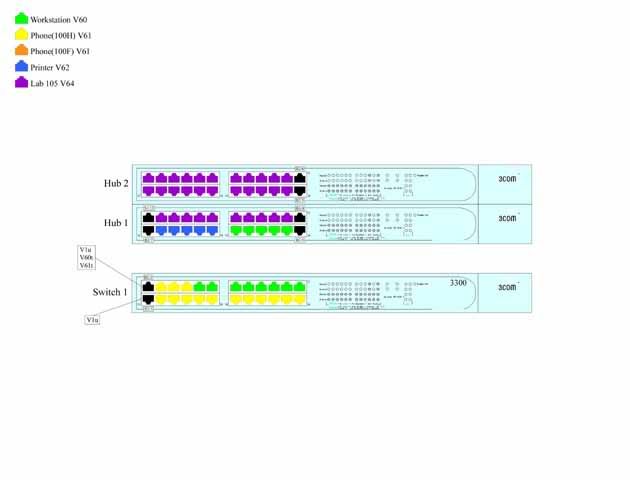
We're doing something similar at work so it's still fresh in my mind. First off: lose the Photoshop crud. Assuming your switches are managed or have at least some smarts in them I'd suggest using SNMP, $LANGUAGE and PHP to track your port information. Then any of your admins can access it via a webpage on your intranet. ($LANGUAGE can be anything but we like python and perl)
Consider replacing the hubs in your diagram with switches that have some smarts and SNMP. Not a crap LinkSys thing for $19 at BestBuy or whatever. A real, managed switch with a serial console port would be best IMHO.
Consider an "out of band" private network too. Something you can use to connect to another machine in the closets with a serial link to the switch console ports. That way if a switch/firewall/router stops talking you can remotely get to it via the console. We just received a bunch of old fibercopper media converters for this purpose (some of the runs are long)
You're there to manage the network, not just pretty up diagram in Photoshop, right?
Trolling is a art,
Masking tape and a sharpie =)
Death by snoo-snoo!
For that matter graph paper, a ruler, and a pen would work equally well.
Uhh.. why do you need diagrams? Just use a spreadsheet with the switch ID, port number and vlan. Much easier for others to use, and as far as I can see, you don't lose any ease of use/finding out which ports do what. Colour code the cells based on vlan number if the colours are important.
But isnt there an SNMP program for 3com switches that does this automatically? I am not a net admin but I worked as a tech in school before and I do remember when we got our massive campus network upgrade to new cisco equipment. The head IT guy was all giddy about how he can see every port and device on the entire campus network from some cisco management program he used.
At the shop that I work at we have over a thousand circuits that we have to keep track of. Visio not only allows us to keep track of all the equipment, circuit flow, extra data, etc via making simple circuit layout records, but it is also easy enough that only minimal training is needed for new users. As an added bonus images can be stored and used over and over again so no "drawing" is required.
Maybe you should try fireworks, the vector drawing in that seems like it should be easier then what you are using. But if you really want it done right get a camera and use windows movie maker where you can narriate the function of each switch.
I like to see how things are connected, what ports are in what blocks, what's wired to to what but my diagrams are simple boxes within boxes connected by lines with a simple ledgend. For what you are doing, you do not need to spend time drawing an exact replica of your 3com 3300 switches with color, the light display, the 3com label, etc. That's just a waste of time. I use open office for my diagrams. If you are using windows, ms paint should suffice.
Others have mentioned proper diagramming software like Visio. For the free software/OSS type person, there is Dia (google it). It works reasonably well on both Linux and Windows. If only I could find a web based wiki-drawing tool...
You want something like NetDisco. It will go out and discover every switch on your network and can figure out how they're interconnected. You can then query ports for VLAN, speed, and duplex settings, among other things. Finally, you can toggle ports on and off. It can even produce graphs of your network layout using GraphViz. You'll need a *nix box, Perl, Apache, and Postgresql, as well as managed switches that support SNMP.
If all of this scares you, then go out and buy Visio, but all you'll get out of that is pretty pictures.
You could probably do something with some flat text files, some scripts and Graphviz that would be at least as good as what you have coming out of Photoshop. ...that assumes you have no need to put boobies on your network diagrams.
my sig's at the bottom of the page.
...do NOT set this kind of autodiscovery stuff loose on a network that you don't admin, otherwise someone is going to come and ask you some pretty pointed questions right before they lay into you with a cat5-o-9-tails...