 Slashdot Mirror
Four Facepalm Bugs In USPS Label-Printing Site
Right away, the USPS website failed that test because it does not allow you to print first-class mail labels, instead steering you towards the more expensive Priority Mail and Priority Mail Express options. Online users have complained about the lack of first-class-mail options on USPS.com for years, and users on several forums suggested using the PayPal Ship Now site instead, which does let you print first class mailing labels online, along with Priority Mail labels other options.
In my case it was a moot point because I had to use the Priority Mail labels in order for my packages to arrive by Christmas, but the deception was still hugely aggravating. Not just because of the thought of millions of people wasting money (and the finite resources of the postal system) due to the USPS site tricking them into a more expensive upgrade that they didn't need. But because it now meant I'd have to second-guess every recommendation they made, wondering if they were steering me toward something that was worse for me and better for them. The reason sites like Amazon are so stress-free to use is because, for the most part, they do display the options that are best for you, even at the expense of their own short-term profit. Some third-party merchant is selling a book for less than Amazon's list price? They'll let the seller list the book right on their site and undercut Amazon's own sales. The benefit to the user is not just the cost savings, but knowing that you don't have to feel like a chump for not wasting time on search engines trying to find a cheaper deal.
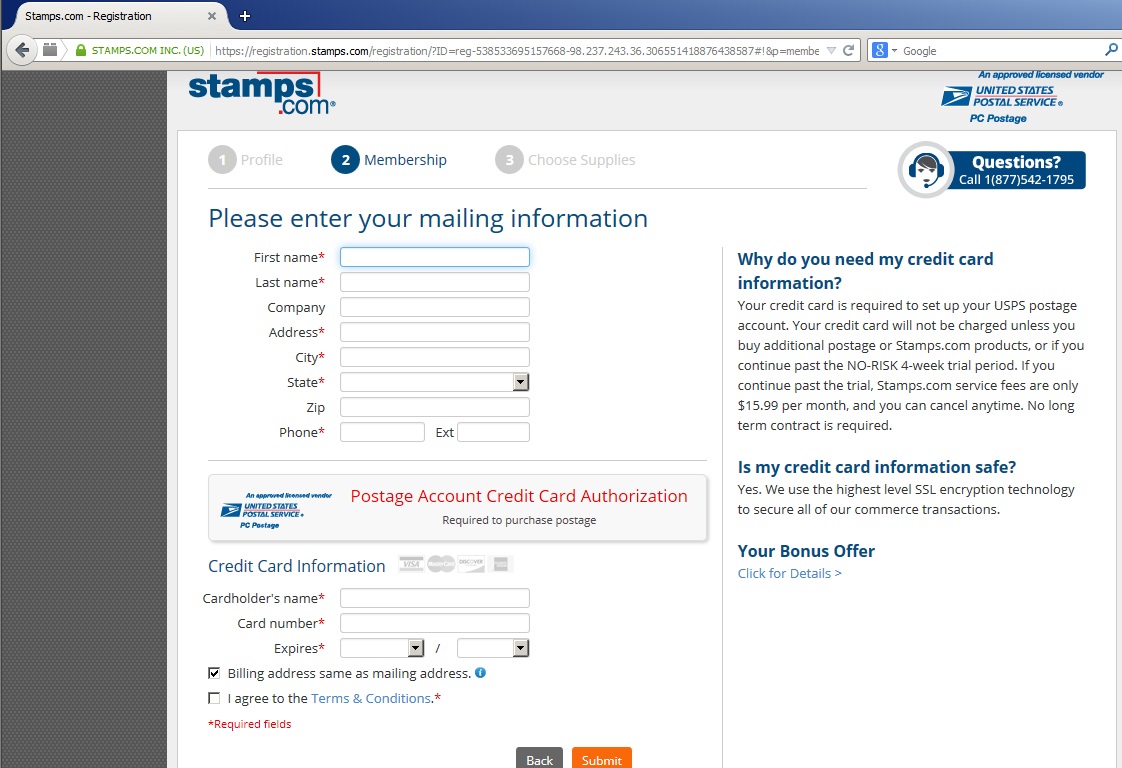
Once I realized the USPS site was concealing the cheaper options, in my determination to avoid getting ripped off by the USPS I almost ended up getting ripped off much worse by one of their "partners". I remembered an ad on a Google search mentioning Stamps.com, so I signed up for an account there and downloaded their software, which does in fact let you print first-class postage. It was only after reading a warning in the original subreddit that I realized I had unwittingly "agreed" to a $15.99/month charge. It turns out that the Stamps.com registration page says above the credit card form that your card info is "required to purchase postage", but this is misleading -- the fine print in the sidebar says you will be charged $15.99 per month if you don't cancel. (And neither the software nor the website gives you a link to cancel -- you have to call their customer service number.) Fortunately, I did call and cancel after realizing I'd been duped, but I was not surprised to learn on Wikipedia that the company had been the subject of over 1,000 Better Business Bureau complaints from users regarding the unauthorized monthly charges. (The part on Wikipedia about "long hold times" is out of date, though -- the automated prompts recognized my account by my phone number and let me cancel without any waiting.)
What does that have to do with USPS.com? Because it never would have happened if the USPS website had been on my side in the first place, giving me all the mailing options that I actually needed. It's bad enough when a private company does this, but the USPS works for us, don't they?
So that's not a "bug" in the traditional sense, but I'm counting it: #1: Not giving users all the mailing options they want to know about.
Most of the other bugs are not self-serving tricks; rather, they're just unclear directions where you have to pause and puzzle out what you're really supposed to do, which is different from what the site tells you to do. For example:
#2: Listing boxes as shipping options that don't fit the dimensions that you've already entered
On the label printing page (requires a USPS.com login if you don't have one) is the option to enter package dimensions. If you specify package details of 1 lbs and 13x5x6 inches, and click to calculate "available Services and Prices" based on the details you've entered, you're presented with a list of options that include 'Priority Mail Flat Rate Envelope 12-1/2" x 9-1/2"', 'Priority Mail Small Flat Rate Box 5-3/8" x 8-5/8" x 1-5/8"', 'Priority Mail Medium Flat Rate Box 11" x 8-1/2" x 5-1/2"', 'Priority Mail Medium Flat Rate Box 13-5/8" x 11-7/8" x 3-3/8"', and 'Priority Mail Padded Flat Rate Envelope 9-1/2" x 12-1/2"' -- all of which, of course, are too small to hold the package whose dimensions you just specified.
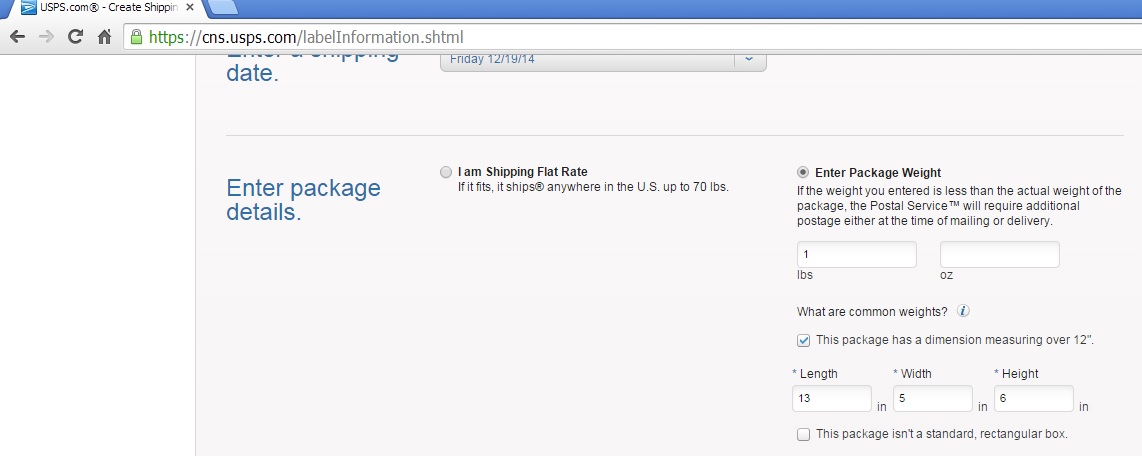
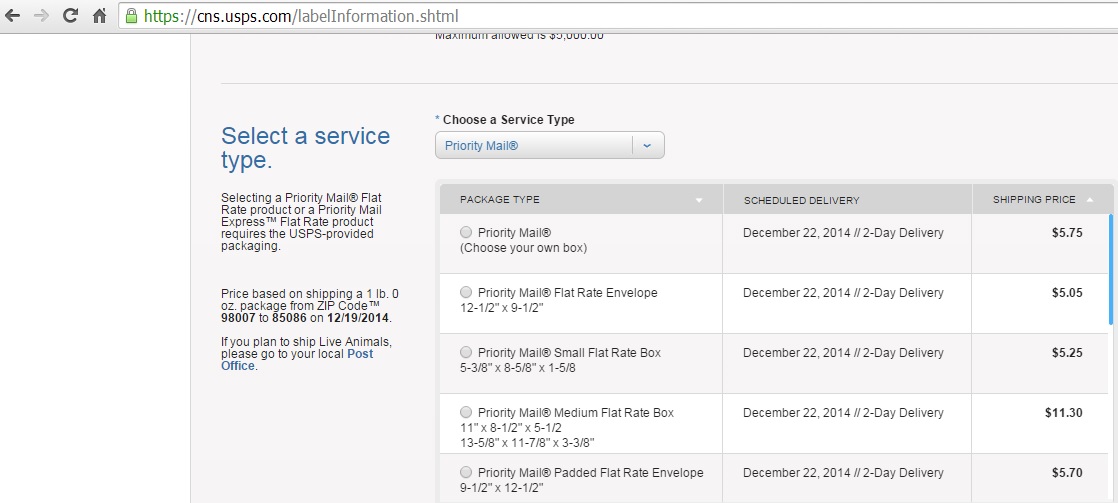
You could argue that it's the user's responsibility to make sure their package fits into the box they select, but a user could reasonably assume that the whole point of entering the length, width and height is so that the USPS can recommend only those boxes that will hold the item. Remember, the user usually doesn't have these boxes in front of them at the time they're printing the label. They could end up selecting a box option, printing the label, taking it all the way to the post office along with their package, only to find out that the package doesn't fit into the box that they printed the label for, and that they have to wait in line anwyay to pay for an alternate method.
It's a middle-school-level programming exercise to take the length, width, and height of a package as an input, take as a second input a list of boxes of varying lengths, widths, heights, and costs, and find the lowest-cost box that will hold the package (keeping in mind that the package can be rotated to different orientations so that the "height" becomes the "width", etc.). It's reasonable to expect the postal service to be able to do this too.
#3: Everything wrong with the "print your labels" page
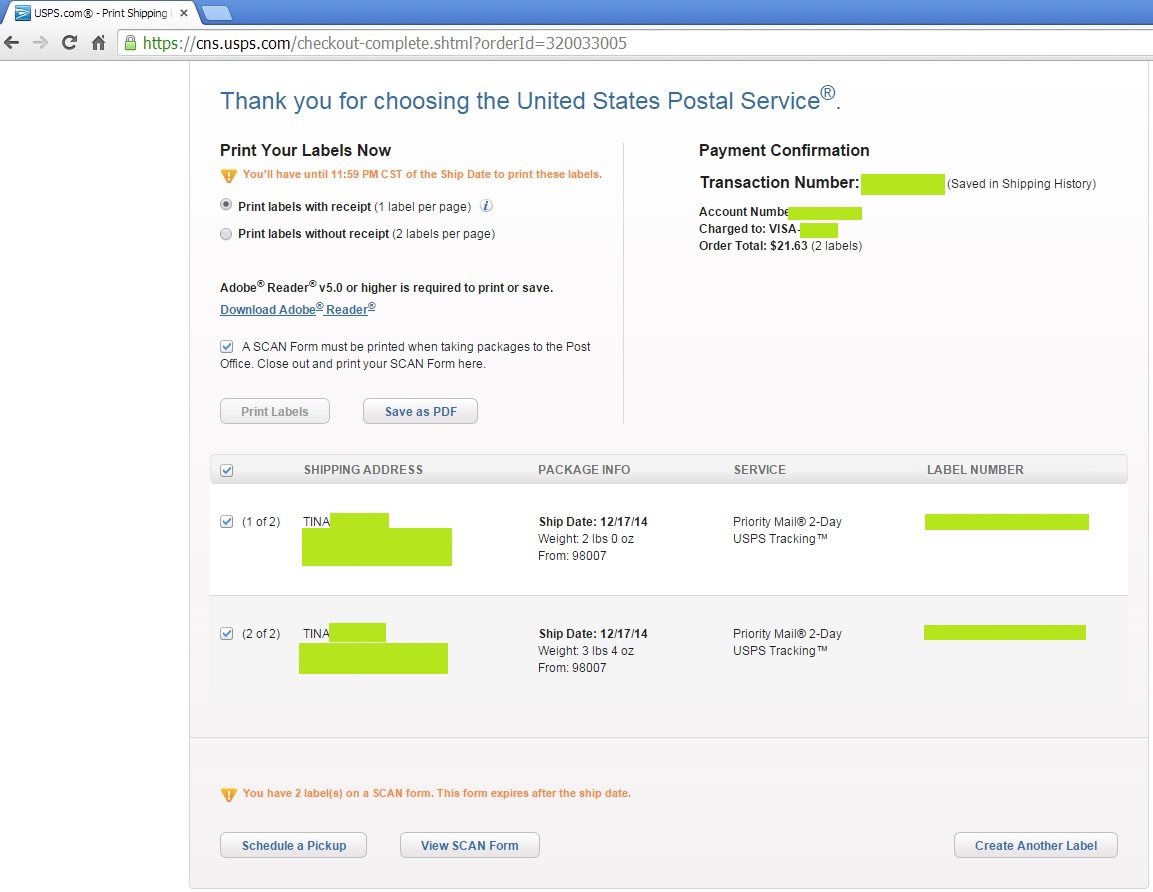
Here's a screen grab of the "print your labels" page that appears after you've paid, which you can use to play the Highlights "What's Wrong?" game:
-
The text at the top says "You'll have until 11:59 PM CST of the Ship Date to print these labels." OK, but if I print them at 11:59 PM, what good does it do if the post office closed at 6? Are the labels only valid on the ship date, or will they still work if I take them to the post office the next day? This should be more clear.
-
Text says "A SCAN Form must be printed when taking packages to the Post Office." Fine, but there's a checkbox next to that sentence. If that sentence describes a postal regulation, what does it mean if I un-check the box? That the regulation no longer applies to me? Can someone tell me if the drug laws work that way as well?
-
The next sentence says: "Close out and print your SCAN Form here." I have no idea what that sentence means. Close out of the browser? And where is "here"? When it's not hyperlinked, "here" means here.
-
WHY IS THE "PRINT LABELS" BUTTON DISABLED?? I have the checkboxes checked for both labels. I want to print them. What else do you want me to DO? (My PC has a printer, which the Chrome browser is aware of -- it lets me print from other webpages with no problem.) I got it to work by saving the PDF and printing that, but I never figured out why the Print button was just sitting there, mocking me from behind its veil of grey.
-
The "Schedule a Pickup" button at the bottom -- same problem as the "print until 11:59 PM" message at the top. Since I printed these labels with the ship date specified as today, it should be more clear if the labels will still be considered valid tomorrow, which is the soonest time that a pickup could be scheduled.
#4: Over an hour on hold and never got through.
As an adherent to the touchingly quaint notion that a reporter should talk to the subjects of their story before running it, and also because I just wanted clarification on some of these questions, I called the USPS help line and waited on hold for 30 minutes before their help line disconnected me. I called back and waited for another 40 minutes before I hung up this time. OK, strictly speaking that's not a "bug". They just suck.
In the end, after reverse-engineering their pricing options as I had vowed to do, I determined what appeared to be their rules, (applies only to domestic Priority Mail), which you may find handy:
- If you're shipping in a Flat Rate box, the weight of the package doesn't matter (up to the 70 lb limit), only the dimensions, to the extent that they determine which Flat Rate box you can fit it into, with the bigger ones being more expensive.
- On the other hand, if you pick the Priority Mail "Use your own box" option, then the dimensions don't matter (unless you exceed the allowed limits), only the weight -- a 5 lb, 3"x3"x3" package and a 5 lb, 21"x21"x21" package both ship for $15.22, but if you change the weight, that's when the price changes. (If you try to ship a 22"x22"x22" package, you get an error that you've exceeded the dimensions for a Click-N-Ship.)
Using this, I was able to strategically break my one shipment, which would have cost about $30, into two separate shipments which cost $12 and $8. All told, with the effort to reverse-engineer their pricing options and to document all of the bugs for posterity, it took me about an hour to figure out that $10 savings and to print labels that I could take to the post office and skip the line -- which, it turned out, looked only about 3 minutes long -- in order to experience what one redditor described as "feeling the hate from the people standing in line as I casually stroll up and drop my packages off at the front desk". But the important thing is, I did it efficiently.
on the other hand, a child would also spell "this" correctly, so maybe it's harder than I thought
http://pinopsida.com