 Slashdot Mirror
Microsoft Removes the 'X' From Windows 10 Update Leaving No Way Out (theregister.co.uk)
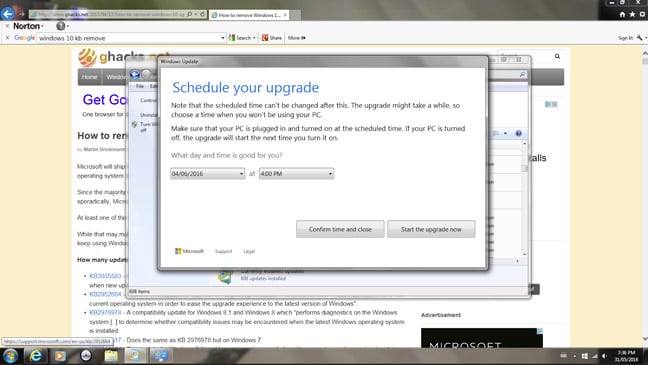
simpz writes: The Register reports that Microsoft has changed the Windows 10 update dialog and no longer shows the "X" close button. They say once agreed to there is no obvious back-out method and it is now out of step with Microsoft's own documentation on this. They have a screenshot of this. As noted above, the latest move is out of step with Microsoft's Knowledge Base documentation, which says you can re-schedule your upgrade.
Try Alt-f4. Works on many apps and usually forgotten by most devs.
https://www.grc.com/never10.htm
don't agree to the license agreement. Done. End of discussion.
Not sure why this is modded down -- I walked into the lab one day to realize that our computer had decided to upgrade to 10. I rejected the EULA, and it restored 7 (it didn't even take too long).
Individuals only got support for Windows 7 until 1/13/2015. They aren't included in the 2020 support plan, and Microsoft is under no obligation to support home users for Windows 7 anymore.
As per Microsoft's lifecycle policy, Extended Support applies to retail purchases, and entitles home users to security fixes until January 14, 2020 (Win 7) and January 10, 2023 (Win 8).
It works, but there can be negative side effects... great example being the TPM.
If you've a TPM in use under 8.1 (at least), after upgrading to 10 it will be tweaked in such a way that it will only work in 10, even after a reset/reinstall of the OS to a lower version.
Worse, because of the changes, the 8.1 UI is unable to clear the TPM so you can re-take ownership of it. Even PS TPM Cmdlets fail you... only a non obvious WMI call can get you back to normal.
Source: I hit this on my personal SP3 after I ran screaming from 10 on it (though run it elsewhere in my home happily).
Help Brendan pay off his student loans