Slashdot Mirror


Microsoft Removes the 'X' From Windows 10 Update Leaving No Way Out (theregister.co.uk)

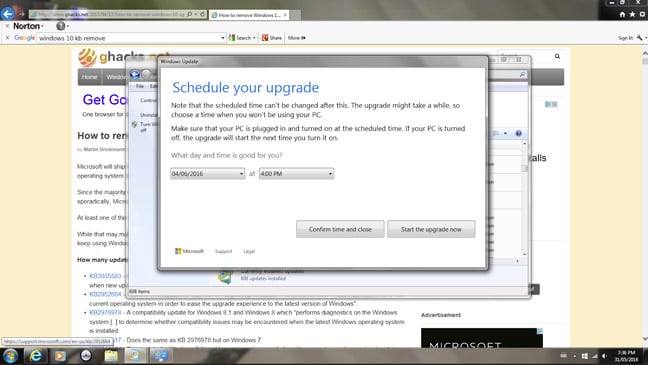
simpz writes: The Register reports that Microsoft has changed the Windows 10 update dialog and no longer shows the "X" close button. They say once agreed to there is no obvious back-out method and it is now out of step with Microsoft's own documentation on this. They have a screenshot of this. As noted above, the latest move is out of step with Microsoft's Knowledge Base documentation, which says you can re-schedule your upgrade.
3 of 664 comments (clear)

  1. alt-f4 by Anonymous Coward · · Score: 5, Informative

    Try Alt-f4. Works on many apps and usually forgotten by most devs.

    1. Re:alt-f4 by WheezyJoe · · Score: 5, Informative

      False. Refuse all the optional updates, accept all the critical updates. You can easily configure windows update to do this.

      THIS. I have Windows 7 with GWX Control Panel (reviewed here) installed,
      and under Control Panel --> Windows Update --> Change settings, I am set to "Check for updates but let me choose whether to download and install them",
      and (most important) "Recommended updates" is UN-checked.

      There is also a tool Never 10 (Peter Thurrott writes about it here). But always make sure you make the changes above to Windows Update.

      When updates announce themselves, accept only those updates for Windows listed "critical" and "security", as well as Windows Defender updates. That's it.

      So far, no problems on any of my systems. MS is being pretty shitty about all this, but they haven't yet stooped to calling 10 a critical/security update. However, anyone not savvy enough to take the above steps (e.g., parents) might be in for some trouble. So, spread the word, or suffer endless calls from suffering masses.

      --
      Take it easy, Charlie, I've got an Angle...
  2. a fix by Anonymous Coward · · Score: 5, Informative

    https://www.grc.com/never10.htm