Slashdot Mirror
Domain: baudline.com
Stories and comments across the archive that link to baudline.com.
Comments · 19
-
Baudline
From their website:
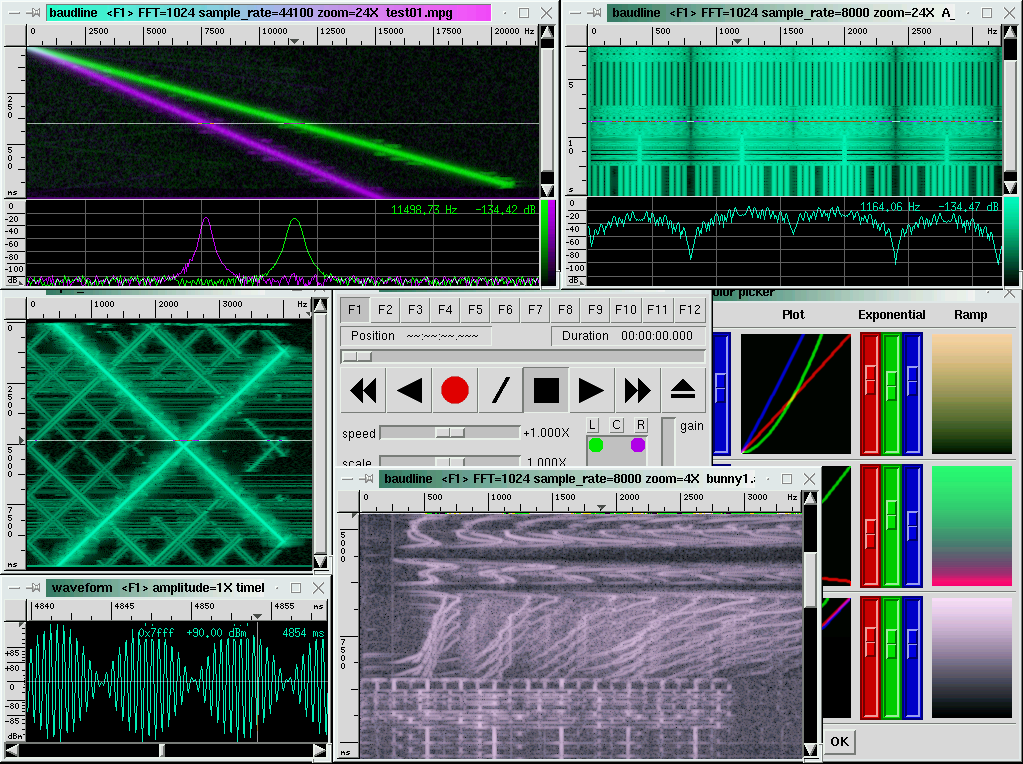
"Baudline is a time-frequency browser designed for scientific visualization of the spectral domain. Signal analysis is performed by Fourier, correlation, and raster transforms that create colorful spectrograms with vibrant detail. Conduct test and measurement experiments with the built in function generator, or play back audio files with a multitude of effects and filters. The baudline signal analyzer combines fast digital signal processing, versatile high speed displays, and continuous capture tools for hunting down and studying elusive signal characteristics."
I have used it also as an oscilloscope (waveform wiindow). Runs on linux and osx.
Official website. -
Re:Will it be...
FFT of course, since we're dealing with audiovisual media.
-
Nothing heard in Australia either
I had my scanner programmed up (Uniden Bearcat 780XLT), I have a nice Dipole Antenna (Diamond D-130J), and a cron job setup to record whatever it heard according to Heavens Above. I'm tapped directly into the descriminator output (ie bypassing the crap audio processing)
I got nothing.
Thinking that I might be a little deaf, I ran the audio file through baudline to see if there was anything.
Nada. Just the normal sound card artifacts i get when recording static.
Now, I know I can hear something on this rig, and I know that I understand the graphs on Heavens Above as I was able to use the same setup to predict and capture some weak telemetry from the ISS a couple of days ago.
This was quite disappointing.
Next pass is coming up this afternoon - fingers crossed. -
Re:Simple solution here.AND is powerful enough to run baudline for use in the field. Background processes could compress material as I was recording (incremental, selectively, to be sure you could grab the entire recording - even if your quality had to suffer - but you'd get the highest possible of any given event). The network interface could stream audio at selectable bitrates (.ogg peeling)
Powerful enough? I run baudline on an old 333 MHz Pentium II laptop and it is fast enough for most things. You mentioned compressing data on the fly and logging to disk. Since you are a fellow baudline fan then you might like this:
baudline -stdout | oggenc -Q -r - > file.ogg
-
Simple solution here.
Here's one way.... Get a small computer, big harddrive.
Get an M-Audio Audiophile 2496 (~$100) and maybe a right-angle PCI adapter to fit it into your little BTX box or whatever. Load your OS of choice. You've already got plans for the rest - that way should be just fine. Rip your stuff onto the drive (encode with FLAC), hook it up to an amplifier, and you're all set.
The 2496 has already got RCA IN/OUT and Digital connectors (read the specifics on compatibility and what you can and cannot use at the same time) making hookup easy. It will also record at impressive rates and resolutions (playback too if you've got fancy hi-res sources). You can find drivers for most of the following at OSS (these are commercial drivers that run ~$50 for the most common OSs that include free tech support and upgrades for 2 years).
* Linux (x86, Alpha, PowerPC)
* VxWorks (Tornado)
* LynxOS (x86, PowerPC)
* SCO Open Server
* SCO UnixWare
* Solaris (x86, Sparc)
* IBM AIX
* FreeBSD
* BSD/OS
* OpenBSD
* NetBSD
* HP-UX
You could buy a mixer and some mics to do some high quality recordings too. (I've picked up a 10 channel Yamaha mixer [MG10/2] w/ 4 mic inputs (phantom capable) for $99 and a Samson CO2 matched pair of small condensers for ~$120 at Sam Ash to do recordings with a setup very similar to that above and it worked quite well.) No experience with the OSS drivers but they seem to be responsive to email inquirys about specifics and have a free trial available.
I dream of a portable custom BSD based solution that has easy controls (serial keypad and LCD - "real" buttons and switches), could be setup for automated recordings, has a builtin mixer, microphone inputs (phantom powered for my dream large condenser pair), and speaker/headphone driver, AND is powerful enough to run baudline for use in the field. Background processes could compress material as I was recording (incremental, selectively, to be sure you could grab the entire recording - even if your quality had to suffer - but you'd get the highest possible of any given event). The network interface could stream audio at selectable bitrates (.ogg peeling) OR amplify a stream like an internet radio station. AND it could do my laundry for me and fit in a backpack. If anybody else would be interesed in something like this please contact me and I'd love to collaborate. [ bricoleur !AT! 80d !DOT! org ] -
Well I've found plenty of things
"we ain't found shit!"
I like noise. In fact I am fascinated by it.
My viewpoint of the seti@home project is that they are a great source of high quality Radio Telescope signals. I let their program do it's science and I get to keep the work units. Seems like a fair trade. So far I have archived 5762 work_unit.sah files (~1.5 GB). Why?
Because I am an amateur SETI enthusiast and I wasn't satisfied with just watching the screensaver. Gaussians, spikes, triplets, phooey! I wanted to do more. So I collect every work unit and I analyze them myself with the baudline signal analyzer. It can read the
Despite the common mixing trough at 1.4200 GHz, and the stationary harmonic bleed-in interference, I have found a lot of interesting things in the data. Every now and then I run into a weak signal with a non-terrestrial Doppler drift rate. Sometimes they wiggle or pulse. Is it ET? Probably not, but it is exciting and fun. I should make a webpage of pictures.
[Disclaimer: Yes, I am an author of baudline and this is a blatant product plug.] -
Generate your own Infrasound
I forgot to mention this in the parent post but baudline can also be used to generate infrasound. It has a built in tone generator that is fairly flexible (pure sine waves, linear or exponential sweeps, brown noise, various modulations,
Generating infrasound at high dB levels is difficult and potentially dangerous to you and your equipment so be careful.
The first thing to do is to test if your audio card can actually output infrasound frequencies. Many sound cards (and subwoofers) have filters that remove inaudible bass. This is easy to test with baudline and a loopback cable. Simply plug the line-in to the line-out on your soundcard and then have baudline's tone generator output a 14 Hz sine wave and see what (if anything) is recorded on the input side.
The next and far more difficult problem is actually moving enough air to create infrasound of any significance. Remember that output ~= Vd * Xmax * frequency^2 where Vd is radiating surface area and Xmax is excursion. Most subwoofers have minimal output below 20 Hz and some even have rumble filters that electronically remove inaudible bass. So this might be more of a project for DIY speaker builders. Also using a subwoofer with a ported alignment is a recipe for destruction unless the port is tuned to (or below) the infrasound frequency of interest. In anycase it is easy to over power most any woofer and make them bottom out at infrasonic frequencies. So be cautious, start with low volume levels. A good general rule is if it sounds bad then it likely is bad and it is causing damage so stop immediately.
DISCLAIMER: I am not responsible for any damage those actually foolish enough to follow my advice inflict on themselves, other people, audio equipment, or physical structures. -
Detecting Infrasound is easy and fun
I'm a bass fanatic and infrasound has sort of been a hobby of mine for the past several years. Detecting infrasound (frequencies less than 20 Hz) is easy if you have the right equipment and it can be very fascinating, educational, and fun.
Capturing and monitoring infrasound is easy with a PC, low end sound card, and a cheap microphone. The key is having a low enough sample rate and a spectrum analysis program that is designed for monitoring long term events. I am the author of a Linux signal analysis program called baudline. It has many features that make it ideal for infrasound monitoring. For those of you who are interested in this sort of thing I would recommend checking out the image entitled -session basso on the Screenshots page, also many of Mystery Signals contain some interesting bass phenomena.
For baudline infrasound monitoring, some good starting command line parameters would be:
baudline -memory 50 -samplerate 8000 -decimateby 16 -overlap 50
This will capture about 5 hours of data at a 500 samples/second rate which is good for frequencies up to 250 Hz. Increasing the -memory buffers to 230 MB, the decimation ratio to 64, and the -overlap to 100% will have a Nyquist frequency of 62.5 Hz and capture almost a weeks worth of data! -
Re:The Need For a Long Patch Cord
I buy at least as much vinyl as I do CDs. I used Baudline to tune the setup before creating a digital representation of the music on my hard disk in the form of an OGG file.
I have a number of artists; old and new on heavy vinyl. Stunning.
Try this interesting experiment. Play a CD and a vinyl record of the exact same track into Baudline's spectrum analyzer and notice the average DB across the high frequencies. Doing so with Fugazi's "End Hits" album showed me that the CD cuts off above 16Khz while the vinyl continues to reproduce the signal up to 20khz.
Most people can't hear above 16Khz but such signals create harmonics that extent down into the audible range.
-
baudline supports FLAC
A 3rd party Linux spectrum analysis tool called baudline supports the automatic loading of both FLAC and Ogg Vorbis audio files. You can use it for visualizing the damage a lossless codec does among other things.
-
SETI@home has lost focus. Here is a new idea.
I am worried that the seti@home project has lost its focus and gone astray. Seti@home was a romantic notion that captured the hearts and minds^h^h^h^h^h of many of it's users. Mindshare YES, brain power NO.
I think seti@home should transform itself from being a passive project to being an active project. Utilizing the spare CPU cycles of a million idle computers is great but utilizing the millions of idle minds that stare at the screen-saver is revolutionary. Imagine the computing potential. It's incredible.
I know the Seti League's project Argus is a volunteer effort, but unfortunately most of us don't have the space, money, skill, or time required to build a seti microwave station in our own backyard.
My idea is to collect high quality microwave data from antennas such as Arecibo and Parkes and distribute that to users over the internet. Instead of (or in parallel to) a seti@program client, the user would use a signal analysis tool such as baudline to search for drifting signals. Search strategies would need to be conceived and programmed. A collaborative component would need to be built to allow IM like communication, second opinions, and instant peer review. It would be true distributed science that anyone with a creative mind and a computer could participate in.
Since baudline can read and decode the seti@home work_unit.sah files you can perform your own secondary analysis of the seti@home data. Baudline is free but it only runs on x86 linux so give it a try if you can. Most WU data files appear to be pure noise and are boring to look at but occasionally you get an interesting one. Auto-drift rulez.
The ukentucky link below a similar concept that is rough and needs more polish. The potential is there but the implementation is flawed. It also needs more volunteers. -
Do-It-Yourself Audio ForensicsGood audio forensics training. Check it out.
www.baudline.com has a selection of Mystery Signals for you to try and identify what they are. Help is provided on how to use the program [called, appropriately enough, 'Baudline'] to isolate, filter, and massage the sound in various ways to figure out what it really is.
It is a sound analysis toolkit that is very flexible and is targeted at audio signal analysis, not editing. See more details here.
Anyway, their Mystery Signals are pretty fun to play with and try to figure out. Hints are provided, as are answers if you choose to look. The explanation provided for this file is:
This mystery signal is the sound of the harmonic oscillations of a surf board strapped to the roof of a rental car that is slowly accelerating. There are two signals of interest here. Let's break it down. The 4 cylinder rental car accelerates from about 30 MPH at the start to about 50 MPH at the end of the file. Switching to a 16384 point FFT size will help bring out the detail. The first signal starts at 80 Hz and it slowly increases in a linear fashion to 88 Hz at the 12 second mark. Using the harmonic helper bars, the 3rd harmonic is the strongest, but the 2nd and 4th are faintly visble. This is the sound of the car engine reving from 2400 to 2640 RPM. Then at the 12 second mark a transition that takes about 3/4 of a second occurs, this is the gear shift of the automatic transmission. The new new fundemental is about 70 Hz and it slowly increases again in a linear fashion to 74 Hz where the file ends. This equates to an increase in engine rev speed from 2100 RPM to 2220 RPM. The acceleration was slow and the RPM calculations match the behavior one would expect from a low performance 4 cylinder rental car with an automatic transmission. The second signal of interest starts at 128 Hz and time zero. Things are fairly calm and the coupled surf board, springy strap, and rental car roof speaker cone are just starting to hum and oscillate. The harmonic helper bars show that the fundamental and the 2nd thru the 6th harmonic are all related. Tracking the wiggles of the fundamental over time show that and they match the variations in the harmonics perfectly. As the car speeds up the lift and the wind force on the surf board increases and the wild harmonic oscillations increase in strength and frequency. There could be some chaos here, it looks like some bifurcation of modulation modes are happening, but some further measurements and analysis is required to say for sure. This mystery signal was recorded on a Canon S110 digital camera in low resolution movie mode. Baudline can read the Canon
Program Features:
* 192 kHz real-time bandwidth * 96 dB dynamic range * Multiple sound card support * Input stream DC offset correction and delay line equalization * Configurable input channels that can perform various operations * Frequency, time, amplitude, and sample probability distribution analysis * High speed displays * Test signal generation * Drift Integration "de-chirping" * Audio player o looping o speed control with multirate resampling o pitch scaling o heterodyning (frequency shifting) o 2D matrix surround panning o notch, high, and low pass filters * File loading o file formats:Grab the latest binary(only) here or find it in the BSD Ports.
-
linux USB audio works just fine
Linux doesn't have very good USB support at this time
This is just not true. I'm running a laptop with a 2.4.9 kernel and both the Telex-560 and Labtec Verse-704 USB microphones work great. They are much cleaner than the lousy ESS Maestro2 chip in my M300, and they are inexpensive! ($25 - $50)
support for Linux would make no sense to me if I was a developer - where's the real time recording software?
Excuse me. Check out a Linux program called baudline, it is a real-time recording and analysis program and it has no peer in either the MS or Mac world (or so I've been told). -
Re:Latency is NOT a problem
Try the linux program called baudline, with a typical cheapo sound card, it's analog input to screen draw latency is less than 1/60 of a second. That is far from slow.
-
Sound cards are better than you think
It is true, sound cards do have limitations when it comes to oscilloscope duty, but they are not as bad as many claim. I can't believe I'm defending the lowly sound card. It is time for some de-bunking. Let's go:
Almost all measurements with oscilloscopes cannot be performed with a sound card. However, if your application meets these
Nothing you're interested in is outside the audio band (50Hz to 5kHz or so)
Low end sound cards with a 48000 sample rate are good from almost DC to 24kHz.
Up to a second delay for the screen update latency (depending on sound card) is ok
Check out a linux program called baudline, it's screen update latency is less than a 1/60 of a second. It's quickness will blow you away.
16 bit digitization (or worse) is enough
Huh? More bits is better. Since high-end digital scopes have 8 or 10 bit ADC's, the cheapo 16 bit PC sound card has far less quanization noise.
No hardware triggering (all done in software)
Why would you want hardware triggering? Deep buffers rule! In baudline you can scroll back to events that happened minutes or hours in the past (depending on RAM).
When dual channel, both have the same settings
What do you mean? Same sample rate? That isn't much of a limitation. Gain, zoom, offset, -
if you use Linux then check out baudline
From the the what is baudline? webpage:
Baudline is a real-time signal analysis tool and an offline time-frequency browser. It has a built in tone generation capability and it can play back audio files with a multitude of effects and filters. Designed for environmental analysis missions that range from modulation parameter measurements to searching for transient signals that go bump in the night, baudline combines fast digital signal processing, versatile high-speed displays, and continuous capture tools for hunting down and studying elusive signal characteristics.
Capture, analyze, measure, play.
Baudline isn't really an oscilloscope although it does have a waveform display. It is more of of an integrated spectral analysis laboratory with a built in function (tone) generator. Baudline currently only works with sound cards and is limited to a 192kHz sample rate.
Some folks have mentioned that computer sound cards are not really sensitive lab tools, this is true. But with a well grounded PC and a decent quality sound card like the $20 Sound Blaster PCI16 you can capture some good clean signal. For low bandwidth work the 16 bit ADC and DAC's in a PC sound card are actually far superior to the 8 or 10 bit ones that are found in todays digital scopes. So if you don't need MHz inputs, then check out baudline or the mirror, it is free, but it only runs on Linux.. -
if you use Linux then check out baudline
From the the what is baudline? webpage:
Baudline is a real-time signal analysis tool and an offline time-frequency browser. It has a built in tone generation capability and it can play back audio files with a multitude of effects and filters. Designed for environmental analysis missions that range from modulation parameter measurements to searching for transient signals that go bump in the night, baudline combines fast digital signal processing, versatile high-speed displays, and continuous capture tools for hunting down and studying elusive signal characteristics.
Capture, analyze, measure, play.
Baudline isn't really an oscilloscope although it does have a waveform display. It is more of of an integrated spectral analysis laboratory with a built in function (tone) generator. Baudline currently only works with sound cards and is limited to a 192kHz sample rate.
Some folks have mentioned that computer sound cards are not really sensitive lab tools, this is true. But with a well grounded PC and a decent quality sound card like the $20 Sound Blaster PCI16 you can capture some good clean signal. For low bandwidth work the 16 bit ADC and DAC's in a PC sound card are actually far superior to the 8 or 10 bit ones that are found in todays digital scopes. So if you don't need MHz inputs, then check out baudline or the mirror, it is free, but it only runs on Linux.. -
I Listened to the Leonids
Now this isn't as cool as hearing meteors unaided with my ears. But while I was outside watching the Leonids here in Cupertino, I was also watching and listening to NASA's Meteor-radar with a linux program called baudline. There was a lot of activity that night, about a hit a second. Unfortunately I can't correlate the radar hits with the visuals since I live in California and the meteor radar is in other states (NM TX and AL). Still it was cool.
Right now the meteor radar is getting a hit about every 20 seconds. Sweet, I just saw a 70 second streak with a doppler shift of about 183 Hz. That is screaming at about 17X earth rotation! (If I wasn't so lazy I'd calculate that in MPH or m/s)
How did I do it? I just piped the real-time NASA stream into the standard input (stdin) of baudline, then equalized it with about 10 seconds of quietness, and then watched and listened away. I used this command line:
mpg123 -s http://icecast.msfc.nasa.gov:8000/forward-scat | baudline -stdin -channels 1 -overlap 100 -fftsize 2048 -mem 9 -record -samplerate 22050 -session meteor_radar
If the geocities site for baudline craps out, try again later, or try the mirror site. The downloaded md5sum for baudline_0.87_i686.tar.gz should be 72f949826ac81a461a8b4b5c5551f366 -
Do your own analysis of the SETI work_unit.sah fil
But there could be signals encoded in more efficient ways and thus look like noise. SETI@Home will never find them.
So true. The signal could come in some other form than the "spikes, gaussians, or triplets" that SET@home searchs for. That is why I save all of my work_unit.sah files and analyze them manually with www.baudline.com. (note: baudline only runs on x86 Linux)
In the 1000+ WU's I've collected and analyzed I have found many interesting signals that didn't match the S@H "spike, gaussian, triplet" profile. Some had the drift rate of a non-terrestrial origin but they didn't match Arecibo's beam width. Were they SETI? Probably not. But hey, it is a lot of fun to keep searching.
You can look for the presence of a carrier so weak that you can't detect the modulation, by averaging over many cycles. That's what SETI@Home actually does.
Baudline can also do this type of averaging with it's drift integrator tool. Coupled with baudline's color aperture window I've found that the human eye is very sensitive at finding signals in noise. What would be really great is if the SETI@home project had a way for users to manually search for signals and send in feedback. Sigh, they probably would hate the flood of message they'd receive. Maybe I should start the SETI@home@baudline project?