Slashdot Mirror
Domain: cybercoment.com
Stories and comments across the archive that link to cybercoment.com.
Comments · 6
-
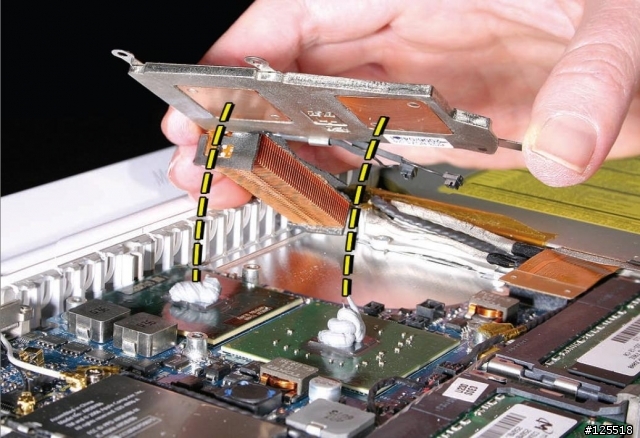
Thermal Compound
Looks like this is in accordance with Apple's service manuals from many years ago: http://www.cybercoment.com/Pictures/news/february17th2007f.jpg
-
Re:Architecture Issues
You cannot even use standard PC video cards on a Mac, since the Mac architecture expects extension cards to have OpenFirmware compliant firmware. Hence, nice Mac-specific NVidia AGP cards that wont fit anywhere else. Again, there are ways around that, but reliabiality suffers.
There is a way to flash the Mac-specific firmware into some PC Geforce2/3 cards. Take a look Still, I agree that Mac-compatible hardware is expensive and you don't have a lot of choices. -
Re:So where's the Mac version? Just try !
Acording to this Site flashing a new BIOS to use PC cards in a Mac is mostly harmless (tried it myself with geforce)
-
Re:Graphics cards for Quartz Extreme
I scored a Pine GeForce2MX specifically for Quartz Extreme (for my Sawtooth 500 AGP)... Flashing the ROM is apparently a breeze (though I've yet to attack mine)
Instructions can be found here
Though I love this comment off the site: "If you have any problems, it sux 2 B U." hehe -
best logo yet
-
Blender (There a GUI Addicts Anonymous for this?)
Blender. This program simply blows me away, and it's interface is simply the most addictive thing since caffeine. You can get it at www.blender.nl, it works for IRIX, Linux, and Windows (most definitely not in my order of favorites =) ) and although it is not opensource, it's free! Now, time to describe the GUI!
Everything you'd ever wish for is customizable. You can set different window placement configurations and save them either in the current file (everything setting-wise is saved in the files, along with a default in your home directory [or wherever]) or set as the default. So you can have frame (they aren't windows, everything in Blender is flattened to prevent anything from being covered up when working) placements for using the sequencer, modelling, texturing, setting IPOs, and more, and set up configurations mixing different frames into one. You can have, say, a modelling / scene frame next to the IPO frame for watching object animation in two ways. You can have the hierarchy frame along with a separate frame for the Material Buttons, plus the normal buttons frame at the bottom. You can even have multiple modelling/scene windows for viewing your scene from another perspective.
Onto the actual widgets and all! Many things are in pulldown menus, which contain a whole good list of names of objects, etc while still taking up very little area. There are also menus (special weird one, it either pops down from a button or just appears when you press space), toggle buttons, and a special kind of input widget (Dunno its name, but it's cool!). It is like a slider, but without a handle, and you can enter text directly into it or drag it one way or the other, or click on one side or the other to move it slowly. All in all, the widgets just rock. And the entire interface was custom made from the ground up, entirely using OpenGL (PORTABLE).
I don't know what to say about keyboard shortcuts... they blow my mind (ooh yeah)! There's a shortcut for nearly everything, and after using Blender for just a little while you get hooked. You'll start trying to use b to borderselect in gimp, F1 to load, F2 to save. G moves stuff, RIGHT? Resizing doesn't work with s? ACK! Then you'll go back to the comfort of Blender and bask in the GUI.
The file load / save frames (more like whole window or something, they cover up the workspace but that's about it) are very customizable and and you can choose to have the directories displayed however and when choosing textures and the sort, thumbnails show exactly what is what. It's grrrrrrrrrrreat!
Well, I guess that's the end of my talk on Blender. I believe wholeheartedly that it has one of the best GUIs ever and deserves this award. If you haven't, please check it out, it's probably the best 3D suite (and does nonlinear sequencing, but no sound) for Linux available. Also, keep watching it, as when 2.0 comes around it will amaze everyone (even I, and I've heard most of the features already!) =)
Ack! I forgot! The new C-key features include Python scripting, and Blender now has an interface to allow Python to use OpenGL commands. This allows scripters to make custom GUIs for their scripts and even in-script object viewers! It's awesome! You can use the Blender widgets (like the cool slider-thingy) within the scripts to allow, say, a script that generates a gear with a certain number of user-inputted teeth. I think this script is already a reality!
Well, I've ranted on enough about my favorite program ever! Please check it out, and possibly check out my website (hopefully it will work, CI|Host is still having some problems) at http://www.cybercoment.com/deadmonkey/ for more info and some of my work.
Thanks!
DeadMonkey
------------------------------------------------ ----------------
Everybody's got something to hide except for me and my monkey...
www.stampede.org