Slashdot Mirror
Domain: darwinfo.org
Stories and comments across the archive that link to darwinfo.org.
Comments · 23
-
OS X rules...Well, since OS X was mentioned, I gotta say I went out and bought a new LCD iMac Friday and absolutely love it. I quickly figured out how to enable the root account and turn on a more normal boot sequence (that makes it look like a real unix system booting). Loads of good info at www.darwinfo.org.
I was pretty blown away when I went into the "sharing" control panel, clicked on web sharing, and apache started up, all ready configured and eager to go. Then there's "remote terminal login" which fired up sshd (and not telnetd thank god).
Next stop, the fink site so I can install a rootless X server and all the GNU and other tools which are missing from it.
Basically, the best of all worlds. Unix, the slick Apple GUI, and even IE and Microsoft Office.
-
Put this in the right place
This is nice and good, but should such information not be put where it should, i.e in the collection of how-to document for darwin?
-
which kernel?
Were you thinking of doing some work on Darwin? That would be a much better choice than Linux, of course. Darwin is based on a free-as-in-speech license, unlike Linux. Linux is licensed under the GPL, which places all kinds of restrictions on your freedom to use the code; for instance, you can only link it to other GPL'd code. Also, Darwin is a microkernel design, so unlike Linux, it actually has a future on the desktop -- you can actually install a new device driver without recompiling the kernel.
-
For better Compatiblility ...
-
Re:GNU Darwin?
-
Great News but ...
To be a lot more effective such announce should be spread a little bit more.
Mozilla will be the browser for many alternative OSes (read OS/2, BeOS, Linux, Qnx, Aix
advogato
Beunited
QnxStart
I don't know any windows related sites, but adnantech should do it.
This announce should also be mailed on developing mailing lists like apple's darwin developement list
.
Anyway a lot of great doc are available here and are good sartup point. Sometimes ago some video detailling how to dig in the code where available on mozilla's web site (but I can't find them right now). -
Re:Although Mandrake is an excellent distro...
I've heard about rootless X on OS X, but I have no idea where to find it! Any leads on where I can find it?
Try the XFree86 on Darwin and Mac OS X page. Most of the work is done through the XonX project at Sourceforge. I believe that in order to get the rootless X in Aqua working, you need to build the latest XFree86 and XonX from CVS. Check the archives of the Darwin Development mailing list at darwinfo.org for postings by Torrey Lyons on how to compile it.
-
Re:They weren't trying for OSS acceptance.
I always thought that Apple had to release their kernel source in some form, since it was based on "Open" Projects (Mach and BSD).
The source code to Darwin is available for download via anonymous CVS and you can browse it via CVSWeb. The details are at Apple's Open Source web page. There are also lots of other sub-projects and source for related tools available there as well. Another place to keep up with developments in Darwin is Darwinfo.org
-
Re:No GUI?
It doesn't include a GUI. However,you can install XFree86 4.02. More info is available at Darwinfo.
-
Applications for OS X on x86... how about Gimp?
Darwin, the underlying 'fifth BSD' that OS X runs on, has an intel port being worked on. What's really exciting now is that a whole ton of GNU stuff is getting ported. XFree86 now includes a Darwin in it's source tree, earlier this year, and since then it's really exploding. Gtk+ was ported so you can build Gimp. Qt was recently ported so you can build KDE.
Here's the page for the GNU Darwin distribution
If you want to see OS X on x86, do it yourself! Darwinfo has a howto to get it booting on Intel" It's very pre alpha, and seems to run only on a few mobo configs, but still, I think this is the only way you'll see Apple port Aqua to x86. They are really into leveraging the Open source community for Darwin already, and they've reiterated their loyalty to PPC, so they need all the persuasion that they can get.
Also, a really interesting note about OS X that is strictly mac, but applies peripherally. Last night at the analyst Meeting, Tevanian, their Software lead, said that they've doubled their number of paid developers in the last 12 months. We can expect the amount of applications for the mac to at least double when OS X comes out.
Still, IIRC, as part of the patent deal that Apple and MS did, gates didn't want cocoa to be put on x86 in exchange for Office (and it is really better than the x86 version
Again, if there is a compelling reason for Apple to go through another hardware transition, it'd be the fact that Darwin is implemented and tested already on that platform.
Personally, I think they'd port it first to SPARC and POWER4 rather than x86 since that iron doesn't conflict with their consumer market. -
Re:Mach 3 microkernel and user mode servers ?
No, they are not using a user mode server. They decided to move that into kernel space to deal with the performance issues. Even without the user mode server, Mach offers a lot of benefits. Try browsing the darwin-development mailing list archives at http://www.darwinfo.org for more info.
-
Darwin on Intel!
Right here.
That should get you started.
-
Re:Earth to Cmdr Taco....The second link in the post describes how to get XFree86 to run on MacOSX. Specifically, look here. Even the page you refer to points to that article, and even says (direct quote) "As a side bonus, if you survive the 50+ mb download, you can log in to OS X's console and run the X server directly from there, if you so choose".
How about reading the article before complaining about it? -
Of course....
[W]ork is being done (by TTimo's team at QERadiant.com) to make the existing Q3 tools cross-platform with a common code-base by porting the Linux GTKRadiant port Loki developed back to Win32 (they just recently made their first Alpha release)
Until TTimo's team includes a Mac programmer (these people are making some noise about it), and until someone can work out the uncertain ground between GTK and OS X (here's one step in the right direction), this should probably read "somewhat cross-platform."
-
Suggested reading on this topic
I recommending checking out the recently updated Darwin FAQ. There's actually quite a bit of insight here, including strategic direction, syncing of the Mac OS X and Darwin trees, etc. It's not just PR fluff. Many of the questions were submitted by Dirk Myers of DaemonNews.
Thanks to darwininfo.org for the link!
- Scott
------
Scott Stevenson -
Apple will release all the GNU tools in Oct!!!!
Apple will release all the GNU tools plus their own spiffy IDE (called Project Builder) in mid-October!
The following comes from MacAddict's Article about getting GNU tools:
***********************************************
Apple has announced that development tools for the public beta will be made available to ADC Online members starting in mid-October. If you can bear to wait the month, it'll be worth it.
***********************************************It is free to become an ADC Online member. I should know, I've done it. I look forward to being able to use all the GNU tools with the MacOS X beta as well.
For those of you who can't wait till mid-October, sign up as a Darwin developer and you'll be able to get all the latest code from the CVS server and you can compile your own GNU tools and new kernels and all that great stuff!
-Tom Hackett
of www.Darwinfo.org -
How to try it for yourself
Darwin is still in its earliest stages on x86. If you miss the early days of Linux and *BSD, you might enjoy helping get Darwin going.
If you want to try Darwin for yourself, you'll need
- A recent PC (440BX motherboards seem to work; 440FX motherboards don't)
- A video card that has a VESA 2.0 compliant BIOS (ATI Rage 128, ATI Rage Pro, and Diamond Stealth III S500 are known to work; the ATI Mach64 GX and the simulated video provided by vmware are known not to)
- A disk with about 450 MB free (and don't try using the end of a huge disk -- that won't work)
- A fast Internet connection
- An Intel i82559 network card if you want 'net connectivity (e.g., Intel EtherExpress Pro/100+ Management card)
Once you have that hardware, you need to download two images: one for a partition of type AB (20 KB compressed) and one for a partition of type A8 (about 100 MB compressed). Create appropriately sized partitions on your disk (945 blocks and 920304 blocks respectively), and uncompress the images onto those partitions (I used primary partitions; extended partitions might work, too) and try to boot. You can either use lilo, or download a Darwin boot sector.
If you can boot Darwin, then you can begin to explore. If you like to hack on a new OS, or would like to see how Apple's idea of Mach (monolithic kernel) differs from that of the Hurd (microkernel), or even if you'd just like to see things done a different way (e.g., dyld vs. ld.so, netinfo vs. NIS, IOKit vs. ????, etc.), Darwin can be pretty interesting.
For more information on on Darwin, check out Darwinfo or Apple's darwin-devel mailing list.
-
How to try it for yourself
Darwin is still in its earliest stages on x86. If you miss the early days of Linux and *BSD, you might enjoy helping get Darwin going.
If you want to try Darwin for yourself, you'll need
- A recent PC (440BX motherboards seem to work; 440FX motherboards don't)
- A video card that has a VESA 2.0 compliant BIOS (ATI Rage 128, ATI Rage Pro, and Diamond Stealth III S500 are known to work; the ATI Mach64 GX and the simulated video provided by vmware are known not to)
- A disk with about 450 MB free (and don't try using the end of a huge disk -- that won't work)
- A fast Internet connection
- An Intel i82559 network card if you want 'net connectivity (e.g., Intel EtherExpress Pro/100+ Management card)
Once you have that hardware, you need to download two images: one for a partition of type AB (20 KB compressed) and one for a partition of type A8 (about 100 MB compressed). Create appropriately sized partitions on your disk (945 blocks and 920304 blocks respectively), and uncompress the images onto those partitions (I used primary partitions; extended partitions might work, too) and try to boot. You can either use lilo, or download a Darwin boot sector.
If you can boot Darwin, then you can begin to explore. If you like to hack on a new OS, or would like to see how Apple's idea of Mach (monolithic kernel) differs from that of the Hurd (microkernel), or even if you'd just like to see things done a different way (e.g., dyld vs. ld.so, netinfo vs. NIS, IOKit vs. ????, etc.), Darwin can be pretty interesting.
For more information on on Darwin, check out Darwinfo or Apple's darwin-devel mailing list.
-
How to try it for yourself
Darwin is still in its earliest stages on x86. If you miss the early days of Linux and *BSD, you might enjoy helping get Darwin going.
If you want to try Darwin for yourself, you'll need
- A recent PC (440BX motherboards seem to work; 440FX motherboards don't)
- A video card that has a VESA 2.0 compliant BIOS (ATI Rage 128, ATI Rage Pro, and Diamond Stealth III S500 are known to work; the ATI Mach64 GX and the simulated video provided by vmware are known not to)
- A disk with about 450 MB free (and don't try using the end of a huge disk -- that won't work)
- A fast Internet connection
- An Intel i82559 network card if you want 'net connectivity (e.g., Intel EtherExpress Pro/100+ Management card)
Once you have that hardware, you need to download two images: one for a partition of type AB (20 KB compressed) and one for a partition of type A8 (about 100 MB compressed). Create appropriately sized partitions on your disk (945 blocks and 920304 blocks respectively), and uncompress the images onto those partitions (I used primary partitions; extended partitions might work, too) and try to boot. You can either use lilo, or download a Darwin boot sector.
If you can boot Darwin, then you can begin to explore. If you like to hack on a new OS, or would like to see how Apple's idea of Mach (monolithic kernel) differs from that of the Hurd (microkernel), or even if you'd just like to see things done a different way (e.g., dyld vs. ld.so, netinfo vs. NIS, IOKit vs. ????, etc.), Darwin can be pretty interesting.
For more information on on Darwin, check out Darwinfo or Apple's darwin-devel mailing list.
-
How to try it for yourself
Darwin is still in its earliest stages on x86. If you miss the early days of Linux and *BSD, you might enjoy helping get Darwin going.
If you want to try Darwin for yourself, you'll need
- A recent PC (440BX motherboards seem to work; 440FX motherboards don't)
- A video card that has a VESA 2.0 compliant BIOS (ATI Rage 128, ATI Rage Pro, and Diamond Stealth III S500 are known to work; the ATI Mach64 GX and the simulated video provided by vmware are known not to)
- A disk with about 450 MB free (and don't try using the end of a huge disk -- that won't work)
- A fast Internet connection
- An Intel i82559 network card if you want 'net connectivity (e.g., Intel EtherExpress Pro/100+ Management card)
Once you have that hardware, you need to download two images: one for a partition of type AB (20 KB compressed) and one for a partition of type A8 (about 100 MB compressed). Create appropriately sized partitions on your disk (945 blocks and 920304 blocks respectively), and uncompress the images onto those partitions (I used primary partitions; extended partitions might work, too) and try to boot. You can either use lilo, or download a Darwin boot sector.
If you can boot Darwin, then you can begin to explore. If you like to hack on a new OS, or would like to see how Apple's idea of Mach (monolithic kernel) differs from that of the Hurd (microkernel), or even if you'd just like to see things done a different way (e.g., dyld vs. ld.so, netinfo vs. NIS, IOKit vs. ????, etc.), Darwin can be pretty interesting.
For more information on on Darwin, check out Darwinfo or Apple's darwin-devel mailing list.
-
Re:Of course...
Yeah, I mean this is something which was always said to be possible. So I'm not *that* amazed.
As usual, it's clear nobody follows links.
If you did, you'd find a link to this image and nothing much else, except a link to DarwInfo which links back to this same story on
Amusing, but irritating. Especially because of all the attention.
Mong.
* -
Re:x86 hardware port?
Pope Slackman wrote:
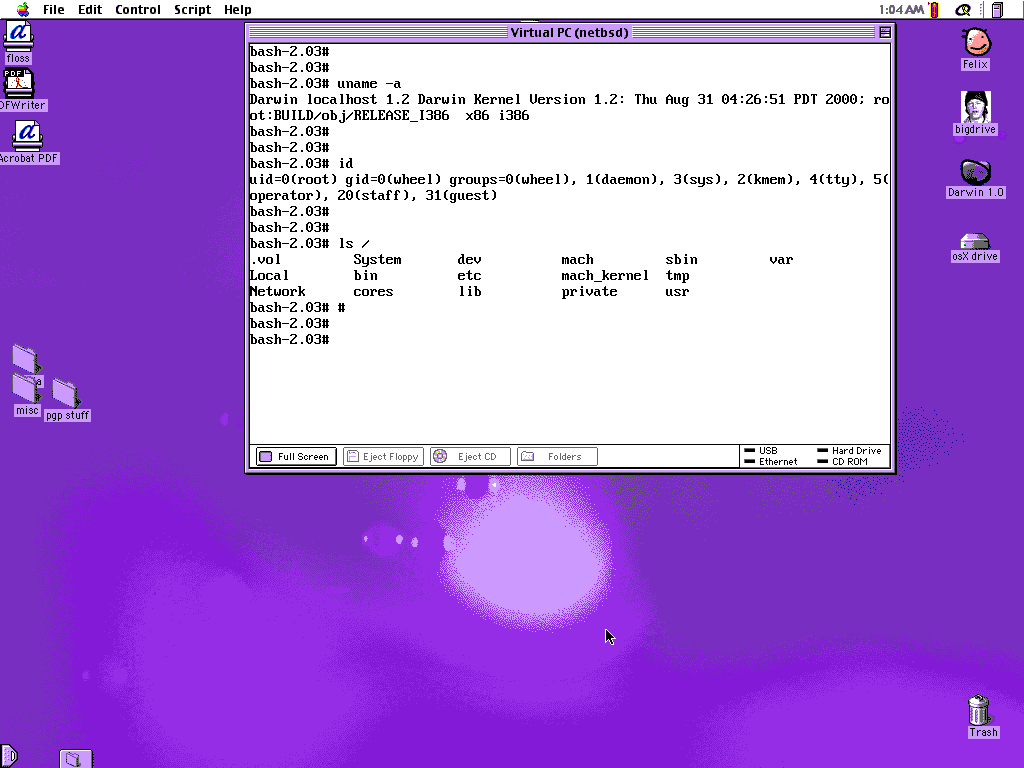
Darwin (The BSD-ish layer of OSX) is open, and supposedly compiling on x86.I don't know about compiling, but it certainly *runs* on x86. There are moderately severe hardware restrictions, though [esp. w.r.t. VESA 2.0 compliance]. Here is the screenshot. Grab the Virtual PC disk image here.
Lots of Darwin info is available at:
-
Re:x86 hardware port?
Pope Slackman wrote:
Darwin (The BSD-ish layer of OSX) is open, and supposedly compiling on x86.I don't know about compiling, but it certainly *runs* on x86. There are moderately severe hardware restrictions, though [esp. w.r.t. VESA 2.0 compliance]. Here is the screenshot. Grab the Virtual PC disk image here.
Lots of Darwin info is available at: