Slashdot Mirror
Domain: freesoft.org
Stories and comments across the archive that link to freesoft.org.
Comments · 22
-
IPv4 has a solution, so why do we need IPv6?
I read a blog article a while back that explains one possible solution quite well - one that strikes me as far more elegant than the monster that is IPv6. Yes, I know there are security issues with LSRR, but they certainly aren't insurmountable. Why is nobody looking at this?
Article, verbatim
The Soapbox
New ideas in computers, networking, and technology in general
" Lightweight Multicast (LWM)
Will Multicast kill Packet Switching? "
NAT and the Failure of Source Routing
Paul Francis, in the conclusion of his 1994 Ph.D. thesis, traces the evolution of the IPv4 address scheme. After quoting a June 1978 Clark/Cohen paper (IEN 46), Francis notes:
Well, something happened here. An argument was put forth that 32 bits is enough because the address does not have to do routing - the source route can handle the rest. Clearly it was recognized that a variable length something was needed, but the source route was deemed sufficient for that, and the 32-bit address won out in the end. So, perhaps what killed IP is not that the address is too short (though probably it is), but that the ability for DNS to hand a host a source route (which it could then put in the header so that the right thing could happen in the network) was not created.
(p. 177)
Not only did the failure to fully implement source routing (in DNS) make it impossible to address into a private network, it also created the situation where NAT had to be implemented as it was.
Consider the following network:
**** Deleted by lameness filter. Click article link above. ****
H1 is on a private network. H2 is a server of some kind on the public network. The two networks are interconnected by a router with address X on the private network and address Y on the public net.
Can H1 initiate a working TCP session to H2 without NAT tables on the router? The answer is yes! H1 addresses its packet as follows. Address X is the IP Destination Address. A Loose Source and Record Route (LSRR) option is also used with a single address - H2's. What happens?
Well, the packet routes first to X on the private network, then the LSRR is processed. RFC 791:
If the address in destination address field has been reached and the pointer is not greater than the length, the next address in the source route replaces the address in the destination address field, and the recorded route address replaces the source address just used, and pointer is increased by four.
The recorded route address is the internet module's own internet address as known in the environment into which this datagram is being forwarded.
So H2's address is moved into the destination address field. Yet note carefully what else happens. The "recorded route address replaces the source address", and the "recorded route address is the... internet address as known in the environment into which this datagram is being forwarded". So address Y is placed into the LSRR option!
So H2 receives a packet addressed to it (of course), with H1's private IP address as the source address and an LSRR option listing the address Y. This is enough information to construct a return packet addressed to Y with H1 listed in an LSRR option. Now, can H1 count on H2 to do this? According to RFC 1122 (section 4.2.3.8) it can:
When a TCP connection is OPENed passively and a packet arrives with a completed IP Source Route option (containing a return route), TCP MUST save the return route and use it for all segments sent on this connection.
So far, it certainly seems like we don't need NAT! What's the problem, then? Well, consider what H1's routing table has to look like:
Destination -
Pull the other one
As if the government, or for that matter the military, could develop something complicated like a computer network.
.
.
.
Uhhhh wait.... -
Re:Net Neutrality and Quality of Service
http://www.freesoft.org/CIE/Course/Section3/7.htm
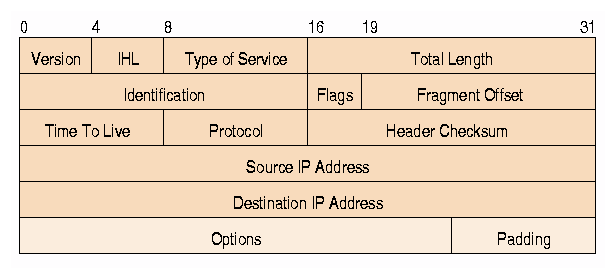
Type of Service: 8 bits (2nd 8-bit octet in every internet packet)
The Type of Service provides an indication of the abstract parameters of the quality of service desired. These parameters are to be used to guide the selection of the actual service parameters when transmitting a datagram through a particular network. Several networks offer service precedence, which somehow treats high precedence traffic as more important than other traffic (generally by accepting only traffic above a certain precedence at time of high load). The major choice is a three way tradeoff between low-delay, high-reliability, and high-throughput.
Bits 0-2: Precedence.
Bit 3: 0 = Normal Delay, 1 = Low Delay.
Bit 4: 0 = Normal Throughput, 1 = High Throughput.
Bit 5: 0 = Normal Relibility, 1 = High Relibility.
Bit 6-7: Reserved for Future Use.
Precedence
111 - Network Control 011 - Flash
110 - Internetwork Control 010 - Immediate
101 - CRITIC/ECP 001 - Priority
100 - Flash Override 000 - Routine
The use of the Delay, Throughput, and Reliability indications may increase the cost (in some sense) of the service. In many networks better performance for one of these parameters is coupled with worse performance on another. Except for very unusual cases at most two of these three indications should be set.
The type of service is used to specify the treatment of the datagram during its transmission through the internet system. Example mappings of the internet type of service to the actual service provided on networks such as AUTODIN II, ARPANET, SATNET, and PRNET is given in "Service Mappings" [8].
The Network Control precedence designation is intended to be used within a network only. The actual use and control of that designation is up to each network. The Internetwork Control designation is intended for use by gateway control originators only. If the actual use of these precedence designations is of concern to a particular network, it is the responsibility of that network to control the access to, and use of, those precedence designations. -
Re: FTP overhead versus HTTP
You just don't get what he's saying, and you're not making any sense.
"The only time FTP has less overhead than TCP is when you're retrieving several files."
I'm going to make a guess here and assume you mean HTTP, not TCP.
First, take a look at the FTP RFC.
http://www.freesoft.org/CIE/RFC/959/index.htm
Then, take a look at the HTTP 1.1 RFC:
ftp://ftp.isi.edu/in-notes/rfc2616.txt
You tell me which has more overhead? A notable part of the difference is the encoding; FTP can transfer data straight binary - no MIME types or special encoding to send the data over the channel.
"the overhead of FTP can be significantly higher than HTTP (logon banners)."
Are you kidding?
" For HTTP, you send the request and sit back and wait for the data. "
If browsers were as simple as an FTP client, this might be true. But don't forget about all the banners and lots of extra data that gets communicated between your average browser and HTTP server these days. Not to mention cookies.
"With FTP, you have to login (USER, PASS), which both require you to wait for confirmation before you can PORT and RETR."
All of this is is likely done in less then 100 bytes of data transferred.
"Not to mention the overhead of establishing another TCP socket to pass the data over."
Here's a quick run down of how a TCP connection is established:
1. Packet sent from initiating machine. Very small packet (bytes) with the SYN flag set.
2. Recieving machine gets packet with SYN. Sends packet back (bytes) with the SYN and ACK flags set.
3. Initiating machine sends back another small packet (bytes) with the ACK flag set.
The amount of data necessary to open a raw TCP connection is so miniscule that it's almost not worth mentioning.
"If you need to retrieve a tree structure of files, download several files from a single server, or need to upload files, FTP is the way to do it. If you need to download only one file, or several files in parallel (typical webbrowsing), then HTTP is your friend."
You're looking at this from a user perspective, not a technical one.
FTP is very low overhead (read: almost zero,) it's a very intelligent design, and it works great over slow and unreliable connections to boot.
Nobody is saying we should replace HTTP with the FTP protocol. -
Netmeeting anyone???
Hey...
The way I look at the issue is thus:
(Almost) Everyone who has Windows, has Netmeeting. M$ gave it away for free.
If you run open source, there's OpenH323.
If you can't make this work, I probably don't want to talk to you anyways. Sure cuts down on the telemarketers!
______________________________
Paranoia is a state of mine... -
Re:Heh
Within ten years the DNS will have migrated to an XML format.
I've heard some RETARDED statements on
Whatever you are smoking, I want some - 'cause it's clearly some REALLY GOOD SHIAT!
Given that:
1) DNS is a protocol, not a data format, and
2) XML is a data format, not a protocol, and
3) DNS is incredibly light and efficient, and
4) DNS has already proven that it scales well to just about any size, and
5) XML offers no particular advantage, since you could serve DVD ISOs over the DNS, and
6) moving to an "XML PROTOCOL" format would require the update of every single DNS server on the face of the earth, many of which are still running Bind 8.x, and some are still running BIND 4.X for god's sake,
I consider this to be HIGHLY UNLIKELY(tm) !!!!! -
Re:REAL Wireless Networking
It's time to go back to basic networking class...
The OSI Networking Model is a 7-layer system that can be used interchangably, layers run on top of each other... for example, HTTP specifies that it use TCP which wraps around IP over any physical protocol. It doesn't care if you're using WiFi or a hardwired connection.
So, what this is saying is that IPv4, and even IPv6 are protocols that were written with wires and not wireless in mind. There are tweaks that can be made to the next version of the Internet Protocol and maybe even TCP and UDP to make them work better when on wireless without giving too much up when used on a wired physical link. This is the process of figuring out what changes should be made for next time. -
Re:Picture of /.'s own Animats
Slashdotters who have done network programming or read the RFC's that describe how the internet works may have heard of John Nagle. He created the Nagle algorithm which combines small packets of data to avoid the dreaded Silly Window Syndrome.
-
Re:DHCP?I think "sniff out" is a bit strong. In fact, I think they use DHCP, and part of the DHCP RFC says:
The client's previous address as recorded in the client's (now expired or released) binding, if that address is in the server's pool of available addresses and not already allocated
So, it's nothing so devious as "sniffing", it's just how DHCP works, as long as the address space isn't over-subscribed.
-
Connected, an Internet EncyclopediaCheck out Connected, an Internet Encyclopedia -- might be useful for those trying to understand how the net works. (might also be out of date...).
-
they'll pass your test easily!
Yep, your file will go through at 0.9x of the regular speed (slower). This is less than 5x faster, so they win! All they are guaranteeing is a maximum speed (5x faster), and that's not hard to do. Stupid, yes. Truth in advertising, yes.
The vast majority of 56k modems already do compression, CSLIP compresses headers, and HTML compression is already built into modern browsers. What's left is caching, image-size/quality reduction, and pop-up blocking. AOL already does two of those three - take a guess which two!! -
Re:So What?
The OSI model is rarely understood. People honestly think that TCP/IP is transmitted over 2 pair copper lines or coax unecapsulated.
-
Re:Great!
The OSI 7-layer model is a tool for describing networking stacks. Actual implemented stacks may combine one or more layers of the OSI model into a single layer for implementation purposes.
For instance, according to TCP/IP Illustrated, Volume 2 (by the venerable but sadly deceased W. Richard Stevens), the BSD network stack in "Net/3" maps onto the 7-level model like so:
- The user process: Layer 7 (application), layer 6 (presentation), and layer 5 (session).
- The socket layer. -- no direct mapping (although I'd personally argue it is partially in layer 5).
- The protocol layer (TCP/IP, XNS, OSI, Unix): Layer 4 (transport), and layer 3 (network).
- The interface layer (Ethernet, SLIP, loopback, etc.): Layer 2 (data link).
- The physical media: Layer 1 (physical).
This breakdown is found on page 10, in Figure 1.3 of the aforementioned book.
So, as you can see, all 7 layers of the OSI model are represented, even if all 7 layers aren't individually represented as layers in the software implementation. If nothing else, though, the OSI model gives us a common terminology for discussing a given network stack without getting bogged down in OS-specific terminology.
--Joe -
Re:Great!
Actually, Cringley gets it wrong. Modulation happens at the PHY layer, not the LINK layer. So either this is a crock of s**t as big as what ZeoSync was stirring, or Cringley has his head up his arse. Notice that that's not an exclusive-or.... both could be true.
This link pretty much covers it. I'll quote the most relevant bits:
- The Physical Layer describes the physical properties of the various communications media, as well as the electrical properties and interpretation of the exchanged signals. Ex: this layer defines the size of Ethernet coaxial cable, the type of BNC connector used, and the termination method.
- The Data Link Layer describes the logical organization of data bits transmitted on a particular medium. Ex: this layer defines the framing, addressing and checksumming of Ethernet packets.
So, in other words, the Physical layer is where signaling happens. (This is where QAM and this wavelet snakeoil are relevant.) The Link layer is where PPP, SLIP, and Ethernet Packet encapsulation happen. (Not Ethernet signaling, just the 802.3-or-whatever framing spec.)
--Joe -
Re:Solution already exists.
You're talking about the Nagel Algorithm. It's described in RFC 896.
-
Re:Not about login password
The easiest answer I can think of is "keyboard buffers", like you'll find in applications like Z-Term - a serial console for the Macintosh that supports X, Y and Z-term file transfers.
Disabling the Nagle algorithm in telnet clients is fairly common because the character you see on the screen is usually echoed to you by the server. Having to wait 200ms for the characters to appear on your screen in clumps would be very distracting.
Having a keyboard buffer means that you will no longer use the built-in scroll-back buffer of shells such as bash or zsh. If the keyboard buffer is implemented well, it should provide you with similar functionality. In a GUI environment, you have the added advantage of copy/paste. Ideally, all keyboard interaction would be handled by a local shell (CLI or GUI), with data only sent over the network when Enter is pressed.
A big advantage of keyboard buffers is that keystroke timing over the network becomes impossible (unless, of course, you're running the terminal application under the X11 Windows System over a network). Attackers would have to resort to measuring the length of your command lines or passwords, to try to guess what you're typing (great! we know that the root password on that host is 7 characters long!).
As far as typing analysis in general is concerned, there's a mention in The Code Book by Simon Singh. He talks about traffic analysis during World War II. The French Resistance was apparently able to track Panzer divisions by the location of their radio transmissions. They could uniquely identify the Panzer division by the "fist" (tapping characteristics) of the morse-code operator, even though they couldn't decrypt the actual message.
Using a keyboard buffer helps overcome congestion (in a friendlier way than the Nagle algorithm does), avoids people identifying you through biometrics, and especially prevents hostiles using biometrics to find out what you're typing in your SSH session.
Nagle Algorithm References:
- SearchNetworking Article (explicitly states why interactive sessions will disable Nagling)
- IBM RS-6000 Support describes the rules used by the Nagle algorithm to decide which data gets delayed by up to 200ms
- RFC 896 - Congestion Control in IP/TCP Internetworks
Traffic Analysis references:
- Traffic Analysis and Cover Traffic, a posting to Cypherpunks mailing list
- The Code Book (it's dead trees, follow the link to find ISBN to buy or borrow)
-
Re:Why do we need "certificates"?
Accoring to this article Verisign's public key is built-in to both Netscape and IE.
-
Re:Of course...> Countries should be forced to use their geographical TLD, including the US
I agree... check out RFC 2352 in which suggests that the US should use the TLD
(The RFC also states that it is probably unfeasable). When we do run short of domain
names (that are not as meaningless as the IP addresses they hide) people can't
complain - it's been shouted about enough. -
Re:misinformation
Look here. You see the fields 11 and 12? It says there clearly: Source IP Address, Destination IP Address. That thing is called a packet. FreeNet, Gnutella, Hotline etc. all work over TCP/IP over the Internet. Now, if a packet like this one was sent over the Internet it passed through a series of nodes (gateways or ISPs) and your IP could be recorded. If you send a message over TCP/IP the destination computer of the packet can also be found, so in fact you compromising two (2) computers at once. If a filtration program is set up on an ISP to search specifically for FreeNet or any other encrypted packets, it could do so, it could match the packets contents and assemble your messages. If your software uses polymorph protocols or even a combination of protocols, you still can be traced if you are connected to an ISP and that is how you get to the web. Now, if you are using a private line and PPP for example, then you are mostly anonymous, but not completely! You can be traced by your local phone company, your messages can be recorded and deciphered. If you are using other ways of telecommunications such as satelite links or radio you can be monitored by hundreds and thousands of various organizations. In fact, even if you establish a direct lazer connection you can probably be traced by using some kind of a filter that can be put in between your lazer transmitter and receiver.
There is another way to communicate safely, but it is not all there yet - direct messages with quantum encryption. This in principle can not be compromized and if it is, the message becomes unreadable (destabilizes quantum polarization.)
Good luck staying anonymous! -
Common Language==IP1)Every 'puter on the net speaks it.
2)Every router pushes it.
These little packets are the true common language on the internet.
Everything else is just fluff.
___ -
Common Language==IP1)Every 'puter on the net speaks it.
2)Every router pushes it.
These little packets are the true common language on the internet.
Everything else is just fluff.
___ -
Common Language==IP1)Every 'puter on the net speaks it.
2)Every router pushes it.
These little packets are the true common language on the internet.
Everything else is just fluff.
___