Slashdot Mirror
Domain: hgb-leipzig.de
Stories and comments across the archive that link to hgb-leipzig.de.
Comments · 13
-
Re:lots of flashing shit
htop running on a water-display
-
I actually like TDFSB
You can see it at theTDFS B Homepage. It's my fav. 3d file browser because you can see pictures, read text files and even play music files. It's just not a file "manager" because you can't actually manipulate files, but it's still the ultimate pr0n viewer!
-
Other 3D file system visualizers
Here are some other 3D file system visualizers:
- FSV is modelled after FSN, but runs on Linux. FSV lays out files and directories in 3D, geometrically representing the file system hierarchy to allow visual overview and analysis.
[Screenshot] | [Download] (Linux)
- Xcruiser lets you fly through a filesystem in 3D as if it were interplanetary space. Directories are represented as galaxies, files are represented as planets (whose mass is determined by the file size), and symbolic links are represented as wormholes.
[Screenshot] | [Download] (Linux)
- TDFSB is a 3D filesystem browser for Linux. Take a walk through your filesystem!
[Screenshot] | [Download] (Linux)
- 3Dtop is an extension for Windows that represents desktop icons in 3D, letting you to fly around your desktop. You can create coloured spotlights, background and floor textures, "paintings" (bitmaps), clocks, and "flags" that represent shortcuts.
[Screenshot] | [Download] (Windows)
- ROOMS turns a Windows desktop into a 3D world. You can see the world either through a first person perspective or with a map view, and you can populate the world with sounds, animated images, and 3D icons.
[Screenshot] | [Download] (Windows)
- CubicEye organizes windows into a navigable cube. Cubes can be arranged by thematic or functional subject matter, and can be explored either individually or collectively as part of a more comprehensive structure of multiple cubes representing various areas of interest.
[Screenshot] | [Download] (Windows) -
Other 3D file system visualizers
Here are some other 3D file system visualizers:
- FSV is modelled after FSN, but runs on Linux. FSV lays out files and directories in 3D, geometrically representing the file system hierarchy to allow visual overview and analysis.
[Screenshot] | [Download] (Linux)
- Xcruiser lets you fly through a filesystem in 3D as if it were interplanetary space. Directories are represented as galaxies, files are represented as planets (whose mass is determined by the file size), and symbolic links are represented as wormholes.
[Screenshot] | [Download] (Linux)
- TDFSB is a 3D filesystem browser for Linux. Take a walk through your filesystem!
[Screenshot] | [Download] (Linux)
- 3Dtop is an extension for Windows that represents desktop icons in 3D, letting you to fly around your desktop. You can create coloured spotlights, background and floor textures, "paintings" (bitmaps), clocks, and "flags" that represent shortcuts.
[Screenshot] | [Download] (Windows)
- ROOMS turns a Windows desktop into a 3D world. You can see the world either through a first person perspective or with a map view, and you can populate the world with sounds, animated images, and 3D icons.
[Screenshot] | [Download] (Windows)
- CubicEye organizes windows into a navigable cube. Cubes can be arranged by thematic or functional subject matter, and can be explored either individually or collectively as part of a more comprehensive structure of multiple cubes representing various areas of interest.
[Screenshot] | [Download] (Windows) -
Other 3D file system visualizers
Here are some other 3D file system visualizers:
- FSV is modelled after FSN, but runs on Linux. FSV lays out files and directories in 3D, geometrically representing the file system hierarchy to allow visual overview and analysis.
[Screenshot] | [Download] (Linux)
- Xcruiser lets you fly through a filesystem in 3D as if it were interplanetary space. Directories are represented as galaxies, files are represented as planets (whose mass is determined by the file size), and symbolic links are represented as wormholes.
[Screenshot] | [Download] (Linux)
- TDFSB is a 3D filesystem browser for Linux. Take a walk through your filesystem!
[Screenshot] | [Download] (Linux)
- 3Dtop is an extension for Windows that represents desktop icons in 3D, letting you to fly around your desktop. You can create coloured spotlights, background and floor textures, "paintings" (bitmaps), clocks, and "flags" that represent shortcuts.
[Screenshot] | [Download] (Windows)
- ROOMS turns a Windows desktop into a 3D world. You can see the world either through a first person perspective or with a map view, and you can populate the world with sounds, animated images, and 3D icons.
[Screenshot] | [Download] (Windows)
- CubicEye organizes windows into a navigable cube. Cubes can be arranged by thematic or functional subject matter, and can be explored either individually or collectively as part of a more comprehensive structure of multiple cubes representing various areas of interest.
[Screenshot] | [Download] (Windows) -
Re:Another Linux 3D file manager
My site has been collecting 3D UIs for some time.
Here are links to some of the 3DUIs that are available today:
- FSN (pronounced "fusion") produces a cyberspace rendering of a file system. This was the original 3D file system navigator shown in Jurassic Park ("Hey, this is UNIX. I know this!").
[Screenshot] | [Download] (IRIX)
- FSV is modelled after FSN, but runs on Linux. FSV lays out files and directories in 3D, geometrically representing the file system hierarchy to allow visual overview and analysis.
[Screenshot] | [Download] (Linux)
- Xcruise lets you fly through a filesystem in 3D as if it were interplanetary space. Directories are represented as galaxies, files are represented as planets (whose mass is determined by the file size), and symbolic links are represented as wormholes.
[Screenshot] | [Download] (Linux)
- TDFSB is a 3D filesystem browser for Linux. Take a walk through your filesystem!
[Screenshot] | [Download] (Linux)
- Visual File System is a 3D file system visualizer for Windows. The tool scans a drive selected by the user, and then models the contents of the drive in 3D, based on the directories that are selected in a tree browser on the side of the display.
[Screenshot] | [Download] (Windows)
- 3Dtop is an extension for Windows that represents desktop icons in 3D, letting you to fly around your desktop. You can create coloured spotlights, background and floor textures, "paintings" (bitmaps), clocks, and "flags" that represent shortcuts.
[Screenshot] | [Download] (Windows)
- ROOMS turns a Windows desktop into a 3D world. You can see the world either through a first person perspective or with a map view, and you can populate the world with sounds, animated images, and 3D icons.
[Screenshot] | [Download] (Windows)
- CubicEye organizes windows into a navigable cube. Cubes can be arranged by thematic or functional subject matter, and can be explored either individually or collectively as part of a more comprehensive structure of multiple cubes representing various areas of interest.
[Screenshot] | [Download] (Windows)
- Vizible WorldViewer distributes windows across the exterior and interior surfaces of spheres, providing the means to visualize and navigate large numbers of web pages and data sources simultaneously.
[ -
Re:Another Linux 3D file manager
My site has been collecting 3D UIs for some time.
Here are links to some of the 3DUIs that are available today:
- FSN (pronounced "fusion") produces a cyberspace rendering of a file system. This was the original 3D file system navigator shown in Jurassic Park ("Hey, this is UNIX. I know this!").
[Screenshot] | [Download] (IRIX)
- FSV is modelled after FSN, but runs on Linux. FSV lays out files and directories in 3D, geometrically representing the file system hierarchy to allow visual overview and analysis.
[Screenshot] | [Download] (Linux)
- Xcruise lets you fly through a filesystem in 3D as if it were interplanetary space. Directories are represented as galaxies, files are represented as planets (whose mass is determined by the file size), and symbolic links are represented as wormholes.
[Screenshot] | [Download] (Linux)
- TDFSB is a 3D filesystem browser for Linux. Take a walk through your filesystem!
[Screenshot] | [Download] (Linux)
- Visual File System is a 3D file system visualizer for Windows. The tool scans a drive selected by the user, and then models the contents of the drive in 3D, based on the directories that are selected in a tree browser on the side of the display.
[Screenshot] | [Download] (Windows)
- 3Dtop is an extension for Windows that represents desktop icons in 3D, letting you to fly around your desktop. You can create coloured spotlights, background and floor textures, "paintings" (bitmaps), clocks, and "flags" that represent shortcuts.
[Screenshot] | [Download] (Windows)
- ROOMS turns a Windows desktop into a 3D world. You can see the world either through a first person perspective or with a map view, and you can populate the world with sounds, animated images, and 3D icons.
[Screenshot] | [Download] (Windows)
- CubicEye organizes windows into a navigable cube. Cubes can be arranged by thematic or functional subject matter, and can be explored either individually or collectively as part of a more comprehensive structure of multiple cubes representing various areas of interest.
[Screenshot] | [Download] (Windows)
- Vizible WorldViewer distributes windows across the exterior and interior surfaces of spheres, providing the means to visualize and navigate large numbers of web pages and data sources simultaneously.
[ -
Re:Another Linux 3D file manager
My site has been collecting 3D UIs for some time.
Here are links to some of the 3DUIs that are available today:
- FSN (pronounced "fusion") produces a cyberspace rendering of a file system. This was the original 3D file system navigator shown in Jurassic Park ("Hey, this is UNIX. I know this!").
[Screenshot] | [Download] (IRIX)
- FSV is modelled after FSN, but runs on Linux. FSV lays out files and directories in 3D, geometrically representing the file system hierarchy to allow visual overview and analysis.
[Screenshot] | [Download] (Linux)
- Xcruise lets you fly through a filesystem in 3D as if it were interplanetary space. Directories are represented as galaxies, files are represented as planets (whose mass is determined by the file size), and symbolic links are represented as wormholes.
[Screenshot] | [Download] (Linux)
- TDFSB is a 3D filesystem browser for Linux. Take a walk through your filesystem!
[Screenshot] | [Download] (Linux)
- Visual File System is a 3D file system visualizer for Windows. The tool scans a drive selected by the user, and then models the contents of the drive in 3D, based on the directories that are selected in a tree browser on the side of the display.
[Screenshot] | [Download] (Windows)
- 3Dtop is an extension for Windows that represents desktop icons in 3D, letting you to fly around your desktop. You can create coloured spotlights, background and floor textures, "paintings" (bitmaps), clocks, and "flags" that represent shortcuts.
[Screenshot] | [Download] (Windows)
- ROOMS turns a Windows desktop into a 3D world. You can see the world either through a first person perspective or with a map view, and you can populate the world with sounds, animated images, and 3D icons.
[Screenshot] | [Download] (Windows)
- CubicEye organizes windows into a navigable cube. Cubes can be arranged by thematic or functional subject matter, and can be explored either individually or collectively as part of a more comprehensive structure of multiple cubes representing various areas of interest.
[Screenshot] | [Download] (Windows)
- Vizible WorldViewer distributes windows across the exterior and interior surfaces of spheres, providing the means to visualize and navigate large numbers of web pages and data sources simultaneously.
[ -
Other 3D UIs: references and links.This is the kind of stuff that is regularly discussed on Nooface (a Slash site BTW).
Ripped straight off the side bar :
Will 3D user interfaces ever take off? With ever-growing 3D processing capabilities available on standard PC hardware, it seems only natural to pursue UI directions that take advantage of this awesome power. Moreover, the generation of users now emerging has had access to video games for as long as they could remember. As the line between video games and PCs becomes blurrier, the time may have come to think about how to apply 3D visualization techniques for more day-to-day computing tasks.
Here are links to some of the 3DUIs that are available today:
- FSN (pronounced "fusion") produces a cyberspace rendering of a file system. This was the original 3D file system navigator shown in Jurassic Park ("Hey, this is UNIX. I know this!").
[Screenshot] | [Download] (IRIX)
- FSV is modelled after FSN, but runs on Linux. FSV lays out files and directories in 3D, geometrically representing the file system hierarchy to allow visual overview and analysis.
[Screenshot] | [Download] (Linux)
- Xcruise lets you fly through a filesystem in 3D as if it were interplanetary space. Directories are represented as galaxies, files are represented as planets (whose mass is determined by the file size), and symbolic links are represented as wormholes.
[Screenshot] | [Download] (Linux)
- TDFSB is a 3D filesystem browser for Linux. Take a walk through your filesystem!
[Screenshot] | [Download] (Linux)
- Visual File System is a 3D file system visualizer for Windows. The tool scans a drive selected by the user, and then models the contents of the drive in 3D, based on the directories that are selected in a tree browser on the side of the display.
[Screenshot] | [Download] (Windows)
- 3Dtop is an extension for Windows that represents desktop icons in 3D, letting you to fly around your desktop. You can create coloured spotlights, background and floor textures, "paintings" (bitmaps), clocks, and "flags" that represent shortcuts.
[Screenshot] | [Download] (Windows)
- ROOMS turns a Windows desktop into a 3D world. You can see the world either through a first person perspective or with a map view, and you can populate the world with sounds, animated images, and 3D icons.
[Screenshot] | [Download] (Windows)
- CubicEye organizes windows into a navigable cube. Cubes can be arranged by thematic or functional subject matter, and can be explored either individually or collectively as part of a more comprehensive structure of multiple cubes representing various areas of interest.
[Screenshot] | [Download] (Windows)
- Vizible WorldViewer distributes windows across the exterior and interior surfaces of spheres, providing the means to visualize and navigate large numbers of web pages and data sources simultaneously.
[Screenshot] -
Other 3D UIs: references and links.This is the kind of stuff that is regularly discussed on Nooface (a Slash site BTW).
Ripped straight off the side bar :
Will 3D user interfaces ever take off? With ever-growing 3D processing capabilities available on standard PC hardware, it seems only natural to pursue UI directions that take advantage of this awesome power. Moreover, the generation of users now emerging has had access to video games for as long as they could remember. As the line between video games and PCs becomes blurrier, the time may have come to think about how to apply 3D visualization techniques for more day-to-day computing tasks.
Here are links to some of the 3DUIs that are available today:
- FSN (pronounced "fusion") produces a cyberspace rendering of a file system. This was the original 3D file system navigator shown in Jurassic Park ("Hey, this is UNIX. I know this!").
[Screenshot] | [Download] (IRIX)
- FSV is modelled after FSN, but runs on Linux. FSV lays out files and directories in 3D, geometrically representing the file system hierarchy to allow visual overview and analysis.
[Screenshot] | [Download] (Linux)
- Xcruise lets you fly through a filesystem in 3D as if it were interplanetary space. Directories are represented as galaxies, files are represented as planets (whose mass is determined by the file size), and symbolic links are represented as wormholes.
[Screenshot] | [Download] (Linux)
- TDFSB is a 3D filesystem browser for Linux. Take a walk through your filesystem!
[Screenshot] | [Download] (Linux)
- Visual File System is a 3D file system visualizer for Windows. The tool scans a drive selected by the user, and then models the contents of the drive in 3D, based on the directories that are selected in a tree browser on the side of the display.
[Screenshot] | [Download] (Windows)
- 3Dtop is an extension for Windows that represents desktop icons in 3D, letting you to fly around your desktop. You can create coloured spotlights, background and floor textures, "paintings" (bitmaps), clocks, and "flags" that represent shortcuts.
[Screenshot] | [Download] (Windows)
- ROOMS turns a Windows desktop into a 3D world. You can see the world either through a first person perspective or with a map view, and you can populate the world with sounds, animated images, and 3D icons.
[Screenshot] | [Download] (Windows)
- CubicEye organizes windows into a navigable cube. Cubes can be arranged by thematic or functional subject matter, and can be explored either individually or collectively as part of a more comprehensive structure of multiple cubes representing various areas of interest.
[Screenshot] | [Download] (Windows)
- Vizible WorldViewer distributes windows across the exterior and interior surfaces of spheres, providing the means to visualize and navigate large numbers of web pages and data sources simultaneously.
[Screenshot] -
Other 3D UIs: references and links.This is the kind of stuff that is regularly discussed on Nooface (a Slash site BTW).
Ripped straight off the side bar :
Will 3D user interfaces ever take off? With ever-growing 3D processing capabilities available on standard PC hardware, it seems only natural to pursue UI directions that take advantage of this awesome power. Moreover, the generation of users now emerging has had access to video games for as long as they could remember. As the line between video games and PCs becomes blurrier, the time may have come to think about how to apply 3D visualization techniques for more day-to-day computing tasks.
Here are links to some of the 3DUIs that are available today:
- FSN (pronounced "fusion") produces a cyberspace rendering of a file system. This was the original 3D file system navigator shown in Jurassic Park ("Hey, this is UNIX. I know this!").
[Screenshot] | [Download] (IRIX)
- FSV is modelled after FSN, but runs on Linux. FSV lays out files and directories in 3D, geometrically representing the file system hierarchy to allow visual overview and analysis.
[Screenshot] | [Download] (Linux)
- Xcruise lets you fly through a filesystem in 3D as if it were interplanetary space. Directories are represented as galaxies, files are represented as planets (whose mass is determined by the file size), and symbolic links are represented as wormholes.
[Screenshot] | [Download] (Linux)
- TDFSB is a 3D filesystem browser for Linux. Take a walk through your filesystem!
[Screenshot] | [Download] (Linux)
- Visual File System is a 3D file system visualizer for Windows. The tool scans a drive selected by the user, and then models the contents of the drive in 3D, based on the directories that are selected in a tree browser on the side of the display.
[Screenshot] | [Download] (Windows)
- 3Dtop is an extension for Windows that represents desktop icons in 3D, letting you to fly around your desktop. You can create coloured spotlights, background and floor textures, "paintings" (bitmaps), clocks, and "flags" that represent shortcuts.
[Screenshot] | [Download] (Windows)
- ROOMS turns a Windows desktop into a 3D world. You can see the world either through a first person perspective or with a map view, and you can populate the world with sounds, animated images, and 3D icons.
[Screenshot] | [Download] (Windows)
- CubicEye organizes windows into a navigable cube. Cubes can be arranged by thematic or functional subject matter, and can be explored either individually or collectively as part of a more comprehensive structure of multiple cubes representing various areas of interest.
[Screenshot] | [Download] (Windows)
- Vizible WorldViewer distributes windows across the exterior and interior surfaces of spheres, providing the means to visualize and navigate large numbers of web pages and data sources simultaneously.
[Screenshot] -
Re:Cool!
SGI were doing it in at least 1993 - Filesystem Navigator (fsn) was available for free for the SGI Indigo. It's the thing with all the little cubes and spotlights for navigating files that you see in Jurassic Park.
More recently, there has been a plain-X11 version of a similar thing, but with really nicely done labelling, and good speed (no GL). I wish I could remember what it was called though! I think it was French.
There are a number of tools out there to provide 3D views of your machine's filesystem:
FSV is pretty cool looking, looking something like a model of a city, with directories and files being the "buildings."
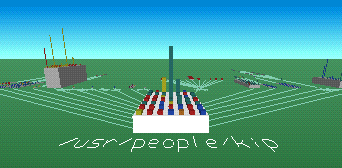
If you want something a little more scifi, check out TDFSB, which offers a more first-person view and a tron-esque landscape filled with a wide variety of different shapes (actual images of image files, etc.). Note: you'll be much happier running TDFSB if you have a beefy video card...it sucks to have a visible frame rate when you ls -a
-
fun 3d shelldoesnt do anything, just let you look, but its real pretty...
http://www.hgb-leipzig.de/~leander/TDFSB/
the server was down last i looked, hopefully its back up now.