Slashdot Mirror
Domain: keyboardco.com
Stories and comments across the archive that link to keyboardco.com.
Comments · 15
-
Re:Good toilet paper?
Slashdot replies are less likely to be sponsored.
That should be modded Funny, or Sad. But in truth Slashdot opinions are nearly as likely to be "astroturf" as legitimate compared to anywhere else.
Personally I do like mechanical keyboards, and for a non-backlit model the Cherry mechanical keyboard (not a 3rd-party keyboard using Cherry switches) I own and can recommend the G80-3000 (USB 104-keys US keymap), available Digikey and other (industrial) electronic suppliers globally. Likely just not your local / mail-order computer shop.
Otherwise for mechanical keyboards it is more a matter of selecting which key switch characteristics (resistance, push-length, noise, etc) than particular brands.
Of course any good keyboard discussion requires mentioning the IBM Model-M successors from UniComp with distinctive yet potentially annoyingly loud, buckling spring switches.
-
Monoprice 9181
If you are looking for a good mechanical and don't want to pay a premium for a brand name the Monoprice 9181 is an excellent choice. It has Cherry MX Red switches, is backlit, and extends your USB and audio ports to the keyboard. I have been using the 9180 for a couple of years and I'm pretty rough on keyboards (think bad golfer but with a keyboard instead of a club) and it has taken all the punishment I've thrown at it. The 9180 has MX blacks instead of Reds and isn't backlit but it is also out of stock until June according to their web site.
-
This
I would go for one of these:
I've never actually bought one of their products, but I have been keeping their address lying around. The story behind that is, that I got fed up with keyboards always being cheap, with a rather rubbery feel to the key action and no proper click; I'm old enough to have worked with - and loved the feel of - the original IBM PC keyboards, that appeared to be made from cast iron and concrete. It seems this company makes keyboards with proper keys, each fitted on top of gold plated switches or whatever. I want one, but they are a bit expensive, so I hold back. You know how it is.
-
All the Cherry info you'd ever want...
I forget the brand name of my keyboard, but I sprang for a cheap one with Cherry MX Black switches.
The mechanical keyboard I bought almost ten years ago has Cherry MX Black switches apparently. It's certainly lasted, but although I'm still using it to type this message on, I've always felt that the spring resistance was just a *little* too stiff to be truly pleasurable to touch-type on. (Something I've since read elsewhere).
The Cherry MX Red has the same "linear" key action I bought the Black-based keyboard for, but with less resistance, and having used a Red-based keyboard, it's closer to what I had in mind when I bought the Black one (mail order). Mind you, the Red switches apparently weren't around back then anyway.
Cherry MX Reds are supposedly too sensitive for touch-typing, and intended for gaming keyboards, but I (as a non-gamer) am still considering buying one.
Of course, all the above is a matter of personal preference; if possible, you should always try out a mechanical keyboard- or at least one based on the same technology- if the feel of it is important. (And you probably wouldn't be bothering to buy a mechanical one if it wasn't!)
FWIW, while I was researching new keyboards a couple of months back, I came across these, both of which are useful in explaining the different types of Cherry switch:-
An introduction to Cherry MX mechanical switches
Cherry MX overview
Note that these colour codings only apply to official Cherry switches, not unofficial clones derived from their patent-expired design. For example, Razer commissioned a custom "green" switch from another manufacturer, which is apparently similar to the official Cherry MX Blue (rather than the Cherry MX Green). -
URL
Sorry, forgot to include the link
-
Re:"Android most important platform for gaming"
Kjella above you:
Recently Ive switched to driving but before that it used to be bus or tram or subway and it's perfect downtime to try catching a star in Angry Birds or whatever. Mobile gaming is usable in a lot of places consoles could never reach.
You:
You can't take your console into another room while your dad watches a football game. You can't take your console for a drive. And the interface for surfing the web or posting to Twitter on your console usually sucks.
I still don't think it's even comparable products. I have a DS. I rarely set down on the couch to play a game on it. I did at the toilet even if the visit could become closer to an hour instead. For some games of simpler content maybe half an hour.
The thing is you wouldn't go very far in Fallout at the bus even if the trip took 30 minutes. You wouldn't shoot very accurately in some shooting game either. You wouldn't get to play Zelda until you had accomplished whatever you wanted to finish. (Or maybe it would be ok for some of that, and I think there is a very obvious benefit of being able to play when you've got time over / can't do much else vs a situation where you're actively allocating time for gaming alone.)
And actually you can take up your WiiU controller or PS Vita and stream games from your console or Nvidia shield or maybe some simpler Steam box design later to stream games from your PC. And I guess in the future from the cloud.
And imho typing shit on a small touch-screen suck balls so that's how I feel about that
The later you mention seem like a good option and regardless it will offer games the Playstation 4 may not do well. Then again the Playstation 4 can at least draw you better looking environments (+ "movement" controllers.)
-
Re:Who cares about?
The problem is they are too tied to the idea of tying everything to windows...
I'm not sure Windows as such is the problem - it is not a bad concept for a GUI desktop, in many ways. I think the real problem is this: they think like managers.
I have worked in the industry for 25 years, as developer on both MVS, DOS, Windows, OS/2, UNIX and Linux. There has always been this dicsonnect between what managers think motivates people, and what really motivates engineers. I don't know how many times I have been "awarded" with something that wouldn't want to own even as a gift - lumps of perspex, basically. They were probably quite expensive, some of them - like, a pair of cuff-links worth $300 or something - but just so utterly misplaced; I would have been happier with something useful - a bag of nails, a good quality hammer, of one of these:
http://www.keyboardco.com/keyboard_details.asp?PRODUCT=12
- in short, something useful of good quality. Managers dno't understand this - in a way they refuse to understand, and that, I think is what Microsoft does on a grand scale: they produce a lump of perspex, and it has worked as a business model, because they sold to managers who love this kind of things. But in the real world, a lump of perspex is just a lump, and it invariably gets left behind at the bottom of a box.
-
Oo
Best bet would be the filco majestouch tenkeyless - one of the rare UK Patten mechanical keyboards - as already suggested
http://www.keyboardco.com/keyboard_search.asp?SG=10037
Available with cherry browns, blues or blacks depending on what tactile response you want. Ps2 native with usb adapter if needed.
I have the cherry brown filco at home (I type and game on it) and it's the best keyboard I've ever owned - and that includes my old IBM death spring model m. The filco leather wrist wrest is also worth investing in.
Blues are best for typing (I have a cheaper cherry blue g80-3000 at the office), blacks are better for gaming, but I've found browns to be a good compromise for general purpose use - and since they're non clicky, I'm less likely to be murdered by the missus.
-
Re:So these are budget high-end keyboards
Best bet would be the filco majestouch tenkeyless - one of the rare UK layout mechanical keyboards.
http://www.keyboardco.com/keyboard_search.asp?SG=10037
Available with cherry browns, blues or blacks depending on what tactile response you want. Ps2 native with usb adapter if needed.
I have the cherry brown filco at home (I type and game on it) and it's the best keyboard I've ever owned - and that includes my old IBM death spring model m. The filco leather wrist wrest is also worth investing in.
Blues are best for typing (I have a cheaper cherry blue g80-3000 at the office), blacks are better for gaming, but I've found browns to be a good compromise for general purpose use - and since they're non clicky, I'm less likely to be murdered by the missus.
-
Re:Any ergonomic mechanical keyboards?
-
Re:So these are budget high-end keyboards
Cheers! Nice. Also the non Ninja version: http://www.keyboardco.com/keyboard_details.asp?PRODUCT=804
It's got to beat the mushy "lenovo KU0225" I'm using at work that just puts me off doing anything.
Maybe I'll treat myself to this...
-
I've just been investigating this myself.
I wanted to get out of bed and clean then you people post this, lovely - I'll be here 20 minutes typing this one up.
So anyhow I'm in the process of hunting for a new keyboard myself.
I personally feel one of those most important things to focus on first is the layout of the keys themselves on the board, if you don't have a layout you're happy with, what's the point?You've got several varieties, I'll show several here and my personal opinion on them (and also why you may like or dislike them)
http://img.clubic.com/photo/00351428.jpg
First up the enermax aurora keyboard.
This is absoloutely 100% standard US key layout, every key is exactly where you would expect it, the only slight change is slimmer and closer function keys to the number keys, I think likely quite acceptable and my favourite layout.http://ak.cdiscount.com/pdt/0/0/0/1/f/PCK8000.jpg
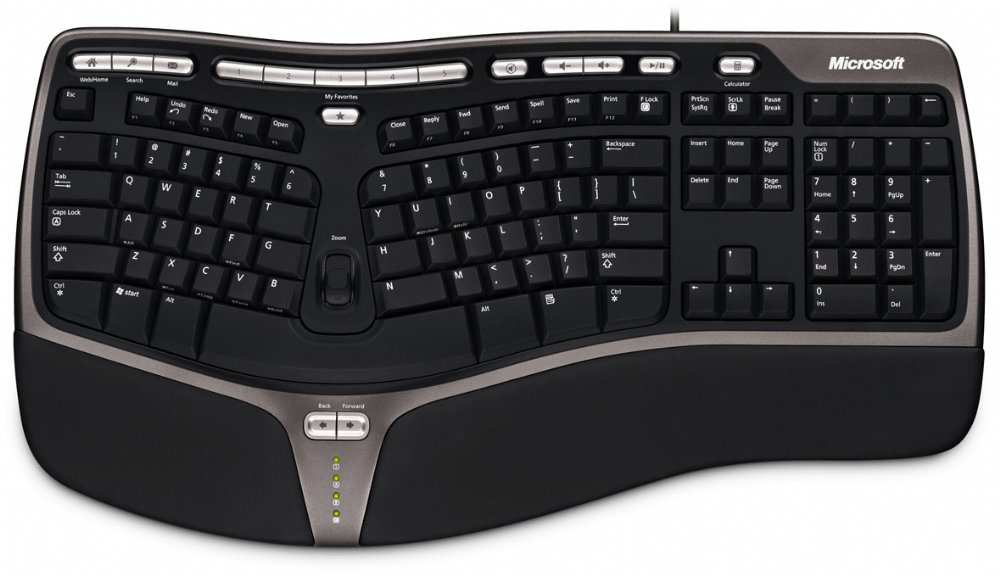
Here is the Samsung Pleomax Zen edition keyboard, this also has perfect and standard key layout, with NON intrusive multimedia keys at the top, aesthetically they look simple (cmon, I'm a slashdotter) but they also don't look like they will get in the way.http://www.keyboardco.com/keyboard_images/microsoft_ergonomic_keyboard_4000_black_usb_large.jpg
An ergonomic keyboard, I have no interest in these at all as I like consistency from machine to machine that I use, if they are good or not, I simply don't care as consistency = speed and that's important to me (I use many, many PC's)https://ssl11.chi.us.securedata.net/miccomputers.com/merchantmanager/v4/images/microsoft-keyboard.jpg
Now this is one of the ones a lot of you should be paying attention to.
I used to use a similar model to this, you will note the multimedia keys are again mostly non intrusive, not in an area you could likely hit them accidentally, HOWEVER! This is one of those new keyboards where MS have opted to well..frankly fuck up the delete key and the function keys (3 grouping not 4) - look at that abomination - it's a disaster, I don't know why they've deviated from the norm but I've accidentally hit delete many a time on one of those things.
AVOID - I hope they die out >:(http://techgasm.files.wordpress.com/2008/07/logitech-g15-gaming-keyboard-2007.jpg
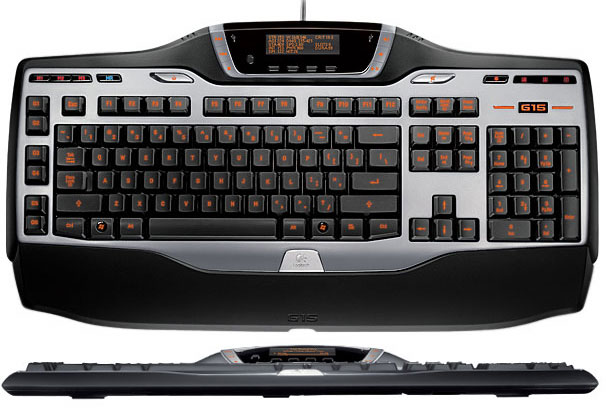
Finally a 'gaming' keyboard from Logitech, the G15, nice and backlit and frankly one of the worst keyboards humanity has created.
Firstly, I want all of you to press control escape.
I use left thumb (ctrl) and middle finger or index finger on escape.
Where do your remaining fingers go? Mine dangle off the edge of the keyboard - on the G15 however they hit these stupid keys strapped to the left - UGH.
Next problem, the distance between left shift and right shift (ie the keyspace) seems to be ever so partially smaller than most, maybe it's 1mm maybe it's 2 but the whole keyboard feels slightly smaller AND the physical key caps are small!
What this means is I end up typing something and always hitting S intead of D or F instead of D snd "studd csn rnd up lookung lukw thus"
In conclusion fuck that keyboard!OK! So we've got the layout out of the way, the only really remaining thing is the keytype
This link should explain it better than I can
http://www.ergocanada.com/ergo/keyboards/mechanical_vs_membrane_keyswitches.html(regular rubber pushback, laptop scissor switch with rubber pushback, or 'full on' mechanical (likely noisy) with spring pushback but reliable)
Over the past 4 years of owning a laptop I've come to enjoy usin
-
Re:KeyboardCo
KeyboardCo sells computer peripherals... in which case yes, a music service is a damn silly idea. For a Yamaha keyboard, I'd much rather download MIDI than MP3. Remember, google is your friend, and googling before posting usually prevents you from embarassing yourself.
-
UK refurb'd Model Ms
I got mine from http://www.keyboardco.com/keyboard_details.asp?PR
O DUCT=13
30quid, and it arrived looking like new. -
Re:Cool, but...
I value keyboard feedback, but I wonder if that's only because I actually have to press the keys.
That said, a rollable rubber pad will give me truly horrible feedback, and if I was happy with something like that, I'd just buy this.
The senseboard looks very cool, though it appears totally vaporous at the moment.