Slashdot Mirror
Domain: nooface.com
Stories and comments across the archive that link to nooface.com.
Comments · 26
-
A few comments on 3D UIs
A) For a slash site covering next-gen UI issues, 3D and otherwise, check out Nooface. There's not a lot of discussion, but it has pretty good high-quality no-fluff content and occassional posts from people who really know their stuff or are actively working in the field.
B) The contrast between 3D FPSes (fun, fairly easy, compelling) and VRML/virtual worlds (often pretty awkward) always struck me as interesting and illustrative of the following point. Too many degrees of freedom makes an interface awkward and highly confusing to someone who hasn't had extensive experience with 3D... a loser at the "mother test." id Software and the 3D FPS genre have always benefitted a fair bit imho from architecting the world such that even though it was 3D, you only had 2 directions to go most of the time; forward and backward.
Wake me up when someone has a (non-bogus) study finding that users can actually be more productive in manipulating information with whatever 3D paradigm is being proposed. Eye candy helps but it's pretty easy to lose productivity going 3D imho.
--LP -
Re:Like What?
Additionally, it looks like the improvements will really make a usability difference in how we interact with the UI. Keeping notes on an application window, tilting the windows to keep most of the perceptual information (btw, using foreshortening to effectively compress windows is a great idea), making multiple desktops more perceptual, etc are all good ideas that will help people interact more intelligently with their programs.
Unfortunately, none of these good ideas justifies 3D. Consider this layered model of human-computer interaction. What do we change when moving from a 2D desktop environment to a 3D desktop environment? It's the lower layers: physical, alphabetic, lexical, syntax. The system gains new capabilities to arrange information on screen, and the users gain new operations to perform with their mice and keyboards. What does not change are the higher layers. A 3D desktop does not change the way we interact with the World Wide Web and its search engines, with our word processors and file systems, or with each other using e-mail and instant messaging. Even through a 3D looking glass, the Web is hypertext, and in your word processor you handle letters consisting of paragraphs and other elements. Your files are still organized in the same hierarchical model as before. Your buddy list does not change. (You will receive the same amount of spam and spim, too.) Nothing of importance does change.
The 3D desktop changes the way you interact with your operating system. Which is something the user shouldn't have to care about. Human-computer interaction is about interacting with your information to accomplish tasks, rather than interacting with systems to flip windows, and about making the system disappear so the user can focus on taks and information. 3D does not achieve this. It requires you to interact in more sophisticated ways with systems, and adds nothing to the way you interact with information or people.
The features you mention might be useful, but the are not really new, and don't require 3D. You can attach notes to documents or objects without 3D in quite a useful way; have a look at MS Word. There, notes are not simply attached to documents but to specific parts of a document, e.g. a heading or a paragraph, which is even more useful and usable than notes on the backside of a window.
Tabbed browsing has been invented quite a while ago. It does effectively compress windows, takes not much screen real estate, and provides for logical grouping of tabs within windows according to the user's needs. A key idea of tabbed browsing is to not simply make the representation of a window smaller, but also more abstract by stripping off everything except the title. 3D lacks such abstraction, trying to replace it with magic.
Multiple desktops work just fine the way they do in 2D. There we do need a map already to find out way around. Having some 3D thing and needing a map to find your way around is inlinkely to make interaction any easier.
3D desktops are misplaced innovation. They make basic interaction harder -- mind that mice and screens are 2D --, and they do not add anything to higher levels. Have a look at nooface.com for more examples of failing 3D interfaces.
-
Other 3D file system visualizers
Here are some other 3D file system visualizers:
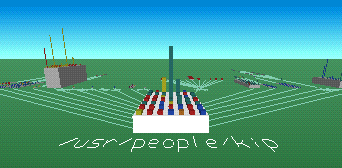
- FSV is modelled after FSN, but runs on Linux. FSV lays out files and directories in 3D, geometrically representing the file system hierarchy to allow visual overview and analysis.
[Screenshot] | [Download] (Linux)
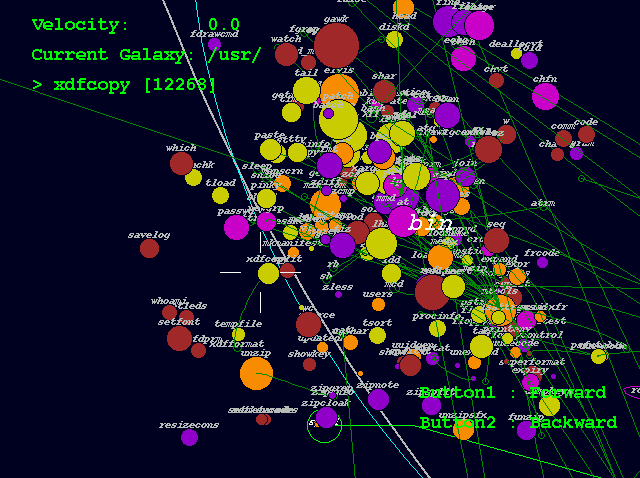
- Xcruiser lets you fly through a filesystem in 3D as if it were interplanetary space. Directories are represented as galaxies, files are represented as planets (whose mass is determined by the file size), and symbolic links are represented as wormholes.
[Screenshot] | [Download] (Linux)
- TDFSB is a 3D filesystem browser for Linux. Take a walk through your filesystem!
[Screenshot] | [Download] (Linux)
- 3Dtop is an extension for Windows that represents desktop icons in 3D, letting you to fly around your desktop. You can create coloured spotlights, background and floor textures, "paintings" (bitmaps), clocks, and "flags" that represent shortcuts.
[Screenshot] | [Download] (Windows)
- ROOMS turns a Windows desktop into a 3D world. You can see the world either through a first person perspective or with a map view, and you can populate the world with sounds, animated images, and 3D icons.
[Screenshot] | [Download] (Windows)
- CubicEye organizes windows into a navigable cube. Cubes can be arranged by thematic or functional subject matter, and can be explored either individually or collectively as part of a more comprehensive structure of multiple cubes representing various areas of interest.
[Screenshot] | [Download] (Windows) -
Other 3D file system visualizers
Here are some other 3D file system visualizers:
- FSV is modelled after FSN, but runs on Linux. FSV lays out files and directories in 3D, geometrically representing the file system hierarchy to allow visual overview and analysis.
[Screenshot] | [Download] (Linux)
- Xcruiser lets you fly through a filesystem in 3D as if it were interplanetary space. Directories are represented as galaxies, files are represented as planets (whose mass is determined by the file size), and symbolic links are represented as wormholes.
[Screenshot] | [Download] (Linux)
- TDFSB is a 3D filesystem browser for Linux. Take a walk through your filesystem!
[Screenshot] | [Download] (Linux)
- 3Dtop is an extension for Windows that represents desktop icons in 3D, letting you to fly around your desktop. You can create coloured spotlights, background and floor textures, "paintings" (bitmaps), clocks, and "flags" that represent shortcuts.
[Screenshot] | [Download] (Windows)
- ROOMS turns a Windows desktop into a 3D world. You can see the world either through a first person perspective or with a map view, and you can populate the world with sounds, animated images, and 3D icons.
[Screenshot] | [Download] (Windows)
- CubicEye organizes windows into a navigable cube. Cubes can be arranged by thematic or functional subject matter, and can be explored either individually or collectively as part of a more comprehensive structure of multiple cubes representing various areas of interest.
[Screenshot] | [Download] (Windows) -
Other 3D file system visualizers
Here are some other 3D file system visualizers:
- FSV is modelled after FSN, but runs on Linux. FSV lays out files and directories in 3D, geometrically representing the file system hierarchy to allow visual overview and analysis.
[Screenshot] | [Download] (Linux)
- Xcruiser lets you fly through a filesystem in 3D as if it were interplanetary space. Directories are represented as galaxies, files are represented as planets (whose mass is determined by the file size), and symbolic links are represented as wormholes.
[Screenshot] | [Download] (Linux)
- TDFSB is a 3D filesystem browser for Linux. Take a walk through your filesystem!
[Screenshot] | [Download] (Linux)
- 3Dtop is an extension for Windows that represents desktop icons in 3D, letting you to fly around your desktop. You can create coloured spotlights, background and floor textures, "paintings" (bitmaps), clocks, and "flags" that represent shortcuts.
[Screenshot] | [Download] (Windows)
- ROOMS turns a Windows desktop into a 3D world. You can see the world either through a first person perspective or with a map view, and you can populate the world with sounds, animated images, and 3D icons.
[Screenshot] | [Download] (Windows)
- CubicEye organizes windows into a navigable cube. Cubes can be arranged by thematic or functional subject matter, and can be explored either individually or collectively as part of a more comprehensive structure of multiple cubes representing various areas of interest.
[Screenshot] | [Download] (Windows) -
Re:Another Linux 3D file manager
My site has been collecting 3D UIs for some time.
Here are links to some of the 3DUIs that are available today:
- FSN (pronounced "fusion") produces a cyberspace rendering of a file system. This was the original 3D file system navigator shown in Jurassic Park ("Hey, this is UNIX. I know this!").
[Screenshot] | [Download] (IRIX)
- FSV is modelled after FSN, but runs on Linux. FSV lays out files and directories in 3D, geometrically representing the file system hierarchy to allow visual overview and analysis.
[Screenshot] | [Download] (Linux)
- Xcruise lets you fly through a filesystem in 3D as if it were interplanetary space. Directories are represented as galaxies, files are represented as planets (whose mass is determined by the file size), and symbolic links are represented as wormholes.
[Screenshot] | [Download] (Linux)
- TDFSB is a 3D filesystem browser for Linux. Take a walk through your filesystem!
[Screenshot] | [Download] (Linux)
- Visual File System is a 3D file system visualizer for Windows. The tool scans a drive selected by the user, and then models the contents of the drive in 3D, based on the directories that are selected in a tree browser on the side of the display.
[Screenshot] | [Download] (Windows)
- 3Dtop is an extension for Windows that represents desktop icons in 3D, letting you to fly around your desktop. You can create coloured spotlights, background and floor textures, "paintings" (bitmaps), clocks, and "flags" that represent shortcuts.
[Screenshot] | [Download] (Windows)
- ROOMS turns a Windows desktop into a 3D world. You can see the world either through a first person perspective or with a map view, and you can populate the world with sounds, animated images, and 3D icons.
[Screenshot] | [Download] (Windows)
- CubicEye organizes windows into a navigable cube. Cubes can be arranged by thematic or functional subject matter, and can be explored either individually or collectively as part of a more comprehensive structure of multiple cubes representing various areas of interest.
[Screenshot] | [Download] (Windows)
- Vizible WorldViewer distributes windows across the exterior and interior surfaces of spheres, providing the means to visualize and navigate large numbers of web pages and data sources simultaneously.
[ -
Re:Another Linux 3D file manager
My site has been collecting 3D UIs for some time.
Here are links to some of the 3DUIs that are available today:
- FSN (pronounced "fusion") produces a cyberspace rendering of a file system. This was the original 3D file system navigator shown in Jurassic Park ("Hey, this is UNIX. I know this!").
[Screenshot] | [Download] (IRIX)
- FSV is modelled after FSN, but runs on Linux. FSV lays out files and directories in 3D, geometrically representing the file system hierarchy to allow visual overview and analysis.
[Screenshot] | [Download] (Linux)
- Xcruise lets you fly through a filesystem in 3D as if it were interplanetary space. Directories are represented as galaxies, files are represented as planets (whose mass is determined by the file size), and symbolic links are represented as wormholes.
[Screenshot] | [Download] (Linux)
- TDFSB is a 3D filesystem browser for Linux. Take a walk through your filesystem!
[Screenshot] | [Download] (Linux)
- Visual File System is a 3D file system visualizer for Windows. The tool scans a drive selected by the user, and then models the contents of the drive in 3D, based on the directories that are selected in a tree browser on the side of the display.
[Screenshot] | [Download] (Windows)
- 3Dtop is an extension for Windows that represents desktop icons in 3D, letting you to fly around your desktop. You can create coloured spotlights, background and floor textures, "paintings" (bitmaps), clocks, and "flags" that represent shortcuts.
[Screenshot] | [Download] (Windows)
- ROOMS turns a Windows desktop into a 3D world. You can see the world either through a first person perspective or with a map view, and you can populate the world with sounds, animated images, and 3D icons.
[Screenshot] | [Download] (Windows)
- CubicEye organizes windows into a navigable cube. Cubes can be arranged by thematic or functional subject matter, and can be explored either individually or collectively as part of a more comprehensive structure of multiple cubes representing various areas of interest.
[Screenshot] | [Download] (Windows)
- Vizible WorldViewer distributes windows across the exterior and interior surfaces of spheres, providing the means to visualize and navigate large numbers of web pages and data sources simultaneously.
[ -
Re:Another Linux 3D file manager
My site has been collecting 3D UIs for some time.
Here are links to some of the 3DUIs that are available today:
- FSN (pronounced "fusion") produces a cyberspace rendering of a file system. This was the original 3D file system navigator shown in Jurassic Park ("Hey, this is UNIX. I know this!").
[Screenshot] | [Download] (IRIX)
- FSV is modelled after FSN, but runs on Linux. FSV lays out files and directories in 3D, geometrically representing the file system hierarchy to allow visual overview and analysis.
[Screenshot] | [Download] (Linux)
- Xcruise lets you fly through a filesystem in 3D as if it were interplanetary space. Directories are represented as galaxies, files are represented as planets (whose mass is determined by the file size), and symbolic links are represented as wormholes.
[Screenshot] | [Download] (Linux)
- TDFSB is a 3D filesystem browser for Linux. Take a walk through your filesystem!
[Screenshot] | [Download] (Linux)
- Visual File System is a 3D file system visualizer for Windows. The tool scans a drive selected by the user, and then models the contents of the drive in 3D, based on the directories that are selected in a tree browser on the side of the display.
[Screenshot] | [Download] (Windows)
- 3Dtop is an extension for Windows that represents desktop icons in 3D, letting you to fly around your desktop. You can create coloured spotlights, background and floor textures, "paintings" (bitmaps), clocks, and "flags" that represent shortcuts.
[Screenshot] | [Download] (Windows)
- ROOMS turns a Windows desktop into a 3D world. You can see the world either through a first person perspective or with a map view, and you can populate the world with sounds, animated images, and 3D icons.
[Screenshot] | [Download] (Windows)
- CubicEye organizes windows into a navigable cube. Cubes can be arranged by thematic or functional subject matter, and can be explored either individually or collectively as part of a more comprehensive structure of multiple cubes representing various areas of interest.
[Screenshot] | [Download] (Windows)
- Vizible WorldViewer distributes windows across the exterior and interior surfaces of spheres, providing the means to visualize and navigate large numbers of web pages and data sources simultaneously.
[ -
Re:Another Linux 3D file manager
My site has been collecting 3D UIs for some time.
Here are links to some of the 3DUIs that are available today:
- FSN (pronounced "fusion") produces a cyberspace rendering of a file system. This was the original 3D file system navigator shown in Jurassic Park ("Hey, this is UNIX. I know this!").
[Screenshot] | [Download] (IRIX)
- FSV is modelled after FSN, but runs on Linux. FSV lays out files and directories in 3D, geometrically representing the file system hierarchy to allow visual overview and analysis.
[Screenshot] | [Download] (Linux)
- Xcruise lets you fly through a filesystem in 3D as if it were interplanetary space. Directories are represented as galaxies, files are represented as planets (whose mass is determined by the file size), and symbolic links are represented as wormholes.
[Screenshot] | [Download] (Linux)
- TDFSB is a 3D filesystem browser for Linux. Take a walk through your filesystem!
[Screenshot] | [Download] (Linux)
- Visual File System is a 3D file system visualizer for Windows. The tool scans a drive selected by the user, and then models the contents of the drive in 3D, based on the directories that are selected in a tree browser on the side of the display.
[Screenshot] | [Download] (Windows)
- 3Dtop is an extension for Windows that represents desktop icons in 3D, letting you to fly around your desktop. You can create coloured spotlights, background and floor textures, "paintings" (bitmaps), clocks, and "flags" that represent shortcuts.
[Screenshot] | [Download] (Windows)
- ROOMS turns a Windows desktop into a 3D world. You can see the world either through a first person perspective or with a map view, and you can populate the world with sounds, animated images, and 3D icons.
[Screenshot] | [Download] (Windows)
- CubicEye organizes windows into a navigable cube. Cubes can be arranged by thematic or functional subject matter, and can be explored either individually or collectively as part of a more comprehensive structure of multiple cubes representing various areas of interest.
[Screenshot] | [Download] (Windows)
- Vizible WorldViewer distributes windows across the exterior and interior surfaces of spheres, providing the means to visualize and navigate large numbers of web pages and data sources simultaneously.
[ -
Re:OT: 3d file manager
This article in Reuters describes the Heliodisplay, a device that creates a two-dimensional image which appears to hover in mid-air and can be seen from several angles. Similar to the Fog Screen, the Heliodisplay projects the image into a cloud of "benign" particles that it sprays into the air. The developer states that he was directly influenced by the hologram communicator shown in the "Star Wars" movies. Here is a set of video clips demonstrating the device in action, and there is more detail about the design on p. 14 of Emerging Display Review (PDF).
-
Some possible web innovations...
...are listed here.
Examples:
Asynchronous Web Interfaces
Shared Zoomable Canvas
Seeing The Web Through The Eyes Of A Calendar
-
Some possible web innovations...
...are listed here.
Examples:
Asynchronous Web Interfaces
Shared Zoomable Canvas
Seeing The Web Through The Eyes Of A Calendar
-
Some possible web innovations...
...are listed here.
Examples:
Asynchronous Web Interfaces
Shared Zoomable Canvas
Seeing The Web Through The Eyes Of A Calendar
-
Some possible web innovations...
...are listed here.
Examples:
Asynchronous Web Interfaces
Shared Zoomable Canvas
Seeing The Web Through The Eyes Of A Calendar
-
Jef Raskin, David Gerlernter, othersPeople have tried. Jef Raskin has quite a few thoughts about new UI in his book The Humane Interface. You can see some of these in play in The Humane Environment, an open source project started by Jef to illustrate some of his ideas.
David Gerlernter also has some ideas about changing the UI based on timelines and visual representation.
As far as your wish about things staying open between powerdown and booting again - I'm not sure whether or not Apple's new user switching persists during shut down, but I think it may (have to go back and read up).
Finally, if you're looking for way-new interfaces, nooface blogs new and upcoming UI projects.
-
Re:Computer interfaces
I really wish someone would give these guys a pile of cash to redesign computer GUIs. I can't be the only one that is sick of the slow pace of development of computer interfaces. We really haven't progressed much since the work of Xerox Park.
What you will get is a computer with a color screen and a pointer device, windows, icons, and menus. What we know as computers today is a result of years of evolution. There is not much potential for radical change unless there is a radical change in the way computers work and interface with the real world. What is more likely to happen is more specialization of devices. Cellphones, digital cameras, etc. are besically computers but easier to use because the particular device is designed for some particular pupose(s). Universal computers supporting word processing as well as online brokerage, Java programming as well as image processing, and gaming as well as spamming, are different from that. They do, of course, not fit any particular purpose outstandingly well but that's a feature and not a design bug.
Also, the WIMP approach represents a canonical solution to the lower levels of interaction. Mice and windows help you to express what you want to do as soon as you what you have to do in order to achieve your goal at hand. They do help you to format text in a word processor but they don't tell you how typesetting works and how to produce a nice looking and readable document. Teaching higher level concepts through user interfaces indeed is a problem largely unsolved, but replacing mice and windows with radically different won't solve it either, at least not for general purpose devices.
If you've ever sat down with someone who hasn't used a computer much and watch them struggle to do the simplest things, you'll understand how bad current GUIs are.
Es dauert Jahre, eine Fremdsprache oder eine andere nichttriviale FÃhigkeit halbwegs zu lernen. Warum sollten Computer ohne jeden Lernaufwand zu benutzen sein? (It takes several years to learn to some extent a foreign language or any other non-trivial skill. Why do you think computers could be usable without any effort learning them?) Sure, it would be nice if they were but don't you expect too much here? Is your assessment of the current situation even correct? As a matter of fact, a lot of people is able to use current computers. It takes them time learning what they can do with their machines and how to do it but they do send and receive e-mail, surf the Web, and make friends online. And they achieve much more than just watching kind of interactive TV this way.
Get real, the revolution you are asking for will have to wait until the Holodeck(TM) has been invented, or Direct Brain Access(R).
-
Other 3D UIs: references and links.This is the kind of stuff that is regularly discussed on Nooface (a Slash site BTW).
Ripped straight off the side bar :
Will 3D user interfaces ever take off? With ever-growing 3D processing capabilities available on standard PC hardware, it seems only natural to pursue UI directions that take advantage of this awesome power. Moreover, the generation of users now emerging has had access to video games for as long as they could remember. As the line between video games and PCs becomes blurrier, the time may have come to think about how to apply 3D visualization techniques for more day-to-day computing tasks.
Here are links to some of the 3DUIs that are available today:
- FSN (pronounced "fusion") produces a cyberspace rendering of a file system. This was the original 3D file system navigator shown in Jurassic Park ("Hey, this is UNIX. I know this!").
[Screenshot] | [Download] (IRIX)
- FSV is modelled after FSN, but runs on Linux. FSV lays out files and directories in 3D, geometrically representing the file system hierarchy to allow visual overview and analysis.
[Screenshot] | [Download] (Linux)
- Xcruise lets you fly through a filesystem in 3D as if it were interplanetary space. Directories are represented as galaxies, files are represented as planets (whose mass is determined by the file size), and symbolic links are represented as wormholes.
[Screenshot] | [Download] (Linux)
- TDFSB is a 3D filesystem browser for Linux. Take a walk through your filesystem!
[Screenshot] | [Download] (Linux)
- Visual File System is a 3D file system visualizer for Windows. The tool scans a drive selected by the user, and then models the contents of the drive in 3D, based on the directories that are selected in a tree browser on the side of the display.
[Screenshot] | [Download] (Windows)
- 3Dtop is an extension for Windows that represents desktop icons in 3D, letting you to fly around your desktop. You can create coloured spotlights, background and floor textures, "paintings" (bitmaps), clocks, and "flags" that represent shortcuts.
[Screenshot] | [Download] (Windows)
- ROOMS turns a Windows desktop into a 3D world. You can see the world either through a first person perspective or with a map view, and you can populate the world with sounds, animated images, and 3D icons.
[Screenshot] | [Download] (Windows)
- CubicEye organizes windows into a navigable cube. Cubes can be arranged by thematic or functional subject matter, and can be explored either individually or collectively as part of a more comprehensive structure of multiple cubes representing various areas of interest.
[Screenshot] | [Download] (Windows)
- Vizible WorldViewer distributes windows across the exterior and interior surfaces of spheres, providing the means to visualize and navigate large numbers of web pages and data sources simultaneously.
[Screenshot] -
Other 3D UIs: references and links.This is the kind of stuff that is regularly discussed on Nooface (a Slash site BTW).
Ripped straight off the side bar :
Will 3D user interfaces ever take off? With ever-growing 3D processing capabilities available on standard PC hardware, it seems only natural to pursue UI directions that take advantage of this awesome power. Moreover, the generation of users now emerging has had access to video games for as long as they could remember. As the line between video games and PCs becomes blurrier, the time may have come to think about how to apply 3D visualization techniques for more day-to-day computing tasks.
Here are links to some of the 3DUIs that are available today:
- FSN (pronounced "fusion") produces a cyberspace rendering of a file system. This was the original 3D file system navigator shown in Jurassic Park ("Hey, this is UNIX. I know this!").
[Screenshot] | [Download] (IRIX)
- FSV is modelled after FSN, but runs on Linux. FSV lays out files and directories in 3D, geometrically representing the file system hierarchy to allow visual overview and analysis.
[Screenshot] | [Download] (Linux)
- Xcruise lets you fly through a filesystem in 3D as if it were interplanetary space. Directories are represented as galaxies, files are represented as planets (whose mass is determined by the file size), and symbolic links are represented as wormholes.
[Screenshot] | [Download] (Linux)
- TDFSB is a 3D filesystem browser for Linux. Take a walk through your filesystem!
[Screenshot] | [Download] (Linux)
- Visual File System is a 3D file system visualizer for Windows. The tool scans a drive selected by the user, and then models the contents of the drive in 3D, based on the directories that are selected in a tree browser on the side of the display.
[Screenshot] | [Download] (Windows)
- 3Dtop is an extension for Windows that represents desktop icons in 3D, letting you to fly around your desktop. You can create coloured spotlights, background and floor textures, "paintings" (bitmaps), clocks, and "flags" that represent shortcuts.
[Screenshot] | [Download] (Windows)
- ROOMS turns a Windows desktop into a 3D world. You can see the world either through a first person perspective or with a map view, and you can populate the world with sounds, animated images, and 3D icons.
[Screenshot] | [Download] (Windows)
- CubicEye organizes windows into a navigable cube. Cubes can be arranged by thematic or functional subject matter, and can be explored either individually or collectively as part of a more comprehensive structure of multiple cubes representing various areas of interest.
[Screenshot] | [Download] (Windows)
- Vizible WorldViewer distributes windows across the exterior and interior surfaces of spheres, providing the means to visualize and navigate large numbers of web pages and data sources simultaneously.
[Screenshot] -
Other 3D UIs: references and links.This is the kind of stuff that is regularly discussed on Nooface (a Slash site BTW).
Ripped straight off the side bar :
Will 3D user interfaces ever take off? With ever-growing 3D processing capabilities available on standard PC hardware, it seems only natural to pursue UI directions that take advantage of this awesome power. Moreover, the generation of users now emerging has had access to video games for as long as they could remember. As the line between video games and PCs becomes blurrier, the time may have come to think about how to apply 3D visualization techniques for more day-to-day computing tasks.
Here are links to some of the 3DUIs that are available today:
- FSN (pronounced "fusion") produces a cyberspace rendering of a file system. This was the original 3D file system navigator shown in Jurassic Park ("Hey, this is UNIX. I know this!").
[Screenshot] | [Download] (IRIX)
- FSV is modelled after FSN, but runs on Linux. FSV lays out files and directories in 3D, geometrically representing the file system hierarchy to allow visual overview and analysis.
[Screenshot] | [Download] (Linux)
- Xcruise lets you fly through a filesystem in 3D as if it were interplanetary space. Directories are represented as galaxies, files are represented as planets (whose mass is determined by the file size), and symbolic links are represented as wormholes.
[Screenshot] | [Download] (Linux)
- TDFSB is a 3D filesystem browser for Linux. Take a walk through your filesystem!
[Screenshot] | [Download] (Linux)
- Visual File System is a 3D file system visualizer for Windows. The tool scans a drive selected by the user, and then models the contents of the drive in 3D, based on the directories that are selected in a tree browser on the side of the display.
[Screenshot] | [Download] (Windows)
- 3Dtop is an extension for Windows that represents desktop icons in 3D, letting you to fly around your desktop. You can create coloured spotlights, background and floor textures, "paintings" (bitmaps), clocks, and "flags" that represent shortcuts.
[Screenshot] | [Download] (Windows)
- ROOMS turns a Windows desktop into a 3D world. You can see the world either through a first person perspective or with a map view, and you can populate the world with sounds, animated images, and 3D icons.
[Screenshot] | [Download] (Windows)
- CubicEye organizes windows into a navigable cube. Cubes can be arranged by thematic or functional subject matter, and can be explored either individually or collectively as part of a more comprehensive structure of multiple cubes representing various areas of interest.
[Screenshot] | [Download] (Windows)
- Vizible WorldViewer distributes windows across the exterior and interior surfaces of spheres, providing the means to visualize and navigate large numbers of web pages and data sources simultaneously.
[Screenshot] -
Other 3D UIs: references and links.This is the kind of stuff that is regularly discussed on Nooface (a Slash site BTW).
Ripped straight off the side bar :
Will 3D user interfaces ever take off? With ever-growing 3D processing capabilities available on standard PC hardware, it seems only natural to pursue UI directions that take advantage of this awesome power. Moreover, the generation of users now emerging has had access to video games for as long as they could remember. As the line between video games and PCs becomes blurrier, the time may have come to think about how to apply 3D visualization techniques for more day-to-day computing tasks.
Here are links to some of the 3DUIs that are available today:
- FSN (pronounced "fusion") produces a cyberspace rendering of a file system. This was the original 3D file system navigator shown in Jurassic Park ("Hey, this is UNIX. I know this!").
[Screenshot] | [Download] (IRIX)
- FSV is modelled after FSN, but runs on Linux. FSV lays out files and directories in 3D, geometrically representing the file system hierarchy to allow visual overview and analysis.
[Screenshot] | [Download] (Linux)
- Xcruise lets you fly through a filesystem in 3D as if it were interplanetary space. Directories are represented as galaxies, files are represented as planets (whose mass is determined by the file size), and symbolic links are represented as wormholes.
[Screenshot] | [Download] (Linux)
- TDFSB is a 3D filesystem browser for Linux. Take a walk through your filesystem!
[Screenshot] | [Download] (Linux)
- Visual File System is a 3D file system visualizer for Windows. The tool scans a drive selected by the user, and then models the contents of the drive in 3D, based on the directories that are selected in a tree browser on the side of the display.
[Screenshot] | [Download] (Windows)
- 3Dtop is an extension for Windows that represents desktop icons in 3D, letting you to fly around your desktop. You can create coloured spotlights, background and floor textures, "paintings" (bitmaps), clocks, and "flags" that represent shortcuts.
[Screenshot] | [Download] (Windows)
- ROOMS turns a Windows desktop into a 3D world. You can see the world either through a first person perspective or with a map view, and you can populate the world with sounds, animated images, and 3D icons.
[Screenshot] | [Download] (Windows)
- CubicEye organizes windows into a navigable cube. Cubes can be arranged by thematic or functional subject matter, and can be explored either individually or collectively as part of a more comprehensive structure of multiple cubes representing various areas of interest.
[Screenshot] | [Download] (Windows)
- Vizible WorldViewer distributes windows across the exterior and interior surfaces of spheres, providing the means to visualize and navigate large numbers of web pages and data sources simultaneously.
[Screenshot] -
Other 3D UIs: references and links.This is the kind of stuff that is regularly discussed on Nooface (a Slash site BTW).
Ripped straight off the side bar :
Will 3D user interfaces ever take off? With ever-growing 3D processing capabilities available on standard PC hardware, it seems only natural to pursue UI directions that take advantage of this awesome power. Moreover, the generation of users now emerging has had access to video games for as long as they could remember. As the line between video games and PCs becomes blurrier, the time may have come to think about how to apply 3D visualization techniques for more day-to-day computing tasks.
Here are links to some of the 3DUIs that are available today:
- FSN (pronounced "fusion") produces a cyberspace rendering of a file system. This was the original 3D file system navigator shown in Jurassic Park ("Hey, this is UNIX. I know this!").
[Screenshot] | [Download] (IRIX)
- FSV is modelled after FSN, but runs on Linux. FSV lays out files and directories in 3D, geometrically representing the file system hierarchy to allow visual overview and analysis.
[Screenshot] | [Download] (Linux)
- Xcruise lets you fly through a filesystem in 3D as if it were interplanetary space. Directories are represented as galaxies, files are represented as planets (whose mass is determined by the file size), and symbolic links are represented as wormholes.
[Screenshot] | [Download] (Linux)
- TDFSB is a 3D filesystem browser for Linux. Take a walk through your filesystem!
[Screenshot] | [Download] (Linux)
- Visual File System is a 3D file system visualizer for Windows. The tool scans a drive selected by the user, and then models the contents of the drive in 3D, based on the directories that are selected in a tree browser on the side of the display.
[Screenshot] | [Download] (Windows)
- 3Dtop is an extension for Windows that represents desktop icons in 3D, letting you to fly around your desktop. You can create coloured spotlights, background and floor textures, "paintings" (bitmaps), clocks, and "flags" that represent shortcuts.
[Screenshot] | [Download] (Windows)
- ROOMS turns a Windows desktop into a 3D world. You can see the world either through a first person perspective or with a map view, and you can populate the world with sounds, animated images, and 3D icons.
[Screenshot] | [Download] (Windows)
- CubicEye organizes windows into a navigable cube. Cubes can be arranged by thematic or functional subject matter, and can be explored either individually or collectively as part of a more comprehensive structure of multiple cubes representing various areas of interest.
[Screenshot] | [Download] (Windows)
- Vizible WorldViewer distributes windows across the exterior and interior surfaces of spheres, providing the means to visualize and navigate large numbers of web pages and data sources simultaneously.
[Screenshot] -
Re:Where are the forums and groups for usability?
Nooface is where I end up going for UI stuff. They cover anything, but love to dote on 3D UI and alternate input devices. OTOH, they've also given decent pointers to CLI stuff and the down-to-earth stuff from Jef Raskin.
-
Appliance evolution
The problem with computing appliances right now is that human-factors engineering has been largely neglected by the computer industry over the past few years. Most computer suppliers have focused on lowering costs, rather than pushing the envelope on hardware design and really improving usability. At the same time, software usability improvements have been slowed by the lock-in of WIMP imposed by Windows and other systems, which have frozen UI state-of-the-art at 1984 levels.
If you are interested in the evolution of appliances, this summary in MIT Technology Review provides an interesting glimpse of how handheld computing could evolve in the future. It questions the assumption that cell-phone Web browsers and pen-based computing will be the dominant paradigms, betting instead on thumb keyboards and portable hard drives. Some interesting market statistics are revealed, such as that 52 percent of households in the 25 largest urban markets in the United States have cell phones (compared to more than 75 percent in some European countries such as Iceland and Finland), and that worldwide sales of digital organizers were 12 million units, while digital camera sales were 6.4 million units last year (3 million MP3 players are expected to be sold this year). These kinds of numbers show that a breakthrough for computing appliances may be near. -
Augmented Reality Quake
You should visit Nooface as you'd be interested by this article which is about Augmented reality Quake
-
Augmented Reality Quake
You should visit Nooface as you'd be interested by this article which is about Augmented reality Quake
-
Re:Overview of sites that run on Slashcode
This list lacks lots of sites...
Examples : Nooface, vakooler, Linux France, TrollAxor...