Slashdot Mirror
Domain: phrogz.net
Stories and comments across the archive that link to phrogz.net.
Comments · 19
-
Still a long ways to go
is expected to have a resolution of some 5,500 by 3,000,
Current VR displays cover about a 200 degree field of view. 20/20 vision is defined as the ability to distinguish a line pair spaced 1 arc-minute apart, so 2 pixels per arc-minute. So this corresponds to (200 degrees) * (60 arc-minutes/degree) * (2 pixels/arc-minute) = 24,000 pixels. You need a display that's 24,000 pixels wide for it to display a 200 degree field of view and have the individual pixels not be discernible to the eye. So this display will be a little more than 1/5 of the way there.
Put another way, the angular resolution of this new VR headset will be (5500 pixels) / (200 degrees) = 27.5 pixels per degree. That's about the angular resolution of a 50" 1080p HDTV viewed from 31" away. Or a 24" 1080p monitor viewed from 15" away. The pixels will still be painfully obvious. -
Learn Key Concepts and Find the Best Toolsy
I used to do a lot of Perl development but now-a-days I am doing heavy JavaScript work. My advice for someone starting out is that, initially, avoid libraries like jQuery until you get a good understanding of core JavaScript functionality. As a for instance, learn about how JavaScript prototype inheritance works (not the Prototype library, but the property). Also learn about closures as they are very powerful when used correctly. The following is a good article about the inheritance in JavaScript:
http://phrogz.net/js/c lasses/OOPinJS2.html
Chrome, Firefox, and even IE8/IE9 now have a JavaScript console that you can log to, this makes debugging worlds easier than it used to be back in the old days. Also, Firebug in Firefox and the built in debugging tools in Chrome/Safari/Webkit are very nice debugging tools that can be used to easily step through code and see what is going on.
Once you get used to debugging and some of the advanced features of JavaScript, then I would recommend starting to get familiar with a library such as jQuery or Dojo. If you know what the core of JavaScript does well, then you will know when to leverage a library method or a native method (because sometimes doing things the native way is faster). If you start doing jQuery, I would suggest reading an article about how to write it cleanly. jQuery is a nice library, but in the wrong hands can make for some very ugly code.
I used to really dislike JavaScript, but now that I have gotten to know the language well, it really is a nice little scripting language. I sometimes feel it gets a bad wrap.
-
Re:Raw- or OOP-base Lua?
BTW, my personal opinion on Lua:
It's a fun language to learn, because at the core it is *so* simple. In less than a week a good scripter can fully wrap their head around everything that Lua has to offer from the scripting side (not the C++ side; that might be another week). It's rather elegant, really, with convenient syntax for integer-based for-loops that automatically create a new copy of the loop variable on each pass for simple closure creation.
However, when you get down to actually typing in itwell, it's not as verbose as Java, but there's some real RSI danger there. With it's simple core come decisions like "not only will we not give you foo++, we won't even give you foo+=1". Try typing things like "frameCounter = frameCounter + 1" many times and you'll start to scream. Every day I scripted in Lua at work I would long for the times when I could use Ruby to actually get something done.
For those who know JavaScript and want to get a glimpse of what Lua is like, I have a page on my site: Learning Lua from JavaScript.
-
Raw- or OOP-base Lua?
I'll be interested to see if they go for WoW-style "raw", imperative Lua (gobs of functions) or a more OOP-style Lua (NB: my site).
In designing the Lua interface for an old Game UI authoring product I originally went with OOP-style Lua. It was (IMHO) a rather elegant wrapper on our DOM. However, we soon found that the memory thrash of using Lua's lightweight userdata to go back and forth between C++ and Lua resulted in poor performance on consoles, and I ultimately had to redesign the interface to be more WoW-like for our next release.
It was a shame, putting more onus on the scripter to manage objects (tables of properties in Lua) based on a 'pointer' passed around to uniquely identify each element in the DOM, and passing that pointer to all relevant functions. But the performance increase was dramatic.
-
Does not work
You obviously haven't tried this...
vertical-align: middle; only works like you think it does along with display: table-cell, but in some browsers it breaks horribly.
For table cells it specifies vertical centering. For inline elements it specifies how to align them relative to the baseline of the containing text. For block elements it does nothing.
http://phrogz.net/CSS/vertical-align/index.htmlmargin: auto 0 has zero effect because of margin collapsing.
http://www.researchkitchen.de/blog/archives/css-autoheight-and-margincollapsing.php -
Re:Joomla For the Win
Why Tables Are Bad For Layout makes several good points:
1. Tables are usually more bytes of markup. (Longer to download, and more bytes of traffic for the host.)
2. Tables are usually slower to layout for the browser. (Takes longer for the user to see anything on the page.)
3. Tables usually prevent incremental rendering. (Takes longer for the user to see anything on the page.)
4. Tables may require you to chop single, logical images into multiple ones. (This makes redesigns total hell, and also increases page load time [more http requests and more total bytes].)
5. Tables break text copying on some browsers. (That's annoying to the user.)
6. Tables prevent certain layouts from working within them (like height:100% for child elements of ). (They limit what you can actually do in terms of layout.)
7. Once you know CSS, table-based layouts usually take more time to implement. (A little effort up-front learning CSS pays off heavily in the end.)
8. Tables are semantically incorrect markup for layout. (They describe the presentation, not the content.)
9. Tables make life hell for those using screen readers. (Not only do you get the other benefits of CSS, you're also helping out the blind/partially-sighted. This is a Good Thing.)
10. Tables lock you into the current design and make redesigns MUCH harder than semantic HTML+CSS. (Have you seen CSS Zen Garden?) -
Re:Frameworks
The route these libraries/frameworks are taking is allowing you to build and thus include only the js you need for your particular use case. For instance, the best JS lib IMO is Ext http://extjs.com/ which has a dependency builder where you specify the framework you want to use (YUI, JQuery, or Prototype) and the capabilities you need (e.g just Core, DD, or choose from umpteen UI components).
At any rate the Dr Dobbs article was pretty poor, seriously outdated and lacking much in the way of details.
Dojo is nice, but I found it to be too slow and recently I think they realized they needed to re evaluate some design decision and set a clearer path on where they are taking dojo in the future. They have not released much in the last 6 months (a minor dot release to 4.1 I believe). It does have the great feature of graceful degradation cause it can take existing markup and convert to supa nice UI widgets, but this requires it to traverse the whole DOM and look for 'dojo' widgets. There are workarounds, e.g specifying the element ids for your widgets to be dojo-ized though. Still though, pages (really when using UI JS frameworks they are not pages anymore but applications) with a lot of dojo widgets can be very slow to render. In addition dojo has some rough edges such as poor docs, too many grids that make it feel like there is a lack of direction etc. I look forward to the next major release though, Dojo certainly has a ton of potential.
But the kick ass JS library right now is Ext http://extjs.com/. Its well documented, very polished, has just about any widget you need, a super nice data abstraction for the grid/editable grid/combo box, and simplifies DOM manipulation and XHR. All the while being written in very nice OO JS style (yes I said OO and JS, for those you are ignorant of JS capabilities take a look at http://www.litotes.demon.co.uk/js_info/private_sta tic.html and http://phrogz.net/JS/Classes/OOPinJS.html -
Re:uh-oh
it's still a million times better than PHP, which is just about the worst language in general use today
Can you explain in a few words why Ruby is so superior? Can you explain why PHP is worse than, for instance, Visual Basic, Fortran, or Cobol? If it's so obvious, it should be very easy to demonstrate.A few words? How about one: taint.
Or for a broader one that incompasses the first, security.
These are just two examples of what I see as a broad pattern. The attitudes of the two languages (and their associated communities) are very different.
--MarkusQ
-
Re:Wow
The tutorial really is one of the best I've ever read, spans 131 pages and walks through building a high quality app with an administration interface and unit testing thrown in.
Many
This book is written primarily by Dave Thomas who wrote pretty much the definitive book on Ruby and who was kind enough to contribute the first edition of the book to the Ruby community (you can read it online here). -
Re:Offtopic - Ruby
why's (poignant) guide to Ruby A very cartoonish introduction to Ruby and programming in general. This one hides complexity of the language at first, but goes into more detail later. It uses interesting analogies and stories to keep the whole thing interesting. Has been praised all over the place. Programing Ruby, The Pragmatic Programmer's Guide annotated version The first edition of the definite Ruby programmer's in-detail book. I learned Ruby using this and enjoyed doing so. Make sure to try out lots of code in IRB while you read it. This version has been annotated so you can easily find places where the language changed since the first edition was released. The second edition is better than ever and you will have to pay for it. Many people happily did so, even if they already had a physical copy of the book. RubyDoc A short and fast introduction to Ruby. Teaches you how to learn by yourself, using IRB, Ruby's amazing interactive code interpreter. Introduction to Ruby Another relatively rapid introduction. Not too much to say about it, but it looks straight-forward. A little Ruby, a lot of Objects While this is more of an introduction to OOP in the world of very dynamic languages, it uses Ruby to express its samples. Definitely worth a read to see just how easy things like meta programming are done in Ruby.Wheres a good tutorial site? (multipule if possible)
Programming Ruby: The Pragmatic Programmer's Guide, Second Edition I already hinted at this in the above list. Definitely worth getting, has all the details. You can either buy this from your local evil overlord mega corporation or directly from the Pragmatic Programmers who are also offering a PDF version on their site. The Ruby Way This goes a long way to explain how to do specific programming tasks in Ruby. It's a slick read and the code sample will usually show insightful ways of using to the language in powerful ways in detail.Any books worth reading?
There's more than these, of course, but these will definitely get you started.
Ruby-Doc Collects lots of documentation of Ruby on one single site. RedHanded Coming from the same guys who brought you the poignant guide to Ruby this is already guaranteed to be a very interesting read. One of the nicest Ruby weblogs there are right now. Also have a deeper look at his Links sidebar, it contains lots of good stuff. Ruby Application Archive Contains lots of interesting Ruby libraries. A nice place to start research. Has been largely superseded by RubyForge These guys offer free Ruby project hosting. You get everything from a bug tracker to CVS access and automatic geneGeneral resources sites?
-
Some of that Spit and Polish
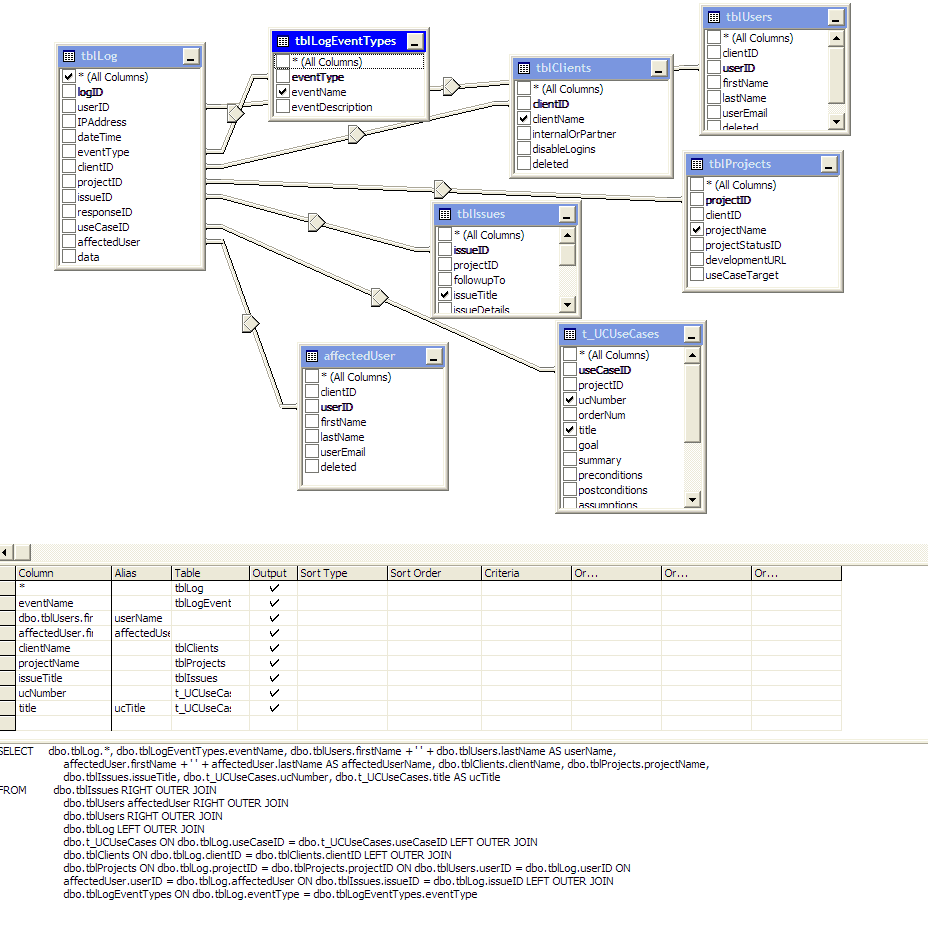
Much as I love a good MS Bashing, I'll tell you what I find really lacking (personally) for PostgreSQL and other OSS RDBMSs - a good GUI management tool.
Something that helps you craft medium-complicated joins quickly with a few clicks and drags.
For example, see this screenshot [phrogz.net] from Visual Interdev working on MSSQL2k, creating a SQL Query for a stored proc. Sure, it's almost trivial to hand-write the SQL code. But it was even easier to just select a few tables, click on the fields I want, right-click on the joins (created automatically from the database structure) to change their type, and be done.
I use PGSQL for all my personal projects now, but I sorely miss the speed that a GUI editor like this allowed me.
ba -
Some of that Spit and Polish
Much as I love a good MS Bashing, I'll tell you what I find really lacking (personally) for PostgreSQL and other OSS RDBMSs - a good GUI management tool.
Something that helps you craft medium-complicated joins quickly with a few clicks and drags.
For example, see this screenshot [phrogz.net] from Visual Interdev working on MSSQL2k, creating a SQL Query for a stored proc. Sure, it's almost trivial to hand-write the SQL code. But it was even easier to just select a few tables, click on the fields I want, right-click on the joins (created automatically from the database structure) to change their type, and be done.
I use PGSQL for all my personal projects now, but I sorely miss the speed that a GUI editor like this allowed me.
sk -
Some of that Spit and Polish
Much as I love a good MS Bashing, I'll tell you what I find really lacking (personally) for PostgreSQL and other OSS RDBMSs - a good GUI management tool.
Something that helps you craft medium-complicated joins quickly with a few clicks and drags.
For example, see this screenshot [phrogz.net] from Visual Interdev working on MSSQL2k, creating a SQL Query for a stored proc. Sure, it's almost trivial to hand-write the SQL code. But it was even easier to just select a few tables, click on the fields I want, right-click on the joins (created automatically from the database structure) to change their type, and be done.
I use PGSQL for all my personal projects now, but I sorely miss the speed that a GUI editor like this allowed me.
lbm -
The Best Slashdot Thread EverIMHO, at least...sadly, I can't take any of the credit for it.
Re: Cat got your tongue? (Score:5, Funny)
by wazzzup (172351) on Tuesday April 22 [2003], @02:12PM (#5782799)
10.4 "Pussy" will be the next installment of the Mac OS using the cat-themed naming convention.
Rumour has it they will really emphasise the lickable interface and of course change the color of all the buttons to pink. Since Steve Jobs announced this year as "The year of the laptop" for Apple, the ad slogan will be "Put a Pussy on your lap for the greatest user experience yet."
They'll also announce that the new 64-bit processor designed to run this OS is not the long-awaited G5 but instead the relatively unknown G-Spot manufactured by Cervix...errr, I mean Cyrix.
How sexy does Longhorn sound now? I expect a doubling of Apple's market share in 3 months after release.
Re: Cat got your tongue? (Score:3, Funny)
by Phrogz (43803) <gavin AT refinery DOT com> on Tuesday April 22, @06:35PM (#5785126)
(http://phrogz.net/)How sexy does Longhorn sound now? I expect a doubling of Apple's market share in 3 months after release.
Doubling after release? I think you meant before.
-1 Offtopic, +1 Funny
[skipped the IMHO less-funny ones]
Re: Cat got your tongue? (Score:2)
by wazzzup (172351) on Tuesday April 22, @06:07PM (#5784879)
Did I mention the 10.4 Pussy will not require a mouse with a button? All you have to do is move the cursor up and down over a button until you get a response from the computer. -
Some of that Spit and Polish
Much as I love a good MS Bashing, I'll tell you what I find really lacking (personally) for PostgreSQL and other OSS RDBMSs - a good GUI management tool.
Something that helps you craft medium-complicated joins quickly with a few clicks and drags.
For example, see this screenshot from Visual Interdev working on MSSQL2k, creating a SQL Query for a stored proc. Sure, it's almost trivial to hand-write the SQL code. But it was even easier to just select a few tables, click on the fields I want, right-click on the joins (created automatically from the database structure) to change their type, and be done.
I use PGSQL for all my personal projects now, but I sorely miss the speed that a GUI editor like this allowed me.
-
Some of that Spit and Polish
Much as I love a good MS Bashing, I'll tell you what I find really lacking (personally) for PostgreSQL and other OSS RDBMSs - a good GUI management tool.
Something that helps you craft medium-complicated joins quickly with a few clicks and drags.
For example, see this screenshot from Visual Interdev working on MSSQL2k, creating a SQL Query for a stored proc. Sure, it's almost trivial to hand-write the SQL code. But it was even easier to just select a few tables, click on the fields I want, right-click on the joins (created automatically from the database structure) to change their type, and be done.
I use PGSQL for all my personal projects now, but I sorely miss the speed that a GUI editor like this allowed me.
-
Extreme?What's extreme about this? The distance? The alienness of a post-communistic European country in shambles, as perceived by an average, ethnocentric American Slashdotter? The underdeveloped network infrastructure? The exploitation of workers who are only too happy to work for Western-funded peanuts because it's a lot more than they would otherwise earn in Russian jobs?
This isn't exactly news that matters.
- Anyone out there in a similarly distant job?
Yeah, I work from Norway, for a New York start-up. Technically it works well: CVS, SSH, web, instant messaging, email, NetMeeting, phone -- technically there is no reason for me to be physically located alongside my coworkers.
However, the psychological effects are dire. Somebody else in this discussion has already catalogued them pretty well (though the thing about bad breath was surprising to me). I never see my co-workers. Communication mostly consist of typing, aside from daily phone meeting and the odd call. I spend all my waking time alone in a rented office. Since I started on this project, my personal life has fallen into ruin, I basically have no friends anymore. Et cetera. It is fun, rewarding work, but man, it can be painful.
On the other hand, I live in one of the world's nicest countries, and I get to sleep late (I'm basically on an EST schedule).
-
There is a downside, however, as the worker...
I forgot to add--while the above comment details some non-obvious benefits of a remote telecommuting force, there are some side-effects you should be aware of before deciding to telecommute from home.
I have been telecommuting from St. Louis to Philadelphia for over 2 years now. I've gotta say, full-time isolated telecommuting is NOT what it's all cracked up to by. From my own experience I've accumulated a good sized list of pros and cons of working at home.
-
Addendum: file for printingI wrote:
To prove to yourself that this is a necessary improvement, go create a bitmap...
At the risk of being slashdotted, I've created such a file for you. It's a 2400x900@400ppi PNG file with the same non-anti-aliased text at 100ppi, 200ppi, and 400ppi. Opening it in Photoshop knows the file's saved 400dpi, but before you print it on your own in another program ensure that it's not about to print out at 72dpi.
http://phrogz.net/tmp/res.png : (48.3k)