Slashdot Mirror
Domain: seasip.info
Stories and comments across the archive that link to seasip.info.
Comments · 14
-
Re:Important caveat
Short answer: No, but some of the CP/M's design was copied.
Long answer:
MS-DOS supports two different methods of file and record management:
* File control blocks (FCBs) ( MS-DOS v1.x)
* File handles (MS-DOS v2.x+)They copied some of the EXACT same FCB (File Control Block) layouts.
WTF is a FCB?
The FCB originates from CP/M and is also present in most variants of DOS, though only as a backwards compatibility measure in MS-DOS versions 2.0 and later. A full FCB is 36 bytes long; in early versions of CP/M, it was 33 bytes. This fixed size, which could not be increased without breaking application compatibility, lead to the FCB's eventual demise as the standard method of accessing files.
The CP/M FCB is documented here
FCB+00h DR - Drive. 0 for default, 1-16 for A-P. In DOSPLUS,
bit 7 can be set to indicate that the operation should work with
subdirectories rather than files.The format of the MS-DOS FCBS is documented here
Funny how both are exactly 33 bytes long!
00 byte drive number (0 for default drive, 1=A:, 2=B:,
01 8bytes filename, left justified with trailing blanks
09 3bytes filename extension, left justified w/blanksAlso, MS-DOS supports two binary executables:
Maybe the source will reveal something different?
-
Re:Seriously?
> Can someone from the UK please explain to me the reason a 'TV' license still exists? It's not the 1950's!
$$$.
--
brain-dead, noun, examples include the CP/M File System (v1.4) which wastes 2 bytes (S1, S2) instead of using them for the 8.3 filename. -
Re:Kildall was a great guy, but perhaps myopic
> something running on an 8-bit processor like the Intel 8080 or Zilog Z-80. There was a memory limit of 64K, and early on that 64K was expensive.
> I encourage you to read up on how these old disk systems worked, so that you can understand why someone might limit the size of file names.As someone who has *used* those 8-bit computers since the early 80's I'm quite intimate with the details of how all those old DOS's worked -- CP/M, DOS3.3, ProDOS. I'm even writing my own DOS for my 6502 Apple
> it was probably a hard-sectored, single-sided drive and the diskettes held 90K of information
A) You mean 87.5 KB when Shugart introduced the first 5.25" SA 400 drive, but OK. Later disc were soft-sectored and able to hold (35 tracks * 18 sectors) = 157.5 KB SD (Apple 2) or (40 tracks * 18 sectors * double density) 360 KB DD (IBM) respectively.
See Floppy Disk - Performance and Capacity
B) CP/M was software skewed
CP/M 1.4 was designed to work with 8" 250k discs. Thus a CP/M 1.4 disc will be laid out in the following way:
77 tracks in total;
26 128-byte sectors per track, software skewed;
2 reserved tracks;
2 1k directory blocks, giving 64 directory entries;
240 1k data blocks, numbered 2-241.> It made sense to limit file name sizes, etc, for the diskette catalogs, so that the space available for data could be maximized.
1. It is obvious you've never done the math, so I'm calling bullshit.
You mean to tell me that increasing the filename
from 8.3 (CP/M never stored the '.' extension) which takes 11*100 / 87.5K = 1200 / 89,600 = 0.012% disk space
to 16 characters = 16*100 / 90K = 1600 / 89,600 = 0.017% disk spaceis going to have any actual impact on maximizing space for data?!?!?! Riiight. Can I have some of what your smoking please!
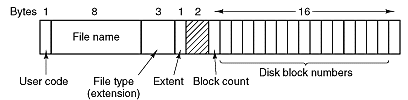
2. Furthermore, looking at the CP/M disk format, particularly the directory entry, Tanenbaum has this picture. We see 2 unused bytes!
For comparison:
Ver 1.4 wastes 2 bytes
Ver 2.2 wastes 1 bytesSo your argument is completely bogus.
3. Lastly, CP/M used a retarded allocation schema:
The CP/M 1.4 directory only has one type of entry:
SS F1 F2 F3 F4 F5 F6 F7 F8 T1 T2 T3 EX S1 S2 RC
AL AL AL AL AL AL AL AL AL AL AL AL AL AL AL ALWhich means:
AL - Allocation. Each AL is the number of a 1k block on the disc. If an AL
number is zero, that section of the file has no storage allocated to it
(ie it does not exist). For example, a 3k file might have allocation
5,6,8,0,0.... - the first 1k is in block 5, the second in block 6, the
third in block 8.Instead of wasting 16 bytes for allocation (WTF!) you store the _starting_ block number (4 bytes) and number of blocks (4 bytes), which leaves 8 more characters for filenames.
The point remains Gary completely fucked up filenames. MS, in typical fashion, just blindly copied others without actually *thinking*.
So yeah, I *do* hold him responsible for his retarded file system -- he never act
-
Re:Kildall was a great guy, but perhaps myopic
> something running on an 8-bit processor like the Intel 8080 or Zilog Z-80. There was a memory limit of 64K, and early on that 64K was expensive.
> I encourage you to read up on how these old disk systems worked, so that you can understand why someone might limit the size of file names.As someone who has *used* those 8-bit computers since the early 80's I'm quite intimate with the details of how all those old DOS's worked -- CP/M, DOS3.3, ProDOS. I'm even writing my own DOS for my 6502 Apple
> it was probably a hard-sectored, single-sided drive and the diskettes held 90K of information
A) You mean 87.5 KB when Shugart introduced the first 5.25" SA 400 drive, but OK. Later disc were soft-sectored and able to hold (35 tracks * 18 sectors) = 157.5 KB SD (Apple 2) or (40 tracks * 18 sectors * double density) 360 KB DD (IBM) respectively.
See Floppy Disk - Performance and Capacity
B) CP/M was software skewed
CP/M 1.4 was designed to work with 8" 250k discs. Thus a CP/M 1.4 disc will be laid out in the following way:
77 tracks in total;
26 128-byte sectors per track, software skewed;
2 reserved tracks;
2 1k directory blocks, giving 64 directory entries;
240 1k data blocks, numbered 2-241.> It made sense to limit file name sizes, etc, for the diskette catalogs, so that the space available for data could be maximized.
1. It is obvious you've never done the math, so I'm calling bullshit.
You mean to tell me that increasing the filename
from 8.3 (CP/M never stored the '.' extension) which takes 11*100 / 87.5K = 1200 / 89,600 = 0.012% disk space
to 16 characters = 16*100 / 90K = 1600 / 89,600 = 0.017% disk spaceis going to have any actual impact on maximizing space for data?!?!?! Riiight. Can I have some of what your smoking please!
2. Furthermore, looking at the CP/M disk format, particularly the directory entry, Tanenbaum has this picture. We see 2 unused bytes!
For comparison:
Ver 1.4 wastes 2 bytes
Ver 2.2 wastes 1 bytesSo your argument is completely bogus.
3. Lastly, CP/M used a retarded allocation schema:
The CP/M 1.4 directory only has one type of entry:
SS F1 F2 F3 F4 F5 F6 F7 F8 T1 T2 T3 EX S1 S2 RC
AL AL AL AL AL AL AL AL AL AL AL AL AL AL AL ALWhich means:
AL - Allocation. Each AL is the number of a 1k block on the disc. If an AL
number is zero, that section of the file has no storage allocated to it
(ie it does not exist). For example, a 3k file might have allocation
5,6,8,0,0.... - the first 1k is in block 5, the second in block 6, the
third in block 8.Instead of wasting 16 bytes for allocation (WTF!) you store the _starting_ block number (4 bytes) and number of blocks (4 bytes), which leaves 8 more characters for filenames.
The point remains Gary completely fucked up filenames. MS, in typical fashion, just blindly copied others without actually *thinking*.
So yeah, I *do* hold him responsible for his retarded file system -- he never act
-
Re:Kildall was a great guy, but perhaps myopic
> something running on an 8-bit processor like the Intel 8080 or Zilog Z-80. There was a memory limit of 64K, and early on that 64K was expensive.
> I encourage you to read up on how these old disk systems worked, so that you can understand why someone might limit the size of file names.As someone who has *used* those 8-bit computers since the early 80's I'm quite intimate with the details of how all those old DOS's worked -- CP/M, DOS3.3, ProDOS. I'm even writing my own DOS for my 6502 Apple
> it was probably a hard-sectored, single-sided drive and the diskettes held 90K of information
A) You mean 87.5 KB when Shugart introduced the first 5.25" SA 400 drive, but OK. Later disc were soft-sectored and able to hold (35 tracks * 18 sectors) = 157.5 KB SD (Apple 2) or (40 tracks * 18 sectors * double density) 360 KB DD (IBM) respectively.
See Floppy Disk - Performance and Capacity
B) CP/M was software skewed
CP/M 1.4 was designed to work with 8" 250k discs. Thus a CP/M 1.4 disc will be laid out in the following way:
77 tracks in total;
26 128-byte sectors per track, software skewed;
2 reserved tracks;
2 1k directory blocks, giving 64 directory entries;
240 1k data blocks, numbered 2-241.> It made sense to limit file name sizes, etc, for the diskette catalogs, so that the space available for data could be maximized.
1. It is obvious you've never done the math, so I'm calling bullshit.
You mean to tell me that increasing the filename
from 8.3 (CP/M never stored the '.' extension) which takes 11*100 / 87.5K = 1200 / 89,600 = 0.012% disk space
to 16 characters = 16*100 / 90K = 1600 / 89,600 = 0.017% disk spaceis going to have any actual impact on maximizing space for data?!?!?! Riiight. Can I have some of what your smoking please!
2. Furthermore, looking at the CP/M disk format, particularly the directory entry, Tanenbaum has this picture. We see 2 unused bytes!
For comparison:
Ver 1.4 wastes 2 bytes
Ver 2.2 wastes 1 bytesSo your argument is completely bogus.
3. Lastly, CP/M used a retarded allocation schema:
The CP/M 1.4 directory only has one type of entry:
SS F1 F2 F3 F4 F5 F6 F7 F8 T1 T2 T3 EX S1 S2 RC
AL AL AL AL AL AL AL AL AL AL AL AL AL AL AL ALWhich means:
AL - Allocation. Each AL is the number of a 1k block on the disc. If an AL
number is zero, that section of the file has no storage allocated to it
(ie it does not exist). For example, a 3k file might have allocation
5,6,8,0,0.... - the first 1k is in block 5, the second in block 6, the
third in block 8.Instead of wasting 16 bytes for allocation (WTF!) you store the _starting_ block number (4 bytes) and number of blocks (4 bytes), which leaves 8 more characters for filenames.
The point remains Gary completely fucked up filenames. MS, in typical fashion, just blindly copied others without actually *thinking*.
So yeah, I *do* hold him responsible for his retarded file system -- he never act
-
Re:Kildall was a great guy, but perhaps myopic
> something running on an 8-bit processor like the Intel 8080 or Zilog Z-80. There was a memory limit of 64K, and early on that 64K was expensive.
> I encourage you to read up on how these old disk systems worked, so that you can understand why someone might limit the size of file names.As someone who has *used* those 8-bit computers since the early 80's I'm quite intimate with the details of how all those old DOS's worked -- CP/M, DOS3.3, ProDOS. I'm even writing my own DOS for my 6502 Apple
> it was probably a hard-sectored, single-sided drive and the diskettes held 90K of information
A) You mean 87.5 KB when Shugart introduced the first 5.25" SA 400 drive, but OK. Later disc were soft-sectored and able to hold (35 tracks * 18 sectors) = 157.5 KB SD (Apple 2) or (40 tracks * 18 sectors * double density) 360 KB DD (IBM) respectively.
See Floppy Disk - Performance and Capacity
B) CP/M was software skewed
CP/M 1.4 was designed to work with 8" 250k discs. Thus a CP/M 1.4 disc will be laid out in the following way:
77 tracks in total;
26 128-byte sectors per track, software skewed;
2 reserved tracks;
2 1k directory blocks, giving 64 directory entries;
240 1k data blocks, numbered 2-241.> It made sense to limit file name sizes, etc, for the diskette catalogs, so that the space available for data could be maximized.
1. It is obvious you've never done the math, so I'm calling bullshit.
You mean to tell me that increasing the filename
from 8.3 (CP/M never stored the '.' extension) which takes 11*100 / 87.5K = 1200 / 89,600 = 0.012% disk space
to 16 characters = 16*100 / 90K = 1600 / 89,600 = 0.017% disk spaceis going to have any actual impact on maximizing space for data?!?!?! Riiight. Can I have some of what your smoking please!
2. Furthermore, looking at the CP/M disk format, particularly the directory entry, Tanenbaum has this picture. We see 2 unused bytes!
For comparison:
Ver 1.4 wastes 2 bytes
Ver 2.2 wastes 1 bytesSo your argument is completely bogus.
3. Lastly, CP/M used a retarded allocation schema:
The CP/M 1.4 directory only has one type of entry:
SS F1 F2 F3 F4 F5 F6 F7 F8 T1 T2 T3 EX S1 S2 RC
AL AL AL AL AL AL AL AL AL AL AL AL AL AL AL ALWhich means:
AL - Allocation. Each AL is the number of a 1k block on the disc. If an AL
number is zero, that section of the file has no storage allocated to it
(ie it does not exist). For example, a 3k file might have allocation
5,6,8,0,0.... - the first 1k is in block 5, the second in block 6, the
third in block 8.Instead of wasting 16 bytes for allocation (WTF!) you store the _starting_ block number (4 bytes) and number of blocks (4 bytes), which leaves 8 more characters for filenames.
The point remains Gary completely fucked up filenames. MS, in typical fashion, just blindly copied others without actually *thinking*.
So yeah, I *do* hold him responsible for his retarded file system -- he never act
-
Re:Correction
If you got a Z80 processor lying around, you can get a CP/M clone under the GNU license.
-
Re:You already know where to go for disks....
Well, it's doable. And yes, the CD-ROM driver and MSCDEX will have to run in conventional RAM.
OTOH, maybe the intended approach was:
- download the CD-ROM of FREEDOS
- extract the floppy images from it
- copy them to diskettes
- boot the diskettes to install
NB: The first 3 steps would be performed on a relatively "modern" system, not the Epson. Also, "???" and "Profit!" are left as an exercise to the reader.
-
I can imagine this guy's pleasure
I can imagine the pleasure he got doing this.
When I still was a teen, I used to spend full week-ends doing such nerd stuff.
I wrote a PC-compatible BIOS for my Sanyo-MBC550 (eg: here: http://www.seasip.info/VintagePC/sanyo.html/),
and was the happiest person of the world when I first got MS-DOS 5.0 to boot on it !
I also designed a simple microcontroller-based robot from printer parts
just for fun, and I was really impressed when I saw it turn around the
whole room for the first time (it could detect obstacles by sending
ultrasonic pulses).
Also, modding a 8088 motherboard to accept a second 8088 on the 8087 socket
was definitely fun. There was no cache coherency problems at that time. You
just had to invert A19 to make the second one boot at 512 kB and the bus arbiter
let them work in parallel. It was really cool to have an 8088-SMP
Those were project during which the time did not exist. I can imagine that this
guy spends his whole spare time on his project without noticing the night come,
then the day... Sometimes I wish I still had that much spare time!
Sincere kudos to him and great respect for his work!
Willy -
Re:The Birthplace of the Megahertz wars
"early all of the video cards were not memory mapped. I know, I used to run a store that sold these."
While this is true, you obviously don't know _why_ they were built this way, otherwise you wouldn't be spouting tripe about it being due to a limitation in the Z80 (then again, it's hardly surprising that what amounts to a computer salesman is pretending to know far more about technical details that is in fact the case). Remember something called CP/M 2.2? CP/M itself took up 7K from the Z80's 64K maximum address space, and people who wanted to run popular software like WordStar wanted all the rest for their applications. Memory mapped graphics on CP/M business machines were not therefore a practical option, so manufacturers adopted a strategy of writing to ports instead.
"Perhaps you were not fully familiar with all the Z-80 sellers. Northstar, Cormenco"
It was Cromenco, not Cormenco. I was more usually involved with Micromation equipment. They made an MP/M based multiuser system that could have up to 16 independent Z80 computer cards in it, one of which would act as a master I/O controller, with the other 15 serving one user each. It absolutely blew most of the single CPU timesharing minicomputers of the day out of the water in terms of multiuser performance.
"Essentially everything that was s-100 bus worked this way"
Again, rubbish. The S100 could be configured as two independent 8 bit buses or a single 16 bit bus. It was quite feasible to put memory expansions for a Z80 on it, and memory expansions are by by their nature _memory mapped_. It also had advanced features such as bus-mastering that PCs didn't get for well over a decade.
"The same was true for most early CGA using the IBM bus."
All CGAs were memory mapped, from the very first to the very last. This page has details about them: http://www.seasip.info/VintagePC/cga.html
"Essentially none of the early implementaitons were able to use this"
This is utter and complete baloney. No production Z80 was shipped without a fully working DRAM refresh system.
"Anyhow my main point was about the megahertz myth not these details. 6502s were much less of a kludge than the z80 which was an augmented 8080 instruction set."
Considering how (to be kind) light on facts the rest of your post is, this particular assertion obviously needs to be taken with a few Dead Sea's worth of salt.. -
Re:Movies while working are newsworthy & produThere were several nifty uses for an MDA/Hercules and CGA/EGA/VGA monitor card in the same system; for several years I used it with Borland's products to debug VGA applications.
There was a device driver called OX.SYS that would redirect debugging output from Windows (via the AUX device) onto a monochrome screen -- always fun for debugging Windows applications.
For the terminally curious, Hercules made a monochrome video card called the RamFont, in which you could load your own text font for use. It came with several very interesting text fonts like computer OCR and Old World. The MDA and CGA cards of the day could not redefine fonts. You could detect a RamFont in a system by looking at one of the undefined bits in the CRTC registers. I think there was a WordPerfect driver that took advantage of the feature.
Even more weird was the Hercules InColor card. Looked like a monochrome video card to the system, but was actually a EGA card in registers and resolution. Not many applications took advantage of the extra hardware, but writing programs to use the features was loads of fun.
Technical notes on classic dual-head setup is here. With the advent of Plug'n'Pray systems and the ability to move I/O and Interrupts, it's possible to have several VGA video cards in a system without much difficulty. Does Windows XP even recognize an MDA or CGA card?
-
No DOSSHELL?
What about my favorite GUI of all time? Okay, my favorite was the DR-DOS SHELL ViewMAX, but still! All DOSSHELLs demand respect!
-
Re:VNC
8086 is 16-bit
Interestingly enough I (in the past week) have thought about implementing Contiki on top of CP/M-86 4. CP/M-86 4 is a rather small OS, and can optionally run DOS programs (the infamous DOSPLUS), and I think, with tools I can easily find for free, I can code low-level stuff for it.
It can be done. IWBN, too.
-uso. -
Re:The only tools you need.
Not DOS 2.1. DOS 2 is limited to about 20MB of HDD space.
BTW, if someone handed me a box, and I could put FreeDOS on it, what else should I load up on it, depending on arch (8088, 286, 386/486SX, slower 486, fastest 486)?
So far for an 8088 I'm saying DOSPLUS 1.2, NewWord, RMF Klondike Solitaire...
486 of any kind gets MSX emulation *g* MSX, the XBox of the 1980s LOL
-uso.