Slashdot Mirror
Domain: unixuser.org
Stories and comments across the archive that link to unixuser.org.
Comments · 15
-
we use dokuwiki and vnc2swf
One problem with documentation is the upkeep because things change
frequently. If the process of updating the dox were simple and easy,
more people would do it. We use dokuwiki because it is pretty simple
and easy to use. When I show a junior admin how to do something on
the terminal, I can past the terminal session into a dokuwiki[0] page
and it's there for reference next time. I know it's working because
now when the juniors call me it's because they don't understand something
in the dox, not where to find the dox. If you have a gui app you need
to demo, hook up vnc2swf[1] and post the flash file as a link in dokuwiki.
[0] - http://wiki.splitbrain.org/wiki:dokuwiki
[1] - http://www.unixuser.org/~euske/vnc2swf/ -
Re:Hope he likes prisonPirates might not, but legitimate users who typo'd might. I usually take a couple of attempts to enter a serial number (my brain doesn't seem to like long meaningless strings of symbols), so if I'd bought this I would probably be restoring from backups right about now.
Fortunately, vnc2swf is free and easy to use.
-
vnc2swf
-
Re:One word
in your view, what are the point of web logs and the huge amount of information that is gathered?
I said this in my first comment:
Web statistics are good for measuring server load and monitoring things like search terms people use to find your site, inbound links from referrers, etc.
I never said that statistics are all bad, just that you can't derive certain information from them.
So far, all your comments have left me with the impression you have absolutely not 'real world' experience either as a web master or as part of an ISP/IAP of any kind. Please correct me if I'm wrong.
I've been a web developer for almost a decade, with my own business for over three years. I've worked on well over a hundred websites and web applications, both big and small. What makes you think that I have no experience? Just because you disagree with me? If anything, I think that naïve faith in stats packages implies lack of experience. It's easy to accept numbers that software gives you if you know nothing; you need to actually know what you are talking about to even begin to disagree with them.
I DO employ people to keep track of whats happening across my web properties.
Then not only are you not the norm, but you aren't relevant to the discussion, as the Ask Slashdotter clearly wants a piece of software to do the job and not employees.
I do account for many variables such as proxied traffic and so on.
How? Simply claiming that you do isn't convincing.
When dealing with millions of hits a day, AOL changing their proxy setup isn't exactly that big of a deal.
I think you are underestimating both the size of AOL and the number of different things that can throw your numbers off.
I'm more concerned about where the traffic is coming from in regards to inbound links than the host ISP of the user.
Well seeing as I explicitly mentioned inbound link detection as a valid use of logs, I completely agree with that.
AOL can change their proxy, great. But they still have to get refreshed copies of the content when it changes, and given 90% of my pages are dynamic, they'd need to refresh them quite often.
The rate at which they refresh them is unimportant. The point is that you don't know how many people their cached copy is served to, so one "hit" corresponds to an unknown number of visitors.
That is unless they can figure out some way to discern the content of an article or whatever from the ancillary information or advertising.
I'm not sure if I'm understanding you right; you're saying that you vary your content pages to rotate your advertising? That's really inefficient. The efficient way of doing rotating advertising is to refer to a static URI that performs 302s. That way, both the content and the advertising can be cached effectively but the ads still rotate properly.
And yes, you can separate content from ancillary information, but I'm not sure why you think this is relevant. Webstemmer is one approach.
Its not accurate, but it is close enough to accurate to make it extremely useful.
How accurate is it? How did you measure how accurate it was?
-
Re:Program to make those 'videos'?
probably this vnc to swf recorder:
http://www.unixuser.org/~euske/vnc2swf/ -
Re:Video software
What software do people use for making these neat videos?
And to bring us (nearly) back on topic, the latest version is written in python!
-
Screenshots ?
Screenchost are soooo 1995...
Try vnc2swf:
http://www.unixuser.org/~euske/vnc2swf/ -
Re:Wink, Wink
Preposterousness aside, I wish Wink were open source. Being only "free" and not free as in speech really limits it's potential.
Here's a GPL'ed program that has the same function and works via VNC, however it is not nearly as polished as Wink:
http://www.unixuser.org/~euske/vnc2swf/ -
Wink is a nice app for Linux
I realize that most of the comments are going to be jokes because of the tone of the submission but Wink itself is a very useful application.
It's similar to Macromedia Captivate and the dozens of other Flash-output screen recording tools available but what sets this app apart from the others in my opinion is it's support for Linux (it's available for Windows too) and it's price (free).
The only other app that I've used that does screen recording and outputs Flash files is the vnc2swf console based program. While vnc2swf is quite good at full motion recording it's editing capability is virtually nonexistent (there is a program called edit_vnc2swf but it's console based at least right now).
Wink has an excellent GUI, is 100% free ( I made a voluntary donation to the developer via Paypal and encourage others to do the same), allows you to do manual or full-motion (timed) captures, and has very good support for Linux. It's definitely an app worth downloading.
(Note: I'm not affiliated in any way with Wink--just a happy user). -
Re:Best AlternativeI researched this a little while ago, and you've got a few options for doing video screencaptures under linux: If you also want to sync audio recording along with the video, it takes some extra work.
-
Recording VNC
Slightly off topic, but I found a bug within eclipse which was more easily documented with a screen cap movie. With a bit of research, I stumbled on vncrec and vnc2swf via this tutorial. Vncrec is excellent, producing good captures in the proprietary
-
Re:Another Linux 3D file manager
My site has been collecting 3D UIs for some time.
Here are links to some of the 3DUIs that are available today:
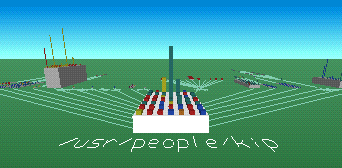
- FSN (pronounced "fusion") produces a cyberspace rendering of a file system. This was the original 3D file system navigator shown in Jurassic Park ("Hey, this is UNIX. I know this!").
[Screenshot] | [Download] (IRIX)
- FSV is modelled after FSN, but runs on Linux. FSV lays out files and directories in 3D, geometrically representing the file system hierarchy to allow visual overview and analysis.
[Screenshot] | [Download] (Linux)
- Xcruise lets you fly through a filesystem in 3D as if it were interplanetary space. Directories are represented as galaxies, files are represented as planets (whose mass is determined by the file size), and symbolic links are represented as wormholes.
[Screenshot] | [Download] (Linux)
- TDFSB is a 3D filesystem browser for Linux. Take a walk through your filesystem!
[Screenshot] | [Download] (Linux)
- Visual File System is a 3D file system visualizer for Windows. The tool scans a drive selected by the user, and then models the contents of the drive in 3D, based on the directories that are selected in a tree browser on the side of the display.
[Screenshot] | [Download] (Windows)
- 3Dtop is an extension for Windows that represents desktop icons in 3D, letting you to fly around your desktop. You can create coloured spotlights, background and floor textures, "paintings" (bitmaps), clocks, and "flags" that represent shortcuts.
[Screenshot] | [Download] (Windows)
- ROOMS turns a Windows desktop into a 3D world. You can see the world either through a first person perspective or with a map view, and you can populate the world with sounds, animated images, and 3D icons.
[Screenshot] | [Download] (Windows)
- CubicEye organizes windows into a navigable cube. Cubes can be arranged by thematic or functional subject matter, and can be explored either individually or collectively as part of a more comprehensive structure of multiple cubes representing various areas of interest.
[Screenshot] | [Download] (Windows)
- Vizible WorldViewer distributes windows across the exterior and interior surfaces of spheres, providing the means to visualize and navigate large numbers of web pages and data sources simultaneously.
[ -
Other 3D UIs: references and links.This is the kind of stuff that is regularly discussed on Nooface (a Slash site BTW).
Ripped straight off the side bar :
Will 3D user interfaces ever take off? With ever-growing 3D processing capabilities available on standard PC hardware, it seems only natural to pursue UI directions that take advantage of this awesome power. Moreover, the generation of users now emerging has had access to video games for as long as they could remember. As the line between video games and PCs becomes blurrier, the time may have come to think about how to apply 3D visualization techniques for more day-to-day computing tasks.
Here are links to some of the 3DUIs that are available today:
- FSN (pronounced "fusion") produces a cyberspace rendering of a file system. This was the original 3D file system navigator shown in Jurassic Park ("Hey, this is UNIX. I know this!").
[Screenshot] | [Download] (IRIX)
- FSV is modelled after FSN, but runs on Linux. FSV lays out files and directories in 3D, geometrically representing the file system hierarchy to allow visual overview and analysis.
[Screenshot] | [Download] (Linux)
- Xcruise lets you fly through a filesystem in 3D as if it were interplanetary space. Directories are represented as galaxies, files are represented as planets (whose mass is determined by the file size), and symbolic links are represented as wormholes.
[Screenshot] | [Download] (Linux)
- TDFSB is a 3D filesystem browser for Linux. Take a walk through your filesystem!
[Screenshot] | [Download] (Linux)
- Visual File System is a 3D file system visualizer for Windows. The tool scans a drive selected by the user, and then models the contents of the drive in 3D, based on the directories that are selected in a tree browser on the side of the display.
[Screenshot] | [Download] (Windows)
- 3Dtop is an extension for Windows that represents desktop icons in 3D, letting you to fly around your desktop. You can create coloured spotlights, background and floor textures, "paintings" (bitmaps), clocks, and "flags" that represent shortcuts.
[Screenshot] | [Download] (Windows)
- ROOMS turns a Windows desktop into a 3D world. You can see the world either through a first person perspective or with a map view, and you can populate the world with sounds, animated images, and 3D icons.
[Screenshot] | [Download] (Windows)
- CubicEye organizes windows into a navigable cube. Cubes can be arranged by thematic or functional subject matter, and can be explored either individually or collectively as part of a more comprehensive structure of multiple cubes representing various areas of interest.
[Screenshot] | [Download] (Windows)
- Vizible WorldViewer distributes windows across the exterior and interior surfaces of spheres, providing the means to visualize and navigate large numbers of web pages and data sources simultaneously.
[Screenshot] -
STWM - Shell controllable TWMI just found this last night so I've not had a chance to really test it. But software.linux.com lists "stwm". It's a Shell controllable TWM. From xterm you can issue standard X widget properties to move, resize, focus, etc. of any standard X Windows Application. The source is 160KB gz'd and only needs the XFree86 4.x. Here's the links:
- The software.linux.com entry
- Old English docs page with examples
- New home of source files
PS. He's got some souce code for that standard X Clock with a transparent background. Schway.
-
another "virtual" browser - xcruise
I just got xcruise, a file browser that creates your fs into a galaxy, to work to work on OS X (need to have x working). I discovered it while sleep deprived at 3am and found myself getting lost in