 Slashdot Mirror
Linux Word Processor Showdown
The following was written by Slashdot Reader Matthew Mastracci
Linux Office Showdown (Part 1: Applixware 5.0 M1 vs. KOffice pre-beta)One of the biggest barriers to the acceptance of Linux on the desktop is the perception of those outside the Linux community that Linux has no support for Office suites and applications. As we all know, this is far from the truth. We've seen StarOffice, Corel, Applixware and the up-and-coming KOffice, but how many of these have you used? The choices are so diverse that people just end up trying or buying one of them and sticking with it.
In this series of reviews, I'm going to try to cut through all the hype and mystery surrounding these applications so that you can see exactly what each of these tools offers, without having to go through all the trouble yourself. I've come from the pure Microsoft Office background myself so I know (at least to some extent) what newcomers to the Linux-as-a-desktop environment will be looking for.
This review includes some beta and pre-beta software, meaning that it crashes often. I'm keeping the state of each program in mind as I write this review so you can be sure it won't take anything away from my review. Also note that I've put a quick overview of my installation experiences in this first piece to ensure you'll know what to expect.
These are the office suite word processing components that will be reviewed in this series of articles:
- KOffice: KWord
- Applixware: ApplixWords
- StarOffice: StarOffice Writer
- Corel Wordperfect 8.0
And for completeness, a few stand-alone applications:
- AbiWord
- KLyX
On that note... let the games begin!
KOffice: KWord (CVS Snapshot, Feb. 5)KOffice is one of the new things that's going to be coming along with KDE2. It's not a clone of one of the office giants like StarOffice or Microsoft Office, but instead a full suite of tools for office productivity with a different set of features than others.
KOffice is such a huge suite that I couldn't review every part
of it in a single article. If I missed or skimmed over something
you're interested in, please send me some mail and I'll try to add it to
the piece as a footnote for future reference.
I grabbed the latest RPM build pointed to from the KOffice binaries homepage: http://koffice.kde.org/install-binaries.html. The one I took was the massive 29 MB RPM with everything in it. Once wget had finished, I just logged in as root and installed it using RPM. That was all it took to install. Wow.
Since I had downloaded the monolithic installation RPM, there were no library conflicts, no package installation order issues or anything else that might even consider giving me grief. Unless you have a good reason for it, I suggest you take this path as well.
From tinkering around with a few of the programs, I discovered that
I had to start dcopserver and kded - two programs used extensively by all
KDE2-based programs. Once those two are going, everything seems to
work like magic.
- KDevelop: a development studio for KDE2 applications
- KDE System Control: a Windows device-manager clone
- AMOR: an "Amusing Misuse of Resources" that sits the titlebars of your windows and supposedly gives tips (the next paperclip clone?)
Back to KOffice KOffice is composed of seven major tools, each with a specific purpose and each with the ability to be embedded in the other applications. These are:
- KWord: a frame-based word-processor (you'll see what this means later)
- KSpread: the classic spreadsheet application
- KPresenter: a presentation tool, similar to PowerPoint
- KChart: a dedicated charting application that can be used with or without a spreadsheet
- KIllustrator: a vector-based graphics drawing application
- KImage: an image viewing/processing application
- KImageShop: a layer-based image creation application
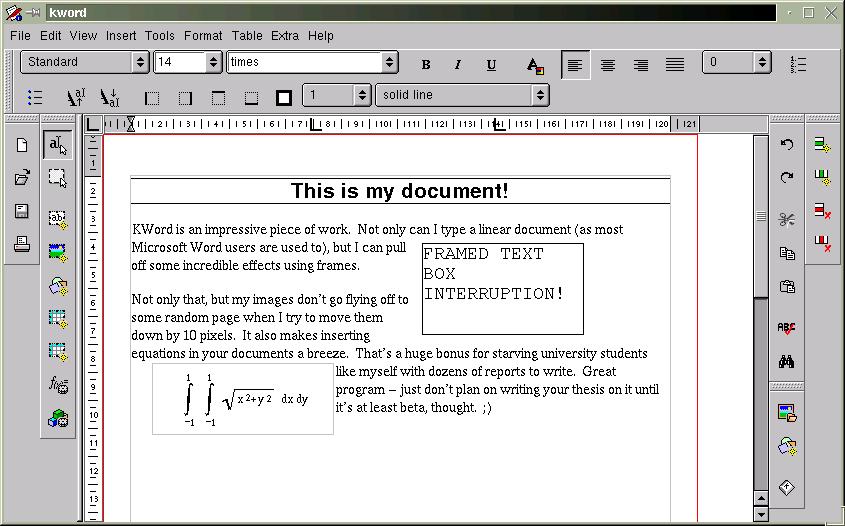
KWord is KDE2's answer to Microsoft Word. Don't take that the wrong way, though. It's not a clone of the infamous Word, but rather an amazing program that can act as either a frame-based document editor for desktop publishing (like FrameMaker), or a word-processer in the traditional sense (like Word or WordPerfect).
The first thing you'll notice about KWord is how different it feels from a classic word-processor. It sure looks like one, but the layout features take a bit of time to get used to. The first mistake you'll probably make is trying to figure out how to modify a frame you put down. Instead of right-clicking the frame to get its properties while you're in a text-editing mode (sorry, Iguess that's a leftover Windows thing), you need to use the "select frame"tool first (it's the second vertical toolbar from the left, the second button down). Once you have this tool selected, you can move and resize the frames to your heart's content. Right-clicking the frame in this mode will give you that elusive popup menu. Don't forget to go back to text mode after you're finished though (the button right above it).
You might wonder why things are implemented this way -- I assure you there is a good reason. Imagine how much time and frustration you'll save yourself knowing that all of the frame objects on your page are essentially static while you're editing text. One of my biggest beefs with the Office suite is the wonderful habit your images have of moving around the page and possibly moving a number of pages down the document if you aren't careful. As well, if you go back to a program like Word, you'll find yourself cursing every time you go to move a text box and start editing the text inside it instead or vice-versa. You don't have to worry about hitting that magical, invisible grippy border that Microsoft expects you to use to move your objects around.
I don't know if it's possible to tie a frame to a particular piece of text, however. This could be useful to ensure your image always follows a description, for instance. There might be a way to do this in the current version, but it wasn't obvious for me (believe me, I looked). It would be nice to be able to set some sort of reference marker, so the image would have position specified relative to the page (as it currently stands), or to the marker, so that moving the text around would move the frame as well.
To help to write documents with consistent layout, KOffice has a solid text style implementation. You can format your text in a number of different header styles and then generate a table of contents from those directly. The "Stylist" command allows you to go in and change these styles to your heart's content. Unfortunately, it seems as if the only table you can generate is a table of contents, and that seems to be hardwired to generate it from the headings. Allowing arbitrary index generation to the release version would be a big benefit.
There are also a number of other great features in this program, like a spell checker, support for tables, generation of tables of contents and the ability to embed any KPart in a document (like a spreadsheet or chart, for instance).
ConclusionsOverall, I'd say this program is well designed and relatively stable, especially impressive given its current alpha status. It's simple to use (after a half-hour of retraining yourself), intuitive, feels responsive and has most of the features that I'd need to write a great technical report. Of course, there are some issues with layout, but they've got enough time to work these out before the release. Best of all, it's free (as in speech) and has a great team of developers behind it.
My final KWord tip:just be careful not to hit the close button if you've got unsaved work (you did save, didn't you?). There's no warning that you haven't committed your changes to disk and no autosave. Uh oh!
Keep in mind that it's still not even a beta yet and many if not most of these issues will be gone by release time.
As the KOffice team says:
"Note: This is not even alpha so it
might compile and might work
(normally it does), but we do not recommend
writing your master thesis with KOffice
yet!"
Applixware is a long-time member of the office suite community. The latest development release version of their software, 5.0 M1, has limited support for the GTK widget set.
At the time of writing, Applixware is currently being chastised for a violation of the LGPL. The application suite is statically linked to the GTK libraries. It seems as if someone from Applix may have noticed this, however, as any official downloads seem to have disappeared from their FTP site. There's still a link off Freshmeat to an alternate download site that still has it, but I assume that it should only be a few days from the time of writing before it comes back up with a dynamically linked version.
At $99 for the 4.4.2 Deluxe Edition for Linux, it's not a bad deal for a commercial office suite. The demo lasts for a couple of months, so you can take your time evaluating the suite before committing yourself to purchasing it.
InstallationAt a whopping 80+ MB, the demo of Applixware might not be in everyone's reach. If you're on dialup, I recommend getting a friend with a Zip drive or CD burner to grab you a copy. Make sure you've got a couple hundred megabytes available on your HD as well. I thought Microsoft Office was big!
Installation of Applixware is just as simple as for KOffice. Applixware is commercial, closed-source software, so there are no source tarballs. You'll need to grab the tarball and run the installation script as room. They've set it up to put all the RPMs in the right spots without any user intervention. If you're planning on uninstalling it in the future, make sure you keep the removal script handy!
Everything should work right out of the box. As mentioned by one of the Freshmeat comments, it seems to have some trouble with pixmap themes. It doesn't affect the operation of the program, so you don't need to worry.
FeaturesApplix Words starts up with a light-weight GUI. Even though they claim GTK compatibility, it looks like they just take the colors from the theme and apply it to their custom menus and toolbars. It still looks good, but reminds more of Netscape than a GTK program.
One of their big selling features are the import filters. I decided to try them out by importing my resume from Office 2000. It came out looking virtually identical to the Office version. There were a few minor layout issues, however. One of the header tables had changed size, forcing my telephone number to drop down a few lines and leftward across the page. This was fixed with a simple cut-and-paste. It also insisted on adding space between some bulleted items. Format/Paragraph Settings..., change the insert space before and after text and voila!
Now that I have a beautiful resume in Applixware, how do I get it to the masses? The File/Print... dialog in Applixware is simple and straightforward. It has support for both PostScript and PCL5 printers. In the version I have, there seems to be no way to print other than to a file, but I'm not complaining. It's nice to see my resume in all its Postscript glory. Applix Words is WYSIWYG, too.
Creating original documents isn't quite as straightforward. Coming from a Microsoft Word environment, I'm used to using styles extensively. Even though Word's support tends to be buggy at best, it's still convenient to have a common look-and-feel across a document, as many of you must realize. A blank Applix Words document doesn't come with any of the nice styles, making it virtually useless for anything more than a shopping list. That's okay -- there's an enormous selection of document templates, ranging from letters to reports to press releases. It takes a while sorting through all of the cryptic names, but you can usually find one to fit your purpose and tweak it until you like it. I must say it's nice to have more than just a single style.
In addition to slick styles, Applix Words has support for cross-referencing and a table of contents. These are two features to look for if your job requires technical report writing. As far as I can tell, there aren't any styles for figure and table captions, meaning you'll have to add a couple yourself to create a list of either of these.
If you're one of those people that enjoys using cheesy clip-art, Applixware is the right suite for you. There seems to be thousands of images from all sorts of characters. I still have nightmares about "face 04" in the People category. *shudder*
I have a few minor issues with the user interface. Every once in a while, the flicker of the document pane while using the menus is little annoying. As well, there's a problem scrolling some documents where grey bars appear. That can get annoying at times if you're trying to do a random seek on your document. Applixware is still beta, so hopefully these won't be around in the final build.
ConclusionsApplix Words is neither free as in speech or in beer, but is worth the price if you're looking to spend money on a solid-looking word processor. Add on to that the support for styles, cross-referencing, tables of contents, equations and other nifty features, and you've got yourself a great tool for developing technical documents under Linux. The import and export features ensure you'll never feel left out of the Windows community.
Feature Comparison Chart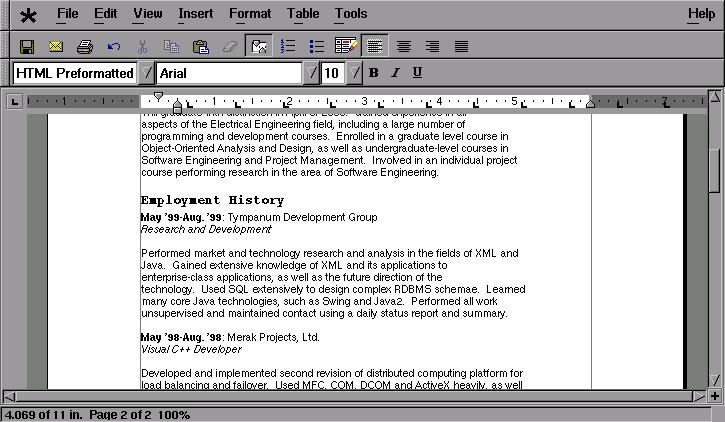
I hate to say it, but most charts of this kind are biased towards one product or another. I've tried to make this chart unbiased to reflect the requirements of a technical writer, rather than showcase the features of any single product. Any word processor can create a simple document, but there are a number of features that make creation of a technical document much simpler. These are the features (in addition to the required features of the programs) that I've chosen to include here:
- Styles: Support for document text style is important, especially from the view of the technical report writer. It allows someone to spend more time on the content, rather than the layout.
- Tables: Table support is important when organizing data in regularly-spaced, easy-to-read formats. To see why tables are important, try reading table data in a browser like Lynx. Yikes.
- Indexing: Generation of TOCs and Lists of figures and tables makes a document writer's life easier. Without them, you need to go back at each revision and manually change page numbers. I guarantee you'll miss a few.
- Printing: Why word process if you can't print? 'Nuff said.
- Import filters: In a world of Windows, it's inevitable that Word- and Wordperfect-format documents are passed around. Being able to import a number of different formats only adds value to a product and allows it to integrate more seamlessly into the work environment.
- Equation editing: Not all technical writers require equations, but those involved heavily in math, engineering or computing science theory will find this useful.
Product Devel
Status Download Size Cost Styles Tables Indexing
(TOCs and other) Printing
Capability Import Filters Equation Editing Stability Look and feel KWord pre-beta Alpha 29 MB Free Yes Yes Yes PostScript Minimal Yes "Quirky" Excellent Responsive Applix Words 5.0 M1 Beta 80 MB $99 Yes Yes Yes PostScript
or PCL5 Extensive Yes Solid Good
GUI tends to flicker Conclusions
The concept of "Linux on the desktop" is getting closer to reality on a weekly basis. From the strong showing of KOffice and ApplixWare, we can see that the world of word processing and other office work isn't a dangerous task for Linux fans. The experience of creating documents under Linux is far from painful, especially with the fully featured office suites available.
KOffice is still a ways from being a complete, stable office suite, but is very feature-complete for being alpha status. The interface is busy, but not cluttered, and almost everything necessary for a good document is available. It's fast, responsive and feels very lightweight. Keep your eye on this one -- it's going to be great. Oh yeah... it's free too.
ApplixWare is a lot older, and being so gives it a huge headstart on KOffice in terms of features. It's way bigger and feels a little overwhelming at times. They haven't put work into making it look as pretty as it could, but it gets the job done, and does it well at that. Hopefully by the time it's past beta, they'll have done some work on the UI. At the given price ($99 for the previous version, hopefully the same for this one), it's a pretty good deal.
Whichever package you choose, you can still rest assured that Linux is and will continue to be a productive desktop environment, rather than just a hacker toy it's been seen as in the past.
I was trying to do something like this at a community center our LUG was helping setup. Right now they are using Windows95 as a microkernel for StarOffice, but as you all know Windows is anything but "micro".
What I wanted to do was migrate them to was very simple local installations of Linux, X and SO only (maybe using remote boot images from the Linux Terminal Server Project. It would have been great, I could have them boot and load SO from a local HDD but have their home directories and mail on the server. SO can do mail, calendar, web browsing, Java, as well as word processing, spreadsheet, presentations, database, etc. so the local admin would only have one program and file tree to maintain.
Unfortunately this won't happen now because they hired a Windows guy to admin and teach, who doesn't know the first thing about Linux. He got frustrated the first day (probably a permissions thing on the Samba shares, maybe he wasn't logging in as himself, who knows?) so he fdisked and formatted the server, without even asking us for help. He is using Win95 File and Print sharing instead of a Samba server, what a maroon.
-- Remember: Wherever you go, there you are!
If you think moderation sucks, than login, and meta-moderate. That's how bad moderators are weeded out from the system.
Yeah, I'm that guy.
While I live and swear by the "Unix way", I don't think a word processor is its place. A word processor is intended to be easy to use and to give you an integrated environment to do fancy stuff with your text. If you want raw power, use TeX or LaTeX. But sometimes, for typing a quick letter or a table, a word processor is the easiest way to go.
I use Emacs+LaTeX myself for mostly everything, but I see the need for good word processors.
--Diego
On this point even AbiWord beats Applix. It may not import most of the stuff properly and break most of the layout, but it does not blow up. Also, it does not work for half an hour before blowing up. It does not take X windows on a 192MB machine with it when it goes down on a failed import.
I would suggest you extend your tests with a proper selection of MS antidocs. Especially the ones produced by non-release Word versions. I mean those that MS word has sometimes problems reading.
While on the same topic a good test is also reading exported "compatible" formats. For example Corel Word fails on importing something written by StarOffice in an MSWord format. Applixware blows up, etc...
Baker's Law: Misery no longer loves company. Nowadays it insists on it
http://www.sigsegv.cx/
After being burned by MS Office, I'm not getting ANY "productivity suite" that doesn't come with source. How about adding "licensing" to your review chart?
--
Here is the result of your Slashdot Purity Test.
Linux MAPI Server!
http://www.openone.com/software/MailOne/
(Exchange Migration HOWTO coming soon)
(Scriptwriter, the Free Film Project's adaptation of AbiWord, is good, but I just feel that KWord is where things are at.)
It's a small world and it smells funny; I'd buy another if it wasn't for the money; Take back what I paid (SoM)
klyx was a one-time port of lyx. It was severely out of date at the time it was released, relying on lyx .11 rather than the then-current .13. The last I heard, there are absolutely no plans to ever update it.
Currently, lyx is moving towards toolkit independence. Some of the klyx code may be cannibalized, but the customization to change toolkits won't really carry over. It has been the intent from the time that klyx appeared that it be rolled back into the main lyx distribution.
Anyway, a klyx comparison wouldn't be nearly as useful as one for lyx iteslf . . .
If you're not part of the solution, you're part of the precipitate.
Well here you go - abiword. Last I heard they were setting up optional vi keybindings.
My other Slashdot ID is much lower.
****On the otherhand I have also used both Staroffice and Wordperfect 8 under linux (neither extensively). These also seem to work fine for writing documents for printing elsewhere (never did get my printer properly configured).****
Amen to that my brother. *Configuring my printer* has been on my action item list for the past month but it seems like such a pain in the arse. I downloaded the CUPs demo and aspfilter but I don't know which way to go and I feel like I'm just flailing around. This has to get easier.
That has to be my biggest beef with Linux right now... my printer output just pretty much blows. It's okay if I'm just printing out a todo list or maybe some tricky code snippets for my own viewing, but I couldn't print out my resume and feel good about giving it to somebody.
So.. I guess I'm just bitchin but it feels silly to keep win95 on a partition just to print out my friggin resume.
The last I heard, there are absolutely no plans to ever update [klyx].
<p>
Not entirely true. If you take a look at the KDE 2.0 CVS tree, you'll see it has at least been ported to the KDE 2.0 libraries. There are even plans to make it KParts-compatible, so you can embed klyx documents in other KOffice components.
<p>
I agree it is currently lagging behind plain lyx feature-wise - but that may change soon.
This message is provided under the terms outlined at http://www.bero.org/terms.html
Between the two, I have to say I preferred the Applix philosophy and user interface -- it felt like a successful cross between the traditional GUI platforms and the EMACS windowing philosophy (windows go anywhere; each window has more or less all the functionality of any other). In contrast, StarOffice sticks everything inside a single large "desktop in a window" that acts completely differently than Gnome/KDE/Twm.
Applixware has excellent user support. Let me repeat: Applixware has excellent user support. I have submitted more than ten bug reports and comments, and their technical staff have diligently followed through on every issue with alacrity, competence, and speed. I'm very impressed with these guys' follow-through. On the other hand, Applixware isn't really ready for prime time yet. There are still lots of minor "gotcha" glitches due to sloppy coding (probably because of the rush to market). For example, their olefilter engine for import/export of Microsoft documents doesn't work too well. I exported a 50-cell excel spreadsheet and tried to re-import it, to find that two columns and al the formatting had disappeared. Many microsoft word documents appear to hang the olefilter entirely. Their mailer uses shell script calls, and the address isn't properly escaped from the shell -- so addresses of the form "Joe Blow <blow@foo.com>" disappear semi-silently (the shell picks up the brokets as redirects and spits an error message back to stderr, where you're not likely to see it).
The detailed interface in the Applixware products is just different enough from both my Mac habits and my emacs habits that it's frustrating. For example, neither ^W nor ^X is a key combination for "cut" -- you have to hit F6 or something. Why do vendors seem always to insist on re-inventing keycodes? On the good side, they offer extensive macro changing capabilities; but OTOH I haven't got time to learn a whole new macro editing language just to get my word processor working right (I'm too busy reading /. ..). There are many broken links in the documentation tree. On the good side, they've done a pretty nice job of writing the drool-proof pages online. The tutorial and users' guide is friendly, informative, understandable, and thorough. On the downside, the grease-stained pages aren't there yet. They need some sort of reference manual where I can quickly get the information I want without wading through paragraphs of carefully written handholding that is edited for 6th-grade reading level.
StarOffice is more polished and its keycodes match convention better. If you've ever used a microsoft product, you'll feel right at home -- it feels like a clone of the windoze environment. The downside is that it feels like a clone of the windoze environment. There is so much that is broken about the styling of the user interface that I must constantly deal with low-grade annoyance while operating it. But I'm much more productive in SO than in AW, mostly because I don't spend nearly as much time trying to figure out what clever paradigm the programmers tried to work out.
Neither of the packages is interoperable enough with Microsoft Word that I can do joint document development with my benighted brethren at our other sites. That's unfortunate, as it means I have to support Word on at least some platform -- and I'd been hoping to get rid of my macs (never have used Windoze). Looks like I'll have to hang on to 'em for at least a while yet.
I don't use many tables. There's a solution to that one. I think it's solved the next time you open the file. If all else fails, the .lyx file is plain text, and can be directly edited. That, and this bug may be fixed by now (I haven't read the developers list for a couple of months).
I *really* gained from the plain text file when I was stranded in a motel with a laptop containing an older version of my dissertation, and a couple of printed versions with changes to be made.
I made a copy, edited a copy, and took a diff. When I got back, I used patch to apply the diff to the newer version, and was immediately in business. [B
I don't think it is possible to overestimate the importance of the issue of data formats, at least not in the context of looking at word processors. If you want your document to be usable five years from now, it is ludicrously unacceptable to use whatever "document embedding" scheme MSFT uses this year.
The format has several notable effects:
- If it is "text-based," this may mean that you can email documents without worrying about special encodings.
- If it is text-based, this means that you may be able to modify the document using other tools than the word processor.
- If the format is based on some normative standard, this means that you can expect to be able to create documents using external tools.
I believe that KWord uses XML as its native data format, with a disclosed DTD. ApplixWare uses a tagged text format that looks a fair bit like SGML. AbiWord uses XML. StarOffice and WordPerfect use not-particularly-readable binary formats; WordPerfect's formats have historically been disclosed, but writing programs to generate it is a NonTrivial Task, whereas StarOffice's format appears to be a big unknown.Note that the spreadsheet XESS promotes this as a "selling feature."
(Others may say, uuencode is your friend. )
That's useful for debugging, solving problems, modifying the document when you move it over to a laptop that doesn't have the word processor installed and have to use vi.
For instance, if the program uses an XML-based format, it becomes reasonable to write a Perl, Python, or Scheme.
Example-of-the-week: I've been working on generating spreadsheet files for use with Gnumeric. The plan is to write Scheme scripts that pull data out of GnuCash, and generate reports. I haven't gotten to the "extraction" part, but have generated some pretty slick demo spreadsheets.
Someone in a law (or para-law) office might want to create a document template scheme where they run a K001 GUIed program that asks for names and sundry fields, and then generates legal documents. Given a sufficiently "open" format, that's pretty practical.
Using formats where there's at least some visible ASCII text seems to me to be the only reasonable way to go. I'll remain a bit skeptical of XML; just 'cause it's buzzword-compliant doesn't mean that the DTD will be in use in the long term...
If you're not part of the solution, you're part of the precipitate.
-monotype-arial-medium-r-normal--0-0-0-0-p-0-iso8
The end result is that sometimes, your fonts print right and sometimes they don't. Of course, there is a way around this: You simply work out what names Koffice is guessing for the fonts, and add the appropriate mappings to your ghostscript Fontmap
However, they really do IMO need to do something about the screenprint font mapping problem. In fact, IMO one of the main things Linux needs right now is a standard way of providing the developers with the means to grab a shape file ( if there is one available ) from a screen font name.
Actually there's quite a difference between KLyX and an applet for eye-candy Window Mangers.
One of the problems with plain lyx is that it uses XForms, which is a proprietary library.
KLyX replaces the XForms calls with KDE/Qt calls. It will still run with any window manager if you have Qt and kdelibs.
Replacing proprietary stuff with opensource stuff is always a good idea if it doesn't break anything.
This message is provided under the terms outlined at http://www.bero.org/terms.html
Because KOffice as a whole is greater than the sum of its parts. The real edge of Koffice lies in KParts my friends:
for a start the individual components of KOffice wil interoperate in a way that is standardized across KDE. What it means is that all the new applications will be able to take advantage of KOffice rendering capabilities (it should be possible to attach an audio file to a KPresenter presentation or automagically play a movie file embedded in an HTML document).
Basically the strength of Windows is the high degree of applications interoperability that Unix world haven't had up until the dawn of KDE.
Yes, I know that Gnome is trying to do the same but it seems to me that KDE is much further down the integration root.
I can already hear those crying that *nix should avoid desktop integration and rely on small utilities to do everything. Bullshit, I say to them. There is nothing bloated about having a standard protocol for applications talking to each other and exchanging the data (if you do it properly that is).
This is what COM and KParts are all about and it's good. COM was the best idea Bill Gates ever conceived and even his implementation is pretty stable now. KParts is doing the same for Linux. If they don't end up writing a desktop environment that offers a comparable to Windows level of integration I'll be really upset. They have the right ingredients (GUI, OS)and the last time I checked KParts I was truly impressed. Its structure is much cleaner than COM/DCOM - they certainly learned from Bill's mistakes. I'd say, give them a year and we should see something that will make even the Redmond guys take a very close look.
I've rememberd a couple of other bits. File transfer betweek Lyx and Klyx is one-way--lyx can read the old format used by klyx, but not vice versa. Nothing malicious; it's just that new features required changes. There's something major with tables that klyx can't do; I forget what it is.
The biggy: tex import. Lyx can now import virtually any latex using reLyX. reLyX generates modern lyx, rather than the old dialect spoken by klyx.
The version of lyx that klyx comes from (.11.x) is at best beta (but still far more stable than any commercial word processor I've used save Word Star 2.x), while regular LyX is a complete release-grade product. The only thing I know that's anywhere near as stable is vim (and I presume other vi).
In particular, many documents in a corporate environment contain templates, input fields, and scripts/macros. MS Office also supports revisions, indexing/search, and database functions. None of the MS Office clones handle the full range of day-to-day documents that appear in a corporate environment, both because they lack compatible macro/scripting capabilities in particular, and because they lack some of the other, seemingly more esotheric features in general.
A lot of people have spent a lot of time learning, and come to depend on, the idiosyncracies of MS Office. Anyone who wants to displace it faces an uphill battle. At the very least, a credible alternative must provide good import/export, scripting, macro, and template support (considerably better than any of the existing systems do). But there also would need to be support for workflow features (a web/server-based system might be an attractive alternative to the MS Office mess). And I think it would be essential to offer any open source Linux office suite on Windows as well to make the migration as easy as possible.
Of course, a more basic question to ask is still: while this could be done, why should the open source community bother? MS Office is ancient technology. Perhaps rather than focussing so much on cloning and displacing MS Office, maybe it would be better to explore new frontiers: better markup-based environments for text processing, data analysis tools that are less limited than spreadsheets, server/web-based workflow and groupware, easy end-user programming, etc. If people come up with something genuinely better, the users will come.
Release Early, Release Often.
No reason why it can't apply to journalism.
As far as features that I would like to see listed in the table:
The net will not be what we demand, but what we make it. Build it well.
We do not statically link with GTK on our 5.0M1 release, if you looked at the shared library libshelf.so you would see that it is dynamically linked with GTK, et al.
Also the themes are not working because for the M1 release we chose to ship the GTK libraries that we were testing with, however they point to the wrong location for the themes. We will not be installing our own GTK for the final release, however it makes it easier to repro bugs when we we all use the same version of GTK.
Look again at KOffice - it DOES uses XML
Hetz (Heunique)
...although it certainly isn't obvious how to do it. I got a Applix techie at a trade show to show me how.
Under the "*" menu, choose "Customize Menu Bar...". The dialog box a list of top-level menus, which you can open and customize. The entry labeled "Keys->" is not a menu item; it actually is a list of all the key mappings! The interface is not especially intuitive or well-documented, but it works.
I'm much happier since I have been able to make the Delete key work correctly.
What kind of printer do you have, an ImageWriter or something? Seriously, I've used three different printers with both StarOffice and (mainly) with Word Perfect 8 for Linux. I primarily use an HP LaserJet III (a $50 used printer, but a reliable workhorse). I also have a Panasonic KX-SP100 (which emulates an HP LaserJet IIp). I used to have an HP DeskJet Plus (but sold it). The only one that I have ever had any trouble with configuring was the DeskJet Plus (which is very old). The problem then wasn't with StarOffice or Word Perfect (in fact Word Perfect worked with it right out of the box), but was with the version of Ghostscript that shipped with the Linux distribution I was using at the time (older Ghostscript versions had a bug in the driver for that series of printers). All I had to do was install a newer version of Ghostscript and all was well.
The only current printers I can think of that you would have trouble getting to work would be crappy GDI-only printers. Most printers even if they aren't directly supported can emulate something that is (like my Panasonic).
If the article has to be broken down, surely one comparison of the commercial WPs (StarOffice, Applix and WordPerfect) and one of the free WPs (Abiword, Kword, Klyx) would make more sense, rather than comparing the upcoming fifth release of a commercial WP with the upcoming first release of a free WP. Oh yeah, and neither Abiword nor WordPerfect should really be classed as a stand-alone app - Abiword will be part of Gnome Office, and WordPerfect will be part of WordPerfect Office.
Interesting, but lacking :-(
Paranoia isn't an infectious condition, it's a way of life
Of course, someone had to do it... =)
Emacs has everything one desires, including the kitchen sink. Who needs a word processor, when you can have the GOD of text editors. Remember: UNIX is a process that runs under Emacs.
Of course, this entire comment is a complete joke. Sorry, I just could not resist...
Aaaaaah, the smell of flame wars in the wee hours of the morning. =)
The right to offend is far more important than the right not to be offended. (Rowan Atkinson)
Please review LyX instead of KLyX, there is lots of development effort for LyX and many new features. KLyX, which looks nicer, will very soon be reintegrated with LyX.
Also, the goal of LyX is quite different from an Office suite or a Wordprocessor.
More info on this great document processor here .
Since you appear to be reviewing the pre-release versions of the first two programs, then wouldn't the beta release of WP Office 2000 be a fairer comparison than the (relatively) long established WordPerfect 8 standalone product?
Otherwise, I think the qualifications you ahve added to the reviews of the beta versions of KWord and ApplixWords, will make the usefulness of any overall conclusions limited.
Work for Change & GET PAID!
RFC1925
Out of all the word processors mentioned, none of them really pay homage to the traditional UNIX way of doing things, namely small programs that do small things really well, chained together through IO redirections and pipes. While I understand the need for integration of applications, does that integration need to be done the Microsoft way? I'd rather not have an 80 megabyte word processor with 10,000 features built into one program. Maybe I'm just an old fart complaining about what the world has turned into. But I'm 31 and I don't feel like an old fart...
Maybe a word processor really isn't quite suited to traditional UNIX integration. LyX does come closest though. It uses LaTeX as the underlying format, and processes files through dvips to make postscript output. If you want to edit the underlying format by hand, you'll find that it is nice plain old LaTeX code. You're never locked out of the machine in other words. With the other word processors there's a feeling of isolation. When I use them, I'm not running a Windows box or a Linux box, I'm a word processor jockey. To me that feels icky. I *like* being immersed in the UNIX environment. At least there's a choice available that I can live with.
If tits were wings it'd be flying around.
"One item that would be of great benefit to people thinking about the change over from Word to a Linux wordprocessor is a feature by feature table showing if a particular word formatting ability can be properly imported or exported from a Word Document."
t m (.) Get:
Corel has done tables like that for the Win32 version of WordPerfect Office 2000. Since the forthcoming Linux version (actually running under a separate Wine session) is the Win32 code adapted to Wine, the Corel tables should still be good. I don't expect any changes in the conversion filters, but could be wrong.
You can download the Corel conversion tables at http://www.corel.com/support/downloads/wtpapers.h
WordPerfect 9 Conversions (North American and International versions)
WordPerfect Office 2000: Compatible Solutions
WordPerfect 9 Transition Guide
There's some overlap in these guides, which are in PDF format. One (can't remember which) compares the steps needed to invoke a procedure in MS Office and WP Office. The others compare features and spell out what converts directly, what won't convert at all, and what is converted in altered form.
Porting to the new libraries is one thing. Porting the current version of lyx would not require an update of klyx, but an entirely new port; the klyx changes are not compatable with the current version of lyx (otherwise, it would have been merged in to the main distribution).
A new port also seems similarly futile--it will not be compatible with versions of Lyx proper coming out in a few months,due to the new device independence.
hawk
Actually I can personally contradict this - I wrote my final year project (in 1998) up on a Mac SE. Now while this is an old machine - it is still perfectly caperble of word processing meaning that I only had to hunt for lab space in order to print.
On the otherhand I have also used both Staroffice and Wordperfect 8 under linux (neither extensively). These also seem to work fine for writing documents for printing elsewhere (never did get my printer properly configured).
But in addition I could have written code and surfed the net (had I not been studiously writting up my project that is)!.
In essence for the average user one WP is much like another, basic style support and some form of graphical import is all thats really essential to the base user.
just thoughts!
Its something that is of particular interest to me as I have written the wv library(mswordview) which abiword among others uses to import word documents, along with a sample word to html program (which has a config file allowing word to latex and word to groff possibilities)
Such a table of all possible word features is painstaking to create, and repeating the process of importing and exporting word features from abi/so/corel/applix and kword so as to compare them properly is a huge task, but one that really needs to be done, it is no good saying "the import of word documents is ok, needs a bit of work afterwards to fix it", a company or other heavy word processor user that is thinking of linux needs to have better information, and more precise data as to how good or bad is the import
You can have the best little wp in the world, but you have to have very good word import to be able to interoperate with others and not go completely insane with the poor quality import, so we need to isolate the capabilities of word and address the import of each of them point by point. Text attributes, graphic capabilities, ole import, equations, tables, table attributes, language support, revision support, absolute layout, hypertext capabilities, forms, etc etc etc
This is a task that requires no programming ability only patience and a copy of microsoft word, create a huge amount of documents that are an example of just about every feature of word and make them available as a test suite for various wp's importers. It would help greatly to have a database of word functionality, then you would have some data of enough validity on which you could fairly judge which wp will provide the best value for users which need to work with others in an organization which runs predominately word, i.e. all of them
C.
I sometimes write stuff
Hear hear. I've recently taken to do presentations for my local LUG and find LyX 1.1.2 a great benefit. It is pretty easy to learn (took about a day or two of use, would have been less if I wasn't fighting with KLyX first) and generates really nice documents. Not only is the formats for printing nice but with LaTeX2HTML you get great HTML copy as well as PostScript.
Once you figure out the interface (which is really ugly IMHO) it helps you out in many ways, like the fact that the Table of Contents object in your document is a clickable button that brings a popup with a tree of your document structure, just click on the area you want and you are whisked there.
Anyway, Go LyX 1.1.2!
-- Remember: Wherever you go, there you are!
"(speaking of beer, check out www.borg.no for the homepages of Borg Breweries in Norway. No english info, unfortunately :)
:-)
:)
Okay, you're pluggin your beer, I'll plug mine
(speaking of free beer, check out www.meer.net/~arandir/code.html for home brewing software. English info, fortunately
A Government Is a Body of People, Usually Notably Ungoverned
If the intent is for the only way to create GNOME application documents is via Bonobo automation, this BADLY breaks the UNIX principle of "Data, not Behaviour."
It is a reasonable idea to expect to be able to use text processing tools to generate documents. The notion that the "correct way" is "through bonobo automation" is roughly equivalent to the notion that we need to embed GNOME closure generators into every development tool, and that seems to me to be a desparately terrible idea.
If we're embedding 40MB videos into spreadsheets, I suppose it may be appropriate to enforce a "it's gonna be binary" rule, but it seems to me that that restricts GNOME to being a useful framework for managing complex porn web sites.
If you're not part of the solution, you're part of the precipitate.
A good word processor for Linux would be really nice. I've been burned by MSWord so many times that I'm getting used to the smell of smoke.
The primary feature it *must* have is compatability with Word documents. There are just too many users of Word to ignore their documents. The resume import was a good test since it usually involves frames and styles.
My favorite word processor of all time is Framemaker. And now they have a Linux version!. I don't care if it's not open as long as it works. It writes it documents in ODMA (an open document language) so it's input/output is open. If Adobe stops supporting it, then any other product that can read ODMA can read your doc. It also outputs to XML.
More features that need review:
import of equations and tables from Word
anchors! can you control what they are stuck to? how far will they float?
BIG DOCUMENTS! Framemaker still flew in a doc that was over 400 pages w/ many pics/code/equations/tables. Word chokes after about 50 pages of heavy tables/equations.
good HTML export. Tables/equations again...
Add Wordperfect and Framemaker to the next review.
-tim
There is a tutorial on how to use LaTeX over at linuxjournal today.
Let's see: it's complete, if you find a bug Knuth will pay you, it does the world's most beautiful equations (I'm a math student), does indexing, has device independent output, and is free as in thought. The only "problem" is that importing Word documents is sketchy. Plus you get the awesome "look and feel" of your favorite text editor.
It would be nice if we'd see a word processor as full featured as word that's also free (in both senses of the word!).
"It's better to keep your mouth shut and be thought a fool than to open it and remove all doubt."
Your review is quite nice & interesting, lacking in only one thing: it is not full. If you are setting the goal to review just word processing software, than it should not matter whether AbiWord is a standalone app or not. And yes, if reviewing betas (and even pre-alfas as with KOffice) -- better review WP2000 than an outdated WP8.
LyX definitely should be on the least. It is great for many things, while so much different than any other package you might consider stacking against it. With its WYSIWYM vs. WYSIWYG metaphor it lets you put together a document in a much more efficient way without going into LaTeX/TeX/SGML.
You may also want to include Adobe's FrameMaker 5.5.6 Beta for Linux -- this is a great package as well. Bring power of desktop publishing with ordinary word processor ease of use -- all within a beta package set to expire some 10 months from now (31-Dec-2000).
--AP