Slashdot Mirror


Apple Updates MacBooks and Mac Pro Desktop With Haswell, "Unified Thermal Core"

MojoKid writes with more detailed information on the new hardware Apple announced earlier today at WWDC "On the hardware side, Apple is updating its two MacBook Air devices; both the 11-inch and 13-inch versions will enjoy better battery life (up to 9 hours and 12 hours, respectively), thanks in no small part to having Intel's new Haswell processors inside. They'll also have 802.11ac WiFi on board. Both models have 1.3GHz Intel Core i5 or i7 (Haswell) processors, Intel HD Graphics 5000, 4GB of RAM, and has 128GB or 256GB of flash storage. Arguably the scene stealer on the desktop side of things is a completely redesigned Mac Pro. The 9.9-inch tall cylindrical computer boasts a new 'unified thermal core' which is designed to conduct heat away from the CPU and GPU while distributing it uniformly and using a single bottom-mounted intake fan. It rocks a 12-core Intel Xeon processor, dual AMD FirePro GPUs (standard), 1866MHz DDR3 ECC memory (60GBps), and PCIe flash storage with up to 1.25GBps read speeds. The system promises 7 teraflops of graphics performance, supports 4k displays, and has a host of ports including four USB 3.0, two gigabit Ethernet ports, HDMI 1.4, six Thunderbolt 2 ports that offer super-fast (20Gbps) external connectivity."
85 of 464 comments (clear)

  1. cylindrical by binarybum · · Score: 3, Funny
    --
    ôó
    1. Re:cylindrical by coastal984 · · Score: 3, Funny

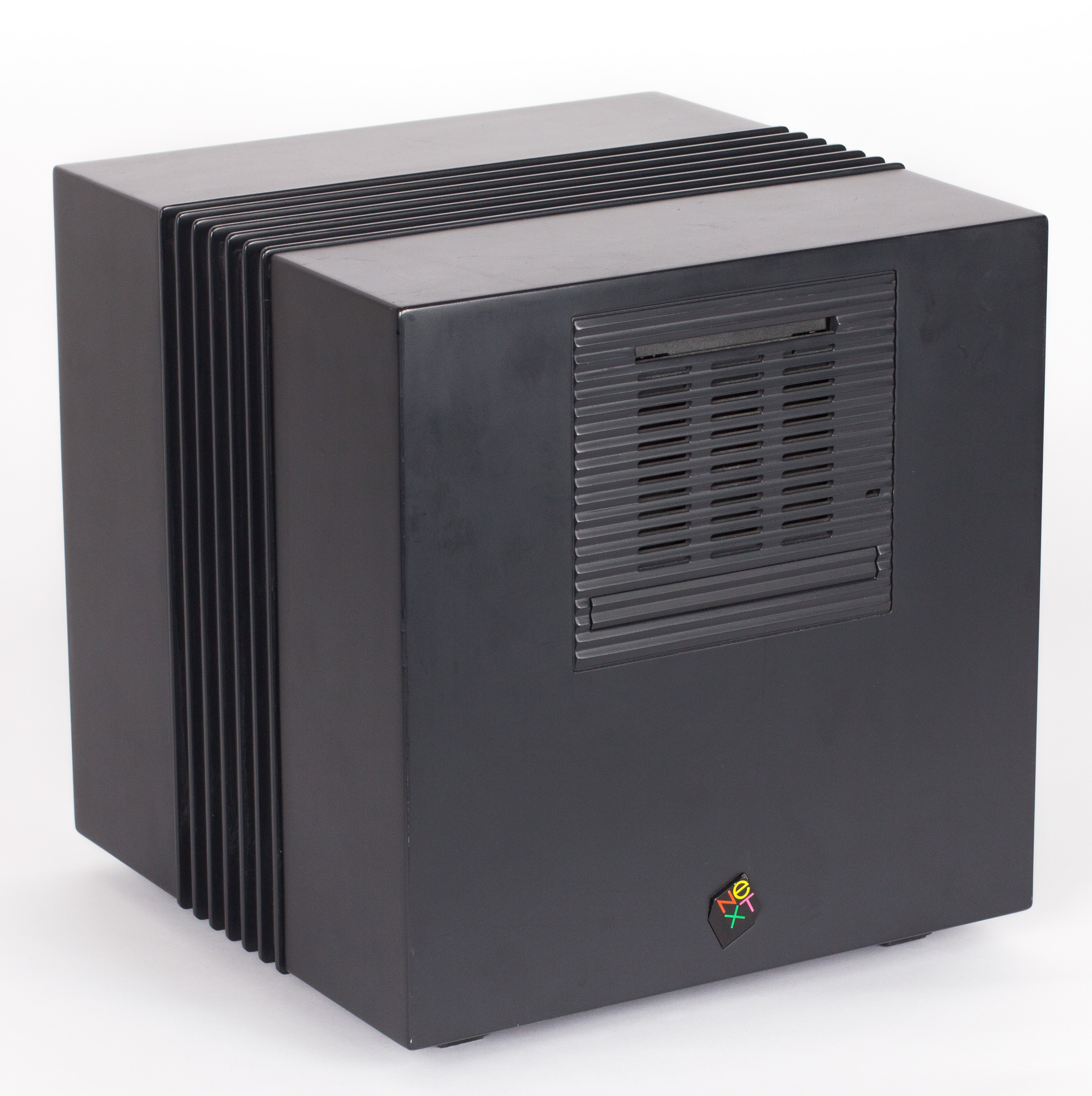
      Did we just get NeXTcubed?

    2. Re:cylindrical by Mitchell314 · · Score: 2

      Dihydrogen Iodide Carbopotassium? I think that's ben and jerry's new ice cream flavor. You should try it.

      --
      I read TFA and all I got was this lousy cookie
    3. Re:cylindrical by H0p313ss · · Score: 4, Funny

      Define cylindrical. http://upload.wikimedia.org/wikipedia/commons/2/27/NeXTcube.jpg

      Like that, only more cylindrical.

      --
      XML is a known as a key material required to create SMD: Software of Mass Destruction
    4. Re:cylindrical by Anubis+IV · · Score: 4, Funny

      It's innovation like cylinders instead of cubes that goes to prove that Apple has what it takes in the post-Jobs world.

      (Disclaimer: I'm an Apple fanatic who thinks that if you can't laugh at yourself, you have a problem)

    5. Re:cylindrical by TWiTfan · · Score: 3, Funny

      Nice try, faker! We all know that real Apple fans have their sense of humor extracted at welcome camp.

      --
      The cow says "Moo." The dog says "Woof." The Timothy says "Thanks, valued customer. We appreciate your input."
  2. and... by LodCrappo · · Score: 4, Insightful

    ..PCs will still be more economical, more powerful, more easily upgraded, and uglier.

    Some things never seem to change.

    --
    -Lod
    1. Re:and... by Mitchell314 · · Score: 2

      Still better than those 90's beige monstrosities IMO.

      --
      I read TFA and all I got was this lousy cookie
    2. Re:and... by aliquis · · Score: 4, Interesting

      It's still a PC.

      Innovative board and case designs though.

    3. Re:and... by fermion · · Score: 5, Insightful
      Actually the Pros were very upgradable, and much easier to do so than any PC. It was always pull a lever, or pull off the top. No screws, not hassle, and this was all the way back , in many cases, to Apple ][. I recall swapping my hard disk out of my Mac LC in about two minutes. Memory on my Mac G4 was about a minute. And worried about getting thing stolen from inside because it so easy? The pass through for the security cable also automatically locks the case.

      Really with mac it was a design decision. Do you limit capability with internal, at the time, IDE ports or do you provide a high speed external port that is plug and play, before most things were plug and play. I have recounted many time how difficult it was to get a ZIP drive to work on a PC, but that such things were automatic on a Mac. Or that hard drives that were too big of slow on a PC were plug and play on a Mac.

      In this case I assume that I would have networked storage through gigabyte Ethernet for archive.

      --
      "She's a scientist and a lesbian. She's not going to let it slide." Orphan Black
    4. Re:and... by Anubis+IV · · Score: 4, Insightful

      ..PCs will still be more economical, more powerful, more easily upgraded, and uglier.

      ...unless you're one of the people relying on a piece of software that only runs on OS X, i.e. the main target demographic for this machine, in which case a PC isn't a valid substitute at any price. Final Cut Pro and Logic Pro still have decent followings, and if you're doing Mac or iOS development and actually have a need for a real workhorse of a machine, you really don't have any better alternatives unless you want to try making a Hackintosh workstation, since you'll need a machine running Xcode.

      Regarding upgrading, the old Mac Pro was remarkably easy to upgrade compared to other towers of its day, but it's since been passed. But if the new one's upgrades really are as trivial as just plugging something into one of the six Thunderbolt 2 ports on the back, then I doubt that any PC case currently out there can provide an easier solution. Whether it works as well as Apple claims remains to be seen, however.

      As for the economics of Macs, modern Macs generally do a rather good job on their launch day of stacking up in terms of price against comparably-built PCs from other major manufacturers like HP or Dell (the last-gen Mac Pro being a notable exception, since it was a poor value, even at launch). That said, with Apple, they've made most of the decisions on what hardware to put in the machine, which is great for people who actually agree with each and every one of those choices, whereas with other vendors, you can find options or alternative models that can save you some money in areas you don't care about as much, thus providing a cheaper machine that, while not truly comparable in terms of specs, is effectively comparable for customers who don't care about the affected areas.

      And, of course, if you're building your own machine you can easily come in at a much lower initial cost than that offered by the major vendors, Apple included, but then you're also accepting a lot of personal responsibility for its upkeep. That simply isn't viable in most corporate environments, since needing to divert people to build and maintain even a few custom-built machines could easily cost the company thousands of dollars in billable hours in no time at all, which isn't an issue with most major manufacturers, with whom you can simply send the machine in and get it back in a functioning condition a few days later as part of the warranty. But for a home environment, where you aren't worrying about billable hours and the like, then sure, building your own makes great sense...but then you're also not the target demographic for this machine either.

    5. Re:and... by Anonymous Coward · · Score: 2, Interesting

      If you're going all the way back to Mac LC, it'd be unfair not to mention the likes of Centris 650/PowerMac 7100 and Quadra 900, which were painful to upgrade. Or the original Macintosh, which could not be upgraded at all. (You could upgrade RAM of the Mac Plus, which had the same case as the original Mac, but not without risking frying yourself with the exposed CRT.)

      Besides, the LC was such a slow piece of junk that it was basically useless without an upgrade. ;-p

      That said, the Mac boxes I bought for myself--Centris 610/PowerMac 6100 and the beige G3 desktop--were quite a bit easier to deal with than any consumer PC case. I don't know about the pro-grade PCs vs Mac Pro, since I've never owned either.

    6. Re:and... by cpt+kangarooski · · Score: 2

      No screws, not hassle, and this was all the way back , in many cases, to Apple ][.

      Not in a continuous tradition, however.

      The compact Macs had bare CRTs inside that would give you a nasty shock if you touched them wrong, and for a while, the power supplies were bare too. And the whole case required an unusually long torx screwdriver to open, in order to deter people from opening it.

      The Mac II's were good, until the end, when the IIvx came along. It was a bit of a bitch to work with, and ushered in an age of Macs that were bitches to work with, most notably everything based upon the Quadra 840AV case. Adding RAM to some of those bastards required disassembling nearly everything. The mid 90s were a dark time for doing hardware upgrades or repairs on high end Mac desktops. The Blue and White G3 case was ugly, but other than the drive enclosure (a bit annoying IIRC) it was a real breath of fresh air.

      --
      -- This and all my posts are in the public domain. I am a lawyer. I am not your lawyer, and this is not legal advice.
    7. Re:and... by dgatwood · · Score: 2

      If you're going all the way back to Mac LC, it'd be unfair not to mention the likes of Centris 650/PowerMac 7100 and Quadra 900, which were painful to upgrade.

      And by painful, I assume you mean physically, as in all those thousands of cuts you'd get all over your hands from all the razor-sharp metal covers and stuff. The 6100, for all its limitations, was a much, much better design, IMO.

      --

      Check out my sci-fi/humor trilogy at PatriotsBooks.

    8. Re:and... by Anubis+IV · · Score: 3, Informative

      Did you really not know?

      Are you really so lazy that you stopped reading after the first sentence? Because you apparently missed the fact that I explicitly mentioned Hackintoshes in the very next sentence of my post. And I also spent a paragraph talking about why building your own machine simply isn't a viable option. But if you didn't even make it to sentence #2, I'm not holding out much hope that you made it to the final paragraph, which was where I discussed that topic.

      Kudos on the excellent knee-jerk reaction, however. ;)

    9. Re:and... by james_a_craig · · Score: 3, Informative

      Sure, but for businesses, that relies on a very precarious licensing situation, and is basically unsupportable.

    10. Re:and... by bemymonkey · · Score: 2, Insightful

      I think the word you're looking for is proprietary. Good luck adding storage when you run out of space, or upgrading to new GPUs when nVidia and AMD have a performance breakthrough one or two years down the line...

      Oh wait Thunderbolt - you can hook up an external graphics card and external hard drives... so it's a bit like a supercharged netbook minus the display and keyboard and portability.

    11. Re:and... by Anubis+IV · · Score: 3, Insightful

      I assume you're referring to the rather plain-looking black towers in their gaming line? Because if you're talking about one of their towers with the excessively-bright blue LEDs and clear sides so that you can show off all of your 1337 internal components, then I don't see a point in continuing this conversation. Antec's designs for their gaming cases vacillate between being tasteful without standing out as anything special and being tastelessly overdone with no sense of restraint, with nothing really coming in between. I'd suggest that their designers are immature in their art, except that I believe that's actually untrue and that they're simply catering to people who prefer gaudiness and excess.

  3. Not Upgradeable? by javakah · · Score: 5, Insightful

    With so much in such a small space/size and an unusual factor as well, I have a very bad feeling about your ability to upgrade practically any parts in this thing.

    1. Re:Not Upgradeable? by csumpi · · Score: 5, Funny

      But why would you want to do that? Apparently it's perfect.

    2. Re:Not Upgradeable? by edremy · · Score: 3, Funny
      Amusingly, back in 2007 Apple ran an ad showing how nice and clean the iMac was compared to the mess of cables behind a typical PC

      My PC has all of its drives, video cards and the like internal, unlike the new Powermac

      Perhaps the PC makers need to update their ads?

      --
      "Seven Deadly Sins? I thought it was a to-do list!"
    3. Re:Not Upgradeable? by aliquis · · Score: 2

      Then, it has 6 Thunderbolt 2 ports running at 20gbps managed by 3 controllers.

      Get whatever external enclosure you want and run whatever you want. Raids, Video cards, etc..

      PCI-express 16x according to Wikipedia:
      v3.0: 15.75 GB/s (128 GT/s)
      v4.0: 31.51 GB/s (256 GT/s)

      15,75*8/20 = 6,3 times faster.

    4. Re:Not Upgradeable? by cheesybagel · · Score: 3, Insightful

      the most upgradable mac ever

      This notice brought to you by the Ministry of Truth.

    5. Re:Not Upgradeable? by WCLPeter · · Score: 5, Interesting

      In all the years I've been building computers I can name only twice where I ever had the opportunity to upgrade; once with an old 466 when I went from a DX2-50 to a DX4-100; another time when I upgraded a K6-2 333 to a K6-2 500. Most of the time when it came time to "upgrade" there had been so many changes to the bus types, socket types, memory types, etc... it was just easier to start over from scratch than try to pick an upgrade from a narrow list of parts which often cost a fortune, while often only giving a moderate speed boost, because they were now considered "specialty" equipment for an obsolete architecture.

      Granted, there are people who will insist that they've been able to upgrade their systems multiple times - but I'm not talking about those compulsive types who need the newest graphics card every other week. Most people I've talked to will buy a machine and keep it for 2-4 years before thinking its time buy a new one, by then everything has changed and the existing machine is mostly obsolete and so they have to start new.

    6. Re:Not Upgradeable? by hazydave · · Score: 2

      Well, there are limits. Thunderbolt 2 isn't any faster than Thunderbolt 1, it just allows the two 10Gb/s links to be aggregated, as PCI Express has always allowed. So, assuming they're all independently connected Thunderbolt ports (eg, aggregate throughput of 20Gb/s x 6, each way), this equivalent to about 15 PCI Express x1 links, in total. Well, that's enough for one external GPU, if you're not working it hard, and some external drives. And given that it's a virtual certainly some of these Thunderbolt ports will be used in DisplayPort mode, I'll bet you don't get anywhere near 120Gb/s to and from (it's a simultaneously two-way channel, just like PCI Express) main memory.

      The real question I would have is on the bus architecture. There's got to be some Thunderbolt/DisplayPort switch internally, to route the output of the GPUs to the Thunderbolt port(s). A typical AMD GPU will have at least two DisplayPort outputs, but of course that's not crossing a main bus, that's driven directly out. That lone HDMI 1.4 port is only for one monitor, and HDMI 1.4 can only drive quadHD at 30p or true 4K at 24p... not what you'd want for a workstation-class system. The rationale for Thunderbolt 2.0 was to allow faster graphics, since Thunderbolt 1.0 can't support 4K in Thunderbolt mode, only DisplayPort mode (DisplayPort 1.2 can hit 17.2Gb/s, ever-so-slightly less than Thunderbolt 2.0). So you're going to be using monitors on at least two of these ports. And again, that's going to want to switch directly from the GPU modules, not cross with anything else.

      So I bet they have a big old cross point switch, which the output of the GPUs, the Thunderbolt ports, and a link to the main system (via PCI Express most likely), to keep this thing going.

      --
      -Dave Haynie
    7. Re:Not Upgradeable? by gman003 · · Score: 5, Interesting

      As a guy currently dragging his old Mac Pro into the modern computer era, let me say this: Apple would have found a way to make it incompatible anyways. There are so many just-slightly-nonstandard things they have, that any significant upgrade is made a hundred times more difficult.

      First are the obvious ones. Nonstandard motherboard layout. The whole case layout in general, which requires a lot of stuff be removed just to access anything beyond the drives, video card and RAM. No legacy PCI ports.

      Then come the subtle incompatibilities. Only certain video cards have OS X drivers, and only an elite, overpriced few have firmware that lets them work in the BIOS/EFI stage. I have to keep the original card around just in case I ever need it. Then the hard drive caddies only work with full 3.5" drives, or with 3.5" -> 2.5" adapters that perfectly mimic a 3.5" drive (I believe a Velociraptor IcePak will work; I use a cheaper plastic one since heat isn't an issue for SSDs). There's also a custom "mini-PCIe power" port, used to provide power to PCIe cards.

      Then come the dangerous ones. Apple seems fond of using standard connectors in non-standard ways. For instance, the front USB panel? That's connected to the mainboard using a SATA connector. Just don't try to plug a hard drive into it. Same for the case fans - they're four-pin, but they don't use PWM for speed control (I believe they use analog voltage instead). Which also means that Windows (should you boot into it) does not get any control over the fan speeds, or even visibility.

      Finally are the downright confusing ones. On mine, there are two unused SATA ports on the motherboard, hidden behind the front fans. They're labeled "ODD_SATA", hinting that they were planning to use SATA-based optical drives instead of IDE. I thought I could just use them for additional hard drives, but nope - they somehow only work in OS X. Don't ask me how, but they managed to make it happen. I've given up and just ordered a RAID card.

      So yeah, don't think for a moment that the only thing standing between the new Mac Pro and any non-trivial upgrades is the form factor. The thing standing in the way is Apple.

    8. Re:Not Upgradeable? by smash · · Score: 3, Insightful

      100% that. Even recently with a bunch of xeon servers (2007 spec), it was cheaper to buy new machines (2012 spec Cisco UCS) with more RAM than it was to upgrade the RAM, as the RAM standard changed and high capacity DIMMs in the old format were super expensive.

      --
      I run: Windows, OS X, Linux, FreeBSD. Just because you have a hammer, doesn't mean everything is a nail.
    9. Re:Not Upgradeable? by MartinSchou · · Score: 2

      Yes, upgrades that aren't Thunderbolt-devices will be difficult. But as others have pointed out, most people don't upgrade, and when they do, so much needs to be changed anyway, that you're almost better off buying a new computer.

      For example. I built a Sandy Bridge based computer in January 2011. Two and a half years ago. If I wanted to upgrade to the newest line of CPUs, I'd be forced to buy a new motherboard as well as CPU, as the Haswell isn't socket compatible with Sandy and Ivy Bridge (nor are AMD CPUs). Fortunately it still supports DDR-3, so I wouldn't have to upgrade that though.

      But pulling everything out of the case, putting in new hardware, reinstalling drivers, the inevitable bitching from Windows about how I'm a damned, dirty, filthy software pirate for upgrading my hardware really doesn't seem worth it compared to simply buying a new computer.

      And if you work in an office? I don't think I know any people who does works in corporate IT, who've upgraded internal hardware - they generally buy new stuff when the old stuff doesn't cut it any more, or when new stuff makes it economically viable to upgrade due to time savings.

      And considering the cheapest Mac Pro available in the Apple Store at the moment is $2,499, I don't think this is aimed at home users either - they'd be going for iMacs.

      Equally upgradable (or lack thereof), but if it works, why bother?

    10. Re:Not Upgradeable? by Molochi · · Score: 3, Insightful

      I've upgraded systems often, but that's more due to some quantity of opportunity than to prescience. Every now and then some remarkable upgrade is offered on an existing platform that is worth exploiting. Usually it's just a doubling of CPU performance like A64 CPU to Athlon X2 or Core2Duo to Core2Quad.

      I never really built any system with a belief that I would be able to upgrade the CPU. I just hoped for and took advantage of the opportunity. The truth is new CPUs tend to require new motherboards which tend to require new memory and PSUs. Even when a new version of a CPU kept the same socket it would tend to use a (lower) voltage, different (higher) FSB, or a BIOS update that older motherboards wouldn't accommodate.

      People tend to look back on the good old days and forget. K6-2 didn't run at full speed on a socket7 mobo, you had to go get a Supersocket7 motherboard. You couldn't replace Celeron 300a CPU with a Coppermine on your i440BX, that required a new (and oddly, inferior) motherboard. VIA's KT133 didn't support AthlonXP. Though in these cases there were sometimes hardware (with a soldering iron or a special slotket) workarounds.

      And during this period we went to DDR memory (though intel went DRAM> RDRAM > back to DRAM and then to DDR), new AGP and PCI cards that didn't work in old slots, different PSU connectors and system power requirements that required new PSUs.

      Today's systems are moving everything onto the CPU... first memory controllers with Athlon64 and now with Haswell even voltage regulation. Any change anybody makes practically requires a new motherboard.

      i7 desktop CPUs alone have used 1366 1155 1156 and 2011 pin sockets and Haswell is being introduced with the 1150. When they come out with a triple or quad memory channel or just something that supports DDR4 it'll mean even more new motherboards.

      But there will probably be some combination of hardware that allows someone to brag about how smart they were with a "planned upgrade".

      --
      "The Adobe Updater must update itself before it can check for updates. Would you like to update the Adobe Updater now?"
  4. Great fun by michaelmalak · · Score: 5, Funny

    Looks like it'll be great fun for pets and kids alike to roll around on the floor.

  5. What the hell? by putaro · · Score: 4, Interesting

    I wanted to like the new Mac Pro but it makes no sense to me.

    Internal FLASH only - that's fine for a MacBook Air, but aren't the target users for this video editors?
    Limited RAM - only 4 ram slots. The old one had 8.
    Cylindrical - Great, now nothing fits next to it
    Exhaust from the top - Can't put anything on top and if you spill a drink on it, it goes straight into the machine.

    What are the pluses to this design? Hopefully it runs quiet but beyond that???

    This is the new Cube. I wonder if this will be the final Mac Pro - "Well, nobody bought it so it's obvious there's no market here..."

    1. Re:What the hell? by kelemvor4 · · Score: 5, Funny

      I wanted to like the new Mac Pro but it makes no sense to me.

      Internal FLASH only - that's fine for a MacBook Air, but aren't the target users for this video editors? Limited RAM - only 4 ram slots. The old one had 8. Cylindrical - Great, now nothing fits next to it Exhaust from the top - Can't put anything on top and if you spill a drink on it, it goes straight into the machine.

      What are the pluses to this design? Hopefully it runs quiet but beyond that???

      This is the new Cube. I wonder if this will be the final Mac Pro - "Well, nobody bought it so it's obvious there's no market here..."

      The pluses are in Apple's bottom line, as they always are. Also, if you put it on the floor and your home is burgalarized the culprit will probably assume it's a wastebin and skip it.

      In an office, you might have a problem when the cleaning person tries to empty it. However, no worries since Apple products aren't often found in offices that can afford a cleaning person.

    2. Re:What the hell? by cheesybagel · · Score: 2

      Why the heck should I need to buy a NAS if all I want is a workstation?

    3. Re:What the hell? by hazydave · · Score: 2

      Thunderbolt doesn't store a single bit. Maybe you meant "eSATA is dead"? You're still going to need a place for that Thunderbolt cable to find some storage, and you're probably going to want it to be redundant. Sure smells like a RAID to me. And there's such little storage in the system, external working drives will not be optional.

      And for lots of media creation, it's not just the single stream throughput of the drive, but the aggregate performance across dozens, maybe hundreds of files. RAID isn' always a better answer here than multiple, independent drives. Of course, you can configure most RAID controllers to just to JBOD if that's what you need, but either way, it's still one more box to deal with. Companies may have a SAN, but then you're bottlenecked at GigE.

      --
      -Dave Haynie
    4. Re:What the hell? by nine-times · · Score: 3, Interesting

      Internal FLASH only - that's fine for a MacBook Air, but aren't the target users for this video editors?

      Real video editors are doing the actual work on external drives/arrays anyway. I don't think it's as big an issue as you're making it sound.

      Limited RAM - only 4 ram slots. The old one had 8.

      I think you have a point, but at the same time, shouldn't the real question be the maximum RAM capacity and RAM performance, and not the number of slots?

      Exhaust from the top - Can't put anything on top and if you spill a drink on it, it goes straight into the machine.

      So maybe don't pour your coffee into it?

      Depending on the price point, I suspect this thing might be successful. What annoys me more is that I've wanted Apple to build something like this for a while (i.e. a larger and more powerful Mac mini), but aiming more for gamers than professional workstations. Apple has kept their monitor-less computers segmented between "low-power desktop productivity" and "high-power professional workstation", but neither is really suitable for "cost-effective mid-range enthusiast/gaming". They should take this design and put a Core i7 and a NVIDIA GTX card. Then they should allow you, if you choose, to plug it into a TV and run an Apple-TV-like interface that would also let you launch games.

    5. Re:What the hell? by Sycraft-fu · · Score: 3, Informative

      On external arrays? No probably not. Not unless you are talking SAS/FC arrays. iSCSI would be an option, but not on a Mac since they don't support it. Firewire and USB are too slow. Yes I realize Thunderbolt is faster, it is also brand new and not in existing Mac Pros, it isn't what people use.

      Most of the video editing stations I've encountered use internal disk arrays. External drivers are used just for acquisition. I'm sure if you talk really high end you'll start going to some external setup to hold more drives, but that isn't the norm. You can pack a lot of drives in a normal tower, most people seem to do that.

      In terms of RAM slots numbers matter because it does dictate cost and capacity. Like say it is using RDIMMs. Ok well with 16GB modules your cost is $160ish per stick. Not bad, provided 64GB of RAM will do it. Want 128GB? There are 32GB sticks... for about $1100 each. It takes a massive jump to go to that density. Now if it uses UDIMMs then you are talking a max of 8GB per stick, that's all there is right now, so 32GB max.

      That's why a system with a lot of RAM slots is often desired, even if you aren't going max RAM capacity. Our VM servers can technically take 768GB of RAM, but we won't ever do that because it would cost like $26k. However we wanted that many RAM slots because we can do 384GB for under $4k which is reasonable. So more slots are useful, they can get you RAM for less money.

      My best? It is 16-32GB max. The 1866MHz speaks to UDIMM RAM (I've never seen 1866 RDIMMs), which means 32GB max no matter what because there aren't bigger sticks right now (and probably won't be, too many electrical issues without a register). It also might end up being 16GB, because as you push speeds, doing 32GB gets hard. Though I dunno, the memory controller on Hawell might have an easier time with that.

      In terms of the liquid thing, this is a real concern. Should you avoid spilling on shit? Sure but accidents happen. Everyone I know likes to have a beverage at their desk while they work. With a normal case, a spill on it (which I have seen happen) is unlikely to be a problem. With an open top, it is likely to short out the system.

    6. Re:What the hell? by Anonymous Coward · · Score: 2, Informative

      Where I work we have > 500 Apple systems, a dedicated team of support staff and an update server behind the firewall. More than half of the executive leadership has MacBook Airs and 27 in displays sitting on their desks, iPads in hand and we get iPhone 5s as a provisioned mobile device. Oh and our revenue is counted with a capital B. I'm certain we're not the only Fortune 500 company with a similar setup, IBM consultants always seem to drop by carrying their MacBook Pros.

    7. Re:What the hell? by phayes · · Score: 2

      For people who need faster storage (video editing comes to mind) NAS won't cut it but using an external RAID box connected over Tbolt is just the ticket.

      Kielistic's problem is that he's certainly accustomed to building/modding up his own PCs & prefers using a huge enclosure so that he can setup RAID inside them.

      Apple has been eliminating spinning disks from their products for years & has a perfectly capable means of accessing external RAID boxes over Thunderbolt but because that's not how he's used to doing it, that's bad. He reminds me of the people who panned the Ipod years, back.

      --
      Democracy is a sheep and two wolves deciding what to have for lunch. Freedom is a well armed sheep contesting the issue
    8. Re:What the hell? by putaro · · Score: 2

      It's not a cup holder. Though I suppose it could keep your coffee somewhat warmer.

      Yes, unfortunately they got rid of the cup holders a few generations back. I always thought that the little cup holder popping out when you hit the button was very handy, myself.

    9. Re:What the hell? by MouseAT · · Score: 2

      Except that the middle of the machine doesn't appear to contain anything - the electronics are all around the outsides, the middle is mostly air and heat sink. Any liquid spilled into the top probably comes straight out of the bottom.

  6. So No then by tuppe666 · · Score: 3, Insightful

    Ram is upgradable

    Then, it has 6 Thunderbolt 2 ports running at 20gbps managed by 3 controllers.

    Get whatever external enclosure you want and run whatever you want. Raids, Video cards, etc..

    The shorter answer would be no. Its not expandable, an incompatible rare expensive *external* interface is simply not a solution. Although I do find it somewhat ironic that you could argue that a raspberry pi costing $25 is upgradable too :).

    1. Re:So No then by tk77 · · Score: 4, Informative

      The system is targetted towards professional workstation use. Having rare expensive "external" devices is already common place. External enclosures for running multiple video cards for resolve systems, firewire / esata raid arrays, etc its all being done currently. Also makes it a lot easier to swap devices between systems.

      While I would like to have at least an upgradable graphics system, having everything external (for meanyway) is already a standard thing. There's only so much storage you can fit inside the system as is, and most of my graphics needs are via additional cards for cuda/opencl processing.

      Being able to swap drive arrays like I was using FW800 but with speeds greater then eSATA will be nice. Being able to just plug in an external enclosure and run cuda/opencl accelerated applications more accelerated.. and not having to worry about internal power, additional psu's, etc will be welcome.

    2. Re:So No then by tysonedwards · · Score: 2

      I wouldn't really call a Xeon or Dual AMD FirePro GPUs "Laptop Hardware", however putting them in a barely serviceable enclosure surely is laptop-esque.

      --
      Thirty four characters live here.
    3. Re:So No then by Anonymous Coward · · Score: 2

      The thing supports 3 4k displays out of the box, but you don't trust it for some reason? If you don't trust it you have no idea how it works and should just shut up and stop spreading FUD.

      To put it simply:

      Thunderbolt == PCIe with a different connector.
      DisplayPort == DVI with a different connector.

      I guess you don't trust PCIe or DVI either. I'm glad you're getting such great quality out of your D-sub VGA card.

    4. Re:So No then by macwhiz · · Score: 4, Informative

      Given that Thunderbolt carries not only the equivalent of a PCIe x4 connection, but also a DisplayPort connection... and that the new Mac Pro has six Thunderbolt 2 connections... it's obvious that the HDMI port is there as a convenience for those who would otherwise bitch about having to buy a Mini DisplayPort to DisplayPort/DVI/HDMI/VGA cable. Since Apple has advertised the unit as supporting three 4K displays out of the box, obviously at least three of those Thunderbolt 2 ports can be used for DisplayPort video.

    5. Re:So No then by Anubis+IV · · Score: 3, Informative

      The shorter answer would be no. Its not expandable, an incompatible rare expensive *external* interface is simply not a solution.

      Yes, it is, and you're apparently ignorant of the fact that workstations already rely on this concept and have for years. Not only that, but they tend to use far less compatible interfaces that are far more expensive than Thunderbolt. External expansion is already in common use in the workstation crowd and is considered perfectly acceptable as a means of expansion. All Apple is doing is making it the primary means of expanding their machine, rather than an optional one, and they're doing it over a rather common interface, relatively speaking, which should help to bring the practice more into the mainstream.

      I'll agree that there is uncertainty whether or not Thunderbolt 2 will be sufficient for these purposes, but dismissing it simply on the grounds that it's an external interface and is thus not a solution is just demonstrating that you're clueless about the sorts of hardware already being employed by the people that this machine is aimed at.

    6. Re:So No then by Anonymous Coward · · Score: 2, Interesting

      Bonus points if the external housing is shaped like a previous-generation Mac Pro, and has a cylindrical hole inside to fit the new Mac Pro.

    7. Re:So No then by Anubis+IV · · Score: 3, Informative

      the fact it only has one real display connection and it is only hdmi 1.4 puts this firmly into bragging-rights consumer level hardware for me. I have my doubts about the thunderbolt connected displays. Also, cramming a bunch of workstation 'laptop' hardware into a cylinder isn't worth the price premium.

      *sigh* I'll feed the troll.

      You do realize that the HDMI port is actually the least capable display interface on the machine? And not just because the Thunderbolt ports can be used for both data and display. Specifically, they can be used to drive higher-res displays than HDMI, which Apple demonstrated during the keynote when they showed a workstation set up with three 4K displays being driven by a Mac Pro: something that HDMI is incapable of doing currently, let alone your laptop.

    8. Re:So No then by Jeremi · · Score: 3, Informative

      I wouldn't really call a Xeon or Dual AMD FirePro GPUs "Laptop Hardware", however putting them in a barely serviceable enclosure surely is laptop-esque.

      It looks pretty serviceable to me... take the cover off, and the hardware is all accessible, arranged around the perimeter. I'm probably missing something obvious, though...

      --


      I don't care if it's 90,000 hectares. That lake was not my doing.
    9. Re:So No then by serviscope_minor · · Score: 2

      HDMI 1.4 (released in 2009) is capable of driving 4k displays.

      One doesn't seem to see it in the wild very often, though one does also ont see monitors capable of reading displayport in the wild very often either.

      Most HDMI seems to be stuck at 1.2, never mind even 1.3, just to make life that little bit more annoying.

      Seriously what the hell is up with monitor connections these days?

      --
      SJW n. One who posts facts.
    10. Re:So No then by d3vi1 · · Score: 2

      Nothing is laptop hardware in that machine. Like previous Mac Pros it has workstation cpu (Xeon), workstation graphics (FireMV) and workstation RAM (registered, ECC). Indeed, the mac mini has a laptop CPU and SO-DIMMs for memory, but we're talking about the Mac Pro.
      Furthermore, I don't get the "doubts about the thunderbolt displays". Thunderbolt can act as a simple mini-display port (with audio also). So go grab your $150 Dell Display Port monitor and plug it in. All it takes is a $8 mini-display port M to display port M cable. If you want to use the more advanced features of thunderbolt, it's a matter of taste, but for a lot of external hardware USB is not an option even in it's 3rd incarnation.

      --
      UNIX was not designed to stop you from doing stupid things, because that would also stop you from doing clever ones.
    11. Re:So No then by Kjella · · Score: 3, Informative

      HDMI 1.4 (released in 2009) is capable of driving 4k displays.

      Up to 30 Hz, which is fine for high resolution stills and 24p movies but I'd never run my computer on anything less than 60 Hz as games and other high FPS content would look horrible. HDMI 2.0 should be right around the corner to bring it up to speed with DisplayPort 1.2 and Thunderbolt 2.0 - even if screens are still thousands of dollars and 4K content still very rare.

      --
      Live today, because you never know what tomorrow brings
  7. Only 4GB of RAM? by Darkness404 · · Score: 3, Interesting

    Only 4 GB of RAM for the Air? Even your bottom-barrel throwaway laptop from Walmart tends to have at least 4 GB of RAM, let alone a laptop you're going to be paying $1K for.

    --
    Taxation is legalized theft, no more, no less.
    1. Re:Only 4GB of RAM? by Kielistic · · Score: 3, Informative

      while Windows 7/8 struggles.

      While Win7x64 might struggle on less than 1 gig of RAM I can assure you it is quite happy with 4.

    2. Re:Only 4GB of RAM? by llmc · · Score: 2

      Only 4 GB of RAM for the Air? Even your bottom-barrel throwaway laptop from Walmart tends to have at least 4 GB of RAM, let alone a laptop you're going to be paying $1K for.

      It also comes in a configuration with 8GB.

  8. Re:Overshadowed by PRISM by jurco · · Score: 2

    Apple is complicit in the largest expansion of government surveillance power in my lifetime...

    How dare you. Apple hasn't even heard of PRISM.

  9. The power button is on the back of existing macs by perpenso · · Score: 3

    You turn off your computers ?

    Most Mac users I know dual boot Windows and OS-X.

    And using the "Restart" menu option works just fine for rebooting. Why is the power button needed?

    I believe the power button is on the back of the Mac mini and iMacs.

  10. the old Mac Pro had 4 RAM slots also by YesIAmAScript · · Score: 4, Informative

    In the one CPU config. That is, one CPU socket package, 6 or 8 cores. If you got the two CPU socket version with 12 cores, you got 8 RAM slots.

    The model pictured is one with a single CPU socket and has 4 DIMM slots. It's quite possible that the two CPU socket version of this Mac Pro will have 8 RAM slots also.

    I checked, there is no 12 core version of Xeon E5, so presumably to get the 12 cores on this one will use two packages as the last one did.

    I don't have any problems putting stuff next to cylinders. I have a coffee cup on my desk, it isn't causing any untoward issues.

    This thing has no HDDs. No amount of flash would be enough for video editors, and not even 4 internal HDDs would either. So you will use a Thunderbolt external HDD or RAID array. I just hope those get somewhat cheaper soon.

    --
    http://lkml.org/lkml/2005/8/20/95
    1. Re:the old Mac Pro had 4 RAM slots also by Anonymous Coward · · Score: 3, Informative

      It will use the e5-2600 v2 series cpu that does indeed have 12 core variants (they have not launched yet), so I do not believe there will be a 2 cpu version otherwise I think they would have displayed it.

    2. Re:the old Mac Pro had 4 RAM slots also by hazydave · · Score: 2

      I concur.. the E5 V2 has already been announced going to 12 cores. Not out yet.. but Apple's certainly waiting on something. As well, you do not see a place in that box for a second processor. Nope, it ain't there.

      --
      -Dave Haynie
  11. Re:Overshadowed by PRISM by Picass0 · · Score: 4, Insightful

    I respect and understand how you feel, but the anger should be directed at Washington. When the White House hands down mandates what do you expect these companies to do?

  12. Receptacle? by Fierlo · · Score: 2

    Is it just me, or does the Mac Pro look like a really fancy garbage can? That's the first thought I had when I saw the pictures in the article.

  13. Sigh by The+Cat · · Score: 2

    It "rocks" a 12-core Intel Xeon processor

    sigh

  14. Re:Dayum... by BluBrick · · Score: 2

    Perhaps the iPlanter? It'll look fahhh-bulous next to the Macquarium! But remember to place it to the East or West or it will block the chi from the North.

    --
    Ahh - My eye!
    The doctor said I'm not supposed to get Slashdot in it!
  15. Re:And where have they put the power button on the by wolrahnaes · · Score: 3, Informative

    Which is done with the reboot option from within the OS, generally. The point was that most computers default to automatically sleeping in a reasonably short time and this has actually worked reliably for the last 5-10 years, so its fairly common to not actually turn a computer entirely off.

    My desktop sleeps at five watts. Parasitic draw when entirely off is 1.5 or so. That's just short of 31 kWh in a year. At my electric rates, that means leaving it asleep rather than off for an entire year would add all of $6 to my electric bill. As it's certainly not off/asleep for all that time, the real-world impact is closer to $2-3. Even with a nice SSD, boot is a 30-45 second thing where the longest part of waking from sleep is waiting for my monitors to realize what's happened and turn on.

    The cost of a smoothie every year in exchange for convenience every time I return to my computer? Yeah, worth it.

    Also, most Mac users don't dual-boot unless they're gaming. VirtualBox works just as well for 95% of uses and adds a lot of features you don't get with bare metal installs like snapshots, plus Parallels and Fusion exist for those with more specific needs who can't get away with VirtualBox. I'll agree that many serious users of Intel Macs run Windows in some form, but the dual boot versus virtualized split has been shifting more and more towards virtualized over the years.

    --
    I used to get high on life, but I developed a tolerance. Now I need something stronger.
  16. Not Haswell Mac Pro by maccodemonkey · · Score: 3, Interesting

    Haswell Xeon E5s don't ship until next year. This would be an Ivy Bridge Xeon E5, unless Apple is going to be super super special.

    1. Re:Not Haswell Mac Pro by Anonymous Coward · · Score: 5, Informative

      Apple shipping Intel CPUs in models/versions/speeds unavailable to other vendors is not unusual - there's been quite a few times when Intel has cut them a 6 month lead on the rest of the industry ( which kind of makes sense as Apple embeds VLSI engineers at Intel in these situations, and buys in unit quantities of a small number of speed bins that are net much larger single orders than any other single Intel customer) eg 3.2 GHZ Xeon availability, or ULV Macbook Air CPU - neither of which was an available part from Intel for 6-12 months after Apple was shipping them.

  17. Re:Mac Pro DRAM by Wesley+Felter · · Score: 3, Insightful

    You mean a workstation uses "not consumer" RAM? Tell me more...

  18. Re:Tassels by Anonymous Coward · · Score: 4, Funny

    Or a wacky, flailing arms, inflatable tube man on top.

  19. From 1.8GHz i5 to 1.3 GHz i5 by phalse+phace · · Score: 3, Insightful

    I'm really curious to see the benchmark comparisons between the previous MacBook Air with the 1.8GHz dual core i5-3427U (Turbo Boost up to 2.8GHz) and the new MBA with a 1.3GHz dual core i5-4250U (Turbo Boost up to 2.6GHz).

  20. No not really by Sycraft-fu · · Score: 4, Informative

    In terms of opening, it depends on the case. There are some very easy no-tools PC cases out there. All Dell servers, for example, are just a lever to open (I mention them since we buy a lot).

    However that aside easy of upgradeability isn't about how easy you can get the side off, I mean really if a thumb screw vexes you, you are being silly. It is about component availability and this has always been a massive Mac problem. Things like custom powersupplies, custom video card BIOSes, that sort of thing, and of course fuck-all available from Apple. When you get a PC, particularly a high end one, you've got all kinds of options. With a good manufacturer, they will sell you the stuff, as well as your ability to get it aftermarket. Like with a Dell workstation Dell will sell you, after the fact, addon processors, memory, GPUs, HDDs, SSDs, RAID controllers, HBAs, network adapters, power supplies, and so on for your system. All of them come with full warranty support though Dell, of course.

    They don't have what you want, or don't have it for a good price? No problem, you can get it all aftermarket. Nothing special needed, buy the regular stuff from any vendor.

    You can really upgrade the hell out of a PC, and keep doing it, if you want. I haven't bought a new desktop in like 8 years, yet it is still very much top of the line. What happens is I just replace components as needed. I get a new GPU every 18ish months, new HDDs if I run out of space or if something is faster enough to catch my interest (like my SSD), a new audio card when I see one with features I want, a new motherboard/CPU every 2ish years, new RAM if the motherboard needs it, new PSU should power requirements change (hasn't happened) and a new case never because I like mine. So even when the core, the CPU and motherboard, get upgraded it isn't a new system. I can keep the case, PSU, GPU, sound card, drives, and all that jazz.

    Now I'm not saying this is how people should do it, but that is a demonstration of what real upgradeability means. It is the ability to upgrade any component when a new one comes out more or less, and to do so with anything as much as needed. Not the ability to take the case off and put in more RAM.

    In terms of network storage I suppose... But what? OS-X can't act as an iSCSI initiator so you can't use any of the nice high end iSCSI arrays (like an Equallogic) or something. No 10gig so no FCoE. Apple doesn't make storage arrays and nothing else seems to support AFP. So... You buy a Windows server and use CIFS? Last I tried, CIFS performance wasn't great on the Mac, but whatever.

    Macs really aren't that well designed for network storage on account of not having anything out there for them. I mean generally for network storage you either want a NAS that speaks the protocol your OS likes, and for OS-X that's AFP which is not popular, or for higher performance/lower latency you hook up using iSCSI or FCoE. iSCSI is real popular because gig (and bonded gig) are options and you can run it over your regular network, even over the Internet if necessary. Most OSes (Windows, Linux, BSD, Solaris, VMWare) can act as initiators and talk to an iSCSI target (most of them can be targets too if you want), but not OS-X, it has no iSCSI support.

    I mean they'll talk to a CIFS share if you are just looking for a place to put stuff, but given the lack of space I presume you are talking about networked storage in a high performance capacity, using it online like local storage. That really only works well with high performance stuff and that they do not seem to have.

    1. Re:No not really by greg1104 · · Score: 2

      You can get AFP support for shares from FreeNAS, and from a few commercial NAS boxes: Netgear ReadyNAS, QNAP, and Synology. I use the ReadyNAS when I'm looking for something cheap, and the Synology if I'm looking for better features like encryption. I'm listening to music streaming off of a ReadyNAS AFP volume as I write this.

    2. Re:No not really by chris_martin · · Score: 5, Interesting

      I have a 10G Ethernet card on my iMac via an external Thunderbolt PCIe expansion chassis. So, OS X can use 10G.
      I have a third party software iSCSI Initiator installed, so OS X can use iSCSI.
      You fail to mention NFS, which OS X supports natively.

      Aside from CPU upgradability, the 6 Thunderbolt ports means that this particular Mac Pro is the single most expandable Mac on the planet.
      You can add a TON of PCIe expansion boxes to give you a ton of slots as needed, including additional graphics cards, RAID cards, etc.
      Since everything is external, you also don't need to worry about upgrading the internal PS of the Pro or worry about cooling needs of the computer itself.
      Yes, it'll mean that everything is external, but it also means that everything is "pay as you grow" and keeps the computer itself nice and small and hopefully less expensive (we shall see).

      No, it's not for everyone, but it is an interesting design and it is expandable.

      --
      -- Chris Martin, System Administrator
    3. Re:No not really by jythie · · Score: 2

      *nod* if we finally start seeing low cost external expansion chassis again, that could really be a game changer in terms of upgradibility. I always really liked the modularity of them back in the NuBus days.

  21. I kinda like it. Sorta. by wezelboy · · Score: 2

    Disclaimer... while I have been an Apple user for a long time, I do get a lot of milage from other hardware and operating systems. I wouldn't call myself a fan boi.

    I bought the G5 Power Mac within a month of its release. This is pretty much the same case that is the current Mac Pro. I was totally disappointed. It had a lot of great features, but it was freakin' HUGE.

    Over the years, I've hoped that Apple would get their desktop case down around a Micro-ATX form factor, but they never did. An obvious design flaw was ignored by The Steve for umpteen years. This new case seems like an extreme reaction to the size issue- which is great. It's tiny. There's some great engineering in there. But unless this new soda can is priced to sell, this is a play straight out of Apple's 1992 playbook. It isn't 1992, and that play didn't work so well the first time around. If they want to pull that shit, they need to fit 4-6 of them in a 2U form factor and get back into the server market.

    In today's economy, is it feasible to price your products out of reach for an average consumer? Maybe I'm just envious because I know I will never be able to afford one of these things. It's not like I have the same job I had when I bought that monstrous G5.

  22. Get over the upgrading by gnu-sucks · · Score: 5, Insightful

    Folks,

    I just read ten posts above about lack of upgradability.

    Who cares!?

    It's not a big deal. The days of upgrading your pc every few years are over. Two years after buying this machine, Apple will release a newer version. The newer version will be so much better (faster bus, etc), that the older one will be left in the dust and on ebay for $499.

    Things have been headed this way for a long while now. Why upgrade when it's only a little more to get a new machine with the best and latest/greatest hardware inside? This argument didn't hold as much weight in the past when the computer ecosystem moved slower. These days though, we move faster.

    I like upgrading because it's an interest of mine to spend/waste my time getting things as fast and cool as possible, but honestly, this is more for fun than anything. If my professional life depended on a few more GB/s, I would drop down the money and upgrade at every chance I have.

    Max out the ram and other options when you buy it, and make the most of it until there's a new model.

  23. In the future we don't use hard drives? by neoshroom · · Score: 3, Interesting

    Yes, the Mac Pro's used to be rather upgradable. I upgraded my drives many, many times and it was much easier than any PC and I upgraded my video card by buying a standard Windows video card and flashing it to work with Mac.

    While the new Mac Pro looks great, but I'm a little worried about expandability in this regard with the Mac Pro. I mean, I guess with dual GPU's you might not really want to upgrade the video card, as it would get quite expensive and they probably perform great to begin with. I can see not needing a CD-ROM. The only thing I use mine for ever currently is ripping music CDs to lossless. However, you are definitely going to want to add hard drives and popping on four thunderbolt connected drives, the same amount of slots as the Mac Pro had before, is going to get ugly fast.

    What they really should do is offer a second version of the same case as another product, with a power supply and four or five hard drive slots. It should as an option automatically put them in a RAID and even include wifi so it becomes a NAS. Then you can just have two of these things connected together locally via thunderbolt or separately over wifi or LAN instead of a mess of external drives.

    --
    Big apple, new Yorik, undig it, something's unrotting in Edenmark.
    1. Re:In the future we don't use hard drives? by aaarrrgggh · · Score: 2

      The internal video can handle (3) 4k displays. Sure, someone might want six... but Apple is providing pretty high-end graphics at least relative to my needs and everything short of a NOC that for some reason must have all displays driven from a single tube.

      Sadly, the only thing I can pick on is how you integrate accessories with it. Do you go with a round RAID array that is 12" diameter, 3" high, and has 16 or (32) 2.5" drive bays around a central core just so you can have the little bugger actually look like a Cray? Do you create a speaking digital assistant with a little blower-man on the top? Can you put it on its side, pair it with a second unit, and use it as a base for your monitor like those advertisement trucks? The possibilities really are endless!

      Some applications might be a stretch for the new Pro, and some might not look so cool with conventional accessories. There are other options they might have been able to add on to ease the transition, but at least the message is clear: you have Thunderbolt, USB3, and dual copper Ethernet. That is it, have at it, or don't.

    2. Re:In the future we don't use hard drives? by MachineShedFred · · Score: 2

      I was also concerned about the lack of PCI-e expandability, but there are Thunderbolt-to-PCIe breakout boxes that exist already, and a couple people have gotten Radeon 7xxx cards working with their MacBook Air via Thunderbolt. It compromises the aesthetic to have a shload of breakout boxes connected all over the place, but it will work.

      Also, in an actual pro environment, thunderbolt-to-fiber channel HBAs fix a lot of that. Keep your storage in a server room, and just run a fiber pair / ethernet cable to the desktop. Especially with Xsan now being built into the OS.

      --
      Slashdot still doesnâ(TM)t support Unicode after it was added to the HTML standard in 1997.
  24. Borg technology by ceview · · Score: 2

    This is very much like borg technology it seems, though it lacks the green glow. But actually this is a pretty nice prosumer device. I suspect that the entry level machine with 4 cores will be what Apple is keen to sell, I suspect the low end spec machine ( similar to current low spec on the Apple store) but probably a few hundred dollars cheaper. This will allow apple to sell more Apple Displays too. I actually think this is a clever strategy to get people who want to play high end graphics intense games. As far as expandability, I also think those days are over. The daisy chaining ability would reduce the actual number of wires at the back too. Pretty sure there is some kind of tower of Thunderbolt external adapeter drives you can sit next to it. No doubt a third party will create a matching cylinder that you can slide other things into like SDDs graphics cards drives etc and only needing one cable into the main cylinder.

  25. Touchscreens by Barryke · · Score: 2

    No touch for the macbooks? I was hoping they would have a highres 18" laptop that i can install W8 on.

    --
    Hivemind harvest in progress..
  26. Re:And where have they put the power button on the by Barryke · · Score: 2

    Performance.

    --
    Hivemind harvest in progress..
  27. Re:And where have they put the power button on the by MichaelSmith · · Score: 2

    I have a copy of VMware Fusion for her mac but she found it very slow running revit, and the display provided by vmware does not provide all the features required by revit.

  28. Re:8GB costs $100 more by phayes · · Score: 2

    Anyone needing storage over the size of the internal SSD will be looking at external Thunderbolt connected RAID boxes like this one.

    --
    Democracy is a sheep and two wolves deciding what to have for lunch. Freedom is a well armed sheep contesting the issue
  29. Yeah, nothing out there... by Anonymous Coward · · Score: 2, Insightful