 Slashdot Mirror
The Classic Control Panel In Windows May Be Gone
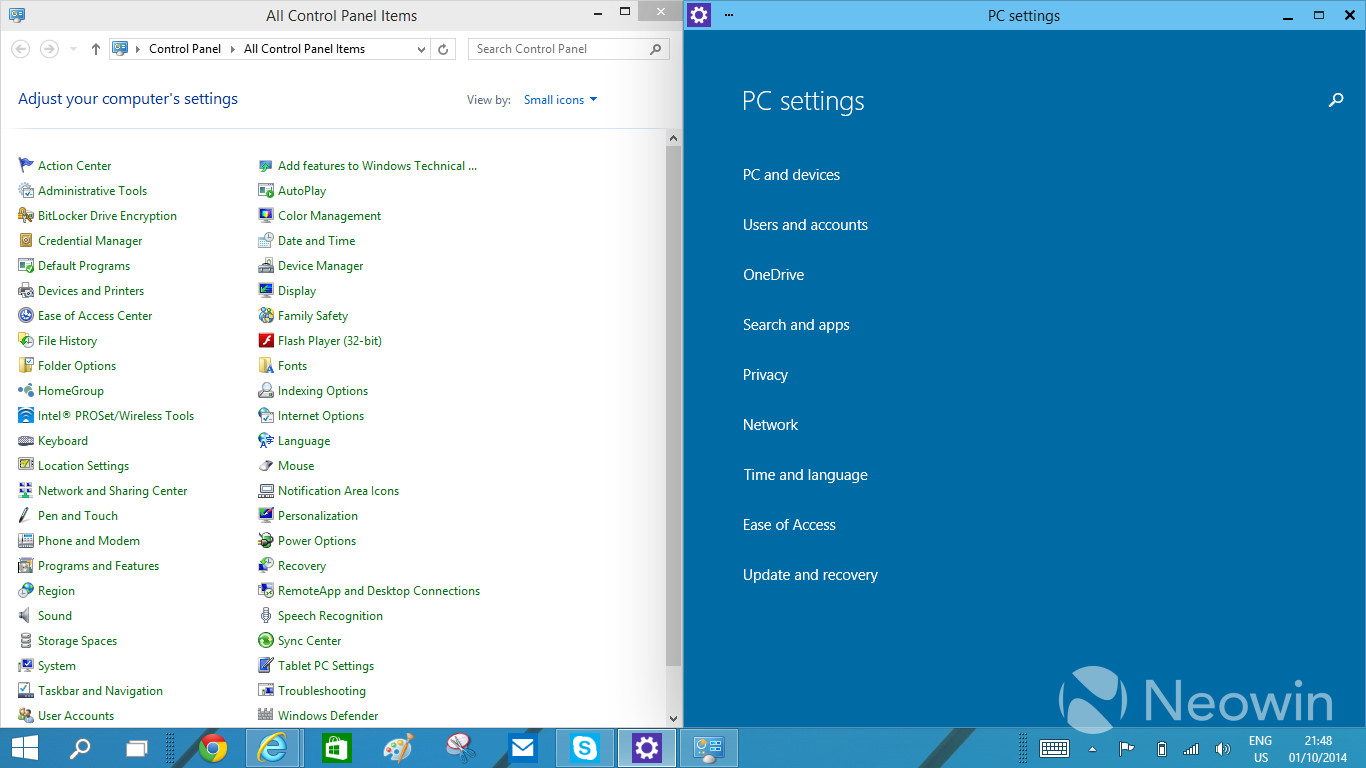
jones_supa writes In Windows 8, there was an arrangement of two settings applications: the Control Panel for the desktop and the PC Settings app in the Modern UI side. With Windows 10, having the two different applications has started to look even more awkward, which has been voiced loud and clear in the feedback too. Thus, the work at Microsoft to unify the settings programs has begun. The traditional Control Panel is being transformed to something temporarily called "zPC Settings" (sic), which is a Modern UI app that melts together the current two settings applications.
Said every Windows admin, ever.
Though all joking aside, changes should make the job easier, or more intuitive, or more cohesive. The change from the 3.1/NT3.5 interface to the Windows 95/NT4.0 interface was an improvement, but slowly fragmented as the GUI design kept changing over time (I dare not call it evolving!).
It's already awkward enough having separate control panels, one for most functions, the other for "Administrative Tools - Computer Management". That needs to be addressed, along with reconciling between two separate GUIs.
Do not look into laser with remaining eye.
> uninstalling programs
I got your back.
start+r, appwiz.cpl
When your OS or UI doesn't offer intuitive routes, you turn management into some arcane manipulation of teh majyks. It might seem nice being a wizard, but users need to use, not peruse archaic scrolls for scrawls of regedit controls. The stench of this is distinct from "planned obsolesce" turds, but it's all a bitter stink.
The reason is because the old panel had everything in front of you. There was no guesswork where to go. It was either the control panel or one of the mmc snapins, with regedit as the worst case scenario. The tablet interfaces are too simplified to be of much use beyond basic settings. Their full screen nature is also irritating on a desktop.
Hell even the changes they did in vista are clunkier than 2k/xp was. Awkward, hard to remember phrases replaced one or two word descriptions, and a lot of the options were hidden, leaving the user to guess where things are, and no, searching for everything is NOT a solution. At least it was still possible to get a compact, complete list in vista through 8.1. If they plan to remove that in 10 and replace it with some stupid touch interface, I will avoid the os.
Removing control panels isn't MS's style. If past experience is anything to go by, the same ones that were in 98/NT will still be there in 10, they'll just be buried under yet another layer of new stuff. Seriously, try find network adaptor settings in 7. After you've navigated through the morass of the network and sharing centre you'll see that it's practically the self same advanced dialog that was there in 95.
Personally, I'm not averse to change but it's well past time MS just started over again instead of tacking on useless, obfuscating fluff over the top of controls that I actually need to get use.
If God forks the Universe every time you roll a die, he'd better have a damned good memory.
My job as an I.T. technician is to console hurt computers and fix broken users. I console (or remote) into computers to find out what is ailing them, which can sometimes take a substantial amount of time because no one wants to reimage their five-year-old system. As for broken users, I try to instruct them on how to take care of their computers but most users don't care about their computers.
You could stay with Win 7 until they stop doing security updates, and then hide it from the scary internet inside a virtual machine that has gpu passthrough (nvidia vgx or amd vdi) and is defined not to have a network adapter. Windows will run your games and never know that the world outside has moved on.
OS X? It's been that way since OS VI. System 6 had a desk accessory called "Control Panel" that would load "cdev" applets. System 7 shifted the cdev loader to Finder, but otherwise they worked similarly. Microsoft has had a long time to copy this stuff.
The control panel in Windows 95 through Windows 7 is a loader for CPL applets which it finds using registry entries which can be created by any installer. The CPL describes the name, icon and tooltip and provide an entrypoint which will be invoked via RunDLL32 to display a popup.
Try looking in list view on Windows 7, you'll find Java and Flash have entries in the panel, they have done for years. Various drivers like nVidia's also add their own shortcuts as well.
This is a terrible idea. The point is that the 'Modern UI' is designed around full screen apps. But system configuration is one thing that enormously benefits from opening up windows alongside the control panel (for example, to follow a set of instructions), opening up multiple control panels to refer to each other, and so on. Microsoft is basically directly removing usability.