 Slashdot Mirror
The Classic Control Panel In Windows May Be Gone
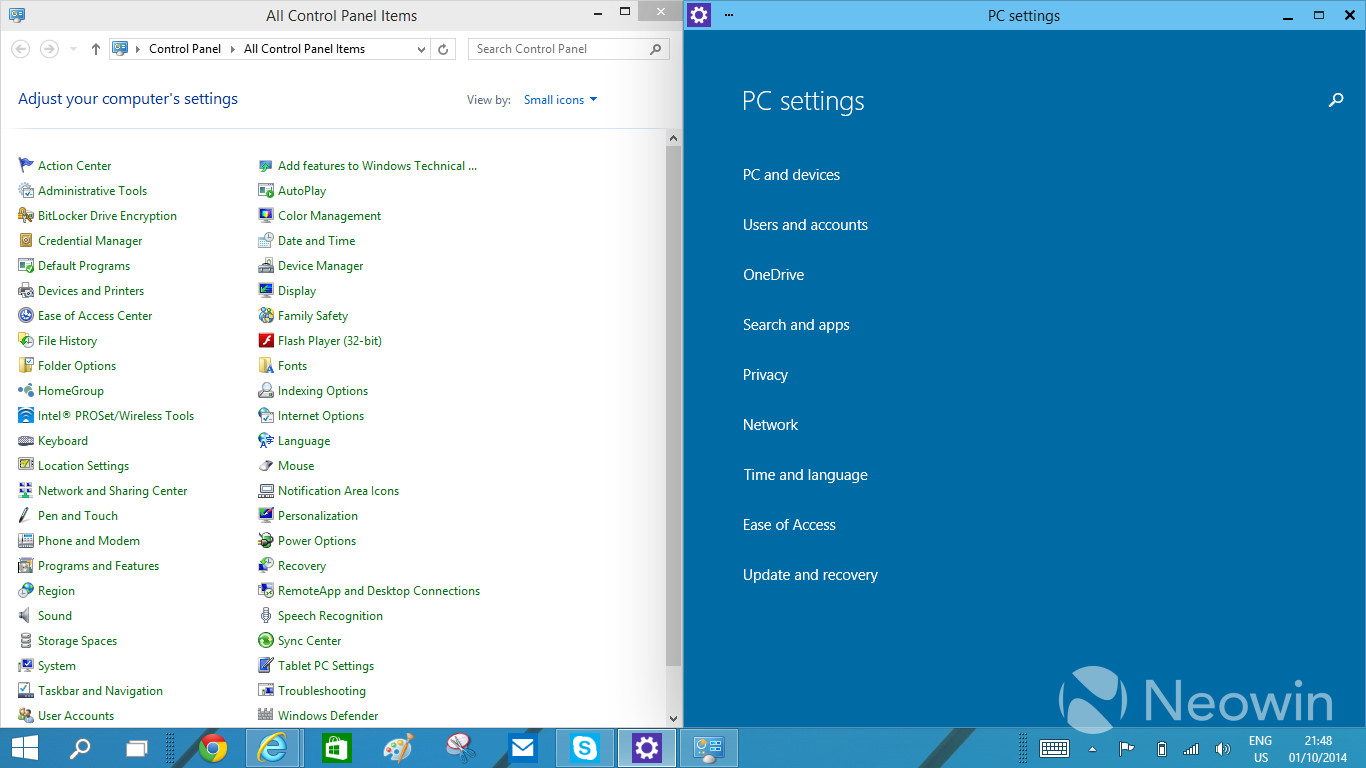
jones_supa writes In Windows 8, there was an arrangement of two settings applications: the Control Panel for the desktop and the PC Settings app in the Modern UI side. With Windows 10, having the two different applications has started to look even more awkward, which has been voiced loud and clear in the feedback too. Thus, the work at Microsoft to unify the settings programs has begun. The traditional Control Panel is being transformed to something temporarily called "zPC Settings" (sic), which is a Modern UI app that melts together the current two settings applications.
It's one thing to abuse the users with interface changes, but don't make the job for I.T. techs any harder as it it. We already got a lifetime of job security because of Windows.
It will have even less functionality than before. Because they keep trying to "simplify" things for the dumb users out there, by removing any type of "advanced" feature. Which means you will be stuck having to manually edit the Registry or gpedit or through some third party software that allow access to those now "hidden" features.
And how exactly do they plan on dealing with Non-Microsoft items in this new settings environment? A huge part of why Windows has always won the OS wars was due to 3rd party extensibility and backwards compatibility.
This is forcing things to become non-standard, where programs are going to have to start having their own "control panels" in their own hard to find locations, rather than having a single place we all know and rely on to administer machines.
As a Mac user, I find the "zPC Settings" categories quite similar to what Apple uses in OS X.
It's not about "dumbing down" features, it's about having clear categories at the first level. If Microsoft hides settings from level 2 and up, then it does become a problem.
Also, I find the look of those GUIs horrible, even more so than OS X Yosemite. Where did the latest GUI designers graduate from? Both OS X and Microsoft look more plain than twenty-five years ago, surely that can't be a coincidence. Are they preparing us to go back to monochrome displays?
Get free satoshi (Bitcoin) and Dogecoins
As long as they leave intact the ancient, tiny, unresizable Environment Variables window that hasn't been updated since it was first introduced in Windows NT, I'll be happy. Who doesn't like editing a huge path in a tiny 40 character single-line text field?
For those to young to remember...MicroSoft thought that they could get away with doing away with a whole profession - the systems administrators. They put out this "initative" to get rid of the admins...it was called "ZAW" which stood for Zero Administration for Windows. They alienated a bunch of sys admins...I moved completely to UNIX/Linux....why would I stick around in a technology that was being pushed away.
As it turns out...the Internet and server administration and desktop administration are too complex to bundled in some stupid little "control panel." This attempt to "merge" functionality will fail as well.
Prepare for the steering wheel in new cars to work in exactly the opposite way, and for the brake pedal and accelerator to be active when released rather than pressed. Surely you won't get into much trouble on the road now that I've told you about that in advance.
Ezekiel 23:20
Why is there a resource-intensive GUI on a server anyway? Is the server supposed to be able to play Solitaire or World of Warcraft? Or is the server supposed to, oh, I donno, serve files and applications to client stations?
That's one thing I never understood, why Microsoft went GUI with the servers like they did, other than to know that they sold a lot of server OSes to people that had no business running servers in the first place...
Do not look into laser with remaining eye.
Because of Fuckwit lazy ass software developers who drool and draw blanks stares at you when asked where the 'client-only' or 'service-only' piece of their server software is.
I still have to deal with commercial software that in 20-mother-fucking-14 has to be logged in locally for the 'server' side of the program (that runs in the foreground) so the scheduled tasks setup within the program will run the batch-imports that upload into SQL!
These servers have to be setup so that when they reboots they auto-logs in and runs a 'shortcut' in the start menu's 'starup' folder (some with the user/password appended to the .exe target) so that nightly imports into their SQL work.
So A.) They don't have a background service, B.) Can't run scheduled tasks without the foreground program running., oh and C.) If there is any alert message (which pop up for anyone running the GUI client software if it is open) The scheduled tasks and all other batch processes will not run because there is a message on the screen that 'someone' has to click ok to acknowledge.
And before you start saying this is old 'legacy' software the version we are using (about 5th upgraded one since we got it) was released in August of 20-FUCKING-14!
These 'programmers'/'developers' can create modern software that can use SQL from 2005 to 2014 (32 or 64bit) but can't figure out how to make a true background service for the server side so it must run the same software the client workstations use to run batch process tasks!
As much as I swear and yell "Fucking Microsoft" at my systems while working all day, not 'everything' is on their end and a lot more seems to be on the Dumb-ASS so-called 'software developer' side of things meaning as longs as these ass-holes are still cranking out shit that is needed in a fucked-up manner there will always be local administration on server, especially GUI on Windows server. Damn-near every damn server software I deal with states that 'Core' editions are not supported. (and 'web' software that uses IIS states that 'web' editions are not supported so these were and never will be used)
Headless servers won't be coming to Windows anytime soon.