 Slashdot Mirror
Windows Setup Error Messages Will Soon Actually Help Fix Problems (arstechnica.com)
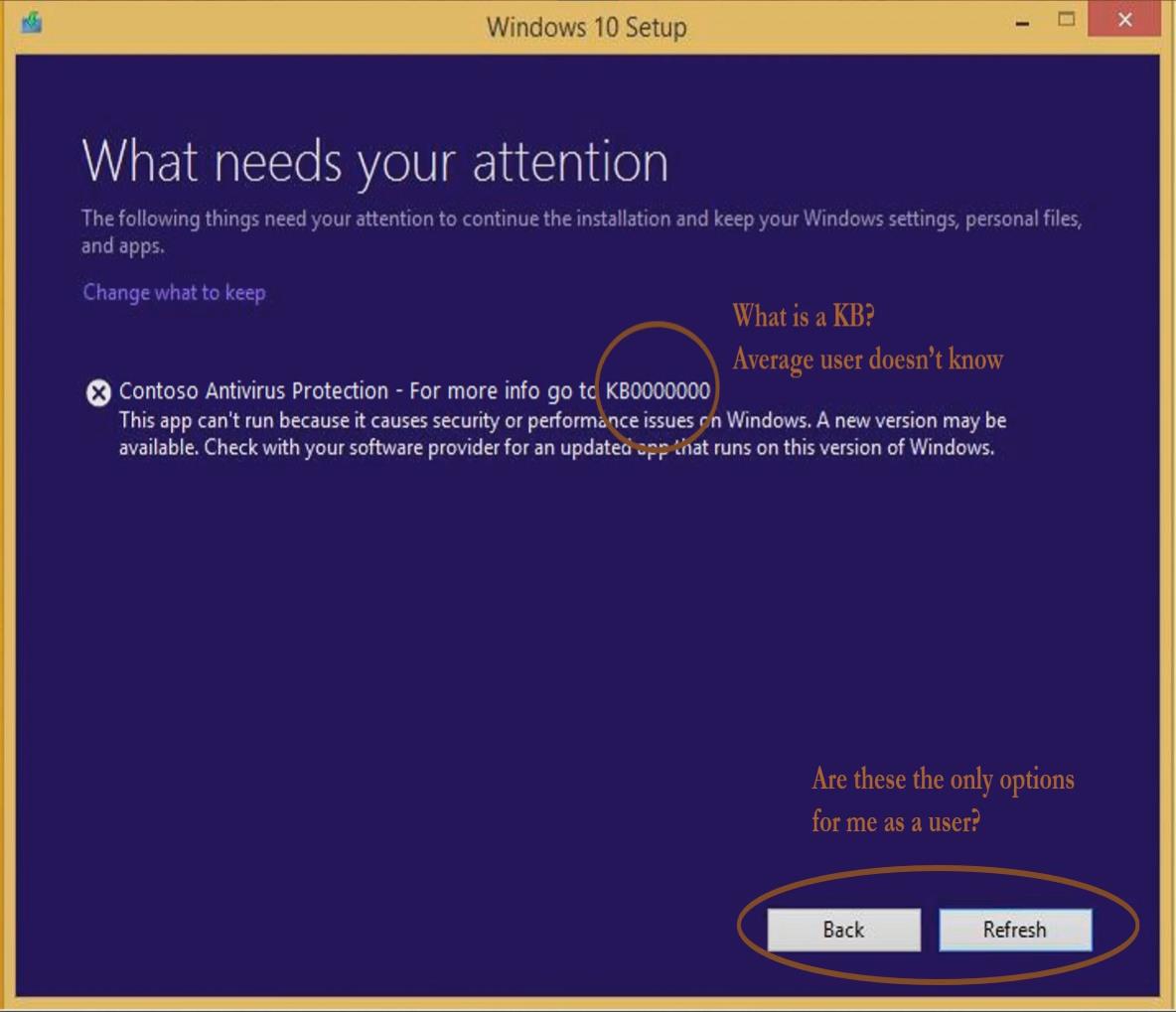
An anonymous reader quotes a report from Ars Technica: The next major Windows release, the Windows 10 April 2019 Update (codenamed 19H1), is going to offer some significant improvements [to error messages]. Microsoft described them on its Windows Insider webcast, and they were spotted initially by WinFuture. Currently, the best case during installation is something like this screen.
The message says that an incompatible application is detected, and a Knowledge Base article is referenced. It turns out that most Windows users don't know what "KBxxxxxxx" actually means, and the article isn't hyperlinked to make accessing it any easier. Issues detected through the other setup experience aren't much better. Windows will offer to uninstall problem applications, but often the better solution is to upgrade the application in question. The new setup process aims to be both more informative and more useful. The general approach is to allow decisions to be made within the setup program where possible and to put meaningful descriptions in the error messages, rather than leaving people with just a KB number to go on. Further, the "learn more" links will take you directly to the relevant Knowledge Base article, rather than hoping that end users know what "KBxxxxxxxx" means. Third-party developers will also be able to provide information about upgrades and updates when applicable to resolving compatibility issues.
The message says that an incompatible application is detected, and a Knowledge Base article is referenced. It turns out that most Windows users don't know what "KBxxxxxxx" actually means, and the article isn't hyperlinked to make accessing it any easier. Issues detected through the other setup experience aren't much better. Windows will offer to uninstall problem applications, but often the better solution is to upgrade the application in question. The new setup process aims to be both more informative and more useful. The general approach is to allow decisions to be made within the setup program where possible and to put meaningful descriptions in the error messages, rather than leaving people with just a KB number to go on. Further, the "learn more" links will take you directly to the relevant Knowledge Base article, rather than hoping that end users know what "KBxxxxxxxx" means. Third-party developers will also be able to provide information about upgrades and updates when applicable to resolving compatibility issues.
It will tell you how to install Linux?
The only thing necessary for evil to triumph is for it to be pitted against a slightly greater evil
Who would have guessed that meaningful errors might be a good idea? I'm not holding my breath though, they will probably be some kind of nebulous "user friendly" error messages that link back to websites with 20 different unrelated causes.
"Windows Setup Error Messages Will Soon Actually Help Fix Problems"
Ha ha, yeah sure they will. As if the average Windows user will be able to understand a KB article and formulate a fix from it.
Just cruising through this digital world at 33 1/3 rpm...
"Hi, i'm clippy... it seems like you're having a systems error..."
is that more often than not, when you click on them, it takes you to a broken URL and redirects you to a generic Microsoft web page that asks how it can help you. The same outcome as clicking on the event log online help. Articles like this seem to praise MS for doing something new an innovative, where as they are really just fixing a feature they broke long ago
The linked image says, "Average user doesn't know".
What a joke! It should have read, "No user could possibly know."
Giving users useful information rather than "0x80000005 an unknown error has occurred". I wonder how much more productive people in the Windows ecosystem would be if Microsoft could be bothered to write their error messages properly.
Windows 7 took up 1 GB of RAM when running, Windows 10 takes 3 GB. Windows 7's background processes consumed less than 5% CPU on my 2008 computer, Windows 10 regularly sits at 100% CPU for hours on end on my 2018 computer.
Well, it is not necessary to install all 10000 applications that are part of the Ubuntu DVD.
And once you get a whole office suite, SQL server, webserver, a couple GUIs to choose from, compilers for pretty much any programming langugage there is for the OS you're installing and a couple things more that I forgot because I never needed them on that same CD as Windows, you actually compare the systems correctly.
We used to have a Bill of Rights. Now, with the rights gone, all we have left is the bill.
Well, considering one of the first thing the install routine does is to phone home to find out whether your copy of Windows happens to have the blessing from the gods of Redmond, you could just use that network connection for something useful too...
We used to have a Bill of Rights. Now, with the rights gone, all we have left is the bill.
Windows 10 takes 3 GB.
No it doesn't. Windows 10 takes bugger all and then the pre-fetch service uses a shit-ton of your available RAM. It's also much faster at freeing this RAM when requested, and you'll notice your 4GB computer doesn't really noticeably slow down at all when you open up something resource heavy e.g. the latest Lightroom with it's 2.7GB memory footprint.
On the flip side launch Office after this exercise takes longer.
Can I introduce you to this new concept of caching? The only wasted RAM is empty RAM.
Windows 10 regularly sits at 100% CPU for hours on end on my 2018 computer.
Given you knowledge of how Windows works it's not surprising you somehow managed to break your system.
The driver is just a few 100k, but telemetry packages are kinda large by now.
We used to have a Bill of Rights. Now, with the rights gone, all we have left is the bill.