Slashdot Mirror
Domain: acropdf.com
Stories and comments across the archive that link to acropdf.com.
Comments · 11
-
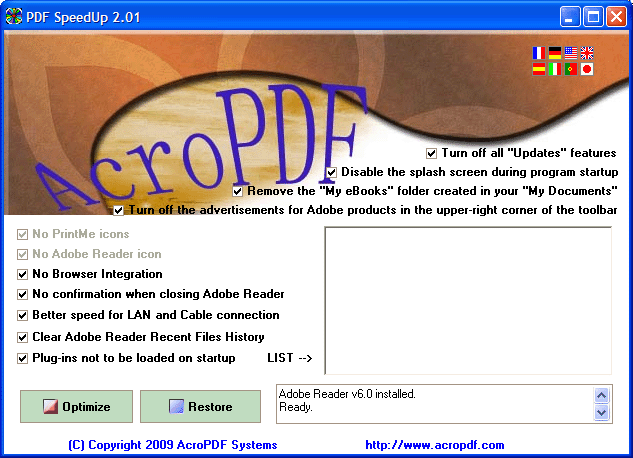
PDF SpeedUp -- Just use it.
PDF SpeedUp 1.42 (win32)
Not only a fancy way to disable the plugins, it actually removes the splash screen, removes crappy GUI elements (advertisments), etc.
-
Re:If they just took the crap out...
just tweak it as others said or even simpler use a tool like : http://www.acropdf.com/pdfspeedup.gif
-
Speed up Acrobat load times
Download PDF SpeedUp. Makes it so Acrobat doesn't load any of the useless plugins. Load time for me (3000+ XP) is literally under a second as opposed to the original and aggravating 10 seconds or so.
http://www.acropdf.com/products.html
I've also seen you can just hold shift to do the same thing, don't think I've tried it. -
Re:GPL Acrobat Plugin????No prob man. Like the other guys say you can turn off the plug-in-ness of acrobat & make it load outside of FF, but, This little freeware PDF Speed up doohicky http://www.acropdf.com/ really cleared up all my crashes.
I first made FF load acrobat reader external. I found this and it unloads all unnecessary plugins to acrobat and wham its up like lightning. After a few days I was curious, Reset reader as plug-in. Few months and 2 or 3 thousand Data-Sheets Later: No crashes.
-
Re:Good, now we can get rid of Acrobat Reader!
http://www.acropdf.com/
Look for PDF Speed Up. Removes the nags, sets all the plugins to optional, turns off the splash screen, kills the ads in the corner, ect.
Acrobat Reader 6.x opens very quick now, and I have yet to have it crash. (By quick I mean in under 3 seconds on my 900mhz, 512mb pc100 sdram win2k machine) -
Re:I'm scared. :(
Check out PDF Speedup (Win32): cuts those PDF launching times to a fraction (takes out plugins though).
-
Re:How does this stack up to IE?
PDF's are a nuisance when viewed within a browser, mostly because it takes my computer (athlon 3K+, come ON!) a LONG time to open the viewer plugin, all the while freezing the entire FF app so I can't even look at any of the other tabs.
Luckily, someone made this, a freeware app that speeds up the acrobat startup because it strips a lot of libraries from it (second down on the page). What remains is a fully functional and very quick PDF viewer. Highly recommended. -
Re:works well
Sure. Its begware (asks you to buy every time you quit it). Product name is "PDF SpeedUp" at http://www.acropdf.com/
Some of the other programs are nice, but if you can export to PDF with ghostscript, you don't need them. -
Re:Here's another law to add
If you don't like fiddling the plugins directory yourself, there is a freeware PDF speedup that gives you semi-sensible gui for disabling unneeded stuff. After that acrobat reader is almost bearable in speed compared to Preview on my iBook..
-
Re:Here's another law to add
An even better option: PDF SpeedUp. A coworker clued me in to this great little utility. It basically disables all the extra junk in Acrobat Reader, cutting the load time down to 1-2 sec tops.
-
To make Acrobat 7 load faster:
To make Acrobat 7 load faster, disable some of the plug-ins. I did that manually (and I can't find the instructions I used). However, try the free Acrobat reader tweaker from AcroPDF.