Slashdot Mirror
Domain: anandtech.com
Stories and comments across the archive that link to anandtech.com.
Comments · 3,318
-
Re:It doesn't matter to the average consumer.
"... all of Apple's MacBook Pros
Wow, that is massively not true. Under real use the new MBP barely get half that as well. My 17 gets 5.5 hours when doing essentially nothing.
Do you have one of the new unibody MacBook Pros? If not, you're comparing the wrong notebook. If you do have one of the new ones, there's something wrong with your battery, or you're lying about how you're using it.
-
Re:The cops'll love it.
SSD circuitry dictates the creation of pages and blocks.
A page is the minimum amount you can write, say 4KB
A block is the minimum you can delete, and it is made up of multiple pages, say 5.
If a block contains pages to keep and pages to delete, the circuitry has to delete the whole block, then rewrite the valid pages just to clear the deletable pages. This takes more time.
Current SDDs when told to delete a file just update the file table and leave the time-consuming delete task to when something needs to be written to a deleted but non-empty page.
The TRIM command deletes blocks as the file is deleted from the file table, so the write operation doesn't have to wait around for the sequence of: cache-valid-pages>delete-block>rewrite-valid-pages>write-new-pages.
So no, it wont make drive forensics easier, in fact it will remove any trace of a deleted file.
My summation. It might be off the mark. See the great AnandTech SDD explanation, where I got the information from. -
Wrong data in article?
In the article it says
But if a cell already contains some data--no matter how little, even if it fills only a single page in the block--the entire block must be re-written
Is this correct?
From whatever I read in AnandTech, it looked like we need not rewrite the entire block unless the available data is less than total - (obsolete + valid) data.Also, the article is light in details. How are they doing the GC? Do they wait till the overall performance of the disk is less than a threshold and rewrite everything in a single stretch or do they rewrite based on local optima? If the former, what sort of algorithms are used (and are the best for it) ?
-
Re:I don't overclock
Dunno these reviews seem to say something different:
http://www.legitreviews.com/article/708/5/
http://www.anandtech.com/cpuchipsets/showdoc.aspx?i=3305&p=7
But anyway, seems Nvidia has discontinued HybridPower for the desktop. Nvidia's excuse is that the newer cards will idle more efficiently. Not sure how true that will be in the near future
-
Re:Coming to Cydia
how about processor
ARM11 in any HTC vs ARM Cortex A8 in 3GS
HTC, Nokia et al. are still using ARM11 for cost saving/legacy reasons. ARM11 has been around for a very long time. Check anandtech for a good writeup on why this is significant for the current batch of smart phones.
-
Re:Glad I waited...
I am now exceedingly glad I waited to purchase a new HDD for my laptop.
The drive is 2.5 inches, but it is 12.5 mm rather than the standard 9.5 mm thick - so it is unlikely to fit in a laptop. On a side note, I wish they started using metric proper instead of this mix of metric and legacy measurements.
-
Re:Premium price, not premium PC
custom battery arrangement to maximize useful lifetime but leave a smaller dimensional footprint. - Laptop manufacturers always make the enclosure, it's just the cells that are outsourced. There's nothing inherently more customized about Apple's battery arrangement than Dell's, although Dell is more likely to use a conservative design.
Apple's cells aren't outsourced, and there is something "inherently more customized about Apple's battery arrangement than Dell's." You should really read up on them since it's one of their major differentiators from competitors at the moment. They generated quite a bit of surprise earlier in the year when the actual results seen by the media and individuals met and exceeded Apple's stated numbers for the expected charge time. More or less, your assertion regarding Apple and Dell's batteries is entirely incorrect.
Thinkpad isn't going to vent its heat directly into your groin, while an aluminum Macbook will.
I think you're overstating or fabricating an issue that doesn't exist. For instance, on my (ancient) Aluminum PowerBook G4 (remember that the G4 chip was notorious for its heat issues), I have vents along the backside of the computer and along both sides (all of which are hidden from view in normal use). In regular practice I can easily max out the CPU for extended periods of time (heck, running Azureus and watching a movie will do that these days), yet it never gets hot enough to warrant concern, due to the proper venting. So while the thermal properties of other metals may be more favorable, it's not an issue if the heat is properly vented, which it is (otherwise, we could make the argument that every computer should use liquids for cooling since they have better thermal properties than air, which would entirely miss the fact that liquid cooling is simply unnecessary in many cases). And last I checked, the current laptop lines from Apple do not have vents in the region that would be directed at the groin.
backlit keyboards that have a sensor to automatically come on - My Thinkpad has an overhead light so I can read papers as well as the keyboard.
Totally missing the point. An overhead light is a ridiculous feature that bothers others around you and is total overkill for the problem. What makes Apple's backlit keyboards a "premium" feature are ideas like the use fiber optics to relay a light both through the character glyphs on each laser-etched key, as well as around the keys. Plus, most people are comfortable purchasing a $5 USB attachment if they really wanted an overhead light. Backlit keyboards are not something you can tack on for $5. It's that sort of difference that was being pointed out as a premium feature of Apple laptops.
Also, as has already been pointed out, the ThinkPad is by no means a commodity laptop. It's most certainly a premium line as well (aimed at a different audience than Macs, but premium nonetheless), and it demands a premium price, so pointing out that your ThinkPad carries similar features is a self-defeating argument if you were trying to suggest that some of Apple's laptop features were common in regular ol' commodity laptops. -
Re:Premium price, not premium PC
custom battery arrangement to maximize useful lifetime but leave a smaller dimensional footprint. - Laptop manufacturers always make the enclosure, it's just the cells that are outsourced. There's nothing inherently more customized about Apple's battery arrangement than Dell's, although Dell is more likely to use a conservative design.
Apple's cells aren't outsourced, and there is something "inherently more customized about Apple's battery arrangement than Dell's." You should really read up on them since it's one of their major differentiators from competitors at the moment. They generated quite a bit of surprise earlier in the year when the actual results seen by the media and individuals met and exceeded Apple's stated numbers for the expected charge time. More or less, your assertion regarding Apple and Dell's batteries is entirely incorrect.
Thinkpad isn't going to vent its heat directly into your groin, while an aluminum Macbook will.
I think you're overstating or fabricating an issue that doesn't exist. For instance, on my (ancient) Aluminum PowerBook G4 (remember that the G4 chip was notorious for its heat issues), I have vents along the backside of the computer and along both sides (all of which are hidden from view in normal use). In regular practice I can easily max out the CPU for extended periods of time (heck, running Azureus and watching a movie will do that these days), yet it never gets hot enough to warrant concern, due to the proper venting. So while the thermal properties of other metals may be more favorable, it's not an issue if the heat is properly vented, which it is (otherwise, we could make the argument that every computer should use liquids for cooling since they have better thermal properties than air, which would entirely miss the fact that liquid cooling is simply unnecessary in many cases). And last I checked, the current laptop lines from Apple do not have vents in the region that would be directed at the groin.
backlit keyboards that have a sensor to automatically come on - My Thinkpad has an overhead light so I can read papers as well as the keyboard.
Totally missing the point. An overhead light is a ridiculous feature that bothers others around you and is total overkill for the problem. What makes Apple's backlit keyboards a "premium" feature are ideas like the use fiber optics to relay a light both through the character glyphs on each laser-etched key, as well as around the keys. Plus, most people are comfortable purchasing a $5 USB attachment if they really wanted an overhead light. Backlit keyboards are not something you can tack on for $5. It's that sort of difference that was being pointed out as a premium feature of Apple laptops.
Also, as has already been pointed out, the ThinkPad is by no means a commodity laptop. It's most certainly a premium line as well (aimed at a different audience than Macs, but premium nonetheless), and it demands a premium price, so pointing out that your ThinkPad carries similar features is a self-defeating argument if you were trying to suggest that some of Apple's laptop features were common in regular ol' commodity laptops. -
Re:Little off topic..
...there are hardly any of them in the shops
But your comment was that development of new faster hardware has pretty much stalled. I strongly disagree with that.
It's true that laptop chips haven't done very much - I have the same 2.16 chip as you, in a late 2006 15" MBP - but the hardware has come a long way elsewhere, especially inside Apple. Just about everything other than the CPU is significantly better on the current versions of our respective laptops. Better screens with LED backlight, much faster graphics, huge multi-touch trackpad, and check out this battery life graph.
There's a lot more to come in 2009-10: Calpella, i.e. Core i7 Mobile, and the gradual, or possibly snowball-like, emergence of SSD drives in mainstream laptops.
-
Re:25% faster game level loads.
Either you misread it or they made some mistake. The reviews by Anand have been pretty positive about the benefits of SSD vs HDD. For example:
http://www.anandtech.com/storage/showdoc.aspx?i=3531&p=31Drives will get better and although we're still looking at SSDs in their infancy, as a boot/application drive I still believe it's the single best upgrade you can do to your machine today. I've moved all of my testbeds to SSDs as well as my personal desktop
I doubt he would have been so positive about SSDs if their benefit was as minimal as you seem to indicate.
-
Re:Oooh.
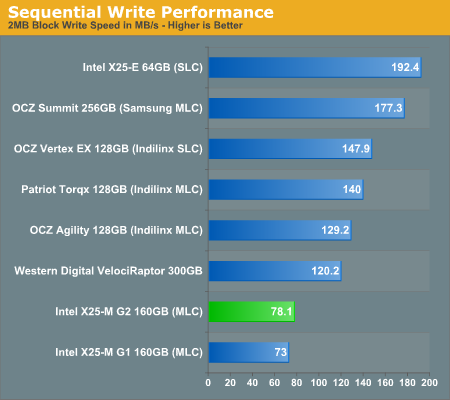
http://images.anandtech.com/graphs/intelx25mg2perfpreview_072209165207/19505.png
tests say sequential write = 50% faster than HD, not twice as fast. Maybe 2x faster than older SSDs, but not than HDs. Again, that's 50% when you're doing disk writes, which really is not that often. Plus those disk writes need to be "blocking", not done in the background.
My point is that SSDs boost performance in the very rare cases where
1- you're doing "blocking" disk IO
2- SSD are significantly faster than HDs
That's not a lot.Four your second upgrade, I'd sell my old PC, and use that + the SSD money to buy a whole new PC, sans SSD. That's what I'm doing right now.
-
Re:AnandTech writeup
If the price curve drops like the first-gen X-25M we should all be happy pretty soon.
-
Re:Oooh.
Last year when the x25-m first came out the 80 gig version cost $595, or just a little less than $7.50/gig. Now the same 1st gen drive costs $314 with a -10 dollar discount and free shipping on newegg, or about $3.92/gig.
The new 2nd generation drive 80 gig drive sells for $225, or $2.81/gig. If it follows the same price trend as the 1st gen model around this time next year it should cost ~125 dollars, or about $1.53/gig.
Here are the quick results of the xbench of my 5400rpm 160gig drive in my two year old macbook pro:
Sequential
Uncached Write 35.48 MB/sec [4K blocks]
Uncached Write 38.42 MB/sec [256K blocks]
Uncached Read 10.70 MB/sec [4K blocks]
Uncached Read 40.71 MB/sec [256K blocks]
Random
Uncached Write 0.86 MB/sec [4K blocks]
Uncached Write 21.42 MB/sec [256K blocks]
Uncached Read 0.42 MB/sec [4K blocks]
Uncached Read 16.66 MB/sec [256K blocks]Compare those to the results of the new drive here: http://www.anandtech.com/cpuchipsets/showdoc.aspx?i=3607&p=4
Sequential read on the SSD is over 6x faster, and sequential write is 2x faster, but for the performance where it matters the difference is much more noticeable. Random read on the SSD is nearly 140x faster, and random write is over 40x faster.
Couple that performance difference with the lower power consumption, lower noise, and higher threshold for damage, and its a no brainer as to what is the single most price-efficient possible upgrade you can make to a laptop to boost overall performance, responsiveness, and battery life.
I wish I could justify buying one now, but I can't. However, 12 to 18 months from now I will probably be shopping around for a new laptop, and when I do I won't be settling for anything but a SSD. The benefits are just to great to ignore.
-
AnandTech writeup
AnandTech has a nice writeup too. If the price curve drops like the first-gen X-25M we should all be happy pretty soon.
-
Re:Interface speed only
TFA said "nearly saturating", but regardless...
http://www.anandtech.com/storage/showdoc.aspx?i=3531&p=24
250MB/s is just below the theoretical limit of SATA 3Gb/s, which is 300MB/s. It's possible that there are still other bottlenecks beside the hard drive.
I also have seen SSD RAID benchmarks somewhere, but I don't remember where.
-
Re:Misleading headline
GbE is 1,000 megabits/s in theory. That's no more than 125 megabytes/s. With four Intel X25-E drives you'll hit 226 MB/s random read and 127 MB/s random write throughput.
I'm fairly certain you can settle for the four on-board SATA ports for that. And those four drives combined will more or less eat a few thousand IO/s as horderves.
-
Re:OK, Since this is a non-event...
the cpu is quick enough for os/x, 2gb is enough for os/x
Great! So you know the workloads that I'll put on it?
How will that 9400M handle today's games?
you can add drives with firewire.
And then have a couple more power bricks and some more cables around.
By point of contrast, my current computer is over 22 months old now -- almost 2 years. For about twice the cost of the cheapest Mac Mini now, I have:
- A much better processor (quad core instead of dual core and better single-thread performance: 2.4 gHz vs 2.0)
- Twice as much RAM (2 GB vs 1 GB; Newegg sells 4 GB of RAM for the cost of the upgrade from 1 to 2 GB that Apple charges)
- An actual video card that almost certainly beats the pants off of the Mini's integrated graphics. (For an unfair test, but still the best I could find, I have an 8800 GTS with 320 MB. In an Anandtech test the 8800 GT with 256 MB of RAM (both a worse GPU and less memory) has 38.4 fps in Crysis at 1600x1200. In another test, the 9400M managed just 30.1 fps at 1024x768. So my 2-year-old GPU manages almost 2 1/2 times as many pixels as the GPU in Apple's only non-super-expensive, non-iMac desktop offering, and I still manage a higher frame rate. Now, the unfairness. In addition to being uncontrolled in the sense of doing different tests, Anandtech doesn't seem to say what else they had in the test rig for the latter tests.)
- Lots of expandability
- The ability to build the system myself (may be a benefit or drawback for you; I enjoy it)
- The ability to carry forward a couple components to my next system to reduce the cost (I expect to do this with the case ($130) and perhaps the power supply ($110))
I don't want to dismiss the mini for some people, but I'm not one of those people. I'd be willing to pay to run OS X... but not that much.
-
Re:OK, Since this is a non-event...
the cpu is quick enough for os/x, 2gb is enough for os/x
Great! So you know the workloads that I'll put on it?
How will that 9400M handle today's games?
you can add drives with firewire.
And then have a couple more power bricks and some more cables around.
By point of contrast, my current computer is over 22 months old now -- almost 2 years. For about twice the cost of the cheapest Mac Mini now, I have:
- A much better processor (quad core instead of dual core and better single-thread performance: 2.4 gHz vs 2.0)
- Twice as much RAM (2 GB vs 1 GB; Newegg sells 4 GB of RAM for the cost of the upgrade from 1 to 2 GB that Apple charges)
- An actual video card that almost certainly beats the pants off of the Mini's integrated graphics. (For an unfair test, but still the best I could find, I have an 8800 GTS with 320 MB. In an Anandtech test the 8800 GT with 256 MB of RAM (both a worse GPU and less memory) has 38.4 fps in Crysis at 1600x1200. In another test, the 9400M managed just 30.1 fps at 1024x768. So my 2-year-old GPU manages almost 2 1/2 times as many pixels as the GPU in Apple's only non-super-expensive, non-iMac desktop offering, and I still manage a higher frame rate. Now, the unfairness. In addition to being uncontrolled in the sense of doing different tests, Anandtech doesn't seem to say what else they had in the test rig for the latter tests.)
- Lots of expandability
- The ability to build the system myself (may be a benefit or drawback for you; I enjoy it)
- The ability to carry forward a couple components to my next system to reduce the cost (I expect to do this with the case ($130) and perhaps the power supply ($110))
I don't want to dismiss the mini for some people, but I'm not one of those people. I'd be willing to pay to run OS X... but not that much.
-
Re:Thorough article backed up with a lot of data
"Slashdotters are always bitching about lack of empirical evidence for claims, yet when an article come along with abundant information to back up its conclusions, it dosn't get any credit."
The truth is the way the article displays the information is shit, they could have done a lot better job on information presentation... and anandtech did a big write up on SSD's a while back that should tell anyone all they really need to know until SSD's come down to sane price levels and storage capacities. Everything published here isn't new, and has been known for a long time and has been written about better by anand.
Anandtech:
-
Re:Sadly...
Before buying any LCD, you need to read this first: Desperately Seeking Quality LCDs.
-
Re:About time
As an example x264, an open source h.264 enocder, scales very well with the number of cores. You can take a look at this chart and compare dual and quadcore processors from the same family with the same clock speed. The second pass of the x264 encode is what you should look at since frametype decision, which is done in the first pass, isn't threaded in x264.
-
Re:Flat screens!
Try using most types of laptop display. They have some very narrow viewing angles if you want things to look okay.
Side to side isn't nearly as bad as up and down. The laptop I'm using (HP Pavilion dv9572) has a decent side to side angle, but if I reposition myself in the chair (moving it up/down or slumping/straightening my back) I have to readjust the display to get the proper look.
And from what I understand, others are desperately seeking quality displays as well.
-
Re:Battery Concerns
If you upgraded from the first iPhone to the 3GS you are going to see a battery life loss because of the 3G.
See: http://www.anandtech.com/gadgets/showdoc.aspx?i=3353
Those results are from nearly a year ago so battery life will have likely improved some from the 2.0 -> 2.1 -> 2.2 -> 2.3 -> 3.0 OS updates, but it gives you an approximation for the difference between the edge vs 3g power consumption.
-
Re:Facebook's application is poorly coded
This really makes me doubt their ability to benchmark / scale things properly. In the article, he sounds like facebook is completely CPU bound, and yet he's slamming the latest generation server processors by Intel / AMD?
From all the benchmarks I've seen, like Anandtech's and from personal experience, web servers scale pretty much linearly with clock speed * IPC and the amount of cores present in the system. The addition of HT is good for another 20% throughput.
What they need to do is to look at their setup, and make sure there isn't another bottleneck - have you spawned enough threads and processes to utilize the system completely? PHP may be "thread safe", but that usually means that there's a huge lock around everything that could be dangerous and one process refuses to use more than 100% cpu on 1 core, so serve it with apache-prefork + load balancer + separate static file server. Same thing for Python - fork off more copies via mod_wsgi even in threaded mode, as many as you can afford within the available RAM, or the Global Interpreter Lock will limit the CPU usage to 1 core.
If you have setup the environment well and there are no other bottlenecks, web services scale perfectly with the available CPU power. And that has increased by an insane amount for the Xeon 54xx to 55xx, it's almost doubled the performance in most server apps (OLTP, VM), but even the PHP test case which failed to scale to 16 cores in a single process was good for +39%. -
Start with the second post
This woman is a gamer, and even blogs about her days with WoW and Second Life. She is also very outgoing (but feels more at home with "geeks") but has the same problem with men. Are links allowed on here? I'll post it and find out...
http://forums.anandtech.com/messageview.aspx?catid=38&threadid=2308402&enterthread=y
-
Re:Eyes wide shut
Anandtech tested the Zotac Ion with a dual core Atom with Win XP. Full screen Hulu videos were unwatchable at 1920 x 1200, even though the Flash code seems to be threaded pretty well. This same machine can handle 1080p Blu ray playback just fine. That's partially due to handling some of the DRM decryption on the GPU, but even if you strip the DRM, playback still has about 10% CPU utilization.
-
Re:Apple doesn't trust other batteries
Microsoft still needs to pull their finger out. OS X gets 20-25% longer battery life on the same hardware as Windows Vista or 7: http://anandtech.com/mac/showdoc.aspx?i=3582
-
Apple Don't
Take a look at Anandtech's MBP review. The tagline 'Battery life to die for' sort of gives away the tale though.
Apple claim 5-8 hours. Anand got 4.92 (heavy downloading + XVid + Web browsing) to 8.13 hours (Wireless web browsing) with the screen at half-brightness ("completely useable") and no funny optimisations.
Maybe, just maybe, there's something to this "our batteries are better" thing they've got going; if someone comes out with a spare-battery-attached-to-a-magsafe-connector for those die-hards who absolutely *need* it, angels may sing in the treetops. Personally I've never needed to change the battery in my portable (whatever portable I've had) so it's no big deal to me. Yadda yadda, one datapoint not a trend...
Simon. -
Re:Understatement
anand's review -- http://www.anandtech.com/printarticle.aspx?i=3531 -- shows that random write performance on a good ssd is still 20x better than the best hdd.
That review also covers the cause of the performance drop as the drive ages that most review don't originally consider. The review covers random reads and writes in a variety of patterns.
-
all you really need to read.
Here is the actual breakdown... RANDOM WRITES people!
JMicron should hang their head in shame... 4 random writes per second... epic fail.
http://www.anandtech.com/cpuchipsets/intel/showdoc.aspx?i=3403&p=8 -
Re:Understatement
The big picture article: http://www.anandtech.com/storage/showdoc.aspx?i=3531
The follow up article: http://www.anandtech.com/storage/showdoc.aspx?i=3535 -
Re:Understatement
The big picture article: http://www.anandtech.com/storage/showdoc.aspx?i=3531
The follow up article: http://www.anandtech.com/storage/showdoc.aspx?i=3535 -
Re:Understatement
Not exactly. Putting Vista or Windows 7 on a quality SSD has big performance gains - but XP is light enough that a fast HDD will beat a fast SSD. An article I read a while back put the 640GB WD Caviars as the fastest boot drive for XP.
That said, SSDs have very real effects on games that can't cache all their textures. See: http://www.anandtech.com/cpuchipsets/intel/showdoc.aspx?i=3403&p=14
The minimum FPS almost doubles, from an unplayable < 15fps, to a playable > 25fps.
Keep in mind that SSDs are not without their performance quips. Many slow down over time, so while they're impressive when you first get them, soon they'll be just average. TRIM is supposed to solve this, by pre-erasing, but for extended read/write workloads it probably won't help much.
I wanted an SSD real bad, but the quality ones still all cost $250+; I settled on a 640GB Caviar, and am relatively happy. My computer is underpowered by today's standards(2.6ghz Athlon X2), and yet invariably I'm the first person to load any TF2 map.
Well, it's either that or the servers just like me and let me connect first. But I don't believe this, because we alternate between North American servers and Australian ones. (He's Aussie, I'm Canadian)
-
Re:I agree
.There are also applications, where SSDs are significantly slower. For example small write performance is really bad.
There are also applications where poorly designed SSDs are significantly slower. This post : http://forums.slizone.com/index.php?showtopic=34943 summarizes the problem revealed by anandtech there : http://www.anandtech.com/cpuchipsets/intel/showdoc.aspx?i=3403.
-
Re:More Gems from the SSD comparison article
since an SSD has no moving platter, there is no difference between sequential and random read/writes.
Yes but many cheaper ssd based on MLC cells *do* have problems with random writes so that they perform, at times, worse than a conventional hard drive. This post : http://forums.slizone.com/index.php?showtopic=34943 summarizes the problem revealed by anandtech there : http://www.anandtech.com/cpuchipsets/intel/showdoc.aspx?i=3403.
-
Re:Understatement
Try this. Just searching for SSD will get you lots of interesting articles there.
-
Re:fragmentation?
A more serious and in depth description of it.
-
Required Reading for Solid State Drives
I've been following the SSD developments since last year and I finally decided to save up enough money to get the Intel X25-M 80GB MLC SSD and I don't regret it. I've been posting and replying to a few threads on HardOCP forum regarding SSDs and there is just no comparison between an HDD, even VelociRaptor in RAID-0 striping, and a single SSD when it comes to random read and write speeds and also access time. Both of metrics determine the responsiveness of your system since they are the ones most heavily utilized by the operating system's disk access to it's own system drive. Lots of random reads with a bunch of random writes thrown in and some sequential read/writes for good measure.
Too many folks buy into the sequential and burst speed marketing disinformation campaigns, including the writer of this article, but fail to realize the advantage of SSDs, which is the random performance and access times. Below is a link to a great part of Anand's article about random performance. I would love to link directly to the pictures here to show you the graphs that speak more than works but I can't do it on this forum!
Look at the numbers for random 4KB read speed X25-M = 54.2 MB/s and VelociRaptor 1.55 MB/s for 3,496% difference or 35-times faster. Random 4KB write speed X25-m = 23.1 MB/s and VelociRaptor 1.63 MB/s for 1,417% difference or 14-times faster. Now consider responsivness which is measured as random 4KB read latency X25-M= 0.11 ms and VelociRaptor 6.83 ms for a 6,209% difference or 62-times faster. Now you realize the huge difference in performance that matters in orders of magnitudes of difference between hard disks and solid state disks.
Arguably much more important to any PC user than sequential read/write performance is random access performance. It's not often that you're writing large files sequentially to your disk, but you do encounter tons of small file reads/writes as you use your PC.
To measure random read/write performance I created an iometer script that peppered the drive with random requests, with an IO queue depth of 3 (to add some multitasking spice to the test). The write test was performed over an 8GB range on the drive, while the read test was performed across the whole drive. I ran the test for 3 minutes.
For the past several months I've been calling SSDs the single most noticeable upgrade you can do to your computer. Whether desktop or laptop, stick a good SSD in there and you'll notice the difference...
A big part of the problem is that once you have more installed on your system, there are more applications sending read/write requests to your IO subsystem. While our CPUs and GPUs thrive on being fed massive amounts of data in parallel, our hard drives aren't so appreciative of our multitasking demands. And this is where SSDs truly shine...
Measuring random access is very important because that's what generally happens when you go to run an application while doing other things on your computer. It's random access that feels the slowest on your machine...
The world's fastest consumer desktop hard drive, Western Digital's 300GB VelociRaptor can access a random file somewhere on its platters in about 6.83ms; that's pretty quick. Most hard drives will take closer to 8 or 9ms in this test. The Intel X25-M however? 0.11ms. The fastest SSDs can find the data you're looking for in around 0.1ms. That's an order of magnitude faster than the fastest hard drive on the market today.
The table is even more impressive when you realize that wherever the data is on your SSD, the read (and
-
Required Reading for Solid State Drives
I've been following the SSD developments since last year and I finally decided to save up enough money to get the Intel X25-M 80GB MLC SSD and I don't regret it. I've been posting and replying to a few threads on HardOCP forum regarding SSDs and there is just no comparison between an HDD, even VelociRaptor in RAID-0 striping, and a single SSD when it comes to random read and write speeds and also access time. Both of metrics determine the responsiveness of your system since they are the ones most heavily utilized by the operating system's disk access to it's own system drive. Lots of random reads with a bunch of random writes thrown in and some sequential read/writes for good measure.
Too many folks buy into the sequential and burst speed marketing disinformation campaigns, including the writer of this article, but fail to realize the advantage of SSDs, which is the random performance and access times. Below is a link to a great part of Anand's article about random performance. I would love to link directly to the pictures here to show you the graphs that speak more than works but I can't do it on this forum!
Look at the numbers for random 4KB read speed X25-M = 54.2 MB/s and VelociRaptor 1.55 MB/s for 3,496% difference or 35-times faster. Random 4KB write speed X25-m = 23.1 MB/s and VelociRaptor 1.63 MB/s for 1,417% difference or 14-times faster. Now consider responsivness which is measured as random 4KB read latency X25-M= 0.11 ms and VelociRaptor 6.83 ms for a 6,209% difference or 62-times faster. Now you realize the huge difference in performance that matters in orders of magnitudes of difference between hard disks and solid state disks.
Arguably much more important to any PC user than sequential read/write performance is random access performance. It's not often that you're writing large files sequentially to your disk, but you do encounter tons of small file reads/writes as you use your PC.
To measure random read/write performance I created an iometer script that peppered the drive with random requests, with an IO queue depth of 3 (to add some multitasking spice to the test). The write test was performed over an 8GB range on the drive, while the read test was performed across the whole drive. I ran the test for 3 minutes.
For the past several months I've been calling SSDs the single most noticeable upgrade you can do to your computer. Whether desktop or laptop, stick a good SSD in there and you'll notice the difference...
A big part of the problem is that once you have more installed on your system, there are more applications sending read/write requests to your IO subsystem. While our CPUs and GPUs thrive on being fed massive amounts of data in parallel, our hard drives aren't so appreciative of our multitasking demands. And this is where SSDs truly shine...
Measuring random access is very important because that's what generally happens when you go to run an application while doing other things on your computer. It's random access that feels the slowest on your machine...
The world's fastest consumer desktop hard drive, Western Digital's 300GB VelociRaptor can access a random file somewhere on its platters in about 6.83ms; that's pretty quick. Most hard drives will take closer to 8 or 9ms in this test. The Intel X25-M however? 0.11ms. The fastest SSDs can find the data you're looking for in around 0.1ms. That's an order of magnitude faster than the fastest hard drive on the market today.
The table is even more impressive when you realize that wherever the data is on your SSD, the read (and
-
Re:Understatement
-
Re:Understatement
Anandtech would disagree with you. Check out this: http://www.anandtech.com/storage/showdoc.aspx?i=3531&p=3
Here's the first paragraph:
For the past several months I've been calling SSDs the single most noticeable upgrade you can do to your computer. Whether desktop or laptop, stick a good SSD in there and you'll notice the difference
Check the benchmarks there. They compare the Intel X-25 it to the VelociRaptor and it runs easily noticeable circles around it.
A SSD is an upgrade that everyone will absolutely notice the improvement on. It seems at least as good as adding RAM to an old computer (which is in some ways exactly what you are doing), except you get the improvement no matter how new or old your PC is.
I don't have one yet due to budget contraints, but as soon as I can afford one I'm getting it. Given the performance increases they offer, on a new computer build I'd jump to a SSD before I'd move to a Core i7 in most cases. The Core i7 is awesome, but not often noticeable to the user. The SSD is noticeable in all cases. Of course, if you can afford a SSD you can hopefully afford the i7 as well.
-
Re:But its the future
That appears to be an 80GB drive for $314. For that price I purchase at least 5 80GB magnetic disks. I think his point was valid, and Im not sure how you thought you were refuting it.
Pick any set of magnetic disks + controller hardware that you can get for $314. Now make it do 23MB/sec in random writes. Or anything close to that.
-
Re:Understatement
is there anyone by now that HASN'T seen the extensive test by Anandtech that completely DESTROYS this bullshit article?
Actually, yes, I hadn't seen the bloody article, and would have greatly benefitted from a link, you know, one of those wonders of modern technology whereby you can give a clickable fragment of text that takes a reader directly to the article you are talking about, so they don't have to scratch their heads and wonder WTF you're talking about.
Having had a quick scan of Anandtech, I guess you are referring to this article, but it's so long that it will be a couple of hours before I can finish reading it and decide for sure, but you probably have a point.
-
Re:Understatement
Unless you ONLY can have 1 hard drive space isn't an issue.
I run a Samsung 128GB SSD for my OS with 220/200MB read/write and a hitachi terabyte drive for storage. This thing FULLY boots Vista in under 30 seconds (to the desktop). It was over 2 minutes on a raid10 array with 4 7200RPM hard drives. SSD for programs and old mechanical for storage is the magic bullet right now.
What makes an SSD own is the random seek time and the random write time. The rest of the numbers don't drive the user experience. Having an extra 20MBs sequential write speed doesn't make much of a difference.
Learn2SSD
-
This article is nearly 80 computer years old
Let me be the first of many to point out this article was posted July 31, 2008, though its central point still stands. Also worth nothing, this article was written before Intel's X-25 SSDs were released which moved the performance bar so high that their insane price (~3-4$/GB) started to make sense for the some people.
-
Re:fragmentation?
For a thorough (RE: long) primer on SSDs and long term performance woes, Anand's overview is a must read.
-
Re:Finally
I have a duel core atom, and it sucks for flash
Probably cuz it's tired from fighting in one-on-one combat with the GPU all the time. I recommend getting an Atom that works with its GPU.
Your link says nothing about the GPU in the Ion chipset (GeForce 9300) helping Flash video in any way (it doesn't). Yes, we all know Ion's GPU accelerates the codecs used in Blu-ray (H.264, VC-1, MPEG-2), but the Atom has to do all the work when it comes to Flash (and it sucks).
Here's a much better link that explains how the Atom (single and dual core) does with Flash on the Ion platform at different resolutions: Zotac's Ion: The Follow Up - Watching Flash Video on the Ion
Summary: single-core Atom on Ion is insufficient for playing Hulu video at 480p in its default window (not full-screen). At full screen, even a dual-core Atom-on-Ion is insufficient for playing 480p Hulu video.
OTOH, Atom-on-Ion works surprisingly well with Blu-ray. Pretty impressive full such a low-power, fanless system. It would seem like the perfect HTPC platform if Flash playback didn't suck.
-
Re:Finally
I have a duel core atom, and it sucks for flash
Probably cuz it's tired from fighting in one-on-one combat with the GPU all the time. I recommend getting an Atom that works with its GPU.
Your link says nothing about the GPU in the Ion chipset (GeForce 9300) helping Flash video in any way (it doesn't). Yes, we all know Ion's GPU accelerates the codecs used in Blu-ray (H.264, VC-1, MPEG-2), but the Atom has to do all the work when it comes to Flash (and it sucks).
Here's a much better link that explains how the Atom (single and dual core) does with Flash on the Ion platform at different resolutions: Zotac's Ion: The Follow Up - Watching Flash Video on the Ion
Summary: single-core Atom on Ion is insufficient for playing Hulu video at 480p in its default window (not full-screen). At full screen, even a dual-core Atom-on-Ion is insufficient for playing 480p Hulu video.
OTOH, Atom-on-Ion works surprisingly well with Blu-ray. Pretty impressive full such a low-power, fanless system. It would seem like the perfect HTPC platform if Flash playback didn't suck.
-
Re:Seems pretty clear:
Okay. Forget the 920 then. My reason not to get excited about the 955: Q9550:
- Phenom II X4 955 - $245
- Mobo w/ 4 DIMM slots, 16GB max, DDR3 (e.g. GIGABYTE GA-MA770T-UD3P) - $80
- Total: $325
- Q9550 - $230
- Mobo w/ 4 DIMM slots, 16GB max, DDR3 (e.g. GIGABYTE GA-EP45T-UD3LR) - $90 (after rebate)
- Total - $320
Performance is approximately equivalent with the AMD chip winning some and the Intel chip winning others. Only, the Intel chip has a TDP of 95W while the AMD has a TDP of 125W. Also, and maybe this is irrational, but I expect the P45/ICH10 to be better supported by "alternative" OSs than the AMD 770/SB710. About the only advantage I see to the 955, unless I really care about a particular application and it happens to perform better, is that the 955 is more overclockable. But since I don't care about overclocking that's not an issue.
-
Re:A better solution.
Well anandtech's tests say differn't
http://www.anandtech.com/weblog/showpost.aspx?i=602
From their posting.
"720p HD Completely unwatchable, CPU utilization > 90%
And that is for an Atom 330 using Nvidia's ION platfrom.
Even over clocking makes it just watchable. Flash even if they use H.264 seems to be slower than just a straight H.264 playback.And my original post specified Flash 780p. I meant 720P but I was having a bad typo day.