Slashdot Mirror
Domain: codeproject.com
Stories and comments across the archive that link to codeproject.com.
Comments · 205
-
Re:Not renting any software I can possibly help
VMWare has a conversion tool, and VirtualBox can work with their VMs. Of course, I'm not sure if there's a way to convert back to Parallels....
-
Re:Define hate speech.
Are you saying that there's a reason to allow baseless insults? I don't see the problem with classifying insults as hate speech. Why is that type of material even necessary on a discussion forum when you could instead use reason and logic to back up your arguments.
If you want insults go send that crap elsewhere. Facebook doesn't suit you? Fine, go write your insults on twitter or write your own shitty app that allows it. It's not that hard.
It's up to each person to make their own choice. Probably most people don't care to see that crap (and insults, hate speech and other crap is hard to monetize) and Facebook is going to optimize for making money. It's ultimately your choice where to spend your time.
-
Re:What could possibly go wrong?
But do you really trust Facebook that much?
Nobody trusts FB. At least nobody should. I don't see any motivation for them to store the image, so I'd like to think they wouldn't, but they do make a habit of collecting everything they can get their mitts on.
If these hashes work the same way as the hashes I'm familiar with, circumvention will require the sophistication to make a minor alteration to a single pixel.
I doubt it, probably like this: https://www.codeproject.com/articles/374386/simple-image-comparison-in-net
similar to what I use in my code -
Re:This sounds familiar... be afraid, very afraid.
The article doesn't explain which compression algorithm is being used. It may very well be the zip compression format.
http://www.codeproject.com/Articles/14204/Better-Than-Zip-Algorithm-For-Compressing-In-Memor
-
Re:It's like dumb and dumber: zuckerberg edition
That's actually a rather good analogy because in the early days of automobiling, you had to know how to fix and maintain a car in order to operate one, either for work or for pleasure. And they were very simple machines that had a rather low barrier to learning how to maintain.
Then later on, as cars got more complex, it became a pleasure to work on them, partly because overcoming the growing barrier was itself rewarding, and it came with a social cache.
Gradually, though, we've come to the point where even the most technically gifted people have to take their car to a mechanic for anything but basic maintenance, and the barrier to being a mechanic is now so high that few people do it as a hobby.
For the automobile, this process took over a century. Personal computers and programming have progressed this entire gamut since I first sat down at a computer in 1977. (A DEC printer terminal in a high school janitor closet, connected to the city hall mainframe. The account I had access to had a program called STARTREK.BAS. You can guess the rest... and remember, it was a printer terminal.)
-
Re:c++ 14 eh?
Hmm... let's see... First off, you'll probably have better luck searching for C++ 11 than C++ 14, which were very subtle changes compared to 11, and not worth worrying about when first learning. You can read up on what changed in 14 later.
In a nutshell, I'd say that the biggest change is the notion that you should very rarely have to use raw pointers any more, meaning you generally shouldn't allocate or release memory with new or delete. By applying RAII principle and smart pointers, you can virtually eliminate all chances of accidental resource and memory leaks.
What's more, you get almost the same sense that you're using a language with managed memory, since you don't typically have to use delete, and even writing destructors becomes much more rare. So, I'd probably start by learning about the smart pointers and which versions to use when, how to properly cast them, and how to use the factory functions in place of 'new'.
I picked up a lot of information on the web via simple tutorial blogs about specific topics, but I also read through Stroustrup's book The C++ Programming Language (fourth edition) as a definitive reference.
Don't feel the need to rush into all the new features. Just start with the basics (nullptr, auto, smart pointers, class enum), and then move to more advanced topics (move semantics, lambas, etc).
Good luck!
-
P not needed
With Microsoft's P language, Not Invented Here has clearly struck again. From their own documentation and examples, P doesn't support state nesting, which is the most powerful feature that UML statecharts have--and statecharts have had it since their inception (Harel, 1988). Skip P, and go for an open-source implementation of UML statecharts. Check out Boost's implementation, or this free one here: A Lightweight Implementation of UML Statecharts
-
Hopefully you;ll find some help here
Check out Code Project - lots of great articles on Palm programming: http://www.codeproject.com/sea...
Go to Sourceforge - it may take a while to pick through the weeds, but you should find some useful projects to examine the code:
http://sourceforge.net/directory/os%3Apalmos/?q=palm&sort=update
C programming for Palm: http://onboardc.sourceforge.ne...
http://www.vb-helper.com/review_palm_ides.html -- a review of Palm IDEs - may give you some ideas
http://porganizer.sourceforge.net/ -- Palm Organizer has the essential files for creating a Palm program if you look at the bottom of the page
Try the 1stSource forums, check out the menu on the left for various Palm models and you'll be sure to find some useful info:
http://www.1src.com/forums/forumdisplay.php?f=156
For some fun - and perhaps some code to review:
http://sourceforge.net/projects/phoinix/ -- Gameboy emulator for Palm
http://sourceforge.net/projects/palmapple/?source=recommended -- Apple II emulator for Palm
More emulators to consider: http://the-gadgeteer.com/2004/...
http://www.codejedi.com/shadowplan/castaway.html -- Atari ST emulator
http://frodopalm.sourceforge.n... -- commodore 64 emulator
Good luck and have fun!
-
Re:No
How the hell do you have a 5 digit id and are so smegging clueless about JavaScript ?!
* http://www.codeproject.com/Art...
JavaScript is a **weakly** typed language else you wouldn't have hacks like this:
var f = 3.14158
var i = f | 0; -
Re:It's too slow.
C#'s speed depends on the coding style than on the language. If you know what you're doing, Microsoft
Games aren't just concerned with what is traditionally thought of as "speed", namely throughput; games are also concerned with latency. C# is based on Garbage Collection, and GC tends to add more latency than deterministic memory management (C/C++). Since writing games largely in GC languages is now a very common thing (e.g. Java on Android), I'm sure articles have been written about how to avoid getting bitten by the GC, but I don't have an article handy to show you.
I doubt the OP wants to write a graphics engine in C#. I'm no game dev so I won't suggest an engine, but the point is, the most sensitive part of game performance tends to be in the area of graphics, and you probably can use a C# wrapper of a C++-based graphics engine, so that the overall performance of the game doesn't depend that much on the performance of the -
Re:As Simple As Possible, No Simpler
In all fairness, UML wasn't meant to express things like individual "for" loops. It's utility is at a much higher level. However, some of its formalisms, such as class diagrams and statecharts are very much one-to-one with actual code. (See this http://www.codeproject.com/Art... for an example.)
And if you need any more reasons to understand why graphical languages didn't make it, just consider the fact that most of the silly icons had a text window behind them where you could put specific text, even short scripts. Why was that needed if graphical programming was so complete? Just like CASE tools and object databases, graphical programming was just an attempt by vendors to shake some more money loose from unsuspecting clients.
-
Re:I think...
You write code in java, but the Java VM isn't used. The java bytecode is translated into Dalvik bytecode before it's packaged, you aren't really running Java applications in Android.
As for performance, well like statistics, you can make benchmarks say whatever you want them to say, but here's the first benchmark I could find (it's 3 years old though, so maybe it has changed with Java 7): http://www.codeproject.com/Articles/92812/Benchmark-start-up-and-system-performance-for-Net
-
Re: Open Source
1) Okay, assuming that geoip is not accurate then use multiple services on a miss. I use freegeoip.net for example.
2) Javascript.. Date().getTimezoneOffset(); Will give you the offset in minutes from UTC. This assumes the user has at least set his / her timzeone correctly. Apply that to the UTC time from the server and you can display the local time (no DST applied however)
3) If you want to be more elaborate here's another. http://www.codeproject.com/Articles/58728/JavaScript-code-to-determine-when-DayLight-Savings as an example.
My choice is to not use the local system time/timezone at all. Present the News clocks of the world and pick your cities:
New York London Paris Moscow Bejing Tokyo Los Angeles as an example and forget what the user has set.
My point is: Time has been done to death in multiple programming paradigms and languages. Pick one. If you assume that the user is dumb enough not to set their own time, again you could use any one of the GeoIP services and if you come up with a blank you can also ask them "Where are you? So we can give you accruate local information." If they refuse, who cares and don't display it. But always take your base UTC time from your servers where you can at least control that aspect of the time presented.
-
Re:Seriously?
Chinese government? Wow, what crock of BS. A careful research by various anti virus agencies clearly proved BOTH US and Israel link. http://www.codeproject.com/Articles/246545/Stuxnet-Malware-Analysis-Paper. Besides what you say clearly doesn't make ANY sense. Why would China have ANY reason to attack Iran, their trading partner? Bravo
-
Re:.NET Developers Have Long Favored Open Source
How about these to name just a few?
Plus tons more available on:
-
Redesign the progress indicator
Actually, this has been done. The most useful progress indicators do the following:
1) Show overall progress
2) Show progress of subprocess
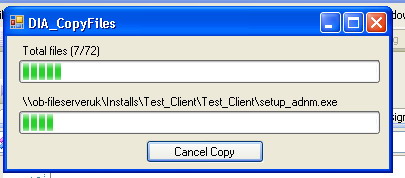
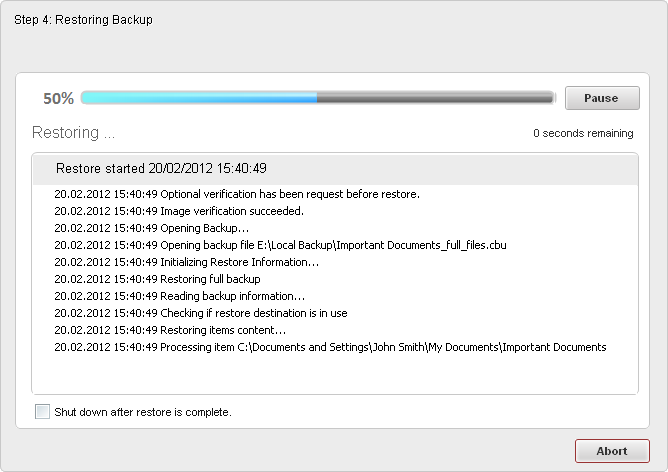
3) Have some type of message display that actually tells us what is happening (in fact having this may be more usefull than showing progress of the subprocesses).Here are some examples of great progress indicators (granted, not all are installers, but they are informative):
http://doc.zarafa.com/7.0/Migration_Manual/en-US/html/images/MGR_Progress.png
http://www.codeproject.com/KB/files/Copy_files_with_Progress/copyfiles.jpg
http://openchrom.files.wordpress.com/2011/09/openchrom-installer-unpack.jpg?w=640
The last one I want to show is actually from a game I like, and I was having a ton of issues trying to find a screenshot of the progress indicator, so instead, I found a Youtube video. The installer is about 5 minutes in - when you first launch the game, you have a progress indicator, but, its a little dark in this video, in the upper left hand corner, you can see how many files there are, what file it is on, if its downloading or installing, etc. Probably one of the most helpful progress indicators I have ever seen:
-
Re:Can't Go Backwards
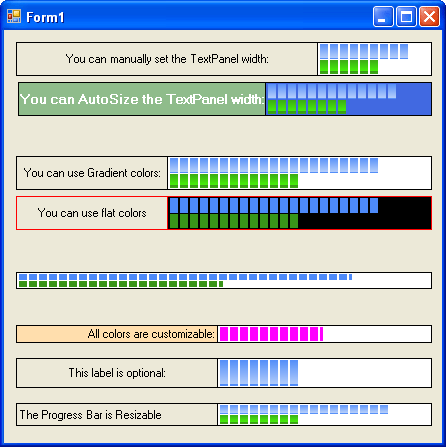
This is why you put two progress bars. One general and one for sub processes.
http://www.codeproject.com/KB/progress/SplitProgressBar/SplitProgressBar.gif -
Re:C?
When you do a malloc in C you are getting memory assigned to you differently than it is with a C++ new. The semantics of "return" in C do not clean up your C++ objects and vice versa. Read the link. http://www.codeproject.com/Articles/6555/To-new-is-C-To-malloc-is-C-To-mix-them-is-sin Not so in Objective-C as the following link discusses: http://stackoverflow.com/questions/1150650/is-it-ok-to-use-classic-malloc-free-in-objective-c-iphone-apps Similarly, fields in a struct in C are contiguous. In C++ there is no such guarantee though often it is true. C++ is also a more complex run-time than C. The point is that you can write C and use it anywhere. You can write an iPhone app almost exclusively in C syntax. You can't get a free C++ compiler on every platform.
-
Not viable
http://www.codeproject.com/Articles/374386/Simple-image-comparison-in-NET
There seems to be some resources available online, if you write some code and run your images through this you should be able to quickly assess the differences. But IMHO you should just get the students to do the assignments on different images. Perhaps even individual assets for each of them. If I were one of them, I'd just blur the image ever so slightly, somewhat mess with the levels and crop a few pixels off the edges and no matter how good your algorithm, it will fail to recognize plagiarism. On the other hand, perhaps the sneaky little bastards that go that far deserve to pass?
-
Re:The only thing Windows needs to do
-
Re:Wait, what now?
XCode is miserable. I've been subjected to it recently, and I give it the "Worse Than Codewarrior" award.
Visual Studio is honestly really good. It has the best Win32 debugger that I've used. But as for as editing goes, I honestly have to say that I give the nod to Eclipse. In order to have the same power with Visual Studio, you need to have VisualAssist. Intellisense is slow and crashy (less so in 2010, but it's still terrible). There's no easy way of switching between source and header. There's no built in way of quickly switching to an arbitrary source file (this is similar. Probably my most desired feature (intelligent scrollbar), is solved through an extension also.
Visual Studio CAN do everything Eclipse does. Oftentimes even better. But I feel way more comfortable using an OSS stack.
-
Re:Stardock: late to the game
I'm already using a third party FOSS replacement, Classic Start Menu, in Windows 7 to replace at least one critical bit of capability that Microsoft revoked: folders in the root of the start menu. I've relied for years on being able to create and manage folders in the start menu as sub-folders to manage shortcuts. I eliminate at least one click, I can organize them by task or function, and I don't have to deal with the confusion of developers' sometimes unintuitive ways of placing their apps in Programs.
I expect the author of Classic Start Menu will shift with the tide when Windows 8 arrives and produce a new version, so I will likely just keep using it if he does and it continues to prove necessary for me. That way I eliminate even the learning curve of Stardock's rendition.
You can still do this:
All users
C:\ProgramData\Microsoft\Windows\Start Menu\Programs
Your user
C:\Users\username\AppData\Roaming\Microsoft\Windows\Start Menu\Programs -
Stardock: late to the game
I'm already using a third party FOSS replacement, Classic Start Menu, in Windows 7 to replace at least one critical bit of capability that Microsoft revoked: folders in the root of the start menu. I've relied for years on being able to create and manage folders in the start menu as sub-folders to manage shortcuts. I eliminate at least one click, I can organize them by task or function, and I don't have to deal with the confusion of developers' sometimes unintuitive ways of placing their apps in Programs.
I expect the author of Classic Start Menu will shift with the tide when Windows 8 arrives and produce a new version, so I will likely just keep using it if he does and it continues to prove necessary for me. That way I eliminate even the learning curve of Stardock's rendition.
-
Re:OpenGLHere is the code to draw 3 triangles in OpenGL without an abstraction library such as GLUT (which is very limiting). Have fun with that!
For that matter, I had to look down to about the 8th page of google hits for "opengl hello world" to find one that did NOT use an abstraction library. Which tells you how many people actually do that. So, "use openGL" isn't much help. How about, "try using openGL throgh wxWidgets" or somesuch. Nobody uses straight openGL.
-
Re:Mod parent up!
Here's one I've been using, it worked well for my purposes:
http://www.codeproject.com/KB/debug/crash_report.aspx -
Re:The only decently sane SQL database
Actually, MSSQL11 will support FETCH FIRST.
Check it out (you'll have to scroll a couple pages down): http://www.codeproject.com/KB/database/Denali_Tsql_Part_2.aspx#3.3
-
Better explanation
Seems like all the screenshots are missing. There's a better explainer for use of cosmos here:
http://www.codeproject.com/KB/cs/CosmosMS5.aspx
The project isn't anything new. It's a year old already.
-
Re:Oops
Of course
If an application doesn't label itself as UAC aware (like explained in the article (link) below) it is virtualised/sandboxed, and thus resources are not accesible and prompt admin rights constantly. Or in another case you can make an elivated thread (root/admin rights thread) and let your app thread inherit the rights, but this also requires the UAC to ask the user "Do you wanna do this?".
In order to bypass this, you first need to define that you actualy are making a UAC aware app, just so that UAC knows "Hey, this developper knows what he's doing, I'll leave him alone". You do this by making a small XLM manifest.
Then, when UAC knows that you're (at least trying to) make a correct privilaged app, your app isn't virtualised and prompting, unles you decide to make some serious fscked up changes to the system, let's say the Program Files folder. By doing so you are ignoring NT6.x's design principles. (NT6.0 == Vista, NT6.1 == 7) and the UAC will still punish you for this. In order to make a change to a config file for example (Doom 3), you should ask an API "Store this to wherever it needs to be stored", by invoking a Common AppData path call (CSIDL, now depricated by KNOWNFOLDERID so check MSDN!).
And so on... Link: http://www.codeproject.com/KB/vista-security/MakingAppsUACAware.aspx
-
Re:Intel wants for there to be no GPU
If by Computational Intelligence you mean Neural networks, Evolutionary Computation or Fuzzy Logic, you should look for GPU use. You can achieve at least 10x, generally 100x performance gain easily without making your code so more cumbersome or difficult to understand. Check this implementation of a neural network in C# and Cuda or some Fuzzy Logic. For portability, in the worst case where the computer can't have NVidia video cards, you still have MCUDA that will translate CUDA GPU processing into normal CPU processing.
Don't be blind. Yes it was more complex and cumbersome some years ago, but now with CUDA, you CPU and GPU code are mixing very well without so much difficulties or complexity.
-
Re:More like Masters/PhD Thesis than Summer of Cod
Genetic algorithms are an optimisation algorithm, but what do you want to optimise exactly ? What are your individuals here ?
The idea of using a large collection of solved problem to check and improve the accuracy of the method looks more like neural network to me. Indeed, this seems to be a common method for OCR. For example : http://www.codeproject.com/KB/dotnet/simple_ocr.aspx
-
Re:Like a zombie
You can always use "unsafe", and there's even a way you can imitate malloc, so you can manage your own memory.
http://www.codeproject.com/KB/cs/UnmanagedArraysInCSharp.aspx
So you can get most of the speed advantage of C/C++ if you really want, and otherwise use safer, more convenient C sharpy stuff.
What do you think?
-
Re:What if you crash?
unless system security is already compromised in some other way
If you HADN'T "compromised security in some other way" then you wouldn't be able to put up a fake login prompt no matter what key press was required as you wouldn't be able to run any applications.
The point is that if you can already run things on the computer (often by fooling the user in to doing so themselves, but other security holes would work too), then you have enough authority to intercept ctrl-alt-del, and if you don't, well it doesn't matter what you can intercept...
Among other methods:
-MSGina.dll can be replaced with a customized GINA DLL.
-Keyboard filter driver (one example: http://www.eggheadcafe.com/software/aspnet/33581352/keyboard-filter-driver.aspx)
-Replacing the process manager application that you get when you press ctrl-alt-del during a normal session
-Changing the registry to point to a different application when you press ctrl-alt-del during a normal session
Further discusion: http://www.codeproject.com/KB/system/preventclose.aspx?msg=1666328 -
Re:I'm glad I went back to Fedora earlier this yea
How can you forward individual app windows over an RDP interface? You can't. You have to get the WHOLE desktop, which is weak.
The way to forward individual windows in RDP has been known for a while now. A no-hack way of doing the same has been supported since Win2008 (and a client update for XP). So it's not an issue with the basic approach nor technology.
-
Be sure to check out WPF with Physics2D.Net
A little while ago I needed a 2D physics simulator, and I was using WPF. I used Physics2D.Net as the engine, and WPF for rendering. It uses an MVVM architecture. The whole thing was open-sourced (LGPLv3). If you happen to go down the Windows route, it's worth a look. Here's an article I wrote about it.
-
C++ can be as flexible as ObjC...
For those who say C++ cannot be as flexible as ObjC, I wrote a little C++0x class and example that demonstrates how easy it is to have message passing in C++.
-
Re:How do you anticipate weak points
Google is your friend:
http://www.nsasys.com/network_tools_utilities/net_send_messenger_spoofer.html
http://www.codeproject.com/KB/IP/fakesend.aspx
http://www.codeproject.com/KB/IP/anetsend.aspxOn Linux it should be possible to make an anonymous net send utility from a customized version of smbclient.
-
Re:How do you anticipate weak points
Google is your friend:
http://www.nsasys.com/network_tools_utilities/net_send_messenger_spoofer.html
http://www.codeproject.com/KB/IP/fakesend.aspx
http://www.codeproject.com/KB/IP/anetsend.aspxOn Linux it should be possible to make an anonymous net send utility from a customized version of smbclient.
-
Re:Shit.
...and FORTRAN.NET
Here you go. Though it's probably about 10 years old by this point considering you can find a codeproject page about it from 2001.
-
Plethora of Options
Couple points:
1. You have to get your mind in the 'programming' mindset. Learning programming isn't necessarily purely about being a techie. You need to have solid logic skills. Much of programming is spent just getting logic right. Check out Boolean Logic for an launch point. The knowledge you gain from briefing this area will carryover into many, many programming languages. Programming *is* logic.
2. Learn what you want to program for. Pick a startup project. Is it a website you want to make? HTML & CSS is very different than learning C or C++, likewise, SQL is very different than assembly. Not that certain concepts don't carry over, but much of being a jack of all trades is simply having the ability to have good conditional logic skills, and the ability to Google things quickly and learn to apply them as you go. You don't have to become a master of all languages, or hell, even one language, but if you are truly *interested* (thats the keyword, if your not interested, its just not going to happen), and you have done a little programming in a couple of simple languages, then you will be in a good position to progress to more difficult projects.
3. Learn what you want to program for. Again. Repeated point. There are hundreds of programming languages, platforms, architectures, styles, libraries, etc. Pick something you are interested in, read about it a little bit, and if it looks like the learning curve isn't too ridiculous, start there. Perhaps a simple text based JavaScript browser game. At the end of the day you will know a bit of CSS, HTML, and JavaScript if you put your mind to it. But thats just one example.
4. W3C. This website is a good starting point for all things web.
5. Chrome Experiments If you really like web, check out the future of browser bling. Heavy JavaScript and HTML5
6. Databases. Not the most mentally entertaining, but you will need the knowhow to connect, select, insert, update, and delete data if you are doing anything with data. I am a Microsoft guy, and I can tell you that the Express Editions of Visual Studio are a greating starting point for a newbie, at zero price-point, and bundled with SQL Express, thats a good place to begin.
7. Also, places like CodeProject, StackOverflow, and CodePlex are great tools for questions ranging from the most basic to the most advanced of topics, and downloading sample code and live projects for tinkering around with. -
Re:Does anyone care?
"I looked around and no other language has anything like this"
c#: http://www.codeproject.com/KB/recipes/DBXParser.aspx
using (DBX DBX = new DBX())
{
int count = DBX.Parse(@"test.dbx");
if (count > 0)
{
for (int i = 0; i {
DBX.Extract(i, (i + 1) + ".eml");
}
}
} -
Re:My question is...
I don't understand why you say Windows Mobile is "locked down". OK, it may have cost a significant amount for the OEM, but it costs NOTHING to develop for the platform. Anybody with a copy of the free version of visual studio can write an app. There is no encryption or app-signing anything, all of the apps are unsigned
Windows Mobile isn't failing because of a lack of a community developing for it and trying to improve it. It's failing because Microsoft let the underlying OS stagnate into a creaky, bloated, kludgy pile of shit that was designed for 10-year-old devices and is not suitable for the devices it is running on today. Take, for example, the HTC HD2 (the flagship WM6.5 device). It has 512MB of physical RAM, but it is impossible to actually use all of this RAM because the constraints of the underlying Windows CE5. So you will get "out of memory" errors even though the system reports that you have 230MB free.
And now that MS is actually trying to do something to catch up to their competitors, they turn their back on the community that kept their platform alive all these years.
MS can die in a fucking fire. I certainly won't be buying any of their new handsets. Android is the future. -
So Many Choices
There are some web sites dedicated to just source code: http://www.codeproject.com/ is a great place to find useful small applications with an explanation. http://sourceforge.net/ has excellent code. http://apache.org/ has very good projects. These sites don't require you to retype anything. While the programs in codeproject are small, some of the projects in source forge and apache are huge -- but many have very good small tutorials to get you up and running. For little hardware projects look at http://www.instructables.com/. Even the commercial products now have incredible online resources that in many ways surpass what we got in Byte, if you're not familiar with http://msdn.microsft.com/ check it out. Another approach is to install Linux, Ubuntu, Fedora, or any distribution comes with a package manager that allows you to browse applications by the thousands. I set one up in my house and my daughter had Tux Racer installed before I got home from work the next day. Computer magazines didn't go away, they were eclipsed. Oh did I mention http://eclipse.org/ its a full IDE, open source and a development environment as well.
-
Re:From the article it is obvious
The problem with static typing in large projects is that a significant proportion of the code becomes devoted to writing bridging delegates from one type domain to another. This isn't so much a problem with smaller projects because it's often possible to force the use of a single type system, but when things get large that becomes impossible; you just can't coordinate the various developers well enough (typically because some of the code is written externally and can't be changed). Dynamic typing can significantly reduce the amount of glue required, at a cost of compile-time safety; dynamic languages typically enforce run-time checks strictly of course, whereas more static languages use their type system to perform those checks during compilation. (Great when it works, horrendous when it doesn't.)
It's not an all-or-nothing proposition, and it is possible to have some middle ground.
Talking about
Such proxies are, of course, not type-checked themselves, and performance-wise they are as slow as any dynamic dispatch. But their clients are still forced to be type-safe, and they only pay the dispatch penalty when they use an object which is proxied; for everything else, it's just the normal cost of vtable dispatch.
Also, obviously, this is somewhat lengthier than an equivalent implementation in a typical dynamic OO language, but then, IMO, you don't want such things to be too easy to write - they're supposed to be kludges, not something that you write routinely. If such proxying becomes commonplace, it is much harder to understand the working of the code, decreasing its maintainability.
Furthermore, there are even better approaches to that problem from a static typing perspective. One example were the C++0x (now C++1x...) concepts, and in particular concept maps - the latter allowed you to take any existing type, and map it to any existing concept, without either the type or the concept aware of it; and with members that map directly being mapped automatically. A bit like an outside interface definition. Furthermore, you could have several concept maps between a given type and a concept, each named, and use one or the other in various situations as need be; and even confine them to local scopes.
-
My open source remote desktop code
I have a free, open source remote desktop system for Windows XP and above. It is written in C++ using MFC and the MDI interface. It supports multiple sessions and the client supports multiple server connections. It is stable but light on the features. It is my hobby project. It would be great if some other coders could help me flesh out the features. If any windows programmer is interested, you can find the source code and executables on codeproject. Here is the link http://www.codeproject.com/KB/IP/remotecontrol.aspx
-
Re:Refuting the imaginary article in your head
Plenty of empty space in the code segments? How so? There are not 'empty blocks' that malware can put itself into, it will either need to delete things (and break things in the program) or enlarge the program.
And with this comment we can conclude you don't know how PE files are mapped in to memory in Windows.
There's plenty of unused space between functions for example, usually INT3 opcodes which never get run as they're outside the program execution path. PE code sections usually also contain a lot of zero-byte 00 memory mapped, which again isn't in use, but is still allocated. Read more here, it's also used when making cheats to games. And that's only way to inject your code in to existing program, and doesn't change it's memory allocation at all.
-
Re:90% shared code?
Yes, I know. I'm a C++ dev myself and I see so much effort being placed in C# (and so much "can we do it in C# please, please can we, can we" from the other devs) that we're most definitely a niche in Microsoft now. Sure VC++ is still developed, but not like the
A rather weird assessment, given that C# (as a language) has significantly fewer major features in
And yes, I know of the Ribbon as the MFC thing that no-one else has
That is not what I was talking about. It's this. Nothing to do with MFC.
Once Office becomes more
Well, maybe, it's because C++ isn't the best language to write Office add-ins in, and something high-level is better?
This doesn't mean that C++ is abandoned in places where it makes sense (like, say, game development - to get back on topic).
-
Re:Oracle DB
I am genuinely interested in what these include, particularly the business case or problem you are solving with them.
One from my limited experience: Recursive queries.
Example: Create a tree structure where every node has a reference to its parent. Now try to select all the leaf nodes under a given $node.
Several commercial DBMSes will let you do this directly (eg, CONNECT BY in Oracle). Postgres and MySQL cannot, and you have to create a loop where you select all nodes where parent = $node, then take that $list and select all nodes where there parent = $list; then repeat until you don't get anything back. There are performance penalties for this.
There are other ways to create trees in an RDBMS without a recursion feature, but you'll invariably end up having to either take a performance hit, or make updates significantly more complicated: your application has to update the tree metadata every time a node is added, deleted, or moved, which is just begging for referential integrity errors.
-
Re:umop apisdn
I have used the LEADTools Imaging SDKs to perform this task. Take a look at http://www.leadtools.com/downloads/evaluationform.htm?linkid=top_menu Here is a sample code from some guy to do that in
-
ToDoList from AbstractSpoon Software
Definitely try ToDoList from AbstractSpoon Software. I think it does everything you mention and more. It's Windows only, but it's free, EPL licensed, small, fast, reliable, flexible and will update automatically. You could use it in a very simple way by ignoring or disabling the features you don't need, or you could use the plethora of features that are similar to those you'd find in a full-on project management tool. Over many years I've tried many of the products listed above and many more too. This is the only one I still use.
-
ToDoList
ToDoList
Tasks on steroids, desktop app, freeware, open source
http://www.codeproject.com/KB/applications/todolist2.aspx