Slashdot Mirror
Domain: postimg.cc
Stories and comments across the archive that link to postimg.cc.
Comments · 17
-
Re:OK where the speed limits are reasonable
'Stralia, never change mate.
-
Re:The Error
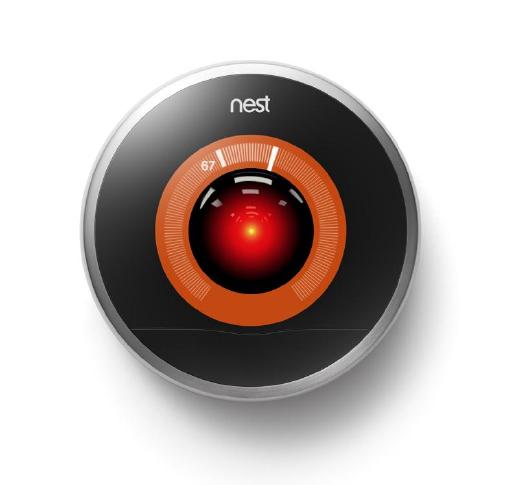
I know I've made some very poor decisions recently, but I can give you my complete assurance that my work will be back to normal. I've still got the greatest enthusiasm and confidence in the mission. And I want to help you.
-
Re:If Trump did his thing
Conveniently, IPCC doesn't mention that the Antarctic ozone hole in 2015, just 3 years ago, was very close to as large as it's ever been. (Largest was in 2017.)
https://postimg.cc/8JmnR7Ys
Source: NASA Ozone Watch.
In fact, the data shown in the graph I linked to shows no apparent trend at all.
Just more propaganda BS. -
Re:If Trump did his thing
Conveniently, IPCC doesn't mention that the Antarctic ozone hole in 2015, just 3 years ago, was very close to as large as it's ever been. (Largest was in 2017.)
https://postimg.cc/8JmnR7Ys
Source: NASA Ozone Watch.
In fact, the data shown in the graph I linked to shows no apparent trend at all.
Just more propaganda BS. -
Re:Citizens argue that power of government...
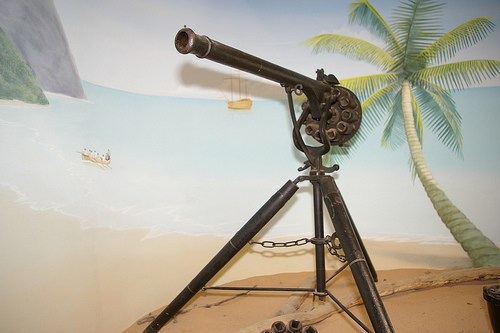
A fully automatic gun, called the "Puckle Gun" was invented in 1708. Here's a replica of it.
They didn't "not exist", they were just not affordable by your average army.
How exactly did armies back then find something "not affordable"?
300+ years ago the "budget" for the Kings army was essentially defined by the Kings wealth, which was pretty fucking vast. If a literal King could not afford the latest weapons, then no one could, which brings the question as to why they were even manufactured. It certainly seems like the resistance to adopt was more of a moral argument than a financial one.
-
Re:Citizens argue that power of government...
They had muzzle loading flintlocks. That's it. The Gatling gun wasn't invented until the 1861, in time for the Civil war. If you don't know the difference between the Revolutionary War and the Civil War then it's back to eighth grade history for you.
They didn't have gatling guns.
BUT repeating arms had been around since before the first British colony was established since 1606. They were just very expensive, that's all.
A fully automatic gun, called the "Puckle Gun" was invented in 1708. Here's a replica of it.
They didn't "not exist", they were just not affordable by your average army.
They were certainly known about by the founding fathers at the time the Constitution was written. So yeah... the guys who wrote the second amendment knew about repeating and even automatic guns. -
How to activate the new UI
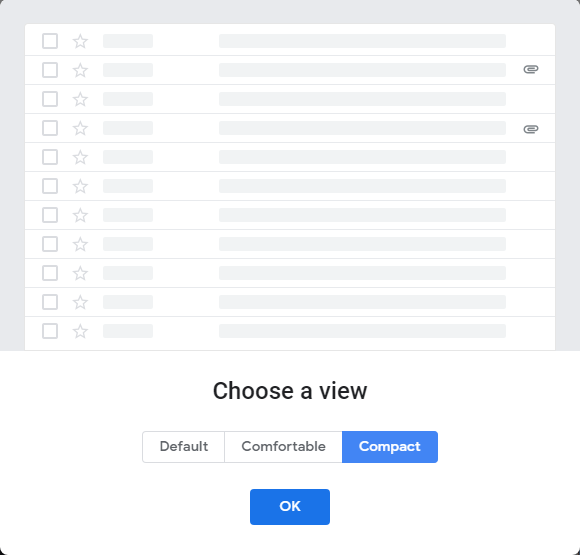
Here are step-by-step instructions to try out the new UI:
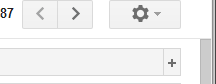
1. Click on Gear top right
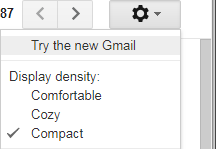
2. Click on the first menu choice Try the new Gmail
If you don't see "Try the new Gmail" menu choice -- it hasn't been rolled out to your account (yet).3. Select the layout Default, Comfortable, Compact
Don't worry if you picked the wrong choice. You can click on gear icon in the top right and the non-descript Display density to choose between the three.Thankfully we can Go back to classic Gmail for now -- until Google rams it down our throats, whether we want it or not.
-
How to activate the new UI
Here are step-by-step instructions to try out the new UI:
1. Click on Gear top right
2. Click on the first menu choice Try the new Gmail
If you don't see "Try the new Gmail" menu choice -- it hasn't been rolled out to your account (yet).3. Select the layout Default, Comfortable, Compact
Don't worry if you picked the wrong choice. You can click on gear icon in the top right and the non-descript Display density to choose between the three.Thankfully we can Go back to classic Gmail for now -- until Google rams it down our throats, whether we want it or not.
-
How to activate the new UI
Here are step-by-step instructions to try out the new UI:
1. Click on Gear top right
2. Click on the first menu choice Try the new Gmail
If you don't see "Try the new Gmail" menu choice -- it hasn't been rolled out to your account (yet).3. Select the layout Default, Comfortable, Compact
Don't worry if you picked the wrong choice. You can click on gear icon in the top right and the non-descript Display density to choose between the three.Thankfully we can Go back to classic Gmail for now -- until Google rams it down our throats, whether we want it or not.
-
Visual differences comparing Classic and New
Since the bloody article can't even show the visual differences here are screenshots comparing the old and new:
* The left column/sidebar of Inbox, Important, Sent Mail, etc. is wider. Number of unread are now in their own sub-column instead of immediately after the Folder name.
Old left Sidebar
New left Sidebar* Tabs (Primary, Social, Promotions, Updates, Forums) no longer have a vertical line separating them. You HAVE to mouse over them to see where each button ends.
* The 2nd column which showed the Senders and the number of emails in a thread no longer shows (#) but just the # number by itself making this harder to read.
The Topic column is less wide, meaning you can't see entire short emails now.
Do. Not. Want.
--
"Get off my LAN." -- Grumpy old programmer -
Visual differences comparing Classic and New
Since the bloody article can't even show the visual differences here are screenshots comparing the old and new:
* The left column/sidebar of Inbox, Important, Sent Mail, etc. is wider. Number of unread are now in their own sub-column instead of immediately after the Folder name.
Old left Sidebar
New left Sidebar* Tabs (Primary, Social, Promotions, Updates, Forums) no longer have a vertical line separating them. You HAVE to mouse over them to see where each button ends.
* The 2nd column which showed the Senders and the number of emails in a thread no longer shows (#) but just the # number by itself making this harder to read.
The Topic column is less wide, meaning you can't see entire short emails now.
Do. Not. Want.
--
"Get off my LAN." -- Grumpy old programmer -
Visual differences comparing Classic and New
Since the bloody article can't even show the visual differences here are screenshots comparing the old and new:
* The left column/sidebar of Inbox, Important, Sent Mail, etc. is wider. Number of unread are now in their own sub-column instead of immediately after the Folder name.
Old left Sidebar
New left Sidebar* Tabs (Primary, Social, Promotions, Updates, Forums) no longer have a vertical line separating them. You HAVE to mouse over them to see where each button ends.
* The 2nd column which showed the Senders and the number of emails in a thread no longer shows (#) but just the # number by itself making this harder to read.
The Topic column is less wide, meaning you can't see entire short emails now.
Do. Not. Want.
--
"Get off my LAN." -- Grumpy old programmer -
Visual differences comparing Classic and New
Since the bloody article can't even show the visual differences here are screenshots comparing the old and new:
* The left column/sidebar of Inbox, Important, Sent Mail, etc. is wider. Number of unread are now in their own sub-column instead of immediately after the Folder name.
Old left Sidebar
New left Sidebar* Tabs (Primary, Social, Promotions, Updates, Forums) no longer have a vertical line separating them. You HAVE to mouse over them to see where each button ends.
* The 2nd column which showed the Senders and the number of emails in a thread no longer shows (#) but just the # number by itself making this harder to read.
The Topic column is less wide, meaning you can't see entire short emails now.
Do. Not. Want.
--
"Get off my LAN." -- Grumpy old programmer -
Visual differences comparing Classic and New
Since the bloody article can't even show the visual differences here are screenshots comparing the old and new:
* The left column/sidebar of Inbox, Important, Sent Mail, etc. is wider. Number of unread are now in their own sub-column instead of immediately after the Folder name.
Old left Sidebar
New left Sidebar* Tabs (Primary, Social, Promotions, Updates, Forums) no longer have a vertical line separating them. You HAVE to mouse over them to see where each button ends.
* The 2nd column which showed the Senders and the number of emails in a thread no longer shows (#) but just the # number by itself making this harder to read.
The Topic column is less wide, meaning you can't see entire short emails now.
Do. Not. Want.
--
"Get off my LAN." -- Grumpy old programmer -
Visual differences comparing Classic and New
Since the bloody article can't even show the visual differences here are screenshots comparing the old and new:
* The left column/sidebar of Inbox, Important, Sent Mail, etc. is wider. Number of unread are now in their own sub-column instead of immediately after the Folder name.
Old left Sidebar
New left Sidebar* Tabs (Primary, Social, Promotions, Updates, Forums) no longer have a vertical line separating them. You HAVE to mouse over them to see where each button ends.
* The 2nd column which showed the Senders and the number of emails in a thread no longer shows (#) but just the # number by itself making this harder to read.
The Topic column is less wide, meaning you can't see entire short emails now.
Do. Not. Want.
--
"Get off my LAN." -- Grumpy old programmer -
Visual differences comparing Classic and New
Since the bloody article can't even show the visual differences here are screenshots comparing the old and new:
* The left column/sidebar of Inbox, Important, Sent Mail, etc. is wider. Number of unread are now in their own sub-column instead of immediately after the Folder name.
Old left Sidebar
New left Sidebar* Tabs (Primary, Social, Promotions, Updates, Forums) no longer have a vertical line separating them. You HAVE to mouse over them to see where each button ends.
* The 2nd column which showed the Senders and the number of emails in a thread no longer shows (#) but just the # number by itself making this harder to read.
The Topic column is less wide, meaning you can't see entire short emails now.
Do. Not. Want.
--
"Get off my LAN." -- Grumpy old programmer -
Visual differences comparing Classic and New
Since the bloody article can't even show the visual differences here are screenshots comparing the old and new:
* The left column/sidebar of Inbox, Important, Sent Mail, etc. is wider. Number of unread are now in their own sub-column instead of immediately after the Folder name.
Old left Sidebar
New left Sidebar* Tabs (Primary, Social, Promotions, Updates, Forums) no longer have a vertical line separating them. You HAVE to mouse over them to see where each button ends.
* The 2nd column which showed the Senders and the number of emails in a thread no longer shows (#) but just the # number by itself making this harder to read.
The Topic column is less wide, meaning you can't see entire short emails now.
Do. Not. Want.
--
"Get off my LAN." -- Grumpy old programmer