Slashdot Mirror
Domain: poynton.com
Stories and comments across the archive that link to poynton.com.
Comments · 19
-
Re:White balance and contrast in camera.
Exactly. It's an automatic white balance failure. I work on ISPs and getting AWB/AE/AF to produce good results for any arbitrary image is incredibly difficult since the results must be evaluated subjectively. Objective measurements will miss certain artifacts that humans easily pick out.
The only way to come close to knowing what color the dress is would be to have a Macbeth chart in the image but with multiple illuminants as in this image it's still difficult.
-
Re:Welcome back to 2005
Whoops, missed the link: http://www.poynton.com/papers/Discreet_Logic/index.html
-
Re:Monitor gamma?
Right. My point is that I've seen a number of references claim that JPEG is supposed to store "linear light" data due to the statement "gamma = 1.0" in the JFIF spec, when really what JFIF means is that JPEG files deal with display-ready data that's already been gamma corrected.
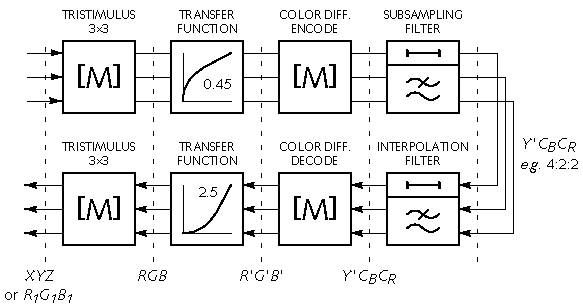
Poynton's Gamma FAQ is pretty cool, BTW, and highlights a lot of the issues that arise with trying to discuss gamma, including folks throwing a lot of imprecise language around muddying the waters. His companion Color FAQ shows where a coding format such as JPEG is supposed to fit in item #27, and specifically in this diagram. JPEG provides the equivalent of the four blocks at the right (color-diff encode, subsampling, interpolation, color-diff decode). The input and output of JPEG is already in the non-linear domain.
That doesn't stop people from getting confused by the "gamma = 1.0" statement in the JFIF spec. For example this page makes the (incorrect) statement "The JFIF file standard (that uses JPEG compression) specifies that the image to be encoded must have a gamma of 1.0 (i.e. a linear image - but not everyone obeys the rules)." There's a lot of confusion out there. It's a mess.
-
Re:Monitor gamma?
Right. My point is that I've seen a number of references claim that JPEG is supposed to store "linear light" data due to the statement "gamma = 1.0" in the JFIF spec, when really what JFIF means is that JPEG files deal with display-ready data that's already been gamma corrected.
Poynton's Gamma FAQ is pretty cool, BTW, and highlights a lot of the issues that arise with trying to discuss gamma, including folks throwing a lot of imprecise language around muddying the waters. His companion Color FAQ shows where a coding format such as JPEG is supposed to fit in item #27, and specifically in this diagram. JPEG provides the equivalent of the four blocks at the right (color-diff encode, subsampling, interpolation, color-diff decode). The input and output of JPEG is already in the non-linear domain.
That doesn't stop people from getting confused by the "gamma = 1.0" statement in the JFIF spec. For example this page makes the (incorrect) statement "The JFIF file standard (that uses JPEG compression) specifies that the image to be encoded must have a gamma of 1.0 (i.e. a linear image - but not everyone obeys the rules)." There's a lot of confusion out there. It's a mess.
-
Re:Monitor gamma?
Right. My point is that I've seen a number of references claim that JPEG is supposed to store "linear light" data due to the statement "gamma = 1.0" in the JFIF spec, when really what JFIF means is that JPEG files deal with display-ready data that's already been gamma corrected.
Poynton's Gamma FAQ is pretty cool, BTW, and highlights a lot of the issues that arise with trying to discuss gamma, including folks throwing a lot of imprecise language around muddying the waters. His companion Color FAQ shows where a coding format such as JPEG is supposed to fit in item #27, and specifically in this diagram. JPEG provides the equivalent of the four blocks at the right (color-diff encode, subsampling, interpolation, color-diff decode). The input and output of JPEG is already in the non-linear domain.
That doesn't stop people from getting confused by the "gamma = 1.0" statement in the JFIF spec. For example this page makes the (incorrect) statement "The JFIF file standard (that uses JPEG compression) specifies that the image to be encoded must have a gamma of 1.0 (i.e. a linear image - but not everyone obeys the rules)." There's a lot of confusion out there. It's a mess.
-
Re:Monitor gamma?
Right. My point is that I've seen a number of references claim that JPEG is supposed to store "linear light" data due to the statement "gamma = 1.0" in the JFIF spec, when really what JFIF means is that JPEG files deal with display-ready data that's already been gamma corrected.
Poynton's Gamma FAQ is pretty cool, BTW, and highlights a lot of the issues that arise with trying to discuss gamma, including folks throwing a lot of imprecise language around muddying the waters. His companion Color FAQ shows where a coding format such as JPEG is supposed to fit in item #27, and specifically in this diagram. JPEG provides the equivalent of the four blocks at the right (color-diff encode, subsampling, interpolation, color-diff decode). The input and output of JPEG is already in the non-linear domain.
That doesn't stop people from getting confused by the "gamma = 1.0" statement in the JFIF spec. For example this page makes the (incorrect) statement "The JFIF file standard (that uses JPEG compression) specifies that the image to be encoded must have a gamma of 1.0 (i.e. a linear image - but not everyone obeys the rules)." There's a lot of confusion out there. It's a mess.
-
Re:Monitor gamma?
But the file formats don't specify this. The image from a camera will set gray 127 to pretty much half the number of photons hitting the sensor as white 255, won't it?
No. Your camera will (probably) assume sRGB for 8bit/channel data in which case halfway between black and white will be about 186 (don't have time to get the correct value), not 128.
The human visual system is non-linear - in dark areas it can distinguish finer changes in brightness than in brighter areas - and so to get the best "bang-for-the-bit", the encoding used by display systems is also non-linear. For more information see Poynton's Gamma FAQ.
-
Re:Monitor gamma?
Are you sure about that? I think you're right, but it's confusing. Supposedly, JFIF files are intended to have a gamma of 1.0. (JFIF stands for JPEG File Interchange Format and is the official name for what's inside a
A number of color spaces can be used: grayscale, RGB and CMYK are all common in prepress. For internet use, the color space can also be YCbCr as defined by CAIRN 601 (256 levels). The RGB components calculated by linear conversion from YCbCr shall not be gamma corrected (gamma = 1.0).
Now, that's the sound bite that suggests JFIF actually deals with linear light. But, if you carefully read the actual JFIF 1.02 spec and compare it to other resources, what sounds like "linear light" really isn't, and JPEGs really do encode "display-ready" pixels that are gamma corrected.
In the JFIF spec, it says:
The color space to be used is YCbCr as defined by CCIR 601 (256 levels). The RGB components calculated by linear conversion from YCbCr shall not be gamma corrected (gamma = 1.0). If only one component is used, that component shall be Y.
So far, it jibes with that first resource. A little later, on page 4, the JFIF spec gives a series of transformation functions between YCbCr and RGB. Mark your page, and flip with me to compare this to the referenced CCIR 601. Wikipedia has a nice summary here, assuming you don't want to send off to the ITU in Geneva for a copy of CCIR 601.
The matrix that JFIF defines matches the non-scaling YPbPr matrix in the Wikipedia page. That makes sense: Rather than use the narrower [16, 235] range that CCIR 601 specifies for component video, JFIF does state that Y, Cb and Cr "are normalized so as to occupy the full 256 levels of an 8-bit binary encoding." And if you scroll down on the Wikipedia page, you'll see that they have the same matrix with JPEG-specific scale factors applied that match the JFIF spec.
But here's the kicker. Notice that the CCIR matrix uses R', G' and B'. The prime symbol means that the signal is not linear light! That is, the signal is gamma corrected and is intended to be displayed on a device with the corresponding gamma as-is with no further correction.
This interpretation is bolstered by Charles Poynton's Color FAQ which states plainly: "The prime symbols in this equation, and in those to follow, denote nonlinear components," and later states "Use prime symbols ( ' ) to denote all of your nonlinear components!" Interestingly, Poynton also notes "no practical image coding system employs linear colour differences."
So what does that really mean? It means that while the JFIF spec says "gamma = 1.0," what they really seem to have meant (and, what everyone seems to have done) is take data intended for direct display without further correction, and then encode it. The result is that no gamma correction needs to be applied to a decoded JFIF file before display, because it's already in display gamma.
At least, I think. But if you just skim the JFIF spec, you'd come away thinking it dealt with linear light.
-
Re:Correct, also calibration and slashdot circa '0
Note that that is only for CRTs. I use this method(also only for CRTs):
http://www.poynton.com/notes/brightness_and_contrast/index.html -
Where do those 30-35% and 90% numbers come from?
They sound crazy to me. I
n the first place, I seriously doubt that there's any meaningful way of measuring the "percentage coverage" of a gamut of colors, since the mapping of colors into a plane is somewhat arbitrary and there are two very different systems in wide use. I notice that this comparison of Adobe RGB vs. sRGB doesn't try to estimate any "percentages."
Neither does Poynton's invaluable Color FAQ.
Second, if we're talking about something like "area included in the CIE xy plane by thus and such system of reproduction" as a percentage of "area included by the entire spectrum," I seriously doubt that you can get a number anything like 90% with only three primaries. You're still trying to approximate a blobby blunt shape with an inscribed triangle.
The article is so vague on details that it's not clear how many primary colors are used. If it uses six primaries instead of three, I'm prepared to believe it could give meaningfully better color than traditional systems. How important that is remains to be seen. HDTV gives obviously, dramatically better picture quality (in terms of resolution) than traditional TV, but it doesn't seem to be setting the world on fire.
The big question, of course, is where one would find program material encoded with more than three primaries; it would need to be specially recorded for this system (requiring new video, broadcast, and optical disk standards). -
Joy of Spex
Well, You might start here
In particular all of your questions are answered here , the second entry on Google's list.
On a more practical note, assuming that your existing monitor and video card are in good working order, and that the monitor is positioned properly, the one thing that you need to do is to focus your eyes somewhere other than your monitor at regular intervals - say every five minutes.
Look at the wall, look out the window - anything to break from focusing only at that screen 18 inches in front of you.
Understand that the lighting should be dimmer than the usual office setting.
And sad to say, your need for eye-glasses may just be a reflection of the aging process, not your work environment.
Besides, who says glasses aren't a good thing? -
Re:Color FAQ
He's right there in my short book-list, but I didn't want to
-
Color FAQ
disclaimer: IANACE (color expert), but my most recent project has been color calibration to precise standards.
Parent has very good info, but if anyone wants additional reading, this guy is a color expert
-
Re:...non-integer frame rate?
And for the lazy that don't like removing spaces: http://www.poynton.com/notes/video/Four-field_NTS
C _sequence/index.html -
Re:Suck at blue something horrid.
Yes, there is a reason for this... The blue-sensitive cones make up about 2% of the total cones in your eye.
However there is another significant aspect of blue. Because of the way the color sensitivity of your cones works, you are particular good at discriminating between different shades of blue.
This article is what you get when you give someone with no formal education in science and research undeserved attention. It's already well known that blue contributes very little to your perception of intensity, thus it is difficult to see detail in a blue image because it lacks contrast. -
For true knowledge...
I've been in the TV postproduction business for the last umpteen years, and here it's a given that Charles Poynton knows more than you & I when it comes to video & color.
-
Lack of calibration...
I noticed the lobby had more light inside than what I wanted. [..] The transfer between my monitor settings and DVD output changes the brightness of the final product [..] I guess I have a really dark monitor.
This guy needs to read how to adjust the "Brightness" and "Contrast" controls (correctly) on his monitor and television.
There's also a lot more in-depth material on the matter.
I know after reading that material, I was able to adjust my TV and monitor controls properly. I have a battered old Sony TV that's nothing special but whenever I have friends over I often get comments that the image quality is really good. Well, duh, that's because black is black and white areas are white - but not so bright as to burn your retinas out in a darkened room. -
Lack of calibration...
I noticed the lobby had more light inside than what I wanted. [..] The transfer between my monitor settings and DVD output changes the brightness of the final product [..] I guess I have a really dark monitor.
This guy needs to read how to adjust the "Brightness" and "Contrast" controls (correctly) on his monitor and television.
There's also a lot more in-depth material on the matter.
I know after reading that material, I was able to adjust my TV and monitor controls properly. I have a battered old Sony TV that's nothing special but whenever I have friends over I often get comments that the image quality is really good. Well, duh, that's because black is black and white areas are white - but not so bright as to burn your retinas out in a darkened room. -
Re:VOD isn't the future - HD-DVD is
what? The horizontal resolution is determined by a) the raster dimensions and b) whatever frequency space limiting was done in the encode stage. For non-interlaced content with no filtering, the addressable picture IS 720x480 (or 720x576).
No, that determines the number of horizontal pixels, but that is NOT what is measured by horizontal "lines of resolution". Reread my original posting. The measurement is deliberately made relative to picture height, not width, so that the horizontal and vertical resolution measurements are comparable.For a reasonably definitive reference, I recommend A Technical Introduction to Digital Video by Charles Poynton.
All video pixels are non-square.
No, only most video pixels are non-square. For example, 1080i HDTV at 16:9 aspect ratio has square pixels. Also, sometimes NTSC video is sampled at only 640 pixels width in order to get square pixels.