Slashdot Mirror
Domain: rtings.com
Stories and comments across the archive that link to rtings.com.
Comments · 26
-
Re:“Trojan Horse” comes to mind
Yes, though unfortunately there aren't many alternatives for TVs without ads - https://www.rtings.com/tv/lear...
Really though you shouldn't allow your SmartTVs online anyway since they usually have tracking technology spying on what you watch.
-
Re:GeForce NOW
Playing competitive FPS game is not the same as playing on a competitive level. You are saying same things console players have been saying for almost 20 years, and you probably know how confrontation between console player and mouse/kb combo looks like. Next thing you will claim there is no difference between "cinematic" 30Hz vs 144Hz
You might be playing fortnite against teenagers using gamepad (handicapped input device) and big screen TV (up to 150ms input lag without switching to game mode https://www.rtings.com/tv/test... ), colloquially called "shitters".
Yes, GeForce now might be good enough for people who find current consoles with dips below 24fps perfectly acceptable.
-
Re:Dynamic Range != Color Gamut
While its valid to ask why these aren't promoted in TV specs, "dynamic range" is a completely different spec item.
That's not really true, when you combine color space and brightness you get color volume because most TVs can display fewer colors when it's really bright. Like it can show extremely bright white sunlight but vibrant reds and greens and blues were much harder. It's one of the things they've made good progress on in recent years, they've now "filled out" the box bounded by the gamut and dynamic range.
-
They do exist
Check out HDTVTest on youtube ( https://www.youtube.com/user/h... ) or http://www.rtings.com/
-
Because...
"why do not have an sRGB or AdobeRGB rating
Because video is ultimately encoded as YCrCb, wide gamut is compared against Rec. 2020, and you're not looking at the right review sites -
Re: 8K content?
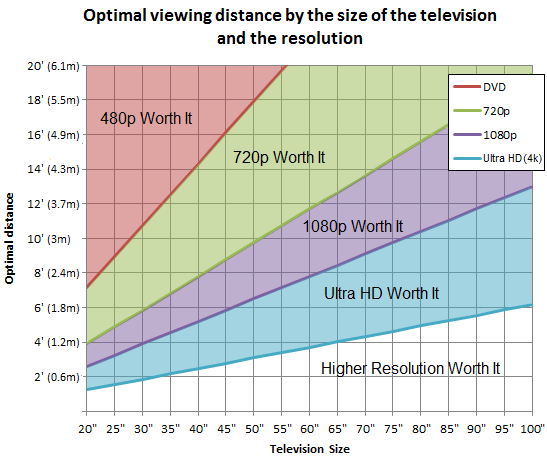
http://i.rtings.com/images/opt...
At 3 meters on a 55 inch, you barely benefit from having 1080p over 720p. 4k is a waste.
-
Re:Apple hasn't innovated since Jobs
Here you go. AAC is simply a different codec running on the SBC channel of Bluetooth audio. Latency up to several hundred milliseconds.
AAC does NOT run on SBC. SBC is it's own thing, just like AAC and AptX.
You're an idiot if you don't see that that "article" is deliberately vague.
-
Re:Apple hasn't innovated since Jobs
Here you go. AAC is simply a different codec running on the SBC channel of Bluetooth audio. Latency up to several hundred milliseconds.
-
Re:Have they also invented an OLED screen...
It's the horrible burn-in that I don't like about OLED. With LCD, I don't have to worry about how much I use it or how long I use a static image, like say for a wallpaper image.
-
Re:Is there a limit?
> But the human eye has its limits too. What's the actual N, beyond which we, the humans -- even those with the sharpest eyes -- can no longer distinguish between N and 2N pixels per inch?
The TL:DR; version is: Use a 4K distance calculator
* Distance Graph (PNG)
The Long version: It's complicated
From a well known and respected Photography:
http://clarkvision.com/imagede...
How many megapixels equivalent does the eye have?
The eye is not a single frame snapshot camera. It is more like a video stream. The eye moves rapidly in small angular amounts and continually updates the image in one's brain to "paint" the detail. We also have two eyes, and our brains combine the signals to increase the resolution further. We also typically move our eyes around the scene to gather more information. Because of these factors, the eye plus brain assembles a higher resolution image than possible with the number of photoreceptors in the retina. So the megapixel equivalent numbers below refer to the spatial detail in an image that would be required to show what the human eye could see when you view a scene.
But if we do the math
Based on the above data for the resolution of the human eye, let's try a "small" example first. Consider a view in front of you that is 90 degrees by 90 degrees, like looking through an open window at a scene. The number of pixels would be
90 degrees * 60 arc-minutes/degree * 1/0.3 * 90 * 60 * 1/0.3 = 324,000,000 pixels (324 megapixels).
At any one moment, you actually do not perceive that many pixels, but your eye moves around the scene to see all the detail you want. But the human eye really sees a larger field of view, close to 180 degrees. Let's be conservative and use 120 degrees for the field of view. Then we would see
120 * 120 * 60 * 60 / (0.3 * 0.3) = 576 megapixels.
Another calculation estimates around ~2200 dpi.
http://wolfcrow.com/blog/notes...
Maximum Resolution of the Eye
So this is how it is. If a healthy adult brings any display screen or printed paper or whatever 4 inches (100 mm) from his or her face, the maximum resolution he/she can see at is 2190 ppi/dpi. It doesn't get any better than this for 99.99% of us, except maybe during pre-kindergarten years.
But the legally accepted norm of 20/20 vision only asks for 876 ppi/dpi at 4 inches!
But since we don't view things from 4 inches away
Cinema
The width of a cinema screen can vary from 30 to 70 feet (360' to 840', 9144 mm to 21,336 mm). The closest viewing distance recommended is about 40 feet (3x height) -- 12,192 mm. If one is projecting 2K on these screens, the ppi is about 2.4 ppi to 5.7 ppi. If one is projecting 4K, it is about 5 ppi to 11.4 ppi.Is this what the eye needs?
p@0.4 works out to be 1.4 mm or 18 ppi.
p@1 works out to be 3.5 mm or 7 ppi.As you can see, 4K comes very close to what the human eye can fully resolve in a cinema screen at average viewing distances. Obviously, many people sit in the front row, and they'd definitely appreciate higher resolution. Which is why we are moving towards:
8K and UHDTV
A 30 to 70 feet screen at 8K (8192 horizontal) gives me from 9.75 ppi to 22.8 ppi. This resolution beats what the eye can resolve at these distances. The future belongs to 8K.
But, to get 18 ppi (the best possible resolution) for a 70 feet screen, we'll need a horizontal resolution of 15120 or 16K. This is about 128 Megapixels. Is anybody working on this?
-
Re:Is there a limit?
> But the human eye has its limits too. What's the actual N, beyond which we, the humans -- even those with the sharpest eyes -- can no longer distinguish between N and 2N pixels per inch?
The TL:DR; version is: Use a 4K distance calculator
* Distance Graph (PNG)
The Long version: It's complicated
From a well known and respected Photography:
http://clarkvision.com/imagede...
How many megapixels equivalent does the eye have?
The eye is not a single frame snapshot camera. It is more like a video stream. The eye moves rapidly in small angular amounts and continually updates the image in one's brain to "paint" the detail. We also have two eyes, and our brains combine the signals to increase the resolution further. We also typically move our eyes around the scene to gather more information. Because of these factors, the eye plus brain assembles a higher resolution image than possible with the number of photoreceptors in the retina. So the megapixel equivalent numbers below refer to the spatial detail in an image that would be required to show what the human eye could see when you view a scene.
But if we do the math
Based on the above data for the resolution of the human eye, let's try a "small" example first. Consider a view in front of you that is 90 degrees by 90 degrees, like looking through an open window at a scene. The number of pixels would be
90 degrees * 60 arc-minutes/degree * 1/0.3 * 90 * 60 * 1/0.3 = 324,000,000 pixels (324 megapixels).
At any one moment, you actually do not perceive that many pixels, but your eye moves around the scene to see all the detail you want. But the human eye really sees a larger field of view, close to 180 degrees. Let's be conservative and use 120 degrees for the field of view. Then we would see
120 * 120 * 60 * 60 / (0.3 * 0.3) = 576 megapixels.
Another calculation estimates around ~2200 dpi.
http://wolfcrow.com/blog/notes...
Maximum Resolution of the Eye
So this is how it is. If a healthy adult brings any display screen or printed paper or whatever 4 inches (100 mm) from his or her face, the maximum resolution he/she can see at is 2190 ppi/dpi. It doesn't get any better than this for 99.99% of us, except maybe during pre-kindergarten years.
But the legally accepted norm of 20/20 vision only asks for 876 ppi/dpi at 4 inches!
But since we don't view things from 4 inches away
Cinema
The width of a cinema screen can vary from 30 to 70 feet (360' to 840', 9144 mm to 21,336 mm). The closest viewing distance recommended is about 40 feet (3x height) -- 12,192 mm. If one is projecting 2K on these screens, the ppi is about 2.4 ppi to 5.7 ppi. If one is projecting 4K, it is about 5 ppi to 11.4 ppi.Is this what the eye needs?
p@0.4 works out to be 1.4 mm or 18 ppi.
p@1 works out to be 3.5 mm or 7 ppi.As you can see, 4K comes very close to what the human eye can fully resolve in a cinema screen at average viewing distances. Obviously, many people sit in the front row, and they'd definitely appreciate higher resolution. Which is why we are moving towards:
8K and UHDTV
A 30 to 70 feet screen at 8K (8192 horizontal) gives me from 9.75 ppi to 22.8 ppi. This resolution beats what the eye can resolve at these distances. The future belongs to 8K.
But, to get 18 ppi (the best possible resolution) for a 70 feet screen, we'll need a horizontal resolution of 15120 or 16K. This is about 128 Megapixels. Is anybody working on this?
-
Re:Is there a limit?
20/20 vision is defined as the ability to distinguish a line pair with one arc-minute (1/60th of a degree) of separation. There's some debate over exactly what that means. This resolution chart on this site is based it meaning 60 pixels per degree. Others argue it means 120 pixels per degree (two pixels needed per arc-minute to show two white lines separated by one arc-minute with a black line in between). But since that's just doubling the 60 pixels per degree standard, you can just halve the resolutions on the chart (i.e. the 1080p section corresponds to 4k, the 4k section corresponds to 8k).
I also like to point out that holograms require a resolution of about 600-1000 pixels per mm. So this isn't a pointless resolution race we're on. It'll take a few more decades, but GPU and display resolution are slowly creeping up to the point where they'll be able to generate and display holograms in real-time. An 8k display shrunk down would correspond to about a 10x5 mm hologram. (If you don't know how holograms work, this would appear as a 10x5mm "window" that you could look through to view the 3D image "behind" it.) -
Smart TV, labotomized
As others have stated, either get a monitor, or get a Smart TV and just don't use the smart parts. In other words, don't connect it to your network.
Personally, the TCL 55P607 ( https://www.amazon.com/dp/B06Y... ) will likely be my next TV:
- it is 4K
- it has HDR (both HDR10 and Dolby Vision
- it has local dimming for better contrast
- it has built-in Roku (which you can just not use)All for $650. It has pretty favorable reviews as well:
http://www.rtings.com/tv/revie...
https://www.cnet.com/products/...
https://www.theverge.com/2017/...While I'd love to get an OLED from LG, they are just too expensive at the moment. Save for OLED, this TV checks off all of the boxes on my wishlist, and has a nice price to boot.
-
Re:Knock-off Vizio TVs
I tell people my TV was so cheap, it's a fake Vizio.
The funny story is that my Vizio TV came with the letters VIZIO on the front corner. But after a few days, the first "I" fell off so it just said V ZIO. A month later, the other "I" fell-off so now it says V Z O. I love the TV snobs who feel snubbed to be in a house that has a low-end TV, but double-so since I would buy a fake version of it. I'm not sure if they believe me or not.
Rtings is not the problem with Vizio as a brand. Unfortunately, unlike cars, it's not easy to assess reliability or brands and models. Vizio, I suspect, has some of the worst reliability. I also have a Vizio TV, and they do look nice. I just think with a 1 year warranty on a $500+ item, you want reliability (because the warranty is miniscule).
-
Knock-off Vizio TVs
I tell people my TV was so cheap, it's a fake Vizio.
The funny story is that my Vizio TV came with the letters VIZIO on the front corner. But after a few days, the first "I" fell off so it just said V ZIO. A month later, the other "I" fell-off so now it says V Z O. I love the TV snobs who feel snubbed to be in a house that has a low-end TV, but double-so since I would buy a fake version of it. I'm not sure if they believe me or not.
-
Missed opportunity
1080p 3D TV needs at least a 120 Hz screen refresh rate. 60 frames each second are used to show the left image, 60 frames each second to show the right image, 120 frames per second total. (If the set is designed to eliminate judder when displaying 24 fps movies, it needs a 240 Hz refresh rate to do it in 3D movies shot at 24 fps (48 fps for both views).
The problem is, every 120 Hz or 240 Hz TV I've seen has made this refresh rate internal-only. They only accept a 60 Hz input signal (which is 120 Hz for 3D-only). Probably because HDMI only supports a maximum of 60 Hz (120 Hz for 3D-only). A few times a week, I run across a gamer asking if they can hook up their 120 Hz TV to their PC and play games at 120 fps. And I have to tell them it's not possible - the TV isn't designed to accept a 120 Hz non-3D input signal.
If they had designed the 3D TVs to accept 120 Hz non-3D input, you'd have gamers tripping over themselves to buy 3D TVs to use as 120 Hz monitors, with the 3D stuff being a "free" added capability. A few of them would then probably experiment with playing their games in 3D (where the depth perception can actually be advantageous), and that might have been enough to make 3D displays catch on. -
Re:Still a bit much
There's quite the range of 'local dimming' technology out there; some of its pretty bad... some of its really good.
http://ca.rtings.com/tv/tests/...
As expected the OLED stuff scores 10/10 but *some* of the full-array stuff scores really well. So does ALL dimming irritate you or just the bad stuff? Of course that's not a comprehensive list... but it does show the range of scores.
Also FWIW a number of TVs also have a menu option to turn it off or adjust the effect so you can get 'some dimming' but not as much... which will reduce the effect -- less 'contrast' but less artifacts.
So you have some options if you want 4K but or the TV otherwise impresses you besides the local dimming.
-
Re:Something else
Sony XBR X800D, 43 inches, 650 dollars, and pretty sweet. I bought one. One caveat is that even the latest HDMI spec doesn't allow 3840 x 2160 at ten bit with 4:4:4 chroma subsampling, it doesn't have the bandwidth. The panel is ten bit but for PC use I had to choose between outputting at ten bit or 4:4:4. Either way looks great, but I went with 4:4:4 (within nVidia's Control Panel. And the Sony itself needs set its HDMI to enhanced output to enable seeing the option for 4:4:4 chroma subsampling in the nVidia Control Panel). But the limitation doesn't feel like an issue for any content I watch. The other minor caveat is that its brightness limitations mean HDR won't be as spectacular with the effects that depend on lots of brightness. You need to spend more money on a bigger set to get that as well, it seems. Great review here: http://www.rtings.com/tv/revie... AVS members owners forum here: http://www.avsforum.com/forum/... I posted some of my impressions there.
-
Re:Cool, and no 4K content
The upscaling is pretty impressive. A good 4k upscaler looks significantly better on the same 1080 source. That said, 1080p give a pretty sharp picture in it's won right. I don't think 4k is very noticeable in typical size family room (i.e. viewing from 10-14 ft away) unless you have a 75" or larger TV. Similarly, if you have 42" or smaller TV 720p is probably OK unless you are sitting 6 ft away from it.
Not this again? Listen, not everyone lives in the burbs in a huge house with a "family room". Many live in condos downtown where a TV cannot be 10-14 feet away so a 55" 4k TV is noticeable.
Rather than rant please take a look at this which is a distance to size calculator and the average size family room may allow a 1.2m (4ft) to 3m (10ft) distance from face to screen, unless you are living in a cardboard box and if this is the case I think you have more to worry about than the purchase of a 4K TV.
-
Re:Cool, and no 4K content
If you notice, one of the resolutions is a subset of the UHD 4k. The other one is only slightly sharper and it should be possible to downsample to UHD 4k with no loss of quality.
Not that most people would be able to tell the difference between a 1080p bluray and a 4k bluray...
Simply put it all depends on the viewer and the distance they like to view from as well as the screen size. The following information goes into much more detail and is well worth the read. As an example say you as the viewer have a preference for a 55" TV (I am not going to make a comparison just yet) and you prefer sitting at 2.4m (8ft) distance then providing you have reasonably good eyes you probably won' be able to tell the difference between a picture at 1080p on a HDTV to one at 2160p on a UHDTV (assuming identical quality). Obviously, as you sit closer the differences do become apparent.
Other factors also come into play as well. There is "High Dynamic Range" (HDR) that all newer UHDTV's support which does add to the crispness of the picture at the expense of latency (gamers take note), however you also have to consider there is a format war going on at the moment. Two HDR formats are on offer the first is HDR10 (open format, licence free) and Dolby Vision HDR (proprietary, requires licence fee) and if you are in the market for a UHDTV then you should be aware of this.
Currently 4K or UHDTV's (there are differences) appear to to be the next big thing in TV's, however there is also another display which will effectively sideline 4k to the equivalent of 720p compared to 1080p and that is 8K TV's which are only just now making an appearance and while they are very expensive they will rapidly come down in price (say 3 to 5 years). Of course, the distance to screen size calculation as per the URL is not going to change so to appreciate an 8K screen it would have to be bigger again and you would have to sit closer. Maybe a curved screen would help since you can sit closer but that may not be all that comfortable for some viewers.
-
Re:Uhh... Why 8k video?
Because marketing, and since 8k doesn't exist they don't have to prove that it really works.
I beg to differ. 8K TV's will be available this year although they won't be cheap so if you want to purchase one I would recommend a wait of 2 to 5 years unless you have money to burn. Of course, like 4K which has little content 8K is going to be even worse initially.
What people fail to realise it is not the resolution that is paramount but a combination of display resolution, display size, display refresh rate (in Hz) and the distance the viewer is to the screen. The following site has more details.
-
Re:The future looks bright!
I think the 6500 would be more than acceptable. I got very good promo pricing on the 7500 during the holidays, otherwise I would have gone with the 6500 or 6700. I suppose you could buy from a store with a lenient return/satisfaction policy if you need the peace of mind. I based my decision on the detailed reviews from RTings.com. Here's their analysis of the 6500:
http://www.rtings.com/tv/revie...
The lack of DisplayPort is no longer an issue, as there is finally have a true DP->HDMI 2.0 adapter (Club3D CAC-1070). Amazon has it for $30, though it is out of stock at the moment - it was released just over a month ago so demand is still quite high, but it will do 4K @ 60hz unlike the HDMI 1.4 adapters which only do 30hz.
You will probably want some kind of desktop management tool. On Windows I just write little AutoHotKey scripts that trap Win+arrow and Win+numpad keys, basically extending / overriding Aero Snap. There are lots of utilities available, free and commercial, but I preferred to work with what I already know.
-
Re:That's great. Now for the really important stuf
It seems that closely related models support 4:4:4 @60Hz. Does this change your view of this for use as a monitor?
-
Re:Same reason blu-ray didn't take off
The original argument though was that the additional information in a real 4K stream would not be apparent...
It is.
It depends on how far away you are from the display.
For example, the average person needs to be less than 4 feet away from a 32" tv in order to see any benefit from 4k resolution over 1080p resolution -
Re:Cost and market
Attach plasma to power strip. Turn power strip off when not watching. Standby power consumption = 0 watts. Better image quality while in use = worth slightly higher energy costs.
Certainly, but a LED based TV offers a 60% savings in energy costs, while switched on. One available chart is here:
http://www.rtings.com/info/lcd-vs-led-vs-plasma/power-consumption-and-electricity-cost
Also, if you are using your plasma TV in the summer, in an air conditioned space, then you are likely to find an even better energy savings with the LED TV. Sure you can argue that in the winter the plasma TV is doubling as a space heater, but it is easier to provide a more efficient heating unit, than it is trying to compensate for the heat in a cooled space. Additionally, a focus on LED based TVs will probably help focus innovation on improving the blacks in that technology.
-
Re:Because of the Limited Lifespan?Here is a pretty cool graph showing the size/watts curve for plasma, LCD/fluorescent, and LCD/LED.
I had thought increasing sizes were offsetting the power reductions obtained by more efficient backlighting, but not really... a 55" LED uses about half the power of a 40" plasma.