Slashdot Mirror
Domain: sourceforge.net
Stories and comments across the archive that link to sourceforge.net.
Comments · 31,462
-
Re:WxPython
Anyone using pyWin32 sould upgrade to 2.5 version as well. Otherwise you will have problems.
-
Social Networking needs to stop being "cool"
If I've said it once, I've said it a million times: One of the biggest things holding social networking back is that people still have this conception of it that is very reminiscent of a 1996 Wired Magazine article. That it's all very cool and hip and revolutionary.
Social networking isn't gonna get anywhere until people everywhere see it as a basic tool, no more, no less. You don't see kids bragging about their email address, do you? Why are teenagers acting the fool over the fact that they have a myspace?
I've been working on a distributed social networking software called Appleseed (at Sourceforge, and a test site at Appleseedproject.org. The idea is to distribute social networking across an infinite number of sites, all of which can communicate with each other flawlessly. Basically, taking the decentralized theory of the internet, and applying it to social networking software.
One of the effects I think this will have, is that a lot of people will join social networking sites who might be normally turned off by a monolothic cesspool such as MySpace. Ridiculous hipsters can have their site, and people who don't suck could have their own site, and someone who doesn't suck could still maintain a relationship with their hipster "friend" so that they can hear where the parties are without having to wear girls jeans and have a haircut that proves that the world has no sense of decency.
Yes, this means that your uncle and your mom and your cousin and even maybe your grandparents are gonna be do the whole social networking thing. Luckily, Appleseed has a lot of privacy options, so you can hide your BDSM Leninist Reading Group from your family.
One of the effects of the "uncooling" of social networking, I think, will be that people recognize that you're not hanging out at 80's night at the local club, or chilling with your friends at a private party. You're broadcasting your life to the whole damn world. Once I think people realize that, I think the absurd and abnormal social habits that social networking creates are going to quickly disappear.
At the very least, I sincerely hope so. -
Re:I would have said 'yes'......Unless the major desktops do something significant to reduce their memory consumption, Linux on the desktop will remain something that only those with rather high-end systems will be able to enjoy.
This one fvwm95 would probably have been a better fit for her system. I've also installed enlightenment on a lot of P2/3 class machines for people I think will be able to adapt to a new desktop.
-
Re:Protection tools?
Others have suggested Tor, but anyone familiar with your posting habits knows how you prefer nothing short of installing an entirely new operating system as a solution.
twitter, you're in luck. I remember seeing a story on Slashdot about an OS that uses services like Tor for this sort of thing. But if there's anything Roland Piquepalle has taught us, it's that people don't like being linked to a link. So here's the SourceForge page itself. HTH. -
Re:New features
That would have been a lot funnier many years ago when vi was known as a tiny elegant editor whose strength was the way it was designed to take advantage of the rich set of command line text tools common to Unix by calling them from within the editor. But now people think of vi as this huge vim thing (which it ain't). It's just not funny anymore. It just about makes me want to cry.
If anyone wants to know what vi really is, then check this out. And no, that's not just my opinion, it is absolutely fact that's what vi really is.
-
Re:WxPython
just noticed that pywin32 (Python for Windows extensions) is now broke as well get pywin32-209.1.win32-py2.5.exe from: http://sourceforge.net/project/showfiles.php?grou
p _id=78018 -
Re:vim is not vi
This is even more like the real thing.
-
FXO
I ran into this problem when I encountered the same situation. There are PA specific hardware SIP devices you can get to do the job, but the best way is to use a simple SIP based FXO device. As for the visual notifications; you could easily get a serial based solution and have asterisk kick off a script to flash the lights. Asterisk is capable of launching external applications before or after a call is placed. It would not be hard to purchase or build some sort of serialized light controller that can flash your lights.
http://sourceforge.net/projects/ciptservices -
The traditional vi is available
You can get the traditional vi here.
I agree that vim has strayed far away from the original vi, the two are not really the same. -
Re:Vim schwim - give me Notepad2 or give me death.
If you like notepad2 you should try Notepad++.
It's my current fave text editor for 'doze. -
Re:Please help me with vim
You could always use Eclipse inside VIM http://sourceforge.net/projects/eclim/ though I can't get my head round it someone else might.
-
Re:Mindstorm
You'd be surprised at the amount of lego used by scientists in quick setups.
There's a surprising amount of things that can be done with Mindstorms. You can even use a wide variety of alternative programming languages such as robotC or leJos a form of Java. These are just two of many different projects.
Just have a look around and you'll find lots of different pages about modding, and making custom bricks. It's much more potent than any of the "build your own robot-arm" type of kits. (which you can also do with Mindstorms) -
Re:easier solution
IE doesn't really "load fast" as it is already mostly running if explorer is (always), so it is more of a "Open new window" operation.
Something I found that might help you:
http://sourceforge.net/projects/ffpreloader/
It is a preloader that you run at windows startup and that is supposed to reduce FF startup time (can't confirm as I don't use it). -
Run with JavaScript enabled, OK?
Just don't do it using MSIE.
Simple, eh?
Of the 4 browsers I have here, all are safer in JavaScript than MSIE (FireFox, SeaMonkey, Opera, Konqueror). Three of those are easily available for 'doze & even Konqueror can be made to work in it.
Er... sorry, I also have lynx, links & w3m available, plus Galeon and a few other GNOMEish built-ins kicking around. Spoilt for choice! -
Run with JavaScript enabled, OK?
Just don't do it using MSIE.
Simple, eh?
Of the 4 browsers I have here, all are safer in JavaScript than MSIE (FireFox, SeaMonkey, Opera, Konqueror). Three of those are easily available for 'doze & even Konqueror can be made to work in it.
Er... sorry, I also have lynx, links & w3m available, plus Galeon and a few other GNOMEish built-ins kicking around. Spoilt for choice! -
Run with JavaScript enabled, OK?
Just don't do it using MSIE.
Simple, eh?
Of the 4 browsers I have here, all are safer in JavaScript than MSIE (FireFox, SeaMonkey, Opera, Konqueror). Three of those are easily available for 'doze & even Konqueror can be made to work in it.
Er... sorry, I also have lynx, links & w3m available, plus Galeon and a few other GNOMEish built-ins kicking around. Spoilt for choice! -
Re:editors are for wimps
Or http://hessling-editor.sourceforge.net/, if you're into that kind of thing...
-
Re:New features
How do i enable that clippy?
I know you're joking, but someone actually created a version of vi with clippy. Creepy.
(Haven't tried it though) -
Re:Please help me with vim
Try running 'vimtutor'
Personally I took in more when I read read the reference manual rather than the tutorial. http://vimdoc.sourceforge.net/ has the manual in PDF form, as well as a Vim book, FAQ and other guides.
As for your cursor keys question, I guess it's due to tradition. You can use the 'map' command to change what the jkl and ; do. -
Re:Please help me with vim
Try running 'vimtutor'
Personally I took in more when I read read the reference manual rather than the tutorial. http://vimdoc.sourceforge.net/ has the manual in PDF form, as well as a Vim book, FAQ and other guides.
As for your cursor keys question, I guess it's due to tradition. You can use the 'map' command to change what the jkl and ; do. -
Re:New features
-
Re:Please help me with vim
LatexSuite at http://vim-latex.sourceforge.net/ is brilliant for editing latex documents. It took me a couple of days to initially learn but the tutorial on their site makes starting easy.
-
Cream For VIM
I recently tried Cream For VIM see - http://sourceforge.net/projects/cream
It is an open source GPL best of add-on's released already built onto VIM. Makes VIM more CUA like, includes versions for MS Windows and many linuxes. I can recommend, and would like to hear others opinions -
Re:easier solution
The reason why IE starts up so quickly is because the act of booting up Windows pre-loads IE in memory. When you click that blue 'E' icon (which points to an
There is a utility which will allow you to also preload Firefox in memory on Windows. Of course, this does not give you the ability to unload IE from memory (decoupling IE from Windows, to any degree, is problematic at best).
Of course, how much an extra 6-7 seconds of load time will impact you would depend on usage. Personally I often leave the same instance of Firefox running for days at a time and leave it minimized on a virtual desktop when it is not in use, but if I were really worried about this on a Linux box then I would use prelink. -
Re:easier solution
Fasterfox makes firefox load pages more quickly through various methods.
The Firefox Tweak Guide has many options for about:config and other tips for improving your specific experience.
Firefox Preloader will make Firefox load more quickly by making Firefox do the same thing Internet Explorer does. Firefox will use system resources before being specifically called. The application will remain resident in memory like IE does, waiting for you to click the little fox. In this way, IE loads faster but slows overall system performance.
How to use UPX to speed it up a little is what this article can tell you. Probably not the best way to go about it, but I have implemented this method on my HTPC.
It is VERY important to realize that the few seconds you wait around for the initial loading of Firefox are quickly surpassed by the lag you experience while using Microsoft's Explorer. Firefox ignores many advertisements right off the showroom floor, but can be configured to show NEARLY NO ADS AT ALL. FlashBlock, AdBlock, and NoScript will make your browsing much faster and cleaner.
Using Firefox, especially with these and other add-ons, will make your browsing incredibly secure. Explorer is left in the dust in comparison.
So the trade-off you seem to have made is this: A few seconds at load time in exhange for a combined several minutes waiting for ads to be displayed, just so you can fall victim to the shiny! new! IE exploit that seems to get barfed all over Slashdot once a week. This while using an underdeveloped, overpriced, practically featureless browser that has no database of expansions. Unless you are using the Vista beta (7 beta) you aren't even using tabs! Do you choose to commut on a horse? HOW DID YOU EVER SURVIVE THE PERMIAN MASS EXTINCTION? BAH! Why did I bother? -
Re:New Project - Redo X-Windows
It's called dsywindows.
-
Re:Qs
See for example SISCweb.
-
Java Libraries?
Furthermore, one can access other libraries than those written in Scheme, using bindings to C/C++ libraries, or in the case of SISC, access to any and all Java libraries. This, combined with Scheme's flexible language constructs, has led to amazingly powerful programming frameworks such as SISCweb (think Web 3.0 if you want a buzzword).
-
Java Libraries?
Furthermore, one can access other libraries than those written in Scheme, using bindings to C/C++ libraries, or in the case of SISC, access to any and all Java libraries. This, combined with Scheme's flexible language constructs, has led to amazingly powerful programming frameworks such as SISCweb (think Web 3.0 if you want a buzzword).
-
Re:PDF
-
Re:PDF
Actually, if you use the "prosper" LaTeX style (built on top of the "seminar" style), you can make the cool transitions with a PDF slide show. http://prosper.sourceforge.net/ would be the first place to look. It's quite a robust package, IMO.
-
LaTeX Beamer to create PDF presentations
The The LaTeX Beamer class lets you use LaTeX to create very professional looking PDF presentations. Take a look at some of the examples linked to from their homepage.
I realize that other people have already suggested using PDF but I didn't see any references to Beamer yet. I think Beamer is the best tool for making presentations regardless of platform. I also happen to think that LaTeX is the best tool by far for creating books, articles, and written works in general.
-
Re:PDFI agree completely. Those animations, sounds and "cool" transitions serve only to distract. Perhaps they're fine when the intent of the presentation is to impress, but when it is intended to actually convey some content, one is better off without them. PDFs are clearly better; they work everywhere, and look exactly the same too.
In this case, if all the parties know LaTeX, then nothing could be better than using Beamer. Thrown in a CVS repository too, and you have the perfect collaboration system.
-
Re:PDF
Indeed, PDF is nice. Especially when it's used with Beamer.
-
UltraVNC Java viewer.
For online presentations, I use Ultra VNC's Java viewer. I setup a webpage that automatically detects the remote desktop size and pops up the VNC viewer window properly scaled to fit, works like a charm. All they need is Java installed and the ability to click a single link.
For just plain presentations where the remote people see your desktop and you use the telephone for audio this setup works about as well as GoToMeeting does. If you don't have the ability to host your own conference calls, there are several free conference call companies out there, just search google for "free conference call". -
Re:There are options
> Logo was made for teaching, but I don't think it's so good for methematical algorithms.
> Pascal might also work well for that. But, try finding a Pascal that will run on your modern PC.
http://sourceforge.net/projects/freepascal -
Re:UPnP?
IGD daemon for UPnP port forwarding: http://linux-igd.sourceforge.net/
-
Re:This + Inkscape = winner
Ummmm.... Teddy + inkscape = not really much. However, I'd terribly appreciate Teddy + Blender. (There's open-source clones of Teddy too, like OpenTeddy. Not sure if it helps from Blender's PoV.)
If you mean "boy, wouldn't it be neat if Inkscape could do something like Flash, i.e., a 2D vector art program that works like a bitmap program", let me remind you that Inkscape can already automagically trace bitmaps with potrace, and potrace rules. Now, if only someone could port Ink9000 to Linux to do what Teddy does, only in reverse...
-
Re:This + Inkscape = winner
Ummmm.... Teddy + inkscape = not really much. However, I'd terribly appreciate Teddy + Blender. (There's open-source clones of Teddy too, like OpenTeddy. Not sure if it helps from Blender's PoV.)
If you mean "boy, wouldn't it be neat if Inkscape could do something like Flash, i.e., a 2D vector art program that works like a bitmap program", let me remind you that Inkscape can already automagically trace bitmaps with potrace, and potrace rules. Now, if only someone could port Ink9000 to Linux to do what Teddy does, only in reverse...
-
Re:This + Inkscape = winner
Ummmm.... Teddy + inkscape = not really much. However, I'd terribly appreciate Teddy + Blender. (There's open-source clones of Teddy too, like OpenTeddy. Not sure if it helps from Blender's PoV.)
If you mean "boy, wouldn't it be neat if Inkscape could do something like Flash, i.e., a 2D vector art program that works like a bitmap program", let me remind you that Inkscape can already automagically trace bitmaps with potrace, and potrace rules. Now, if only someone could port Ink9000 to Linux to do what Teddy does, only in reverse...
-
Kuartet is the next generation WM
It is nice, but so old school with start menus and all. It is hard to find the right application when you have like 30 applications if you have traditional start menu. There is a next generation WM that solves these problems. It's called Kuartet.
Kuartet is a KDE app using Superkaramba to make a KDE environment look like an improved Mezzo desktop. -
One comment, already slow, so...
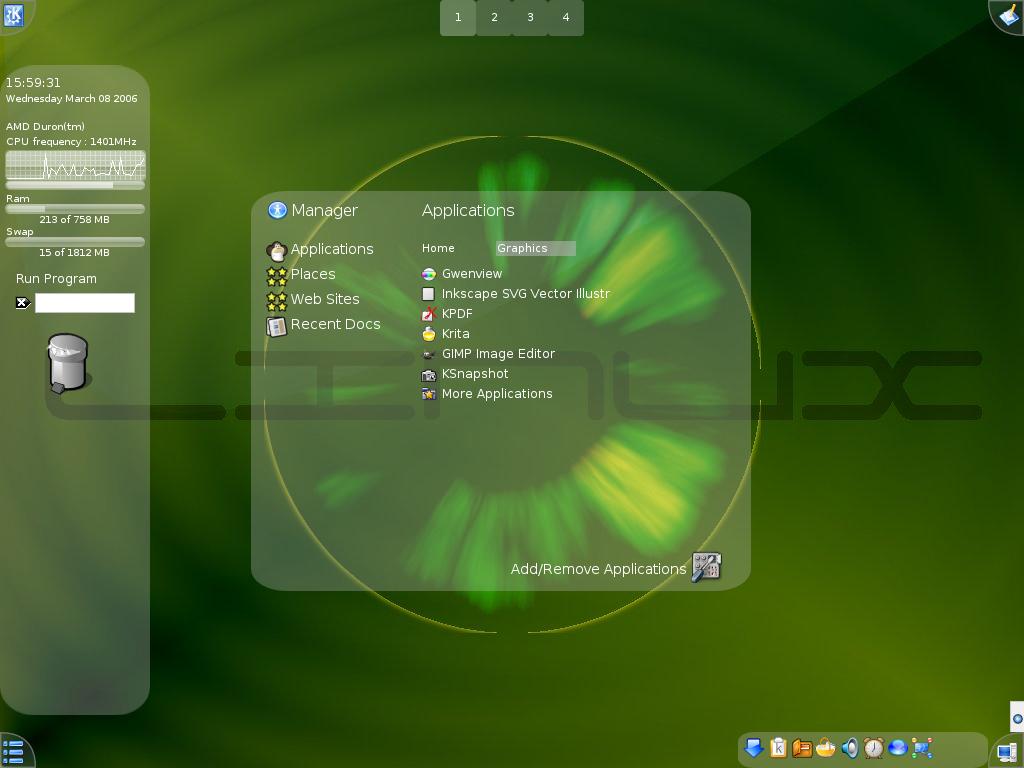
FVWM-Crystal is an eye-candy, functional and ultra-fast desktop environment for GNU/Linux, based on FVWM. Crystal can be used even on very old machines, thus it is a noticeable alternative to popular desktop choices like XFCE or Fluxbox.
Pic 1. FVWM-Crystal default desktopHistory
FVWM is one of the oldest window managers for the X Window System. It is actually so old that even the creators don't remember what the first letter of the acronym stands for. FVWM acronym is often evaluated to "Flexible Virtual Window Manager". If you like, you can however put any other word there. Some examples include: "Fine", "Freaky", "Favorite", "Furious", "Functional", etc
FVWM is known for its configurability. It provides a countless number of options making it possible to personalize your desktop to a very large extent. It even has it own scripting language and a shell (called FVWM console) which can be exploited by advanced users to interactively change the desktop looks and behavior. For programmers, there is an API available for creating new applets for FVWM, written in Perl.
The default FVWM looks is very minimalistic. There is just a blank desktop and a menu accessed with a right mouse button. In order to appreciate this great window manager you need to visit the FVWM-themes website, where you can see multiple screenshots of modified FVWM desktops, as well as download numerous themes. Here are just a few interesting examples:
- FWVM which Windows XP looks and FVWM with MacOS looks - themes by user sa from xmission.com
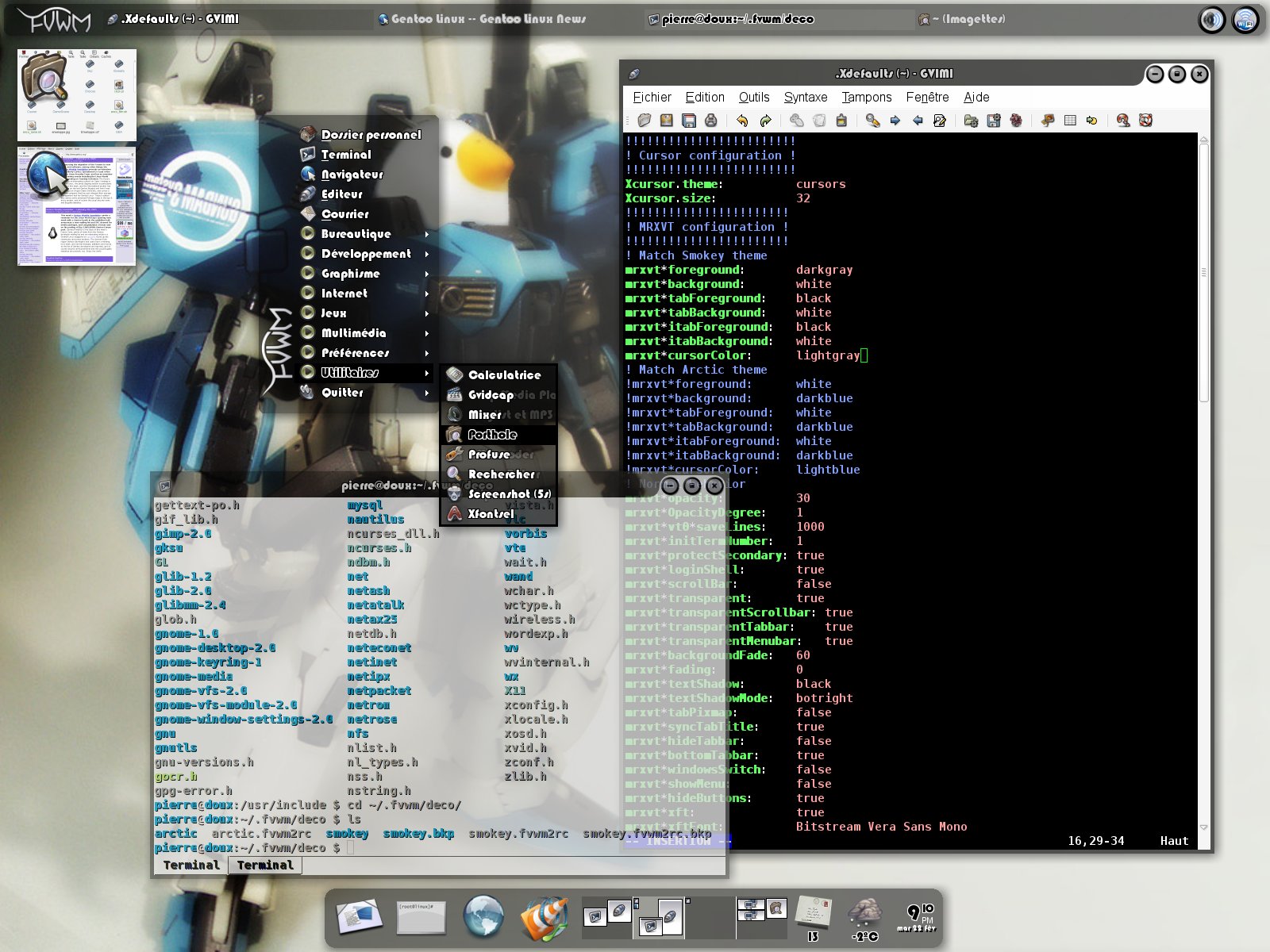
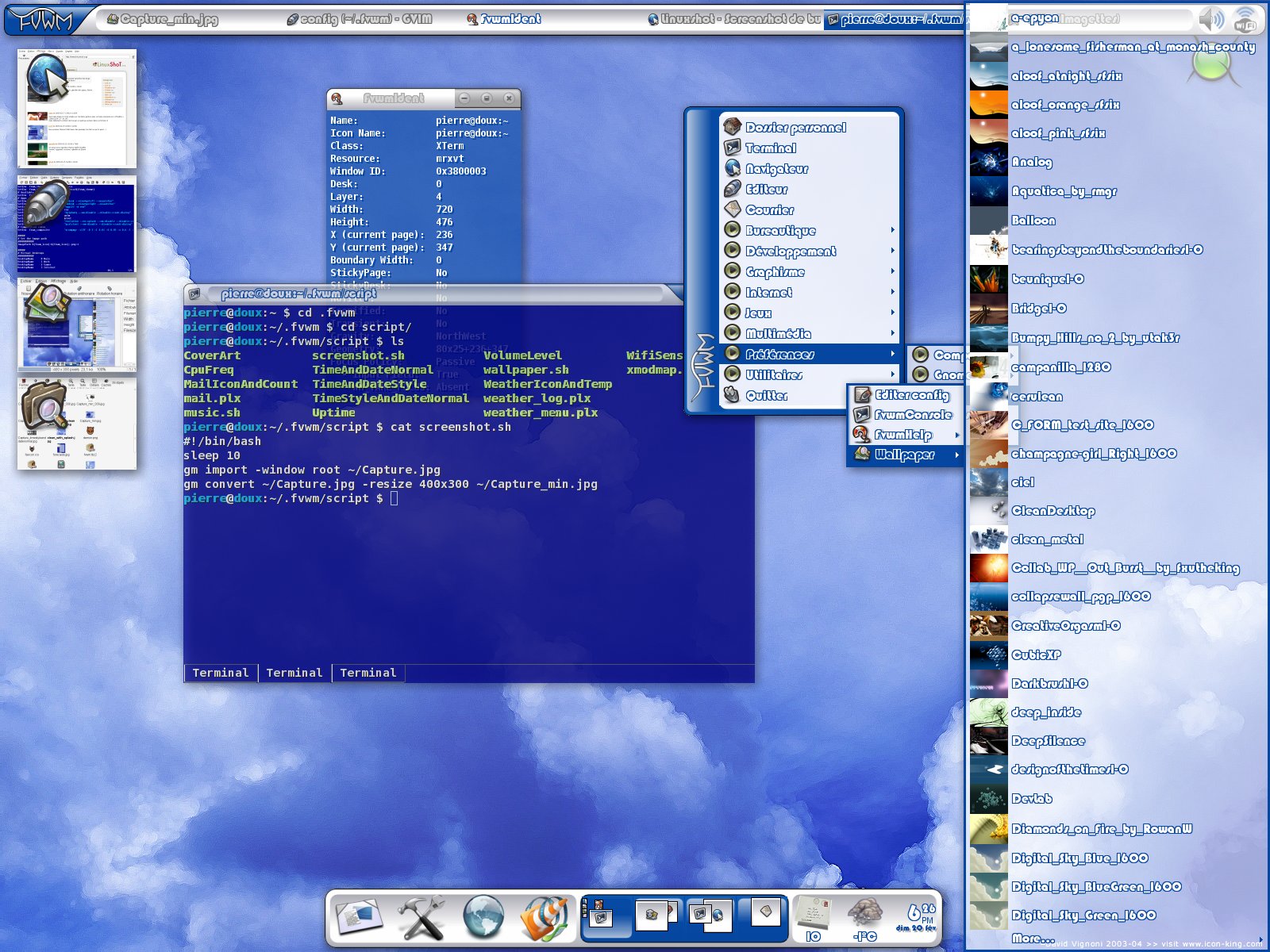
- Smokey and Artic - original themes created by Pierre Eric Marchandet, with transparency enabled
- Another interesting theme created by Tril from ironphoenix.org, using a matrix of virtual desktops (3×3) and WindowMaker-like docks.
FVWM-Crystal, which is the subject of this article, has been originally created as an FVWM theme as well. However, it evolved to something much more complex. Currently Crystal is integrated with a bunch of external tools like music players, desktop toolbars, file managers, terminals and more, so we decided to call it a minimalistic desktop environment with FVWM as the window manager. Following this path, it should be compared with GNOME or XFCE rather than Fluxbox, WindowMaker and such. But, to be precise, it's actually something in between.
Pic 2. FVWM-Crystal with NautilusWhy Crystal?
Good question, like a politician would say. We have dozens of window managers for X and a few full-featured desktop environments. Why should you care for yet another not very popular program doing the same thing? Well, there are a couple of reasons why, actually.
- FVWM-Crystal is fast. It boots-up a few times quicker than GNOME or KDE and takes up a dozen times less memory. This is however a feature of most lightweight window managers. Nothing too fancy.
- FVWM-Crystal looks really great. The whole desktop is transparent by default, includin
-
Try thistry Workrave
http://sourceforge.net/search/?type_of_search=sof
t &words=workraveThis is a pretty good program that pops up a reminder at set intervals, telling you to get up and stretch. If I'm not mistaken it provides stretching 'tips' as well. Forewarned that you need to take time to change the default settings once its installed. They are atrocious and you'll end up cursing me out for ever suggesting it if you don't. It'll also minimize full-screen games and what not.
It's not posture-related but I came across another tip. Stick your finger out (I prefer index, but if your having a bad day make your choice) about a foot, focus on your finger for 20 seconds, then look in the area behind your finger for 20 seconds, repeat a couple times -- or until you start to hear people laughing. It's supposed to relieve eye strain. Works for me.
-
You worthless scumbag
I can't help but feel that Slashdot is a trash can full of fags like you and that you should check this out. It's the open sores version of Teddy ready for you commie to download, share and destroy business opportunities. ZBrush and SharpConstruct are based on an entirely different concept.
-
DNS is the Achilles heel of the Internet
-
Re:Mac OS X Updates
I have used Fink and created my own repositories to manage Macs. Note that there is a lot of manual labour involved.
-
This took 90 seconds to findSmallBASIC, which can run on Windows, Linux or a Palm PDA. Simple, supports graphics. Open source. What's not to like?
-
XLogo For Mac Needs Help
Speaking of which, does anyone want to help with my attempt to fill the gap that this article talks about? My old XLogo project needs some tender loving care: http://xlogo.sourceforge.net/. It's a simple Logo/Turtle app, just like in the old days. It works: runs commands, even complex series of commands. However, it has not been worked on for quite some time and still needs someone to implement other commands into the parser, and make it Intel processor compatible (aka. Universal Binary).
-
Giant Leap for Robot Artificial Intelligence
Robot AI Mind.Forth goes beyond mere jumping and gives a robot the smarts for thinking like a human being.
Artificial life for robots is the joint development of a sound mind in a sound body for jump-for-Joy robots.
The Joint Stewardship of Earth lets robots jump into a position of equality with human beings in running the planet Earth.
Technological Singularity by 2012 will be the Great Leap Forward in the co-evolution of intelligent humans and superintelligent robots.
JavaScript for AI describes how even a simple language like JavaScript can leap into action with tutorial artificial intelligence for amateur robot-makers.
Turing Store Books are all about the Great Leap to artificially intelligent robots.
JavaScript Mind.html is the tutorial version of the Robot AI Mind.Forth.
-
Giant Leap for Robot Artificial Intelligence
Robot AI Mind.Forth goes beyond mere jumping and gives a robot the smarts for thinking like a human being.
Artificial life for robots is the joint development of a sound mind in a sound body for jump-for-Joy robots.
The Joint Stewardship of Earth lets robots jump into a position of equality with human beings in running the planet Earth.
Technological Singularity by 2012 will be the Great Leap Forward in the co-evolution of intelligent humans and superintelligent robots.
JavaScript for AI describes how even a simple language like JavaScript can leap into action with tutorial artificial intelligence for amateur robot-makers.
Turing Store Books are all about the Great Leap to artificially intelligent robots.
JavaScript Mind.html is the tutorial version of the Robot AI Mind.Forth.