Slashdot Mirror
Domain: swiki.net
Stories and comments across the archive that link to swiki.net.
Comments · 24
-
Re:Wiki or blog software
Yes, minimalists love wikis. I'll describe a Wiki for those who haven't seen one: A wiki is a web site where you can modify the pages (usually cgi driven). In its purest form, a wiki is a collection of web page anyone can read or modify, but most wiki software now allows you to restrict access in various ways. Most wikis also version control their pages, so you can undo mistakes made by you, or if it's a world-writable wiki, undo mistakes made by others.
Ward Cunningham wrote the canonical wiki, but there are many others now.
A wiki is somewhat easy to modify (typing your changes into a CGI text box is OK but not the greatest), very easy to search, and pretty easy to link pages together. It's biggest advantage is that you can read and edit it from from anywhere you have a browser. I use a wiki to store notes and links -- I don't keep bookmarks on my browser anymore, so now it doesn't matter which browser I'm using or what computer I'm on. I just set my browser home page to my wiki page that has all my links on it.
If you don't want to run your own, there are wiki sites that will lend you space to do your own thing in (Here's one public wiki, but there are others.
-
Re:Wiki or blog software
Yes, minimalists love wikis. I'll describe a Wiki for those who haven't seen one: A wiki is a web site where you can modify the pages (usually cgi driven). In its purest form, a wiki is a collection of web page anyone can read or modify, but most wiki software now allows you to restrict access in various ways. Most wikis also version control their pages, so you can undo mistakes made by you, or if it's a world-writable wiki, undo mistakes made by others.
Ward Cunningham wrote the canonical wiki, but there are many others now.
A wiki is somewhat easy to modify (typing your changes into a CGI text box is OK but not the greatest), very easy to search, and pretty easy to link pages together. It's biggest advantage is that you can read and edit it from from anywhere you have a browser. I use a wiki to store notes and links -- I don't keep bookmarks on my browser anymore, so now it doesn't matter which browser I'm using or what computer I'm on. I just set my browser home page to my wiki page that has all my links on it.
If you don't want to run your own, there are wiki sites that will lend you space to do your own thing in (Here's one public wiki, but there are others.
-
Fake FUD on this issue
I wrote some fake FUD on this very issue. Enjoy!
-
Re:Finally!!!
There is info on how to do that on the Eclipse Wicki. Or for a commercial product (freely downloadable) based on Eclipse, try Device Developer.
-
I maintain a page about PDA-hosted development env
Yo-
One of the things I use a PDA for is just this. Believe it or not, it is one of the bigger reasons I got a PDA, and at the time, the Newton 2100, which could be programmed in its native language NewtonScript on the device itself. You can produce the same full applications as you could using the desktop NewtonScript tools.
I maintain a page about PDA-hosted development envrionments here. It is mostly concerned with WinCE and the Newton OS, but there is a link to a similar page for Palm OS info.
If you want to do C development, on the road, there really aren't many options. To my knowledge, there is no WinCE port of gcc. There are many programming systems available for WinCE and PocketPC machines, some compiled to machine code, some compiled to bytecode, and some interpreted.
To my knowledge, other than getting something like a Toshiba Liberetto (a 'real' PC, more than $400, and with > 2 hr battery life), the only option for doing C development on a small, PDA-class device is on the various Zaurus PDAs. You can install GCC, etc, on the Zaurus. Modern C development takes, relatively, a lot of storage space, compared to other options. You should be able to get external keyboards for the Zaurus SL-5x00 models. I doubt the wee thumbboard would be much more efficient than just using a decent character recognizer. Battery life may not be quite 8-hours, but that's what you get, I guess.
The newer JP only Zaurus has a built in keyboard, but it is quite small- a lot smaller than you'd find on the Jornada 720. Nothing touch typeable. But perhaps it is all you need?
If you were willing to go low-tek, you could get an older, DOS-based handheld PC like the HP OmniGo. You could probably run Turbo C on them. Or Watcom, etc. Those can he had pretty cheaply, and I believe get good battery life. Probably approaching 8 hours. They may use a non-rechargable battery (AAs or something), which could be good if youl'll be in the middle of nowhere for long stints. You could still use rechargable NiMH AAs even, just carry a bagfull of them.
Yet another option would be to install Linux on a Jornada 720. It would be able to run run GCC like the Zaurus, and have the added benefit of having a keyboard, 75% of fullsize. After a few days, I got quite used to it, and can type almost as fast as I can on a fullsize keyboard- and I have some pretty big and stubby fingers. I am using one right now for typing up this post, although under WinCE. (I use it for programming in Squeak Smalltalk. With the Jornada, you could get the optional 24-hour battery if long life is what you need. Under Linux, that battery could probably get you at least 8 hours, but a lot less than 24 hours. (poor or non-existant power management in Linux for the J720) I'm not sure about your environmental conditions, but the J720's screen isn't very readable in sunlight- TFT screen isn't reflective. Unreadable in direct and full summer or spring sunlight. Aside from that, it's a great device, and almost has replaced my poor iBook.
I use it for development (in Squeak and Dialect [a Python-like RAD language]), write papers in TeX (and render and read them), record data in Excel, browse the web in IE (much more full featured than the IE in PocketPC), listening to MP3s, SSH for email and sysadminage, read eBooks in uBook and Acrobat... Like I said, it is like a full computer.
Under CE, the Jornada 720 gets 6-8 hours of battery life. -
Bus Schedules on my Newton and Jornada 720!
I rely on the bus (in addition to my feet and bike- no car) to get everywhere around town. Carrying around paper schedules was a pain, and sometimes they'd go out of date without you knowing.
Luckily, my city has all the bus schedules on line. For me, it was a simple matter of downloading the PDFs of the schedules and putting them on my PDA, which is usually a Newton 2100, but also a Jornada 720 (for research).
I've been meaning to write a small app in Squeak for Dynapad that does something similar to this hardware solution. It has all the data for the all the bus routes in town (as well as the Greyhound route I take to my parents house), and gives you available bus times out of a given location. Creating a multi-route iternerary would be pretty easy as well.
Unfortunately, I've not gotten around to this yet. The code side of it would be pretty straightforward and IMO fun to write. But the Duluth Transit Authority has opted to only have the schedules online in paper form or as PDF- which would mean I'd have to do some serious PIA data entry. It would be a pain to maintain, looking over a lot of numbers to find a couple of minor changes in bus schedule.
So, I figured I could dick aroudn with pdf2txt or pdf2html converters, parsing from there. But parsing never is fun to me, in any language, so I've kind of not bothered, just dealing with the plain old PDFs for now. -
I use my Newton 2100 all the time
The PDA I use is a Newton MessagePad 2100. It's an awesome tool. I carry it around with me most of the time. I take all of my college lecture notes [1] on it using handwriting recognition (which comes in incredibly handy when you are trying to find something- don't just page through, do a full-text search!); I use it as a 'net pad with 802.11b (regular ethernet when I'm at school) and web browsers, irc, email, telnet; I use it for data collection any analysis with a spreadsheet; I use it for writing papers, between NewtonWorks (WYSIWYG) and a small TeX interpreter; I use it for coding, in Forth, Lisp and NewtonScript, with and without the keyboard, whether I'm just trying to find a number quick or writing a full blown application.
That's most of what I do. I never sync. I backup onto a memory card, but a Newton does not need a desktop to be useful. I had to use a desktop in order to put on the driver for ethernet, but past that, everything else I've been able to install using it. Unlike the 3600-series iPAQs (are they still this bad?) I get a lot more than 2-3 hours of battery life, so I only have to charge once a week. I usually get a few weeks out of a charge of the NiMH battery if I'm not doing much with the wireless ethernet... if I am using it for an hour or so a day, about a week.
A while back, I tried both a Jornada 720 and an iPAQ 3150 to replace the Newton, and for doing real work it just isn't practical yet for me. Someday, my own PDA environment/OS Dynapad will be mature enough to be useful, but not for a while. Until then, I'm going to stick to the Newt, preferring to have a PDA be a computer that supplants some of the activities I do at a desktop or laptop rather than being an overpriced electronic organizer or status symbol...
[1] But I stopped putting them up online- no one wanted my messy notes. -
No worthwhile email client?
What's the deal here? Is the original asker just ignorant (not an insult, just a state of mind), or is it that hard to find a decent email client for the Zaurus?
I'm even more glad I didn't buy a Zaurus to replace my Newton 2100 when I had the impulse to do so, as a platform for running the Dynapad PDA OS/environment (which has an email client already). -
Homebrew it!
Provided you have some network device for your PDA- be it a serial cable (for SLIP/PPP- not USB), ethernet or wireless would work, one could whip up a decent syncing solution in a couple days' time. Wouldn't do everything, but Calendar, Contacts and Todo would be pretty straightforward.
I wonder why no one else has done it yet. I have iPAQ hardware, but I don't use PocketPC for anything but a platform for running my own PDA environment, Dynapad.
I'm confident that I could hack something together using PocketC on the PDA and Perl on the desktop within a weekend. If anyone wants to sponsor me in this, I could do this. By sponsor, I mean for a price. Not a very high price. The person fronting the money can choose the license under which it lives - LGPL, closed-source commercial product or whatever. If there are any serious takers, email me and we can discuss what email app to support and cost, and so on. -
Re:use a Wiki... yeah!Don't forget the squeak smalltalk Swiki
It's probably one of the more feature complete ones out there, and essentially comes with it's own development environment, the Smalltalk system that runs it...
You can use the swiki tools themselves, or the Squeak Server Pages extension too.
It's a breeze to set up and run, and it's easy to maintain.
Swiki.net is a website offering free swiki hosts using Squeak Swiki as the back end. -
Re:2 Meg of ram?
Myself, I prefer a monochrome display quite a bit over a color.
For a few years, I used a Newton 2000u, a kick ass machine. For various reasons, I sold my rad Newton setup and bought an iPAQ 3150 (darned cheap, at $150 with a CF sleeve!). The 3100 line is B&W. I was a bit weary of getting an iPAQ, because from the reviews of the 36xx and talking with friends, as the battery life of the color iPAQs is horrible. 3 hours. Or less. That's appaling. Luckily, the B&W iPAQ gets a good 20 hours of battery life, by virtue of its very readable monochrome screen.
But... one of the things that really bothered me about the iPAQ is the fact that the screen is tiny. So I sold the iPAQ and got a Jornada 720, hoping that the twice-as-large 640x240 screen would help ease the pain of leaving the Newton. And it does, a little, as long as you're inside a room with no natural light coming in. If you're outside, it's unreadable. As a biologist who has a fetish for doing quick analysis in the field as the data is entered, it makes the Jornada 720 worthless for too much of what I need it for.
Of course, there are some PDAs with reflective screens that can be read outside. The iPAQ 3600 series, for example. However, you still have the horrible battery life. Do most modern PocketPCs (PPC2k2) and color Palm OS devices have a similar reflective screen? Or do most have the unreadable ones?
Color sells to consumers though. They want flasher units rather than useful ones. It's a fact of life, but it still blows.
I guess if you're the kind of person that likes to stay inside and watch TV, your PDA tethered to the wall with an AC adapter and the windows shut, color screens would be fine.
-
NewtWiki
-
Re:Too big or not to beg
Almost forgot-
Unlike the PalmOS and PocketPC, on the Newton you can program apps for the native API using the native language. The very same API and language you'd use if you were developing for Newton OS via a Mac or Windows host. Complete with an IDE and building GUIs, all on the Newton.
Yes, on PalmOS or PocketPC, you can program using various non-native environments, LispMe, Python, etc. There are similar options to this on the Newton, but neither the other "big players" can you do first-class development. I suppose you can program in assembler on the Palm OS and probably call native Palm OS API funcs, but that's hardly how you'd usually do it on the desktop.
I keep track of self-hosted PDA programming environments on this page. -
Re:Newton or Pad comp?
The Newton is more than simply nostalgia. Even today, it is still very useful and still has more power than most PDAs people are using now a days with a 162 MHz StrongARM processor.
I personally always *liked* the size of the Newton. Sure, it wouldn't hurt if it were lighter, but I am the kind of person that likes to get a lot of use out of a PDA device- not just use it to keep track of appointments. I took all of my college lecture notes on my Newton, read a lot of ebooks/websites, IRCd, read/wrote email, even wrote full-blown Newton OS applications on the device itself.
Then I switched to WinCE so I dedicate more time to developing and testing my PDA OS/environment, which aims to be Newton OS replacement for me. It's hard to get everything working as smooth as it did on the Newton. I'd much rather go back to my Newton, and I regret switching. -
Re:this looks like a job for...
I wish InkWell would work with more.
I'd probably attempt to convert my iBook2 into a tablet like one of the authors of one of those links did, but without InkWell, there's really no motivation for me to do so. I don't think there is any other usable HWR for OS X, OS 9, or even Linux/PPC. Oh well, I guess I'll just have to stick with my original plan- to sell my ibook and Jornada 720 and buy an OQO when they come out! -
Should be possible...
I came across the same info myself- same chip as in older PowerBooks which had the ability to monitor-span. I've a feeling that it's disabled as a part of the driver- to give people a reason to get a PB over an iBook, I suppose.
To get it to work with the iBook, I imagine you'd have to write a new driver for OS X. Perhaps the ATI 128 driver from Linux and docs from ATI (specs) and Apple (DDK, monitors-api for OS X) should be enough? Apple may have done something to disable this feature on the chip itself, or perhaps in OpenFirmware, but I pray that it's just an issue of drivers.
Can Linux/X11 use monitor spanning on a PowerBook with the same chip as in the iBook? If that's the case, perhaps the next step to determine if it's just a gimpy driver in OS X or something in HW/firmware would be to see if the same technique to get dual-head setup for a PowerBook works for the iBook with the same gfx chipset.
Many iBook owners will be forever in your debt if you got this to work. Myself included, at least until I sell my iBook to get an OQO for running Dynapad. -
Where can I get e-textbooks?
I've used a Newton and more recently a Jornada 720 for taking all of my notes and a lot more at school. I would love to have electronic versions of my textbooks rather than sticking with the expensive and bulky papers ones I have now. Where can I get e-textbooks instead of regular ones? What do they cost? Do they have a decent selection?
-
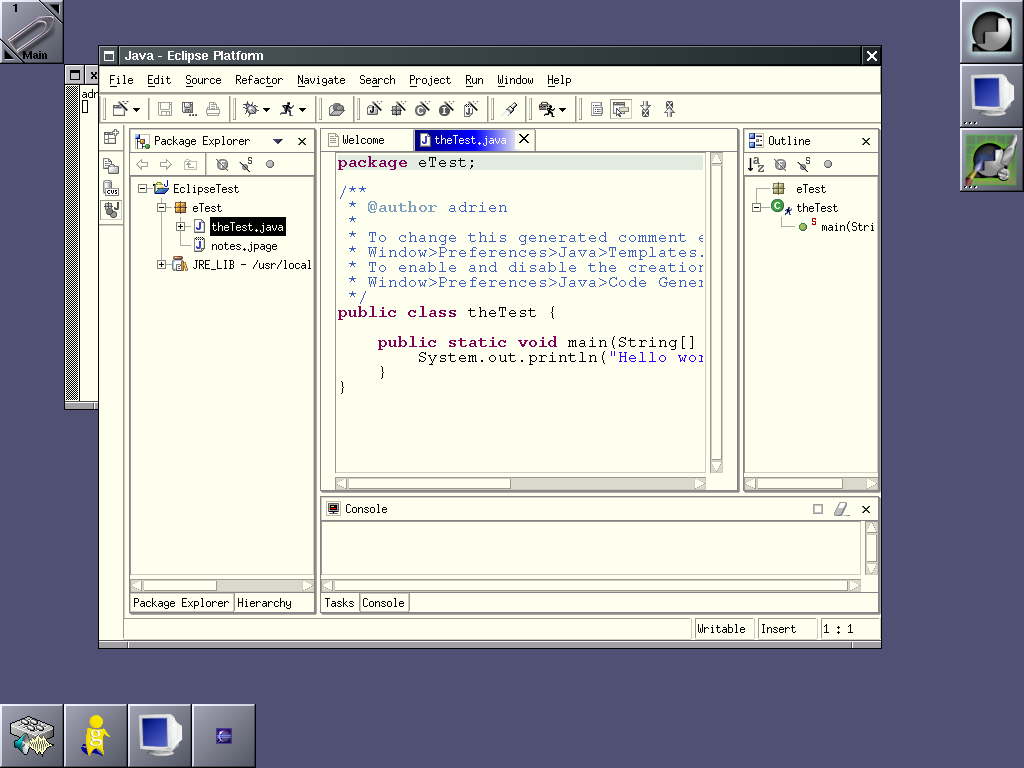
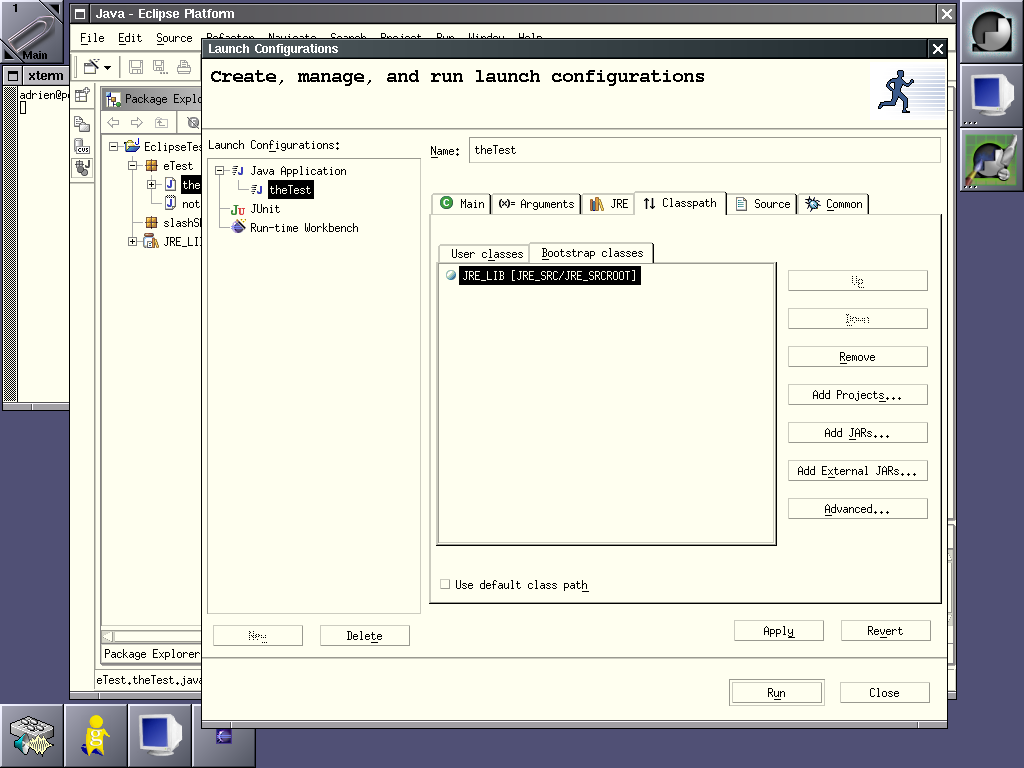
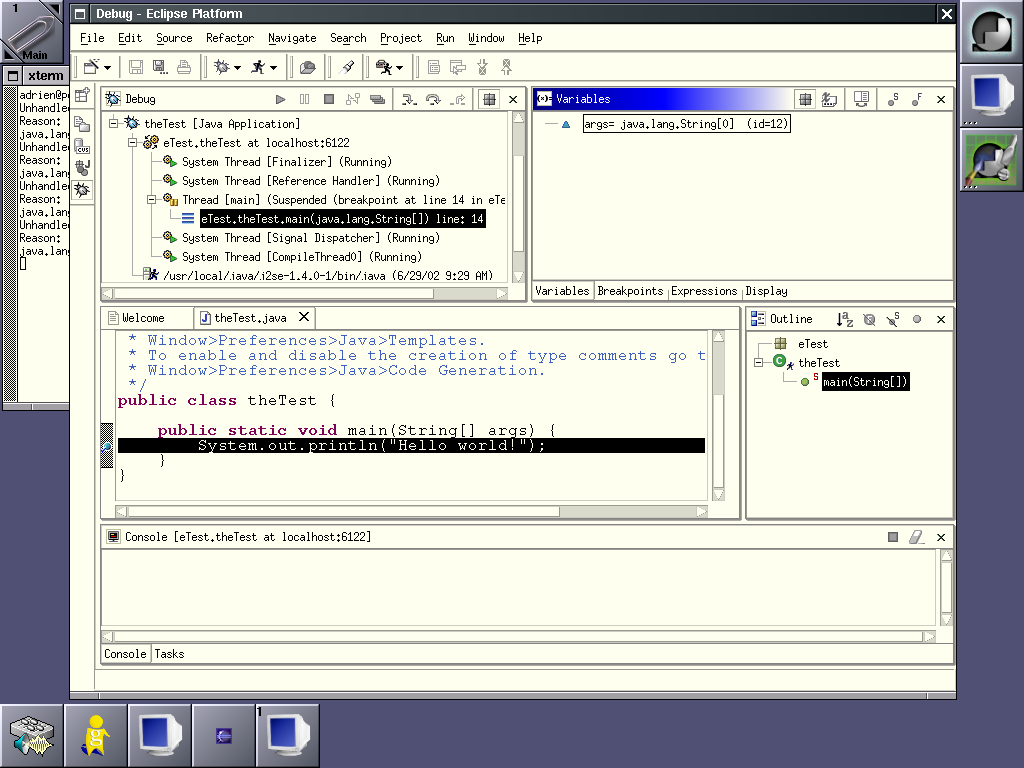
Here are screenshotsI too was quite surprised about the missing screenshots. So, I made some screenshots of Eclipse/Motif. Copy them as long as you want, I hereby give away any copyright I could have had on them. Besides, they won't stay forver on my web space, as soon as I need the space, they're gone.
- Eclipse is starting.
- The first time you start Eclipse.
- Running in basic Java mode.
- I have made some mistakes, the editor is suggesting corrections. It's not an annoying popup: I had to click on the yellow lamp on the side to get these.
- I have saved my mistakes. Now look at the ToDo list. And look at the red zones in the right editor sidebar, too. You can click on them to get quickly to the erroneous lines.
- Let's add a new class.
- Here we define our running environment.
- We can also debug the program.
- Here I configure access to a CVS repository. Couldn't make it work thoug.
Well, that's it! Enjoy! There's also an interesting wiki about Eclipse. -
Re:VMs in the OS
But has anybody given any thought to making a VM that runs almost on top of the hardware with almost no system calls?
It's been done many times since the 70s. Not sure the first time a VM-based language was the OS, but it was the case with Smalltalk, as far back as 1972 or 1976. You can still get a Smalltalk-based OS with SqueakNOS. Squeak traditionally runs on top of a host OS like Linux, Mac OS, Windows and many others, but it has almost all of the features of an OS, including an awesome (but non-traditional) GUI system, compleat with remote viewing. The binaries are identical between the OS-version of Squeak an the hosted-on-Linux version.
The current state of SqueakNOS is that you still have to write a little C for certain things. Luckily, you can write your low-level code in a subset of Smalltalk and have it translated to C. That's how the Squeak virtual machine is written, no manual C coding required. However, there is active work being done on Squeampiler, which allows Squeak itself to compile and generate native code. Which means the entire system 100% will be in Smalltalk.
As it is now, if you want to change (in SqueakNOS or Squeak on top of a 'normal' OS) fundamental changes to the language can be made within the environment. The only thing compiled to C is the virtual machine and other C plugins, like OS-specific functions. Everything else, the bytecode compiler, the parser, an emulator for itself, all the development tools and libraries are all written in Smalltalk.
I am working on an operating environment for PDAs, Dynapad along these lines. I'm doing the development on top of Linux/PPC, Solaris/SPARC, and Windows/x86 and run it on my iPAQ under WinCE/ARM. Eventually, I'd like to run it as the OS, if something like OSKit ever makes it's way to the iPAQ platform. -
Re:VMs in the OS
But has anybody given any thought to making a VM that runs almost on top of the hardware with almost no system calls?
It's been done many times since the 70s. Not sure the first time a VM-based language was the OS, but it was the case with Smalltalk, as far back as 1972 or 1976. You can still get a Smalltalk-based OS with SqueakNOS. Squeak traditionally runs on top of a host OS like Linux, Mac OS, Windows and many others, but it has almost all of the features of an OS, including an awesome (but non-traditional) GUI system, compleat with remote viewing. The binaries are identical between the OS-version of Squeak an the hosted-on-Linux version.
The current state of SqueakNOS is that you still have to write a little C for certain things. Luckily, you can write your low-level code in a subset of Smalltalk and have it translated to C. That's how the Squeak virtual machine is written, no manual C coding required. However, there is active work being done on Squeampiler, which allows Squeak itself to compile and generate native code. Which means the entire system 100% will be in Smalltalk.
As it is now, if you want to change (in SqueakNOS or Squeak on top of a 'normal' OS) fundamental changes to the language can be made within the environment. The only thing compiled to C is the virtual machine and other C plugins, like OS-specific functions. Everything else, the bytecode compiler, the parser, an emulator for itself, all the development tools and libraries are all written in Smalltalk.
I am working on an operating environment for PDAs, Dynapad along these lines. I'm doing the development on top of Linux/PPC, Solaris/SPARC, and Windows/x86 and run it on my iPAQ under WinCE/ARM. Eventually, I'd like to run it as the OS, if something like OSKit ever makes it's way to the iPAQ platform. -
Use WikisSave your money and try Wikis you can try swiki.net or you can try the Wiki in my signature.
Stephan
-
orang55
I would suppose the boxes with the built in satelitte recievers would have the best quality. There is a ton of conversion involved here. The built-in box has no conversion involved.
Non-intergrated/2 boxes MPEG2 Satelitte Stream -> VBR Decoded to FBR -> downconverted to analog output -> cable to pvr, signal loss, interference, etc -> MPEG2 Vbr Conversion -> MPEG2 Decoding -> Out to TV
Intergrated box MPEG2 Satelitte Stream -> VBR already encoded, data alreay MPEG2 compressed, saved directly to disk, video remains unedited and uncompressed. -> Downconversion to analog -> Out to TV
Rumor has it that next month, EchoStar (parent company of DishNetwork) will release a HD PVR. Of course, that would require a huge drive, but there is also news that Dish ordered a slew of 120gb drives from a large storage sompany. So, more room for plain-ol broadcasts, which dont take up nearly as much room. The box has been dubbed the DishPVR 721. Oh yeah, it runs linux.
More news and stuff on the Echostar Knowledge Base. There's lots of stuff on the AVSFORUM dish network board with other info. -
Don't forget Squeak!Didn't see it mentioned here, so I'd like to point out a pure smalltalk OS project (back to the future
-
Swiki for Collabrative editing
You can try Swiki (here) for a collaborative Web server. It is very very easy to use and it is free!! You can find implementations in Perl, Smalltalk and Java.
It is used in the portland pattern repository too. You can write web pages, without knowing a lot of html, do search on the archive and so on...
Enjoy!!