Slashdot Mirror
Domain: vampy-alumni.org
Stories and comments across the archive that link to vampy-alumni.org.
Comments · 15
-
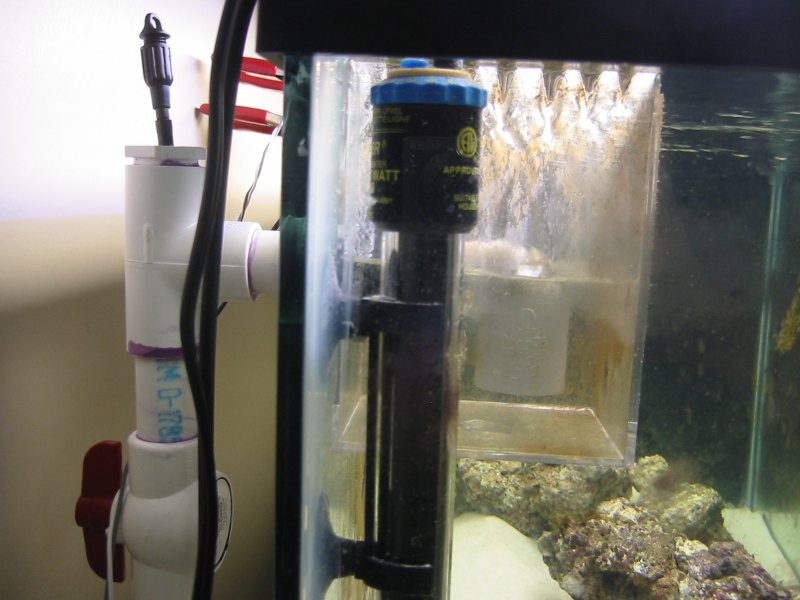
Define "built"... A 75 gallon saltwater aquarium
While several large parts were pre-built, I did the design and building for a 75 gallon saltwater aquarium with 20 gallon sump.
Cool parts? Moonlighting, from a cold cathode tube designed for computer cases, and the complete sump for filtration.
Most things were automated (lighting was on timers, water loss due to evaporation was replaced by an automated switch), so the final result was self-sustaining for the most part.
The "this is completely mine" was the external Durso.
In all I estimated that I did about 200-300 hours of research and designing, and about 200 hours worth of construction and set-up on the tank before I ever added a fish. -
My attempt...
I was stuck at work all day, but managed to sneak some supplies to make my own.
My results
I could not use sand, since I could not find any within walking distance of work, so I ended up cutting up foil tissue paper. I even framed mine.
My boss was proud of me (but told me I had to clean up the mess of glittery paper that was all over the floor once I got done) -
My experience...
I maintain(ed) a Usenet FAQ for about six years or so for Eudora/Mac
It takes effort. Since the application I was writing for was still being released, information would change with every new version. Of course, you had to keep questions specific to a certain beta version as long as they remained "frequently asked".
It also requires following the newsgroup on a very regular basis, and watching for the trends (and the questions that are getting asked a bit).
For a while I looked at things to turn the flat text file I was posting to the group into a nice HTML version. I ended up doing what I think that 90% of Usenet FAQ-writers did - did most of by hand. I just wrote the FAQ in HTML and then exported to plain-text to post and email.
Some suggestions tp anyone thinking about maintaining a Usenet FAQ:
1) Do not list your email address anywhere in it unless you want people contacting you with every question imaginable.
1a) Refer everyone who emails you to the newsgroup, even if it is an easy question. If you answer the quick question, then they email you back with a more complicated one.
2) Be honest and succinct.
3) Find a program or script to regularly post the FAQ to the newsgroup.
4) Get it set up so that you can post the FAQ to *.answers This will help with propagation and will automatically get several copies up on the web.
5) Realize it is largely a thankless job. -
Mine...
My desk was a lot cheaper and I like it a lot more. That and it has a lot more screen real estate.
Besides, mine also runs OS X. -
Apple and Windows...
I had an Apple
A couple of years ago I picked up an entire box for Windows 1.0 The screen shots are amazing when you compare it against the
I posted a picture of three manuals next to each other. -
My thoughts...I posted a journal article about the "AlBook as a pimped out iBook" idea when they first come out. Some thoughts:
My first reaction when hearing about the new 12 ince PowerBook is the effects that would have on high-end iBooks. Some Slashdot comments were dead on the money with their question.
Then I read the specs. I have been looking for a computer to replace my aging PowerBook Duo 2300c. I want something small and useful. I have a full desktop that I will be using 90% of the time, the laptop would be a stop-gap between times when the Clie 665C is too little and moving my desktop is way too much. The laptop would supplement the desktop, and not come close to replacing it.
I do quite a bit of flying, so a DVD player was a requirement. Size was also an issue. I would rather have a smaller laptop that I can bring more places.
I had been seriously looking at the iBooks, mostly around the middle of the line. The size advantage they had on the full PowerBooks was nice, as was the price. In the end, with DVD player and an Airport card, I was looking at spending about $1500 on the iBook. I decided that when I got the money together, I would buy one.
I am glad I waited. The features that the new 12 inch PowerBook has over the iBook is enough that I want to get it instead. The size difference is also very nice.
What does this mean? This means that I am going to be buying on the the smaller PowerBooks (at a cost of about $2000) instead of the $1500 iBook. So Apple ends up with about $500 more of my money - money I am glad to give them because of the new product.
I know in Japan and in a lot of fields there is a large demand for smaller sub-notebooks. I think that the 12 inch PowerBook fills that nicely. I think that Apple will have a hit on their hand, even more so than the 17 inch model.
I do have to say that the price-drops on the 14 inch iBooks are nice, as well, and make them all the more tempting.
Ahh, the joys of having too many choices. Apple is doing well, I think.
Since that time a student of mine showed me his new 12" AlBook. I only held it for a minute - any longer and I fear that I would just run off with it. The form factor is perfect, the weight is perfect. It is a wonderful machine.
My conclusion? Who cares if it could be described as n iBook on steroids? It is a wonderful second computer to compliment (not replace) a full dektop machine. -
One desire...
The only thing keeping me from going from Palm Desktop 4.0 on Mac OS X to iCal is the messed-up mounth view.
I tend to keep Palm Desktop open in month view. When I do so, I like being able to see the start times for events (as you can see in the example). iCal, on the other hand, does not list start-times for events while in month view. As a result, I have two choices: I can run in weekly view (Ugh...) or I can double-click events when I want to see when they start.
Neither is acceptable. I was hoping that v1.0.1 of iCal would bring this feature (some others have been asking for it), but I suppose I will have to wait even longer. -
Re:The games that shipped with Windows 1.0
I actually happen to have a boxed copy of Windows 1.0 (opened, but...) and, after a quick glance, the only game it seems to include is Reversi, which is not included with Windows these days.
It also included Windows Paint and Windows Write.
(Oh, and I keep the box right next to my MacOS X 10.2 "Jaguar" box on my bookshelf. Also beside it is my Apple
ObTopic: I think that one of the most collectable games was Pitfall II for the Atari 2600. It apparently had a custom sound chip, making it difficult to emulate. Other versions, such as for the Commedore and for the arcade, were not as fun.
It was probably one of the most complex games for the 2600. -
Great software...
I bought my G4 in March, and finally installed Fink about a month ago.
I cannot believe I did not do it sooner. Tools like dselect and apt-get are truly great. I was setting up some local Spam filtering, using Fetchmail, PostFix, Procmail, and Spambouncer. I also installed Pine and Lynx so I could easily SSH into the machine and use it.
Fink made the process so seamless and easy that I was amazed.
I had researched installing the different programs by hand, and the instructions for each were several pages long. Fink reduced this down to a handful of terminal commands.
I went ahead and installed X11 with Sawfish and Gnome. The screenshot was simply amazing.
The fact that Apple's OS, combined with these tools, makes running these applications this easy is simply jaw-breaking.
The good people behind Fink deserve a large pat on the break, as well as Apple, who made something like this possible in the first place. -
Re:bullshit (offtopic reply)
We are out here.
obTopic: I have been looking to purchase a PVR for some time. While I am not a big fan of the monthly fee (to be paid on top of a cable or satellite bill), it does not seem too bad of a deal.
The big problem I have, though, is that I do not watch enough telelvision to really make it worth it. If I were to lose my [provided free] cable now I do not think I would miss it that much. I have a huge collection of movies that I am constantly adding to. I would rather take the money for a PVR and simply use that to buy/rent/see more movies.
So I suppose the tech guy in me likes the idea of a PVR, but the budget-minded side of me wonders why... -
Movie buff...
I consider myself a rather devoted movie fan. I go to the theaters about once a week, and I currently own about 120 movies on VHS, about 30 on Laserdisc, and about 50 movies on DVD. I have a full list online.
I would never go for a deal like this, even if it supported MacOS X.
I have gotten to the point where I only rent a movie a few times *a year*. Owning is far easier. Blockbuster is slowly catching on to the idea that the used DVD market is going to be huge, similar to the new VHS market (and the VHS rental industry as it used to be). New DVD sales are also going to be large. Walk into any Bolockbuster and notice the growth in their used and new DVD for sale sections.
I buy most of my movies on DVD for about $8-$10, and most of my movies on VHS for $3-$6. Compare these prices against a one-time watch fee of $3, with quality that probably approaches VHS on my nice television.
My thoughts - I would rather buy a movie for 2x-3x what it coest to rent provided I have a decent notion that the movie is watching more than once. If that is the case, the cost to buy competes directly with renting it ($8 to buy a DVD, or rent twice for $4 each time).
(As far as watching movies in the theater goes - I justify that since the theater has things to offer than I cannot get at home - a huge screen and an atmosphere of being at the theater) -
Linked to before...
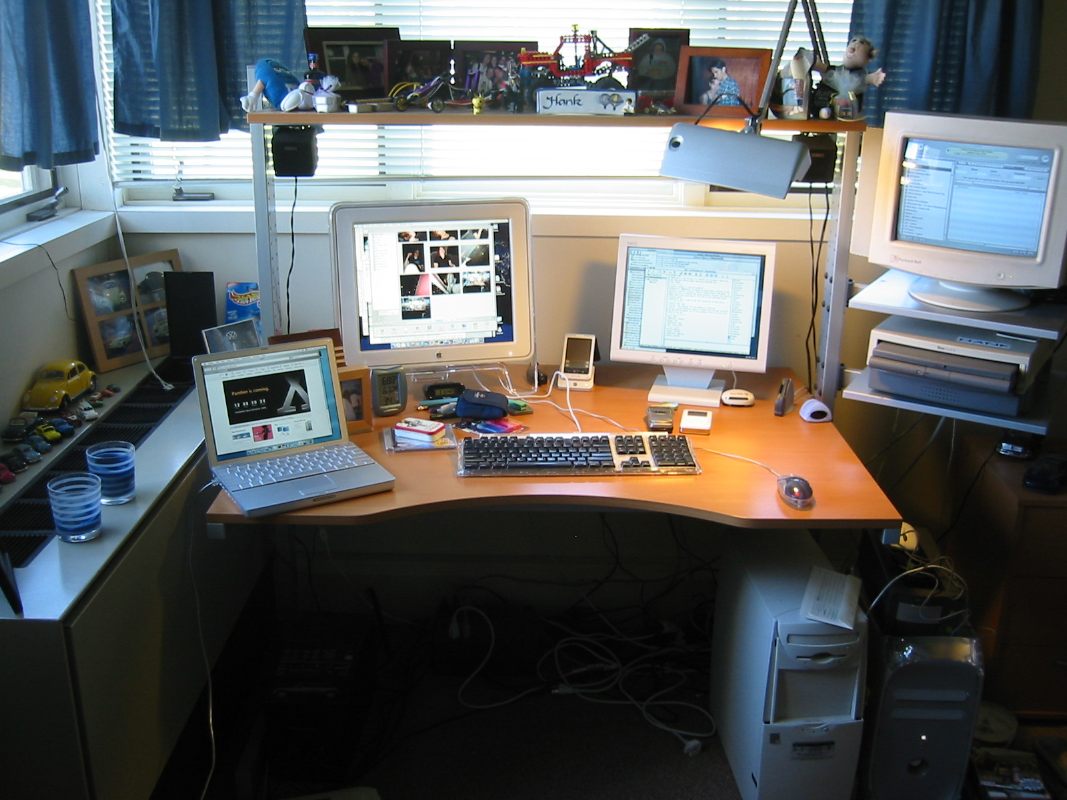
I linked to my bedroom before, but this is probably the best place for me to post the link again.
Harware in the bedroom:
G4/933 hooked up to a 17" Studio Display, a 15" NEC LCD, and a 14" VGA CRT.
Apple PowerBook Duo 2300c with DuoDock II. Headless at the moment.
These two are hooked into a 5 port 100Base-T switch. The G4 is hooked (via another port) to a 100Base-T Internet connection.
Also hooked up to the G4:
CompactFlash drive, MemoryStick drive, Cambridge Soundworks speaker system, a Sony Clie T665c, a Canon S200 digital camera, and a Keyspan Digital Remote Control.
In the closet, I have an Apple
I am looking to add a Athlon-based PC to the mix (via KVM switch to the keyboard and the NEC monitor) to learn FreeBSD on. I am also looking at buying one of the new iBooks to replace the very aging PowerBook Duo. -
Linked to before...
I linked to my bedroom before, but this is probably the best place for me to post the link again.
Harware in the bedroom:
G4/933 hooked up to a 17" Studio Display, a 15" NEC LCD, and a 14" VGA CRT.
Apple PowerBook Duo 2300c with DuoDock II. Headless at the moment.
These two are hooked into a 5 port 100Base-T switch. The G4 is hooked (via another port) to a 100Base-T Internet connection.
Also hooked up to the G4:
CompactFlash drive, MemoryStick drive, Cambridge Soundworks speaker system, a Sony Clie T665c, a Canon S200 digital camera, and a Keyspan Digital Remote Control.
In the closet, I have an Apple
I am looking to add a Athlon-based PC to the mix (via KVM switch to the keyboard and the NEC monitor) to learn FreeBSD on. I am also looking at buying one of the new iBooks to replace the very aging PowerBook Duo. -
Re:Macs?
I have a picure of my set-up online.
I am running three monitors off my G4/933 - a 17" Studio Display off a Radeon 7500, and a 15" NEC LCD and 14" crap CRT screen both running off a Radeon 7000 card.
I went with dual displays back when I had two 15" VGAs. They work seamlessly under MacOS (I started with them under 7.6.1, and now run them under 10.2.1) and I find that I am significantly more productive as a result.
The tird monitor was largely because I had an exta monitor and an extra VGA out to run it off of. Right now I just keep iTunes on that monitor.
I highly recommend multiple monitors to anyone that can run them. A lot of times, a second monitor can be added for a lot less money than a larger monitor (since the second monitor can be relegated to non-accelerated tasks and can use a cheap video card, especially sicne it will be stuck in a PCI slot). -
Re:Sigh....
i am running dual LCDs right now, a 17" Apple Studio Display and a 15" NEC 1550V.
While it is not the dual set-up diaplayed on that page, it definitely is much more productive than any one screen.
Obligatory picture actually showing three monitors off one computer.
I was in an Apple store last week, and was able to play with one of the 23" Cinema Displays. Those are extremely nice...