 Slashdot Mirror
A Simple Tool for Tracking Switch Ports?
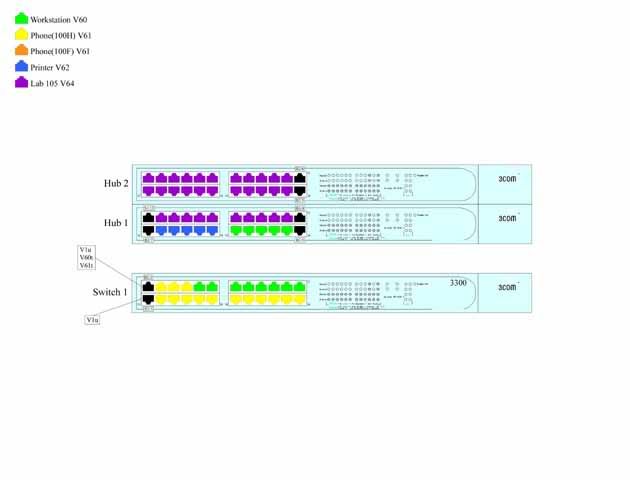
jeremy cobert asks: "I work for a large school district in the Computer Networking department. We have several network closets at each school and each switch is set for different equipment on different VLAN's. Sometimes a Tech at a school will call in and need a printer plugged into a switch, and we are currently using maps drawn with PhotoShop to keep track of which ports are set for different equipment. I can look at a map and tell them to use a port that is already setup for printers. I am the only person who knows how to use Photoshop in our department and it is becoming way too time consuming every time someone switches a port. Here is an example of how we currently track our ports. Is there any program that we can use to make changes and diagrams in some similar fashion?"
We're doing something similar at work so it's still fresh in my mind. First off: lose the Photoshop crud. Assuming your switches are managed or have at least some smarts in them I'd suggest using SNMP, $LANGUAGE and PHP to track your port information. Then any of your admins can access it via a webpage on your intranet. ($LANGUAGE can be anything but we like python and perl)
Consider replacing the hubs in your diagram with switches that have some smarts and SNMP. Not a crap LinkSys thing for $19 at BestBuy or whatever. A real, managed switch with a serial console port would be best IMHO.
Consider an "out of band" private network too. Something you can use to connect to another machine in the closets with a serial link to the switch console ports. That way if a switch/firewall/router stops talking you can remotely get to it via the console. We just received a bunch of old fibercopper media converters for this purpose (some of the runs are long)
You're there to manage the network, not just pretty up diagram in Photoshop, right?
Trolling is a art,
Masking tape and a sharpie =)
Death by snoo-snoo!
For that matter graph paper, a ruler, and a pen would work equally well.
Microsoft Visio? ... yea I said it MICROSOFT.
Uhh.. why do you need diagrams? Just use a spreadsheet with the switch ID, port number and vlan. Much easier for others to use, and as far as I can see, you don't lose any ease of use/finding out which ports do what. Colour code the cells based on vlan number if the colours are important.
But isnt there an SNMP program for 3com switches that does this automatically? I am not a net admin but I worked as a tech in school before and I do remember when we got our massive campus network upgrade to new cisco equipment. The head IT guy was all giddy about how he can see every port and device on the entire campus network from some cisco management program he used.
If you want a visual i might reccomend using M$ Viso and Racktools my Middle Atlantic.... usualy has nice diagrams of what model switches look like, etc. I've looked at a few and the pics looked decent.
Be warry though as I mostly use it to design racks for Pro-Audio Instalations. so it might not work that well. but for my needs its awsome.
At the shop that I work at we have over a thousand circuits that we have to keep track of. Visio not only allows us to keep track of all the equipment, circuit flow, extra data, etc via making simple circuit layout records, but it is also easy enough that only minimal training is needed for new users. As an added bonus images can be stored and used over and over again so no "drawing" is required.
This can be as complicated or simple as you like. Diagram with ascii art or just a list of components. I prefer this to Visio. I keep mine on an internal web server with network config backups. Internal read only to the right people and I keep documentation updated.
My manager loves pretty pictures, I'll update the many colors on slow days when I don't feel like working, but I can lay out an ascii network diagram in minutes. A Visio diagram can take days to complete for a large site. Both live on the same web server, but guess which diagrams I use for troubleshooting and change control.
I think a simple spreadsheet like program would work well (I heard VisiCalc is pretty sweet.) But, on to the nitty, I think your legend should be listed in ascending-color order. So, the first item in your legend would be Lab 105 V64, then Printer V62, Workstation V60, and Phone(100H) V61. Also, the black items are confusing - consider colour coding them and adding them to the legend.
I really do think it's important to keep this type of documentation. So good on you for the initiative.
Kurt
Wow, I've never heard of using Photoshop for network documentation. :)
Excel would be an excellent tool for this. You could set up a worksheet (tab) for each switch. For a 48-port switch, use a 24x2 grid, so each cell is a physical port. You can even color-code the cells.
If your running KDE, or can get kdelibs/qtlibs/koffice to compile on whatever your running, kivio (a flowchart/mind mapping program part of Koffice) sounds like what your after.
It would be a simple change to keep track of all the switches and ports.
DYWYPI?
We keep similar info in a simple HTML table in a Wiki ['trac' to be exact]
I should put something clever here. Maybe someday.
Maybe you should try fireworks, the vector drawing in that seems like it should be easier then what you are using. But if you really want it done right get a camera and use windows movie maker where you can narriate the function of each switch.
I like to see how things are connected, what ports are in what blocks, what's wired to to what but my diagrams are simple boxes within boxes connected by lines with a simple ledgend. For what you are doing, you do not need to spend time drawing an exact replica of your 3com 3300 switches with color, the light display, the 3com label, etc. That's just a waste of time. I use open office for my diagrams. If you are using windows, ms paint should suffice.
Others have mentioned proper diagramming software like Visio. For the free software/OSS type person, there is Dia (google it). It works reasonably well on both Linux and Windows. If only I could find a web based wiki-drawing tool...
I stumbled across this the other day while I was researching MRTG stuff. You may find it helpful.
You want something like NetDisco. It will go out and discover every switch on your network and can figure out how they're interconnected. You can then query ports for VLAN, speed, and duplex settings, among other things. Finally, you can toggle ports on and off. It can even produce graphs of your network layout using GraphViz. You'll need a *nix box, Perl, Apache, and Postgresql, as well as managed switches that support SNMP.
If all of this scares you, then go out and buy Visio, but all you'll get out of that is pretty pictures.
I once wrote a preprocessor for troff(1) that drew diagrams showing how to wire various types of serial cable.
:-)
Today I'd probably consider using GraphViz (open source graph renderer that takes a simple text description and figures out the best layout), perhaps with a simple database backend to let you update the information over the Web and draw a new picture automatically.
I'm assuming you got the images of the hardware from the manufacturer's Web site; you could use the same images in GraphViz, with a little work, but the result would be something that, once set up, could keep the pictures up-to-date automatically, suitable for printing out and sticking on the cabinet doors
The hard part is getting everyone to keep the information up to date. Making sure the end of every cable is clearly labeled (e.g. with a wide cable tie, a luggage tag, or a sharpie pen used to write on the connector or the cable) can help a lot.
Liam
Live barefoot!
free engravings/woodcuts
Why not describe it in a text file, but formatted as an SVG or a graphviz input file? They're easy enough to read that anyone with Notepad or better can understand and update them, but trivially compile to pretty pictures that you can give to management or hang on the wall.
Dewey, what part of this looks like authorities should be involved?
I agree with others who've recommended modern, manageable switches. Preferably with Layer 3 functionality, you're already using VLAN, so why not standardize?
Standardization is your first move and most enterprise-class switches (if not all) have built-in web interfaces that show you exactly what port is doing what.
The best part is, these switches have the ability to create read-only user acounts to keep the mgmt centralized. At least others will at least be able to browse to the web config page and see wtf is going on.
Dell and Cisco swtiches have this ability. Dump the hubs. If you're dept is short on funding, get the IT mgr to campaign for more cash.
Anyway, this resolves the need for any sort of manually-updated Photoshop (I've NEVER used this app for anything other than photos) files or babysitting a spreadsheet.
Us MS Paint and Microsoft Word (or maybe Wordpad if Office is too expensive)
Its a shitty way to do stuff, but still better than using photoshop.
Conformity is the jailer of freedom and enemy of growth. -JFK
Why not simply print the VLAN display of your switch?
If you're using Cisco switches, just print the VLAN list [and comment the VLANs accordingly], and then the port list. Tape to racks as needed. It doesn't take a CCNA to match the number on the list to the number under the port.
Other brands should have similar cli admin mechanisms, which should allow for similar use.
then I'd suggest starting a wiki. Personally, I like and use Dokuwiki and have set up several processes to pull this sort of information directly into a wiki page (Dokuwiki uses plain .txt files) and it works great.
Show me what you want, and I'll show you how to get along without it...
Use nagios. It's a good networ mapping tool. http://www.nagios.org/
Where I work we manage switches for all our clients, some sites have 2, some have 9+.
What we do is make a spreadsheet with the switch host, switch port, vlan, physical location, service thats being used on that port and so on.
You can add as much information as you like, or keep it simple, what makes it searchable is using AutoFilter option in MS Excel (Data->Filter->AutoFilter), this lets you select filter down on any part of the sheet and makes finding information simple.
Cheers.
Here's what I'd do, if you could spare a web programmer for a couple days, assuming the data is already in a database somewhere. Even if it isn't, your need for writeability means the UI should be easy.
First, open your PSD in ImageReady (free with Photoshop) to divide the image in slices around the ports. Export the different port colors as rollover states. Also export the HTML as a template for your web programmer.
On the server side, the programmer need to make DB queries to figure out which port gets which color port image.
Once done, add soem simple javascript to change port colors on the fly.
Lastly, a button need to recompile the current state into web request to update the serverside data.
Now you data is also distributed and with some read vs. write authorization, can help others without a tech support call.
Anm
You could probably do something with some flat text files, some scripts and Graphviz that would be at least as good as what you have coming out of Photoshop. ...that assumes you have no need to put boobies on your network diagrams.
my sig's at the bottom of the page.
...do NOT set this kind of autodiscovery stuff loose on a network that you don't admin, otherwise someone is going to come and ask you some pretty pointed questions right before they lay into you with a cat5-o-9-tails...
This is EXACTLY the type of program I was looking for a few months ago. I wanted to provide an interface to MRTG that showed images of the actual devices with interfaces. I'm going to add this one to my MRTG toolkit.
Ummm, Jon, aren't you supposed to be dead...? - Otter(3800)
"VMPS (VLAN Management Policy Server) is a way of assigning switch ports to specific VLANs based on MAC address of connecting device."
So basically, once you have a db of all your network devices (hosts), you can configure a server to automatically assign the proper VLAN.
AFAIK, this is cisco proprietary, but an opensource server exists.
Another standard/open alternative would be to use 802.1x.
#include "coucou.h"
it's searchable.
...
it's 100% cross-platform.
it's substantially smaller than an image.
it's editable by anyone.
why not a text file?
heck, even an ASCII art text file:
| IDF4-Switch3 Dell PowerEdge 3024 |
| 1 3 5 7 9 11 13 15 17 19 21 23 g1 |
| 2 4 6 8 10 12 14 16 18 20 22 24 g2 |
Port Assignments:
1 --> VLAN1
2 --> VLAN2
3 --> VLAN1
...etcetera. a simple sed/awk/grep search would tell you what switches were assigned to what VLANS or devices.
"If any part Linux was stolen, then Windows was the biggest heist in history."
I also work for a school district with about ~1000 workstations. We don't label anything like this. To us, a port, is a port, is a port. You don't buy much by putting things on seperate vlans. If I plug a computer, phone, or printer into a port it works and the job is done nothing with nothing to put into a diagram. Vlans just ensure that printer traffic has to make it full circle, where as without the vlan it may just stay on the same switch, this is more secure and more efficient. I might be able to see a use for phones to be on a seperate vlan, but under those situations I would just put them on a seperate network altogether. So my suggestion would be to review your network, perhaps you don't need vlans and your diagraming time would be better spent labeling where the other end of the cable goes.
What about those that are color blind? Colored cables may not be the best solution.
Why are most folks suggesting yet another program? Someone still has to own the diagram in the new program. Utilize SNMP or the other management protocols to feed a web interface.
This is what cargo cult network management looks like. (If you don't have a clue, get yourself a copy of Dream Park or something and read instead of making a stupid, slashdotty remark.)
Now I'm having a hard time typing this for wanting to roll around the floor chortling madly.
Don't forget ucd-snmp.