Slashdot Mirror


Stop Trying To 'Innovate' Keyboards, You're Just Making Them Worse

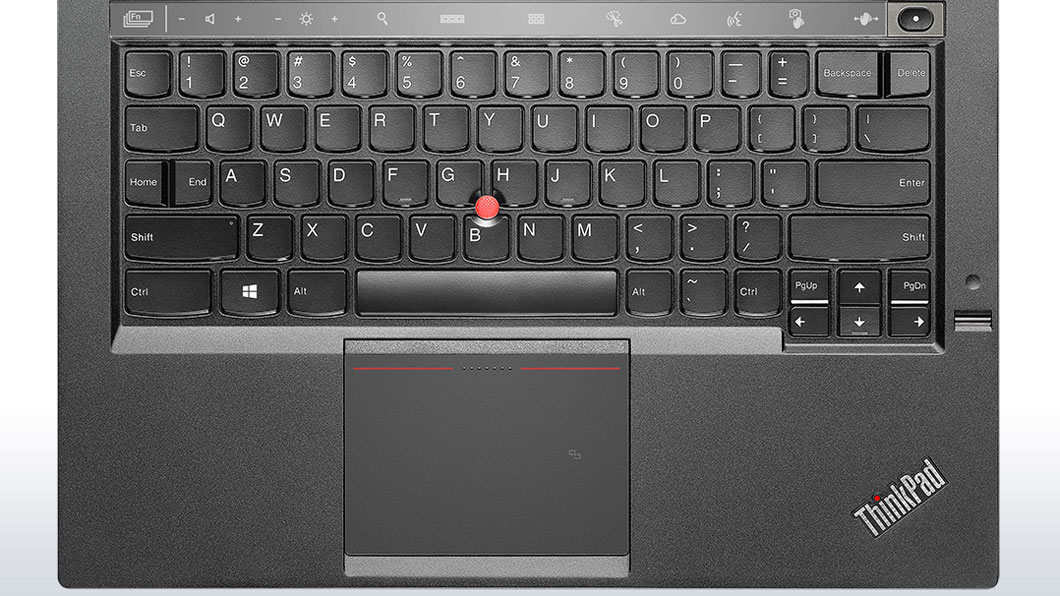
FuzzNugget writes "Peter Bright brings the hammer down on the increasing absurdities of laptop keyboard design, from the frustrating to the downright asinine, like the 'adaptive keyboard' of the new Lenovo X1 Carbon. He says, 'The X1's Adaptive Keyboard may have a superior layout to a regular keyboard (I don't think that it does, but for the sake of argument, let's pretend that it does), but that doesn't matter. As long as I have to use regular keyboard layouts too, the Adaptive Keyboard will be at a huge disadvantage. Every time I use another computer, I'll have to switch to the conventional layout. The standard layout has tremendous momentum behind it, and unless purveyors of new designs are able to engineer widespread industry support—as Microsoft did with the Windows keys, for example—then their innovations are doomed to being annoyances rather than improvements.' When will laptop manufacturers focus on perfecting a standardized design rather than trying to reinvent the wheel with every new generation?"
73 of 459 comments (clear)

  1. Isn't just the keyboards by Anonymous Coward · · Score: 4, Insightful

    Anyone else find that you cannot get 16:10 laptops these days unless they're made by Apple?

    Damn the "movie nerd" 16:9 ratio!

    1. Re:Isn't just the keyboards by Anonymous Coward · · Score: 5, Insightful

      Forget 16:10. Give me some 4:3 alternatives please. Some of us actually work with our laptop, not just use them as YouTube clients.

    2. Re:Isn't just the keyboards by ByTor-2112 · · Score: 4, Insightful

      Agreed. I need the vertical space WAY more than the horizontal. If all you want to do is watch movies get a f'ing tablet.

    3. Re: Isn't just the keyboards by Bing+Tsher+E · · Score: 3, Insightful

      What part of 'the spectrum' does that place them on?

      Is there a pharmaceutical treatment yet?

    4. Re:Isn't just the keyboards by TWX · · Score: 4, Funny

      *cough*laptop*cough*

      --
      Do not look into laser with remaining eye.
    5. Re: Isn't just the keyboards by taxman_10m · · Score: 2

      Wholeheartedly agree. I consistently hit my Dell trackpad wrong because of this. Enough time has passed that I can say definitely that I did not adapt.

    6. Re:Isn't just the keyboards by taxman_10m · · Score: 4, Insightful

      And a matte screen instead of glossy.

    7. Re:Isn't just the keyboards by Bradmont · · Score: 2

      Or... a TV...

    8. Re:Isn't just the keyboards by Immerman · · Score: 3, Insightful

      >Some people can't use a laptop efficiently if the screen is the wrong shape.

      FTFY

      Try this with an quality monitor with a wide vertical viewing range: rotate the screen 90* into portrait mode and use it to read websites, write software, type documents, work on projects destined to be printed "normally", etc. Give yourself a few days/weeks to get used to it, then switch back and tell me that screen shape isn't a major consideration.

      --
      --- Most topics have many sides worth arguing, allow me to take one opposite you.
    9. Re:Isn't just the keyboards by Immerman · · Score: 4, Funny

      Yeah, and I love 16:X monitors in portrait-mode, but trying to type on a laptop balanced on edge is a real PITA.

      --
      --- Most topics have many sides worth arguing, allow me to take one opposite you.
    10. Re:Isn't just the keyboards by Hamsterdan · · Score: 4, Informative

      But unless it's IPS, rotating an LCD will shift colors because the viewing angles aren't the same for horizontal vs vertical. It also messes up font smoothing since the order of sub-pixels isn't the same (unless the OS is aware of that)

      Still won't work for a laptop

      --
      I've got better things to do tonight than die.
    11. Re:Isn't just the keyboards by Hamsterdan · · Score: 2

      ^THIS

      Glossy screens are a pain for reflections (since you could, i dunno, use a laptop *outside* where that bright evil yellow thing in the sky will make sure the screen is unreadable).

      Besides, glossy is a fingerprint magnet

      --
      I've got better things to do tonight than die.
    12. Re:Isn't just the keyboards by Immerman · · Score: 2

      Not on monitors that can be easily rotated (aside from issues with asymmetric viewing angles, sub-pixel rendering, and even update speeds on some video cards), but if your monitor is firmly attached to a non-rotating stand or, say, a laptop, then the orientation of the screen becomes a non-trivial part of the shape of the monitor.

      --
      --- Most topics have many sides worth arguing, allow me to take one opposite you.
    13. Re: Isn't just the keyboards by Immerman · · Score: 2

      Try moving your taskbar to the right edge of the screen (and making it wider). More vertical space and the "active" part of the screen is better aligned with the keyboard. Or perhaps your trackpad isn't roughly centered below G/H? That would suck.

      --
      --- Most topics have many sides worth arguing, allow me to take one opposite you.
  2. Oh yes by Anonymous Coward · · Score: 2, Insightful

    Please don't put cursor keys where the right shift key should be. Nothing like pressing cursor-up in a console window when you meant to type a capital letter.

    1. Re: Oh yes by Adriax · · Score: 2

      But without going through annoying changes like that they'll never stumble on that one "Oh yeah, this is much better" change they can patent and make a fortune off of.

      You know, it's really insensitive of you to want a product that works nicely when they're only trying to find their way to dominate the industry and get a slice of everyone else's pie.

      --
      I don't suffer from insanity, I enjoy every minute of it!
    2. Re: Oh yes by mcgrew · · Score: 4, Insightful

      So then why didn't the Dvorak keyboard take hold? QWERTY was designed to keep keys on mechanical typewriters from jamming, Dvorak should be much faster.

      What the corporate (and yes, some open source) dumbasses don't understand is that if you change my interface there's going to be a learning curve. For someone who has touch-typed for years, it would take years to get up to speed with Dvorak; TFA was right on the money IMO.

      Unity, Windows 8, Lenovo and other keyboards... just stop already! Jesus, if they were designing cars you'd have a joystick instead of a wheel and the brake and gas pedals would be reversed (and have a hand-operated clutch).

      I only want new if old is broken or new is demonstrably superior. Change for the sake of change is stupid and counterproductive.

    3. Re: Oh yes by MouseTheLuckyDog · · Score: 3, Informative

      So then why didn't the Dvorak keyboard take hold? QWERTY was designed to keep keys on mechanical typewriters from jamming,

      When will people get their facts straight? QWERTYdid not prevent jamming by making people type slower. They prevented jamming by arranging keys in a way that you are very rarely pressing keys next to each other. Which means the strikers are less likely to collide.

    4. Re: Oh yes by aardvarkjoe · · Score: 3, Insightful

      When will people get their facts straight? QWERTYdid not prevent jamming by making people type slower.

      The post you replied to didn't claim that it did. Why do I get the feeling that you were just looking for a place to "correct" somebody about the QWERTY layout, and this was the best place that you could find?

      --

      How can we continue to believe in a just universe and freedom to eat crackers if we have no ale?
    5. Re: Oh yes by Teun · · Score: 2
      Yes people are different, like I could easily do without that stupid touchpad and instead select my laptop on the availability of a trackpoint (clit).

      But it's a second consideration after good Linux compatibility.

      --
      "The likes of Facebook and WhatsApp are free to those whose privacy is of zero value."
    6. Re: Oh yes by hankwang · · Score: 3, Interesting

      For someone who has touch-typed for years, it would take years to get up to speed with Dvorak

      As someone who moved to Dvorak after 5 years of touch-typing Qwerty, I can tell you that this is not the case. A lot of the effort of learning to touch-type is in the motor/coordination skills in the fingers, not in memorizing which letter goes where. I think it took me about a month to get up to speed in Dvorak; it didn't help that I was recovering from a rather painful RSI at the time. I ended up being faster on Dvorak than I ever was on Qwerty.

  3. Worst keyboard I ever used by Kell+Bengal · · Score: 4, Interesting

    The worst keyboard I ever used was the Logitech MX5500. Poor design all over - it was clear that whoever designed it was focussing on ideas that sounded nice, but were ergonomically unfeasible. Stupid things like putting keys underneath the keypad such that pressing them from a natural posture caused cramps, or removing the numlock key and replacing it with some calculator function integrated with the LCD display. Perhaps they forgot that computers powerful calculators in of themselves? The list went on - I wrote an eight page engineering design critique (I teach college mechatronic design) and sent it to them. The logitech PR person who answered it said they'd send it on to the design office. From what's come out of there since, I'm sure they just sent it straight to trash. :P

    --
    Scientists point out problems, engineers fix them
    altslashdot.org: The future of slashdot.
    1. Re:Worst keyboard I ever used by hendrips · · Score: 2, Interesting

      Maybe this is the problem with keyboard design. I absolutely love that keyboard. When I got a new computer at work, I specifically requested that keyboard model, and I use a similar model at home. The actual office drones like me who have to use these keyboards seem to have different needs in practice than what your theoretical expertise claims. I certainly use the LCD calculator constantly, and I have no idea how I'm supposed to be giving myself hand cramps with it. As far as I can tell, Logitech has discontinued this model, so I'll be clinging to desperately to the one I have. But, to echo one of the other replies, I don't teach "mechatronic design," I'm just a lowly actuary who has to use the damn thing every day, so what do I know?

  4. eh, it's not that bad by Trepidity · · Score: 4, Interesting

    Many Europeans are already used to using different keyboards at different times. As we speak I'm typing on a Danish-layout keyboard remapped to US-English. Which is... almost like US-English, except that the Enter key is vertical rather than horizontal, so \| is located to the left of enter rather than above it (can't remap the physical shape of the keys...). Oh, and `~ is to the left of Z. Sometimes I use a UK keyboard, which is somewhat different yet again.

    1. Re: eh, it's not that bad by Trepidity · · Score: 2

      The infidels shifted Scandinavian keyboards' parentheses one key over, so they're on 8 and 9 instead of 9 and 0, might deserve bankruptcy and worse, but somehow their countries are prospering anyway.

    2. Re:eh, it's not that bad by Fusselwurm · · Score: 2

      Many Europeans are already used to using different keyboards at different times.

      Yes. For me it's three.

      Mostly, I'm using the Neo2 layout. When gaming, I use the standard German qwertz layout, and sometimes I have to use US English. It takes time getting used to it, but once you've mastered a layout, you're fine on ANY DEVICE.

      The problem I see here is that the X1, by re-positioning or abandoning physical keys, effectively forces you to not only know 3 different layouts, but 3*2 = 6. Great.

      (Plus, with the caps lock key gone, I'd have to hack Neo2 to get the 3rd level switch on the home or end key, blegh.)

    3. Re:eh, it's not that bad by evilviper · · Score: 4, Interesting

      Many Europeans are already used to using different keyboards at different times. As we speak I'm typing on a Danish-layout keyboard remapped to US-English.

      As someone who touch-types Dvorak at home, and has to switch back to QWERTY at work, I think I can safely say my experience trumps your few symbol keys moving around...

      The thing that bothers me the most is poor visibility... I'd be fine with the CTRL and ALT keys moving all over the place with different laptop keyboards, IF the keyboard was backlit... Those with small, low-contrast ink labels in low-light are the WORST. Without a clear visual indicator to orient yourself to using a different keyboard than usual, it can be painful to switch... Lighting can make all the difference, and a smooth transition.

      Personally, I'd like laptops to standardize keyboard sizes and connectors so we can swap them after-market, as I previously said here: http://slashdot.org/comments.pl?sid=4683675&cid=45998205
      But I prefer the current state of uselessness to laptop makers standardizing on lowest-common-denominator crap that is good for nobody.

      --
      Slashdot gets worse every day... Pipedot: News for nerds, without the corporate slant
    4. Re: eh, it's not that bad by Ceriel+Nosforit · · Score: 3, Informative

      We have  where ~ should be. That's a big clue right there who's responsible for this shit.

      --
      All rites reversed 2010
    5. Re: eh, it's not that bad by Ceriel+Nosforit · · Score: 2

      For the love of... /. it's 2014!

      http://en.wikipedia.org/wiki/Section_sign where ~ should be.

      --
      All rites reversed 2010
    6. Re:eh, it's not that bad by TheP4st · · Score: 2

      Indeed the situation in Europe can be quite horrific, some years ago I would often find myself working on Swiss (qwertz), UK (qwerty), Belgian (azerty) and Scandinavian (qwerty) keyboards during my average day. To make matters worse I were working on the machines remotely so glancing down on the keys to find that "misplaced" comma, period, forward slash, parenthesis and so forth were not an option. My favorite layout to hate is the Belgian/French azerty where digits and period require use of shift as the keyboard design work from the assumption that semi colon is more frequently used than period and section sign () more than the digit six and so on. Seriously! What insane person came up with this?

      --
      "I have downloaded hundreds and hundreds of records, why would I care if somebody downloads ours?" Robin Pecknold
    7. Re:eh, it's not that bad by mcgrew · · Score: 4, Insightful

      Very few IT departments will let users install anything on "their" computers, which makes sense because otherwise you're going to have security problems.

      It isn't my computer at work, it's my employer's. He pays me to use it.

    8. Re:eh, it's not that bad by Cinder6 · · Score: 2

      I'd argue that no, it actually doesn't trump it.
      IME it is *far* easier to switch between two completely different systems, than to switch between two systems which are exactly the same, except for one or two minor parameters.

      Agreed. I can switch between QWERTY, Dvorak, and Workman on-the-fly without any ramp-up time, but a one-month stint in Germany with QWERTZ threw me off for at least half my stay. And then it took time getting used to QWERTY again when I got home.

      The innovation I would really like to see from laptop keyboards is to make them mechanical. It doesn't bother me that most desktop keyboards are membrane crap, because I can replace them with a good keyboard, such as the Das Keyboard (yes, I know the redundancy of "the Das"). But attaching a mechanical keyboard to a laptop largely defeats the purpose of a laptop.

      At the same time, I'm not sure it could be done in a way that's satisfying. You could never replicate a desktop mechanical keyboard perfectly without drastically increasing the thickness of the case. I'm not sure if a "low-travel" version of mechanical keys would be as satisfying or worth the extra cost. For the time being, my favorite laptop keyboard is Apple's. The keys aren't mushy or sticky like on a lot of keyboards, and their low travel distance lets you bottom out quicker (which is important for this type of keyboard, if not mechanical ones).

      --
      If you can't convince them, convict them.
    9. Re: eh, it's not that bad by elfprince13 · · Score: 2

      My officemate has a German laptop. Not only are the symbols like () in the wrong place, they switched z and y keys. Horrific.

    10. Re: eh, it's not that bad by ShaunC · · Score: 2

      We have [section sign] where ~ should be. That's a big clue right there who's responsible for this shit.

      The fucking lawyers?

      --
      Thanks to the War on Drugs, it's easier to buy meth than it is to buy cold medicine!
  5. "Innovation" needs to correspond to reality by hessian · · Score: 4, Insightful

    Too much "innovation" is appearance only, or the act of making gee-whiz gadgets that look like they might be far out. The clueless buying public falls for it every time.

    Back in the 1990s, I used one of those Microsoft ergonomic keyboards for a little while... but then I learned that it was in fact putting more strain my hands. Back to the old tried-and-true 100-year-old typewriter style configuration.

    Every time I've tried any kind of tricked out keyboard, the result has been the same. It doesn't work better than the original. For innovation to be actual innovation, it must solve a problem and do so in the context of reality, not merely be a nifty concept or look.

    1. Re:"Innovation" needs to correspond to reality by jbmartin6 · · Score: 2

      Can you provide a reference for your claim that the ergonomic keyboard produces more stress? Everything I found as well as personal experience says the opposite. Or was this peculiar to you?

      --
      This posting is provided 'AS IS' without warranty of any kind, implied or otherwise.
  6. Windows keys? by guruevi · · Score: 5, Informative

    The "Windows key" location existed before on other systems, it was called the "meta" key. Apple had the Apple logo in that place, Sun keyboards had the diamond logo, even the Symbolics machines had the key well before Microsoft even talked about ripping off DOS.

    --
    Custom electronics and digital signage for your business: www.evcircuits.com
    1. Re:Windows keys? by honestmonkey · · Score: 2, Interesting

      Does anyone actually use the damn Windows Key? I have a Microsoft keyboard (the "split-in-half" one, tilted and all). It has a "Windows" key and another one on the right the is for - menus or something? I never touch either one. Hell, I rarely even hit any of the function keys. The only non-standard key I use is the one that brings up a calculator because at least that's useful.

      --
      Everything you know is wrong, Just forget the words and sing along.
    2. Re:Windows keys? by Zeinfeld · · Score: 2

      Symbolics machines had the key well before Microsoft even talked about ripping off DOS

      The serviceable 16 bit CP/M clone was the Holy Grail for every geek in his garage who saw the potential of the 8086. What the geek didn't have was a full suite of programming languages ready to port and the resources to build on the launch of the new IBM micro,

      Except Gary Kildal who famously refused to sign the IBM NDA on the advice of his wife going surfing instead. Microsoft then bought MSDOS 1.0 from one of said garage geeks. But all they needed it for was to be undetected long enough to be able to sell MSBasic while they worked on a clone.

      The Windows key was appearing on DEC keyboards before it was a Windows thing. And that is from Symbolics as many of the DEC engineers were Symbolics graduates. And when DEC crashed, Microsoft bought up most of the talent. Given the state of Apple at the time, it was pretty much the only option if you hated UNIX.

      I am surprised that nobody has brought up a pathetic piece of bought-by-lobbyists research 'the fable of the keys' written by a couple of K-street hacks for an organization calling itself 'the independent institute'. This tried to claim that path dependence and network effects don't exist. Microsoft funded the 'study' while they were fending off the anti-trust suit.

      One of the examples that the authors tried to expose as 'myth' is that Dvorak was more efficient. And they do actually have some evidence to suggest that the studies on efficiency are unreliable. But that does not prove their case. All it actually shows is that the Navy realized that there was no point in performing further tests because they were not going to switch from Qwerty regardless of what the result was. A 10% improvement in typist productivity was not worth the cost of retraining. Many typists would refuse to be retrained. Nobody would want to learn a keyboard that was only used in the Navy under a program that might be cancelled at any moment.

      The same goes for their effort to 'prove' that VHS was better than Betamax. Like the idiots trying to disprove evolution, they don't make their case and all they do is to show that things are a little more complex than the naive version of the theory they are attacking suggests. The point of VHS and Betamax is that what made a VCR better than a competitor was not picture quality, it was how many movies you could buy and watch on it.

      --
      Looking for an Information Security student project suggestion?
      Try http://dotcrimeManifesto.com/
    3. Re:Windows keys? by freeze128 · · Score: 2

      Yes! Those keys are for stopping the action when you're playing FPS games.

    4. Re:Windows keys? by dmatos · · Score: 2

      For two things only:

      -E opens up the file browser (aka windows explorer)
      -R opens up the "run" dialog box, so I can launch calc, or cmd, or mspaint (useful when snapping and cropping screenshots) without navigating through six layers of menus

      --

      It may look like I'm doing nothing, but I'm actively waiting for my problems to go away.
      --Scott Adams
    5. Re:Windows keys? by reikae · · Score: 2

      I use it all the time, both in Windows (8.1 currently) and Debian GNU/Linux (with xbindkeys). It has a lot of useful shortcuts in Windows by default and I've configured several on the Linux side too.

      I mean no offense, but someone not using the winkey seems to me as incredulous as it apparently seems to you that people would use it very often. For example, do you really click the start button with a mouse and then select Run... instead of Win+R? Or search without pressing Win+F (or Winkey on its own, or Win+W for settings search)? Not to mention Win+1, Win+2 etc. to run and focus taskbar pinned applications.

    6. Re:Windows keys? by mcgrew · · Score: 2

      A full suite of programming languages? Kids today are spoiled, what's wrong with assembly? I mean, besides the fact that 8086 assembly is a pain in the ass compared to a Z-80 or 6802?

    7. Re:Windows keys? by novakreo · · Score: 2

      Windows 7 added a lot more functionality to the Windows keys, especially for dual monitor setups. Win+P lets you toggle each monitor on and off, Win+Shift+Left/Right moves windows between screens, Win+Left/Right tiles windows to the left or right side of the current screen, Win+Up maximizes, Win+Down restores or minimizes, Win+E opens a new Explorer window.

      There are a few more, but those are the ones I use frequently. Admittedly, I rarely use the Menu key, but that makes it quite handy to use as the Host Key in VirtualBox.

      --
      O frabjous day! Callooh! Callay!
  7. Don't stop innovating keyboards yet, please by sideslash · · Score: 5, Interesting

    I would pay a lot of money for a backlit, Microsoft Natural style keyboard. Googling indicates I'm not alone. I don't care about gaming, but when I walk into my home office at night and sit down, I want to see where all the keys are. And I'm used to the Microsoft Natural keyboard shape from many years of exclusive use.

    You getting this, Microsoft / clone manufacturers?

    1. Re:Don't stop innovating keyboards yet, please by Ceriel+Nosforit · · Score: 4, Insightful

      The keyboard is a tool for the job... You seem to indicate that you know that by identifying as a touch-typist, but you also seem to be giving general advice as if this was a board for typists.

      Slashdot is frequented by programmers, researchers, analysts, hardware hackers, web designers, students, PC gamers, and and all manner of geeks. Personally I have 4 different keyboards and I'm looking for more.

      --
      All rites reversed 2010
  8. Optimus keyboards by abies · · Score: 3, Interesting

    Take a look at
    http://www.artlebedev.com/everything/optimus/concept/
    http://www.artlebedev.com/everything/optimus/tactus/
    and other things from this family.

    This is an _adaptive keyboard_.

    Yes, it is plain horrible for coding or text editing, but idea behind it is to support some more niche programs for video/photo editing, 3d modelling etc, with keyboard changing icons on keys depending in which mode are.

  9. Standard sizes & interchangable by evilviper · · Score: 3, Informative

    Input devices are the most important part of any computer, yet we don't worry about keyboards/mice on desktops, because we know we can swap them with something we prefer, at will. With laptops, we're stuck with the cheap junk that's included. And worse, we're stuck with the economics laptop makers are under, and we don't want to pay $500 extra for a high-end laptop, just to get a $20 keyboard we like.

    If laptop makers standardized on a few sizes of keyboard, and made them easy to slide in and out and swap with a different model, life would be good...

    It's POSSIBLE for laptop makers to get it right and include a great keyboard with their laptops. There are innumerable awesome small keyboards out there. In fact, I use nothing but ultra compact keyboards for my home computers, because the ergonomics of super-flat are best, and the lack of a keypad on the side makes reaching over for the mouse vastly quicker and easier. To make an awesome laptop, start with a keyboard like this one: http://typematrix.com/
    But the odds of them doing that are far too slim, and there's just too little incentive to ever expect it to happen. The input market is far too specialized. Instead, just make the parts interchangeable, and not only will your core customers be happy with their input options even on the cheapest laptops, but your products will also sell better to non-English speakers, who want a very different keyboard.

    It's long overdue.

    --
    Slashdot gets worse every day... Pipedot: News for nerds, without the corporate slant
  10. And what about REISUB? by nicomede · · Score: 4, Informative

    As a Linux user it's sometimes necessary to cleanly reboot the machine through the Kernel call Alt+PrintScreen+ REISUB, I don't see how to do that on this laptop?

  11. screw you Brite by iggymanz · · Score: 2

    cubic yards of standard keyboards are out there for you. some of the rest of us appreciate some choice and variation. carry a standard USB keyboard for those times you have to use someone else's machine and don't like their keyboard.

  12. Beyond Keyboards by Sponge+Bath · · Score: 2

    This is the same principle that makes heavy customization of OS installations not worth while. If you have to move between a large number of machines, you can't count on that certain editor being installed or your favorite key mapping configured. After a while, you give up and get accustomed to the least common denominator.

  13. You are the 5% that vendors don't care about. by geekmux · · Score: 4, Insightful

    OK, the poster has a valid argument perhaps within the Slashdot community, whom in a given day, may traverse their hands across a dozen or more keyboards in their various tasks, but the argument to manufacturers falls completely flat.

    Believe it or not fellow keyboard jockeys, the other 95% of the planet will buy a laptop...to use that laptop, pretty much exclusively, for the next 4-5 years. The average person does not know nor care about the day-to-day keyboard issues of the 5%.

    To be honest, I'd rather see vendor variety. Backlight keys, increasingly intelligent designs and layouts, and even the return of the buckling-spring design have all come about through constant innovation.

    Let me put this to you another way. Within your demands for a "standard" design, do you really want to subject the world to iKeyboard as the standard? Be careful what you ask for, for the 95% control your fate.

  14. Best keyboard by mwvdlee · · Score: 2

    In my opinion, the best keyboard for over a decade is the "whatever the cheapest keyboard Microsoft is selling".
    Currently it's this: http://www.microsoft.com/hardware/en-us/p/wired-keyboard-200/JWD-00046

    It's wired.
    It has all the keys, all in the usual place, all actual clickable buttons.
    It doesn't have RSI-inducing wrist-rests.
    It isn't colored like a rainbow.
    It doesn't bend in contortionist ways.
    It doesn't have a "shutdown" button you accidentally hit every once in a while.

    I've been through multiple iterations of this "cheapest MS keyboard", and they're all good.
    (When MS software finally croaks, their hardware division will still be going strong).

    Some other brands have similar keyboards too, also cheap and also better than the more expensive keyboards.

    With keyboards, as you go up in price, you go down in usability.

    --
    Slashdot social media options: AIM, ICQ, Yahoo, Jabber and Mobile Text. Why no MySpace?
    1. Re:Best keyboard by pellik · · Score: 2

      I've had an IBM model m keyboard I've been using forever and I just now discovered these guys still make them. Thank you.

    2. Re:Best keyboard by sandytaru · · Score: 2

      I'm typing on a Microsoft Comfort Curve 2000. I think I paid $11 for it. I'm devastated they discontinued it. The 3000 just isn't the same.

      --
      Occasionally living proof of the Ballmer peak.
  15. Ergonomic 'Split' Keyboards! :D by devphaeton · · Score: 5, Interesting

    The only thing I would ever want from a laptop is a keyboard that's in the ergonomic 'split' style. Yes that would be butt-ugly and probably make the laptop itself the size of an elementary school desk, but with RSI issues I can't type on a standard keyboard for very long. Yes you can plug a standard ergo USB keyboard into a laptop, but that setup requires a desk as it is too big for my lap. Since I'm desk bound with that, I just use the desktop computer I already have.

    Meanwhile, I'm noticing that decent ergo kbs are getting scarce for desktops too. Back 10 or 15 years ago there were dozens of brands and all of them cheap and good, now there are only 2 or 3 to chose from with crappy key layouts and they last about a year or so.

    --


    do() || do_not(); // try();
  16. Bad example. by csumpi · · Score: 3, Insightful

    I agree, the ever changing keyboard layout is frustrating. The worst ever offender is macbook keyboards where they made the power button a keyboard button (and in the worst place, where a 'del' or 'backspace' button should be).

    However, the keyboard linked in the article actually has some nice ideas, for example replacing the totally useless caps lock with 'home' and 'end'. It would be a great keyboard for programmers.

    .

  17. Get off my lawn? by Vellmont · · Score: 2, Insightful

    I'm not sure about the rest of it, but I HATE the caps lock key. I NEVER use it. I'm glad someone has thought about how it's mostly a nuisance these days for typing in passwords, especially on a crowded laptop keyboard where it's easy to miss-type and hit a key without knowing it. Seriously, who uses freaking caps-lock?

      (Oh, and why yes, I am a software developer and use all kinds of strange keys, but certainly not caps lock). ~ occasionally, but not enough to get me cranked off. I also certainly don't expect a hardware maker to cater to the needs of the 1 person in several thousand that writes software for a living. I run linux too, but I rarely use the function keys. I really have rather a rare need to go to a text console.

    Frankly I think it's people like this guy that hold back any sort of innovation. The standard keyboard layout is archaic, and has needed to change for years. People that use computers these days are everyday people who don't need a freaking scroll lock key. The laptop I'm currently using has home and end on the top right, and doesn't have a scroll lock key at all. I didn't even notice that until just now and have had the laptop for a year. My only real complaint is it's too tight, and not comfortable. But it's a very small laptop that's light and really portable (perfect for travel, or just having a spare machine I can grab in my bedroom when I need it).

    --
    AccountKiller
    1. Re:Get off my lawn? by dokebi · · Score: 3, Interesting

      I have been remapping caps lock to ctrl for years, and it's really nice. Having it (capslock/ctrl) be replaced by home/end would be a disaster for me.

      --
      In Soviet Russia, articles before post read *you*!
    2. Re:Get off my lawn? by Common+Joe · · Score: 2

      Seriously, who uses freaking caps-lock?

      don't expect a hardware maker to cater to the needs of the 1 person in several thousand that writes software for a living

      Who uses the cap locks key? I do. I'm a programmer and a writer and I use it in both of my professions / hobbies. I would use it to type words in all caps like you did. The extra keystrokes or hunt-and-peck method that you must have used to write "HATE" and "NEVER" is too inefficient for me. Want to move the caps lock some place different? I'm open to suggestions. Just don't take it away entirely.

      Next: Who uses the scroll lock? I do. Very rarely, but I do. It's useful on occasion in spreadsheet applications. (Although it seems to be going the way of the do-do. It can still be used in Excel, but not in LibreOffice Calc. Don't professional financial people who use Excel all day long use this key from time to time?) I use the same kind of functionality in IDEs too to scroll my text up and down without moving my cursor, but IDEs use different key strokes to accomplish the same thing. (Ctrl-Up and Ctrl-Down).

      The 1 person in several thousand can be important enough to keep keys around. If it's used heavily by a certain group of people, why not keep special keys around? Some people use keyboards a lot more than mice. I picked up a lot of my keyboard habits from working with people who are blind. (They don't tend to use mice as much as a fully sighted person.) It also sounds like you suggest actually taking away the function keys. You'd be surprised how often they are used in niche fields or custom programs... and the function keys are the keys that are the least in the way when I'm doing heavy duty typing in a word processor (which is what most people probably use).

      I'm all for innovation, but I just don't want to see keys that are rarely used go away entirely because "most people" don't use for it. For instance, I'd love to see a different German layout. The German keyboard sucks for languages like Java, C#, and any bracket languages. (Right Alt+8, Right Alt+9) U.S. keyboard, of course, sucks for writing in German. I switch between the two settings depending on what I'm doing. I'd love to see improvements in the U.S. keyboards too. I also like someone else's idea of backlit keyboard keys.

    3. Re:Get off my lawn? by tverbeek · · Score: 2

      "Seriously, who uses freaking caps-lock?"

      Taking help-desk calls, I've been horrified to find out that there are people who use it for typing any uppercase letters. I'll sometimes use remote-viewing software to watch someone's screen as they're trying to log in to something, and as they're typing their password I'd see the Caps-Lock warning pop up. I'd warn them that they'd accidentally hit Caps-Lock and that would mess up typing their password. "So how am I supposed to type a capital letter?" they'd ask.

      All the more reason that key needs to be removed from keyboards 20 years ago.

      --
      http://alternatives.rzero.com/
  18. I don't care... by agapeton · · Score: 2

    ...what people do, as LONG AS THEY REMOVE THE CAPS LOCK! Yes, I typed that holding shift. The first thing I've done on every KB since 1998? REMOVED THE CAPS LOCK! Yes, I'm a programmer, yes my #DEFINE are in caps, yes, I type my SQL in CAPS. No, I'm not going to cry about my first-world problem of NEEDING TO HOLD DOWN SHIFT! It's easy to train your pinky to hold it-- it becomes natural real quick.

  19. Just fix the %^&**$%$# CAPS LOCK key... by QuietLagoon · · Score: 2

    Give me an easy way to permanently (and independent of the OS in use) disable the CAPS LOCK key. That is all I ask.

    1. Re:Just fix the %^&**$%$# CAPS LOCK key... by Ralph+Spoilsport · · Score: 2
      Pry the key off, glue a washer (or three - cut them to fit with scissors) around the element, then glue the caps lock key down to them. Result? A finger rest for your left pinky that says "CapsLock". TFTFY.

      :-)

      --
      Shoes for Industry. Shoes for the Dead.
  20. CAPS LOCK MUST DIE by egarland · · Score: 2

    Messing with keyboard layouts is not something to be taken lightly. Just like you wouldn't reverse the break and gas pedals on a car, moving keys around on the keyboard should not be done trivially. That said, the caps lock key is in one of the most easily accessible locations on the keyboard, and its one of the keys we use the least. It should be moved, and replaced with one we use more often. Personally, I'd like to see a new modifier key here. One thing I have done in the past, is to re-map my caps lock key to alt, which can be done with a Windows registry setting. This makes using key combinations much easier, which is nice when you're playing WoW and need as many keyboard shortcuts as you can get.

    --
    set softtabstop=4 shiftwidth=4 expandtab nocp worlddomination
  21. There is only one keyboard by Ralph+Spoilsport · · Score: 2
    The Model M. You can still buy them here:
    http://www.pckeyboard.com/

    You will buy one, once. It will last you the rest of your life, or, until USB disappears, which ever comes first.

    --
    Shoes for Industry. Shoes for the Dead.
    1. Re:There is only one keyboard by PPH · · Score: 3, Funny

      A keyboard should be sturdy enough to beat a man to death with. And then use to write his obituary.

      --
      Have gnu, will travel.
  22. Re:I demand my UNIX! by rnturn · · Score: 2

    ``Move the Control(Ctrl) key back to it's rightfull place where CapsLock is...''

    I always thought that the change in position of the Ctrl key is what killed off WordStar. It was painful to navigate within documents when you have to contort your hand to get your pinky on the repositioned Ctrl key.

    --
    CUR ALLOC 20195.....5804M
  23. Re:Why try to fix poor technique with a keyboard? by ColdWetDog · · Score: 2

    Why are you channeling my high school typing teacher?

    --
    Faster! Faster! Faster would be better!
  24. Truly Ergonomic by holophrastic · · Score: 4, Interesting

    I've been using the Truly Ergonomic ( https://www.trulyergonomic.com/ ) keyborad for well over a year now. It's totally different from a normal keyboard. I'm also using a blank-keycap one, in dvorak mode, with some personal key-changes.

    I love it being different. I love the way that it's different -- columnar arrangement, tab, backspace, enter down the middle, home-row shifts, delete mirroring escape.

    It took a whopping two weeks to get used to the new layout. Much like it took me two weeks to switch from qwerty to dvorak fifteen years ago. And I've no trouble bouncing back and forth to "normal" keyboards when necessary.

    More important that how I feel, is how I feel. My fingers move a lot less, I type much more fluidly, I'm much more comfortable, and long days feel the same as short days.

    I welcome new designs and layouts. You're not forced to use the ones that you don't like. Which is good, because otherwise I'd be forced to use a qwerty keyboard -- you know, the one designed to be horrible to use. The author might want to focus on that problem first.

  25. Re:Yes. by jbmartin6 · · Score: 3, Insightful
    You are right, what I should have said was something like this:

    That is interesting. I have had the opposite experience. When you say "in fact" did you mean that you read some study or got doctor's advice indicating that the strain was increased by switching to ergo? Or was that just your experience?

    Rudeness isn't productive. Misunderstandings are common in an online format, where would all of us be if everyone reacted the way you did? Well, I will take a lesson and try to phrase better in the future. But in this case if I had, I would have missed out on the useful data that you're a dickhead.

    --
    This posting is provided 'AS IS' without warranty of any kind, implied or otherwise.
  26. Re:"AN quality monitor" by Immerman · · Score: 4, Informative

    Probably because I modified the original phrasing and failed to update the article preceding it.

    --
    --- Most topics have many sides worth arguing, allow me to take one opposite you.
  27. The worst is missing ... by Misagon · · Score: 2

    The article on Ars Technica missed the worst thing about the new ThinkPad keyboard: what happened with the Caps Lock function.
    To enable Caps Lock, you press the Left Shift key twice.

    That's right, one press less than what is required for invoking Sticky Keys under Windows - which everyone hates because it gets invoked when you don't want it. Expect a shitstorm from angry Thinkpad users who will buy laptops with this keyboard.

    --
    "We mustn't be caught by surprise by our own advancing technology" -- Aldous Huxley