 Slashdot Mirror
Ask Slashdot: the State of Free Video Editing Tools?
New submitter Shadow99_1 writes I used to do a lot of video editing (a few years ago, at an earlier job) and at that time I used Adobe Premiere. Now a few years later I'm looking to start doing some video editing for my own personal use, but I have a limited budget that pretty well excludes even thinking about buying a copy of Adobe Premiere. So I ask slashdot: What is the state of free (as in beer or as in open source) video editing tools? In my case... I support a windows environment at work and so it's primarily what I use at home. I am also using a camcorder that uses flash cards to record onto, so for me I need a platform that supports reading flash cards. So that is my focus but feel free to discuss video editing on all platforms.
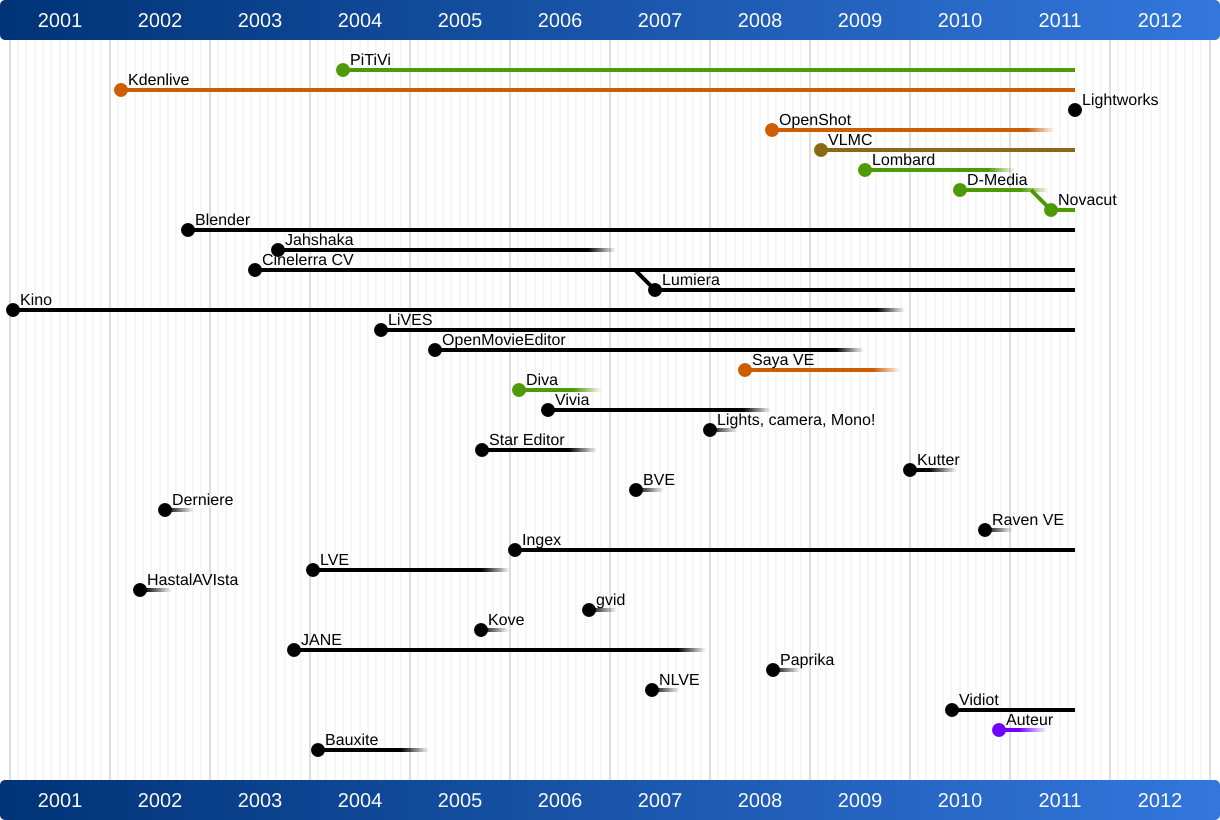
I've been looking forward to the Kickstarted upgrade to OpenShot; based on the project's latest update, early versions of an installer should start appearing soon. Video editing is a big endeavor, though, and ambitious announcements and slipped schedules both seem to be the norm: an open-source version of Lightworks was announced back in 2010. Some lighter open-source options include Pitivi (raising funds to get to version 1.0) and Kdenlive, also in active development (most recent release was in mid-May). Pitiviti's site links to a sobering illustration about many of the shorter- and longer-lived projects in this area.
It's free and pretty powerful.
Unless you have an aversion to closed source or need some features it does not provide, adobe has made CS2 versions of their products available for free for some time. You do need to register and login if you do not have an Adobe account, but presumably that could be done with fake info for the paranoid.
Silence is a state of mime.
Blackmagic has lots of hardware and likely will be supported in the future - davinci is sweet, if this system proves stable it will create a much needed solution. https://www.blackmagicdesign.c...
If you're looking for free but not "libre" check out BlackMagic's "DaVinci Resolve". It started out as a color correction software. Now it's a full fledged editor. It's free unless you need uber advanced noise reduction etc.
i just migrated to it from Adobe Premiere because premiere isn't great for team work.
-S
The first one that springs to mind is Cinelerra:
http://cinelerra.org/1/
There's also the Community Version of Cinelerra:
http://cinelerra-cv.org/
Honestly though no open-source solution is going to come CLOSE to Premiere. And since you can get Creative Cloud for $50/month, it isn't THAT big of an expenditure up-front, and if you're making money from the editing (and, if you're looking at a Premiere-level video editing platform, I would hope this would be something you're monetizing) $50/month isn't much to get all the tools you'd need for editing, compositing, graphic design, etc etc etc.
So, yeah, my suggestion is to find a way to afford $50/month for Creative Cloud, and barring that, check out Cinelerra.
My desktop power user workflow wrt video is:
cat (unix command) to piece together the 2gb splices the camcorder makes (avchd)
ffmpeg to change the container from whatever the camcorder uses to a more editor friendly mkv, you can use the copy option for blazing fast remuxing without reencoding.
kdenlive or cinelerra. They are both prone to crash so save often. Cinelerra has best curves for fading but it's a very peculiar GUI.
If you know your stuff, you can do pretty decent videos.
---- MISSING MISCELLANEOUS DATA SEGMENT --- [sigdash] trolololol
I found that Blender has a surprisingly intuitive Video Sequence Editor. It might be worth looking into.
Fight or flight its all the same
Live to die another day
--Ryan
Blender is mostly for 3d animation, but it does have it's own video editor built in. Added bonus that you can animate things like callouts, thought clouds, etc... Added bonus that the community for Blender seems massive.
QYbix
Qybix ----- I do not have a belief system; I'm an Anti-theist and proud of it! Saying that not believing in anything i
I need a platform that supports reading flash cards.
What are you trying to do? Referring to? It's a completely different technology!
Now go away or I shall taunt you a second time!
I have discovered a truly marvelous proof of killer sig, which this margin is too narrow to contain.
I've been using KDEnlive a lot, and I find it really nice for my personal use.
It hasn't crashed in about a year either, and uses MELT underneath.
Slightly OT: I've also replaced adobe lightroom with darktable now, and I like it a lot.
AviSynth is extremely versatile and often leads in state-of-the-art filters long before any other video editor gets them, including professional ones. The trick is that there's no UI for it -- to edit videos, you write scripts.
Free software hates patents and most modern camcorders use H.264, hence a free video editing tool is impossible.
Or has Mozilla been bullshitting us all this time about H.264 support in HTML5?
Get free satoshi (Bitcoin) and Dogecoins
Nothing is really useable and stable enough. Lots of people dabbling, NONE doing feature length or even 30 minute tv episodes.
I go down this road every year and crawl right back to the single Windows box with Sony Vegas and After Effects on it. I really wish I could replace it with a linux system but it will never exist as the open source options are still not as good as even Adobe Premiere in 2004.
All pro and prosumer cameras record in MOV or AVCHD and if your editor can not handle those natively it is a major failure. I have no interest in spending 8 hours converting video and introducing generational losses right off the bat.
Do not look at laser with remaining good eye.
I tried the free/open source route on video editing and ended up falling back to a commercial tool (MAGIX Movie Edit Pro). I still use Camtasia at home. For me, the key things that saved me time ($$$) when looking at commercial tools were:
- ability to quickly integrate still shots and movies (without a separate save/load process like some editors - e.g., VSDC)
- ability to see the voice-over waveform (makes it very easy to close up dead spaces, do in-line retakes and edit out "ums" and stumbles)
- ability to control every audio track independently (without an explicit "split the original video" step)
I just took another look out there for a quick project at work and STILL ended up with a non-open-source (but free) editor in VSDC (and CamStudio 2.7 for screen recording), but I'd be embarrassed to put my name on the resulting videos if they weren't just for internal use.
if you're open to other platforms, check out iMovie on mac. it's cheap like $20, and runs OK on older hardware. Trolls in three, two, one...
As the original question poster...
It has less to do with copyright infringement (even though I don't want to run the risk of being sued for it), but the simple crazy amount of hurdles to do it with Adobe products. The last time I looked into it was(because I'd lost physical copies of the disks for the old master suite work had bought me and I'd had to do all the editing at home as my work PC at the time was a meager Celeron cpu with barely 1 GB of ram, which was no match for my home system with a dual core Athlon cpu running twice as fast and 4 GB of ram and multiple HDDs. However I guess I was stupid and had actually taken the disks back to work to store them, so when I rebuilt that PC I lost the Master Suite install... Looking online the sheer hoops to pirate a copy (permanently making sure it couldn't phone home, replacing certain files after install, the chance that it just refuses to work even after jumping through the hoops) was enough that I didn't go through with it.
I haven't needed the power of Premiere since then... Well until now. But I doubt jumping through a ton of hoops has changed, Adobe is fanatical about piracy (even though in a lot of cases it helps them in the long run).
we are all invisible unless we choose otherwise
Lol, maybe where you live... I live in the middle of nowhere in PA. People don't hire people to mow their lawns... Hell the 'economic recovery' never came here, the unemployment rate is still crazy high and the support system for people without jobs has basically broken. I have a job, but it's part time and minimum wage, though it is basically 'in my field' which is sort of a plus. I'm considered lucky where I live to even have that. Some of my neighbors finally got jobs working manual labor jobs at a food processing plant recently and where immensely happy with that. However all my skills are of a technical nature and like almost everyone else here that plant brought people from elsewhere in to run their technical systems without ever looking for local talent.
Anyways... Mowing some yards isn't an option. Thanks for that suggestion from on high though.
we are all invisible unless we choose otherwise
Have you looked at synfig http://www.synfig.org/
Why is that link relevant? Because they were all made using Kdenlive.
When I first started mucking around with digital video, I tried a bunch of free/libre packages, and formed the following opinions of each:
Windows Movie Maker
Yes, $(GOD) help me, I gave it a serious try. To my utter surprise, it mostly worked and did what I wanted without crashing. However, the UI was rather inflexible, and I needed more than the handful of features it offered, so I kept looking.
Cinelerra
Every Google search for free video editing software always turns this up, so I tried it. Then, ten minutes later, I had to stop trying it because it kept crashing and/or hanging at the slightest provocation. It has an impressive-looking array of features, and the editing timeline looks quite powerful. Evidently, you can do some fairly impressive things with Cinelerra, provided you can identify and avoid all its weak spots.
Pitivi
The last time I tried this, it was unreliable, under-featured, and incredibly slow. Just loading a one hour-long video clip into the timeline took several minutes as it tried to generate thumbnails and an audio waveform for the clip.
OpenShot
Assuming I'm remembering this package correctly, all it does is assemble edits -- that is, you can tack together a bunch of clips one after the other to create a larger work. If you want to do any effects or titling, you're SOL. Perhaps the Kickstarter-funded upgrade will yield some improvements.
Lightworks
I had to learn something the hard way with this package: This is a professional package. By that, I don't mean it has a ton of features (although it certainly does). I mean it expects a certain level of media asset before it will operate on it in the manner you expect. Us mere proles are satisfied to use MP4 or MKV or ($(GOD) help us) AVI files. However, in the pro space, you have files that contain not just compressed audio and video, but also timecode. And not just timecode measured relative to when you last pressed the RECORD button, but also a master timecode from an achingly accurate central timecode generator fed to all your cameras and microphones. This not only means all your cameras and mics are in precise sync ('cause otherwise their internal clocks will drift relative to each other), but you can trivially sync all your master footage and then intercut shots without even thinking about it. Also, near as I can tell, there's no such thing as inter-frame compression in professional video. Each frame is atomic, which means you can cleanly cut anywhere, but it doesn't compress anywhere near as small as, say, H.264.
The result is that, if you don't have equipment that generates all this metadata for you, then you need to convert it from the puny consumer format you're likely using. This means having truly monstrous amounts of disk available just to store the working set, and tons of RAM to make it all work. And hopefully your conversion script(s) didn't cough up bogus timecode.
So, yes, Lightworks is very very nice, if you have the proper resources to feed it. I don't, so I've set it aside for that glorious day when I get some proper equipment :-).
Kdenlive
Kdenlive is built on top of the MLT framework, and is about the best and most reliable thing I've found out there that doesn't cost actual money (either directly or indirectly). It has a non-linear timeline editor, it supports a wide variety of media formats, and it has a modest collection of audio and video effects (almost none of which you will use).
One of the more amazing things Kdenlive does is transparently convert sample and frame rate
Editor, A1-AAA AmeriCaptions