Slashdot Mirror


The Classic Control Panel In Windows May Be Gone

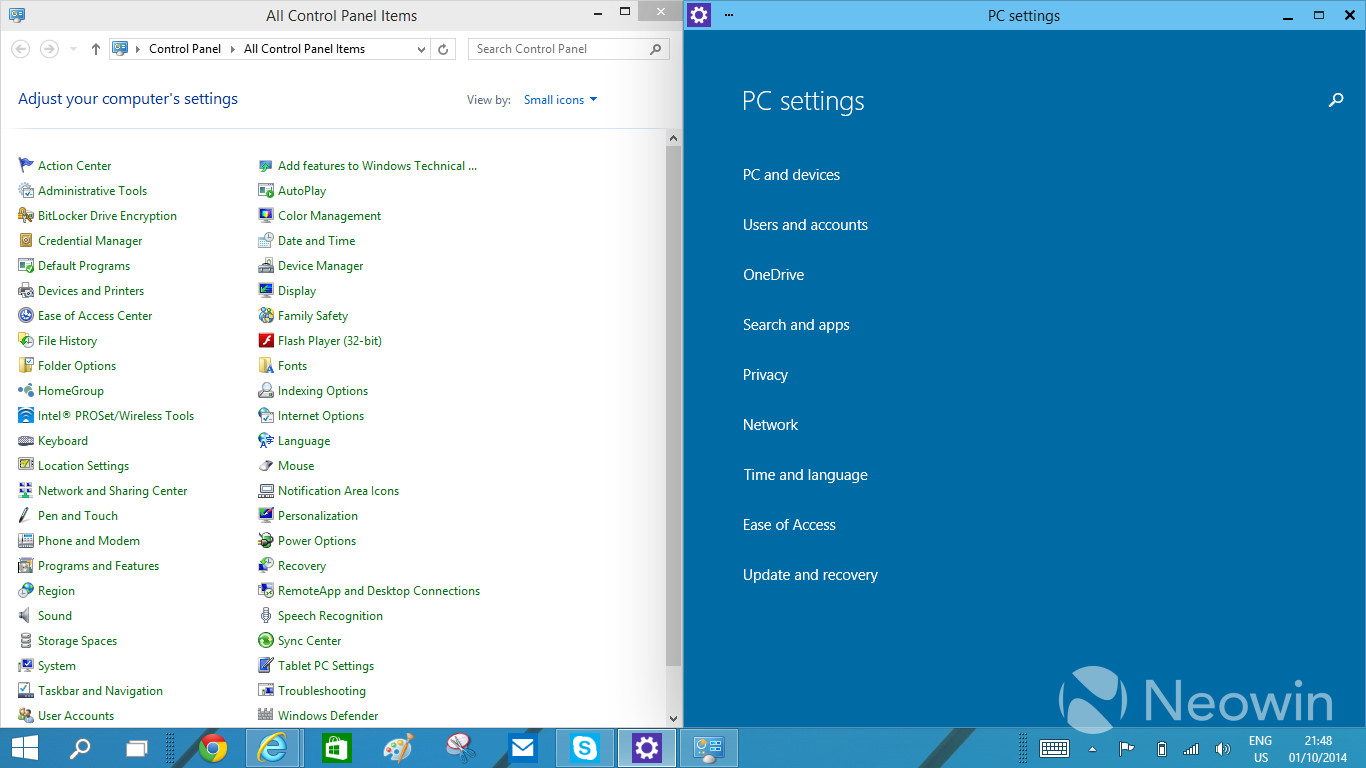
jones_supa writes In Windows 8, there was an arrangement of two settings applications: the Control Panel for the desktop and the PC Settings app in the Modern UI side. With Windows 10, having the two different applications has started to look even more awkward, which has been voiced loud and clear in the feedback too. Thus, the work at Microsoft to unify the settings programs has begun. The traditional Control Panel is being transformed to something temporarily called "zPC Settings" (sic), which is a Modern UI app that melts together the current two settings applications.
59 of 347 comments (clear)

  1. Please Microsoft... by __aaclcg7560 · · Score: 5, Insightful

    It's one thing to abuse the users with interface changes, but don't make the job for I.T. techs any harder as it it. We already got a lifetime of job security because of Windows.

    1. Re:Please Microsoft... by Anonymous Coward · · Score: 5, Funny

      Don't fret. This shouldn't affect your daily routine of telling people to restart their computers.

    2. Re:Please Microsoft... by __aaclcg7560 · · Score: 2, Funny

      We have a script that automatically boots off all the users on the weekend. That fixes half the problems. The other half of the problem is all the systems that didn't come back up from the reboot.

    3. Re:Please Microsoft... by Anonymous Coward · · Score: 3, Insightful

      But after windows 8, the users need help even to restart their machines. Who would have thought at UX meeting, that people do not find the hidden shutdown option by moving mouse cursor to magic right upper corner.

    4. Re:Please Microsoft... by PRMan · · Score: 5, Funny

      Even worse. I RDP'ed into a Server the other day and nobody, even those running Windows 8 on their laptops could figure out how to do a "log out" on the server.

      --
      Peter predicted that you would "deliberately forget" creation 2000 years ago...
    5. Re:Please Microsoft... by FSWKU · · Score: 5, Insightful

      Maybe I am wrong, but over the years I have noted an increasing condescendension of IT people over "mere users". I wonder why that is. Bear in mind that IT typically isn't the company's cash cow, but "overhead", making this condescension rather inappropriate imho. Even on /. there are many "users" that are no IT people: designers, programmers, etc. I wonder why the interface they are using is apparently less important than computer maintenance software, or any other user experience, for that matter.

      The "overhead" designation is precisely the reason IT people tend to hate users (at least in my experience). The end-user sees the IT person as nothing more than an electronic janitor who's sole purpose is to clean up the messes that they, the user, were too careless or too inept to prevent from happening in the first place. Thus, they don't bother to learn how to do things properly, they don't learn how to keep from getting a virus, they don't learn how to do even the simplest of things because "That's IT's job. I shouldn't have to know computers!" No, they don't have to know the ins and outs of every modern OS, but they should know how to at least keep it from obliterating everything they're working on (meaning stop clicking "OK" on every damn thing that pops up!). Then to top it all off, they behave as if security policies, best practices, etc. don't apply to them, even though management approved them as being a site-wide mandate...

      So in short, users see IT as "the help" and treat them as such. And much like a janitor who is constantly cleaning up after idiots who have no concern for anyone other than themselves, the IT worker learns to hate certain users because they seem to have a mission in life to make IT's job as miserable as possible.

      --
      "So after all this, you make my case for me. To end this stalemate, you must die..."
    6. Re:Please Microsoft... by __aaclcg7560 · · Score: 3, Insightful

      whoosh!

    7. Re:Please Microsoft... by __aaclcg7560 · · Score: 4, Interesting

      My job as an I.T. technician is to console hurt computers and fix broken users. I console (or remote) into computers to find out what is ailing them, which can sometimes take a substantial amount of time because no one wants to reimage their five-year-old system. As for broken users, I try to instruct them on how to take care of their computers but most users don't care about their computers.

    8. Re:Please Microsoft... by JDG1980 · · Score: 2

      Maybe I am wrong, but over the years I have noted an increasing condescendension of IT people over "mere users". I wonder why that is. Bear in mind that IT typically isn't the company's cash cow, but "overhead", making this condescension rather inappropriate imho.

      All this is the sign of a poorly run organization with excessive siloing. IT should be working with other departments, helping to streamline and automate their processes, making other people's jobs easier and less tedious. If people think of IT as "the computer janitors", your organization is throwing away a tremendous amount of potential productivity. It's bad for morale on both sides, too.

    9. Re: Please Microsoft... by jd2112 · · Score: 4, Funny

      Try fixing them in the veterinary sense...

      --
      Any insufficiently advanced magic is indistinguishable from technology.
    10. Re:Please Microsoft... by X0563511 · · Score: 2

      It's difficult not to become jaded after years of (re)fixing computers or being forced to work with ridiculous arrangements because regular users insist on their dancing pigs.

      Since PCI has turned into a huge deal, this has only gotten even more irritating.

      --
      For large sets, this will be our guide even unto death, for the LORD will work for each type of data it is applied to...
    11. Re:Please Microsoft... by Anonymous Coward · · Score: 3, Insightful

      I work at a smaller company (~150 people) and regularly chat with the janitors. They get treated like utter trash by the white-collar workers here, to the point that people will spill coffee on carpets and hardwood floor and leave it to dry, only to later get very upset over the janitors who now have even more work than normally and stains that are near-impossible to remove. It's not the job of our janitors to clean up after every little accident that people are too lazy to take care of, nor is it their job to wash the dishes or tidy up trash that people are too lazy to throw in the garbage bin, but many of my colleagues think that they can do whatever the fuck they please.

      I'd say the same goes for IT. If my computer breaks I need the help of IT, but I shouldn't assume that I can break it through negligence just because we have IT staff. If I have a service contract on my car I still need to learn how to drive it to avoid unnecessary damages, for example by learning how to change gear and not hit other cars on the road.

    12. Re:Please Microsoft... by Tablizer · · Score: 2

      As intuitive as molasses. All these years the option was in the lower left somewhere. Now it's at the upper right, the complete opposite, and under your name. What's a name have to do with logging out? I'm not exiting my body. That may be intuitive for an exorcist.

    13. Re:Please Microsoft... by bwcbwc · · Score: 3, Insightful

      Yeah, if they reorganize the "PC Settings" into categories where we have to read the minds of the MS development team to figure out what category the applet runs under,it'll be another C-F. How many IT folks here _don't_ switch the current control panel to "Classic" view on Win Server 2003/2008 or Win7? Don't force folks into an extra layer of memorization to figure out how to get to the WIndows Services dialog, etc.

      --
      We are the 198 proof..
    14. Re:Please Microsoft... by MachineShedFred · · Score: 2

      Or, better yet, in Windows 2012 when you right click on the computer and select "Manage", you get the completely useless Server Manager application that takes forever to populate with data and become usable rather than the computer management MMC snap-in that we're actually looking for since Windows 2000.

      Now I have to either run MMC manually and add the snap-in, or use the shitty start "menu" to click on administrative tools, and click computer management.

      Thanks for that.

      --
      Slashdot still doesnâ(TM)t support Unicode after it was added to the HTML standard in 1997.
    15. Re:Please Microsoft... by afidel · · Score: 2

      Hasn't the remote desktop client always suppressed those options?

      No, and in fact on server 2003 there's a race condition between the RDP process and the server service that will cause a shutdown initiated through RDP to go into limbo over 50% of the time (supposedly fixed in SP1 but it wasn't) so we too always use shutdown.exe with -r -f -t 0.

      --
      There are 4 boxes to use in the defense of liberty: soap, ballot, jury, ammo. Use in that order. Starting now.
    16. Re: Please Microsoft... by TangoMargarine · · Score: 2

      Yeah, rebooting PCs via automated scripts is both fucking lazy, and addresses the symptoms, not root cause.

      Except for those times where it actually solves the problem, on Windows. (Rebooting Linux almost never fixes anything.)

      --
      Unity? Screw that: XFCE. Slashdot Beta? Screw that: SoylentNews. Australis? Screw that: Pale Moon. UX developers DIAF
  2. Just keep it off the servers.... by Kenja · · Score: 5, Informative

    Had to maintain a Windows 2012 Server system last weekend.... dealing with the Windows 8 configuration interface on a server makes me very angry.

    --

    "Have you ever thought about just turning off the TV, sitting down with your kids, and hitting them?"
    1. Re:Just keep it off the servers.... by TWX · · Score: 4, Interesting

      Had to maintain a Windows newer Server system last weekend.... dealing with the Windows newer configuration interface on a server makes me very angry.

      Said every Windows admin, ever.

      Though all joking aside, changes should make the job easier, or more intuitive, or more cohesive. The change from the 3.1/NT3.5 interface to the Windows 95/NT4.0 interface was an improvement, but slowly fragmented as the GUI design kept changing over time (I dare not call it evolving!).

      It's already awkward enough having separate control panels, one for most functions, the other for "Administrative Tools - Computer Management". That needs to be addressed, along with reconciling between two separate GUIs.

      --
      Do not look into laser with remaining eye.
    2. Re:Just keep it off the servers.... by Mr_Wisenheimer · · Score: 2

      Yeah, until I learned that you can just go straight to the traditional control panel interface and skip through the tablet-PC nonsense.

      I don't know that the old way is necessarily "better" from a user-interface point of view, but certainly long-time windows power users and system administrators prefer it and it seems very contrary to Microsoft's philosophy of "legacy-forever" to remove it completely.

    3. Re:Just keep it off the servers.... by epyT-R · · Score: 4, Interesting

      The reason is because the old panel had everything in front of you. There was no guesswork where to go. It was either the control panel or one of the mmc snapins, with regedit as the worst case scenario. The tablet interfaces are too simplified to be of much use beyond basic settings. Their full screen nature is also irritating on a desktop.

      Hell even the changes they did in vista are clunkier than 2k/xp was. Awkward, hard to remember phrases replaced one or two word descriptions, and a lot of the options were hidden, leaving the user to guess where things are, and no, searching for everything is NOT a solution. At least it was still possible to get a compact, complete list in vista through 8.1. If they plan to remove that in 10 and replace it with some stupid touch interface, I will avoid the os.

    4. Re:Just keep it off the servers.... by K.+S.+Kyosuke · · Score: 3, Insightful

      Prepare for the steering wheel in new cars to work in exactly the opposite way, and for the brake pedal and accelerator to be active when released rather than pressed. Surely you won't get into much trouble on the road now that I've told you about that in advance.

      --
      Ezekiel 23:20
    5. Re:Just keep it off the servers.... by TWX · · Score: 5, Insightful

      Why is there a resource-intensive GUI on a server anyway? Is the server supposed to be able to play Solitaire or World of Warcraft? Or is the server supposed to, oh, I donno, serve files and applications to client stations?

      That's one thing I never understood, why Microsoft went GUI with the servers like they did, other than to know that they sold a lot of server OSes to people that had no business running servers in the first place...

      --
      Do not look into laser with remaining eye.
    6. Re:Just keep it off the servers.... by PRMan · · Score: 2

      Because they saw how crappy Novell Netware servers without it were? There are many amazing server apps that run with a convenient GUI when you are administrating the box.

      --
      Peter predicted that you would "deliberately forget" creation 2000 years ago...
    7. Re:Just keep it off the servers.... by tepples · · Score: 2

      Yeah, until I learned that you can just go straight to the traditional control panel interface and skip through the tablet-PC nonsense.

      In Windows 8 and Windows 8.1, administrators already cannot create or modify a user account inside Control Panel. They have to make changes "in PC settings", which is code-word for "click here to open the tablet-PC nonsense".

    8. Re:Just keep it off the servers.... by Zynder · · Score: 2

      That's funny because it's true. Case in point: Japan.
      In Japan, you could always tell who the new American GI's were because we'd flip on our wipers to change lanes and signaled right turns when it was pouring cats and dogs. I'm just so grateful they didn't decide to swap the pedals around as well. I'm guessing British RHD cars also have the wiper and signal stalks flipped but I'm not sure.

    9. Re:Just keep it off the servers.... by epyT-R · · Score: 2

      The whole point of a gui is intuitive navigation. If the user is expected to type everything, why not just have a text console that switches to gfx mode when needed, like an old dos machine? This would actually fit the asinine 'fullscreen-by-default' trend better as well. The whole point of the gui 'revolution' was to eliminate guessing what command to enter. Now, they made the gui deliberately harder to use and less flexible, and then slapped a search box on it to compensate. Talk about coming full circle. How is this guesswork better for end users? If they couldn't handle dos, then how are they expected to know what 'magic' terms to search for to get at what they want within a much more complex system? How about the techs that have to support them? It's better to have the options available in one consistent place with short, intuitive, easy to remember names, so they at least someone knows where to look.

      Hunting for (in this case, removed) configurability within hidden, 'intuitively' displayed oversimplification is a big problem with metro, and the fact it's foisted on the desktop makes it even worse. Really, they need two environments, one for touch, and one for full desktop. The control panel for metro controls metro, and the control panel for the desktop gives full configurability.

      The other piece is I don't want all of my data and executables indexed into some database that gets uploaded to a microsoft account when that becomes mandatory in the future. Win-R and paths are sufficient, and faster.

  3. And... by Anonymous Coward · · Score: 4, Insightful

    It will have even less functionality than before. Because they keep trying to "simplify" things for the dumb users out there, by removing any type of "advanced" feature. Which means you will be stuck having to manually edit the Registry or gpedit or through some third party software that allow access to those now "hidden" features.

    1. Re:And... by newcastlejon · · Score: 4, Interesting

      Removing control panels isn't MS's style. If past experience is anything to go by, the same ones that were in 98/NT will still be there in 10, they'll just be buried under yet another layer of new stuff. Seriously, try find network adaptor settings in 7. After you've navigated through the morass of the network and sharing centre you'll see that it's practically the self same advanced dialog that was there in 95.

      Personally, I'm not averse to change but it's well past time MS just started over again instead of tacking on useless, obfuscating fluff over the top of controls that I actually need to get use.

      --
      If God forks the Universe every time you roll a die, he'd better have a damned good memory.
    2. Re:And... by Entropius · · Score: 2

      The Registry.

      Oh, god, the Registry.

      Those of you know more than me can maybe advise: why the hell does this thing even exist? Why not stick with ordinary text files containing things like

      # set the preferred meaning of life
      meaningoflife = 42

      like sane OS's? Yes, okay, sometimes they're hard to find, but if you want to mimic the "registry" idea, make it standard practice to name them "foobar.ini" and symlink them into a central location.

    3. Re:And... by PRMan · · Score: 2

      So that multiple programs can share the same settings system-wide. The worst thing about Linux is that every program works in a different non-standard way.

      --
      Peter predicted that you would "deliberately forget" creation 2000 years ago...
    4. Re:And... by 0123456 · · Score: 2

      So that multiple programs can share the same settings system-wide. The worst thing about Linux is that every program works in a different non-standard way.

      Like putting system config in /etc and user config in $HOME, you mean?

    5. Re:And... by sexconker · · Score: 4, Insightful

      So that multiple programs can share the same settings system-wide. The worst thing about Linux is that every program works in a different non-standard way.

      Like putting system config in /etc and user config in $HOME, you mean?

      Like putting system config in HKEY_LOCAL_MACHINE and user config in HKEY_USERS, you mean?
      The registry is trash, but so is a mish-mash of non-standard textfiles strewn about.

      The problem that's specific to Windows is that programs can decide to use the registry, text files, or both, and when they use text files they can be in my documents, (which is now a library with no fixed location), the program's installation folder, the system-wide application data folder, or a user-specific application data folder. When using an application data folder, you have the choice of using Local, LocalLow, or Roaming. No one in the world understands the difference between these folders or why some programs use one over another (or use multiple!).

      It wouldn't be a problem if everything was relegated to living in one of:
      A: The application's install directory
      B: A single directory (one per application) in a specific user/system directory (or both)
      C: Living in the registry (again, user/system/both as appropriate)

      But when applications can choose A, B, C, A & B, A & C, B & C, or A, B & C it's a fucking nightmare.

    6. Re:And... by Jack+Griffin · · Score: 2

      Worst thing was after XP, the Windows Control Panel was displayed in groups which made everything hard to find, or you had the option to display by icons which sorts everything into columns. This would be great except instead of ordering in alphabetical order down the column it displays across, so that when you resize the window everything moves around. The human eye is used to scanning down a list in order, not across. Whoever decided this was the best way needs to be fired.

  4. Non-Microsoft Items by darkain · · Score: 3, Insightful

    And how exactly do they plan on dealing with Non-Microsoft items in this new settings environment? A huge part of why Windows has always won the OS wars was due to 3rd party extensibility and backwards compatibility.

    This is forcing things to become non-standard, where programs are going to have to start having their own "control panels" in their own hard to find locations, rather than having a single place we all know and rely on to administer machines.

  5. What about the big setting monster? by istartedi · · Score: 2

    I don't know the architecture that well, but aren't all of these things just safe interfaces to the registry or rundll commands? Whenever the UI goes nuts, the fix almost always involves regedit or rundll. How about just giving us a safe, generic interface to regedit and rundll commands? Such a beast could be made to look like the classic control panel, or customized to look like anything you want.

    --
    For all intensive purposes, "whom" is no longer a word. That begs the question, "who cares"?
  6. This looks familiar by ArcadeMan · · Score: 3, Insightful

    As a Mac user, I find the "zPC Settings" categories quite similar to what Apple uses in OS X.

    It's not about "dumbing down" features, it's about having clear categories at the first level. If Microsoft hides settings from level 2 and up, then it does become a problem.

    Also, I find the look of those GUIs horrible, even more so than OS X Yosemite. Where did the latest GUI designers graduate from? Both OS X and Microsoft look more plain than twenty-five years ago, surely that can't be a coincidence. Are they preparing us to go back to monochrome displays?

    1. Re:This looks familiar by ArcadeMan · · Score: 3, Insightful

      I don't recall any design from the past 50 years that looked as plain and boring as OS X Yosemite and Windows 8/10.

    2. Re:This looks familiar by Mr_Wisenheimer · · Score: 3, Insightful

      That's one of the most frustrating things about OSX, is that they try to make it as difficult as possible to actually make meaningful modifications to your system.

      Microsoft isn't quite as libertine as Linux's, "if you don't like our billion options, then compile your own version of KDE or Gnome," (unless you are the US government or another big contract holder with access to MS source code), but it has always been power-user and system-administrator friendly by giving straightforward tools to micro-manage system settings that were just a step or two behind the "friendly" interface.

      We'll see if that changes in Windows 10. I doubt it, but you never know.

    3. Re:This looks familiar by jones_supa · · Score: 3, Insightful

      Me neither. Even the crusty-looking desktops of old UNIX workstations, such as 4DWM or CDE, begin to look professional and attractive when compared to Win10 and Yosemite.

    4. Re:This looks familiar by Hognoxious · · Score: 2

      Yes. But we all know correlation is not causation. [retires to a safe distance]

      --
      Confucius say, "Find worm in apple - bad. Find half a worm - worse."
    5. Re:This looks familiar by Jack+Griffin · · Score: 2

      The flat look scales easier between various screen sizes. By just having a big monochrome square, it doesn't look any different whether on a 4" screen or 30".

  7. Environment Variables by Rejemy · · Score: 5, Insightful

    As long as they leave intact the ancient, tiny, unresizable Environment Variables window that hasn't been updated since it was first introduced in Windows NT, I'll be happy. Who doesn't like editing a huge path in a tiny 40 character single-line text field?

    1. Re:Environment Variables by neilo_1701D · · Score: 3, Insightful

      You just reminded me about that.

      I looked in my Build 9680. There, in all it's annoying pop-out glory and quite tasteful shadow (but minus any discernible windows border) is the Environmental Variables window in all it's NT 3.1 glory!

    2. Re:Environment Variables by jones_supa · · Score: 5, Insightful

      Guys, this is a perfect opportunity to use the Windows Feedback tool.

  8. Another failure of ZAW!!! by Anonymous Coward · · Score: 2, Insightful

    For those to young to remember...MicroSoft thought that they could get away with doing away with a whole profession - the systems administrators. They put out this "initative" to get rid of the admins...it was called "ZAW" which stood for Zero Administration for Windows. They alienated a bunch of sys admins...I moved completely to UNIX/Linux....why would I stick around in a technology that was being pushed away.

    As it turns out...the Internet and server administration and desktop administration are too complex to bundled in some stupid little "control panel." This attempt to "merge" functionality will fail as well.

    1. Re:Another failure of ZAW!!! by MightyMartian · · Score: 2

      I don't know if it ever went as far as trying to get rid of sysadmins (Redmond has made no lack of money off of MCSEs and the like over the years), but they certain encouraged an attitude that command prompts, scripting and of the more "traditional" methods of system administration had been rendered obsolete; or rather, would be with "the next version". I have been subjected to numerous issues over the years that required me manually altering the registry, registering/re-registering/de-registering COM DLLs, screwing around in the bowels of IIS, Exchange, SQL Server, and yes, in many cases, invoking the dreaded command line. It was always alright because "In the next version, this functionality will be added!"

      And now, as of 2014, Microsoft has pretty much flipped everything on its head. The GUI admin tools are all but deprecated, viewed as the lesser way to administer a Windows server, and PowerShell is proper and appropriate way.

      The worst part about all of this is neither Microsoft or its legion of faithful sysadmins see any irony in this. Unix, in their view, is still some antiquated operating system with dated methodologies and philosophies (despite having commands like Move-Item to *nix's mv).

      --
      The world's burning. Moped Jesus spotted on I50. Details at 11.
  9. About time by BLToday · · Score: 2

    The Control Panel's organization has been terrible. I can't think of a time when it was actually good, but it's just getting worse with each Windows release. Use to be Add/Remove Programs, then it's Program and Features but does the exact same thing. Printers got moved to Devices and Printers. Here's the thing, printers and ability to remove programs are fairly important, why make it less descriptive? While at the same time, there are applets/control panel applications that doesn't deserve their own icon at the top level: Windows Cardspace, Notification Area Icons, Indexing Options, Getting Started (really?), Folder Options, Default Programs (should be within Program and Features),

  10. Re:Ugh - The "classic" control panel is the best. by Lehk228 · · Score: 2

    stop finding, just type, the top right search bar from the control panel will find just about anything by name or description, just like the new start menu (winkey then type what you want)

    as far as i am concerned win 7 is the pinnacle of the MS windows UI. I used 8 "metro"/"modern" once it was such utter shit i will never use it, steam OS is close enough I will switch to linux full time and only buy steam games that work on linux or wine.

    --
    Snowden and Manning are heroes.
  11. Use SETENV by CrashNBrn · · Score: 2
    Can't be any worse than trying to change Security Permissions|File Ownership through the GUI.

    Environment Variables are better off being set via CMD.exe

    SETENV.exe
    SETENV -m PATH "%PATH%;C:\Somewhere\Else"

    Then you don't even need to reboot/logout to have the change take effect.
    Or the old-school way, but you'll need to logout/or reboot.

    SET PATH=%PATH%;C:\Somewhere\Else

  12. Why a GUI? Well, back in the day.... by MasterOfGoingFaster · · Score: 4, Informative

    That's one thing I never understood, why Microsoft went GUI with the servers like they did, other than to know that they sold a lot of server OSes to people that had no business running servers in the first place...

    Simple. Most business people had been exposed to DOS, then moved to Windows and found it much easier to use and understand. The Novell guy comes in and tries to sell a Netware server. Yep - looks like DOS. I came in with a Windows server. Looks just like his PC. He sees File Manager, drive letters, Notepad, Paint, and suddenly he feels like this is the more advanced system, and he is far more comfortable with it.

    A lot of the Netware guys around my area were extremely arrogant, and treated their customers like crap. Once they got a server installed, the customer was clueless and the vendor would abuse that. Our business model was to be open with the system and point out that we can easily be replaced, keeping us focused on their satisfaction. With NT Advanced Server (the correct name), the business owner could actually watch us and understand what we were doing with his system. We replaced a fair amount of Netware servers in those days. And you can see who won.

    --
    Place nail here >+
  13. Screw this. I'm sticking with Windows 9. by mmell · · Score: 3, Funny

    (N/T)

  14. Live in yOur wXrld, plAy in []urs by tepples · · Score: 2

    You could always do work on X11/Linux and game on PlayStation.

  15. OS X? Try OS VI by tepples · · Score: 2

    OS X? It's been that way since OS VI. System 6 had a desk accessory called "Control Panel" that would load "cdev" applets. System 7 shifted the cdev loader to Finder, but otherwise they worked similarly. Microsoft has had a long time to copy this stuff.

    1. Re:OS X? Try OS VI by Anonymous Coward · · Score: 2, Interesting

      OS X? It's been that way since OS VI. System 6 had a desk accessory called "Control Panel" that would load "cdev" applets. System 7 shifted the cdev loader to Finder, but otherwise they worked similarly. Microsoft has had a long time to copy this stuff.

      The control panel in Windows 95 through Windows 7 is a loader for CPL applets which it finds using registry entries which can be created by any installer. The CPL describes the name, icon and tooltip and provide an entrypoint which will be invoked via RunDLL32 to display a popup.

      Try looking in list view on Windows 7, you'll find Java and Flash have entries in the panel, they have done for years. Various drivers like nVidia's also add their own shortcuts as well.

  16. Re:Monochrome, Yes by ArcadeMan · · Score: 3, Funny

    And yellow can be replaced by blinking. Hell, the speed of blinking could even be a better indicator of how much time is left before it turns "red". Epileptic people would love it.

  17. Cause it is a GUI OS? by Zynder · · Score: 2

    Don't know about him but I'm a stubborn old fart. The OS has a GUI. I shouldn't have to be typing command line style queries. I wanna point and click. You can talk efficiency regarding number of clicks vs number of key presses all day but once I've memorized a drill down menu, I'm pretty damned fast. Fast enough for me anyway. Also, showing me a menu shows me all of the options available in the event I forgot them, I'm new, or I was unaware of their existence. You can't search for something you don't know is there without having at least a couple characters to get the searcher started. I can't recall what I was trying to tweak last week after I installed a new SSD but the searcher had no idea what I was talking about. Maybe it was the device manager (though that seems to work on the work PC here). Anyway, I had to drill through the computer management panel to hunt it down myself. If you are an admin or some other type of person who is all up in a PC day in and day out then your method is probably better but for us simple home users, we forget stuff or may not be trained so we need some pictures.

    One other reason that may actually apply to you, is that I disable Windows Search and all of its indexing garbage for performance improvements. When you do this, you can still search, but without the index it is painfully slow. I just ensure I never invoke the searcher unless I just absolutely have to.

  18. uhhh... no.... by SuperDre · · Score: 2

    I really don't like the new UI PC Settings, it's missing about every option one might need to control, at least if you are even a bit serious about configuring your PC..
    Just keep the old screen for people who know what they are doing, and the other crap for people who actually never have to use it...

  19. WHY by FhnuZoag · · Score: 3, Interesting

    This is a terrible idea. The point is that the 'Modern UI' is designed around full screen apps. But system configuration is one thing that enormously benefits from opening up windows alongside the control panel (for example, to follow a set of instructions), opening up multiple control panels to refer to each other, and so on. Microsoft is basically directly removing usability.