 Slashdot Mirror
GNOME Settings Area Getting a Refurbishment (gnome.org)
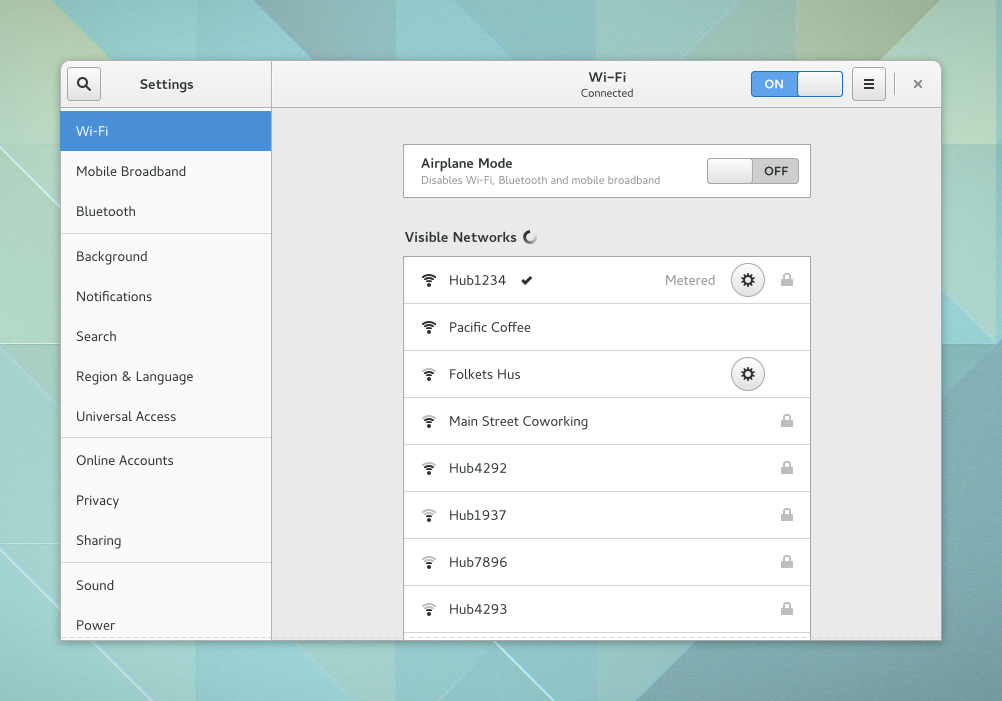
jones_supa writes: Allan Day has written a blog post today about some of the improvements that are being worked on for GNOME's settings area. The new GNOME Settings area is working toward a model that uses a list sidebar for navigation. The window is now resizable, and overall should be a nice upgrade. The new GNOME settings area certainly bears some resemblance to the Windows 10 settings app. Work is also ongoing specifically around improving GNOME's network settings, redesigned sound settings, experiments around improved display support, and various other enhancements to GNOME's settings area. For now, this work is considered experimental and all may not be completed in time for the GNOME 3.20 release in March.
Try listening to your users instead of implementing whatever eye candy and widgets you dreamt up after the 5th pint and 2 shots the night before. Just a thought.
There's not even that much of a difference between them and Windows in the first place.
The Linux desktops appear to have not yet discovered the concept of remembering the size and position of a window when the window is closed, and using that size and position the next time the window is opened.
.
I made a similar comment a few days ago about KDE, and was told the new version does that. Well, yes, but it has to be manually enabled on a per-window basis, instead of with a global setting.
I could find the global setting to center all windows when they're open, and a bunch of other global settings, but I still cannot find any global setting to have all the windows remember their size and position when they are closed.
A couple of years ago, I thought it was GNOME 3 and Unity that would be most responsible for retarding the adoption of GNU/Linux on the desktop. Both are, in my opinion, fucking awful to use. I find them extraordinarily inefficient to use, I find that they look like shit, and their UIs are completely unintuitive. No normal user would want to use them, and no poweruser would want to use them either.
But then systemd was installed on my Debian GNU/Linux desktop, and GNOME 3 because the least of my problems. All of a sudden the desktop doesn't matter when the computer doesn't boot properly. I quickly became more concerned with getting access to the boot lots, which are now stored in some godawful binary format.
Long story short, I don't use Linux any longer. I now use FreeBSD, which does not come with systemd, and does not come with GNOME 3 by default. I couldn't be happier! My desktop boots properly each and every time, I can still use pretty much all of the good (that is, non-GNOME 3) software that I want to use, and I can use good desktop environments like XFCE and KDE.
Protip: Linux kernel development is highly dependent on corporations.
Welcome to the Metro design philosophy:
- Make all containers as big as possible instead of based on the content.
- Assume that everybody runs just one app at a time, full screen, with no Z order support.
- Remove resizing.
- Convert any text you can to upper case. (The two gentlemen named Davis and daVis should obviously both be called DAVIS.)
- Use the same visual presentation for bread text and links.
- Remove borders, especially on clickable elements.
- Remove rollover hints.
- Avoid color shades like the plague.
The window is now resizable
When this is listed as a new feature of an application, I think you might be a couple decades behind the state of the art.
I've even tried the latest Cinnamon and I thought there were some paper cuts in there still.
Although maybe a wider monitor (to get more task bar space) and a recent graphics card or GPU would fix some of that.
Mate is predictable regardless of your hardware or whether you use a bleeding edge distro or a stable one.
No hunt for applets : too bad if you wanted an ecosystem of little applet and widget things, but the built-in ones are dependable.
Reminds me of Microsoft TweakUI which I swore by 10/15 years ago. Although it was for little things (Autorun, auto-login, make arrows on shortcuts smaller etc.) not a replacement for control panel and start menu editing and so on.
GTK isn't GNOME at all. Why is GTK ruined?
I'm not saying I agree or disagree, but here's one take on it from a developer using gtk.
GTK widgets don't have any style at all, it's all done via css themes. GTK does ship with the Adwaita theme by default, early versions of gtk3 did not do that and could look very badly if a theme was not installed.
Cathegorically, *no*. X11 forbids the application from having any say over where its windows appear. At best it can give a hint. The Window manager is totally free to ignore this hint.
I know this, because I was tasked with implementing an application on Linux once that had a user requirement that the windows should come up where the user last left them. I couldn't figure out which arcane combination of window hints and X11 calls made a window appear at those coordinates, so I asked on the internet - and had a ton of drek deposited on me for not respecting the One Unix Way, the True Unix Philosophy, and My Users' Right To Choice. Of course they had made their choice, and they wanted the windows to appear where they last left them, which the window manager did not do, but that was hardly important.
So there's your answer, as provided by the veritable gods of UNIX. It is not the application's responsibility, it is entirely up to the window manager.