 Slashdot Mirror
All-Radio 4.27 Portable Can't Be Removed? Then Your PC Is Severely Infected (bleepingcomputer.com)
CaptainDork shares a report from Bleeping Computer: Starting yesterday, there have been numerous reports of people's Windows computers being infected with something called "All-Radio 4.27 Portable." After researching this heavily today, it has been determined that seeing this program is a symptom of a much bigger problem on your computer. If your computer is suddenly displaying the above program, then your computer is infected with malware that installs rootkits, miners, information-stealing Trojans, and a program that is using your computer to send send out spam.
Unfortunately, while some security programs are able to remove parts of the infection, the rootkit component needs manual removal help. Due to this, if you are infected with this malware, I strongly suggest that you create a malware removal help topic in our Virus Removal forum in order to receive one-on-one help in cleaning your computer. Some of the VirusTotal scans associated with this infection have also indicated that an information stealing Trojan could have been installed by this malware bundle as well. Therefore, it is strongly suggested that you change your passwords using a clean machine if you had logged into any accounts while infected. 6/29/18: The story has been updated to specify that this malware campaign is targeting Windows computers.
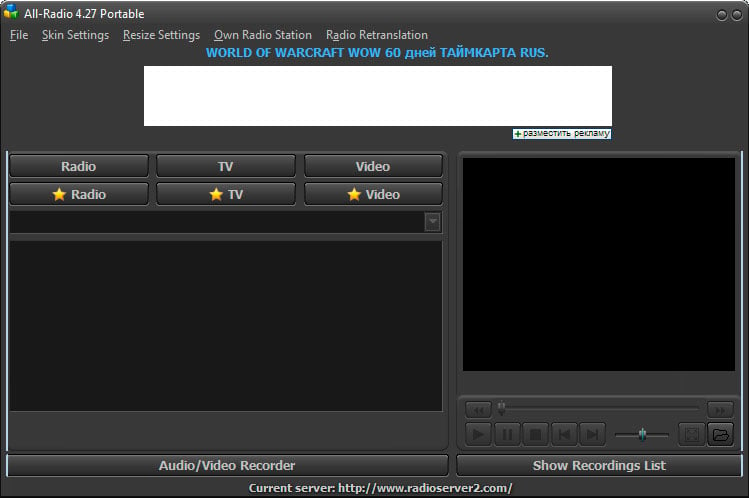
Unfortunately, while some security programs are able to remove parts of the infection, the rootkit component needs manual removal help. Due to this, if you are infected with this malware, I strongly suggest that you create a malware removal help topic in our Virus Removal forum in order to receive one-on-one help in cleaning your computer. Some of the VirusTotal scans associated with this infection have also indicated that an information stealing Trojan could have been installed by this malware bundle as well. Therefore, it is strongly suggested that you change your passwords using a clean machine if you had logged into any accounts while infected. 6/29/18: The story has been updated to specify that this malware campaign is targeting Windows computers.
Windows users get all the cool stuff.
The shepherds did so well protecting the flock that the sheep no longer believed that wolves existed.
Would it be so difficult to place somewhere in an "Operating System" tagged posting which operating system was affected? Slashdot folks really might have more than one OS in their areas and it would be nice to know which is at risk right at the top.
When malware removal expert, Aura, started helping these victims he noticed a common theme. Most of the users reported being infected after they downloaded and installed game cracks and Windows activation tools such as KMSpico.
So don't do that.
I browse on +1 so AC's need not respond, I won't see it.
Hello, my name is Vikash and I am from Microsoft. I am calling because you are the infected PC. I can do the needful but you must revert with all CC number and bank detail. I am also to be posting on the Slashdot with relevant detail. Please to revert immediately.
Comment removed based on user account deletion
Greetings! Kindly install the attached program so as to remote into your Windows and remove bug. But first visit link below and provide credit card information so as to I can verify your computer fingerprint identity. Seeing many scams, rest assured I want to remove virus and send you on happy day. Salutations, Chris from Salina, Kansas
You clearly have no clue as to how expensive writing a new Operating System would be. Hell, just look back at when Apple needed to replace Mac OS and had to endure bringing back that smug turtle neck wearing megalomaniac bastard as CEO just to get an OS that wasn't some Open Source cheeseball
For every five hundred thousand or so obstinate windows users who think they are punishing us, there is one that it might sink through to. We'll continue to try to save the ones that deserve it, thank you. You can strive to become worthy or you can continue to get bent.
Yet another reason to not waste your money on "virus protection." Use the free Windows Defender if you must, and make sure you have good backups.
"First they came for the slanderers and i said nothing."
To be fair, it's less work for everyone involved to format and re-install, even if you can manually fix something major. And with a Windows box you'll probably have to re-install sometime in the next 5 years anyways.
“Common sense is not so common.” — Voltaire
I run Windows in a VM on Windows. Get twice the updates!
Does anyone have a customer service number I can call? I want to complain that this software does not run on Linux.
Huh? What operating system are you using?
.NET Core, I don't really use much more than a simple Linux install anyway. I don't use anything but Raspberry, Orange and Banana Pis for servers anymore. I have 25,000 of them now. When they die, I just throw them away and get more.
Out of the box, Windows sets you up with OneDrive and points all of your storage stuff to OneDrive. The result is that all your files are backed up.
Out of the box, Apple sets up iCloud and points all your file storage to iCloud. The result is that all your files are backed up.
You can use DropBox or a thousand alternatives if you want.
If you want a better solution, you can use either Windows Backup and Restore or Apple Time Machine which does pretty much the same thing.
If you're a developer, then all your stuff is on Github or similar.
As for applications, Windows Store and App Store makes that pretty quick and simple. Of course, there are some other programs you would install otherwise, but it's not like you can't download them.
Also, if you have a Mac or a Microsoft Surface, you can simply reinstall the OS no matter how bungled it may by simply connecting to the Internet from the UEFI system and recovering from the cloud for example.
You have to be an absolute moron in 2018 to no have access to all your stuff.
That said, to be honest, I have absolutely no idea how to maintain good backups of my Linux systems. I keep most of my stuff on Github. Other than VS Code and
Here's the problem.
"Unfortunately, while some security programs are able to remove parts of the infection, the rootkit component needs manual removal help."
I have never in my life ever heard of any type of malware or code that can be written that can :
"Be removed with human assistance" that cannot be removed by a program.
If someone were even a mildly competent "security researcher", they would write a script or a program that would do the removal that is needed as well as provide detailed instructions of how to use it if necessary.
Under no circumstance should you ever trust anyone who claims to be competent in security who is not able to do this. And as such, you should never let them connect to your computer.
I mean seriously, CVEs are how we report vulnerabilities of this sort. Once the CVE is reported and someone shares the virus with programmers (which are like security researchers but tend to fix problems instead of updating the LinkedIn everytime they learn a new buzz word), the virus/malware is disassembled/decompiled as well as run in sandboxes with all system calls hooked and the attack vectors are identified. Once this is known, it is possible to undo pretty much anything that has been done.
So... if you don't know enough about security to do those things and you make comments about how something can't be done without human intervention, then you're more or less useless when it comes to security.
If you happen to have a computer infected with this virus, contact any of the many antivirus companies out there and pass it along to them. They'll properly document it and make a removal tool for it. It's not particularly difficult.
Though I like Win10, I have noticed it installing things I never asked it to. Bubble crush saga or some such thing. I guess (another) bad thing about this bad behavior is that the appearance of random new "apps" is may not be a surprise to anyone, thus inuring them to their potential infection!
BTW, this does seem like an ad more than a legit story.
Thank you for post. You've done great job listing things that fool smart, conscientious people into thinking they have a backup. That's why I said a "proper backup", proper being an important word. Those things all LOOK a lot like proper backup, don't they? And yet people who do those things end up asking me to try forensic techniques to recover their data. You seem like you know a few things, so I don't need to tell you exactly how you should do a backup, but let me point out a few common pitfalls to avoid:
> Windows sets you up with OneDrive and points all of your storage stuff to OneDrive. The result is that all your files are backed up.
The result of the default setup is that all of your infected files are stored on One Drive. This doesn't help. Your files are still infected. There is no backup copy, only the infected copy, so they are not backed up. It doesn't do you any good to have the infected files there rather than here.
So here's our first file of proper backup: backups must store multiple versions going back in time, with old versions immutable.
Recently, Microsoft has offered an option to store old versions if you pay a subscription to Office. If you're paying for it already, you may want to look into that option.
> Windows Backup and Restore or Apple Time Machine which does pretty much the same thing.
For those unfamiliar, Time Machine uses a USB drive connected to your computer, or a network drive to store old versions. The interface is really nice and it's awesome when you realize you screwed up and deleted or overwrote an important file. It's the ultimate undo. When you have a fire, a burglary, a flood, or a ransomware infection, that'll take both your computer itself and the USB drive. So this isn't proper backup - you're not protected a good against most types of catastrophic loss. It's a really cool extension of ctrl-z, though, to get back that file you just messed up.
This illustrates proper backups are off site. I used to do backups for web sites. I pointed out that just in Texas alone, every year for the last four years there had been major disaster at a public datacenter. Anyone who had a server at one of these data centers and had their "backup" in the same datacenter lost everything. In one instance, I had to get creative in retrieving some customers' data from a datacenter after the company operating it failed to pay their lease and took off into the night.
Backups must be in a separate physical location - a fire, flood, or burglary will take or destroy everything in your office.
I mentioned before backups must be tested regularly. Backups that haven't been recently tested have a failure rate of about 50%, in my experience.
They also need to be automated, because most people only do manual systems properly for a little while, then try start slacking off and eventually "forget" to run a backup for six months.
Ransomware reminds us of another requirement - the system being backed up (which may get ransomware) can not have the ability to delete or modify the backups. Sending backups to a network drive just means the ransomware or disgruntled employee will destroy two copies of the data.
> That said, to be honest, I have absolutely no idea how to maintain good backups of my Linux systems.
After I sold one of my companies, I spent a year and half designing and building a very good backup for Linux systems. The new company backup up the web servers for hundreds of web sites. The backups were kept off site, they kept several versions, the protected system had no way to remove the backups, they were fully automated, and you could easily restore any files at any time to test it. Add a bonus, you could click a button and BOOT the backup - they were stored as virtual machines.
It's too bad my skills at running a business aren't nearly as good as my engineering skills. I was like Wozniak without Steve Jobs - I built something really cool, something really useful, but making a successful, stable company from it wasn't my forte. If you actually have a ton of Linux systems, and if you care about any them, maybe we should talk. I still have some pretty awesome backup software for Linux.
Some viruses are hard to remove
Spending one day looking into something is now called "researching heavily".
On the serious side, I've often been annoyed by Windows 10 aggressively pushing updates, but there have been some interesting security features added to recent builds. Microsoft has a demo website with some good information, along with some tools for testing your configuration.
There is also a video online that details the new features.
However the term malware does imply Windows, so no harm done.
Sent from my ASR33 using ASCII
Security Program Manager, Microsoft Corporation
I Got Hacked, What Do I Do?
https://technet.microsoft.com/en-us/library/cc700813.aspx
So the parent was modded up before, suddenly it gets modded down. Really slashdot moderation has been trashed recently. It's worth saying why this was the money post. The only post in the whole thread which really mattersL:
The key quote you have to follow is:
But it's the bit before that which really matters:
Below there are people proposing reverse engineering the malware and then, if you know what it does, you can clean it up by reversing that. However, one thing most malware does is open up to the network and let the malware authors do what they want, so even if you know what this malware does you don't know what all malware does. Anything more could have happened to your system.
Reinstall from original installation media and pray to god that your system's onboard firmware is not compromised.
I have never in my life ever heard of any type of malware or code that can be written that can :
"Be removed with human assistance" that cannot be removed by a program.
Those have been around for over a decade.
They work by replacing some core part of the OS, like the SATA driver or the filesystem driver. That makes it impossible for anti-virus software to clean the infected files, because the rootkit can block writes to those files and hand the AV software clean copies when it scans them. They operate at such a deep level, running inside the kernel, that the best AV software can do is detect their secondary effects and try to suppress them.
The only way around this is to manually boot from a recovery CD and replace the infected files. Some AV companies provide bootable CDs that can run their software. The best ones use Linux because the Linux NTFS driver just ignores permissions and lets them access those system files and delete them. Then you can use a Windows install disk or the Windows 10 recovery system to replace them and get the system running.
It's a manual process, the rebooting from CD/USB drive and then running the Windows recovery can't be automated.
const int one = 65536; (Silvermoon, Texture.cs)
SJW, n: "Someone I don't like, and by the way I'm a fuckwit" - AC
Sync to OneDrive, et al, isn't backup.
Most malware doesn't immediately destroy your computer, it cripples it over days or weeks. I can't tell you the number of people who told me "Yeah, I noticed something last week and it's been flaky since then."
Meanwhile, you've been syncing your infection up to the cloud the whole time so now your cloud storage is infected, too. You may get some of it back, but I've also seen people just re-infect themselves, too.
Some cloud storage often at higher tiers will offer some kind of versioning and let you restore pre-infected files, but for most people this isn't the default or isn't even a feature they have.
The only way cloud sync really works as a backup is if you have a spare computer you only bring online periodically that syncs itself and that you then take offline again, but now all you've done is add a complex network transaction to what amounts to a local backup.
Ummm.... no.
No sig today...
Reinstall from original installation media and pray to god that your system's onboard firmware is not compromised.
Sadly today that last part is also very significant. Thanks to the mess of modern infrastructure like UEFI, everybody's device having embedded functionality that can be updated, and processors-within-processors, it's basically impossible to ever fully trust a system that has been compromised now, no matter how drastic your recovery procedures might be. Of course, for similar reasons it's also basically impossible to trust a system that you don't know has been compromised either. Security in modern tech is broken, and the tech industry and security services broke it.
If you disagree, post your argument. (-1, Overrated) isn't your personal censorship tool for views you don't like.
So, that guy seems like a douche, but I did basically the same when working at a repair shop. Run scan to find proof of virus infection. Format & reinstall for 100% reliable malware removal. Anything less than format was about a 50/50 as to whether you really removed ALL of the malware. Nuke it from orbit. It's the only way to be sure.
"Prediction: within 10 years, Windows will be a Linux distribution." Me, 7-6-2016
But it's the bit before that which really matters:
That why you don't try anything from within the compromised system.
Either you try all your effort from a known clean bootdisk (CD, USB stick, etc),
or even better, you disconnect the drive and connect it to a known clean machine.
A non compromised OS will not lie about what is on the disk of another system, even if that other (non-currently running system) happens to be compromised.
(The sole exception being malware like ransomware that encrypt your data. Then nobody except the hacker holding the decryption key can read that disk).
Reinstall from original installation media and pray to god that your system's onboard firmware is not compromised.
Well, the attack of firmware (UEFI) or "management chips" running their own firmware (Intel ME engine and co) is indeed an entirely different level of scary.
And given the almost total disappearance of socketed flashchips to hold these firmwares, any chance to recover from that becomes bleak.
"Sufficiently advanced satire is indistinguishable from reality." - [Tips: 1DrYakQDKCQ6y52z6QbnkxHXAocMZJE61o ]
I ran across a particularly devious malware tactic recently. The malware was purposely setting the NTFS "dirty" flag repeatedly, so the filesystem was flagged as needing repair. That, in turn, prevented most of the bootable virus cleanup/recovery discs from cleaning the system. They'd boot up but report they could only mount the target filesystem as "read only" because it was damaged and needed to be repaired first!