 Slashdot Mirror
All-Radio 4.27 Portable Can't Be Removed? Then Your PC Is Severely Infected (bleepingcomputer.com)
CaptainDork shares a report from Bleeping Computer: Starting yesterday, there have been numerous reports of people's Windows computers being infected with something called "All-Radio 4.27 Portable." After researching this heavily today, it has been determined that seeing this program is a symptom of a much bigger problem on your computer. If your computer is suddenly displaying the above program, then your computer is infected with malware that installs rootkits, miners, information-stealing Trojans, and a program that is using your computer to send send out spam.
Unfortunately, while some security programs are able to remove parts of the infection, the rootkit component needs manual removal help. Due to this, if you are infected with this malware, I strongly suggest that you create a malware removal help topic in our Virus Removal forum in order to receive one-on-one help in cleaning your computer. Some of the VirusTotal scans associated with this infection have also indicated that an information stealing Trojan could have been installed by this malware bundle as well. Therefore, it is strongly suggested that you change your passwords using a clean machine if you had logged into any accounts while infected. 6/29/18: The story has been updated to specify that this malware campaign is targeting Windows computers.
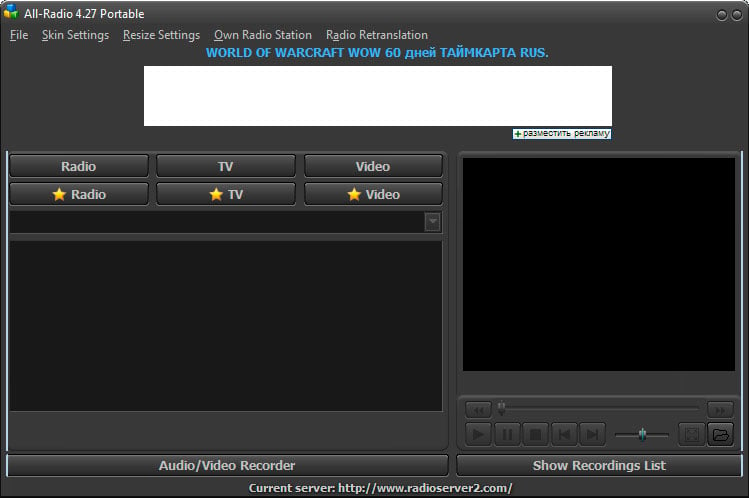
Unfortunately, while some security programs are able to remove parts of the infection, the rootkit component needs manual removal help. Due to this, if you are infected with this malware, I strongly suggest that you create a malware removal help topic in our Virus Removal forum in order to receive one-on-one help in cleaning your computer. Some of the VirusTotal scans associated with this infection have also indicated that an information stealing Trojan could have been installed by this malware bundle as well. Therefore, it is strongly suggested that you change your passwords using a clean machine if you had logged into any accounts while infected. 6/29/18: The story has been updated to specify that this malware campaign is targeting Windows computers.
Windows users get all the cool stuff.
The shepherds did so well protecting the flock that the sheep no longer believed that wolves existed.
Security Program Manager, Microsoft Corporation
I Got Hacked, What Do I Do?
https://technet.microsoft.com/en-us/library/cc700813.aspx
Would it be so difficult to place somewhere in an "Operating System" tagged posting which operating system was affected? Slashdot folks really might have more than one OS in their areas and it would be nice to know which is at risk right at the top.
When malware removal expert, Aura, started helping these victims he noticed a common theme. Most of the users reported being infected after they downloaded and installed game cracks and Windows activation tools such as KMSpico.
So don't do that.
I browse on +1 so AC's need not respond, I won't see it.
Let's talk about the pros of this,
Hello, my name is Vikash and I am from Microsoft. I am calling because you are the infected PC. I can do the needful but you must revert with all CC number and bank detail. I am also to be posting on the Slashdot with relevant detail. Please to revert immediately.
Comment removed based on user account deletion
Someone tries to post a helpful PSA type message and predictably the comments section is immediately flooded with people who have nothing of any value to say, but can't help but be assholes and make some kind of stupid "Windoze $ux!" type comment. We're all happy that Linux, macOS, or whatever the fuck else you might be using works for you, now kindly take your insecurities back to Linux or Mac forums where you can blissfully live out the rest of your days in a happy echo chamber where no one will ever challenge your views. We don't need the same 50 people making the same 50 useless comments every time there's a post about Windows. We all heard you the last 50 times and didn't care, so the odds of us suddenly caring now are zero.
Greetings! Kindly install the attached program so as to remote into your Windows and remove bug. But first visit link below and provide credit card information so as to I can verify your computer fingerprint identity. Seeing many scams, rest assured I want to remove virus and send you on happy day. Salutations, Chris from Salina, Kansas
You clearly have no clue as to how expensive writing a new Operating System would be. Hell, just look back at when Apple needed to replace Mac OS and had to endure bringing back that smug turtle neck wearing megalomaniac bastard as CEO just to get an OS that wasn't some Open Source cheeseball
Yet another reason to not waste your money on "virus protection." Use the free Windows Defender if you must, and make sure you have good backups.
"First they came for the slanderers and i said nothing."
Absolutely you're right the best way to handle a rootkit is restore from a known-good backup. Just like you practiced, last month when you tested it when found and fixed the problem with backup system.
Unfortunately, 90% of people don't have a proper backup system. Probably over half of systems that are being "backed up" can't actually be restored because the backup media went bad a year ago or whatever.
For the people who don't have a solid backup:
> some IT professional who sells himself to a client by claiming he can remove this and leave the user's precious data intact?
What you definitely don't do is try to salvage the operating system and programs. Just re-install those. It was time to upgrade anyway. DATA *can* be painstakingly recovered. It's a heck of a lot easier if your data isn't mixed with code - no MS Office macros, etc. If you keep your data separate from executable code, it absolutely can be recovered, though it's very easy to slip up and let a potentially infected file through.
To be fair, it's less work for everyone involved to format and re-install, even if you can manually fix something major. And with a Windows box you'll probably have to re-install sometime in the next 5 years anyways.
“Common sense is not so common.” — Voltaire
Comment removed based on user account deletion
I run Windows in a VM on Windows. Get twice the updates!
Yes sir immediately, I will call Bob and Mova for help, please hold.
#DeleteFacebook
Does anyone have a customer service number I can call? I want to complain that this software does not run on Linux.
Which one is a better alternative to macOS? OpenBSD or FreeBSD?
#DeleteFacebook
One technique for data sterilization is to convert to a different format. For example, converting a Word document to WordPerfect will make sure there are no macros, I believe. Then convert back. Even better, convert to plain text if possible, and leave it as plain text. JPG to bump, etc.
Donâ(TM)t look now, but this All-Radio Trojan seems to have control of your DNS server!
#DeleteChrome
"so you can actually run a properly designed, maintained, and supportable operating system"
... I want to get and ASCII art image of Megan Fox, rub whip cream all over the screen and go to town. Windows + Linux all on the same box. I mean you're in the butter zone baby.
So, it's designed, maintained and able to be supported but doesn't actually have support?
I'm struggling here. Which operating system are you suggesting is designed, maintained and supportable?
I've been using Linux since pretty much the first time I managed to borrow an Yggdrasil CD from a friend and eventually figured out how to make the boot floppies. I've used many operating systems before and after that.
I've only ever seen a handful of "designed" operating systems. They were interesting academic research topics which never really became more.
I've seen a few maintained operating systems, do varying scales. I think that Elementary OS seems to be slowly closing in on being maintained. I actually think they're doing a pretty good job of trying to make a Linux which seems kinda usable, but "init 3" works for me. ArchLinux and Ubuntu Core are starting to look good too. Windows and Mac are extremely well maintained.
Supportable... I think most operating systems are generally supportable. I've always had three categories of OS
Mac) Instead of making an OS and proper documentation to make fixing things possible, they made an awesome reinstall and restore system so that any user can reinstall their entire machine by holding key during boot and clicking next, next next finished.
Windows) Offers the exact same feature as the Mac, but also is well known and supported on a massive scale. Many things can be easily fixed with a Google and a few clicks and such, but people instead tend to reinstall because it's probably faster.
Linux) Absolutely everything can be fixed... and if you're a linux person, you probably are very good at fixing those things... not because it's easy. It's absolutely black magic. It's just that you spend 30% of your time working and 70% of your time fixing your Linux system. It's basically the Ford of computing. You can fix everything with little more than a screw driver, a wrench and a hammer and it's all really easy to understand. Hit here, smack there, bang there.. it's fixed. And you can anything you want with that Ford... you can easily convert it to a driving hot dog. But just like a Ford, Linux will never be pretty, it will never be the best solution for everything. It's just a damn good tool you accept can fit just about anywhere even if you'll spend 70%-90% of your time just banging on it with a hammer hoping it will work.
But WSL... oh baby... I mean... every time I start working on my PC and I start Ubuntu without having to start the Linux kernel and I get all that yummy Linux goodness
No, no, no. If you are infected with deep malware, you do not go whining to some dude's Internet forum with a request for help. You run DBAN on your system's disks. Then you enter the combination to your fireproof safe, extract your OS and backup media, and start from scratch.
That's what my Grandma does.
There are two problems with your approach.
Most users will read what you wrote and ask "What the hell is he talking about?"
Second is that most everyone who does what you demand isn't likely to have the problem in the first place.
My backups are similar to yours, except I have multiple. I take the added measure that anything critical is not on my Windows machines. No personal information, or cards, and even the emails on it are throwaway accounts.
I check my Wireshark logs a lot too.
Probably 1 out of every 500 users will do that sort of thing.
The shepherds did so well protecting the flock that the sheep no longer believed that wolves existed.
Though I like Win10, I have noticed it installing things I never asked it to. Bubble crush saga or some such thing. I guess (another) bad thing about this bad behavior is that the appearance of random new "apps" is may not be a surprise to anyone, thus inuring them to their potential infection!
BTW, this does seem like an ad more than a legit story.
Comment removed based on user account deletion
Comment removed based on user account deletion
Thank you for post. You've done great job listing things that fool smart, conscientious people into thinking they have a backup. That's why I said a "proper backup", proper being an important word. Those things all LOOK a lot like proper backup, don't they? And yet people who do those things end up asking me to try forensic techniques to recover their data. You seem like you know a few things, so I don't need to tell you exactly how you should do a backup, but let me point out a few common pitfalls to avoid:
> Windows sets you up with OneDrive and points all of your storage stuff to OneDrive. The result is that all your files are backed up.
The result of the default setup is that all of your infected files are stored on One Drive. This doesn't help. Your files are still infected. There is no backup copy, only the infected copy, so they are not backed up. It doesn't do you any good to have the infected files there rather than here.
So here's our first file of proper backup: backups must store multiple versions going back in time, with old versions immutable.
Recently, Microsoft has offered an option to store old versions if you pay a subscription to Office. If you're paying for it already, you may want to look into that option.
> Windows Backup and Restore or Apple Time Machine which does pretty much the same thing.
For those unfamiliar, Time Machine uses a USB drive connected to your computer, or a network drive to store old versions. The interface is really nice and it's awesome when you realize you screwed up and deleted or overwrote an important file. It's the ultimate undo. When you have a fire, a burglary, a flood, or a ransomware infection, that'll take both your computer itself and the USB drive. So this isn't proper backup - you're not protected a good against most types of catastrophic loss. It's a really cool extension of ctrl-z, though, to get back that file you just messed up.
This illustrates proper backups are off site. I used to do backups for web sites. I pointed out that just in Texas alone, every year for the last four years there had been major disaster at a public datacenter. Anyone who had a server at one of these data centers and had their "backup" in the same datacenter lost everything. In one instance, I had to get creative in retrieving some customers' data from a datacenter after the company operating it failed to pay their lease and took off into the night.
Backups must be in a separate physical location - a fire, flood, or burglary will take or destroy everything in your office.
I mentioned before backups must be tested regularly. Backups that haven't been recently tested have a failure rate of about 50%, in my experience.
They also need to be automated, because most people only do manual systems properly for a little while, then try start slacking off and eventually "forget" to run a backup for six months.
Ransomware reminds us of another requirement - the system being backed up (which may get ransomware) can not have the ability to delete or modify the backups. Sending backups to a network drive just means the ransomware or disgruntled employee will destroy two copies of the data.
> That said, to be honest, I have absolutely no idea how to maintain good backups of my Linux systems.
After I sold one of my companies, I spent a year and half designing and building a very good backup for Linux systems. The new company backup up the web servers for hundreds of web sites. The backups were kept off site, they kept several versions, the protected system had no way to remove the backups, they were fully automated, and you could easily restore any files at any time to test it. Add a bonus, you could click a button and BOOT the backup - they were stored as virtual machines.
It's too bad my skills at running a business aren't nearly as good as my engineering skills. I was like Wozniak without Steve Jobs - I built something really cool, something really useful, but making a successful, stable company from it wasn't my forte. If you actually have a ton of Linux systems, and if you care about any them, maybe we should talk. I still have some pretty awesome backup software for Linux.
Some viruses are hard to remove
Spending one day looking into something is now called "researching heavily".
On the serious side, I've often been annoyed by Windows 10 aggressively pushing updates, but there have been some interesting security features added to recent builds. Microsoft has a demo website with some good information, along with some tools for testing your configuration.
There is also a video online that details the new features.
Assuming that you really want to know, since I use Linux, Mac, Open and Free BSD I think I can answer objectively:
Both OpenBSD and FreeBSD are reasonably easy to download and install and run on pretty much anything. At least, I have not found a server/desktop/laptop computer that it would not run on.
Theo De Raadt has a 'cut the crap' mentality so OpenBSD is simpler, with a smaller repository of programs. However, you can install FreeBSD software on OpenBSD. After a few days of use, you will know how.
In general, OpenBSD feels a lot like Slackware Linux: Simple and very fast.
By comparison, other distros look fancy and are very slow - there are many reasons why. MacOS obviously falls into the fancy and slow category. So if you want a Mac replacement then you first need to decide whether you want a fancy or a fast system.
Way to keep readers informed. Oh, by the way, you forgot to mention something kinda important, that this is malware impacting systems running MICROSOFT WINDOWS.
Had to waste time to go read the linked article to learn what you SHOULD have put somewhere in the title or summary. The term PC does NOT imply MS Windows; a device with the same electrical design and functionality running GNU/Linux, Apple macOS/OS X, or some other flavor or variant of UNIX is still very much, just as much, a PC. So saying malware infecting PCs and NOT specifying that itâ(TM)s MICROSOFT WINDOWS that, (if I read and understood the article,) is the targeted system, is a disservice to your readers. I didnâ(TM)t see which version or versions, etc., are impacted, but this was poor journalism from a website that styles itself as being news for nerds... I know you know that WE know that PC does not imply a system running something from Microsoft, and we know you know that. Or should.
Our reign has gone on long enough. Indeed. Summon the meteors.
I check my Wireshark logs a lot too. Probably 1 out of every 500 users will do that sort of thing.
I would bet that's closer to one in every 500,000 users. Even security researchers don't do that (of course some do).
"First they came for the slanderers and i said nothing."
If you run Windows inside a VM in your house because you're constantly getting your windows corrupted by viruses, then maybe you shouldn't be let near a computer .... like ... ever.
Security Program Manager, Microsoft Corporation
I Got Hacked, What Do I Do?
https://technet.microsoft.com/en-us/library/cc700813.aspx
So the parent was modded up before, suddenly it gets modded down. Really slashdot moderation has been trashed recently. It's worth saying why this was the money post. The only post in the whole thread which really mattersL:
The key quote you have to follow is:
But it's the bit before that which really matters:
Below there are people proposing reverse engineering the malware and then, if you know what it does, you can clean it up by reversing that. However, one thing most malware does is open up to the network and let the malware authors do what they want, so even if you know what this malware does you don't know what all malware does. Anything more could have happened to your system.
Reinstall from original installation media and pray to god that your system's onboard firmware is not compromised.
As someone that worked in a PC shop, all we ever did for a solution was run a virus scan, format then reinstall Windows. It usually fixed 99% of the problems and you payed us a nice, fat sum for it.
Sorry to say but Microsoft doesn't care about this level of security. Their experts have already determined that the effect of current malware is already an acceptable tradeoff, and they continue to put just enough emphasis on security research and prevention to maintain this level.
"What lies behind us, and what lies before us are tiny matters compared to what lies within us." Ralph Waldo Emerson
Sync to OneDrive, et al, isn't backup.
Most malware doesn't immediately destroy your computer, it cripples it over days or weeks. I can't tell you the number of people who told me "Yeah, I noticed something last week and it's been flaky since then."
Meanwhile, you've been syncing your infection up to the cloud the whole time so now your cloud storage is infected, too. You may get some of it back, but I've also seen people just re-infect themselves, too.
Some cloud storage often at higher tiers will offer some kind of versioning and let you restore pre-infected files, but for most people this isn't the default or isn't even a feature they have.
The only way cloud sync really works as a backup is if you have a spare computer you only bring online periodically that syncs itself and that you then take offline again, but now all you've done is add a complex network transaction to what amounts to a local backup.
Reinstall? I think it would probably take me months to re-install all my programs, fight with the companies that have "activation" while attempting to explain why I need to re-active the old program, maybe $100's or $1000's to re-purchase the software where I was unsuccessful at fighting with the companies that have the "activation" nonsense, re-install stuff, and just generally get my computer back to the way it was. I have LOTS of stuff on my computer - my backup file is around 800 Gb, and it doesn't even back up some directory structures that are already backed up and never change. Reinstall? I'd rather buy a whole new computer and start from scratch, and that's saying something since this one is high-end and cost near $4K to build 3 years ago.
Of course since the latest Windows 10 update broke my computer, forced a call to Microsoft help to fix it, required rolling back to the previous version, and locking out further updates lest they re-install the "upgrade" and I once again start getting memory management BSOD's, I'm probably looking at replacing this computer in a couple years as it is frozen in time, receiving no further updates, and will, I expect, probably become obsolete. But Microsoft has to keep dicking around and "upgrading" the damned thing until they make some change that's incompatible with some driver which can't be determined which it is, and for which there may be no update to fix it anyway, and... instant obsolescence. Would rather they just "upgrade" by coming out with Windows 10, 11, 12, etc and so if these don't work, then I can revert to the previous version which will at least be maintained for a while.
If it weren't for Linux being compatible with nothing I'm interested in (there's no Linux solution for a ham radio program I use called "Winlink", I understand) (No, I DON'T want to run it in some damned emulator and add another level of complexity to the question of why it doesn't work, I just want it to work...) I'd abandon Windows. But either way, stay with Windows or jump ship to Linux, it all looks like an incredible hassle.
"Cleaning your computer"? Geez, if you have this, reformat. Period.
Thank you for the comparison.
#DeleteFacebook
Your reply seemed like an incredible hassle.
Comment removed based on user account deletion
I'm amazed at how they still haven't managed to load antivirus software before the viruses.
It's what, 2018 now?
(and also amazed that Windows "safe" mode still loads everything in the "run at startup" registry key... safe or otherwise)
No sig today...
Why bother with a virus scan if you're going to format? Did nobody explain even the basic concepts to you?
No sig today...
Ummm.... no.
No sig today...
Phishing by means of slashdot post.
Fascinating.
This signature has Super Cow Powers
Reinstall from original installation media and pray to god that your system's onboard firmware is not compromised.
Sadly today that last part is also very significant. Thanks to the mess of modern infrastructure like UEFI, everybody's device having embedded functionality that can be updated, and processors-within-processors, it's basically impossible to ever fully trust a system that has been compromised now, no matter how drastic your recovery procedures might be. Of course, for similar reasons it's also basically impossible to trust a system that you don't know has been compromised either. Security in modern tech is broken, and the tech industry and security services broke it.
If you disagree, post your argument. (-1, Overrated) isn't your personal censorship tool for views you don't like.
That's a very good question. You can use diff to see what the differences are between different backups. That normally makes it pretty obvious. You pretty much know which files were supposed to change and which weren't. This can even give you good hints as to HOW you got infected.
There are even faster ways to tell because rootkits tend to re-send the same components. I can normally see a rootkit on a Linux system in seconds, without even actively looking for it. I'm not going to post the trick here because I don't want the rootkit authors to fix it.
> apps will need to be reinstalled but at least on Linux that's fairly easy.
Re-installing the software is REALLY easy if your data includes the output of rpm -qa.
Also sometimes very handy when things go wrong - /proc/mdstat, pvdisplay, lvmbackup, and gdisk -l
cat
I'm recovering an old customer's data right now. He no longer has backups with me and someone built a new, wmpty raid on his drives, making it "impossible" to recover his data. However, the old copies of mdstat and the partition layout were still hanging around from when he uses to have the backup service I used to sell. That info allowed me to reconstruct his storage from a seemingly destroyed state.
The lazy fuck ran a virus scan just to show the customer that there was a virus. You missed the point of his post - he just flat out told you how he would intentionally screw customers and get paid.
I'll bet the "PC shop" he worked for was Geek Squad. So yes, someone likely did explain the basic concepts to him: do as little work as possible, charge as much as possible, rinse, repeat.
Reinstall? I'd rather buy a whole new computer and start from scratch, and that's saying something since this one is high-end and cost near $4K to build 3 years ago.
A fool and his money are soon parted.
Several times I've seen the backup server ran out of space. The ssh key was changed. The list of directories to backup or not backup wasn't up to date. Those are a few things that have broken it after it was setup and running.
All of these can be detected by occasionally doing a test restore, perhaps to a VM, and checking that the important files are there and important functionality works.
..that while a Windows user is willing to run that root exploit, a typical Linux user is far too lazy to remount /boot as rw and then sudo apt-get install malware. Most Linux users are so lazy they never bother to try out any malware at all, going for decades at a time, never having the tenacity or curiosity to try out "what's it like to have a computer that runs software intended to serve someone not me?"
When you look at that last part, you realize it's not even just laziness, it's fucking selfishness. Linux users like to hoard their computers all to themselves or their users, and the bastards never think to be kind to strangers, letting them control the computer for a while. Sickening and pathetic.
This Winlink? It looks like there are plenty of options. Even so, slapping it in a vm that you can snapshot and maintain would be way less work then maintaining your behemoth pc.
Cheap storage VM.
True, cleaning up is usually at least 3 to 4 times more expensive in time and the end product is always suspect.
Cheap storage VM.
If you ensure you completely wipe the drive, by "nuking" it or formatting with different filesystems, for example xfs before reinstalling windows, it's pretty safe.
Cheap storage VM.
No, not really. Sorry.
I check my Wireshark logs a lot too. Probably 1 out of every 500 users will do that sort of thing.
I would bet that's closer to one in every 500,000 users. Even security researchers don't do that (of course some do).
I suppose some would call me paranoid, but I just kind of enjoy it. And people would be surprised at what they find.
It all started when I was having issues with brittle networking software coupled with bad documentation. Then I got hooked.
The shepherds did so well protecting the flock that the sheep no longer believed that wolves existed.
So, that guy seems like a douche, but I did basically the same when working at a repair shop. Run scan to find proof of virus infection. Format & reinstall for 100% reliable malware removal. Anything less than format was about a 50/50 as to whether you really removed ALL of the malware. Nuke it from orbit. It's the only way to be sure.
"Prediction: within 10 years, Windows will be a Linux distribution." Me, 7-6-2016
Yeah, I should do that more. You aare right, every time I do, I find something I didn't expect.
"First they came for the slanderers and i said nothing."
But it's the bit before that which really matters:
That why you don't try anything from within the compromised system.
Either you try all your effort from a known clean bootdisk (CD, USB stick, etc),
or even better, you disconnect the drive and connect it to a known clean machine.
A non compromised OS will not lie about what is on the disk of another system, even if that other (non-currently running system) happens to be compromised.
(The sole exception being malware like ransomware that encrypt your data. Then nobody except the hacker holding the decryption key can read that disk).
Reinstall from original installation media and pray to god that your system's onboard firmware is not compromised.
Well, the attack of firmware (UEFI) or "management chips" running their own firmware (Intel ME engine and co) is indeed an entirely different level of scary.
And given the almost total disappearance of socketed flashchips to hold these firmwares, any chance to recover from that becomes bleak.
"Sufficiently advanced satire is indistinguishable from reality." - [Tips: 1DrYakQDKCQ6y52z6QbnkxHXAocMZJE61o ]
Don't download and install dodgy software designed to violate copyright, and you stand less chance of winding up with root kits on your computer...
I've abandoned my search for truth; now I'm just looking for some useful delusions.
Why do they all have Indian accents?
I've abandoned my search for truth; now I'm just looking for some useful delusions.
"You can't cheat on honest man."
I've abandoned my search for truth; now I'm just looking for some useful delusions.
Have you looked into https://www.winlink.org/conten...
Kaspersky provides a Live CD rescue disk. I have had luck with it in the past. But even with a live CD, you have to know a good deal about both the target system and the malware.
I am not your blowing wind, I am the lightning.
I think this is 99% FUD. Drive firmware alteration would crash stuff and it's outside the norm for malware of the current generation.
Cheap storage VM.
This situation has only escalated to this point in recent times.
I used to have a business on the side doing PC service and upgrading work, on call. About half of my calls were from small businesses or individuals who needed malware and virus cleanups.
Back then, it was definitely possible to clean a system so it was back to normal working condition again, although sometimes it was VERY time consuming. You had to run multiple tools on the system, including ones that booted from recovery OS's you had on bootable CD, DVD or USB stick. Admittedly, you couldn't PROVE you had a system 100% clean, but when over a dozen scanning tools say it's clean and you no longer see any excessive CPU usage or disk chatter, and you can't find anything acting abnormally or showing up in the task manager? It's clean enough to make a paying customer happy.
The best answer was ALWAYS to wipe and reinstall from scratch. But sometimes that's not even viable. (EG. Customer has numerous apps installed that he or she no longer has license keys or installation media for and doesn't want to lose them.) If you really CAN'T get it clean, then you can tell them they're screwed and have to start over fresh -- but they're NOT gonna pay you for that answer.
What's crazy, now, is how these rootkits have gotten so advanced, they're really winning the battle for the first time in computing history. I fought for days to remove malware on a PC for a friend, last month, and despite throwing everything I knew of at it and manually poring over all possible registry locations that can start an app on boot or login? I never did feel confident I had it fully cleaned. It was better/usable instead of freezing up and running so slowly, it was useless. And everything reported it clean. But to me, it just didn't feel quite right. I just saw too many little pauses or hesitations that MAY have been his CPU being too old and slow. But not having used his laptop before the infection, I couldn't say for certain. I wound up advising him to wipe the machine and use it as an opportunity to upgrade to a new SSD.
I ran across a particularly devious malware tactic recently. The malware was purposely setting the NTFS "dirty" flag repeatedly, so the filesystem was flagged as needing repair. That, in turn, prevented most of the bootable virus cleanup/recovery discs from cleaning the system. They'd boot up but report they could only mount the target filesystem as "read only" because it was damaged and needed to be repaired first!
No, not that one, that's gateway software. I need client software. These are the available clients:
https://www.winlink.org/Client...
The client software absolutely has to do Winmore and Ardop, and you can see that the only one that does is the Windows software.
Then of course there is the other Windows-only stuff like my Nikon camera utilities, Photoshop Elements, Office 365 (did they make it Linux yet? Maybe... don't want to lose VBA), and so forth.
Since I have a mortally wounded computer from the last Windows update, it's tempting to build a new one an make Linux the base OS and attempt to make everything work through VMs for Windows, (see if I can get Call of Duty and Quake III (yeah, its ancient, but have been playing it about 20 years and have over 200,000 dead bots behind me), and so forth. I just really don't want to end up scripting a shell and wondering why the m-fing regular expression isn't doing what I want it to. Damn, I hated that when I had to do it for work, and it made me appreciate Windows so much more...
When you decide to throw away your $4,000 computer to solve your Windows glitch, can I have it? I'll actually come to your house and pick it up, if you live in North America.
I'll have both the crippled computer & the new linux computer simultaneously. If I can get the new linux computer to do what I want, I'll likely convert the old one to linux too, except it'd likely be several years of learning and experimentation to get the windows software to cooperate so the old computer might really be obsolete by then anyway. Anyway, I'd find a way to sell it as parts... 850 watt PS, 32Gb ram, core i7, blue ray burner, etc.
Ransomware typically wipes any network drives using the SMB protocol, as Samba does, if the infected machine has access to the share. That can be made secure by the backup backup pulling files that are shared by machine to be backed up. So the reverse of the typical model.
I had envisioned something a tad different when I read your earlier post.
That's fairly similar to part of what I did on the very cool backup service I used to sell. Except I used LVM snapshots rather than ZFS, which gave us the flexibility to do some other really cool stuff.
Sometimes the integration of ZFS is handy, sometimes it's a major limitation. It's a lot more flexible to use a file system as a file system, a volume manager as a volume manager, and RAID for RAID. ZFS tries to be all three, creating coupling that is entirely unnecessary (but convenient if your needs are simple).
Thanks, I hadn't seen that one but will look out for it.
const int one = 65536; (Silvermoon, Texture.cs)
SJW, n: "Someone I don't like, and by the way I'm a fuckwit" - AC