Slashdot Mirror
Domain: askvg.com
Stories and comments across the archive that link to askvg.com.
Comments · 27
-
Re:Very large and very small applications
> It's not spyware.
What part of "Collecting data without my consent" do you not fucking understand?
> they introduced the ability to manually pin and move programs on the taskbar.
Gee, there was a 3rd party program, TaskBarEx on Windows XP that did this. You don't need fucking telemetry to know this.
/sarcasm Yay for M$ innovation! Copying 3rd party programs since 1990.
--
Microsoft Windows, noun: A 64-bit compilation of 32 bit extensions and a graphical shell for a 16 bit patch to an 8 bit operating system originally coded for a 4 bit microprocessor written by a 2 bit company that can't stand 1 bit of competition with 0 bit of understanding good UI. -
Re:Blue Screen While Upgrading
In the interest of finding some concrete details, I just searched for "PowerShell remove Store apps", and came up with this very useful page (lots of others came up, but this one looked good enough): https://www.askvg.com/guide-ho....
There's some info on editing the hosts file here: https://www.bleepingcomputer.c..., with some links to sample hosts files that block certain ads servers. But it would be useful to know how editing the hosts file can be used to reduce telemetry without (for example) blocking updates.
-
Re:MS Office?
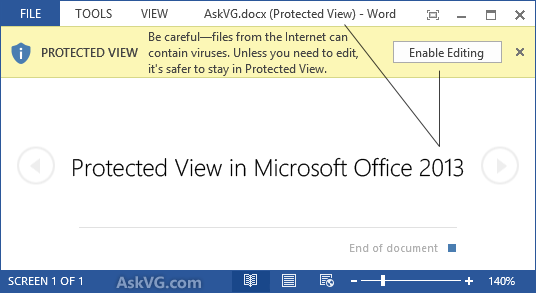
If your wife was stupid by effectively clicking yes to the "Hey, don't be stupid out there, the world is a dangerous place" box ( http://media.askvg.com/article... ) to a malware laden document she randomly opened, she deserves to be infected.
She opened a Word Document sent from her professor (and had been expecting a Word Document from her so didn't treat it as suspicious).
-
MS Broke Windows 7 Updates
This does not surprise me. I have two systems on which the update process was broken on Windows 7. With auto-updates set for automatic mode, updates would not install. If you manually force the system to check for updates, it gets stuck in an endless loop showing a moving progress indicator. This is the best link I found to deal with the issue: http://www.askvg.com/fix-windows-7-keeps-checking-for-updates-for-hours/
If the process is broken and there's no notification, then all of these systems are vulnerable. -
Re:Runs?
I don't want Cortana, I don't want internet searches from the desktop and I DO NOT WANT telemetry or my WiFi passwords shared etc. etc. etc. I'm not a node in Microsofts network I'm a private business.
If I can't turn this shit off and uninstall the crap I don't want then it's not getting installed.
You can. Shared WiFi passwords has been removed with the Anniversary update. The other stuff you want can be fixed with Winaero Tweaker, including shutting down Cortana (as opposed to simply hiding it). and Classic Shell makes live tiles go away. You can even restore the Windows 7 calculator from here if you hate the Metro version. These things do a pretty good job of reducing 10 down to the non-intrusive OS, shell and app platform that 7 was.
-
Re:Does this give me native CLI tools or not
It is possible to eliminate the driver updates from Windows Update in 10, though buried a bit.
http://www.askvg.com/fixing-windows-10-automatic-updates-install-problem/
-
DisableGWX
First off, If there's no reason not to upgrade other than FUD, then they should update. 7 only has a little more than 4 years left and is already in extended support and windows 8/8.1 interface is crap vs 10. If they're worried about being spied on stay with a Local account and don't setup a Microsoft account. It will only take the same telemetry that they've been doing since the customer experience program in vista, which you can then turn off. That being said MS shouldn't have started downloading the OS on PC's without explicit reservations but even that can be disabled.
Easiest method to disable windows 10 from updating is to use the DisableGWX Policy setting. This site's Method 3 will walk you through setting the registry key. Microsoft Also has some other blocking methods as well.
If you just want security patches from that point forward go to windows update settings and uncheck "give me Recommended updates the same way I receive important updates"
-
Cleaning Up Temporary Files & Defrag
I know it's been mentioned elsewhere, but Disk Defragmentation of hard disk drives with Windows 7 installed can offer a significant boost in minimizing boot times. In addition to cleaning up cached and temporary files from applications and web browsers before defragmentation can help. You might also want to look into the contents of the \Windows\WinSxS directory for backup sets of previous OS files updated by the installation of Microsoft patches and updates as described in the posting at [Tip] Reclaim Free Space by Removing Old Windows Updates Files in Windows 7, 8 and 8.1 on AskVG.com.
-
Re:Android, not quite an Egg but close.
There are "real" easter eggs in Android related to this: http://www.askvg.com/hidden-secret-easter-eggs-and-daydreams-in-google-android-devices/
Kool! Thank you for that one, need to pass it along then try them out.
-
Re:Android, not quite an Egg but close.
There are "real" easter eggs in Android related to this: http://www.askvg.com/hidden-secret-easter-eggs-and-daydreams-in-google-android-devices/
-
Re:What about the 87% of 'sad' feedback reports?
.
Below update is now outdated:
UPDATE: With the release of new versions, opera:config page has been replaced by opera://flags.
http://www.askvg.com/how-to-ac...Going back and forth I got lost, and ran opera:config on Opera 12 (I'll take the hits), Opera 27 (which is the only Opera open) also runs log-in info like FireFox knew I should of quit at the finger.
Sigh-goto go now and find the key word to edit Opera 27 to something usable.
-
Re:What about the 87% of 'sad' feedback reports?
People are genuinely disappointed with all of the Firefox products these days. That's why 87% of the reports are classified as 'sad'. Firefox just doesn't make people happy! It used to, years ago, but it doesn't any more.
Why isn't Mozilla taking this more seriously? Why are they so complacent with 87% of Firefox users being unhappy? That's an atrocious failure rate. Why aren't they making a big deal about it?
The screw: Opera did this to all of it's program users by removing bookmarks as "research shows" people prefer those thumbnails that FireFox uses, while for "me", I have to wait for FireFox show that site as a thumbnail then pin it, Opera lets you edit or put the one you want where and when you want.
The the finger: Opera will import bookmarks but not Opera's own.
I noticed just now Opera will import Opera.12 bookmarks this Version: 27.0.1689.69 - Restart Opera to update to version 27.0.1689.76
What I was met with, that's one important update - I thought I had updates disabled, It's how one ends up with FireFox 36 (I'll take your word for it, and avoid it), but it is a standard practice of mine to disable updates. (carry over from Windows history of bad updates).Below update is now outdated:
UPDATE: With the release of new versions, opera:config page has been replaced by opera://flags.
http://www.askvg.com/how-to-ac...Opera saved an entire web page as a
-
Re:just want I wanted!
They were not useless
They were cheap, underpowered with low resolution screens and poor quality trackpads making them a race to the bottom competing only on price. They were only useful for the sorts of things that are easier on a tablet, everything else is better on an ultrabook which is why the market has expelled them.
The problem was bloatware -- MS apps had expanded to fill the vacuum of a much bigger computer... but why? I would love to see computing becoming more efficient, rather than algorithms abhoring a vacuum.
Citation? Windows has been reducing its hunger for system resources and on Linux you can use reduced-functionality shells on and less graphically intense window managers to remove the need to load the high-capability graphics drivers that take up a lot of memory.
I'm not sure what "MS apps" you're referring to that have "expanded" or what you mean by that. For example say you open a built-in application like Wordpad, on Windows 7 it uses about 20mb of RAM, open Wordpad on Windows 8.1 and it uses just over 9MB of RAM. Then there's the base install of Windows 8 which brings the memory footprint from 7's ~400MB down to ~280MB of RAM.
-
Re:Too little too late
The start button takes you back to the Metro screen, not anything remotely like the start menu, and all the hot corners and charms crap are still there.
You're right about the Start button still not exhibiting correct behavior, but Windows 8.1 does permit hot corners to be disabled without needing third-party add-ons. See here for details. Also, Windows 8.1 allows booting straight into the desktop as an option, whereas Windows 8 would only boot to the Metro start screen unless you used a third-party add-on.
Hopefully Windows 9 will bring back the real Start Menu, add an option to completely hide all traces of Metro for desktop users, and bring back the much nicer Aero theme as an option. Without Ballmer, there's some hope.
-
Re:the return of the Start button
Dude, you haven't noticed that you can group icons into columns, just like a newspaper?
http://www.askvg.com/tip-organize-windows-8-start-screen-tiles-in-groups-and-name-these-groups/
And you can shrink them down with a keystroke:
http://blogs.computerworld.com/sites/default/themes/cw_blogs/cache/files/u98/Win_8_groups.jpg
Organize your stuff.
Also, yes, you can get stuff out the start screen to the desktop. Easiest way is to pin it to the taskbar, then drag it wherever you want.
-
Re:Big square uniformly-shaded buttons.
Using 3rd party themes require you to install modified system files first: http://www.askvg.com/how-to-install-use-custom-3rd-party-themes-in-windows-xp-vista-and-7/. And a quick search seems to indicate that this is necessary in 8 as well.
I think that's more like "they didn't go far out of their way to stop you from..." rather than "made it so that...".
-
Re:I can assure you...
I suspect
No, Windows 8 also run faster and uses less memory while doing so. Text rendering has become hw accelerated, more 2d rendering hw accelerated, DirectX and video rendering performance enhanced and general "creative" rendering has vastly improved:
http://www.zdnet.com/windows-8-vs-windows-7-benchmarked_p2-7000002671/
http://www.askvg.com/comparison-between-windows-7-and-windows-8-memory-management-system/
from http://www.dailytech.com/Windows+8+is+Using+Less+Memory+Than+Windows+7/article22986.htm
[Windows 8]has 124 MB (~20 percent) more "Available Memory" on his 1 GB notebook -- the Windows 7 minimum memory requirement.
-
Not quite true - Classic Shell allows it
Well, almost. I've got Classic Shell installed on the leaked version of Win8 Enterprise N. What happens is that it'll load Metro for a fraction of a second and then CS takes me back to the old "desktop" environment complete with start menu.
So it's not a complete bypass but it's close enough for my purposes.
If, like me, you prefer the Win7 start menu's look to the default Win98/2000 look Classic Shell provides, there's a skin to make that possible.
-
To make Metro go away, press LWin
I seem to remember reading that the "greasy finger interface", as you call it, is analogous to the Start menu of Windows 4 through 7. This article claims that one can toggle between it and the desktop by pressing the Windows key, just as one can toggle the Start menu on and off with the Windows key.
-
Re:Maybe we'll get lucky
If you HONESTLY think they are gonna gut the ENTIRE UI before release day? here is a cookie to go with the koolaid you have been drinking. as for why show it to them?
Actually the Start tiles experience was redesigned due to customer feedback about the Developer Preview.
The concept is not going away, but the implementation is improving a lot before release.
Compare the design after feedback was taken into account to the earlier design
It was improved.
I know this may surprise you, but Microsoft relies on selling stuff to customers. As such, as a general rule (though not always, everyone messes up from time to time), they try to create products that customers want to buy. If they get feedback that something can be improved, and if it is possible to improve it given budget/time/etc, quite often it ends up being improved. Not always, but features have a cost to implement (both financial and in terms of human resources).
folks PUT UP with their cell phone, most don't sit there caressing the thing and they sure as hell don't want to spend their day in front of it!
Try talking to a younger demographic.
Also, if you are putting up with technology, try getting better technology.
In regards to the new start screen though, it is basically a simple evolution of the original Windows 95 flyout start menu that just now takes up the entire screen. It is a full screen start menu. Live Tiles are Desktop Icons that can display snippets of information, and that are easier to arrange in to meaningful groups.
Do either of those sound that bad to you? Does de-cluttering desktops (while still allowing users to put things on the desktop! Just making those things easier to organize!) really sound horrible? And why the hell not make the start menu full screen? It damn well should be, much better than the stupid small hit boxes that existed on the Win95 through WinXP start menus, and tons better than the seriously unusable start menu that debuted with Vista and continued on to 7.
-
ext2 on windows.
If only there were ext2 drivers for Windows . .
Oh, wait.
(I personally recommend ext2fsd of those listed)
-
Re:Not even October 22 yet...
Just thought you'd like to know I found a "hack" to get quicklaunch back! Yay! I have bookmarked AND printed it as a PDF so I don't lose it. I don't know how well it works as I haven't switched to Win7 yet, but from what I've seen ANYTHING has to be better than that new Mac rip launch bar. Why is it MSFT seems to always want to steal the "purty" from Apple but never the good stuff, like easy application installs?
-
Re:Eyecandy in cost of usability
There actually is: http://www.askvg.com/insert-classic-menubar-and-toolbar-in-microsoft-office-2007/
Try posting one that gives this functionality for free.
I doubt a lot of people want to pay money for the same functionality that they used to get for free. -
Re:Eyecandy in cost of usability
There actually is: http://www.askvg.com/insert-classic-menubar-and-toolbar-in-microsoft-office-2007/
Paying $20 for a third party program to friggen change a menu isn't nearly as nice as it would have been to have a native free "2003 Office Theme" included in 2007.
-
Re:Eyecandy in cost of usability
-
Re:Hookay... damage control? Paid by MS?
5 - The only view I ever want to use in Explorer is Details. So like every other version of Windows, the first thing I did was to set the view to Details for a folder, go into the Folder Options, and tell Windows not to use unique views for each folder. Despite doing this many times, Vista will still randomly pick other views that it thinks are better (even though they're worse) for some folders some of the time. It also refuses to remember the sort order I choose for my Documents folder, and every time I go into it, it's sorted by Type, not Name.
Oh dear god yes. This has got to be my #1 annoyance with Vista.
Here, let me google that for you.
In all seriousness though, I agree it's a pretty horrible "feature". Here's a more concise guide that fixes just what you're talking about: http://www.askvg.com/how-to-fix-annoying-folder-view-type-problem-in-windows-vista/
-
Say "no" to Google spyware
If you want to try Chrome, use this version without the silently installed, never removed and hard to disable 'Google Update'.