Slashdot Mirror
Domain: cdspeed2000.com
Stories and comments across the archive that link to cdspeed2000.com.
Comments · 14
-
Re:Hoarder, or preservationist?
If you wouldn't mind, can you read the MID codes from those discs & post them here? (You can use a tool like CDspeed to read the MID code -- http://www.cdspeed2000.com/ ).
Ultimately, the MID code is the final authority on whether or not a disc is HTL or LTH, because it's how the drive determines its writing strategy.
My guess is that the manufacturer of the discs you bought just decided that it didn't even HAVE to identify its discs as "LTH" on the packaging anymore, and didn't.
I suppose it's not inconceivable that things might have changed... but absent a low-key industry-wide move to abandon LTH and return to HTL, I think it's MORE likely that the manufacturers just found a loophole that allowed them to stop disclosing on the packaging that a given pack of discs are LTH.
My own personal Amazon experience the last time I bought non-LTH discs ~2 years ago was that nearly all of the discs listed there said nothing whatsoever in the listing about whether the discs were HTL or LTH, and NONE of the non-Verbatim discs were HTL when I looked up the UPC or SKU number online.
-
use CD/DVD speed
You need certain brands of optical drives, but with them and this program (and others), you can see the PI/PO or C1/C2 correction (I can't remember which is for CD and which is for DVD) rates on a per-sector basis on your disc. As the rates rise, the disc is going bad, becoming marginally readable and you can copy the disc before it becomes unreadable.
You can find out which drives to buy at http://cdfreaks.com/. The terminology on there for a drive that can do this is a "scanning drive".
I have no idea if you will find that your correction rates are rising over time.
-
Re:Get busy with eBay
Don't get a single-speed CD drive. The lasers on those are woefully underpowered, and can't read rewritable or recordable discs properly. You can generally use software to slow down the CD read speed if you need to. I know it's an option in the BIOS of my T61, too.
-
Re:Fat or muscle?
Thunderbird was OK until a corruption in my gigantic MBOX file really made me aware of maildir's superiority.
As for DVD burning... what we need is a PIE/PIF scanning tool such as Nero CD-DVD Speed because "disk verification" (Nero/k3b-style) isn't that useful IME. Currently I use TY +R discs and use a Windows machine running CD-DVD Speed to verify each burn. -
Re:Oh Great. Even less stable media.
Now take one of those DVDs and run Nero's CD-DVD Speed on it.
I used to use Fujifilm all the time, because they used Taiyo-Yuden. Then they switched to Ritek, and I unknowingly bought a spindle. The first clue that something was wrong was that things played and copied from the DVD at inconsistent speeds. And then a couple were completely faulty and cut out 100's of MBs of data, randomly. So I ran CD-DVD Speed's Disc Quality on it and got spikes of errors everywhere, and the maximum read spead varied from 2x to 14x (this is a 16x DVD, too). Even on some of the Ritek DVDs that don't have too many errors, the speed on them is inanely inconsistent.
So I bought some Taiyo-Yuden DVDs from http://www.supermediastore.com/ and tried them out. I've not gotten any bad discs from Taiyo, yet (though some people have reported bad Taiyo-discs, but nevertheless, the occurrence rate is leagues underneath that of other companies). And the speeds are very consistent. The speeds start (on my 8x Taiyo-Yuden DVD+Rs) at ~7x in the inside of the DVD, and the speed linearly increases, without any spikes at all, up to about ~12-14x on the outside of the DVD (again, these are 8x DVDs).
In anycase, I've had numerous bad experiences with Ritek DVDs since then. My cousin's computer refuses to burn 16x Ritek DVD-Rs at anything more than 2.4x, and occasionally those go bad, too. I've never had a problem with Taiyo-Yuden. -
Re:How loud is the dvd drive?
Can't help on a Mac, but did run into the same problem with my own HTPC using Windows MCE. I found two utilities that allow you to control the speed of your optical drive, check them out if interested:
http://cdbremse.dyndns.org/cdbremse.htm - page and installation are in German, but tool has English menus. Tool is shareware, I believe the author will take payment in the form of crates of Pepsi Light.
http://www.cdspeed2000.com/go.php3?link=nerodrives peed.html - Nero DriveSpeed -
Re:Depends how you define lifetimeThis isn't quite what you're asking for, but Nero CD-DVD Speed has some quality tests that might give you some (scary) insight. At least one of the error reporting features only works on some drives (interestingly, my burner doesn't support this feature but my readonly drive does).
Also, if you want to know more than you want to know about the bits, check out the CD R Primer (this is a pdf, but there's an HTML version and additional stuff here)
-
Re:Some Advice
Not only that, but the QUALITY of the burn, meaning, how many errors are actually on the disc. This can be checked with Nero CD-DVD Speed that comes packaged with Nero. Would you rather have a 10 minute burn with a few thousand errors or a 10 minute and 30 second burn with a few hundred errors? Again, this varies widely by media also.
-
Re:Funny"I've had discs become unreadable from both TDK branded discs (about 1.50ukp each 5 or 6 years ago) and POS cheap discs."
Depending on what batch you buy, the TDK stuff is the identical to the cheap POS media. The latest TDK spindle I brought home was made by CMC Magnetics, which is one of the worst CDR manufacturers out there. (Their DVDR discs are better though.) The CDR spindle was returned to costco. As to what TDK was putting in their spindles 6 years ago in the UK, I really have no idea. It would be interesting if you were able to to post the Manufacturer ID codes from those discs here, which are retreivable using tools like Nero CDSpeed.
"It is not very many but a few.. however, if that few contains important data you have no other copy of, you're screwed (and I guess this is exactly the situation joe public is in). The bigger deal is probably that you just don't know which are going to fail, and unless you check them regularly you probably won't find out which are failing very quickly."
In that case, Joe Public is being screwed by his own ignorance. My digital photos are mirrored on two machines, a FW enclosure and DVDRw. It is unlikely that I will lose my collection anytime soon. As to not knowing which ones will fail, that's why multiple copies should be burned. Ignorance is no excuse in the face of proper data backup procedures.
"These days I use POS cheap discs for my backups coz they only have to last until the next backup is taken."
I use Rw for the same reason. And I don't fill landfills in the process. At least not as quickly.
"With respect, thats only 8 years which isn't long in the grand scheme of things. Printed photos are still not bad (a bit faded) after 50 - 100 years - all evidence I've seen suggests that even the best CD-Rs won't last anywhere near that long."
CD-R technology is clearly much younger than printed photographs. In fact there is no digital storage method that's guaranteed to last 100 years. Still, I find it more desirable than keeping prints/negatives as my only copy because they don't preserve perfectly and I can't transfer them digitally perfectly to another medium before the first medium fails (and even the best CD-R will fail if you wait long enough.) My bet though is that I can get a few decades out of my T-Y at least before they degrade into unreadability. Regardless, I burn everything twice onto different batches of media just in case.
-
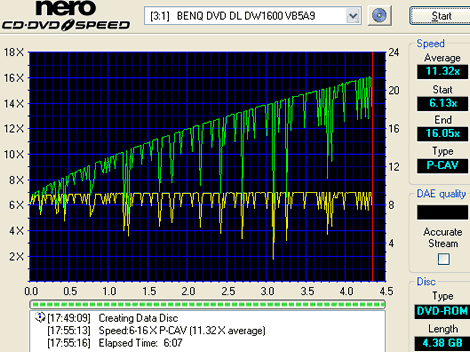
Re:Average write speed under 12x?
> The average write speed on this drive barely qualifies it as a 12x drive.
> Claiming this is a 16x drive is silly.
No, it is not silly. It's just creative marketing which, incidently, was in common use since CD readers reached 8X speeds.
This particular drive uses CAV (Constant Angular Velocity) technology. That means that the disk spins at a constant speed, just like your old LP record players.
The circumference of an inner track is smaller than that of an outer track and yet thay take the same time to complete a revolution. That means that the linear speed thatthe laser reads/writes is lower on the inner tracks than on the outer. The speed increases from the inside to the outside but since CD and DVD disks are written from the inside out, you may not reach the max speed at all if the disk is not full.
Ignoring the "dips" (write quality adjustment attempts), the speed graph should be close to linear.
Most other drives use eithr Z-CLV or P-CAV to achieve higher average speeds.
See here, here or here for an explanation of the terms and here for a comparison. -
Re:Or CD/DVD drives
Uhhh
-
Re:How about normal CDs? Error detection"Is there a way to detect when a CD is about to fail?"
Check out the freeware win32 tool Nero CDSpeed which has many excellent functions for measuring the quality of optical discs (CD, CD-R, CD-Rw, DVD, etc) and tools for verifying the integrity of stored data. Its scandisc function test the drive's ability to read each file at the filesystem level and read each sector at the physical level, telling you which sectors are good, which are failing and which are dead.
An interesting side effect of using this tool is that I've noticed that the manufacture of pressed DVDs is highly variable! Some discs are excellent, some are crap. And it seems to be pretty consistent with the company that distributed them too. Some discs read very smoothly while others require all kinds of speed adjustments by the drive to get data out of them.
-
Re:Doesn't hurt me
"But any tech geek worth his salt knows Plextor is besto"
This was true 3-4 years ago when CD-R drives were less common and more expensive, but times have changed.
Lite-On makes some of the least expensive drives you can buy, yet they are top quality. They consistently beat Plextor and other expensive brands, not only in burning performance, but in ripping audio and reading data. Lite-On drives are one of the few brands that have a dead-on implementation of C2 Error detection, which is great for anyone who is serious about ripping their CDs to digital format. See Nero's Advanced DAE Error test results and you'll see Lite-on in 3 out of the 10 top spots. Not bad for a $48 48x CD-R drive.
And this probably the exact reason that Yamaha is backing out. They can match the quality or the price, but they can't match both. -
Re:So...
about 678 thousand kmh, though my arithmetic is probably wrong somewhere
Yeah, you're off by at least a factor of a thousand.
At 40x, the CD is spinning 8,000 RPM (here). The CD is 5.25" in diameter = 16.5" = circumference. 16.5" * 8,000 RPM * 60 min/hour / 12 inch/foot / 5280 feet/mile = 125 miles/hour (about 200 kph).