Slashdot Mirror
Domain: entropymine.com
Stories and comments across the archive that link to entropymine.com.
Comments · 31
-
Re:Suggestions...
Lode Runner: The Legend Returns is a puzzle type game with excellent coop play. Some of the levels are designed where you can only beat it if you time your cooperation.
Pocket Tanks Deluxe is also a classic. -
Re:Nostalgia Trumps True Skill?I am talking about what a game requires. User expectations are very much a part of game requirements!
Sure, a text adventure game implemented on an XBox still won't require an artist or a musician, just as it did not in 1985. However, a 2-D shooter game in 1985 might not have required a real artist or a real musician, because a reasonably knowledgeable amateur can fake it and hide under the poor capabilities of the machines at the time. A 10x10 black and white icon depicting a soldier can easily be drawn by a non-artist, and a monotonic theme song can be composed by a non-musician, and your product still wouldn't be far behind full-scale commercial games. Today, the machines are powerful enough to expose the programmer's lack of skill in the arts. The users will notice if you set your video mode to 280x192 or your icons are blocky and ugly. Your users will notice if your music is monotonic. Good graphics and music are "required" for a 2-D shooter today.
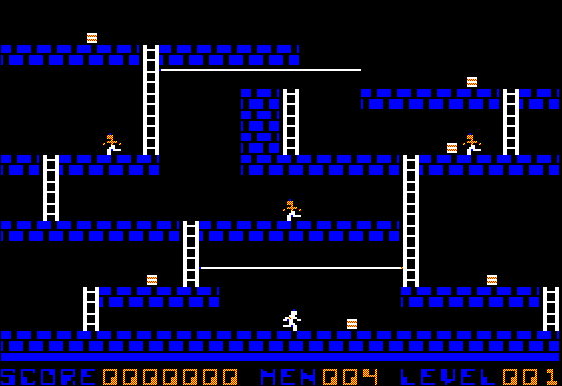
For an example, simply compare the original Lode Runner to its sequel.
I can write a flight simulator game in the form of a text adventure. Does that mean flight simulator games don't really "require" 3-D graphics?
-
Re:Nostalgia Trumps True Skill?I am talking about what a game requires. User expectations are very much a part of game requirements!
Sure, a text adventure game implemented on an XBox still won't require an artist or a musician, just as it did not in 1985. However, a 2-D shooter game in 1985 might not have required a real artist or a real musician, because a reasonably knowledgeable amateur can fake it and hide under the poor capabilities of the machines at the time. A 10x10 black and white icon depicting a soldier can easily be drawn by a non-artist, and a monotonic theme song can be composed by a non-musician, and your product still wouldn't be far behind full-scale commercial games. Today, the machines are powerful enough to expose the programmer's lack of skill in the arts. The users will notice if you set your video mode to 280x192 or your icons are blocky and ugly. Your users will notice if your music is monotonic. Good graphics and music are "required" for a 2-D shooter today.
For an example, simply compare the original Lode Runner to its sequel.
I can write a flight simulator game in the form of a text adventure. Does that mean flight simulator games don't really "require" 3-D graphics?
-
Transparency in 8-bit PNGs in IE
IE6 supports transparency in 8 bit PNGs but not in 24 bit PNGs.
Do you mean T1, T2, G5, and G6 of this page? Bon Echo displays them correctly, but Microsoft Internet Explorer 6 on Windows 2000 displays all not completely opaque pixels of T1 and T2 as completely transparent and all pixels of G5 and G6 as opaque. The only 8-bit images on that page that IE displays conforming to the PNG spec are M1 and M2, which use GIF style transparency.
-
8 or 16 bits per channel, 24 to 64 per pixel
it's saying you have have an 8 bit depth for a true color PNG with alpha?
That's 8 bits for each of red, green, blue, and alpha in the common "32-bit" RGBA mode. The PNG specification also provides for a mode with 16 bits per channel, for 48 bits per pixel without alpha or 64 bits per pixel with alpha. This page has some 64-bit test images.
-
Re:Majority of end-user features not included...
According to my research here it works a treat.
Yay! -
Re:IE PNGs
To the best of my knowledge this is not the case. 24-bit color seems to be supported, but if an alpha channel is present it is blended with either the PNG's background color (an optional property of PNG images, which is normally not used at all) or, if no background color is present, with a light blue (almost white) color.
This page contains a PNG transparency test that comes in handy for figuring out exactly how IE handles different PNG types. It's theoretically useful for other browsers as well, of course, however I believe that all other modern graphical browsers now have full PNG support. -
Re:That's a minimum....What I was thinking was that if a Picard geometry would cause some dimensions to be shrunk to tight circles near it's narrow end, could us being near the narrow end explain why the dimensions predicted by string theory(s) are so tiny.
One of the important points about the Picard geometry discussed in the "horn of plenty" theory is that the universe would look different depending on where you are.
As we look around, the universe appears to be pretty much the same in any direction we look. The fine structure constant and other important physical numbers appear to be same here on earth and in the farthest galaxy we see. There is some question if these constants might have changed over time, but the change is thought to be far, far less than the change one would expect being in the strange part of a Picard universe.
The diameters of the "rolled-up" dimensions are thought to affect the properties of the forces and sub-atomic particles we observe. Why those properties are what they are is one of the great mysteries of Quantum Mechanics and Cosmology. An argument can be made that, if the numbers were different, we wouldn't be here to observe that difference. Some have argued that the numbers are deliberate - that God (or some researcher) caused those numbers to be what they are so that either a) life would exist or b) the universe would be "interesting" (like choosing which rules to use for the game of Life.
Would the diameter of the the rolled-up dimensions be affected in an extreme section of a Picard universe? That's a good question. I'd be tempted to say "no." There are places near a black hole where light orbits - in other words, if you look forward, you can see the back of your head! This is similar to the way the Picard universe behaves at an extreme point. Atoms being torn apart in the accretion disk of a black hole seem to have the same physical constants as atoms on Earth. So that would indicate that no, it doesn't change the smaller dimensions. But who knows? Perhaps a Picard extreme region behaves differently from a black hole region in our section of the universe. Our understanding of why the universe "is the way it is" is primative. My understanding, of course, is far more primative than Hawking, Greene, or Thorne.
I have a crude vision in my mind of a universe where, depending on where you are, you see different dimensions rolled up. Properties would change as you moved from one region of the universe to another - each region being far in excess of 156 billion light years in diameter. My topological intuition begins to fail me, though, and I'm getting a major migrane as a result! I should check to see if my brains are being squeezed out my ears.
I really would suggest that you read Greene's books. In the first one, you might find yourself skipping some of the math. I read through it and humored myself by thinking that I understood the math. I do find that Greene has a wonderful way of tying what you already know into what he's trying to explain.
-
Re:Your graphs are unreadable
name a "major browser" that won't support PNG.
How about that legacy browser, Microsoft Internet Explorer?
Disclaimer: I'm a big fan of PNG, just not a fan of MSIE.
-
MNG plugins are availableWhile I feel MNG's removal from Mozilla is unjustified, you may restore MNG support with these:
-
some PNG related tools
- Bright (download) is the best non-dithering quantiser in the whole world, and reasonably fast, too; based on dlquant
- pngrewrite sorts the palette
- pngcrush removes junk chunks, fixes Photoshop's gamma bug and tries many filters to find a smaller filesize
- OptiPNG is similar to pngcrush, but executes much faster
- pngout uses an alternative deflate, yields sometimes even smaller filesizes
- tweakpng manipulates chunks comfortably with a GUI
- pngquant quantises PNG24 with alpha transparency to PNG8 with transparent palettes, the result is alas mostly ugly
sleightplus demonstrates how to overcome IE's rendering bugs without polluting your markup or styles; no silly style inlining required, either. Use PNG images or backgrounds all the way they were intended.
Predecessors with only support for foreground images: Youngpup sleight, WebFX PNG behavior, mongus pngInfo, Bob Osola. PNGHack, a server side solution, is doomed to fail because of dysfunctional browser sniffing.
If that was useful for you, and you are a C hacker, I have a plea. Take the dlquant sourcecode (see above) and massage it so it works with PNG instead of the archaic PPM. I want a functional Bright clone for Linux that takes a true colour PNG and outputs a paletted PNG. Can you do that?
<daxim@gmx.de> -
some PNG related tools
- Bright (download) is the best non-dithering quantiser in the whole world, and reasonably fast, too; based on dlquant
- pngrewrite sorts the palette
- pngcrush removes junk chunks, fixes Photoshop's gamma bug and tries many filters to find a smaller filesize
- OptiPNG is similar to pngcrush, but executes much faster
- pngout uses an alternative deflate, yields sometimes even smaller filesizes
- tweakpng manipulates chunks comfortably with a GUI
- pngquant quantises PNG24 with alpha transparency to PNG8 with transparent palettes, the result is alas mostly ugly
sleightplus demonstrates how to overcome IE's rendering bugs without polluting your markup or styles; no silly style inlining required, either. Use PNG images or backgrounds all the way they were intended.
Predecessors with only support for foreground images: Youngpup sleight, WebFX PNG behavior, mongus pngInfo, Bob Osola. PNGHack, a server side solution, is doomed to fail because of dysfunctional browser sniffing.
If that was useful for you, and you are a C hacker, I have a plea. Take the dlquant sourcecode (see above) and massage it so it works with PNG instead of the archaic PPM. I want a functional Bright clone for Linux that takes a true colour PNG and outputs a paletted PNG. Can you do that?
<daxim@gmx.de> -
Re:not yet...
You want to know what REALLY held PNG back? It was Internet Explorer that STILL doesn't do the transparency right.
I don't see that as a reason to avoid PNGs. Recall that GIFs at best can only do 8-bit colour, which is only really acceptable for the most basic icons.
I just see it as yet another reason to avoid IE like the plague.
Take the PNG transparency test. -
Animated PNG = MNG
Read the other comments on this page. PNG Animation exists, and is called MNG.
Any PNG image is a valid MNG object, therefore creating MNG animations is a trivial task.
Alas browser support is non-existant except in certain builds of Mozilla, or by use of a plug-in/ActiveX component. -
Animated PNG = MNG
Read the other comments on this page. PNG Animation exists, and is called MNG.
Any PNG image is a valid MNG object, therefore creating MNG animations is a trivial task.
Alas browser support is non-existant except in certain builds of Mozilla, or by use of a plug-in/ActiveX component. -
Re:here's hoping.
I was wondering about this just two or three weeks ago, and tested with Mozilla and IE 6. Both of them can display PNG files, but it's only Mozilla that could render the 256-level alpha channel properly. Made for some very neat effects. IE didn't manage the transparency at all.
You can easily test your browser here. -
And that's what MNG is for
Of course MNG has even less support than PNG, but thanks to Jason Summer's MNG plugin anyone using a Netscape-plugin-compatible user agent or IE can see them.
-
PNG vs GIF
PNG is good for large pictures, but GIF has animated format (GIF89). PNG doesn't have this feature.
Also, IE still doesn't support correctly PNG
And GIF compression is generally better for 16 colors picture (icon and small images) than PNG.
I think that the two formats are just complementary.
---- -
WTF?Bonk's Adventure and Hudson's Adventure Island were great games but what really caught my eye in his article was this:
The series is set to debut in Japan on July 10 with the release of two games: Star Soldier and Cubic Lode Runner.
Cubic Lode Runner? What is that? I've loved Lode Runner from the first moment I played it and I've owned just about every version ever released but I've never heard of Cubic Lode Runner. The world needs more Lode Runner.
By the way, if you're a fan of the game, you'll enjoy the Lode Runner Archive.
-
Put your browser through the PNG transparency test
To see if your browser is up-to-date with PNGs, take this test
-
Re:The job is not done yet.
Test it with this.
-
My advice...
Put as many widgets as you want in there, as long as it works in all browsers. There are lots of things that Opera and Netscape will slip up on, and things that IE also dives rendering. One thing that everyone has been (rightfully) bitching to MS about is PNG support. Come over here with a bunch of diffrent browsers and compaire results. Another thing I found to not work in IE is the top logo on this page. The first example you might want to stay away from because it'll make your site ugly if it fails, but the second one is fine. For people still looking, in Opera the top logo is fixed when scrolling like it should be, and in IE it moves. This kind of thing adds to the coolness of the site, but if you can't see it it's really no big problem.
-
PNG handles still images only
so it's better to use PNG
Unfortunately, PNG doesn't support animation, IE doesn't support MNG out of the box, and users may be unable or unwilling to install MNG4IE.
-
Re:Can anybody actually view MNG images?
Because Microsoft Internet Explorer does not come with a MNG viewer, the vast majority of home users of the World Wide Web cannot see MNG images.
See MNG4IE, an ActiveX control for viewing MNG in Microsoft Internet Explorer by Jason Summers, which installation is a simple matter of clicking the right link. There's also MNG Plug-in by Jason Summers. I don't use Microsoft Internet Explorer (I use Mozilla, which doesn't have such problems), but I know that there are actually many different ways of using MNG in that browser (like using a QuickTime MNG component for example). You can find out more informations on MNG and libmng web sites.
Of course, since the libmng license "specifically permit[s], without fee, and encourage[s] the use of this source code as a component to supporting the MNG and JNG file format in commercial products," there is absolutely no excuse why libmng shouldn't be used natively by Microsoft Internet Explorer. Of course, a detailed specification of the MNG format is freely available, so anyone can support MNG even without using libmng, which makes it absolutely unacceptable to not support MNG in any modern web browser. If you use Microsoft Internet Explorer I would suggest you sending a feature request, or even a bug report, asking them to add native MNG support.
And is there any way to convert XCF (GIMP's format) to MNG?
convert file.xcf file.mng
Use ImageMagick, which is, in my opinion, the best "robust collection of tools and libraries (...) to read, write, and manipulate an image in many image formats (over 87 major formats)." You can also write
convert -delay 100 frame*.png anim.mng
and make a MNG animation anim.mng from individual frames frame01.png, frame02.png, etc. That way you don't have to use multilayer file format as your input. ImageMagick is great for such uses.
-
Re:Can anybody actually view MNG images?
Because Microsoft Internet Explorer does not come with a MNG viewer, the vast majority of home users of the World Wide Web cannot see MNG images.
See MNG4IE, an ActiveX control for viewing MNG in Microsoft Internet Explorer by Jason Summers, which installation is a simple matter of clicking the right link. There's also MNG Plug-in by Jason Summers. I don't use Microsoft Internet Explorer (I use Mozilla, which doesn't have such problems), but I know that there are actually many different ways of using MNG in that browser (like using a QuickTime MNG component for example). You can find out more informations on MNG and libmng web sites.
Of course, since the libmng license "specifically permit[s], without fee, and encourage[s] the use of this source code as a component to supporting the MNG and JNG file format in commercial products," there is absolutely no excuse why libmng shouldn't be used natively by Microsoft Internet Explorer. Of course, a detailed specification of the MNG format is freely available, so anyone can support MNG even without using libmng, which makes it absolutely unacceptable to not support MNG in any modern web browser. If you use Microsoft Internet Explorer I would suggest you sending a feature request, or even a bug report, asking them to add native MNG support.
And is there any way to convert XCF (GIMP's format) to MNG?
convert file.xcf file.mng
Use ImageMagick, which is, in my opinion, the best "robust collection of tools and libraries (...) to read, write, and manipulate an image in many image formats (over 87 major formats)." You can also write
convert -delay 100 frame*.png anim.mng
and make a MNG animation anim.mng from individual frames frame01.png, frame02.png, etc. That way you don't have to use multilayer file format as your input. ImageMagick is great for such uses.
-
Another bug.This page, a browser test page for png images, instantly crashes IE on Jaguar. Kind of funny considering that IE on OS X has far better png support than the windows version.
Overall, I've found OS X to be a wonderfully stable product, and have never seen a kernel panic.
-
Re: Convince Me
There are more tests available through the parent of that link. The latest version of Mozilla seems to do very well on the tests. IE 6 for Windows does poorly on many.
-
Re:Convince MeWell, because microsoft doesn't release code _is_ a vaild answer. It'd be great to have a fast, full-featured, OpenSource browser.
That said, I'm typing this on ie on OS X. I also use ie on my windows box. I use it 'cause it works, mostly. One interesting place it doesn't work (at least on os X) is a link I discovered last night. It's a test page for png files. Instant segfault, heh.
-
Scavenger of course
-
The thing I really like about Mozilla...
-
Re:Hmm seems to me..."No, it's QuickTime that renders PNG transparency poorly; IE6's support works perfectly fine."
I must disagree with you here, based on my own experiences.
I happen to have a squeaky clean installation of Windows XP here (updated through Windows Update, but I doubt it installs QuickTime automatically just like that), and decided to test Internet Explorer 6's PNG alpha transparency handling. This page should make a good test:
http://entropymine.com/jason/testbed/pngtrans/
The results are as follows (if I counted correctly):
- IE6 - 2 of 20 right
- Mozilla 0.9.7 - 20 of 20 right
- Opera 6 - 20 of 20 right
I have no additional plugins installed, and this is a clean installation of Windows XP, with all upgrades from Windows Update applied. It is clear that something is not right with IE's handling of these images.
Could you please point us in the direction of information which will show that IE does in fact have better support for PNG alpha transparency than this test would indicate?