Slashdot Mirror
Domain: evation.com
Stories and comments across the archive that link to evation.com.
Comments · 24
-
Re:Did a bunch of research on this in 2003 - moreHave to reply to myself here -
DIY links for building your own system
- WinLIRC - open source IR receiver/decoder software.
- Girder - freeware that controls you PC - will work with winLIRC to control any program
- IR2PC - some guy in Germany who sells an IR receiver for RS232 for $20
- IRTrans - another guy in Germany who designed a high performance IR transmitter/receiver.
- www.evation.com - make an IR software system for controlling WinAMP, but looks configurable.
- www.mp3remote.com - the whole package for $14
- software for talking to your serial port
- Epanoramana - excellent collection of links
- Another useful collection of links
- IRAssistant - free software
-
Re:CPUIn btw, I am currently looking at the same jukebox question from a different perspective - to move the picturebook to the car and plug it into the AUX IN on the car stereo.
There are tons of resources on the web for doing just this. I did this with an old toshiba Libretto 100 (the one that's a P166 and about the size of a VCR tape, easily stashed under a seat). For driver-friendly control, use a parallel-port LCD display, like this, and a serial port IrMan with a credit card-sized universal remote. I built the whole thing for under $100, not counting laptop.
Just google for car mp3, or look at CAJUN to get started. If it helps I used ZipSlack as my linux distro, but any small distro will do.
-
Re:My system
I have Redrat which can send and receive IR signals and an IRMan which can receive IR, one upstairs in the bedroom and one downstairs beside the PC and amplifiers. The Redrat needed a little bit of coding but now it can learn from any remote and can output any learned signal - this means I can use the little-used buttons on any remote to control other parts of the system
-
MyHTPC
Or for those stuck on windows, www.myhtpc.net. It's easy fast and works great with all your MSWin(tm) hardware. I use it with an Athlon 800 on Win98SE with an IrMan from evation.com and it runs everything i throw at it just fine. It even has Project64 integrated into it, so i can just use my remote to start my N64 games. Great picture viewing options too, metadata support so you can add info to movies and music, and xmltv support. All without the hassle of a linux setup.
-
Use an extender
I'm in the process of shifting all my AV gear and the PC into the attic to free up more space. I have one of the original Prontos, which is truly excellent if you are prepared to put in the time to build the interface - see Remote Central for more.
I am going to keep the Pronto and use a simple remote control extender like this one. I use an IRMan to control the jukebox on the PC (Monkey's Audio rips of my CDs). -
Cajun??
I know you are after a component system but have you looked at building a CAJUN? Although it is designed for cars (Car Audio Jukebox for UNix), I use it as a home audio component (a HAJUN!).
I have it set up with an IR reciever on a serial port and the display is Crystalfontz 20x4 LCD panel. As for how it fits your requirements:
- Ethernet connectivity: Runs linux, so can mount/share Samba/NFS or anything you like
- Intuitive interface: You can program the remote any way you like, does take some getting used to though.
- IR Remote: I use the IRMAN remote.
- OGGs and MP3s: I don't think it can play OGGs yet, but I beieve that is being worked on
- TV out: No, but the LCD panel is used for output
- Digital Out: Depends on your soundcard (I have digital out on a Yamaha 744 based soundcard)
- CDR Capabilities: You can mount removeable media on the CAJUN
I built one two years ago and an very happy with it. I am still using the v3 software, v4 may have more features that you requrire. Its worth checking out.
-
A nice little projectI wrote some gtk software to do just that. Haven't released it yet (not mature enough, missing most features), but it works pretty well on the home tv/stereo system with lirc, a $35 Irman, and my universal remote (sony rmvl900). It plays using xmms in the background, so it can do anything xmms does (I think can play ogg). Also it plays videos with MPlayer.
There are a few similar projects out there as well that I've been tracking.
- Myth TV has a music mode AND does live tv functionality! (I will probably migrate to this instead of continuing my project).
- Dave/Dina project may fit the bill too.
- IR File Chooser for the perl hackers.
-
Irman remote control
-
Yes
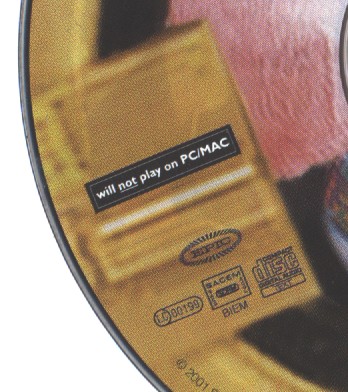
I bought Shakira's album Laundry Service about a week ago. Unfortunately for me, I didn't notice the small print on the cover and on the CD itself ("will _not_ play on PC/MAC") until I got home and tried to convert it to MP3s. I have encoded all my CDs to MP3 files so that I wouldn't have to change the CD in the CD player whenever I want to listen to some other artists. I have a high stack of CDs, the MP3s are there just for extra convenience. A small hint to everyone: get an Evation IRman infrared receiver so you can control your MP3 player remotely. I couldn't live without it.
Oh, back to copy protection.. I was unable to play or rip that CD with any of the computers that I have at home. I tried various ripping programs, but none of then did the trick. They didn't even recognize that there was a CD in the CD drive. My regular Technics CD player played the disc just fine, along with my DVD player in CD audio mode (this was somewhat surprising). Computers were completely unable to play the CD. Yes, the CD does have the Compact Disc digital audio logo on it. Or actually, it's "Compact Disc digital audio TEXT". However, that additional "text" part hasn't stopped ripping some other CDs that I have. The actual reason why the CD didn't want to cooperate was most probably the fact that it had a nice "SACEM/SDRM" logo right next to the Compact Disc logo. You can see an image of the CD here if you're interested about the details. Unfortunately the image quality isn't very good as my scanner is kind of old and the print quality on the CD itself leaves something to be desired.
Fortunately, a friend of mine at work had the same CD without the copy protection scheme applied so I was able to encode that troublesome CD to MP3. Seems like they released a few copy protected CDs to test how the consumers would react. Both of those CDs were manufactured in Austria.. go figure.
Well, at least I know I'll have to be more careful the next time I go shopping for CDs.. I would have most probably returned the CD if I had found some non-computer device that was unable to play the CD, but as I found none, I guess I'll just keep this as a reference in case someone asks my opinion about copy protected CDs. You can bet I won't buy another CD that won't let me encode it to MP3s. -
Re:Remote control
-
Re:What's kludgy about remotes?
-
There is a cheaper solution
You can also use your own or an old pc with an Irman and a remote you probably already have. You won't have a fancy display, but it will cost only $35. And seperate displays are available for under $100.
-
Re:I must be missing somethingI would so dig controlling my mp3s (actually oggs) on my pc with a remote.
Get an Irman.
-
Laptop and ShowShifter
Sounds like you could use a laptop and Show Shifter. This allows you to use it as a PVR, play MP3's. You could always download some sort of MP3 / DVD ripper / encoder. Use this with IrMan and any remote. And you have pretty much the same thing.
Plus with a laptop you can take it to your friends and move it anywhere else in the house. And any recorded shows can be watched on the move. -
Why bother buying it.
Why would a person realy want to bother buying the Rio Reciever when you can put togeter an mp3 playing computer for less than a 100$. Meanwile this unit will at least set you back 127.95$ and that is if you buy it at buy.com as far as I can tell the unit should cost 300.00 dollars in most cases.
If a person is looking for a cheap stationary media player there really is no reason to go all out and get this thing. The way I see it you have two options one put together a high end 486or beter with a network card that way you can stream all the mp3's you want from your other computers be they mac's win boxes or 'nixers. Then conect the box to your hi-fi. For 40 dollars you can even throw in the option for a remote controller. The other option that I came up with is, if your on a buget and you want somthing that plays cds,mp3s and what the hell even mpg video go buy your self a Dreamcast they go for as litle as 70 bucks. With that you can do what ever you want even play doom. -
Re:A good PC setup - One solution
You can setup remote control of your PC with an IRman from Evation. I use this to control xmms, there is a plug in so it's trivial to setup. You can also setup a much more complex IR gateway using software from LIRC. This will allow you to map IR input to shell scripts.
For IR output I quite like the RedRat2 as an IR driver. I wrote some GUI software for it, initially to drive my ReplayTV, but eventually to drive my whole A/V stack. See Linux RedRat2 Software. The package can easily be used to wrap a simple control panel around most any mechanism(IR, X10, web,
The home grown package I have put together gives me most of what I want. It's lacking some integration, the ability to use the TV as the visual interface, a web gateway -
Re:Sounds cool but ...
What I'd really like to see is a cheap hardware card that you could throw into that old P 90 you have laying around that would give you remote control capability.
Here you go: http://www.evation.com/irman/ -
seems like an old computer is superiorI've got an old P133 tower sitting in my living room that seems to do everything this gadget does and then some. It's got a local disk so it holds about 7 GB of music locally, and it's connected to my network so it can grab more music anytime I want it to. It's got an irman installed so it uses my stereo's remote control.
There are two nice things about this setup IMO.
- You don't need any special dedicated software. Anything you can do with a real PC, you can do with the PC without a keyboard, mouse, or monitor you have sitting next to your stereo. Just use winvnc or a similar program to log in from your real computer. No waiting for patches for the special-purpose software that the company provides.
- It's really, really cheap. You can get an old computer for way less than $300... doubt mine's worth half that. It's slow as hell, but the processor almost never pins on playback and it's reliable--weeks of uptime, even with Win98. Tack on an irman and you're ready to roll.
Anyway, as far as I can tell this looks like a problem that didn't need solving in the first place. Maybe if the appliance were cheaper than a computer that would really work just as well, they'd have something.
- You don't need any special dedicated software. Anything you can do with a real PC, you can do with the PC without a keyboard, mouse, or monitor you have sitting next to your stereo. Just use winvnc or a similar program to log in from your real computer. No waiting for patches for the special-purpose software that the company provides.
-
IRMCTL
I've done a nifty program... IRMCTL which receives any infrared command through the IRMAN receiver (though it should be easy to do more receivers) and executes a shell script or a built in function.
It's not a programmable remote, but you can say what that button you just pressed will do on your linux machine.
Help is appreciated, for I had some ideas which haven't still showed up because I need help!
Hugs, Cyke -
Re:Good QuestionThe irman is an example of a serial port dongle that understands RF remotes. Plenty of people make them, and they are quite common among people using full computers in their cars or PC/TV setups.
As far as the LCD & GPS, both are commonly done. You'll find a wealth of resources at mp3car especially on the bulletin boards. They are an excellent resource for finding the best LCD screen.
links for the href weary:
http://www.evation.com/irman/
http://www.mp3car.com/ -
BeOS...Yup, I'd go the BeOS route. Fast boot times, nice query related filesystem, and there's been a ton of work done on similar systems (try Scot Hacker's mp3box or go straight to Be In Your Stereo for web based interfaces.
Use CL-Amp for the tunes, go and grab an IRMan and BeInControl for the remote control, and you're set. CL-Amp also has a bunch of plug-ins that support LCD displays, monitors, etc... check BeBits
The only downsides are that BeOS can be a little fussy about hardware (/me = Asus P2B-S, SB-Live Value), and that Samba support is, erm... well, it's there, but it didn't work for me; but BeOS can happily mount your CIFS shares (or ftp in/out, or telnet in/out,
FWIW, I just used a standard Abit desktop case (hidden, quiet fan), with only the IRMan exposed...
-
remote control, etcFor remote control, have a look at Irman, which is supported under Linux via LIRC. Definitely the way to go.
As for Dolby Digital, I'll bet that some high end sound cards support it, but I have no links to back this up. Also, Linux support may very well not exist for these. (hmm, I'm assuming you would be running Linux but you don't say... however this is
For other features, networking is a must, to control it from elsewhere and perhaps to get program data like the Tivo does. I've always envisioned my house of the future having a central audio server somewhere with all my CDs as high quality MP3s. Then in each room would be some sort of networked terminal for song selection, and a pair of speakers connected to the server's sound card. Have as many sound cards as rooms where you potentially want to have something different playing at the same time. The same could be done with video. I suppose someday soon disk space will be cheap enough that we'll store terabytes of DVD video the same way we store gigs of MP3s now.
Then, it'll need intelligent software to control it. The software should take command-line input, gui input, networked input from remote clients, ir remote control input, and of course, voice input. Fast search/play capabilities are a must, but a menu-driven UI could be available for those who want it. My current system at home (not quite the audio server described above, but slowly getting there) has a custom perl script I wrote that plays songs, albums, etc based on regular expression searches. So rather than wading through a menu to get to Rock -> Van Halen -> 1984 -> Hot For Teacher, I can simply type "playmp3 ^Hot" and it will play everything that matches. Great convenience. Same thing for playing movies on DVD (hmm, do they make 200-disc DVD changers or anything like that?) and selecting TV programs to watch.
Just some random ideas, that's all I have to say...
-
Remote control of your PC
The only advantage I can see for this product is that you can control your mp3's from another room.
There are many other options for that, including the Irman infrared receiver to control your PC with a normal remote. And with $29 it's a lot cheaper too.
-
Re:xmms + irman
IRMan is a piece of hardware that allows you to use standard remote controls to control your PC. There's software available that works under both Linux and Windows. The webpage is http://www.evation.com/irman/