Slashdot Mirror
Domain: hometheaterhifi.com
Stories and comments across the archive that link to hometheaterhifi.com.
Comments · 67
-
Re:True pixels?
To be fair, this was one of the criticisms Apple laid out against Samsung's original Galaxy S when it was released. That it used a pentile RGBG display instead of RGB like the iPhone, so it's 800x480 display resolution supposedly wasn't really an advantage over the iPhone 3G's 480x320 resolution. Evidently some iPhone owners still remember that, and Apple is now being hoisted by their own petard.
Your eyes are much better at resolving green than they are at red or especially blue. Nearly every method of storing video or photos has taken advantage of this - the old NTSC broadcast TV standard, color film composition, JPEG compression, digital camera sensors, even the latest h.265 video codec. All of them stored red and especially blue at a lower resolution than they do green. So you've been looking at the equivalent of pentile images all your life and never noticed it. Unless you peep at the pixels with a magnifying glass, there's no reduction in image quality from using a lower blue and red subpixel resolution than green. The only exception I've seen is due to a long-lived MPEG bug from the 1990s which still occasionally crops up as striations in blocks of solid color, especially red, which might not have been visible at a higher red resolution.
Unfortunately it was nearly impossible to convince iPhone owners and reviewers who'd drunk Apple's kool-aid of this fact, and Samsung eventually relented and used RGB versions of its OLED displays on their newer phones. So I'll shed no tears that Apple's chickens are now coming home to roost.
Oh right, huge pentile resolution controversy! We all remember that right? Right?
Well let me explain it to you all so I can set up how it came back to an even bigger nothing burger than before!
-
Re:True pixels?
To be fair, this was one of the criticisms Apple laid out against Samsung's original Galaxy S when it was released. That it used a pentile RGBG display instead of RGB like the iPhone, so it's 800x480 display resolution supposedly wasn't really an advantage over the iPhone 3G's 480x320 resolution. Evidently some iPhone owners still remember that, and Apple is now being hoisted by their own petard.
Your eyes are much better at resolving green than they are at red or especially blue. Nearly every method of storing video or photos has taken advantage of this - the old NTSC broadcast TV standard, color film composition, JPEG compression, digital camera sensors, even the latest h.265 video codec. All of them stored red and especially blue at a lower resolution than they do green. So you've been looking at the equivalent of pentile images all your life and never noticed it. Unless you peep at the pixels with a magnifying glass, there's no reduction in image quality from using a lower blue and red subpixel resolution than green. The only exception I've seen is due to a long-lived MPEG bug from the 1990s which still occasionally crops up as striations in blocks of solid color, especially red, which might not have been visible at a higher red resolution.
Unfortunately it was nearly impossible to convince iPhone owners and reviewers who'd drunk Apple's kool-aid of this fact, and Samsung eventually relented and used RGB versions of its OLED displays on their newer phones. So I'll shed no tears that Apple's chickens are now coming home to roost. -
Re:supposedly obsolete tech
what could you possibly still be using that has vacuum tubes in it?
Amplifier?
Though most people who 'use' those, just 'use' it as a conversation piece.
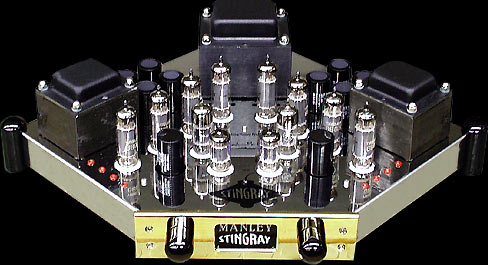
e.g. http://www.hometheaterhifi.com/volume_6_4/images/manley-stingray-amplifier.jpgHahaha... are you kidding? go to any reputable recording studio youll find tube amps and theyre used for good reason.
-
Re:supposedly obsolete tech
what could you possibly still be using that has vacuum tubes in it?
Amplifier?
Though most people who 'use' those, just 'use' it as a conversation piece.
e.g. http://www.hometheaterhifi.com/volume_6_4/images/manley-stingray-amplifier.jpg -
Re:no analogue holes
HDMI signals that aren't quite good enough for the transmission length and bit rate they're being challenged with do not necessarily fail in a binary "get a picture/don't get a picture" way. On the edge of failure, there's a class of bit errors that are measurable and possibly visible but not so bad that the connection drops altogether. There's a decent intro the topic on the Blue Jeans HDMI Cables Overview, and the visual pattern just before the connection becomes unusable is usually described as a "sparkle". This is not unique to HDMI; similar DVI sparkles have been described for years.
This is not intended as a defense of Monster's products though. Even those paying attention to sparkle issues and the like know that there are plenty of cheap models from sources like Monoprice that work just fine; the comments at CNET on HDMI are a fair description of the marketplace.
-
Re:Yeah..Wow, a portable device with a touch sensitive screen that has a skinnable layout. I claim prior art (1999)
http://www.hometheaterhifi.com/volume_6_2/philipsprontoremotecontrol.html
I don't see how this terribly revolutionary in a phone either. You could do this with a Palm III(1998) so I'd assume any of the PalmOS based phones had this ability as well.
I can see how this would be worth a fiver if you already have a smartphone with IR, but if you need to glom a third party IR transmitter onto it I don't see that most people will bother.My iPhone could also change the labels under the touchscreen buttons depending on the device (or a different arrangement).
-
Re:Noone likes DRM
When you use S-Video instead of Component Video, you are discarding some of the color information stored on the DVD. S-Video connections separate the Luminance and Chrominance signals, but on a DVD, the Chrominance signal is subdivided into Pr and PB signals. That's why component video became popular with the advent of DVD.
And, if on occasions, you see combing and other deinterlaceing related artifacts, you may want to deinterlace in the player and send 480p over component video-- S-Video only allows for 480i and 576i signals.
This is entirely separate from upscaling, which generally requires an HDMI or DVI-D connection. OK there are some DVD players out there with upscaling VGA outputs, but the video quality still leaves something to be desired
-
Another common old bug
Is the MPEG Chroma bug. That was created by someone who wrote one of the original MPEG decoders that was eventually sold/distributed to most of the companies making the first DVD players (pre-1993). This one just won't go away either - initially most of the DVD manufacturers refused to acknowledge it even existed (probably because they didn't want to recall millions of DVD players with non-upgradeable firmware). I still see it every now and then on TV (indicating one of the upstream broadcasting companies is still using equipment afflicted with the bug). I notice it most often when diagonal red lines end up staircased like they're poorly interlaced (see pictures in the above link).
-
Re:Then you had better lower those prices!
The quality of the chipset doing the scaling is of huge importance. I have a couple upconverting DVD players, which I purchased mostly to watch PAL videos on NTSC equipment. (All the good rally videos are from the UK!)
The really sweet player is the Oppo DV-971. The test reviews put it at the top of the list with the $1600 Denon player but it was only $200. It has been replaced by the DV-981 which is pretty similar. Outputting HDMI at 1080 really shows a difference. Also zooming in at 4X shows how much can be shown.
The NeuNeo/Helios H4000 is nice but not quite as polished as the Oppo. The cool thing is that it will ignore all of the 'command inhibit' features on a dvd. Basically you can fast-forward/skip through everything including the stupid FBI warnings, previews, silly intros, etc.
Here is a really good DVD player comparison page:
http://www.hometheaterhifi.com/volume_10_1/dvd-benchmark-guide-to-progressive-scan-shootout-1-2003.html
Here is an explination of their their testing methodology:
http://www.hometheaterhifi.com/volume_10_1/dvd-benchmark-guide-to-progressive-scan-shootout-1-2003.html -
Re:Then you had better lower those prices!
The quality of the chipset doing the scaling is of huge importance. I have a couple upconverting DVD players, which I purchased mostly to watch PAL videos on NTSC equipment. (All the good rally videos are from the UK!)
The really sweet player is the Oppo DV-971. The test reviews put it at the top of the list with the $1600 Denon player but it was only $200. It has been replaced by the DV-981 which is pretty similar. Outputting HDMI at 1080 really shows a difference. Also zooming in at 4X shows how much can be shown.
The NeuNeo/Helios H4000 is nice but not quite as polished as the Oppo. The cool thing is that it will ignore all of the 'command inhibit' features on a dvd. Basically you can fast-forward/skip through everything including the stupid FBI warnings, previews, silly intros, etc.
Here is a really good DVD player comparison page:
http://www.hometheaterhifi.com/volume_10_1/dvd-benchmark-guide-to-progressive-scan-shootout-1-2003.html
Here is an explination of their their testing methodology:
http://www.hometheaterhifi.com/volume_10_1/dvd-benchmark-guide-to-progressive-scan-shootout-1-2003.html -
Re:I never got the ferrari
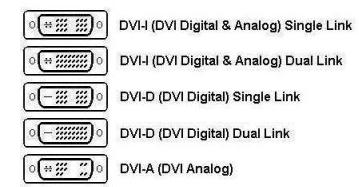
oh yes. you have to be observant http://www.hometheaterhifi.com/qa/images/dvi-jack-configuration.jpg
-
Re:Does anyone even care at this point?
Oppo has two upscaling DVD players under $200. And their current flagship, while over the $200 price point, is barely over at $230. The Oppo decks are very well known for being some of the best, if not the best, upconverting players available.
Check out the Benchmark tests from Secrets of Home Theatre and HiFi
These decks are also universal for everything but HD disks (DVD, DVD-Audio, SACD, HDCD, CD, etc), plus can play Divx and do upscaling for the Divx. Two models also have a handy USB jack for flash drives or hard drives.
Personally I'll wait for Oppo to come out with an HD deck as it is very likely they will have one that will play absolutely everything, and do it very well, when it arrives.
-
Re:Read the opposite opinion from Secrets
and page five of that article has some useful examples of what line twitter and combing artifacts actually look like.
A lot of comments here seem to be in the vein of "Well, who cares if X is four pixels wide, or three pixels, or only two? Trigonometry says I can't see the difference so why should I care?" As the image of the skiier shows, the important difference between interlaced frames and progressive scan isn't imporant when you're dealing with a line that has pixels in both half-frames. You get noticable problems (line twitter) when an edge is only one pixel tall, and it only shows up on alternating frames. You're sure as hell going to notice when stuff flickers in and out of existance.
Combing is more irritating to me, becuase it happens a lot more frequently. Any time you have a sharp edge in motion across the screen, the interlaced picture is noticeably fuzzy. That's the tomato pic, and the faces at the bottom of the page... -
Read the opposite opinion from Secrets
I recently saw an article posted by Secrets of Home Theatre, very well known for their DVD benchmark process and articles.
The article is here.
They show numerous examples of how the processing involved can indeed lead to a better image on 1080p sets. Mind you it is not just the resolution, but how 480 material being processed and scaled can look better on a 1080p screen than on a 720p (or more likely 768p) screen. It is a very interesting read. Although if you are already conversant in scaling and video processing some of it can be very basic. I count that as a feature though as most non-technical people should be able to read it and come away with the information they are presenting.
Definitely interesting as a counterpoint.
-
Re:PS3 owners?
Incorrectly encoded discs are par for the course. While that link has an awful lot of information on it, one thing to take out of it is that sometimes studios just don't care what kind of quality is coming out of the authoring houses. SciFi playing some Dead Like Me prompted me to get the DVD box sets and it looks downright horrible in spots on just about every DVD player.
The question then becomes, does the PS3 follow the footsteps of the PS2 as a finicky, low-quality DVD player or does it rival stand alone players? I don't think we'll know into well into the future of Blu-Ray when the discs start getting churned out as a commodity (like DVDs today) instead of meticulously babied discs (like DVDs were when they started to hit the scene). -
Re:Why the delay?Since the advertising reaches us all the way here, the marketing boosts the filesharing! Most DVD players in
DVD players are cheap. Simply buy one from each reagon you need. If you can't get one, use a PC. Most DVD drives permit a limited number of region changes. Simply set one to US, one to Europe and you are set.
One player from each region? Why would anyone want to dispose of that much extra cash for additions to their 'idiot box'? Besides only a real over the top geek type wouldn't see having a stack of DVD players as being real lame.
Now for a couple suggestion to make your wallet happy and to solve the region problem. Get an Oppo OPDV981H player and go into setup and press 9210. You can then set it to region 0 and you are good to go. It is cheap and is the highest ranked player on HomeTheaterHiFi.com! Its upconversion to 1080p or 1080i is great! (Link: http://www.hometheaterhifi.com/cgi-bin/shootout.cg i?function=search&articles=all
Another option is the NeuNeo Helios H4000. It is nowhere near as polished as the Oppo but it is region free out of the box and will let you fast forward and skip anything on a disk. Its "Smart Play" feature analyzes a disk and just starts playing what it thinks is the movie, completely skipping the menu and any FBI warnings! The fast forward and reverse aren't real smooth and sometimes it takes 10+ seconds to eject a disk but it is a cheap answer to the flexibility problem.
Both of these players will operate on US or Euro electricity and will also play either NTSC or PAL movies completely freely on either NTSC or PAL TVs. Finally I can waych those european ralley DVDs that I really like. -
Re:Surprising
There's a site that runs benchmarks on dvd players. In a sense, it's a selective benchmark, focusing mainly on deinterlacer performance. The DVP-642 scores a 52/100, meaning that it has some bugs, and if a disc is authored incorrectly (as many are), the picture will look rather poor. In that respect, it's not a fancy pants player like this one or this one
I'm not even sure that it's the "best bang for the buck"-- looks like the Toshiba SD760 is rather decent, though.
There are a number of discs in my collection (Dancer in the Dark, Monty Python's Meaning of Life..) that are quite painful to watch on a player with a buggy deinterlacer. They can be enjoyed for what they are on a bug free player.
You might argue that the deinterlacer is itself a luxury feature that shouldn't matter to people still trying to figure out how to connect it to a RF-only TV. But at a certain point, you've just got to move on... Most TVs sold today have at least component inputs. -
Re:Surprising
There's a site that runs benchmarks on dvd players. In a sense, it's a selective benchmark, focusing mainly on deinterlacer performance. The DVP-642 scores a 52/100, meaning that it has some bugs, and if a disc is authored incorrectly (as many are), the picture will look rather poor. In that respect, it's not a fancy pants player like this one or this one
I'm not even sure that it's the "best bang for the buck"-- looks like the Toshiba SD760 is rather decent, though.
There are a number of discs in my collection (Dancer in the Dark, Monty Python's Meaning of Life..) that are quite painful to watch on a player with a buggy deinterlacer. They can be enjoyed for what they are on a bug free player.
You might argue that the deinterlacer is itself a luxury feature that shouldn't matter to people still trying to figure out how to connect it to a RF-only TV. But at a certain point, you've just got to move on... Most TVs sold today have at least component inputs. -
Re:Surprising
There's a site that runs benchmarks on dvd players. In a sense, it's a selective benchmark, focusing mainly on deinterlacer performance. The DVP-642 scores a 52/100, meaning that it has some bugs, and if a disc is authored incorrectly (as many are), the picture will look rather poor. In that respect, it's not a fancy pants player like this one or this one
I'm not even sure that it's the "best bang for the buck"-- looks like the Toshiba SD760 is rather decent, though.
There are a number of discs in my collection (Dancer in the Dark, Monty Python's Meaning of Life..) that are quite painful to watch on a player with a buggy deinterlacer. They can be enjoyed for what they are on a bug free player.
You might argue that the deinterlacer is itself a luxury feature that shouldn't matter to people still trying to figure out how to connect it to a RF-only TV. But at a certain point, you've just got to move on... Most TVs sold today have at least component inputs. -
Re:Surprising
There's a site that runs benchmarks on dvd players. In a sense, it's a selective benchmark, focusing mainly on deinterlacer performance. The DVP-642 scores a 52/100, meaning that it has some bugs, and if a disc is authored incorrectly (as many are), the picture will look rather poor. In that respect, it's not a fancy pants player like this one or this one
I'm not even sure that it's the "best bang for the buck"-- looks like the Toshiba SD760 is rather decent, though.
There are a number of discs in my collection (Dancer in the Dark, Monty Python's Meaning of Life..) that are quite painful to watch on a player with a buggy deinterlacer. They can be enjoyed for what they are on a bug free player.
You might argue that the deinterlacer is itself a luxury feature that shouldn't matter to people still trying to figure out how to connect it to a RF-only TV. But at a certain point, you've just got to move on... Most TVs sold today have at least component inputs. -
Re:I know this'll burn karma...
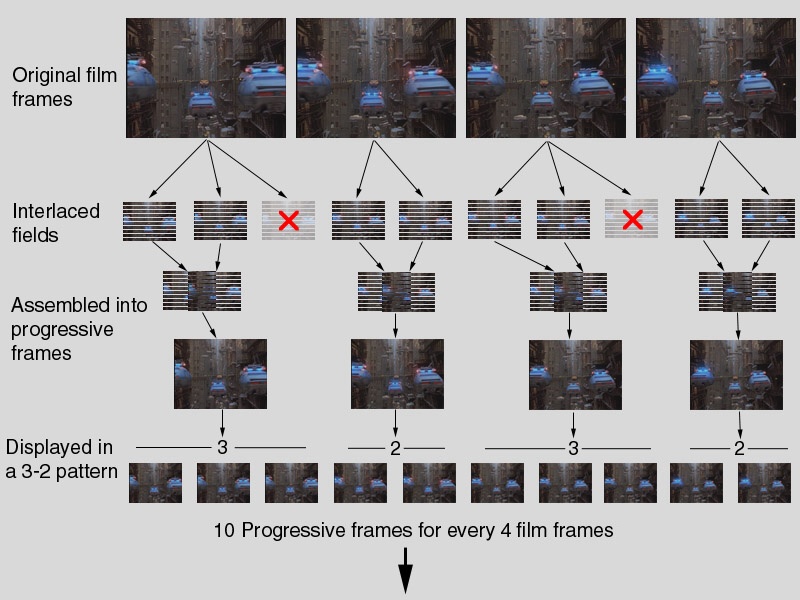
No, your deinterlacer does not do that during 3:2 pulldown, it does not interleave the 3rd frame like that,
It follows the below pattern
1A 1A 2A 2A 2A 3A 3A 4A 4A 4A
1B 1B 2B 2B 2B 3B 3B 4B 4B 4B
Just as is does if it were fed a progressive signal
1 1 2 2 2 3 3 4 4 4
More here http://www.hometheaterhifi.com/volume_7_4/images/d vd-benchmark-part-5-main-2.jpg -
Re:I know this'll burn karma...
The only way you get interlace artifacts on a progressive tv, is if the source material was shot as interlaced, for example http://thewebfairy.com/911/presentation/artifact.
No, the deinterlacer is trying to reassemble the separate fields of an interlaced image to a frame. To do this, is has to guess where the 2:3 cadence falls, and detect whenever there are glitches (bad edits). While modern deinterlacers are actually quite good at guessing, none are perfect. Additionally, this makes it unneccesary hard to smoothly play movies at 24Hz, 48Hz or 72Hz to avoid the judder inherent in 60Hz playback.h tm, but both hd-dvd and blu-ray, and presumably network tv are all shot in a progressive format, so your deinterlacer is reassembling the same image you'd see over 1080p.
The interlacing part isn't as simple as you make it out to be. For film it's actually showing the odd lines of the first movie frame, the even lines of the same frame, then repeates the odd lines, shows the even lines of the second frame, then the odd lines of the second frame. Note that inbetween there's a video frame that is made up of odd lines of the first movie frame and the even lines of the second, so the deinterlacer has to start assembling some frames with odd fields and some with even ones. More on this in Wikipedia or secrets of home theater and hifi. -
Re:DVD is 480p
From http://www.hometheaterhifi.com/volume_7_4/dvd-ben
c hmark-part-5-progressive-10-2000.html:
"It's important to understand at the outset that DVDs are designed for interlaced displays. There's a persistent myth that DVDs are inherently progressive, and all a DVD player needs to do to display a progressive signal is to grab the progressive frames off the disc and show them. This is not exactly true. First of all, a significant amount of DVD content was never progressive to begin with. Anything shot with a typical video camera, which includes many concerts, most supplementary documentaries, and many TV shows, is inherently interlaced. (Some consumer digital video cameras can shoot in progressive mode, and a handful of TV programs are shot in progressive, particularly sports events.) By comparison, content that was originally shot on film, or with a progressive TV camera, or created in a computer, is progressive from the get-go. But even for such content, there is no requirement that it be stored on the DVD progressively." -
Re:does not matter.
According to the discussion here:
http://www.hometheaterhifi.com/volume_7_4/dvd-benc hmark-part-5-progressive-10-2000.html
Implies the cadence is consistent for long periods and only occasionally interrupted, and then the IVTC (operating in film mode) might get out of synch for a while and combine the wrong frames.
"If the 3-2 sequence is interrupted, sometimes the cadence-reading players will stay in film mode for a handful of frames, and the result on screen is combing, which is very distracting."
So. IVTC as required to convert 1080i back to 1080p might have errors, and so you would be right that transmitting from player to TV in 1080i would damage the end result. But how common are these errors? -
Especially with the Oppo missing
Home Theatre Secrets DVD benchmark shows the Oppo players as being one of the best, if not the best, and they are sub $200 players that outrank $2000 players.
I find it interesting that the most critically acclaimed DVD decks of the last couple of years were left out of this comparison...
-
Those numbers are just wrong...
Go look online, the scores are way off for the HQV tests on many of the dvd players they tested. For instance, AudioHolics has the Denon 3910 scoring 75, not 58. It also does not appear to line up with other test results like the Home Theater Secrets massive DVD Benchmarks which has become one of the "standards" from home theater audio/video.
But in all honestly, lets be a little fair in the prices. Yeah that $300 video card with pure video or AVIVO does well in the tests, but you can't just use that $300 video card alone. You need the rest of the $1500 computer along with it. I have been using a HTPC for almost 2 years now. They are extremely hard to beat in terms of video quality. Especially when you factor in FFDShow (on Windows side). Yes, I have pure video as well on that box, but I don't use it because FFDShow completely "crushes" pure video, more so then what the Harware.Info review is showing of pure video and AVIVO... But that computer cost me $2200 to build (yes, build not buy, since no one offered anything like it 2 years ago, HTPC's were still a DIY only and to a point still are if you want it done right). -
Those numbers are just wrong...
Go look online, the scores are way off for the HQV tests on many of the dvd players they tested. For instance, AudioHolics has the Denon 3910 scoring 75, not 58. It also does not appear to line up with other test results like the Home Theater Secrets massive DVD Benchmarks which has become one of the "standards" from home theater audio/video.
But in all honestly, lets be a little fair in the prices. Yeah that $300 video card with pure video or AVIVO does well in the tests, but you can't just use that $300 video card alone. You need the rest of the $1500 computer along with it. I have been using a HTPC for almost 2 years now. They are extremely hard to beat in terms of video quality. Especially when you factor in FFDShow (on Windows side). Yes, I have pure video as well on that box, but I don't use it because FFDShow completely "crushes" pure video, more so then what the Harware.Info review is showing of pure video and AVIVO... But that computer cost me $2200 to build (yes, build not buy, since no one offered anything like it 2 years ago, HTPC's were still a DIY only and to a point still are if you want it done right). -
Re:Boneheaded article...
That $200 player will not perform better than "most" $2000 PCs. It'll perform better than "all" of them. Cost isn't really a factor as long as you're talking off the shelf components and not professional video processing suites. If you actually want to see a proper shootout done of different DVD players head on over to http://www.hometheaterhifi.com/volume_7_3/dvd-ben
c hmark-introduction-9-2000.html instead. The sad fact is that PC based players have such a long way to go before they perform acceptable results. Once you start feeding them real world material that's difficult to handle (such as anime) they fail time and time again. -
HDCP is apparently a nightmare
Check out this forum of people complaining about HDCP: http://www.hometheaterhifi.com/forum/showthread.p
h p?t=3121&page=1&pp=10/
The first post:
"In discussion with some industry engineers, I found that there are some problems popping up with the adaptation of the new HDMI standard. Here is what was discussed:
(1) Some cable TV boxes with HDMI out are not delivering any picture to displays with HDMI inputs.
(2) The current HDMI plug appears not to be as sturdy as anticipated, and there may be a change next year in the design of the plug, and the new plug would not fit in current HDMI sockets.
(3) If you have an HDMI source such as a DVD player, and connect it to your display via HDMI, you may not be able to get 5.1 digital bitstreams to come out of the coaxial or Toslink digital output of the player at the same time as digital video and audio out of the HDMI output.
(4) HDMI is a two-way digital communication, and some displays send a handshake signal to the DVD player that permanently messes up the player's ability to output digital video through its HDMI jack.
(5) HDMI v 1.1 is already hitting the shelves, with v 1.2 on the way, and v 1.3 in the next couple of years (v 1.3 will deliver higher res 5.1 digital audio). What will be the backward compatibility of these versions?
In my own situation, using a DirecTV satellite box with HDMI out to an LCD TV with HDMI in, when I turn off the TV, the satellite box crashes. I have to unplug the satellite box and then plug it back in. I have not solved this problem, except by switching to some other input besides HDMI before turning the TV off. Then, when I turn the TV back on, I switch to the HDMI input for viewing."
There follows a litany of woe where devices need to be turned on in a specific order for the HDCP handshake to work, where the coax cable needs to run from the digital set top box to the tv (even though it's not needed) to keep the box from crashing, complaints from professional AV system installers who can't get components to work, some boxes that will either transmit the HDCP stream or the digital audio but not both, some components that don't recognize HDCP repeaters so that hooking your cable box straight into your tv works, but not with the dvr between them, etc. All for nothing. If the HDMI cables just didn't have to deal with HDCP they would transmit the same quality with no problems. You can't put out a technology that requires you to turn on components in a specific order to work, it's just ridiculous. -
Why is this surprising..
I wrote an indepth article in 2002 for god sakes.. and made it clear that if HDCP went forward in anyway those of us with CRT's or HDTV early adopters would be screwed.. The industry was pissed at the article. Even more scarry was the blatent coverup by the industry. They knew that if the consumer was educated on the plans for HD content, no one would spend $5000 on a TV that wouldn't be able to get HD content.
I know for a fact that they kept silent, and were shipping products they knew would be useless in a matter of years.
http://www.hometheaterhifi.com/volume_9_1/feature- article-digital-home-video-2-2002.html
It's a decent article if I do say so myself. -
Re:1080i - yuk is right.
On the DVD deinterlace issue, it depends on how the DVD is mastered. Some are done 'properly'; i.e. the progressive fields are stored with info on how the player should interlace them, and that works well on most players. Some, however, are mastered on the cheap with the interlaced frames, and it's those ones that normally end up being a mess on cheaper players. There's a good description at Home Theater Hifi that makes far more sense than I can. For what it's worth, I know a few people who have taken their 1080i HDTV captures of films and deinterlaced them for 1080p playback on their computers, and they look absolutely stunning, so it must be possible.
-
Re:My HDTV was purchased for DVDs
"The 3:2 pulldown is created in software by the player."
Sure seems logical, but this is just not the case:
"There's a persistent myth that DVDs are inherently progressive, and all a DVD player needs to do to display a progressive signal is to grab the progressive frames off the disc and show them."
http://www.hometheaterhifi.com/volume_7_4/dvd-benc hmark-part-5-progressive-10-2000.html
This is just one of the many, many well-written, technical articles out there that explain this issue. Unfortunately, as your post suggests, I just don't think this myth is ever going to go away. -
Re:It's sticky tape now, huh?
(We're pretty far off topic here, but oh well.)
My vague "common knowledge" recollection is that speakers typically range between 0.5% and 2% THD+N, with good reference headphones getting down to the 0.1% range. With modern (transistor
Googling around for something to back up my recollections
Somebody should probably find some authoritative sources to back me up or refute me. I'm out of time for it now, sorry.
-
Re:CaveatsIntegrated amplifiers greatly reduce customizing, additional ADCs and DACs reduce resolution, increase the noise floor and change the sound.
That may be the perception, but in many cases (but not all), it's wrong. Integrated amps allow the manufacturer to to cutomize the amp for the specific driver which can greatly improve the performance of the overall speaker. for example:
- the amp in the Sunfire sub (which is rated for 2kW, but doesn't actually deliver that kind of power to the speaker because of the back EMF properties of the speaker magnet - any other amp would be eaten alive), and
- the BeoLab 5 integrated amp (I've written about the BeoLab 5 before).
- Heck, even if you hate Bose speakers, try listening to externally-amplified Acoustimass-series speakers, and compare them to the internally-amp'd models - the self-amplified models sound much better.
-
Re:Paint your own screen
Well, you will probably want to invest in a good DVD player. The decoding between players can have a big difference on image quality. I am not a videophile, but in my experience it's not so much the quality during slow, colorful scenes, but during very rapid sequences where you might see issues with playback. The Home Theater Forum is always a great start (they have a very nice moderated DIY section), and I am looking into possibly getting an Oppo Digital DVD which has been extremely well rated. As a plus, places like HK Flix sell it with updated firmware (so you can switch regions easily on the fly), although I've seen it for $50 less on Froogle.
As far as receivers, I can give you my analysis and feedback as a regular consumer (I wouldn't even call myself a "prosumer") of home theatre electronics. You definitely would do well in investing in a good receiver with as many inputs as possible, and don't get them from Circuit City / Best Buy / Fry's as they are usually $100 more than what you can find online. In reality, you will probably not need more than 3 or 4 component inputs (DVD + HDTV + Console + Other). Depending on the # of inputs on your TV/projector, this should put you in the $300-$500 range for receivers. Look for wattage ratings and buy from a well-known company (say, Harman-Kardon, Denon, Onkyo, Sony, Yamaha).
Once everything is set up, get a calibration DVD like Digital Video Essentials or Avia to tweak your settings. It can make a noticeable difference.
You don't need Monster Cables. If you have a friend at a store who can get you the discount (retailer markup is at least 100%), then they're fine. But you don't need to spend $300 on cables. Spend that money on better equipment.
Just do your research. It's possible that over the next few months older models will be discontinued and be heavily discounted. That can always save you some cash. -
Re:Cha-ching
A CD player can reproduce frequencies from 20 Hz to 20,000 Hz.
The bose acoustimass satellites can reproduce sounds from 280Hz to 13.3 kHz. The bass module can reproduce sounds from 46 Hz t 202 Hz. There's an 80 Hz hole in the midrange. It's also missing treble. This is not typical of a well designed speaker system.
Indeed, the THX crossover is designed so that the satellites and subwoofers frequency response curves mesh perfectly. Or so they say.
Still, there is a small matter of stereo bass. Below a certain frequency, sound can't be localized. Above, one can detect that's it's coming from that squat box in the corner. I'm not so sure that 80 Hz is the ideal point. -
Re:Multiple StandardsIncreasing framerate to 50/60 Hz would not reduce judder in DVD movies. If you're seeing what I think you're seeing, it is the result of 3-2 pulldown (at least in NTSC world) from transferring a 24 fps film onto a 30 frame / 60 field per second video. Each alternate film frame is shown 2 or 3 times in succession (12*2 + 12*3 = 60 fps), which gives it that jerky look.
Now, if you could run your display at 48 Hz or 72 Hz, you could show each frame for an equal amount of time (24*2 = 48 fps or 24*3 = 72 fps) and have a smooth, film-like appearance.
Check out this page for a good read on this.
-
Re:Who hates that all-in-device
> I suppose you own dolby 5.1 components. Separate pre-amps, power amps, tuners etc.
Taking this to it's logical end, let me know when I can get a Plasma+DVD+Reciever+Satellite+Speakers as one unit.
In the mean-time, components lets us upgrade when & as we decide. Piece-wise systems makes a lot MORE sense in a home theatre. When something breaks, you aren't up the creek having to replace the whole system. I wouldn't trade my seperate components any day of the week.
> Eventually the integrated systems will be much more than adequate for 99.99% of the population.
Audio systems are different - Hi-end recievers are ALREADY better then seperates, by far for the average audiophile, and even approaching the high-end seperates. It's decreasing returns, and increasing prices.
Check out the reviews of Denon 4802 and 5803 Receivers for example on hometheaterhifi
--
Them: "If you don't like it you can leave!"
Me: "Is that how you deal with all your problems? By running away from them? Name one government that is not corrupt so we can move there?" -
Re:Extremetech article inaccuraciesThe chroma channel on DVDs is also only half the resolution of the luminance channel so that argument isn't really valid. DVDs are stored in 4:2:0 format.
this article explains it nicely in the chroma formats paragraph a little way down. The problem has more todo with seperating the two channels and analog signal loss.
-
Re:Not me...
You're probably talking about the chroma upsampling bug that a lot of DVD players suffer from (even the high-end ones.)
Not to mention the fact that a lot of people buy fancy plasma/LCD screens, and haven't the slightest clue how to hook them up properly, what a scaler/de-interlacer is, or a good DVD player model. -
Re:And so...
Errors:
LD players were still made until 2002:
http://home.q03.itscom.net/nsa/PioneerLD-S9 .htm
According to a test of several hundred models at DVDrhelp.com, DVD-R has a 90+% compatibility rate.
Good DVD blanks can be purchased for under $1 a piece in quanities of 25 or so.
One CAN get an HD-ready TV now, 27" for a little over $500 - from Samsung and a couple other players, some widescreen 30" HD-ready sets go for under $1000. The difference in even such a "small" set is that it is a progressive scan TV - very much reduced flickering. I find it highly amusing that geeks clutch to an interlaced TV set when I'm sure they probably wouldn't tolerate using interlaced modes on their computer monitors.
Some of the DVD players with best high-end value are in the $200 to $500 range, particularly those with a Faroudja DCDi deinterlacer and a Matsushita MPEG decoder. There are simply no equivalents that use these parts made by the Chinese names. All it takes is a side-by-side comparison to see the difference. All it takes is comparing any chinese player with any one of the higher rated models in the Secrets DVD shoot-out, many of which street or have streeted in the $200 to $400 range. These sites also have neat pictures of the kind of flaws that DVD players generate, often the cheaper the player, the more of these flaws it has.
Frankly to say that a $30 player is as good as a $5000 Denon is silly, I can see MPEG decoding flaws in my sister's $50 player on a 15 year old 19" TV with an RF input that don't show up on my Pioneer or Panasonic DVD players on a 27" screen or XGA projector fed with a component video source. That DVD player uses the same ESS decoding MPEG chip as most of the cheap Chinese players.
Secrets DVD player shoot-out 2004
Secrets DVD player shoot-out 2002-2003
Test materials for the benchmarks -
Re:And so...
Errors:
LD players were still made until 2002:
http://home.q03.itscom.net/nsa/PioneerLD-S9 .htm
According to a test of several hundred models at DVDrhelp.com, DVD-R has a 90+% compatibility rate.
Good DVD blanks can be purchased for under $1 a piece in quanities of 25 or so.
One CAN get an HD-ready TV now, 27" for a little over $500 - from Samsung and a couple other players, some widescreen 30" HD-ready sets go for under $1000. The difference in even such a "small" set is that it is a progressive scan TV - very much reduced flickering. I find it highly amusing that geeks clutch to an interlaced TV set when I'm sure they probably wouldn't tolerate using interlaced modes on their computer monitors.
Some of the DVD players with best high-end value are in the $200 to $500 range, particularly those with a Faroudja DCDi deinterlacer and a Matsushita MPEG decoder. There are simply no equivalents that use these parts made by the Chinese names. All it takes is a side-by-side comparison to see the difference. All it takes is comparing any chinese player with any one of the higher rated models in the Secrets DVD shoot-out, many of which street or have streeted in the $200 to $400 range. These sites also have neat pictures of the kind of flaws that DVD players generate, often the cheaper the player, the more of these flaws it has.
Frankly to say that a $30 player is as good as a $5000 Denon is silly, I can see MPEG decoding flaws in my sister's $50 player on a 15 year old 19" TV with an RF input that don't show up on my Pioneer or Panasonic DVD players on a 27" screen or XGA projector fed with a component video source. That DVD player uses the same ESS decoding MPEG chip as most of the cheap Chinese players.
Secrets DVD player shoot-out 2004
Secrets DVD player shoot-out 2002-2003
Test materials for the benchmarks -
Re:And so...
Errors:
LD players were still made until 2002:
http://home.q03.itscom.net/nsa/PioneerLD-S9 .htm
According to a test of several hundred models at DVDrhelp.com, DVD-R has a 90+% compatibility rate.
Good DVD blanks can be purchased for under $1 a piece in quanities of 25 or so.
One CAN get an HD-ready TV now, 27" for a little over $500 - from Samsung and a couple other players, some widescreen 30" HD-ready sets go for under $1000. The difference in even such a "small" set is that it is a progressive scan TV - very much reduced flickering. I find it highly amusing that geeks clutch to an interlaced TV set when I'm sure they probably wouldn't tolerate using interlaced modes on their computer monitors.
Some of the DVD players with best high-end value are in the $200 to $500 range, particularly those with a Faroudja DCDi deinterlacer and a Matsushita MPEG decoder. There are simply no equivalents that use these parts made by the Chinese names. All it takes is a side-by-side comparison to see the difference. All it takes is comparing any chinese player with any one of the higher rated models in the Secrets DVD shoot-out, many of which street or have streeted in the $200 to $400 range. These sites also have neat pictures of the kind of flaws that DVD players generate, often the cheaper the player, the more of these flaws it has.
Frankly to say that a $30 player is as good as a $5000 Denon is silly, I can see MPEG decoding flaws in my sister's $50 player on a 15 year old 19" TV with an RF input that don't show up on my Pioneer or Panasonic DVD players on a 27" screen or XGA projector fed with a component video source. That DVD player uses the same ESS decoding MPEG chip as most of the cheap Chinese players.
Secrets DVD player shoot-out 2004
Secrets DVD player shoot-out 2002-2003
Test materials for the benchmarks -
At last an Oldfield item?
We needa nice little tubular bells icon just for these!
Oldfield's been dabbling in "virtual worlds" for a few years now with his MVR (Music Virtual Reality) project. For the most part, it has been empty flat landscapes with a few objects scattered around. -
HDTV tuners too
I just realized that my Panasonic TU-DST52 HDTV tuner has the interlace vs progressive chroma streaking problem. One of the channels (the local Austin WB station) is apparently being broadcast in progressive, because both the main channel and the second channel (a weather radar) show evidence of the chroma being decoded to the wrong scanlines. I don't know for sure, because the tuner doesn't tell anything about the resolution of the MPEG2 stream, but I'm clearly seeing the effect shown on the page that was linked from the article.
-
Re:The question is
Isn't VHS like 360x240 (1/4 NTSC or PAL)?
Yes it is
In general (regardless of the source) you want to do your analog-digital conversion at the higher sampling rate/resolution, rather than multiply your final result at the digital level. NTSC has 525 scanlines to fill (though only about 480 are visible), so if you only captured at a resolution of 360x240, you're going to have a pretty crappy looking output video. Here's a website with additional information.
Better to do things at the best possible resolution
As long as your hardware can keep up, of course (to put this post back on topic...) -
Re:AIFF
If you are looking at going for multi-channel sound, may I suggest going with a name you already trust? I happened to be at CEDIA this year in Indianapolis and had the pleasure of listening to a new system that Klipsch is going to introduce on or about the 24th of October, THX Ultra2 speakers. According to the Indianapolis Star, The system, called THX Ultra2, includes seven speakers and two subwoofers and literally surrounds the listeners. If the sound in movies is as important to you as your music, then you should give these speakers a serious look. I know I am drooling.
-
Re:quick path to HD DVD
One really neat application for DiVX might be a fast end-run around the HD DVD standardization process. A movie studio and player manufacturers could get together and squeeze HD movies down using DiVX so that they fit on a standard DVD.
That is a good idea. Microsoft is already working on it. -
Re:Let the market decide
Plus, the more codecs there are, the higher the chances that MPlayer will become "the" "standard" movie playing software
This really isn't about streaming video over the web. This is about what codec will replace MPEG 2 for DVD, cable, OTA and satellite. It is clear that MPEG 2 is not the most efficient. A new codec can made HD-DVD possible without completely replacing the hardware (with bluray or something). Also, a new codec could double the number of channels on cable or satellite. Everyone is waiting to see what everyone else is going to do. Microsoft has leapt ahead by getting an example HD-DVD (T2 EE) released with their codec (WM9). I think Microsoft has a good chance of winning this one. -
Re:Microsoft has a real advantage here
They spent time and care to encode those video examples and the product appears a lot better for it.
The WM9 demo I saw did not include "hand encoding". It was a stragight encode using the available WM9 encoder.