Slashdot Mirror
Domain: ironwolve.com
Stories and comments across the archive that link to ironwolve.com.
Comments · 12
-
Late Post
I'm an avid tribes player, Tribes1/2 and some TV. The biggest problem is Sierra and Vivendi are horrible about support and management of smaller companies. They are the modern day land barons, they are buying every game franchise they can get their hands on, and killing off any competition they can.
If you follow the forums for most game support you will see the developers are kept in the dark, until they are let go. This is a common trend with them. This is nothing new, they have been doing it for years. Its extremely cheap to hire 2 developers to write patches for a year, but of course, patching isnt included in the budget, so its chopped at first VP's sight.
Its sad, as Tribes was my favorite game, I watched the server count for "Base" the normal game dwindle to a couple that was always full of extremely die hard players. I even collected every sound pack I could and merged them into 1 sound pack, over 800 megs of
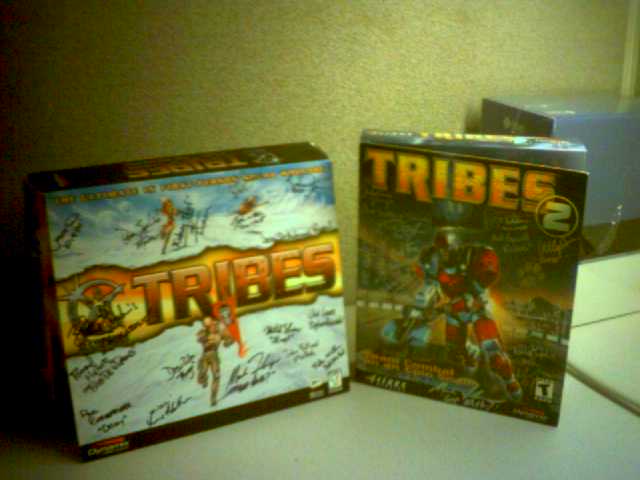
Tribescon was my first gamecon I went too, came in 2nd and 1st at the first 2 tribes cons. Even keep 2 signed boxes of tribes on my desk, for the 5 years I played tribes, I played almost daily. (And yes, went to work, school, and had family time..)
Simple, fun, and for a long time, no aimbots. It was on par with counterstrike in pure enjoyment and simple gameplay. Tactical operations, not sci-fi mega weapons. Smooth gameplay, and great maps.
Glad its free, I have both the freely released versions sitting on my HD, think I'll play this weekend. I urge you guys to download and play it, while the graphics of T1 isnt the greatest, it is a pure enjoyable game. T2 was the early engine that Garage games used to launch its business. And wow, how that engine has progressed. I was reading the changelog on the Developers build, the vegetation, and rendering is simple awesome.
BTW, heres whats on my desk at work, -minus the empty cups of coffee.
-
Re:Ofcourse
MY ISP is going to kill me but.
D3 vs HL2 vs Farcry vs World -
Re:Pretty neat.
Well, I was IRC'ing on my phone back a few years ago using T9 over CDPD on ATT Wireless.
Now I'm playing with UMTS A845 Motorola phone in Seattle, bigger screen, just waiting fo the SSH client or a new updated IRC client. Thing has 64 megs, just need an SDK to compile IRC.
BTW, Wonder if my ISP will hate me for that link.. -
IRC
IRC and other stuff. And that was on my CDPD phone, now its in GPRS/EDGE.
Thank god for T9. After using a keypad, you crave a thumbboard. -
Digital watches with Analog looking displays.
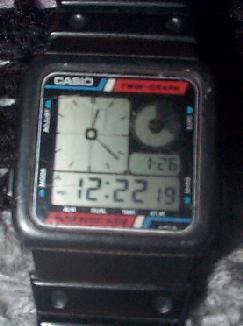
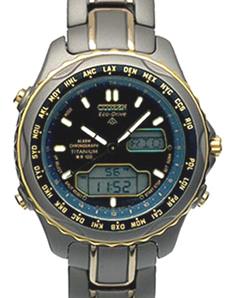
I like the mix of analog/digital watches. The only digital watch I could find that emulated an analog watch, was a Casio. I bought it in the early 90's. That was a great watch, but I couldn't find a replacement for it, so I went with a nice mix Citizen titanium worldtime watch. And its an echo-drive, never have to replace batteries, its solar. Has the digital date on it, and the normal digital features, and the hands glow in the dark. So yes, analog is still here, but there are lots of enhancements to standard "Analog". Diving, Sailing and Pilot watches are the only ones that come close to the look of both technologies, but are overkill for just a nice digital looking watch.
So, I would say the article is wrong about digital watchs. They can display analog type faces, my first casio back in the 90's did. Most high end watchs are just a combinination of both. -
Digital watches with Analog looking displays.
I like the mix of analog/digital watches. The only digital watch I could find that emulated an analog watch, was a Casio. I bought it in the early 90's. That was a great watch, but I couldn't find a replacement for it, so I went with a nice mix Citizen titanium worldtime watch. And its an echo-drive, never have to replace batteries, its solar. Has the digital date on it, and the normal digital features, and the hands glow in the dark. So yes, analog is still here, but there are lots of enhancements to standard "Analog". Diving, Sailing and Pilot watches are the only ones that come close to the look of both technologies, but are overkill for just a nice digital looking watch.
So, I would say the article is wrong about digital watchs. They can display analog type faces, my first casio back in the 90's did. Most high end watchs are just a combinination of both. -
Sidebars, Large Icons, Pictures, sliders..
I'm not impressed with it the screenshots for longhorn, they dont show all the transparency and other options longhorn includes.
Where are the Gui's you see in Anime? The ones with multiple overlapping, transparent windows that pop up with information, and a nice loading screen and color videos. The closest thing ive seen is the frame buffer xwin replacement. OSX is pretty close, but use the 1 window model.
-
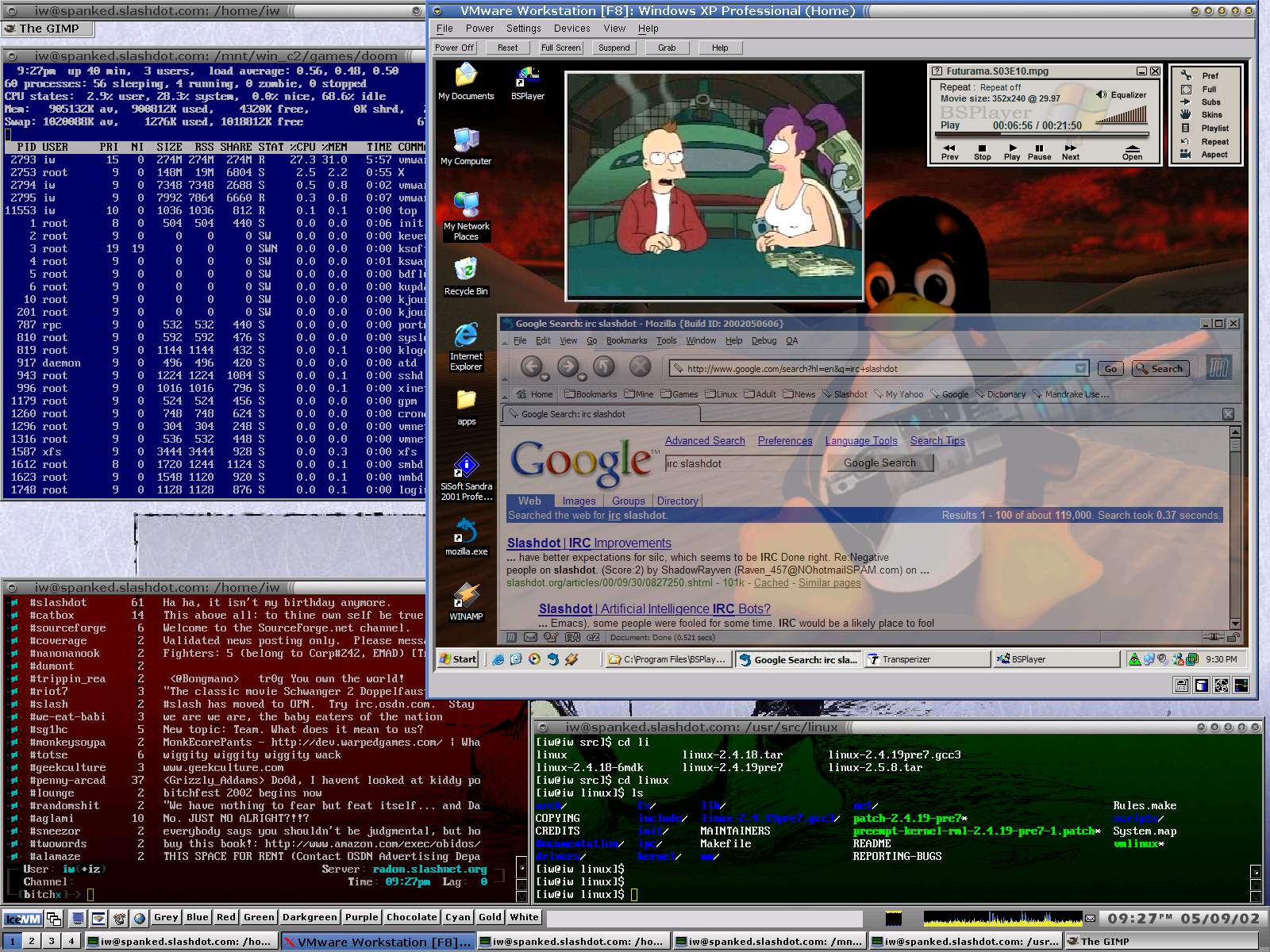
screenshot of me playing around with icewm. -
Mandrake Anti Alias
I must say I was really like how anti aliasing looks in Mandrake. Looks better than WinXP (cleartype). Just need some font tweak tools like RedHat. (Unless I just didnt seem them in Mandrake)
Now, lets see if my hosting service crumbles with the
-
Re:VMWare tips
If you have a fast enough cpu, a 2gh+ machine, sound works alot better. On my dual 800, sound was ok, but did skip. On my amd 1800, i can watch dvds, mp3s, and play mpegs with no sound or video skipping. I also used the newest emu10k1 drivers. Of course pre-empt and a gig of ram didnt hurt either. (-;
Screenshot. http://www.ironwolve.com/desktop.jpg
Only thing left is to get AA fonts working with IceWM, and the side buttons working on my explorer mouse.
-
cd -
Mapping gnutella p2p with Gnucleus
If your interested playing around with some internet mapping software, Gnucleus will map out some gnutella hosts around you.
Check out a picture of me running gnucleus. gnucleus.jpg
-
Thoughts on Win Gui and OS layout.
As a long time computer user, starting from a C64/Floppy/300 baud modems to DualP3s/Terrabyte storage/DSL I have migrated and changed the way I interact with GUI's and store my files many times over the years.
Mark Hursts ideas are almost like mine. I will break it down a little as to HD layout then OS.
I have normally have 2 HDs in my system, HDA for my OS's and HDB for my Games and Work. HDA I break down into 4 Paritions.
HDA1 for Win98,
HDA2 for Win2K,
HDA3 for either a Linux dristro or WinXP beta
HDA4 for the swap if im using linux.
HDB1 is 1 parition, normally 3 folders, Games, Work and Emulators. (Im a UAE and Mame freak.)
I dont normally use boot loaders other than Win2k's, If i boot linux i use loadlin, it seems easier for me to maintain. (C:\linux)
Im a big fan of Norton Ghost, using ghost on the paritions, I can restore quickly. As I like to play around with drivers and migrate my HD's to more space. I also burn the
I'm a little more in depth on my HDA1 drive, I use directory names, Apps, GFX, Net, Sound, Utils, Work. I also have the normal windows directories, My Documents, Windows and Temp. Under My Documents I put My Pictures, My Music and Favorites. I then use M$ Tweak UI to point all windows versions on my HD to c:\My documents, C:\My Documents\favorites, etc.. This keeps all my files at hand if im either Win98, Win2K or linux. It makes it easier to keep every file in the same place under ever os. (Example, IE for Win2K and Win98 point to the same favorites, so my bookmarks are the same.)
After I get the basic windows installed (doesnt matter what version). I upgrade the entire installation with the newest patches and drivers. Then register file types for my apps, not windows defaults. Apps include textpad, winzip,winrar,cdrwin,nero,acdsee,winamp,proxomitro n. Windows modifications as x-teq and m$ powertoys.
Now that windows is installed, and apps, I keep a shortcut to a folder NET in c:\net\net on my desktop. This folder c:\net\net keeps shortcuts for all my programs. Even if I reinstall windows, my c:\net\net folder stays. I put a shortcut of my NET folder in my tooltray. I can either alt-tab or click on the tooltray icon (in case my apps are maximized) to have access to my favorite apps. I really dont use the start menu, as it takes longer to get to my commonly used applications.
Microsoft has weened us off Dual pane file managers.(I miss fileman!) This was (IMHO) the hardest thing to get used to in win95 and new versions of windows. Trying to copy files from a file viewed pane, then select the destination folder is slower and has more steps involved. M$ introduced powertoys that included "Copy To and Move To" extensions to windows, that at least helped. I do keep a copy of 2xExplorer for when I need to handle large ammount of files.
The part that actually increased my productivity was the toolbar. Being able to have access to my running applications, instead of alt-tabbing was a nice changed. It also provides a quick visual que on what programs im running. The tooltray also speeds up access to my c:\net\net quick launch folder full of shortcuts.
Drag and Drop, right mouse menus have become standard. I have found that I now drag mp3's onto winamp, and right mouse clicking and enqueing them. My older habit was using playlists for everything. IE didnt have the best right mouse menus, but with IE6, they have the most common menus again. (Using proxomitron and enabling all right mouse clicks also helps)
Now as my Linux GUI, I really use Windows as workstation, and unix as a server and display X back to my windows box. (X-win32 is far the best for this.) But when Im using a unix workstation, I normally install IceWM. IceWM is small, fast and has a toolbar and tooltray. It is highly customizable and can add those extra buttons that come in handy. The windowshade mode which rolls up the window to a bar is very handy. Comes in handy when I need to view multiple load balanced servers at the same time. Also for quick eye-candy, I like the network and cpu meters on the toolbar, dont really need it, but nice to see.
Started to use WinXP beta, and I'm pretty impressed with its Font Smoothing features. Check out some screenshots I made for friends here and here.. The font smoothing works all throught the GUI, notice how the menus are changed.
I spend too much time playing around with new utilities and GUI's for windows. If your interested in modifing your windows GUI, check out Shell City, WindowBlinds, and Litestep.
Have fun!
-Brook -
Thoughts on Win Gui and OS layout.
As a long time computer user, starting from a C64/Floppy/300 baud modems to DualP3s/Terrabyte storage/DSL I have migrated and changed the way I interact with GUI's and store my files many times over the years.
Mark Hursts ideas are almost like mine. I will break it down a little as to HD layout then OS.
I have normally have 2 HDs in my system, HDA for my OS's and HDB for my Games and Work. HDA I break down into 4 Paritions.
HDA1 for Win98,
HDA2 for Win2K,
HDA3 for either a Linux dristro or WinXP beta
HDA4 for the swap if im using linux.
HDB1 is 1 parition, normally 3 folders, Games, Work and Emulators. (Im a UAE and Mame freak.)
I dont normally use boot loaders other than Win2k's, If i boot linux i use loadlin, it seems easier for me to maintain. (C:\linux)
Im a big fan of Norton Ghost, using ghost on the paritions, I can restore quickly. As I like to play around with drivers and migrate my HD's to more space. I also burn the
I'm a little more in depth on my HDA1 drive, I use directory names, Apps, GFX, Net, Sound, Utils, Work. I also have the normal windows directories, My Documents, Windows and Temp. Under My Documents I put My Pictures, My Music and Favorites. I then use M$ Tweak UI to point all windows versions on my HD to c:\My documents, C:\My Documents\favorites, etc.. This keeps all my files at hand if im either Win98, Win2K or linux. It makes it easier to keep every file in the same place under ever os. (Example, IE for Win2K and Win98 point to the same favorites, so my bookmarks are the same.)
After I get the basic windows installed (doesnt matter what version). I upgrade the entire installation with the newest patches and drivers. Then register file types for my apps, not windows defaults. Apps include textpad, winzip,winrar,cdrwin,nero,acdsee,winamp,proxomitro n. Windows modifications as x-teq and m$ powertoys.
Now that windows is installed, and apps, I keep a shortcut to a folder NET in c:\net\net on my desktop. This folder c:\net\net keeps shortcuts for all my programs. Even if I reinstall windows, my c:\net\net folder stays. I put a shortcut of my NET folder in my tooltray. I can either alt-tab or click on the tooltray icon (in case my apps are maximized) to have access to my favorite apps. I really dont use the start menu, as it takes longer to get to my commonly used applications.
Microsoft has weened us off Dual pane file managers.(I miss fileman!) This was (IMHO) the hardest thing to get used to in win95 and new versions of windows. Trying to copy files from a file viewed pane, then select the destination folder is slower and has more steps involved. M$ introduced powertoys that included "Copy To and Move To" extensions to windows, that at least helped. I do keep a copy of 2xExplorer for when I need to handle large ammount of files.
The part that actually increased my productivity was the toolbar. Being able to have access to my running applications, instead of alt-tabbing was a nice changed. It also provides a quick visual que on what programs im running. The tooltray also speeds up access to my c:\net\net quick launch folder full of shortcuts.
Drag and Drop, right mouse menus have become standard. I have found that I now drag mp3's onto winamp, and right mouse clicking and enqueing them. My older habit was using playlists for everything. IE didnt have the best right mouse menus, but with IE6, they have the most common menus again. (Using proxomitron and enabling all right mouse clicks also helps)
Now as my Linux GUI, I really use Windows as workstation, and unix as a server and display X back to my windows box. (X-win32 is far the best for this.) But when Im using a unix workstation, I normally install IceWM. IceWM is small, fast and has a toolbar and tooltray. It is highly customizable and can add those extra buttons that come in handy. The windowshade mode which rolls up the window to a bar is very handy. Comes in handy when I need to view multiple load balanced servers at the same time. Also for quick eye-candy, I like the network and cpu meters on the toolbar, dont really need it, but nice to see.
Started to use WinXP beta, and I'm pretty impressed with its Font Smoothing features. Check out some screenshots I made for friends here and here.. The font smoothing works all throught the GUI, notice how the menus are changed.
I spend too much time playing around with new utilities and GUI's for windows. If your interested in modifing your windows GUI, check out Shell City, WindowBlinds, and Litestep.
Have fun!
-Brook