 Slashdot Mirror
Domain: kde-apps.org
Stories and comments across the archive that link to kde-apps.org.
Comments · 138
-
Re:It's a CPU hog
You don't.
-
Re:Oh no, not again...
There were several plasmoids that allowed you to replicate Windows 7 taskbar functionality in KDE, and they've been available for years. I used this one back in 2009.
http://kde-look.org/content/show.php/STasks?content=99739
I think the current version is here.
-
Re:And for those older machines?
Take a look at Recoll, full text search tool based on the Xapian backend. Non-slow, full text, proximity clauses and all
-
Re:How can xterm be improved?
You're looking for Yakuake. It's just like Quake: hit the tilde and a command console drops down from the top.
-
Re:Tips from a long-time mpd user
-
Re:Yes, patent system not meant for software paten
We don' have software patents over here, but It's a subject that I fallow regularly here on Slashdot. I found this analogy about English prose one of the bests I saw to inform non computer literates about this subject.
Take my example. I'm currently writing an FTP client for learning and contribute purposes. One of the things about FTP is that each server vendor as some kind of slightly different application. So if I want to make a client that has some kind of success I have to test many of the servers(closed sourced and open) out there, so my program can parse every line. I've mostly wrote this software from scratch fallowing the RFC specifications.
At some point I've downloaded the source code of some popular open-source FTP clients(FileZilla, KFtpGrabber), to analize the code and look for different approaches. It was surprising to see that while both this programs and mine are very complex applications, and that my work is completely original, we have very common programming techniques(and code) on several identical subjects(even the variables have the same name sometimes).
What I've realize is that for some problems there are out there have just about one or two best solutions. No one can argue that my creativity is not original. I've only looked at the code of these programs after the engine was almost written, but hypothetically if at any point some FTP client program or idea was patented my program wold violate that for sure(although it would not violate copyright since it's not the same code).
Patenting code is like patenting solutions to problems and it could be justified if there were many different solutions out there but the reality is that many problems have only one or two correct approach. -
Re:why aRe:They're glowing!
It was in KDE 3 - KDE's had it since 2006 - ALT + Space launches Katapult
-
Re:Command line is not easy for most users
and ffmpeg2theora offers an easy way to create content.
Only for certain definitions of easy. Let me know when you have a point and click version that my non technical friends can use.
-
Re:CDE? Nooo... I think he's talking about
the DOCK, as in look at Ksmoothdock, and kxdock:
http://ksmoothdock.sourceforge.net/ksmoothdock-manual.html
http://www.kde-apps.org/content/show.php?content=6585
http://www.vivaolinux.com.br/screenshot/KDE-OpenSUSE-10.3-com-kxdock-geekzen
http://www.xiaprojects.com/index.php?find=kxdocker
But, even in 1992, there was "Killer Windows Utilities", and in it was a floating, apps-customizable dock:
I still have my old book, but i cannot find it on the internets.
As MUCH as i applaud Apple for its design successes, i cannot back Jobs on this. At least not 100%. It's too obvious, hasn't been enforced, nor discouraged, and way too many Open Source implementations exist. Even IF the software DEVELOPERS cannot further deploy "finished" dockers, too much software capability exists such that nowadays, with a little finessing, end users can just "roll their own".
Use of IDE's and other exploiting well-available know-how will eventually tear down the onerous burden of software patents. The USPTO needs to STOP sucking up and the US needs to stop subsidizing its income stream from patents processing. After all, it's becoming all-too-easy to just do an end-run on the patents -- with a little creativity -- as go design patents, and maybe even *some* process patents that are dubious or outright *unworthy* of patent (artificial) protection.
-
Re:Speaking of Compiz...
You need special 3rd-party pager and taskbar widgets:
http://www.kde-apps.org/content/show.php?content=49484
http://www.kde-apps.org/content/show.php?content=46021 -
Re:Speaking of Compiz...
You need special 3rd-party pager and taskbar widgets:
http://www.kde-apps.org/content/show.php?content=49484
http://www.kde-apps.org/content/show.php?content=46021 -
Re:Linux needs system-wide color management
As for Amarok, not sure if this helps, but you can have this script run a web server after which, you just need a browser on your other pc, and control it over your local network. http://www.kde-apps.org/content/show.php?content=36970
-
Re:kwrite?
What does he mean? He means he would like to see Kwrite ported natively to Windows.
The word processing component of Koffice, to which I assume you think he is referring, is called "KWord".
-
Re:I stopped caring about QtThen we could have a package manager to sort this out, so that you could have tiny 100kb apps using a 10MB library. Oh, a man can dream... Well, one example of such an app is youtube-dl gui
-
Re:Crash recovery, eh? Crash Recovery...i LIKE FF, and wish it would use the KDE file exploring/management widgets to which I've become so attached. i can't stand that older file display interface. Check out KGtk. It's a hack, but it can make many Gtk apps (including Firefox) use KDE file dialogs, I've been using it ages and it works nicely and hasn't caused any problems for me. (lower-casing/deprecation of "I" and "I'm" intentional; many other languages do not arrogantly case-place the self of the speaker above the listener or observer-- even though other languages tend to have separate words (honorific and plain/familiar) for the western/Latin "I"). So, it is my mission to start a movement to deprecate the importance of "I" and force it to "i"... Not that this bothers me much, but shouldn't you still capitalise "I" at the start of a sentence?
If a convention of not capitalising "I" becomes prevalent, it will most likely be because of people's laziness rather than your efforts. Myself I will continue to capitalize "I", but I don't when texting. -
Re:The point being....
The problem is sometimes that we, the users, are not listened.
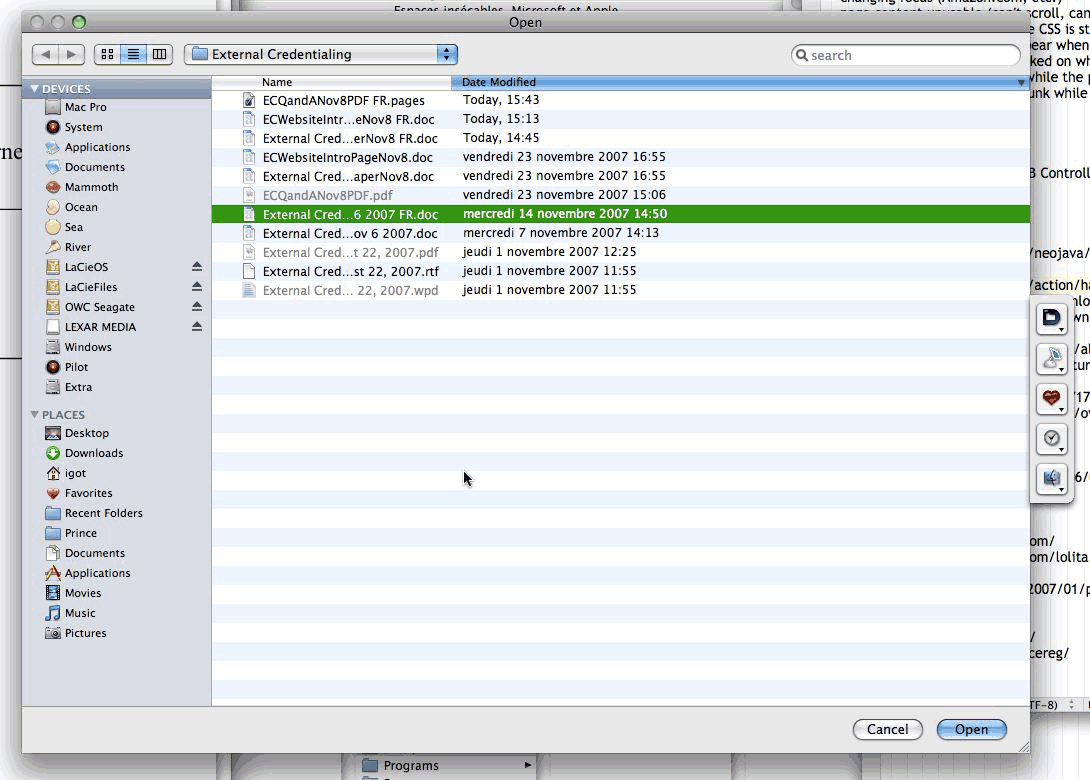
My proposal: Fix the fucking GTK-file-selection box! http://www.gnome.org/~seth/designs/filechooser-spec/
Why on earth is "Browse other folders" taking huge amount of screen estate (in save dialog)???
Do hidden files work (when I type ".bashrc" will gedit open it)?
Vista: http://www.tmssoftware.com/atbdev6.htm (?)
XP: http://www.microsoft.com/library/media/1033/windowsxp/images/using/setup/tips/68222-click-save.gif
Leopard: http://www.betalogue.com/images/uploads/finder/OpenDialogBox-ListView.gif
Java: http://java.sun.com/docs/books/tutorial/figures/uiswing/components/FileChooserOpenMetal.png
Other: http://www.guidebookgallery.org/screenshots/openfile
More: http://www.raizlabs.com/interface/hall-of-shame/default.asp
There is even a theme to change it to KDE style!!!
KGtk: http://www.kde-apps.org/content/preview.php?preview=1&id=36077&file1=36077-1.png&file2=36077-2.png&file3=36077-3.png&name=KGtk+(Use+KDE+Dialogs+in+Gtk+Apps)&PHPSESSID=83fa01cf68ec222d01626c20f3ebe9af -
Did similiar last year
I made a quick POS to do book sales with Python, PyGTK, Adodb, and MySQL. It was quite the learning experience, didn't take very long. I actually upgraded it just this past week to ensure that it worked on Windows (it did, so it's cross platform) I just cleaned up the UI a bit. If I had to do it again I would have coded it differently, but it works, and pretty well.
I recently came across Lemon POS, it looks good but haven't tried it yet, http://www.kde-apps.org/content/show.php/Lemon+POS?content=69945
In terms of bar code scanner, I had one for my own POS. I used the CueCat, modded by some entrepreneurial eBay seller. eBay for "USB Barcode Reader - Cue Cat CueCat CueCats Scanner", I think the seller was 'herder-of-cats'. He modded it to work like a keyboard, so it essentially just "types" out the barcode, no special programming required
I used my complete app in Linux, in Linux from Windows via NX, and on Windows XP, all three times with the CueCat barcode reader and a keypad (for when I had to manually enter ISBN numbers
If anyone is interested I can share the code, just need to remove some hard coded passwords.
-
filechooser ?
my pet peevee with _any_ GTK based app is the filechooser.
it's ugly and far from intuitive.
there's a wrapper aplication that allows some GTK apps use KDE's filechooser, but it doesn't work with everyting.
if GTK developers really don't wan't to fix this, could they at least put something to allow the use of KDE's dialogs when the app is not running under gnome ?
BTW, the wrapper is here: http://www.kde-apps.org/content/show.php?content=36077 -
Re:Konsole on OSX!
One KDE terminal emulator that OS X doesn't have an equivalent for is Yakuake, a terminal emulator that works like Quake's ingame console. You hit the shortcut and down pops a terminal. You're done, you press the shortcut again and it's gone. Quite nice.
The proper OS X equivalent would be a Dashboard widget, but since Dashboard requires you to stick to HTML/JavaScript there are no decent terminals for Dashboard. If only Dashboard's developer mode would allow me to drag regular windows onto the Dashboard... -
Re:This is cool
I got old (fat) PSP for Christmas so I spent some time modding it out and here's what I've found.
4gb memory sticks can be found for $60 online and are a great investment.
You can use this program to backup your UMD disks and then compress them, put them on the memory stick, and tada.
iR Shell is awesome, it provides a the ability to control IR devices, nice skinnable shell, good file browser, lets you switch out of games (think alt-tab), play MP3s while you're playing a game and mute game music, toggle CPU speed, do adhoc wifi transfers between PSPs, take screenshots and much more, you can find a larger list of features (and the un-official forum) here.
PSP Vault has a very nice downloads section, tons of guides and very active forums.
Psp-homebrew has a great list of homebrew you can sort by firmware version. compatibility
QJ.net is another good resource.
PSP Radio lets you stream internet radio on your PSP.
There are NES, SNES, GB, GBC, GBA, Sega Genesis, Neo-Geo, N64, Atari 2600, C64 and probably others.
Wifisniffer is a great probably that does just what it says.
PSP Weather is another good one.
PSP HTTPD lets you use your psp as a webserver.
Portable VNC lets you control your PC with your PSP and there is software that will let you use your PSP as your gamepad for your PC.
PSP XTI is a TI-92 (Graphing calculator) emulator for the PSP. GPS is soon coming to the PSP (USA only), it will be available as a UMD but no release date or price has been set.
There are many others, just browse the file collections and forums.
If you have a PSP with the factory firmware and wish to downgrade it can be an annoying process, it depends on what version firmware you're running.
This forum post as has the information you need.
Used PSPs can be had for less than $100 in stores near me, including a 1gb pro-duo stick, I think I've squeezed $100 worth of features out of it.
Si Hoc Legere Scis Nimium Eruditionis Habes -
Re:Well, isn't it obvious?
You could always just re-encode rather than re-rip, that's 10 minutes work to set soundKonverter up (on KDE) and then just leave it running overnight. Quintessential player can be persuaded to do similarly on Windowz. You just need to have a decent amount more bitrate available in your source oggs as you want to output to your mp3s - a 'budget' mp3 player is unlikely to get any advantage out of a higher mp3 bitrate that 128kbps anyway, so if you have 196kbps or above oggs, you'll probably get away with it.
If you want native ogg playback, you could try an iriver player - the H-300 series is out of production now, so they'll either be cheap or expensive, they're complete bricks, but they play oggs, as do some other iriver players - there were a few which don't (such as the H10), so do check. -
Re:Before we get into a GNOME vs KDE flamewar...
Firefox isn't a Gnome app, it just happens to use GTK+. Whether Gimp is a Gnome app is debatable... However, if you run KDE and dislike the Gnome file dialog (who wouldn't?), check out kgtk.
-
Re:Before we get into a GNOME vs KDE flamewar...I agree. Just some notes... But those file dialogs and other GNOME widgets are just different enough from KDE to be irritating. KGtk lets you use KDE file dialogs in GTK apps. the old debate about whether the "OK" or the "Cancel" button should be on the left QtCurve lets you use the GTK button order in KDE apps. Wouldn't it be nice to be able to set apps to use a certain type of widget, the way KDE has modified OpenOffice so that it's only partially inconsistent with KDE, and maybe even make it user-customizable on the spot? Not sure what you mean here. Are you looking for something like GTK-QT Theme Engine, which lets you use KDE widgetstyles in GTK apps?
-
Re:input device?
Yes, I hate it when the touchpad activates unintentionally. I've always wondered why the engineers don't put the touchpad at the TOP of the keyboard, rather than the bottom? Then it would not be accidentally activated when you are typing? (Hey, I want to copyright, patent, and trademark that idea!
http://www.kde-apps.org/content/show.php?content=50914
http://ubuntuforums.org/showthread.php?t=271052&highlight=disable+touchpad+while+typing
Et cetera...
Non-Annoymous Coward,
Ed Montgomery, Neo-pseudo-noobie-wannabe-laptop designer keyboard engineer -
RetrospeKt
You can also take a look at my quick-hacked frontend for rsnapshot (for KDE) - RetrospeKt: http://www.kde-apps.org/content/show.php/RetrospeKt?content=57952 I wrote it mostly for myself but it is really handy.
-
Re:LinuxYou've got to be kidding me. In addition to the touch typing options mentioned above, there are:
For languages:
- Parley - Introduced in KDE 4
- KVerbos - in the Edutainment package of all KDE-based distros
- Rosetta Stone under Wine (gold rated as of 2006)
- Konjue - an add-on, but useful
For Physics:
- eduKator - an hypertext based book for physics instruction with working examples
- Step - a physics particle simulator
For Math:
- KAlgebra - a function plotter with advanced capabilities
- Kalcul - simple arithmetic trainer
- GeoGebra - similar to geometer's sketchpad
- At an upper level, Scilab, Octave, R, QtiPlot, RKWard
For geography:
For music:
- Score Reading Trainer
- KLearnNotes2 - a basic score tutor
- NoteEdit - reads midi files and converts them to scores - also great for composing
- A ton of other audio programs including Audacity, Rosegarden, etc. for composing, editing, multitracking...
For Mind-Mapping:
Anyhow, you get the gist. As someone who has taught in both High School and College and whose wife tutors middle schoolers, I can't say that I've seen anything they are running that can't be replaced by linux based code (or in rare cases, by Windows code running on Wine).
-
Re:LinuxYou've got to be kidding me. In addition to the touch typing options mentioned above, there are:
For languages:
- Parley - Introduced in KDE 4
- KVerbos - in the Edutainment package of all KDE-based distros
- Rosetta Stone under Wine (gold rated as of 2006)
- Konjue - an add-on, but useful
For Physics:
- eduKator - an hypertext based book for physics instruction with working examples
- Step - a physics particle simulator
For Math:
- KAlgebra - a function plotter with advanced capabilities
- Kalcul - simple arithmetic trainer
- GeoGebra - similar to geometer's sketchpad
- At an upper level, Scilab, Octave, R, QtiPlot, RKWard
For geography:
For music:
- Score Reading Trainer
- KLearnNotes2 - a basic score tutor
- NoteEdit - reads midi files and converts them to scores - also great for composing
- A ton of other audio programs including Audacity, Rosegarden, etc. for composing, editing, multitracking...
For Mind-Mapping:
Anyhow, you get the gist. As someone who has taught in both High School and College and whose wife tutors middle schoolers, I can't say that I've seen anything they are running that can't be replaced by linux based code (or in rare cases, by Windows code running on Wine).
-
Re:LinuxYou've got to be kidding me. In addition to the touch typing options mentioned above, there are:
For languages:
- Parley - Introduced in KDE 4
- KVerbos - in the Edutainment package of all KDE-based distros
- Rosetta Stone under Wine (gold rated as of 2006)
- Konjue - an add-on, but useful
For Physics:
- eduKator - an hypertext based book for physics instruction with working examples
- Step - a physics particle simulator
For Math:
- KAlgebra - a function plotter with advanced capabilities
- Kalcul - simple arithmetic trainer
- GeoGebra - similar to geometer's sketchpad
- At an upper level, Scilab, Octave, R, QtiPlot, RKWard
For geography:
For music:
- Score Reading Trainer
- KLearnNotes2 - a basic score tutor
- NoteEdit - reads midi files and converts them to scores - also great for composing
- A ton of other audio programs including Audacity, Rosegarden, etc. for composing, editing, multitracking...
For Mind-Mapping:
Anyhow, you get the gist. As someone who has taught in both High School and College and whose wife tutors middle schoolers, I can't say that I've seen anything they are running that can't be replaced by linux based code (or in rare cases, by Windows code running on Wine).
-
Re:LinuxYou've got to be kidding me. In addition to the touch typing options mentioned above, there are:
For languages:
- Parley - Introduced in KDE 4
- KVerbos - in the Edutainment package of all KDE-based distros
- Rosetta Stone under Wine (gold rated as of 2006)
- Konjue - an add-on, but useful
For Physics:
- eduKator - an hypertext based book for physics instruction with working examples
- Step - a physics particle simulator
For Math:
- KAlgebra - a function plotter with advanced capabilities
- Kalcul - simple arithmetic trainer
- GeoGebra - similar to geometer's sketchpad
- At an upper level, Scilab, Octave, R, QtiPlot, RKWard
For geography:
For music:
- Score Reading Trainer
- KLearnNotes2 - a basic score tutor
- NoteEdit - reads midi files and converts them to scores - also great for composing
- A ton of other audio programs including Audacity, Rosegarden, etc. for composing, editing, multitracking...
For Mind-Mapping:
Anyhow, you get the gist. As someone who has taught in both High School and College and whose wife tutors middle schoolers, I can't say that I've seen anything they are running that can't be replaced by linux based code (or in rare cases, by Windows code running on Wine).
-
Re:LinuxYou've got to be kidding me. In addition to the touch typing options mentioned above, there are:
For languages:
- Parley - Introduced in KDE 4
- KVerbos - in the Edutainment package of all KDE-based distros
- Rosetta Stone under Wine (gold rated as of 2006)
- Konjue - an add-on, but useful
For Physics:
- eduKator - an hypertext based book for physics instruction with working examples
- Step - a physics particle simulator
For Math:
- KAlgebra - a function plotter with advanced capabilities
- Kalcul - simple arithmetic trainer
- GeoGebra - similar to geometer's sketchpad
- At an upper level, Scilab, Octave, R, QtiPlot, RKWard
For geography:
For music:
- Score Reading Trainer
- KLearnNotes2 - a basic score tutor
- NoteEdit - reads midi files and converts them to scores - also great for composing
- A ton of other audio programs including Audacity, Rosegarden, etc. for composing, editing, multitracking...
For Mind-Mapping:
Anyhow, you get the gist. As someone who has taught in both High School and College and whose wife tutors middle schoolers, I can't say that I've seen anything they are running that can't be replaced by linux based code (or in rare cases, by Windows code running on Wine).
-
Re:LinuxYou've got to be kidding me. In addition to the touch typing options mentioned above, there are:
For languages:
- Parley - Introduced in KDE 4
- KVerbos - in the Edutainment package of all KDE-based distros
- Rosetta Stone under Wine (gold rated as of 2006)
- Konjue - an add-on, but useful
For Physics:
- eduKator - an hypertext based book for physics instruction with working examples
- Step - a physics particle simulator
For Math:
- KAlgebra - a function plotter with advanced capabilities
- Kalcul - simple arithmetic trainer
- GeoGebra - similar to geometer's sketchpad
- At an upper level, Scilab, Octave, R, QtiPlot, RKWard
For geography:
For music:
- Score Reading Trainer
- KLearnNotes2 - a basic score tutor
- NoteEdit - reads midi files and converts them to scores - also great for composing
- A ton of other audio programs including Audacity, Rosegarden, etc. for composing, editing, multitracking...
For Mind-Mapping:
Anyhow, you get the gist. As someone who has taught in both High School and College and whose wife tutors middle schoolers, I can't say that I've seen anything they are running that can't be replaced by linux based code (or in rare cases, by Windows code running on Wine).
-
Re:LinuxYou've got to be kidding me. In addition to the touch typing options mentioned above, there are:
For languages:
- Parley - Introduced in KDE 4
- KVerbos - in the Edutainment package of all KDE-based distros
- Rosetta Stone under Wine (gold rated as of 2006)
- Konjue - an add-on, but useful
For Physics:
- eduKator - an hypertext based book for physics instruction with working examples
- Step - a physics particle simulator
For Math:
- KAlgebra - a function plotter with advanced capabilities
- Kalcul - simple arithmetic trainer
- GeoGebra - similar to geometer's sketchpad
- At an upper level, Scilab, Octave, R, QtiPlot, RKWard
For geography:
For music:
- Score Reading Trainer
- KLearnNotes2 - a basic score tutor
- NoteEdit - reads midi files and converts them to scores - also great for composing
- A ton of other audio programs including Audacity, Rosegarden, etc. for composing, editing, multitracking...
For Mind-Mapping:
Anyhow, you get the gist. As someone who has taught in both High School and College and whose wife tutors middle schoolers, I can't say that I've seen anything they are running that can't be replaced by linux based code (or in rare cases, by Windows code running on Wine).
-
Re:LinuxYou've got to be kidding me. In addition to the touch typing options mentioned above, there are:
For languages:
- Parley - Introduced in KDE 4
- KVerbos - in the Edutainment package of all KDE-based distros
- Rosetta Stone under Wine (gold rated as of 2006)
- Konjue - an add-on, but useful
For Physics:
- eduKator - an hypertext based book for physics instruction with working examples
- Step - a physics particle simulator
For Math:
- KAlgebra - a function plotter with advanced capabilities
- Kalcul - simple arithmetic trainer
- GeoGebra - similar to geometer's sketchpad
- At an upper level, Scilab, Octave, R, QtiPlot, RKWard
For geography:
For music:
- Score Reading Trainer
- KLearnNotes2 - a basic score tutor
- NoteEdit - reads midi files and converts them to scores - also great for composing
- A ton of other audio programs including Audacity, Rosegarden, etc. for composing, editing, multitracking...
For Mind-Mapping:
Anyhow, you get the gist. As someone who has taught in both High School and College and whose wife tutors middle schoolers, I can't say that I've seen anything they are running that can't be replaced by linux based code (or in rare cases, by Windows code running on Wine).
-
Re:LinuxYou've got to be kidding me. In addition to the touch typing options mentioned above, there are:
For languages:
- Parley - Introduced in KDE 4
- KVerbos - in the Edutainment package of all KDE-based distros
- Rosetta Stone under Wine (gold rated as of 2006)
- Konjue - an add-on, but useful
For Physics:
- eduKator - an hypertext based book for physics instruction with working examples
- Step - a physics particle simulator
For Math:
- KAlgebra - a function plotter with advanced capabilities
- Kalcul - simple arithmetic trainer
- GeoGebra - similar to geometer's sketchpad
- At an upper level, Scilab, Octave, R, QtiPlot, RKWard
For geography:
For music:
- Score Reading Trainer
- KLearnNotes2 - a basic score tutor
- NoteEdit - reads midi files and converts them to scores - also great for composing
- A ton of other audio programs including Audacity, Rosegarden, etc. for composing, editing, multitracking...
For Mind-Mapping:
Anyhow, you get the gist. As someone who has taught in both High School and College and whose wife tutors middle schoolers, I can't say that I've seen anything they are running that can't be replaced by linux based code (or in rare cases, by Windows code running on Wine).
-
Re:LinuxYou've got to be kidding me. In addition to the touch typing options mentioned above, there are:
For languages:
- Parley - Introduced in KDE 4
- KVerbos - in the Edutainment package of all KDE-based distros
- Rosetta Stone under Wine (gold rated as of 2006)
- Konjue - an add-on, but useful
For Physics:
- eduKator - an hypertext based book for physics instruction with working examples
- Step - a physics particle simulator
For Math:
- KAlgebra - a function plotter with advanced capabilities
- Kalcul - simple arithmetic trainer
- GeoGebra - similar to geometer's sketchpad
- At an upper level, Scilab, Octave, R, QtiPlot, RKWard
For geography:
For music:
- Score Reading Trainer
- KLearnNotes2 - a basic score tutor
- NoteEdit - reads midi files and converts them to scores - also great for composing
- A ton of other audio programs including Audacity, Rosegarden, etc. for composing, editing, multitracking...
For Mind-Mapping:
Anyhow, you get the gist. As someone who has taught in both High School and College and whose wife tutors middle schoolers, I can't say that I've seen anything they are running that can't be replaced by linux based code (or in rare cases, by Windows code running on Wine).
-
Re:LinuxYou've got to be kidding me. In addition to the touch typing options mentioned above, there are:
For languages:
- Parley - Introduced in KDE 4
- KVerbos - in the Edutainment package of all KDE-based distros
- Rosetta Stone under Wine (gold rated as of 2006)
- Konjue - an add-on, but useful
For Physics:
- eduKator - an hypertext based book for physics instruction with working examples
- Step - a physics particle simulator
For Math:
- KAlgebra - a function plotter with advanced capabilities
- Kalcul - simple arithmetic trainer
- GeoGebra - similar to geometer's sketchpad
- At an upper level, Scilab, Octave, R, QtiPlot, RKWard
For geography:
For music:
- Score Reading Trainer
- KLearnNotes2 - a basic score tutor
- NoteEdit - reads midi files and converts them to scores - also great for composing
- A ton of other audio programs including Audacity, Rosegarden, etc. for composing, editing, multitracking...
For Mind-Mapping:
Anyhow, you get the gist. As someone who has taught in both High School and College and whose wife tutors middle schoolers, I can't say that I've seen anything they are running that can't be replaced by linux based code (or in rare cases, by Windows code running on Wine).
-
Re:Extra apps already exist, just converge...-- Kexi
-- -- for Access-style database management
That's the one they're using according to koffice.org. -
Extra apps already exist, just converge...It will also feature more applications, including an Access-like database creator, a flowcharter, and an image manipulation tool. Shouldn't be too hard; most of this capability exists as individual apps already. For example, the could probably implement code from the following fairly well-regarded entries listed on the KDE Apps site:
-- QCad
-- -- for flowcharting (if supplied with pre-defined shapes)
-- Pixel
-- -- for painting/photo manipulation
-- Kexi
-- -- for Access-style database management
(Items for illustration purposes only; not an endorsement of any particular package.) -
Extra apps already exist, just converge...It will also feature more applications, including an Access-like database creator, a flowcharter, and an image manipulation tool. Shouldn't be too hard; most of this capability exists as individual apps already. For example, the could probably implement code from the following fairly well-regarded entries listed on the KDE Apps site:
-- QCad
-- -- for flowcharting (if supplied with pre-defined shapes)
-- Pixel
-- -- for painting/photo manipulation
-- Kexi
-- -- for Access-style database management
(Items for illustration purposes only; not an endorsement of any particular package.) -
Extra apps already exist, just converge...It will also feature more applications, including an Access-like database creator, a flowcharter, and an image manipulation tool. Shouldn't be too hard; most of this capability exists as individual apps already. For example, the could probably implement code from the following fairly well-regarded entries listed on the KDE Apps site:
-- QCad
-- -- for flowcharting (if supplied with pre-defined shapes)
-- Pixel
-- -- for painting/photo manipulation
-- Kexi
-- -- for Access-style database management
(Items for illustration purposes only; not an endorsement of any particular package.) -
Re:Alternative:
GenTube looks similar, although it only supports Youtube at the moment.
-
OneKript
Actually you are wrong about there not being a Linux GUI. There is actually a pretty good one for KDE. It is Called OneKript:
http://kde-apps.org/content/show.php/OneKript?cont ent=49071 -
Re:Quicksilver
For the record, there's a little application for KDE called Katapult that does the exact same thing as Quicksilver.
But the replying
-
Re:Gnome developers aren't idiots
Ask and ye shall receive: kgtk. Doesn't work with every GTK app, but at least Firefox and Gimp seem to work fine.
-
Re:Another approach.
That is nothing close to mentioned "app bundle". I guess something like http://kde-apps.org/content/show.php?content=1284
1 was ment. -
It's a nice idea...
... but the implementation is not very good (yet).
It basically attempts to implement something like QuickSilver but comes out being much more like the much simpler Katapult. It's curious then why they aren't copying stuff like the activation keys, etc. QuickSilver and Katapult share the same basic keystrokes and they're pretty comfortable too.
I like the idea of the spell-check feature. I was always curious why this isn't the default behavior for text boxes in Windows as it is in Linux/KDE (where it's automatic) or on the Mac (where sometimes you have to hit a key-combo). I've been fiddling around with Vista a bit and am still surprised about how many little UI niceties that MS hasn't lifted from their competition. There's some good stuff out there, and I can't believe that they aren't aware of it. I haven't done much coding for Windows in a while, but I can see how under pre-Vista versions of Windows these things might be a little tricky to implement (perhaps that explains the large size of this app, about 10x that of QuickSilver or Katapult).
-
Re:The bubble was never there.
Linux needs a universal framework for application development
Windows has the Windows API, MFC,app installation/uninstallation
I'm not so sure whether this needs to be universal. Most people will install apps through the package manager of their distribution, and some distributions have repositories that cover virtually every FOSS application the user would ever like to install. And there is work being done on distribution-neutral packages as well.user configuration storage
This, I kind of agree with. Having lots of configuration files in various forms and locations in ~/.* is intimidating to a new user. However, when we're talking about desktop usage, the user rarely if ever has to modify these files directly.sound and graphics
I'm not sure what you're getting at here. ALSA and SDL/GL?users won't have to install two entire desktop environments just to run all the apps out there
Funny that, I run KDE on my desktop, but use some GTK+ apps (Firefox and Gimp mainly) as well. I have the GTK+ libraries, not the whole Gnome desktop, installed. And with a few clever hacks, they blend in with the desktop seamlessly. -
Re:Some quick questions on linux software
For Greeting cards you could try http://kde-apps.org/content/show.php?content=1786
9 Of course for high end use there is GIMP.
Family tree stuff I have heard about a few options.
There is always WINE if you want to try and run PAF but I have not tried it but it looks as if it can sort of work. -
Re:Slick interface
Yeah, they also Sit on my hard disk too.
-
Re:Let's be accurate.
Well, you can write plugins for Konqi, be they DCOP based service menus ala konqil.icio.us, or direct C++ extensions ala Digg.com plugin for Konqueror.


&PHPSESSID=83fa01cf68ec222d01626c20f3ebe9af)
