Slashdot Mirror
Domain: kde.org
Stories and comments across the archive that link to kde.org.
Comments · 3,588
-
Re:mail
Some GUI's include that sort of capability too.
-
Re:Python
Are there still Logo implementations around?
KTurtle : http://edu.kde.org/kturtle/ My 8-years old son really enjoyed playing with it, after giving him a few basic informations. Amazing how children can try and discover by themselves.
-
Re:Still waiting for a Total Commander equivalent
The last crashes were that it wouldn't start at all. After a long search, I found the cause to be that it somehow wrote a bad value in it's config file which prevented it from starting (see here).
Another time, it crashed during a big directory sync. over the local network.
Unfortunately I can't remember the other crashes.
I also hate that the mtime sort also sorts directories by their times, instead of leaving them alone. (that is configurable in TC).
It's viewer cannot handle huge files. It also tries too much to show files formatted, and sometimes doesn't let me switch to raw view.
And it FTP abilities are very limited when compared with TC.
Still, Krusader is what I use most, and I'm sure it will improve with some time.
-
Re:Nautilus following KDE's Dolphin?
It does appear that Nautilus' people are taking many many lessons from (let's not say ripping off) KDE's Dolphin. I mean, if you compare Nautilus' demo screenshot and you use KDE's Dolphin (please ignore the command line at the bottom and info dock widget at the right) on a daily basis you will be hard pressed to find any differences.
And they rip of XTree, Thunar, Apple Finder (OS X), Windows Explorer (between 95 and XP) and hundreds of other file navigators too. Just look at the screenshots (using the rigth set of preferences)!
-
Re:Those who like the new-window-every-folder view
> The point of a spacial file browser is to use your spacial memory
I thought spacial file browsers were for "spacial people" e.g. retards
Seriously though, I agree. Lots of these "fancy UIs" that these jokers come up with only work fine for users who just need to manage a handful of objects (windows, tasks, files, folders) at a time.
I find this silly since there is evidence that people are already able to manage a handful of objects at a time ( http://en.wikipedia.org/wiki/The_Magical_Number_Seven,_Plus_or_Minus_Two ), but can't manage far more.
We don't really need help when there are a few objects and need help when there are lots. But that's when all those stupid GUIs start getting in the way.
For example: thumbnailed windows don't really help when you have > 10 of them (especially if they are similar looking documents - using the same standardized template), same goes for those graphical selectors where they show the windows from a 3d or fancy perspective. Useless if you have 20+ windows, cool looking when you have three or four windows, but why'd you need them when you only have a few windows?
When you have a few objects to track you should be able to remember which ones are which. When you have way more, you need some help. That's where computers and software should help. But they don't!
The exceptions are some game UIs. Some of which are proof that you can build UIs that work for "noobs" and still help skilled users.
Games are also proof that people, when sufficiently motivated to, can actually do far more than what these Desktop GUI makers assume. Very many actions per second. Keeping track of stuff. Learning of difficult combos. So where's the Desktop GUI that actually helps you to sustain a high "actions per second" average?
I've personally suggested this:
http://live.gnome.org/GnomeShell/DesignersPlayground/KeyboardShortcuts
And something like it in 2006:
http://bugs.kde.org/show_bug.cgi?id=121349I think this sort of thing will help skilled users more, while not getting in the way of "naive" users (you can still leave the flashy stuff for them).
Car analogy: current OS GUI designers seem to be making cars that look really cool (and are theme-able) but have top speed of 30kph (play a beautiful animation while doing so), have a range of 3km, and have only space for one person at a time.
Not really helpful when we need to do some serious traveling.
-
Nautilus following KDE's Dolphin?
It does appear that Nautilus' people are taking many many lessons from (let's not say ripping off) KDE's Dolphin. I mean, if you compare Nautilus' demo screenshot and you use KDE's Dolphin (please ignore the command line at the bottom and info dock widget at the right) on a daily basis you will be hard pressed to find any differences.
-
Re:Software isn't just programming...
Just to back the parent up - there are definitely more ways to contribute than coding. Find your particular niche skill and find how it might help.
* You may not think of yourself as a documenter but can't you post useful bug reports?
* You may not think of yourself as a programmer but can't you contribute to user wish lists and feedback?
* You may not think of yourself as a teacher but can't you give advice on forums?I code free software as part of my job and my hobby but I've found other ways to contribute outside of coding as well (I don't do all of these myself):
* Advocacy : tell your friends & help them
* Artwork : I recently came up with a couple of additional "playgrounds" for Ktuberling for my kids. They liked them so much I'm considering submitting them to the project. It was really easy - draw the objects in inkscape and edit a text file. Okay you need the graphics skills but just saying it wasn't a programming task
* Translations : We participate in a multi-cultural web and sometimes your language won't be the first language of those behind the project. They may have made a sterling effort but the grammar needs tidying or something - you could help with that.
* Packaging : some packages are only available in rpm or deb or just source and they need packagers to make them available in other formats
* Testing : you can use software so can you not test it?You've made a good start asking here but really - just go out there and do it. Browse the forums, read the help wanted section on Sourceforge and don't forget you can and should engage with the developers of free software.
-
Re:Thanks Mark
Actually, I happen to agree with the second poster. Although I won't contest that Qt is nicer to develop for in a lot of ways, KDE itself is an absolute nightmare. It's painfully obvious that KDE doesn't do UI testing, while GNOME appears to have at least made an attempt.
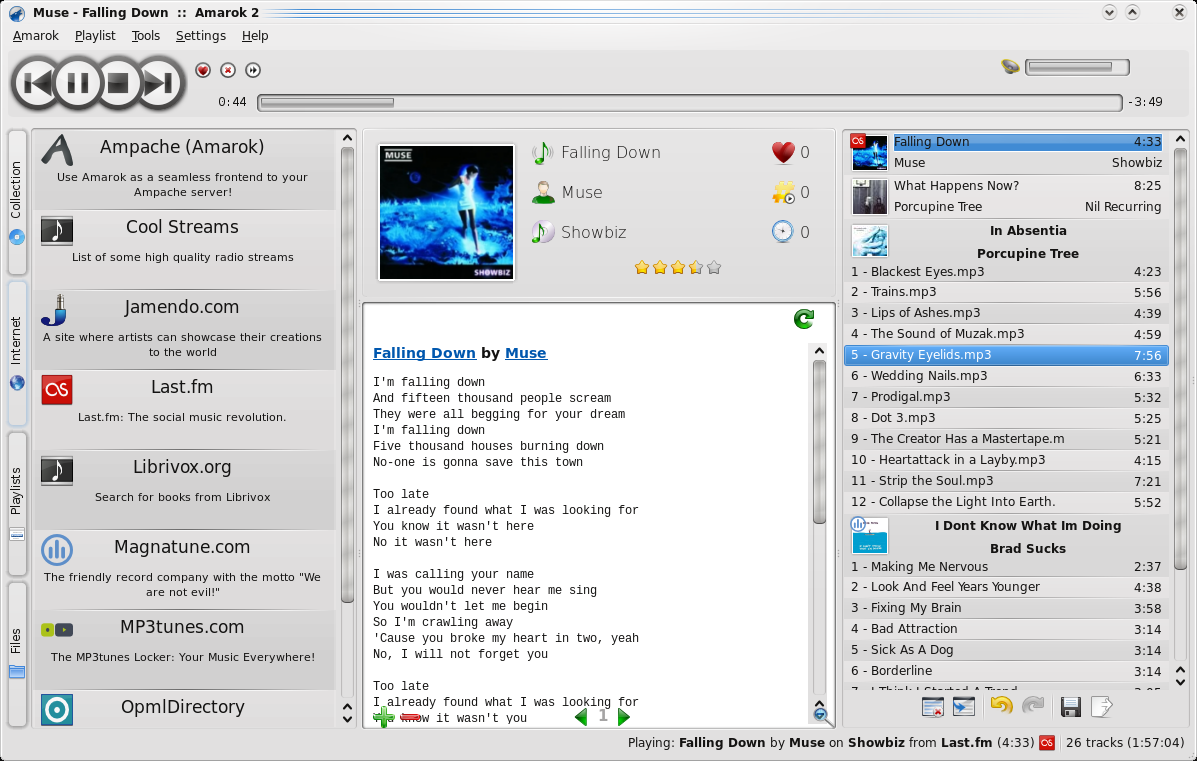
I present this screenshot of Amarok, which many KDE users seem to consider to be the "crown jewel" of the suite as evidence.
A few observations:
- Lots and lots of empty space. This could be fixed effortlessly, and yet it hasn't.
- Less than one third of the screen space is devoted to the application's primary function -- finding and playing music. It's nice that Amarok does lots of other stuff, but there's WAY too much going on all at once. (I always liked Winamp's collapsible interface -- there when you need it, gone when you don't)
- Lots of tiny icons with no apparent function. Although I commend KDE for finally drifting away from indistinguishable tiny blue icons, the replacements aren't much better. With the exception of the save icon, I cannot even begin to guess what the controls under the playlist do.
- Why are there tiny icons next to huge icons up top? The same three icons also appear below. WTF?
- Why is there a stop button?
- In the screenshot, the status bar is completely superfluous and unnecessary.
- The typefaces used in the UI are quite poor, and terribly kerned. I'll concede that this effects open source UIs across the board, though it is still unacceptable given that good open-source fonts are gradually becoming available, and that LaTeX's industry-leading typesetting algorithms have been open to the public for many years.
-
Things I've used in the past:
Ditz for per-project tracking. It just sits there in your repository (which you should have). I used Git for a repository. This meant that the change that fixed a problem would also close the bug, making things much more closely tied than something like Trac could hope to be. (Ever wanted to know which branch still has a given bug open? Now you can.)
I've also used Ktimetracker, back when it was called Karm, to track billable hours. The advantage of a GUI/desktop time tracker, in addition to being KDE-based, is that it can do things like notice which desktop I'm on, notice when I become idle, and punchin/punchout with a global keystroke -- these kinds of things are more difficult (though not impossible) with a tool closer to Ditz.
I have not, however, used both of these at the same time.
-
Use Basket or similar
-
KDE's Documentation Is Woefully Out Of Date
If you follow the links to http://www.kde.org/documentation/ and read the "Application documentation" paragraph, a lot of those links are extremely old:
http://docs.kde.org/development/en/kdebase-runtime/userguide/ last revision date 2004-06-16
http://docs.kde.org/development/en/kdebase-runtime/faq/ last revision date 2005--01-19
http://www.kde.org/info/ no date, but aRts? No Plasma?
It's inexcusably irresponsible, especially since they've completely re-written KDE. Doing certain things can be a big hassle. Configuring workspaces properly is rather complex. KDE users shouldn't have to scour the Web for documentation, and no one should have to remind them to update it. Isn't part of software development maintaning accurate, timely documentation?
Yes, there's http://userbase.kde.org/Plasma/FAQ/HowTo, but where's the link from the main documentation page? -
KDE's Documentation Is Woefully Out Of Date
If you follow the links to http://www.kde.org/documentation/ and read the "Application documentation" paragraph, a lot of those links are extremely old:
http://docs.kde.org/development/en/kdebase-runtime/userguide/ last revision date 2004-06-16
http://docs.kde.org/development/en/kdebase-runtime/faq/ last revision date 2005--01-19
http://www.kde.org/info/ no date, but aRts? No Plasma?
It's inexcusably irresponsible, especially since they've completely re-written KDE. Doing certain things can be a big hassle. Configuring workspaces properly is rather complex. KDE users shouldn't have to scour the Web for documentation, and no one should have to remind them to update it. Isn't part of software development maintaning accurate, timely documentation?
Yes, there's http://userbase.kde.org/Plasma/FAQ/HowTo, but where's the link from the main documentation page? -
KDE's Documentation Is Woefully Out Of Date
If you follow the links to http://www.kde.org/documentation/ and read the "Application documentation" paragraph, a lot of those links are extremely old:
http://docs.kde.org/development/en/kdebase-runtime/userguide/ last revision date 2004-06-16
http://docs.kde.org/development/en/kdebase-runtime/faq/ last revision date 2005--01-19
http://www.kde.org/info/ no date, but aRts? No Plasma?
It's inexcusably irresponsible, especially since they've completely re-written KDE. Doing certain things can be a big hassle. Configuring workspaces properly is rather complex. KDE users shouldn't have to scour the Web for documentation, and no one should have to remind them to update it. Isn't part of software development maintaning accurate, timely documentation?
Yes, there's http://userbase.kde.org/Plasma/FAQ/HowTo, but where's the link from the main documentation page? -
KDE's Documentation Is Woefully Out Of Date
If you follow the links to http://www.kde.org/documentation/ and read the "Application documentation" paragraph, a lot of those links are extremely old:
http://docs.kde.org/development/en/kdebase-runtime/userguide/ last revision date 2004-06-16
http://docs.kde.org/development/en/kdebase-runtime/faq/ last revision date 2005--01-19
http://www.kde.org/info/ no date, but aRts? No Plasma?
It's inexcusably irresponsible, especially since they've completely re-written KDE. Doing certain things can be a big hassle. Configuring workspaces properly is rather complex. KDE users shouldn't have to scour the Web for documentation, and no one should have to remind them to update it. Isn't part of software development maintaning accurate, timely documentation?
Yes, there's http://userbase.kde.org/Plasma/FAQ/HowTo, but where's the link from the main documentation page? -
KDE's Documentation Is Woefully Out Of Date
If you follow the links to http://www.kde.org/documentation/ and read the "Application documentation" paragraph, a lot of those links are extremely old:
http://docs.kde.org/development/en/kdebase-runtime/userguide/ last revision date 2004-06-16
http://docs.kde.org/development/en/kdebase-runtime/faq/ last revision date 2005--01-19
http://www.kde.org/info/ no date, but aRts? No Plasma?
It's inexcusably irresponsible, especially since they've completely re-written KDE. Doing certain things can be a big hassle. Configuring workspaces properly is rather complex. KDE users shouldn't have to scour the Web for documentation, and no one should have to remind them to update it. Isn't part of software development maintaning accurate, timely documentation?
Yes, there's http://userbase.kde.org/Plasma/FAQ/HowTo, but where's the link from the main documentation page? -
Re:Amarok on windows
Where's my Amarok on winders, and why does a simple port need all kinds of name changing foolishness?
uhm... here? together with all other available platforms?
-
Re:Last piece
About HTML mail, take a look at this bug (from 2004, no less): http://bugs.kde.org/show_bug.cgi?id=86423
Briefly, the problem is that you need to be able to reply in HTML to HTML mails you receive.
This is a real shame, because ignoring these two problems (though I will try IMAP again per your suggestion), KMail is hands down the best darn e-mail client I have ever used.
-
Re:Last piece
I is this bug, which is currently the fourth most hated bug in KDE. There were originally several problems with SSL in KDE, including shipping with CA Root Certificates that KDE/QT libraries reject as having invalid syntax. I think most distros have fixed this bug, but it cropped back up for a while again when 4.3 landed in Debian. This caused KDE apps to reject about 3/4 of the SSL sites on the internet as having bad certificates.
While that appears to be fixed now, I still haven't been able to load my own certificates for the website and email servers I run.
-
Re:Last piece
I is this bug, which is currently the fourth most hated bug in KDE. There were originally several problems with SSL in KDE, including shipping with CA Root Certificates that KDE/QT libraries reject as having invalid syntax. I think most distros have fixed this bug, but it cropped back up for a while again when 4.3 landed in Debian. This caused KDE apps to reject about 3/4 of the SSL sites on the internet as having bad certificates.
While that appears to be fixed now, I still haven't been able to load my own certificates for the website and email servers I run.
-
Process explorer features
As for my feedback, I'd like to see more features from process explorer available. The tool provides _a lot_ for detailed information about a process:
- the tcp/ip connections the process has open.
- the libraries it has loaded
- the environment variables the process has.
- the security context of the process (think selinux)
- the strings the process contains (both image and memory)
- the threads it has open, including their starting point.
- the cpu and memory usage per process.See https://bugs.kde.org/show_bug.cgi?id=127728
Oh and other nice features of it:
- killing an app by pressing delete
- a brief highlight of a row on process creation and destruction.Could you consider some of these points? It would be yet a reason less to open a terminal, and rival `top`
-
Re:Labelling.
I think we need to get over this misstep. I totally agree that they played the version number badly, but they also released plenty of warnings about what 4.0 meant and that it was different than a traditional point-oh release. I read these warnings and knew not to take 4.0 seriously. Why didn't other people?
For one, because the distros didn't seem to hear or pass on those warnings. The KDE-centric distros pretty much all went "and now we're upgrading you to 4.0" as if it was the most natural upgrade path in the world. And I dare you to find any place in the release announcement that gave you any hint that's it's not for everyone. You hear "Wait for x.1" about every x.0 release, so you expect the general warnings of "this is a major new release, expect bugs" but still have certain expectations. They would have to come with much, much more explicit warnings that said "This is NOT what you normally expect from a x.0 release, it's much, much more incomplete and buggy than that. Maybe they did but it was a whisper compared to the fanfare it was introduced with.
-
KDE for Windows
I also love the windows port they're doing: http://windows.kde.org/ Works great for those who're stuck on windows boxes at work.
-
Re:Manually semantic != semantic
I saw a preview of the semantic desktop at the Open World Forum in Paris and I think it has the same down-fall as other initiatives: you need to tag most of it yourself.
Not entirely true...Nepomuk works with three types of metadata. One is simple metadata stored in files (mp3 tags, timestamps, document texts - we can already search for that. The second is metadata created by the user - this is the one you're talking about. Now dolphin makes it extremely easy to tag files... basically you can assign 1-5 stars with a single click - of course this is something new, takes some time to get used to, but once you get into the habit of tagging your important files like that, it can become quite handy... But the most interesting part for nepomuk is metadata that is usually lost, yet can be still extremely useful:
The most interesting type of metadata is, however, the kind that cannot be extracted easily by an indexer and is not generated by the user manually. This includes for example the url of a file that is downloaded from the internet. Once saved on the local harddisk this information is lost. The same goes for the (rather popular) example of email attachments: Once an email attachment is saved to the local harddisk its connection to the email and with it the connection to the sender is lost. These are just two examples relating to the source of files. There are many more. http://nepomuk.kde.org/node/1
-
Re:Can we stop posting links to cio.com.au?
I'm still waiting for the damn site to load, so lets all just read the KDE 4.4 Feature Plan instead.
-
Re:Who...cares?
Most of KDE4 has actually been ported to Windows as native binaries (using qt4, which is open-source across all platforms). http://windows.kde.org/ . Still very much a work in progress, but many things (like Kate, possibly my favorite text editor) work great. It has a simple graphical package management tool that allows you to select the KDE packages you want, update them, or uninstall them (and will automatically grab dependencies for you).
For other Unix-y programs, I've found that the native POSIX support in NT is good enough that quite a few programs simply compile and run without a problem. You'll need to install Interix (operating environment for the POSIX subsystem of NT) and its build toolchain (GCC based, though you can use the Microsoft build tools instead if you want). You'll probably also want to grab some of the nice pre-compiled binaries (such as bash, subversion, X11R7 libraries, and gcc4) from the SUA Community folks. Lots of info on this here: http://suacommunity.com/
In theory, you could actually compile KDE on Interix. Not sure anybody has put in the effort though; porting something that size is sure to run into hassles.
-
Re:Who...cares?
For some i[insert word]s anyways, yes.
Doesn't exactly look simple or easy or "better"
If your iPod database has become corrupted (because you disconnected your device at an unfortunate point in time, because of an Amarok failure,
Heh.
-
Re:Exact!
Not only KDE is sophisticated, but KDE people are always gentle. When did a KDE developer got angry responding to critics? They're the first to recognize problems, fixable or not, and they take their time to explain where they're going, too -- because there is a explainable plan.
Don't know the guy, but from his very early post ( http://www.kde.org/announcements/announcement.php ), one may think his frank, open tone somehow attracted the same kind of "dreamer" folks.
Open Source projects need a strong leader like Ulrich Drepper or Hans Reiser.
-
Re:Am I the only one who cares?
I'm leery of the "Smart desktop" technology
As far as I can tell: Mandriva's name for NEPOMUK. See http://en.wikipedia.org/wiki/NEPOMUK_(framework) , http://nepomuk.kde.org/
-
Exact!
> Yes, we love KDE that much.
Precisely. Difficult to put what I feel in words so simple yet so powerful.
KDE is lovable like that old multipurpose Swiss knife one gets as birthday gift. Always there, always trustworthy (version 3, that is, version 4.x is shaping up nicely -- now!).
Not only KDE is sophisticated, but KDE people are always gentle. When did a KDE developer got angry responding to critics? They're the first to recognize problems, fixable or not, and they take their time to explain where they're going, too -- because there is a explainable plan.
Don't know the guy, but from his very early post ( http://www.kde.org/announcements/announcement.php ), one may think his frank, open tone somehow attracted the same kind of "dreamer" folks.
Thank you very much, Matthias, for sharing your dream with other developers -- who together made it all happen -- and with us, KDE users.
-
Re:Bloated? Not a fair accusation
I don't think it's fair to say that because linux has kept up with current technologies (CD-ROMs and USB drives) that it has become bloated.
It certainly became bloated when KDE 4.3.2 comes with Akonadi that requires 100MB of disk space to hold an empty adressbook and a to-do list. You can turn it off, but it comes back when some app asks for it. In 90% of cases the functionality can be replaced with:
new entry: echo "John Smith, Main St. 25, Los Angeles, 0904-666555" >> ~/.contacts
search: grep -i "smith" ~/.contacts -
Re:Hyperbole much
That's something like asking why Amarok needs 20-some tables to store a list of songs... Presumably the purpose of the 88 tables would be apparent if you were more familiar with the problem domain.
Just off the top of my head: Sure, you want to store Votes. And those need to be associated to individual Voters, as well as the chosen Option for each Item on a Ballot. Each Item will be either an ElectedPosition or an Issue, and each Option will be either a Candidate or an IssueResponse. You're going to want to store the VotingLocation, which needs to be associated with the right Precinct, SchoolDistrict, Senator/RepConstituency, City, and County (and maybe other designations) so that you can present the correct set of positions and issues. You'll also need some sort of interface for Administrators, and you'll need to Log what they do for auditing purposes.
That's at least 17 tables for starters, and that's not even touching ballot formatting, tabulation, alternate audio/image versions, text translations, etc. 88 tables is not unreasonable, if the schema needs to cover every voting scenario.
-
Re:PDF always preserving formatting?
Hmm, I just had a PDF yesterday that looked different (=wrong) in KDE's okular than it looked in PDF XChange (Windows version). When I printed it from PDF XChange, some of the text underlines were so thick on the printout that they covered the text. Finally, I printed from Adobe's Reader to get the expected result
Please file an issue at the KDE bug tracker with a test document. Or sent it to me, my gmail address is the same as my
Thanks!
-
Re:who's to blame.
Compare video and 'compositing', and '3d effects'. Luckily, that works well for me now, but it didn't in the past, and still doesn't work (completely) for many people. When compositing or 3d effects don't work for your system, then either is has already been switched off automatically, or you can switch it off easily in the system settings (and even with a special three-finger salute (alt-shift-f12)), and you system will work as if compositing and 3d effect never existed. It never breaks video on your system.
Tell that to the KDE4 devs:
https://bugs.kde.org/show_bug.cgi?id=196379In short, non-composting KDE4 is designed to look like garbage.
-
Re:Window management
I suggested this some years ago:
http://bugs.kde.org/show_bug.cgi?id=121349
IMO something like my suggestion might help you a lot more than that fancy multitouch stuff.
Doesn't have to be exactly like my proposal (probably shouldn't be the alt key). I may have an updated proposal floating about somewhere, but nobody else seems interested
All that zooming in and out and scrolling may look cool, but it's a waste of time to skilled users. Analogy: all that crap is just like a fancy cutscene in a _good_ game that non-noobs want to skip to get to the "real thing". It may be nice to see the first few times, but after the 100th or 1000th time it gets in the way.
Most GUI people design stuff for the "naive" users, but don't cater for trained skill users. Except perhaps for game designers - some of the game UIs allow very many actions-per-second.
-
Favorite light games
Frozen Bubble Slogan: "You need this game." Not sure I can endorse the slogan, but it's hours of fun. In fact, too many hours for me... the game sucks me in, and I just keep playing "only one more level" until I beat level 100 and finally stop. I'm careful now when I let myself start playing this.
Solarwolf An updated version of an Atari 2600 game! Easy to learn, addictive, fun.
KGoldrunner A modern remake of the classic LodeRunner from the Apple ][ and other computers of that era. They urge you to use the mouse, but I find I prefer the keyboard.
Stella An Atari 2600 emulator. I have ROM images of many of the games in my collection, and I still enjoy the streamlined play of classic 2600 games. My favorite is Millipede. Stella runs nice and fast even on a very old computer.
-
Re:This article oversimplifies a complex problem
Is the open source solution close enough to the needs of the Ontario government that, as the article alleges, all you need to do is buy some servers and set it up and there are negligible other costs? I seriously doubt it. I would be willing to bet heavily against it. Anyone who thinks otherwise probably hasn't spent much time developing software for government.
I haven't, no...but what are said needs?
I'm assuming that the main component of a record system is going to be a database. You'll also need a usable system and interface for entering and retrieving said records into the DB. You're also going to want to do SQL dumps and periodic offsite backups, so that if anything goes wrong, you can get the data back.
Of course, it will also be very important to ensure that the operating system the database is hosted on, is as robust as possible, to minimise the possibility of crashes; as well as a strong filesystem for times when you need to make a lot of queries at once. Even though that system is meant for servers, you can still make it user friendly for your administrative staff as well, if you need to.
If you're going to want the records accessible from outside the hospital, you'll probably also want to make sure that they are protected by a couple of very secure firewalls, as well, since it could potentially mean the loss of someone's life if they get cracked.
Finally, they will need to make sure that whoever puts the network together does so according to sound administration principles, as well.
-
Re:Apple's activity is criminal here, Palm's is le
Although I'd love to be able to mount my iPod into the filesystem, and manage it that way, I can appreciate the historical reasons that Apple chose the method that they did, even if they're not particularly applicable anymore. (That said, it really is time for them to improve upon this)
I've never had a huge issue with iTunes, apart from a few gripes about memory consumption. I don't know of any applications that provide a similar level of functionality without having severe issues of their own (even if you ignore proprietary features such as iPod sync and
Windows Media Player can't figure out what it wants to be, Winamp's a bit sparse, and seems to have been mostly abandoned by its developers. Songbird still lacks essential features, and is also quite bloated.
Don't knock iTunes without considering that nobody else seems to have to produced a worthy competitor.
-
Re:Conveyor-belt planet
good lord what stays solid at those temperatures? inquiring minds need to know!
4220F = 2600K. The following elements (with associated melting points) would all remain solid at those temperatures.
- Carbon (3825K)
- Niobium (2742K)
- Molybdenum (2896K)
- Ruthenium (2610K)
- Tantalum (3293K)
- Tungsten (3695K)
- Rhenium (3455K)
- Osmium (3300K)
- Iridium (2720K)
...and that is all the known atomic elements that would remain solid. It's possible elements 99+ may remain solid but Kalzium doesn't have their melting points and it's doubtful they would occur in nature anyway. It is, however, quite likely many alloys and compounds could remain solid as well.
-
Re:Well, kind of obvious...
I see so many comments about how much people hate KDE 4, why doesn't someone just make a distro with the 3.x version? The instructions are on kde.org, and the source still appears to be on their ftp site.
-
Re:Well, kind of obvious...
I see so many comments about how much people hate KDE 4, why doesn't someone just make a distro with the 3.x version? The instructions are on kde.org, and the source still appears to be on their ftp site.
-
Re:Why is OS/2 mentioned twice in the article?
I would really like to know the advantages that these OS's have. Can their UI features be incorporated into KDE, for example? The KDE bugtracker is here, let's file some feature requests or at least mention them here so that I could file them:
http://bugs.kde.org/Thanks!
-
direct link to reports
If anyone is actually interested:
http://ev.kde.org/reports/ev-quarterly-2009Q1.pdf
http://foundation.gnome.org/reports/gnome-report-2009-Q2.pdf -
Re:more like OpenS vs. Ubuntu
KDE 4.0 doesn't run on OpenS yet.
4.0 doesn't, 4.3 does, quite well actually. See http://techbase.kde.org/Projects/KDE_on_Solaris/OpenSolaris/Korona
-
Re:Fast flip?
I'm not sold. Your browser and set up might be painful but mine are not.
Sort of like this Google News and decent clients do very nicely for me. Keyword search, maybe an image or two. You don't need a lot of fancy graphics to make that work, just a browser and OS that can handle the load. Three or four browsers with 40 or 50 tabs is a sweet spot of good research. Each browser has a topic or two that interest me. I don't have to read it all at once because my OS has months worth of uptime.
We'll see what comes of all this but the last thing I want to do is go back to a newspaper format. Perhaps Google can make something cool, but I like minimal with good search.
-
Re:KDE4
Even though the History panel was removed from Konqueror in KDE 4.3? Seriously, how do these decisions get made?
http://bugs.kde.org/show_bug.cgi?id=193966#c1Even though Krunner turns UTF-8 into gibberish?
https://bugs.kde.org/show_bug.cgi?id=192166Shall I go on?
-
Re:KDE4
Even though the History panel was removed from Konqueror in KDE 4.3? Seriously, how do these decisions get made?
http://bugs.kde.org/show_bug.cgi?id=193966#c1Even though Krunner turns UTF-8 into gibberish?
https://bugs.kde.org/show_bug.cgi?id=192166Shall I go on?
-
Re:Tabs on top, do it NOW!
Since almost all webpages are designed to be tall, reducing the amount of vertical space to display them is stupid.
Whatever; I almost never have a problem with screen real estate. Sure, maybe I can fit a line and a half less than you at one time or something like that, and so have to scroll one extra screenful if the page is 40 screens long.
But at the same time, I have 16 tabs open right now. (My usage pattern is a bit different on this computer than some others, but it's unusual for me to have more than that many open in one window. I tend to go tab cleaning when it gets that many; in fact, I closed 6 tabs while going through and counting them, so I'm down to 10 now.) The current height of my tab bar is ~24 px. 16*24 is 384 pixes, so those tabs would take 384 pixels of vertical height if arranged on the left (if they are kept the same size). But I estimate ~768 pixels of height are available even within the page, and if you dropped the tab bar from the top and if I closed the find bar at the bottom, this would increase a bit more. If the tabs are even just 100 pixels wide (seems narrow to me for 1", but that depends on your resolution of course), that means 100*(768-384)=38,000 pixels would be completely unused if the tab bar was at the left. (Unless you wanted to do the annoying auto-hide thing as someone else said, or cover up the page.) We're talking like 4 square inches -- AT LEAST -- of completely wasted space. If we say I only have 10 tabs open and I include the amount I gave the tab bar and find bar, and give the width 128 px instead of 100 (that's the width of my tabs right now, with 10 open across the top; it's a decent size) then we're at 5.7% of wasted space.
I'll take using an extra 24 pixels of height to get 0 truly wasted space.
And I don't get where you came up with sideways text. You must have a lot of crazy stuff in your ass to be able to pull things like that out.
It's called "imagining implementation choices". I didn't say you'd require sideways text, just that it was an option (that would avoid the wasted space in the above analysis).
And it's not like sideways text in sideways tabs are unprecedented.
-
Other press friendly methods
Is anyone else struggling to find the actual article? My CPU and fans went crazy on the actual article.
If you ask me, open source projects need to do these to appeal to the outside world:
- Treat the project like an actual marketable product, look at UltraVNC homepage It's delicious, you'd almost expect that you would have to purchase it. The author is obviously passionate about all these features. The download page even has videos for parts of the product!
- Naturally, put lots of beautiful screenshots and videos
- Advertize open developer chats to get user feedback. Maybe a moderated IRC channel which could then be turned into an interview on the website.
- Create narrated videos with Wink. Take a look at some o
- Using Mozilla's Press Center as a guide, I found the following:
- A dedicated press email address. You could set up an email address that autosubmits to your bug or issue tracker I reckon.
- Links to all closely related communities, like Mozillazine, Foxiewire and For the Record. Anything that expresses 'community support' to a journalist will be juicy!
- There's a list of rewards and awards down the right side. This kind of thing is quoted by magazines, stuff like 'worlds most secure browser', of course you need reviews first.
- User testimonials. Look at OpenVPN.
- Have a section called 'Community' and link to the IRC channel, mailing list and web forums.
- KDE has a section called 'KDE for your business'. It is explicitly trying to sell KDE to users by suggesting success stories of real people
- Impress businessy types makes me go cool.
If you want support from everyday people, you have to sell them the idea.
-
Cut maintenance 90% with Ubuntu or OS X
Sounds like you're a liar, alternately a shill. Based on several hundred first and second hand contacts, not counting schools, tech support calls go away after upgrading parents or non-technical users to Ubuntu or OS X. Really. If you failed to give a quick orientation, then you'll get a few days of 'how do I' calls. After that it's smooth sailing. Maintenance is a major savings once you leave M$ products behind.
A hidden savings is found with the end users. The end users are more productive as well, once you leave M$ products behind. Interestingly, even crusty, old KDE 3.5 is easier to use than XP, even for those with a Windows legacy.
YMMV, but I find the above based on several hundred first and second hand contacts, not counting schools.
-
Re:Physics Simulators
Kde's Step is a good basic physics simulator. It is part of kde's education project.
From their description:
Step is an interactive physics simulator. It works like this: you place some bodies on the scene, add some forces such as gravity or springs, then click "Simulate" and Step shows you how your scene will evolve according to the laws of physics. You can change every property of bodies/forces in your experiment (even during simulation) and see how this will change the outcome of the experiment. With Step you can not only learn but feel how physics works !