Slashdot Mirror
Domain: kde.org
Stories and comments across the archive that link to kde.org.
Stories · 648
-
Google Play Store Mistakenly Removed KDE Connect (twitter.com)
Google's Play Store made a bad mistake on Tuesday, long-time Slashdot reader sombragris writes: KDE Connect, a project designed to enable seamless communcation and control between a desktop computer and a mobile phone, was suddenly removed from Android's Google Play store. According to a Twitter thread by Albert Vaca, KDE Connect's maintainer, the removal was allegedly because the app was in breach of Google's new SMS policy.
There's an exemption which applies to KDE Connect, but the maintainer was unable to contact anyone at Google to provide support. "There is simply no way to talk to a human being at @Google", he said.
Cintora also announced on Twitter that while trying to comply with the Play Store's new policy, he'd initially been stopped again by technical problems. "The @GooglePlay console gives me an internal error, so I can't upload the version without SMS support."
But on Thursday Cintora tweeted that KDE Connect "finally got approved, and SMS support is back in version 1.12.4, both on the Play Store and F-Droid!" Cintora credits this resolution partly to his Twitter thread, which got over half a million impressions.
Its last tweet now features a picture of a celebrating parrot. -
KDE Plasma 5.15 Released (kde.org)
jrepin writes: Today, KDE launched Plasma 5.15, the first stable release of the popular desktop environment in 2019. For this release the Plasma team has focused on hunting down and removing all the paper cuts that slow you down. Plasma 5.15 brings a number of changes to the configuration interfaces, including more options for complex network configurations. Many icons have been added or redesigned to make them clearer. Integration with third-party technologies like GTK and Firefox has been improved substantially. Discover, Plasma's software and add-on installer, has received tons of improvements to help you stay up-to-date and find the tools you need to get your tasks done. For a more detailed list of features/changes, you can browse the full Plasma 5.15 changelog. -
KDE Plasma 5.15 Released (kde.org)
jrepin writes: Today, KDE launched Plasma 5.15, the first stable release of the popular desktop environment in 2019. For this release the Plasma team has focused on hunting down and removing all the paper cuts that slow you down. Plasma 5.15 brings a number of changes to the configuration interfaces, including more options for complex network configurations. Many icons have been added or redesigned to make them clearer. Integration with third-party technologies like GTK and Firefox has been improved substantially. Discover, Plasma's software and add-on installer, has received tons of improvements to help you stay up-to-date and find the tools you need to get your tasks done. For a more detailed list of features/changes, you can browse the full Plasma 5.15 changelog. -
KDE Plasma 5.14 Released (kde.org)
jrepin writes: KDE has released Plasma 5.14 desktop. Among many other things, Plasma 5.14 simplifies managing multiple displays thanks to its new Display Configuration widget; Global Menus a la macOS now work also with GTK applications like GIMP; a new safeguard feature warns you if other users are logged in when you log out; and Discover now lets you install Snaps from all available channels (not just the default), orders software by release date, and shows package dependencies. Downloads can be found here. -
KDE Plasma 5.14 Released (kde.org)
jrepin writes: KDE has released Plasma 5.14 desktop. Among many other things, Plasma 5.14 simplifies managing multiple displays thanks to its new Display Configuration widget; Global Menus a la macOS now work also with GTK applications like GIMP; a new safeguard feature warns you if other users are logged in when you log out; and Discover now lets you install Snaps from all available channels (not just the default), orders software by release date, and shows package dependencies. Downloads can be found here. -
KDE Plasma 5.13 Released (kde.org)
jrepin writes: KDE unveils the final release of Plasma 5.13, the free and open-source desktop environment. Members of the Plasma team have focused on optimizing startup and minimizing memory usage. Plasma Browser Integration is a suite of new features which make Firefox, Chrome and Chromium-based browsers work with your desktop. For example, downloads are now displayed in the Plasma notification popup, and the Media Controls Plasmoid can mute and skip videos and music playing from within the browser. Browser tabs can be opened directly using KRunner via the Alt-Space keyboard shortcut. System Settings design has been improved further. Window manager gained much-improved effects for blur and desktop switching. Wayland work continued, with the return of window rules, and initial support for screencasts and desktop sharing. You can view the changelog here. -
KDE Plasma 5.13 Released (kde.org)
jrepin writes: KDE unveils the final release of Plasma 5.13, the free and open-source desktop environment. Members of the Plasma team have focused on optimizing startup and minimizing memory usage. Plasma Browser Integration is a suite of new features which make Firefox, Chrome and Chromium-based browsers work with your desktop. For example, downloads are now displayed in the Plasma notification popup, and the Media Controls Plasmoid can mute and skip videos and music playing from within the browser. Browser tabs can be opened directly using KRunner via the Alt-Space keyboard shortcut. System Settings design has been improved further. Window manager gained much-improved effects for blur and desktop switching. Wayland work continued, with the return of window rules, and initial support for screencasts and desktop sharing. You can view the changelog here. -
KDE Plasma 5.11 Released (kde.org)
jrepin writes: KDE publishes this autumn's Plasma feature release, KDE Plasma 5.11. Plasma 5.11 desktop environment brings a redesigned settings app, improved notifications, a more powerful task manager. Plasma 5.11 is the first release to contain the new "Vault," a system to allow the user to encrypt and open sets of documents in a secure and user-friendly way, making Plasma an excellent choice for people dealing with private and confidential information. -
KDE Plasma 5.11 Beta Released (kde.org)
JRiddell writes: The original and best linux desktop has a new version, KDE Plasma 5.11 beta is out. UI improvements include a redesigned System Settings and notification history. Privacy improvements include Plasma Vault, which helps you store your files securely. Progress on Wayland support continues with many people now using it as their daily setup. The full changelog can be viewed here. -
KDE Plasma 5.11 Beta Released (kde.org)
JRiddell writes: The original and best linux desktop has a new version, KDE Plasma 5.11 beta is out. UI improvements include a redesigned System Settings and notification history. Privacy improvements include Plasma Vault, which helps you store your files securely. Progress on Wayland support continues with many people now using it as their daily setup. The full changelog can be viewed here. -
Which Linux Browser Is The Fastest? (zdnet.com)
ZDNet's Networking blog calls Firefox "the default web browser for most Linux distributions" and "easily the most popular Linux web browser" (with 51.7% of the vote in a recent survey by LinuxQuestions, followed by Chrome with 15.67%). But is it the fastest? An anonymous reader writes: ZDNet's Networking blog just ran speed tests on seven modern browsers -- Firefox, Chrome, Chromium, Opera (which is also built on Chromium), GNOME Web (formerly Epiphany), and Vivaldi (an open-source fork of the old Opera code for power-users). They subjected each browser to the JavaScript test suites JetStream, Kraken, and Octane, as well as reaction speed-testing by Speedometer and scenarios from WebXPRT, adding one final test for compliance with the HTML5 standard.
The results? Firefox emerged "far above" the other browsers for the everyday tasks measured by WebXPRT, but ranked near the bottom in all of the other tests. "Taken all-in-all, I think Linux users should look to Chrome for their web browser use," concludes ZDNet's contributing editor. "When it's not the fastest, it's close to being the speediest. Firefox, more often than not, really isn't that fast. Of the rest, Opera does reasonably well. Then, Chromium and Vivaldi are still worth looking at. Gnome Web, however, especially with its dreadful HTML 5 compatibility, doesn't merit much attention."
The article also reports some formerly popular Linux browsers are no longer being maintained, linking to a KDE forum discussion that concludes that Konqueror and Rekonq "are both more or less dead." -
KDE Plasma 5.9 Released (softpedia.com)
KDE has announced the release and general availability of the KDE Plasma 5.9 desktop environment for GNU/Linux operating systems. While it only took a few months to develop and isn't a long-term supported (LTS) version like KDE Plasma 5.8, the update does have several new features and improving Wayland support. Softpedia reports: Probably the most important one, which will make many KDE users upgrade from KDE Plasma 5.8 LTS or previous versions, is the return of Global Menus, a feature that was available in the KDE 4 series of the desktop environment. Only now, after numerous requests from users, did the KDE developers manage to implement Global Menus again in KDE Plasma 5.9. Quite a multitude of improvements have landed in the KDE Plasma 5.9 desktop environment for those who use the next-generation Wayland display server. These include the ability to take screenshots, support for using the color picker, implementation of borderless maximized windows for full-screen support, and support for dragging apps by clicking on an empty area of the user interface using the Breeze style. KDE Plasma Wayland support allows users to set color schemes for windows, which may come in handy for accessibility, implements auto-hide support for panels, and properly displays the window icon on the panel when using X11 apps. Moreover, there's now a new settings tool for configuring touchpads, which you can see in action in the second video attached below. Wayland users can also set up gestures and relative motions. KDE Plasma 5.9 also adds several cool new tools that promise to enhance your productivity. For example, you'll be able to drag a screenshot taken with the Spectacle utility from the notification pop-up straight into a web browser form, chat window, or email composer. There's also a brand-new drag and drop functionality that lets you add widgets directly to the system tray area, and it's now possible to add widgets directly from the full-screen Application Dashboard launcher. KRunner actions like "Open containing folder" and "Run in Terminal" are now displayed in the application launchers for search results powered by KRunner, of course, and there's now a new applet that lets users group multiple widgets together in a single one. You can read the announcement and download KDE Plasma 5.9 via their website. -
KDE Plasma 5.9 Released (softpedia.com)
KDE has announced the release and general availability of the KDE Plasma 5.9 desktop environment for GNU/Linux operating systems. While it only took a few months to develop and isn't a long-term supported (LTS) version like KDE Plasma 5.8, the update does have several new features and improving Wayland support. Softpedia reports: Probably the most important one, which will make many KDE users upgrade from KDE Plasma 5.8 LTS or previous versions, is the return of Global Menus, a feature that was available in the KDE 4 series of the desktop environment. Only now, after numerous requests from users, did the KDE developers manage to implement Global Menus again in KDE Plasma 5.9. Quite a multitude of improvements have landed in the KDE Plasma 5.9 desktop environment for those who use the next-generation Wayland display server. These include the ability to take screenshots, support for using the color picker, implementation of borderless maximized windows for full-screen support, and support for dragging apps by clicking on an empty area of the user interface using the Breeze style. KDE Plasma Wayland support allows users to set color schemes for windows, which may come in handy for accessibility, implements auto-hide support for panels, and properly displays the window icon on the panel when using X11 apps. Moreover, there's now a new settings tool for configuring touchpads, which you can see in action in the second video attached below. Wayland users can also set up gestures and relative motions. KDE Plasma 5.9 also adds several cool new tools that promise to enhance your productivity. For example, you'll be able to drag a screenshot taken with the Spectacle utility from the notification pop-up straight into a web browser form, chat window, or email composer. There's also a brand-new drag and drop functionality that lets you add widgets directly to the system tray area, and it's now possible to add widgets directly from the full-screen Application Dashboard launcher. KRunner actions like "Open containing folder" and "Run in Terminal" are now displayed in the application launchers for search results powered by KRunner, of course, and there's now a new applet that lets users group multiple widgets together in a single one. You can read the announcement and download KDE Plasma 5.9 via their website. -
KDE Plasma 5.9 Released (softpedia.com)
KDE has announced the release and general availability of the KDE Plasma 5.9 desktop environment for GNU/Linux operating systems. While it only took a few months to develop and isn't a long-term supported (LTS) version like KDE Plasma 5.8, the update does have several new features and improving Wayland support. Softpedia reports: Probably the most important one, which will make many KDE users upgrade from KDE Plasma 5.8 LTS or previous versions, is the return of Global Menus, a feature that was available in the KDE 4 series of the desktop environment. Only now, after numerous requests from users, did the KDE developers manage to implement Global Menus again in KDE Plasma 5.9. Quite a multitude of improvements have landed in the KDE Plasma 5.9 desktop environment for those who use the next-generation Wayland display server. These include the ability to take screenshots, support for using the color picker, implementation of borderless maximized windows for full-screen support, and support for dragging apps by clicking on an empty area of the user interface using the Breeze style. KDE Plasma Wayland support allows users to set color schemes for windows, which may come in handy for accessibility, implements auto-hide support for panels, and properly displays the window icon on the panel when using X11 apps. Moreover, there's now a new settings tool for configuring touchpads, which you can see in action in the second video attached below. Wayland users can also set up gestures and relative motions. KDE Plasma 5.9 also adds several cool new tools that promise to enhance your productivity. For example, you'll be able to drag a screenshot taken with the Spectacle utility from the notification pop-up straight into a web browser form, chat window, or email composer. There's also a brand-new drag and drop functionality that lets you add widgets directly to the system tray area, and it's now possible to add widgets directly from the full-screen Application Dashboard launcher. KRunner actions like "Open containing folder" and "Run in Terminal" are now displayed in the application launchers for search results powered by KRunner, of course, and there's now a new applet that lets users group multiple widgets together in a single one. You can read the announcement and download KDE Plasma 5.9 via their website. -
KDE Turns 20, Happy Birthday! (softpedia.com)
prisoninmate writes from Softpedia: Can you believe it's been 20 years since the KDE (Kool Desktop Environment) was announced on the 14th of October, 1996, by project founder Matthias Ettrich? Well, it has, and today we'd like to say a happy 20th birthday to KDE! "On October 14, KDE celebrates its 20th birthday. The project that started as a desktop environment for Unix systems, today is a community that incubates ideas and projects which go far beyond desktop technologies. Your support is very important for our community to remain active and strong," reads the timeline page prepared by the KDE project for this event. Feel free to share your KDE experiences in a comment below! You can read the announcement "that started the revolution of the modern Linux desktop," as well as view the timeline "prepared by the KDE team for this unique occasion." -
KDE Turns 20, Happy Birthday! (softpedia.com)
prisoninmate writes from Softpedia: Can you believe it's been 20 years since the KDE (Kool Desktop Environment) was announced on the 14th of October, 1996, by project founder Matthias Ettrich? Well, it has, and today we'd like to say a happy 20th birthday to KDE! "On October 14, KDE celebrates its 20th birthday. The project that started as a desktop environment for Unix systems, today is a community that incubates ideas and projects which go far beyond desktop technologies. Your support is very important for our community to remain active and strong," reads the timeline page prepared by the KDE project for this event. Feel free to share your KDE experiences in a comment below! You can read the announcement "that started the revolution of the modern Linux desktop," as well as view the timeline "prepared by the KDE team for this unique occasion." -
KDE Turns 20, Happy Birthday! (softpedia.com)
prisoninmate writes from Softpedia: Can you believe it's been 20 years since the KDE (Kool Desktop Environment) was announced on the 14th of October, 1996, by project founder Matthias Ettrich? Well, it has, and today we'd like to say a happy 20th birthday to KDE! "On October 14, KDE celebrates its 20th birthday. The project that started as a desktop environment for Unix systems, today is a community that incubates ideas and projects which go far beyond desktop technologies. Your support is very important for our community to remain active and strong," reads the timeline page prepared by the KDE project for this event. Feel free to share your KDE experiences in a comment below! You can read the announcement "that started the revolution of the modern Linux desktop," as well as view the timeline "prepared by the KDE team for this unique occasion." -
KDE Plasma 5.8 LTS Desktop Officially Released (softpedia.com)
prisoninmate writes from a report via Softpedia: KDE will celebrate 20 years of activity on October 14, 2016, and they've just released the first LTS (Long Term Support) version of the KDE Plasma desktop environment. Prominent new features of KDE Plasma 5.8 LTS include support for desktop widgets, a new system-wide search functionality that promises to let users easily search their KDE desktops for everything they want, including apps, music, videos, files, folders, etc., a new tool to get hot new stuff for your KDE Plasma desktop, such as wallpapers, widgets, desktop effects, or window styles, and infinite customization possibilities. Moreover, KDE Plasma 5.8 LTS comes with a unified look for the default Breeze theme so that, no matter what type of application you're using (Qt4, GTK2, GTK3, or Qt5), it will look the same, mobile phone notifications, along with the ability to use your smartphone as a PC remote, transfer files or mute music during calls, all with the new KDE Connect plasmoid. There's also Right-to-Left (RTL) language support, simplified global shortcuts, improvements to many applets, and much better Wayland support. KDE Plasma 5.8 LTS will receive nine point releases until 2018. "Today KDE releases its first Long Term Support edition of its flagship desktop software, Plasma," reads the announcement. "This marks the point where the developers and designers are happy to recommend Plasma for the widest possible audience be they enterprise or non-techy home users. If you tried a KDE desktop previously and have moved away, now is the time to re-assess, Plasma is simple by default, powerful when needed." -
QtCon Opens In Berlin (qtcon.org)
Long-time Slashdot reader JRiddell writes: A unique coming together of open source communities is happening in Berlin over the next week. QtCon brings together KDE, Qt, VLC and FSF-E to discuss free software, open development, community management and proprietary coding. Live streams of many of the talks are available now. The opening keynote spoke of open data and collaborative coding freeing accessibility information. 13 tracks of talks cover Community, Web, Best practices, Automotive, Mobile and Embedded, Let's talk business, Tooling, QtQuick, Multithreading, OpenGL and 3D. -
KDE Plasma 5.7 Released (neowin.net)
An anonymous reader quotes a report from Neowin: Earlier today, the KDE project released KDE Plasma 5.7, its popular Linux desktop environment. The update brings improved workflows, better kiosk support, a new system tray and task manager, and further steps towards Wayland windowing system. New live images of KDE Neon have been spun which feature the all-new Plasma 5.7, and other distributions will get the new software sometime in the future based on their release model. Plasma 5.7 builds on the jump List Actions that were introduced in Plasma 5.6, which allowed users to use certain tasks within the application; now the feature has been extended and those actions are present in Krunner. Another change which improves workflow is the return of the agenda view in the calendar, providing users with a quick and easily accessible overview of upcoming appointments and holidays. The volume control applet in the system tray is now able to control volume on a per-application basis; it even allows the user to move application sound output between devices by just drag and dropping. The Wayland window manager -- which has been kicking around for at least half a decade -- still isn't the default window manager on many Linux distributions, mainly because desktop environment (DE) developers are still making their DE work properly with it. With KDE Plasma 5.7, support for the windowing system is greatly improved, especially when it comes to tear-free and flicker-free rendering, as well as security. The image can be found here via KDE. -
KDE Plasma 5.7 Released (neowin.net)
An anonymous reader quotes a report from Neowin: Earlier today, the KDE project released KDE Plasma 5.7, its popular Linux desktop environment. The update brings improved workflows, better kiosk support, a new system tray and task manager, and further steps towards Wayland windowing system. New live images of KDE Neon have been spun which feature the all-new Plasma 5.7, and other distributions will get the new software sometime in the future based on their release model. Plasma 5.7 builds on the jump List Actions that were introduced in Plasma 5.6, which allowed users to use certain tasks within the application; now the feature has been extended and those actions are present in Krunner. Another change which improves workflow is the return of the agenda view in the calendar, providing users with a quick and easily accessible overview of upcoming appointments and holidays. The volume control applet in the system tray is now able to control volume on a per-application basis; it even allows the user to move application sound output between devices by just drag and dropping. The Wayland window manager -- which has been kicking around for at least half a decade -- still isn't the default window manager on many Linux distributions, mainly because desktop environment (DE) developers are still making their DE work properly with it. With KDE Plasma 5.7, support for the windowing system is greatly improved, especially when it comes to tear-free and flicker-free rendering, as well as security. The image can be found here via KDE. -
KDE Plasma 5.7 Released (neowin.net)
An anonymous reader quotes a report from Neowin: Earlier today, the KDE project released KDE Plasma 5.7, its popular Linux desktop environment. The update brings improved workflows, better kiosk support, a new system tray and task manager, and further steps towards Wayland windowing system. New live images of KDE Neon have been spun which feature the all-new Plasma 5.7, and other distributions will get the new software sometime in the future based on their release model. Plasma 5.7 builds on the jump List Actions that were introduced in Plasma 5.6, which allowed users to use certain tasks within the application; now the feature has been extended and those actions are present in Krunner. Another change which improves workflow is the return of the agenda view in the calendar, providing users with a quick and easily accessible overview of upcoming appointments and holidays. The volume control applet in the system tray is now able to control volume on a per-application basis; it even allows the user to move application sound output between devices by just drag and dropping. The Wayland window manager -- which has been kicking around for at least half a decade -- still isn't the default window manager on many Linux distributions, mainly because desktop environment (DE) developers are still making their DE work properly with it. With KDE Plasma 5.7, support for the windowing system is greatly improved, especially when it comes to tear-free and flicker-free rendering, as well as security. The image can be found here via KDE. -
KDE Bug Fixed After 13 Years (kate-editor.org)
About 50 KDE developers met this week in the Swiss Alps for the annual Randa Meetings, "seven days of intense in-person work, pushing KDE technologies forward and discussing how to address the next-generation demands for software systems." Christoph Cullmann, who maintains the Kate editor, blogs that during this year's sprint, they finally fixed a 13-year-old bug. He'd filed the bug report himself -- back in 2003 -- and writes that over the next 13 years, no one ever found the time to fix it. (Even though the bug received 333 "importance" votes...) After finally being marked Resolved, the bug's tracking page at KDE.org began receiving additional comments marveling at how much time had passed. Just think, when this bug was first reported:
-- The current Linux Kernel was 2.6.31...
-- Windows XP was the most current desktop verison. Vista was still 3 years away.
-- Top 2 Linux verions? Mandrake and Redhat (Fedora wouldn't be released for another 2 months, Ubuntu's first was more than a year away.) -
KDE Bug Fixed After 13 Years (kate-editor.org)
About 50 KDE developers met this week in the Swiss Alps for the annual Randa Meetings, "seven days of intense in-person work, pushing KDE technologies forward and discussing how to address the next-generation demands for software systems." Christoph Cullmann, who maintains the Kate editor, blogs that during this year's sprint, they finally fixed a 13-year-old bug. He'd filed the bug report himself -- back in 2003 -- and writes that over the next 13 years, no one ever found the time to fix it. (Even though the bug received 333 "importance" votes...) After finally being marked Resolved, the bug's tracking page at KDE.org began receiving additional comments marveling at how much time had passed. Just think, when this bug was first reported:
-- The current Linux Kernel was 2.6.31...
-- Windows XP was the most current desktop verison. Vista was still 3 years away.
-- Top 2 Linux verions? Mandrake and Redhat (Fedora wouldn't be released for another 2 months, Ubuntu's first was more than a year away.) -
Will You Be Able To Run a Modern Desktop Environment In 2016 Without Systemd?
New submitter yeupou writes: Early this year, David Edmundson from KDE, concluded that "In many cases [systemd] allows us to throw away large amounts of code whilst at the same time providing a better user experience. Adding it [systemd] as an optional extra defeats the main benefit". A perfectly sensible explanation. But, then, one might wonder to which point KDE would remain usable without systemd?
Recently, on one Devuan box, I noticed that KDE power management (Powerdevil) no longer supported suspend and hibernate. Since pm-utils was still there, for a while, I resorted to call pm-suspend directly, hoping it would get fixed at some point. But it did not. So I wrote a report myself. I was not expecting much. But neither was I expecting it to be immediately marked as RESOLVED and DOWNSTREAM, with a comment accusing the "Debian fork" I'm using to "ripe out" systemd without "coming with any of the supported solutions Plasma provides". I searched beforehand about the issue so I knew that the problem also occurred on some other Debian-based systems and that the bug seemed entirely tied to upower, an upstream software used by Powerdevil. So if anything, at least this bug should have been marked as UPSTREAM.
While no one dares (yet) to claim to write software only for systemd based operating system, it is obvious that it is now getting quite hard to get support otherwise. At the same time, bricks that worked for years without now just get ruined, since, as pointed out by Edmunson, adding systemd as "optional extra defeats its main benefit". So, is it likely that we'll still have in 2016 a modern desktop environment, without recent regressions, running without systemd? -
Will You Be Able To Run a Modern Desktop Environment In 2016 Without Systemd?
New submitter yeupou writes: Early this year, David Edmundson from KDE, concluded that "In many cases [systemd] allows us to throw away large amounts of code whilst at the same time providing a better user experience. Adding it [systemd] as an optional extra defeats the main benefit". A perfectly sensible explanation. But, then, one might wonder to which point KDE would remain usable without systemd?
Recently, on one Devuan box, I noticed that KDE power management (Powerdevil) no longer supported suspend and hibernate. Since pm-utils was still there, for a while, I resorted to call pm-suspend directly, hoping it would get fixed at some point. But it did not. So I wrote a report myself. I was not expecting much. But neither was I expecting it to be immediately marked as RESOLVED and DOWNSTREAM, with a comment accusing the "Debian fork" I'm using to "ripe out" systemd without "coming with any of the supported solutions Plasma provides". I searched beforehand about the issue so I knew that the problem also occurred on some other Debian-based systems and that the bug seemed entirely tied to upower, an upstream software used by Powerdevil. So if anything, at least this bug should have been marked as UPSTREAM.
While no one dares (yet) to claim to write software only for systemd based operating system, it is obvious that it is now getting quite hard to get support otherwise. At the same time, bricks that worked for years without now just get ruined, since, as pointed out by Edmunson, adding systemd as "optional extra defeats its main benefit". So, is it likely that we'll still have in 2016 a modern desktop environment, without recent regressions, running without systemd? -
Will You Be Able To Run a Modern Desktop Environment In 2016 Without Systemd?
New submitter yeupou writes: Early this year, David Edmundson from KDE, concluded that "In many cases [systemd] allows us to throw away large amounts of code whilst at the same time providing a better user experience. Adding it [systemd] as an optional extra defeats the main benefit". A perfectly sensible explanation. But, then, one might wonder to which point KDE would remain usable without systemd?
Recently, on one Devuan box, I noticed that KDE power management (Powerdevil) no longer supported suspend and hibernate. Since pm-utils was still there, for a while, I resorted to call pm-suspend directly, hoping it would get fixed at some point. But it did not. So I wrote a report myself. I was not expecting much. But neither was I expecting it to be immediately marked as RESOLVED and DOWNSTREAM, with a comment accusing the "Debian fork" I'm using to "ripe out" systemd without "coming with any of the supported solutions Plasma provides". I searched beforehand about the issue so I knew that the problem also occurred on some other Debian-based systems and that the bug seemed entirely tied to upower, an upstream software used by Powerdevil. So if anything, at least this bug should have been marked as UPSTREAM.
While no one dares (yet) to claim to write software only for systemd based operating system, it is obvious that it is now getting quite hard to get support otherwise. At the same time, bricks that worked for years without now just get ruined, since, as pointed out by Edmunson, adding systemd as "optional extra defeats its main benefit". So, is it likely that we'll still have in 2016 a modern desktop environment, without recent regressions, running without systemd? -
KDE Turns 19
prisoninmate writes: Believe it or not, it has been 19 long years since Matthias Ettrich announced his new project, the Kool Desktop Environment (KDE). "Unix popularity grows thanks to the free variants, mostly Linux. But still a consistent, nice looking free desktop-environment is missing. There are several nice either free or low-priced applications available so that Linux/X11 would almost fit everybody needs if we could offer a real GUI," wrote the developer back in October 14, 1996. -
KDE Plasma 5.4 Released
jrepin writes: KDE have announced the release of Plasma 5.4 desktop. This release of Plasma brings many nice touches for our users such as new fullscreen application launcher, much improved high DPI support, KRunner auto-completion and many new beautiful Breeze icons. It also lays the ground for the future with a tech preview of Wayland session available. We're shipping a few new components such as an Audio Volume Plasma Widget, monitor calibration tool and the User Manager tool comes out beta. -
KDE Applications 15.08.0 Released
jrepin writes: KDE announces the release of KDE Applications 15.08. With this release a total of 107 applications have been ported to KDE Frameworks 5. There are several new additions to the KDE Frameworks 5-based applications list, including Dolphin, the Kontact Suite, Ark, Picmi, etc. This release of Kdenlive video editor includes lots of fixes in the DVD wizard. Okular document reader now supports Fade transition in the presentation mode. -
KDE Plasma 5 Problem Traced To Bug In Intel Graphics Driver
prisoninmate writes with news that certain complaints about the KDE Plasma 5 desktop environment may not be KDE's fault at all: Apparently, KDE Plasma 5 runs just fine, and the issue is related to a serious Intel Graphics Driver Stack bug. The good news is that a workaround for the bug is already available, and it requires you to modify the /etc/X11/xorg.conf.d/20-intel.conf file from your Linux kernel-based operating system, by switching back to the older UXA acceleration method instead of the default SNA method used in many distros. -
KDE Plasma 5.3 Released
jrepin writes: The KDE community has released Plasma 5.3, a major new version of the popular, open source desktop environment. The latest release brings much enhanced power management, better support for Bluetooth, and improved Plasma widgets. Also available is a technical preview of Plasma Media Center shell. In addition, Plasma 5.3 represents a big step towards support for the Wayland windowing system. There are also a few other minor tweaks and over 300 bugfixes. Here is the full changelog, and here's the package download wiki page. -
KDE Plasma 5.3 Released
jrepin writes: The KDE community has released Plasma 5.3, a major new version of the popular, open source desktop environment. The latest release brings much enhanced power management, better support for Bluetooth, and improved Plasma widgets. Also available is a technical preview of Plasma Media Center shell. In addition, Plasma 5.3 represents a big step towards support for the Wayland windowing system. There are also a few other minor tweaks and over 300 bugfixes. Here is the full changelog, and here's the package download wiki page. -
KDE Plasma 5.3 Released
jrepin writes: The KDE community has released Plasma 5.3, a major new version of the popular, open source desktop environment. The latest release brings much enhanced power management, better support for Bluetooth, and improved Plasma widgets. Also available is a technical preview of Plasma Media Center shell. In addition, Plasma 5.3 represents a big step towards support for the Wayland windowing system. There are also a few other minor tweaks and over 300 bugfixes. Here is the full changelog, and here's the package download wiki page. -
KDE Plasma 5.3 Beta Brings Lot of Improvements
jones_supa writes: The KDE project today announced the release of KDE Plasma 5.3 beta. It brings better power management, improved Bluetooth support, improved widgets, Wayland support, new media center, and nearly 350 bugfixes. The power management improvements include settings that can be independently configured per activity, there is a new energy usage monitor available in KInfoCenter, and a battery applet identifies applications that hog power. Bluetooth applet brings added support for blocking and unblocking devices. New touchpad module has been added as well. The combined window manager and compositor KWin is now able to start a nested XWayland server, which acts as a bridge between the old X11 and the new Wayland world. -
KDE Accepted To Google Summer of Code 2015
jrepin writes The KDE student programs team is happy to announce that KDE has been accepted as a mentoring organization for Google Summer of Code 2015. This will allow students from around the world to work with mentors on KDE software projects. Successful students will receive stipends from Google. Ideas on what a student entering Google Summer of Code 2015 with KDE might work on are listed on the Community Wiki. -
KDE Accepted To Google Summer of Code 2015
jrepin writes The KDE student programs team is happy to announce that KDE has been accepted as a mentoring organization for Google Summer of Code 2015. This will allow students from around the world to work with mentors on KDE software projects. Successful students will receive stipends from Google. Ideas on what a student entering Google Summer of Code 2015 with KDE might work on are listed on the Community Wiki. -
Kubuntu 15.04 Will Be Based On KDE5
jones_supa writes Kubuntu Vivid is the development name for what will be released in April next year as Kubuntu 15.04. The exciting news is that following some discussion and some wavering, the Kubuntu team will be switching to Plasma 5 by default. They claim that it has shown itself as a solid and reliable platform and it's time to show it off to the world. There are some bits which are missing from Plasma 5 which are planned to be filled in over the next six months. As another technical detail, Debian git is now used to store the packaging in a Kubuntu branch, so hopefully it will be easier to share updates. -
KDE Releases Plasma 5.1
jrepin notes the release of KDE Plasma 5.1. Quoting the release announcement: KDE Plasma 5.1 sports a wide variety of improvements, leading to greater stability, better performance and new and improved features. Thanks to the feedback of the community, KDE developers were able to package a large number of fixes and enhancements into this release, among which more complete and higher quality artwork following the new-in-5.0 Breeze style, re-addition of popular features such as the Icon Tasks taskswitcher and improved stability and performance.
Those traveling regularly will enjoy better support for time zones in the panel's clock, while those staying at home a revamped clipboard manager, allowing you to easily get at your past clipboard's content. The Breeze widget style is now also available for Qt4-based applications, leading to greater consistency across applications. The work to support Wayland as display server for Plasma is still ongoing, with improved, but not complete support in 5.1. Changes throughout many default components improve accessibility for visually impaired users by adding support for screenreaders and improved keyboard navigation. Aside from the visual improvements and the work on features, the focus of this release lies also on stability and performance improvements, with over 180 bugs resolved since 5.0 in the shell alone." -
KDE Releases Plasma 5
KDE Community (3396057) writes "KDE proudly announces the immediate availability of Plasma 5.0, providing a visually updated core desktop experience that is easy to use and familiar to the user. Plasma 5.0 introduces a new major version of KDE's workspace offering. The new Breeze artwork concept introduces cleaner visuals and improved readability. Central work-flows have been streamlined, while well-known overarching interaction patterns are left intact. Plasma 5.0 improves support for high-DPI displays and ships a converged shell, able to switch between user experiences for different target devices. Changes under the hood include the migration to a new, fully hardware-accelerated graphics stack centered around an OpenGL(ES) scenegraph. Plasma is built using Qt 5 and Frameworks 5." sfcrazy reviewed the new desktop experience. It would appear the semantic desktop search features finally work even if you don't have an 8-core machine with an SSD. -
Plasma 5 Release Candidate Announced
sfcrazy writes: The KDE Community has announced the first release of Plasma 5. It's a release candidate, so it's meant for testing and preview purposes, like the developer preview of Android L. The final release will be announced next week, so this is the last chance for testers and developers to find issues and get them fixed before the release. -
KDE Releases Frameworks 5
KDE Community (3396057) writes The KDE Community is proud to announce the release of KDE Frameworks 5.0. Frameworks 5 is the next generation of KDE libraries, modularized and optimized for easy integration in Qt applications. The Frameworks offer a wide variety of commonly needed functionality in mature, peer reviewed and well tested libraries with friendly licensing terms. There are over 50 different Frameworks as part of this release providing solutions including hardware integration, file format support, additional widgets, plotting functions, spell checking and more. Many of the Frameworks are cross platform and have minimal or no extra dependencies making them easy to build and add to any Qt application. Version five of the desktop shell, Plasma, will be released soon, and packages of Plasma-next and KDE Frameworks 5 will trickle into Ubuntu Utopic over the next few days. There's a Live CD of Frameworks 5 / Plasma-next, last updated July 4th. -
KDE Releases Frameworks 5
KDE Community (3396057) writes The KDE Community is proud to announce the release of KDE Frameworks 5.0. Frameworks 5 is the next generation of KDE libraries, modularized and optimized for easy integration in Qt applications. The Frameworks offer a wide variety of commonly needed functionality in mature, peer reviewed and well tested libraries with friendly licensing terms. There are over 50 different Frameworks as part of this release providing solutions including hardware integration, file format support, additional widgets, plotting functions, spell checking and more. Many of the Frameworks are cross platform and have minimal or no extra dependencies making them easy to build and add to any Qt application. Version five of the desktop shell, Plasma, will be released soon, and packages of Plasma-next and KDE Frameworks 5 will trickle into Ubuntu Utopic over the next few days. There's a Live CD of Frameworks 5 / Plasma-next, last updated July 4th. -
KDE Releases Frameworks 5
KDE Community (3396057) writes The KDE Community is proud to announce the release of KDE Frameworks 5.0. Frameworks 5 is the next generation of KDE libraries, modularized and optimized for easy integration in Qt applications. The Frameworks offer a wide variety of commonly needed functionality in mature, peer reviewed and well tested libraries with friendly licensing terms. There are over 50 different Frameworks as part of this release providing solutions including hardware integration, file format support, additional widgets, plotting functions, spell checking and more. Many of the Frameworks are cross platform and have minimal or no extra dependencies making them easy to build and add to any Qt application. Version five of the desktop shell, Plasma, will be released soon, and packages of Plasma-next and KDE Frameworks 5 will trickle into Ubuntu Utopic over the next few days. There's a Live CD of Frameworks 5 / Plasma-next, last updated July 4th. -
KDE Ships First Beta of Next Generation Plasma Workspace
rohangarg (1966752) writes "KDE announced the beta of its next generation of its plasma workspace today. Built ontop of Qt5 and KDE Frameworks 5, with this transition, all QML-based UIs — which Plasma is built exclusively with — will make use of a new scenegraph and scripting engine, resulting in huge performance wins as well as architectural benefits, such as being able to render using available graphics hardware." There are experimental packages for some distros, and a Live CD (ISO download) available if you want to try it out. -
KDE Ships First Beta of Next Generation Plasma Workspace
rohangarg (1966752) writes "KDE announced the beta of its next generation of its plasma workspace today. Built ontop of Qt5 and KDE Frameworks 5, with this transition, all QML-based UIs — which Plasma is built exclusively with — will make use of a new scenegraph and scripting engine, resulting in huge performance wins as well as architectural benefits, such as being able to render using available graphics hardware." There are experimental packages for some distros, and a Live CD (ISO download) available if you want to try it out. -
KDE Ships First Beta of Next Generation Plasma Workspace
rohangarg (1966752) writes "KDE announced the beta of its next generation of its plasma workspace today. Built ontop of Qt5 and KDE Frameworks 5, with this transition, all QML-based UIs — which Plasma is built exclusively with — will make use of a new scenegraph and scripting engine, resulting in huge performance wins as well as architectural benefits, such as being able to render using available graphics hardware." There are experimental packages for some distros, and a Live CD (ISO download) available if you want to try it out. -
KDE Releases Calligra Suite 2.8
It's not just graphics app Krita: user KDE Community writes "The Calligra team is proud and pleased to announce the release of version 2.8 of the Calligra Suite, Calligra Active and the Calligra Office Engine. Major new features in this release are comments support in Author and Words, improved Pivot tables in Sheets, improved stability and the ability to open hyperlinks in Kexi. Flow introduces SVG based stencils and as usual there are many new features in Krita including touch screens support and a wraparound painting mode for the creation of textures and tiles." KDE has also just announced the first beta of its Applications and Platform 4.13. -
Why Do You Need License From Canonical To Create Derivatives?
sfcrazy writes "Canonical's requirement of a license for those creating Ubuntu derivatives is back in the news. Yesterday the Community Council published a statement about Canonical's licensing policies, but it's vague and it provides no resolution to the issue. It tells creators of derivative distros to avoid the press and instead talk to the Community Council (when they're not quick about responding). Now Jonathan Riddell of Kubuntu has come forth to say no one needs any license to create any derivative distro. So, the question remains: If Red Hat doesn't force a license on Oracle or CentOS, why does Canonical insist upon one?" -
KDE Releases Frameworks 5 Tech Preview
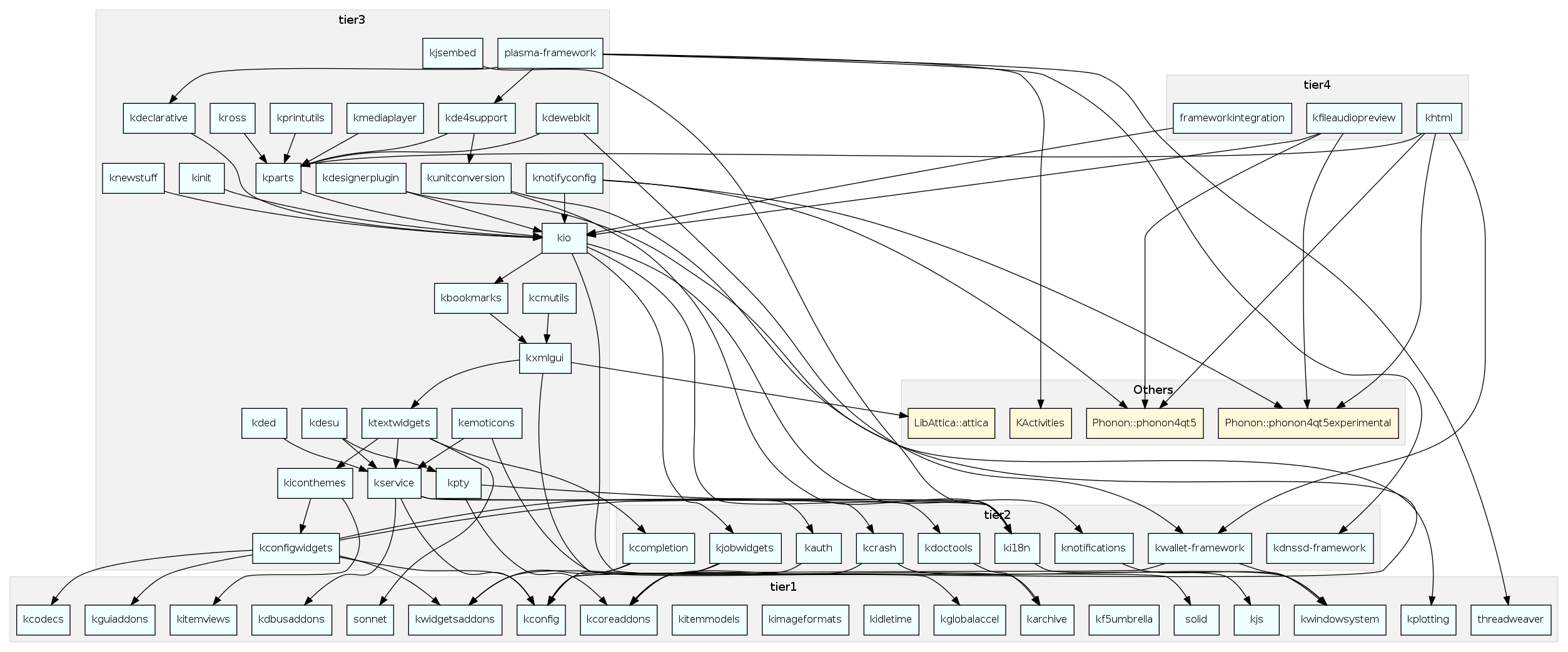
KDE Community writes "The KDE Community is proud to announce a Tech Preview of KDE Frameworks 5. Frameworks 5 is the result of almost three years of work to plan, modularize, review and port the set of libraries previously known as KDElibs or KDE Platform 4 into a set of Qt Addons with well-defined dependencies and abilities, ready for Qt 5. This gives the Qt ecosystem a powerful set of drop-in libraries providing additional functionality for a wide variety of tasks and platforms, based on over 15 years of KDE experience in building applications. Today, all the Frameworks are available in Tech Preview mode; a final release is planned for the first half of 2014. Some Tech Preview addons (notably KArchive and Threadweaver) are more mature than others at this time." Check out that dependency graph.